Organizations today operate in an unpredictable environment where crises can arise at any time. Cyber incidents, operational disruptions, natural disasters, reputational risks, and supply chain failures can severely impact business continuity. Therefore, companies must not only respond quickly but also measure how effectively they manage crises.
However, many organizations still rely on scattered reports and manual tracking systems during crisis situations. As a result, leaders struggle to evaluate response efficiency and identify improvement areas. This challenge highlights the importance of structured performance monitoring.
The Crisis Management KPI Scorecard in Excel provides a practical solution. It helps organizations track crisis response performance using measurable Key Performance Indicators (KPIs) in a centralized and easy-to-use format.
In this comprehensive article, you will learn everything about the Crisis Management KPI Scorecard in Excel, including its features, structure, advantages, implementation steps, best practices, and frequently asked questions.
Click to Purchases Crisis Management KPI Scorecard in Excel
What Is a Crisis Management KPI Scorecard in Excel?
A Crisis Management KPI Scorecard in Excel is a ready-to-use performance monitoring tool designed to evaluate how effectively an organization prepares for, responds to, and recovers from crisis events.
Instead of reviewing multiple operational reports, decision-makers can analyze crisis performance metrics in one structured scorecard. Consequently, organizations gain better visibility into response effectiveness and operational resilience.
Moreover, Excel automation allows users to update data easily while visual indicators instantly highlight performance status.
Why Is Crisis Management Performance Measurement Important?
Every organization creates crisis response plans. However, without measurement, teams cannot evaluate whether those plans actually work.
Common Challenges Without KPI Tracking
-
Slow incident response
-
Lack of accountability
-
Poor communication tracking
-
Inefficient resource allocation
-
Difficulty analyzing past crises
Therefore, KPI scorecards help transform crisis management from reactive actions into measurable processes.
Click to Purchases Crisis Management KPI Scorecard in Excel
Key Features of the Crisis Management KPI Scorecard in Excel
This ready-to-use template contains four structured worksheets, each designed to support effective KPI monitoring.
1️⃣ Scorecard Sheet – Main Performance Dashboard
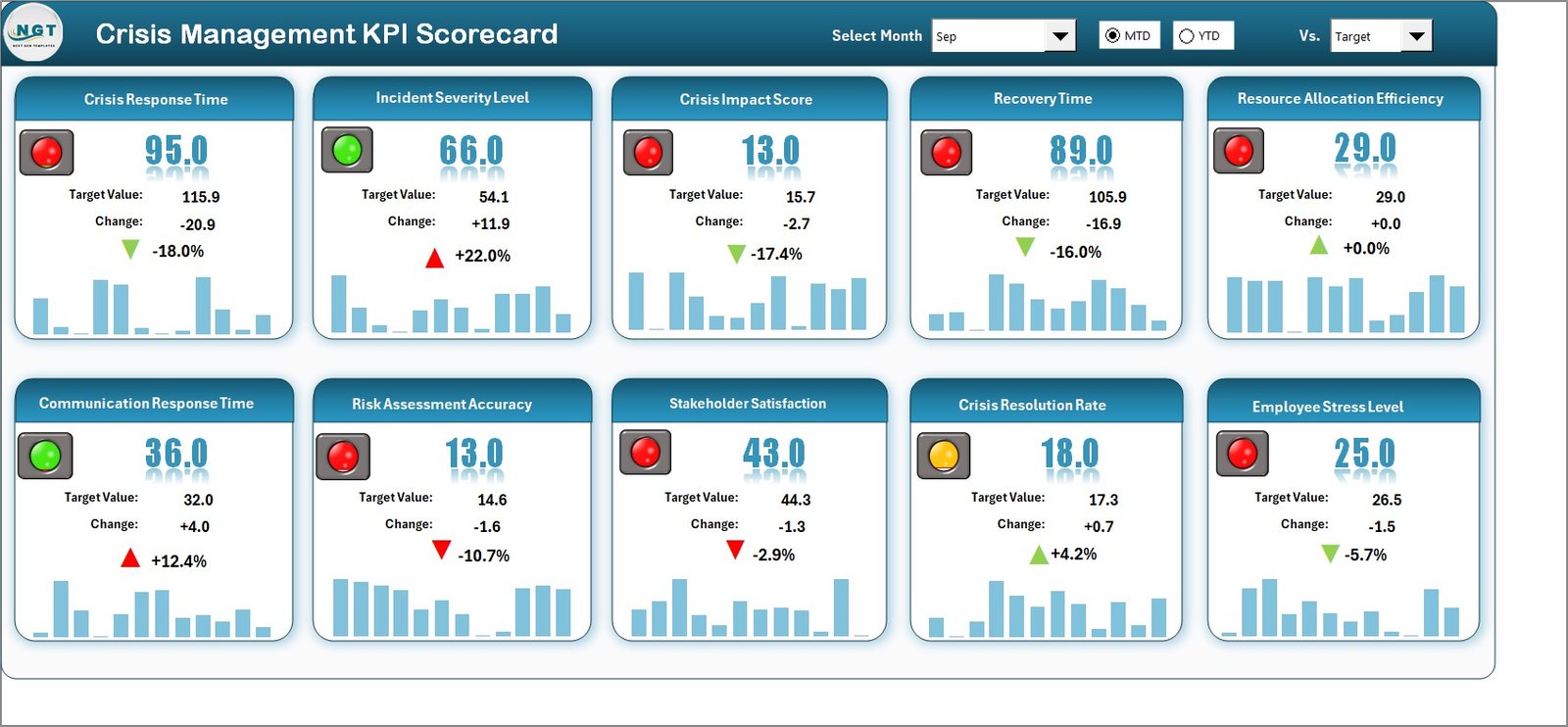
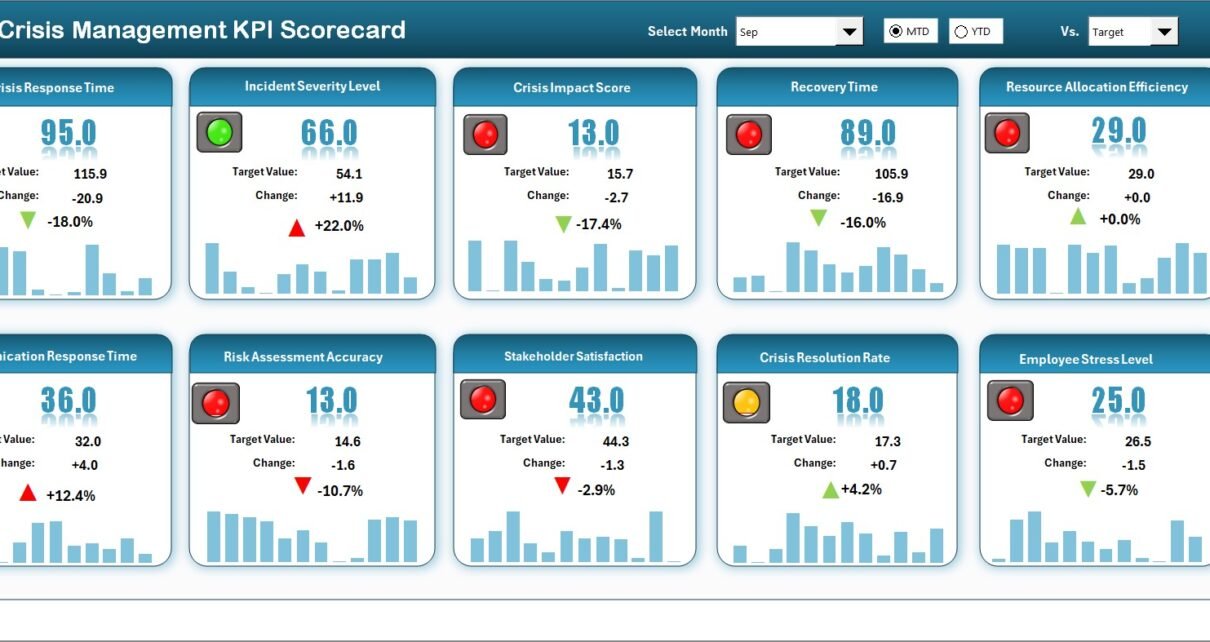
The Scorecard Sheet serves as the primary interface where users monitor KPI performance.
Core Features
Dropdown Menus
Users can select:
-
Month
-
MTD (Month-to-Date)
-
YTD (Year-to-Date)
As selections change, performance metrics update automatically.
Actual vs Target Comparison
The scorecard compares actual performance against predefined targets for every KPI.
Visual Indicators
Color-coded visuals and conditional formatting help users identify:
-
KPIs meeting targets
-
KPIs requiring attention
Comprehensive KPI Overview
The sheet displays:
-
MTD comparisons
-
YTD comparisons
-
Overall KPI performance insights
Because all KPIs appear in one view, leaders gain instant situational awareness.
Click to Purchases Crisis Management KPI Scorecard in Excel
2️⃣ KPI Trend Sheet – Performance Analysis Over Time
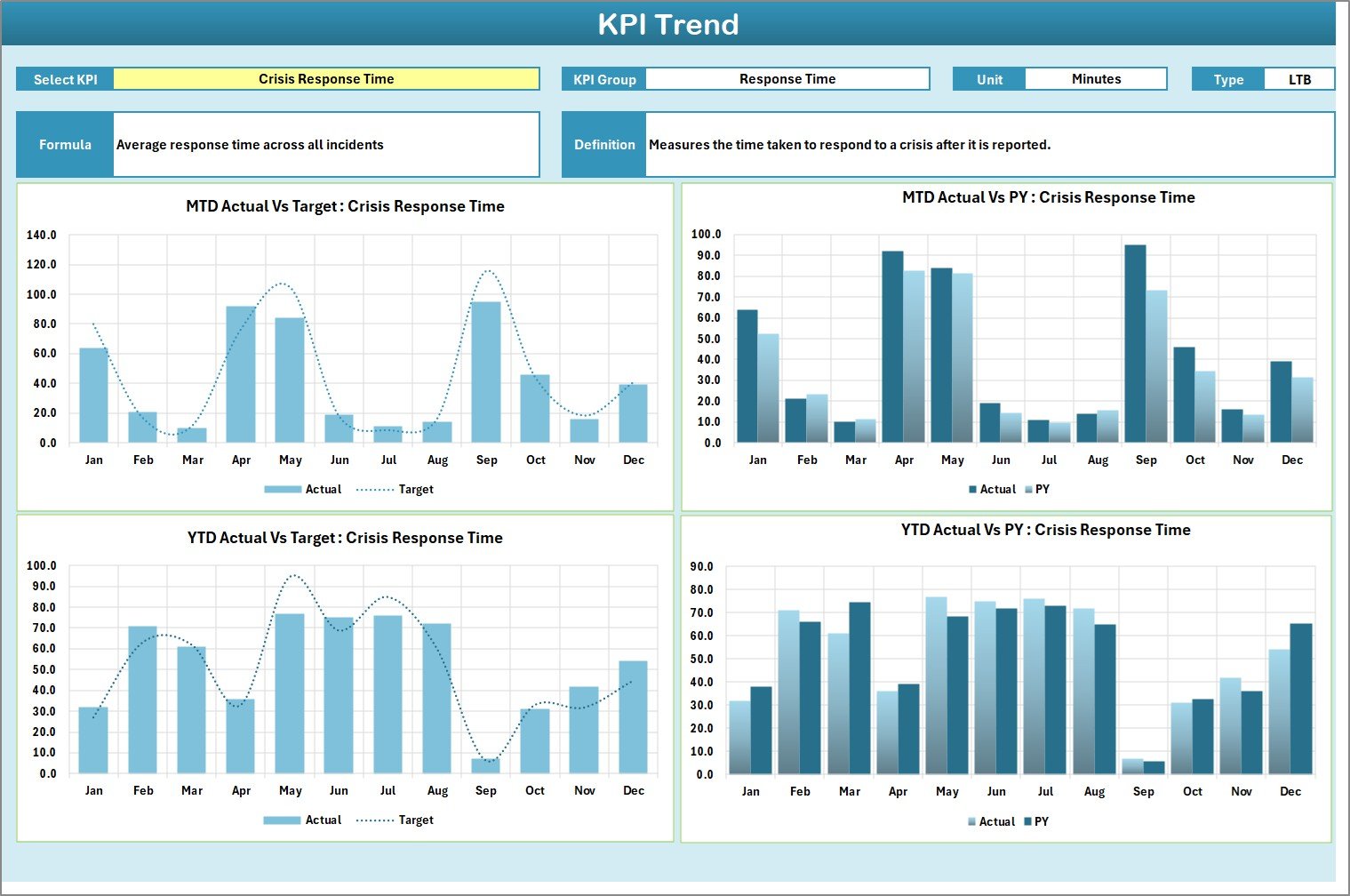
The KPI Trend Sheet provides detailed analysis for individual KPIs.
Users can select a KPI from the dropdown available in cell C3.
Information Displayed
-
KPI Group
-
Unit of Measurement
-
KPI Type (Lower the Better / Upper the Better)
-
KPI Formula
-
KPI Definition
Trend Charts Included
-
MTD Trend Chart
-
YTD Trend Chart
-
Actual vs Target comparison
-
Previous Year comparison
Therefore, organizations analyze performance trends and identify recurring issues.
3️⃣ Input Data Sheet – Centralized Data Entry
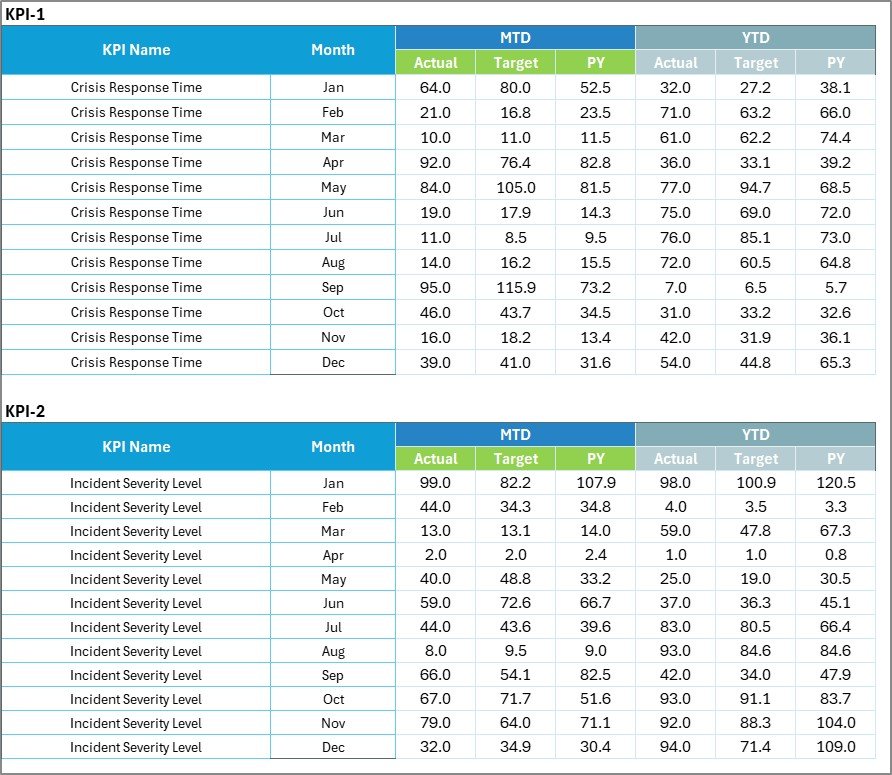
The Input Data Sheet stores all KPI performance data.
Key Functions
-
Enter Actual KPI values
-
Record Target values
-
Update metrics regularly
Because users update data in one location, the scorecard remains accurate and current.
Click to Purchases Crisis Management KPI Scorecard in Excel
4️⃣ KPI Definition Sheet – KPI Configuration Hub

This sheet defines the structure of all KPIs used in the scorecard.
Required Fields
-
KPI Name
-
KPI Group
-
Unit
-
Formula
-
KPI Definition
Centralized KPI definitions ensure consistency across departments.
Click to Purchases Crisis Management KPI Scorecard in Excel
What KPIs Should Be Included in Crisis Management?
Organizations can track various crisis-related KPIs.
Response Efficiency KPIs
-
Incident Response Time
-
Escalation Time
-
Resolution Time
Communication KPIs
-
Stakeholder Notification Time
-
Communication Accuracy Rate
-
Incident Reporting Compliance
Operational Recovery KPIs
-
Recovery Time Objective Achievement
-
Service Restoration Time
-
Downtime Duration
Risk Management KPIs
-
Risk Mitigation Effectiveness
-
Crisis Preparedness Score
-
Training Completion Rate
Balanced KPIs provide a complete view of crisis readiness.
How Does the Scorecard Improve Crisis Management?
A structured KPI scorecard strengthens organizational resilience.
Faster Decision-Making
Visual indicators highlight issues instantly.
Improved Accountability
Teams clearly understand performance expectations.
Better Preparedness
Historical trends support future planning.
Continuous Improvement
Organizations learn from past crises.
As a result, crisis response becomes proactive rather than reactive.
Click to Purchases Crisis Management KPI Scorecard in Excel
Advantages of Crisis Management KPI Scorecard in Excel
✅ Centralized Performance Monitoring
All crisis KPIs remain in one place.
✅ Easy Data Updates
Users update performance quickly.
✅ Automated Calculations
Excel formulas calculate comparisons automatically.
✅ Visual Status Indicators
Color coding improves understanding.
✅ Flexible Customization
Organizations tailor KPIs easily.
✅ Cost-Effective Solution
No advanced software investment required.
How to Implement the Crisis Management KPI Scorecard?
Step 1: Define Crisis Objectives
Identify what success looks like during crisis response.
Step 2: Select Relevant KPIs
Choose measurable indicators aligned with risks.
Step 3: Configure KPI Definitions
Enter KPI details in the definition sheet.
Step 4: Set Performance Targets
Define realistic benchmarks.
Step 5: Enter Data Regularly
Update the Input Data sheet consistently.
Step 6: Review Trends Monthly
Analyze performance patterns for improvement.
Following these steps ensures effective adoption.
Click to Purchases Crisis Management KPI Scorecard in Excel
Best Practices for the Crisis Management KPI Scorecard
✔ Focus on Actionable KPIs
Track metrics that influence decisions.
✔ Update Data Frequently
Regular updates maintain accuracy.
✔ Align KPIs with Risk Strategy
Ensure KPIs support business continuity goals.
✔ Conduct Monthly Reviews
Analyze trends instead of single results.
✔ Train Stakeholders
Ensure teams understand scorecard usage.
✔ Document Lessons Learned
Use insights to strengthen future crisis plans.
Common Challenges and Solutions
Data Delays
Solution: Assign clear data owners.
KPI Overload
Solution: Track only critical metrics.
Misinterpretation of KPIs
Solution: Maintain clear KPI definitions.
Lack of Engagement
Solution: Share scorecard insights regularly.
Click to Purchases Crisis Management KPI Scorecard in Excel
Why Excel Is Ideal for KPI Scorecards
Excel remains widely used because it offers:
-
Familiar interface
-
Flexible customization
-
Automated formulas
-
Visual formatting
-
Easy sharing across teams
Therefore, Excel-based KPI scorecards remain highly practical for organizations of all sizes.
Who Can Use This Scorecard?
This template benefits:
-
Risk Management Teams
-
Crisis Response Teams
-
Business Continuity Managers
-
IT Security Teams
-
Operations Leaders
-
Compliance Officers
-
Senior Management
Each stakeholder gains measurable insights into crisis readiness.
Future of Crisis Management Analytics
Crisis management continues evolving with technology. Future scorecards will integrate with:
-
Real-time incident monitoring
-
AI-driven risk prediction
-
Automated alert systems
-
Integrated communication platforms
However, structured KPI scorecards remain the foundation of performance measurement.
Conclusion
The Crisis Management KPI Scorecard in Excel provides organizations with a structured and practical approach to measuring crisis response performance. By combining KPI tracking, visual indicators, and trend analysis, the scorecard transforms crisis management into a measurable and continuously improving process.
Because organizations gain clear insights into preparedness and response effectiveness, they strengthen resilience and reduce operational risks. Therefore, implementing a KPI scorecard becomes an essential step toward building a proactive crisis management strategy.
Click to Purchases Crisis Management KPI Scorecard in Excel
Frequently Asked Questions (FAQs)
What is a Crisis Management KPI Scorecard?
It is a performance tracking tool used to measure crisis preparedness, response efficiency, and recovery performance using KPIs.
Who should use this scorecard?
Risk managers, business continuity teams, operations leaders, and crisis response teams can use it.
Can KPIs be customized?
Yes. Users can modify KPIs through the KPI Definition sheet.
How often should data be updated?
Organizations should update KPI data monthly or after major incidents.
Does the scorecard support trend analysis?
Yes. The KPI Trend sheet provides MTD and YTD trend charts.
Is Excel suitable for crisis performance tracking?
Yes. Excel offers flexibility, automation, and accessibility for KPI monitoring.
Click to Purchases Crisis Management KPI Scorecard in Excel
Visit our YouTube channel to learn step-by-step video tutorials