Customer feedback plays a vital role in business growth. Every organization collects feedback through surveys, support interactions, reviews, and customer engagement activities. However, many companies struggle to organize feedback analysis tasks efficiently. When teams fail to schedule feedback reviews properly, valuable insights remain unused.
Therefore, businesses need a structured system to plan, track, and manage feedback-related activities. The Customer Feedback Analysis Scheduling Calendar in Excel provides a smart and ready-to-use solution that helps organizations schedule feedback analysis tasks, manage events, and improve customer experience planning.
In this comprehensive guide, you will learn what a Customer Feedback Analysis Scheduling Calendar is, how it works, its features, benefits, best practices, and how organizations can use it to streamline feedback management effectively.
Click to Purchases Customer Feedback Analysis Scheduling Calendar in Excel
What Is a Customer Feedback Analysis Scheduling Calendar in Excel?
A Customer Feedback Analysis Scheduling Calendar in Excel is an interactive calendar-based management tool designed to organize feedback analysis activities, review meetings, surveys, and customer experience improvement tasks.
Instead of managing feedback schedules manually, teams use a centralized Excel calendar that displays events in annual, monthly, and daily views.
As a result:
-
Teams stay organized.
-
Feedback reviews occur on time.
-
Customer insights receive proper attention.
-
Decision-making becomes faster.
Moreover, Excel automation simplifies event management without requiring advanced software.
Why Do Businesses Need a Feedback Analysis Scheduling Calendar?
Customer feedback arrives continuously. However, without structured scheduling, teams often delay analysis.
Common challenges businesses face:
-
Missed feedback review meetings
-
Poor coordination between departments
-
Lack of event visibility
-
Manual tracking errors
-
Disorganized feedback workflows
Therefore, scheduling feedback activities becomes essential.
A structured calendar ensures that organizations consistently analyze customer feedback and implement improvements.
Click to Purchases Customer Feedback Analysis Scheduling Calendar in Excel
Key Features of Customer Feedback Analysis Scheduling Calendar in Excel
This ready-to-use template contains five worksheets, each designed to support organized planning and scheduling.
1. Home Sheet – Navigation Center
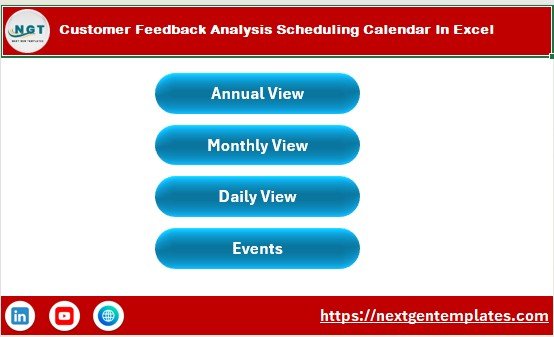
The Home Sheet works as the index page of the workbook.
It includes four navigation buttons:
-
Annual View
-
Monthly View
-
Daily View
-
Events
These buttons allow users to move quickly between calendar views. Consequently, users save time and navigate easily.
2. Annual View Sheet – Yearly Planning Overview
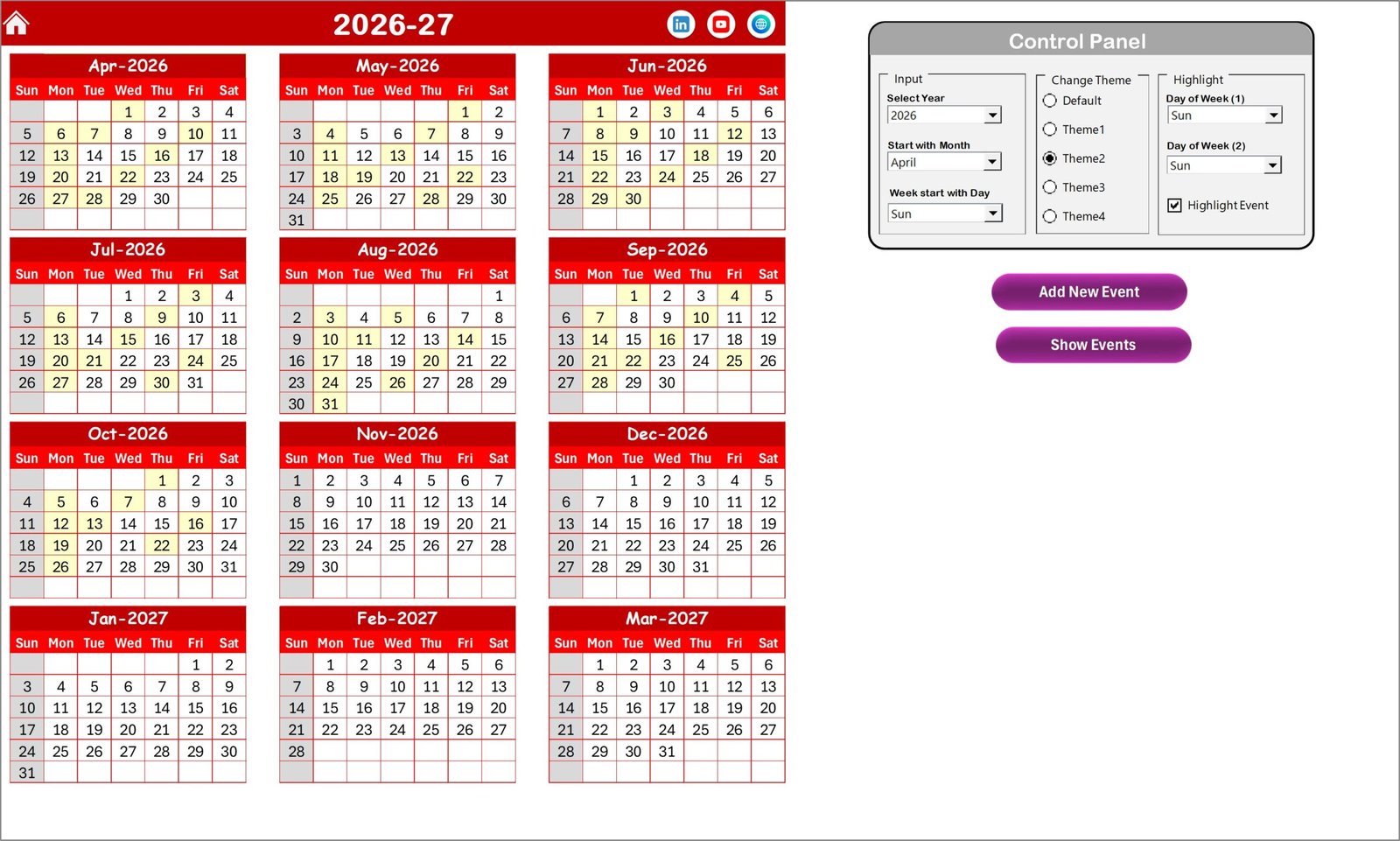
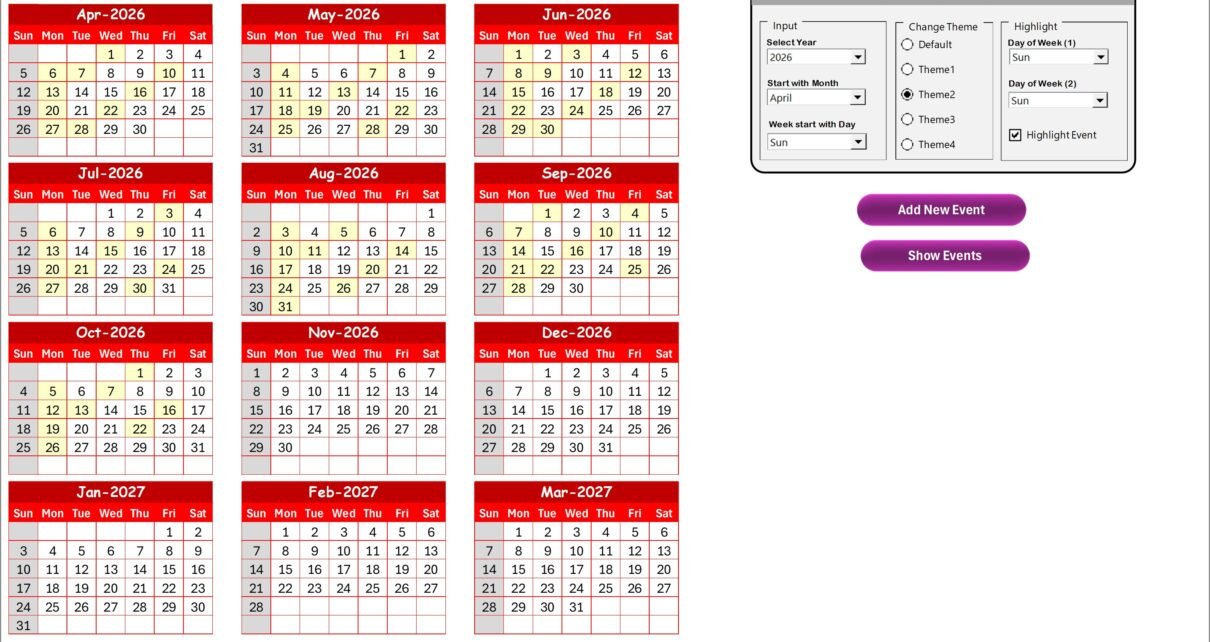
The Annual View Sheet displays all twelve months in one screen.
This view helps managers plan feedback analysis activities across the entire year.
Control Panel Features
The annual calendar includes a powerful control panel divided into three groups.
Input Group
Users can customize calendar settings:
-
Select Year automatically updates calendar
-
Change starting month
-
Modify starting day of the week
Therefore, organizations adapt the calendar to their operational schedules.
Change Theme Group
The template provides five color themes.
Users select their preferred theme, and the entire workbook updates automatically. This feature improves visual clarity and personalization.
Highlight Group
Users can highlight specific days of the week.
For example:
-
Highlight Saturdays and Sundays in grey color
-
Emphasize working or review days
Additionally, a Highlight Event checkbox marks scheduled events in yellow color, making them instantly visible.
Add New Event Button
Users simply select a date and click Add New Event.
An event form opens where users enter details. After submission, the event automatically appears on the selected date.
Show Event Button
This button displays all events scheduled for a selected date.
Therefore, users quickly review planned activities.
Click to Purchases Customer Feedback Analysis Scheduling Calendar in Excel
3. Monthly View Sheet – Detailed Monthly Scheduling
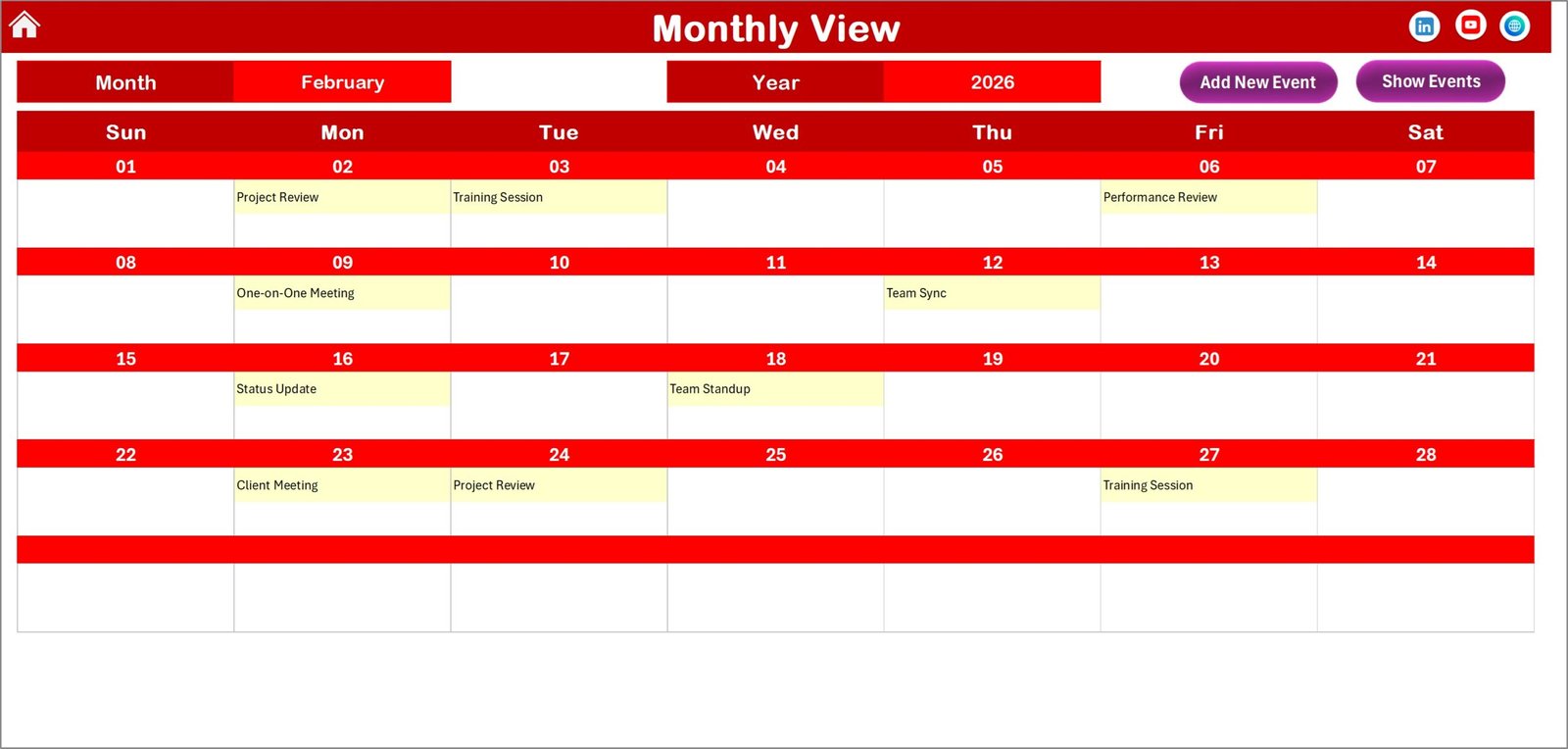
The Monthly View Sheet shows a single month calendar.
Users select:
-
Month
-
Year
The calendar updates automatically.
Event Display Feature
-
Shows one event directly on the calendar
-
Displays “more than 1…” when multiple events exist
This design keeps the calendar clean while maintaining visibility.
Monthly View Buttons
Add New Event
Add events directly from the monthly calendar.
Show Event
View all events scheduled for a selected date.
Consequently, users manage schedules without switching sheets.
Click to Purchases Customer Feedback Analysis Scheduling Calendar in Excel
4. Daily View Sheet – Detailed Event Tracking
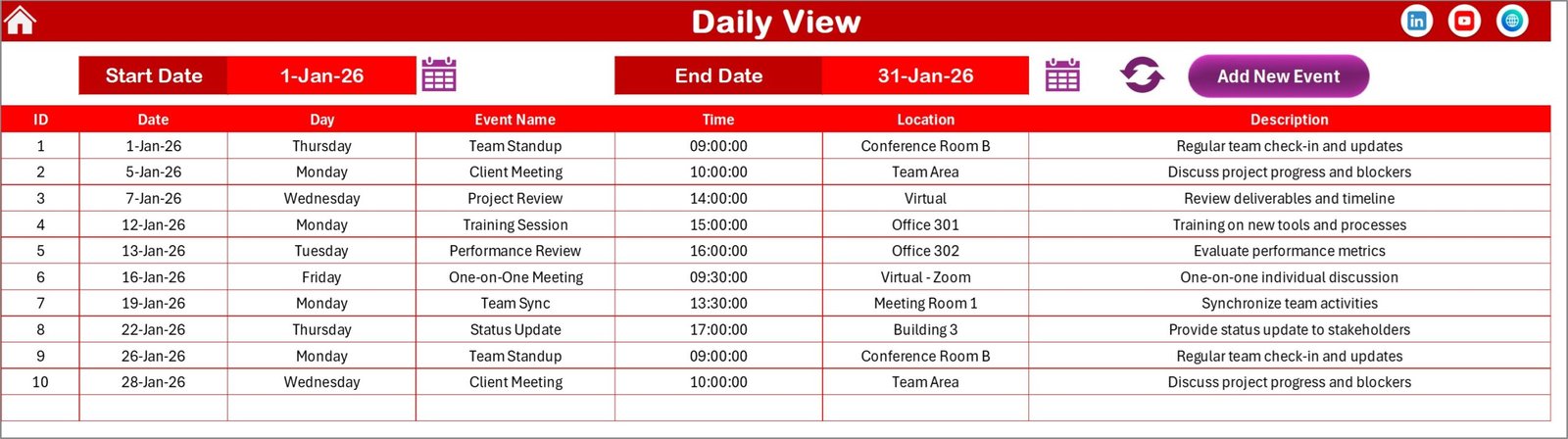
The Daily View Sheet displays detailed event information within a selected date range.
Users define:
-
Start Date
-
End Date
Then click Refresh to load updated data.
Features Included:
-
Complete event list
-
Event details visibility
-
Calendar icon for easy date selection
-
Add New Event button
Therefore, teams analyze feedback activities day by day.
Click to Purchases Customer Feedback Analysis Scheduling Calendar in Excel
5. Events Sheet – Central Event Database
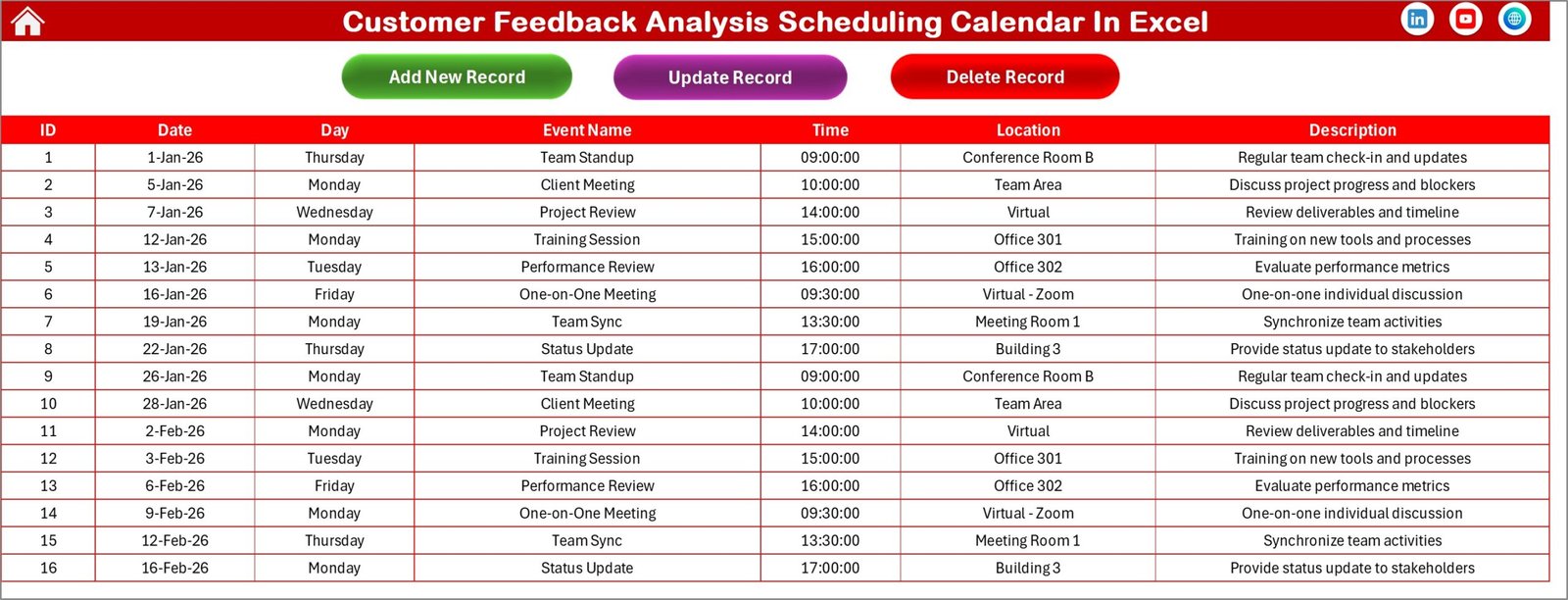
The Events Sheet acts as the backend database storing all event records.
Information Captured:
-
ID (Auto-generated)
-
Date
-
Day
-
Event Name
-
Time
-
Location
-
Description
This structured database ensures data consistency across all calendar views.
Event Management Buttons
Add New Record
Opens event form for new entries.
Update Existing Record
Loads selected event data for editing.
Delete Record
Removes selected event permanently.
As a result, users maintain accurate scheduling records.
How Does the Calendar Improve Customer Feedback Management?
Scheduling feedback analysis ensures consistent improvement.
The calendar helps organizations:
-
Plan survey reviews
-
Schedule feedback meetings
-
Track customer experience initiatives
-
Monitor follow-up actions
-
Organize improvement cycles
Therefore, feedback transforms into actionable business insights.
Click to Purchases Customer Feedback Analysis Scheduling Calendar in Excel
Advantages of Customer Feedback Analysis Scheduling Calendar in Excel
✅ Centralized Event Management
All feedback activities stay organized in one place.
✅ Multiple Calendar Views
Annual, monthly, and daily perspectives improve planning.
✅ Automated Event Forms
Users add events quickly without manual formatting.
✅ Customizable Themes
Visual customization enhances usability.
✅ Highlighted Important Days
Important review days remain visible.
✅ Easy Data Maintenance
Database-driven design reduces errors.
✅ No Advanced Software Required
Excel familiarity ensures easy adoption.
How to Use the Customer Feedback Analysis Scheduling Calendar?
Step 1: Navigate from Home Sheet
Choose calendar view using buttons.
Step 2: Set Calendar Preferences
Select year, start day, and theme.
Step 3: Add Feedback Events
Click Add New Event and fill details.
Step 4: Monitor Monthly Activities
Review events in monthly calendar.
Step 5: Analyze Daily Schedule
Use date range in Daily View.
Step 6: Maintain Event Database
Update or delete events when required.
Best Practices for the Customer Feedback Analysis Scheduling Calendar
To maximize effectiveness, follow these best practices.
✔ Schedule Regular Feedback Reviews
Plan weekly or monthly review sessions.
✔ Standardize Event Naming
Use consistent naming conventions.
✔ Assign Clear Responsibilities
Include ownership in event descriptions.
✔ Update Events Immediately
Avoid outdated schedules.
✔ Highlight Critical Review Days
Use highlight features strategically.
✔ Maintain Accurate Descriptions
Provide short but clear event details.
✔ Review Calendar Frequently
Ensure alignment with business goals.
Click to Purchases Customer Feedback Analysis Scheduling Calendar in Excel
Who Can Benefit from This Calendar?
This template supports various business roles.
Customer Experience Teams
Manage feedback evaluation schedules.
Marketing Teams
Plan survey analysis and campaign reviews.
Product Managers
Track improvement discussions.
Support Teams
Schedule issue review meetings.
Business Analysts
Monitor customer insights timelines.
Why Choose Excel for Scheduling Feedback Analysis?
Excel remains widely used because:
-
It requires no additional tools.
-
Users understand its interface.
-
It allows customization.
-
It works offline.
-
It supports automation through forms.
Therefore, organizations implement scheduling systems quickly.
How Does Scheduled Feedback Analysis Improve Business Performance?
When companies analyze feedback regularly:
-
Customer satisfaction increases.
-
Issues resolve faster.
-
Products improve continuously.
-
Customer retention grows.
-
Decision-making becomes data-driven.
Thus, structured scheduling directly supports business success.
Click to Purchases Customer Feedback Analysis Scheduling Calendar in Excel
Future of Customer Feedback Scheduling Systems
As businesses adopt digital transformation, scheduling tools will evolve further.
Future enhancements may include:
-
Automated survey integrations
-
AI sentiment tracking
-
Real-time feedback alerts
-
Cloud collaboration
-
Predictive customer analytics
However, Excel scheduling calendars already provide a practical and powerful foundation.
Conclusion
The Customer Feedback Analysis Scheduling Calendar in Excel offers a smart and structured approach to managing feedback-related activities. By combining annual planning, monthly scheduling, and daily tracking, organizations gain full visibility into customer feedback workflows.
Moreover, automated event forms, customizable themes, and centralized databases simplify scheduling tasks significantly. As a result, teams stay organized, analyze feedback consistently, and improve customer experience effectively.
Therefore, this Excel calendar becomes an essential productivity tool for organizations focused on customer-centric growth.
Click to Purchases Customer Feedback Analysis Scheduling Calendar in Excel
Frequently Asked Questions (FAQs)
What is a Customer Feedback Analysis Scheduling Calendar?
It is an Excel-based calendar used to plan and manage feedback analysis activities and events.
Can beginners use this template?
Yes. The template includes simple navigation buttons and automated forms.
Can I customize calendar themes?
Yes. The workbook includes multiple color themes.
Does the calendar support multiple events per day?
Yes. It shows “more than 1…” when multiple events exist.
Can events be edited later?
Yes. Users can update or delete records from the Events sheet.
Is this calendar suitable for other scheduling purposes?
Yes. You can adapt it for marketing, HR, or project scheduling.
Click to Purchases Customer Feedback Analysis Scheduling Calendar in Excel
Visit our YouTube channel to learn step-by-step video tutorials