Customer service compliance is no longer optional. Instead, it has become a daily operational requirement. Organizations must track regulatory deadlines, internal audits, training schedules, service reviews, and customer-related compliance activities without missing a single date. Because of this growing pressure, many teams struggle with scattered reminders, emails, and unstructured spreadsheets.
That is exactly where a Customer Service Compliance Calendar in Excel delivers massive value.
In this detailed guide, you will learn what a Customer Service Compliance Calendar in Excel is, why it matters, how it works, its worksheet-wise structure, key features, advantages, best practices, and frequently asked questions. By the end, you will clearly understand how this ready-to-use Excel calendar helps customer service teams stay compliant, organized, and audit-ready—every single day.
Click to Purchases Customer Service Compliance Calendar in Excel
What Is a Customer Service Compliance Calendar in Excel?
A Customer Service Compliance Calendar in Excel is a structured, interactive, and ready-to-use calendar template designed to manage all compliance-related customer service activities in one centralized Excel workbook.
Instead of relying on manual reminders or fragmented files, this calendar visually displays annual, monthly, and daily compliance events. As a result, teams gain complete visibility into upcoming obligations, deadlines, and critical service events.
Moreover, Excel keeps everything familiar, flexible, and easy to maintain. You can update events, filter by date ranges, apply themes, and generate compliance views without complex tools.
Why Do Customer Service Teams Need a Compliance Calendar?
Customer service operations face strict rules and timelines. However, teams often lose track of important dates because they rely on emails, chats, or memory. As a result, they risk penalties, audit failures, and customer dissatisfaction.
A Customer Service Compliance Calendar in Excel solves these problems because it:
-
Centralizes all compliance events
-
Prevents missed deadlines
-
Improves audit readiness
-
Enhances accountability
-
Simplifies planning and reporting
Most importantly, it turns compliance from a reactive activity into a proactive process.
How Does a Customer Service Compliance Calendar in Excel Work?
This Excel-based calendar works through five well-structured worksheets, each designed for a specific purpose. Together, they create a complete compliance management system.
Let us now walk through each worksheet in detail.
Click to Purchases Customer Service Compliance Calendar in Excel
What Is Included in the Customer Service Compliance Calendar in Excel?
1️⃣ Home Sheet Tab – The Control Center
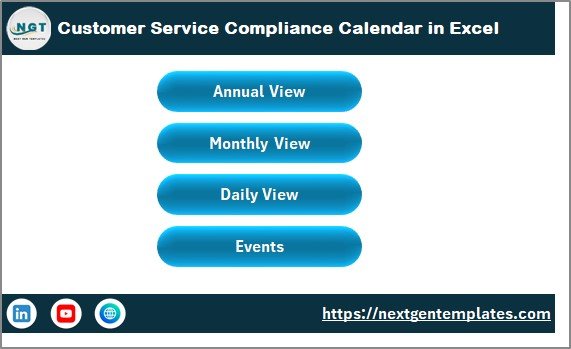
The Home sheet works as the index and navigation hub of the entire workbook.
What does the Home sheet contain?
-
Four interactive navigation buttons:
-
Annual View
-
Monthly View
-
Daily View
-
Events
-
-
A clean layout that helps users jump to any section instantly
-
A professional snapshot-style dashboard view
Because of this design, even non-technical users can navigate the calendar easily without training.
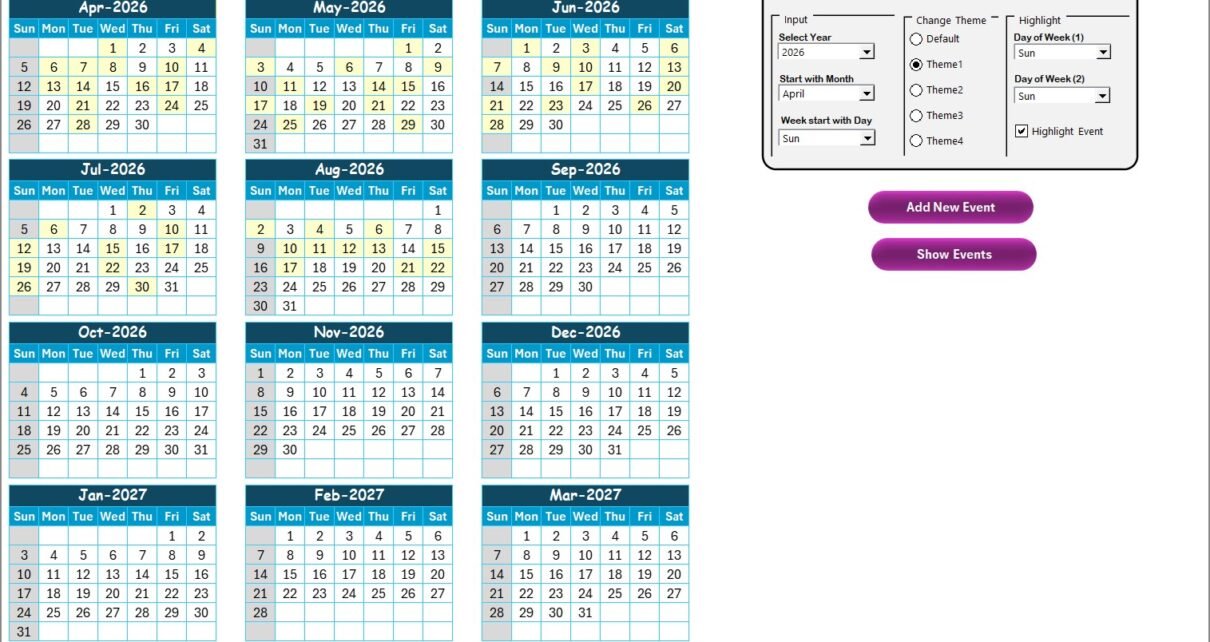
2️⃣ Annual View Sheet – One Year at a Glance
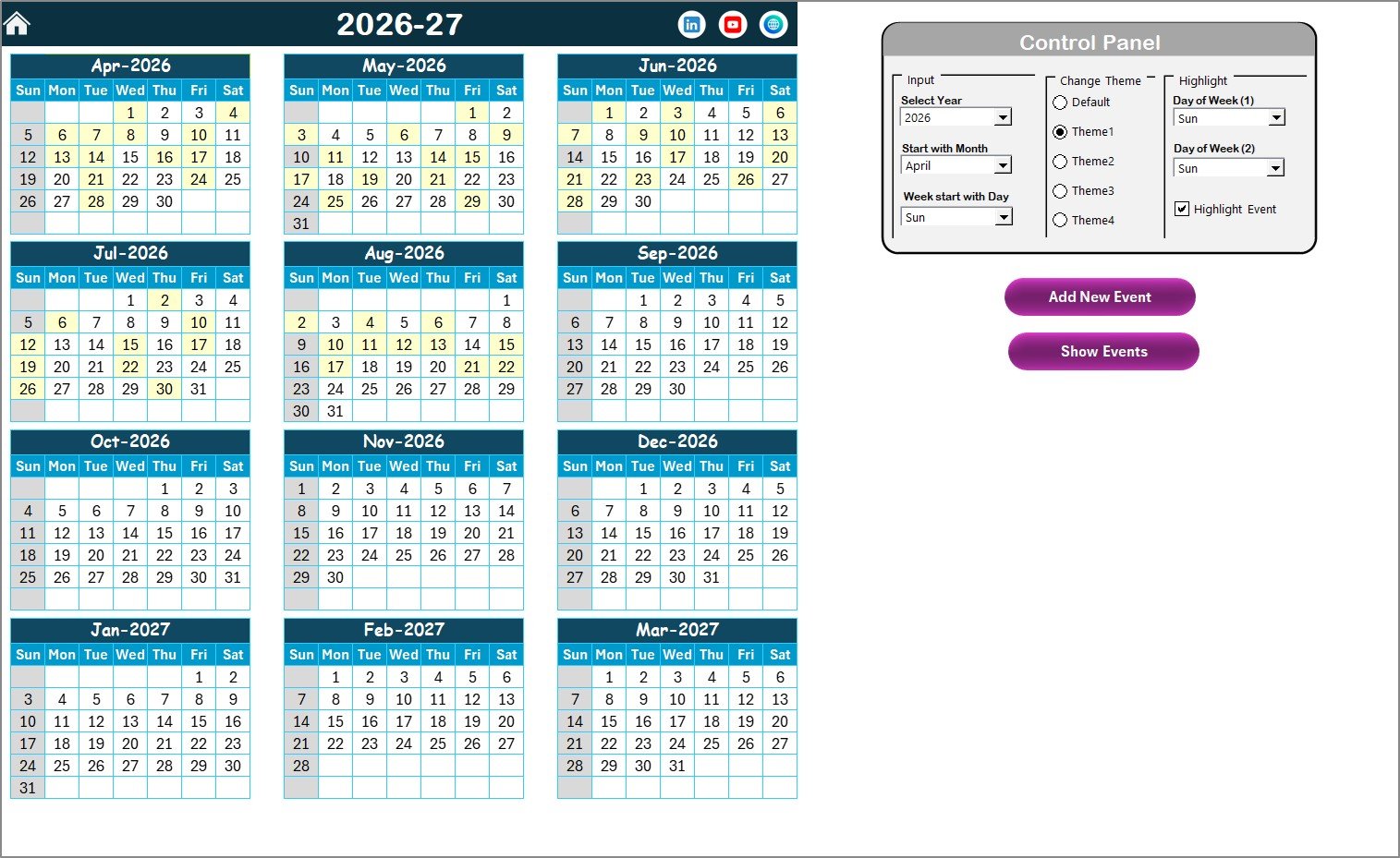
What makes the Annual View powerful?
🔹 Control Panel Features
The built-in control panel allows complete customization:
Input Group
-
Select the Year dynamically
-
Change the starting month of the calendar
-
Modify the starting day of the week
Change Theme Group
-
Choose from 5 predefined color themes
-
Apply the selected theme across the entire workbook instantly
Highlight Group
-
Highlight Day of Week (1) and Day of Week (2)
-
For example, highlight Saturday and Sunday in grey
-
Enable Highlight Event checkbox to mark event dates in yellow
🔹 Action Buttons
-
Add New Event
-
Select a date
-
Click the button
-
Fill the event form
-
Submit to add the event instantly
-
-
Show Event
-
Select a date
-
Click the button
-
View all events scheduled for that date
-
As a result, teams can manage yearly compliance planning visually and efficiently.
Click to Purchases Customer Service Compliance Calendar in Excel
3️⃣ Monthly View Sheet – Focused Monthly Compliance Tracking
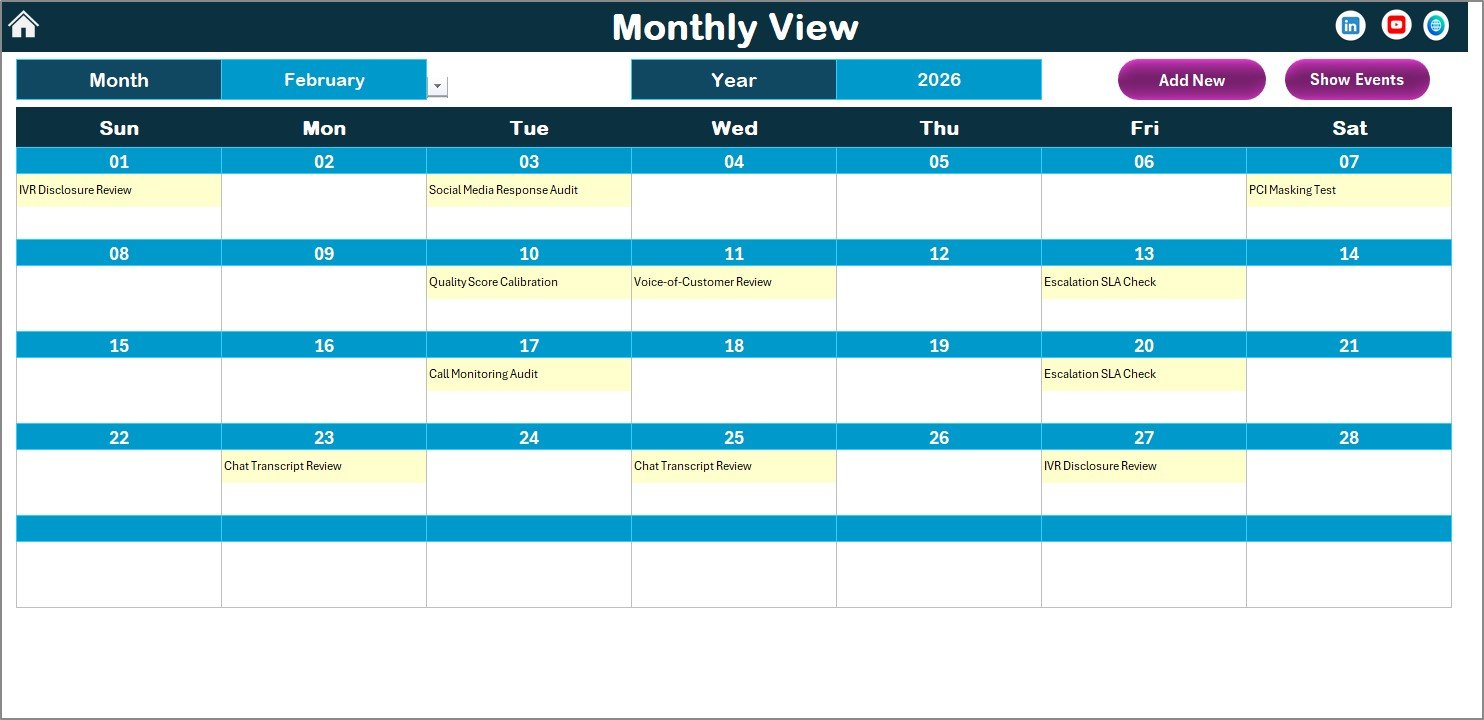
Key highlights of the Monthly View
-
Month and Year dropdowns at the top
-
Automatic calendar refresh based on selection
-
Displays one event per date directly on the calendar
-
Shows “more than 1…” if multiple events exist on the same date
Buttons available on Monthly View
-
Add New Event
-
Add compliance events directly from the monthly calendar
-
-
Show Event
-
View all events scheduled on the selected date
-
Because of this structure, teams can focus on short-term compliance without losing context.
4️⃣ Daily View Sheet – Detailed Event Listing
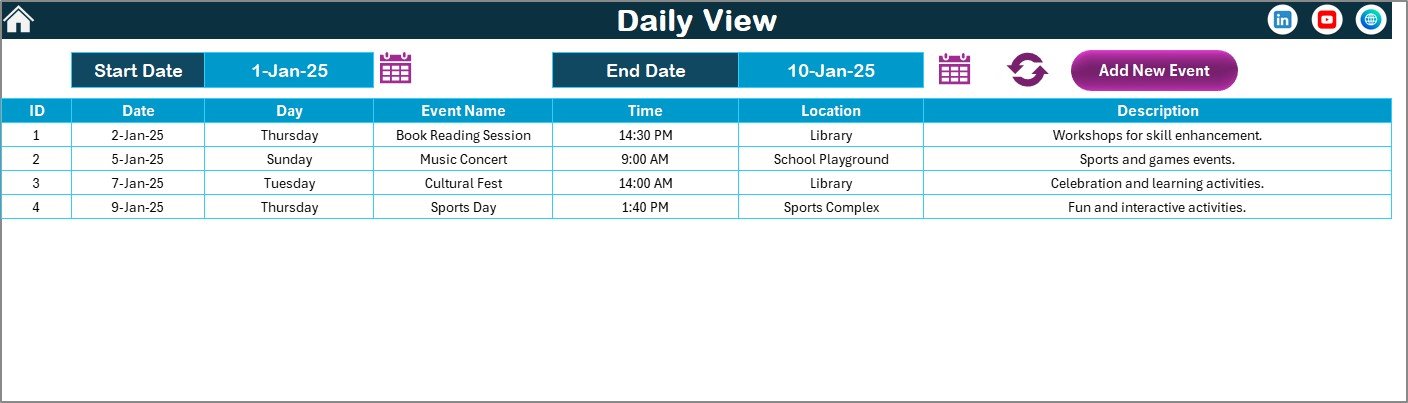
How does the Daily View work?
-
Select Start Date and End Date using calendar icons
-
Click the Refresh button
-
Instantly view all events within the selected period
Additional feature
-
Add New Event button
-
Opens the event entry form
-
Allows quick addition of compliance records
-
This view helps during audits, reviews, and compliance reporting periods.
5️⃣ Events Sheet – The Compliance Database
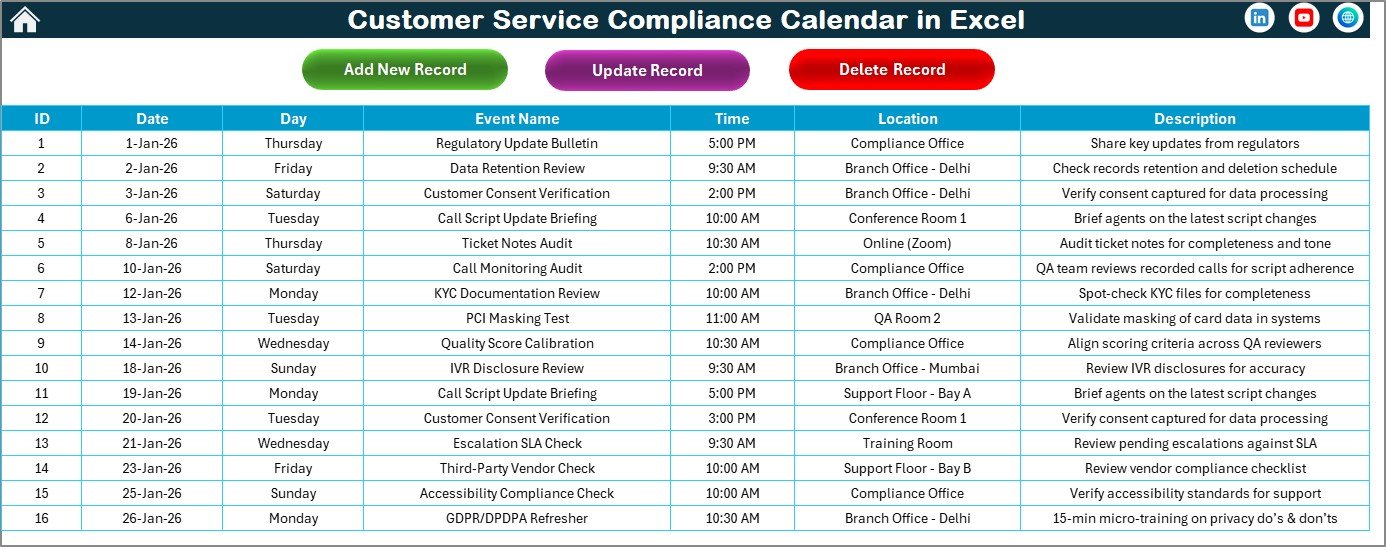
The Events sheet acts as the backend database of the entire system.
Columns included in the Events sheet
-
ID – Auto-generated unique number
-
Date – Date of the compliance event
-
Day – Day name (Monday, Tuesday, etc.)
-
Event Name – Name of the compliance activity
-
Time – Time of the event
-
Location – Event location
-
Description – Short event description
Buttons available on Events sheet
-
Add New Record
-
Update Existing Record
-
Delete Record
These buttons open user-friendly forms, which ensures data accuracy and consistency.
Click to Purchases Customer Service Compliance Calendar in Excel
Advantages of Customer Service Compliance Calendar in Excel
A Customer Service Compliance Calendar in Excel offers multiple operational and strategic advantages.
✔ Centralized Compliance Management
All customer service compliance activities stay in one Excel file.
✔ Visual Planning
Annual, monthly, and daily views provide instant clarity.
✔ Easy Event Management
Add, update, or delete events using simple forms.
✔ Customizable Themes
Apply professional color themes without manual formatting.
✔ Audit-Ready Structure
Daily and date-range views simplify audit preparation.
✔ User-Friendly Design
Even beginners can use it confidently.
✔ Cost-Effective Solution
No additional software or licenses required.
How Does This Calendar Improve Customer Service Compliance?
This Excel calendar improves compliance because it:
-
Reduces missed deadlines
-
Improves accountability
-
Enhances team coordination
-
Supports proactive compliance planning
-
Creates a clear audit trail
As a result, customer service teams move from reactive firefighting to structured compliance execution.
Best Practices for the Customer Service Compliance Calendar in Excel
To get the maximum value, follow these best practices:
📌 Update Events Regularly
Add compliance events as soon as they are identified.
📌 Standardize Event Names
Use consistent naming conventions for clarity.
📌 Review the Annual View Monthly
This habit prevents last-minute surprises.
📌 Use Highlight Features Wisely
Highlight weekends and critical days for better visibility.
📌 Maintain Clean Descriptions
Keep event descriptions short and meaningful.
📌 Backup the File Periodically
Always keep a backup for audit safety.
Click to Purchases Customer Service Compliance Calendar in Excel
Who Should Use a Customer Service Compliance Calendar in Excel?
This calendar works best for:
-
Customer Service Managers
-
Compliance Officers
-
Quality Assurance Teams
-
Call Center Operations
-
Support Desk Supervisors
-
Audit and Risk Teams
Because Excel is universal, teams across industries can adopt it instantly.
Why Choose Excel for Compliance Calendars?
Excel remains a preferred tool because it is:
-
Widely available
-
Easy to customize
-
Secure and offline-friendly
-
Flexible for reporting
-
Familiar to most users
Therefore, an Excel-based compliance calendar delivers speed, simplicity, and control.
Conclusion
A Customer Service Compliance Calendar in Excel transforms the way organizations manage compliance activities. Instead of relying on memory or scattered reminders, teams gain a structured, visual, and reliable system.
With its Home dashboard, Annual View, Monthly View, Daily View, and Events database, this ready-to-use template ensures nothing slips through the cracks. Moreover, its intuitive design, powerful controls, and Excel-native flexibility make it ideal for any customer service environment.
If your goal is to improve compliance discipline, reduce risk, and stay audit-ready, this Excel calendar is the perfect solution.
Frequently Asked Questions (FAQs)
❓ What is a Customer Service Compliance Calendar in Excel?
It is an Excel-based calendar that tracks customer service compliance events across annual, monthly, and daily views.
❓ Can I customize the calendar year and week start?
Yes, you can change the year, starting month, and starting day of the week.
❓ Does the calendar support multiple events on one date?
Yes, it displays multiple events and provides a detailed event list.
❓ Is this calendar suitable for audits?
Absolutely. The daily view and event database make audits easier.
❓ Do I need Excel expertise to use it?
No. The template is user-friendly and beginner-friendly.
❓ Can I update or delete events later?
Yes, you can add, update, or delete records using built-in forms.
❓ Does it require macros?
Yes, the event forms and buttons use Excel VBA for automation.
Click to Purchases Customer Service Compliance Calendar in Excel
Visit our YouTube channel to learn step-by-step video tutorials