In today’s digital world, data has become the most valuable asset for businesses, governments, and individuals. From customer information to financial records, organizations collect and store massive amounts of data every day. While data helps improve operations, drive growth, and enhance decision-making, it also creates risks. Mismanagement or unauthorized access to sensitive information can lead to data breaches, compliance violations, financial losses, and reputational damage.
To avoid such risks, businesses must adopt structured and reliable processes for monitoring how data is handled. This is where a Data Privacy Review Checklist in Excel becomes a powerful tool. Easy to use, flexible, and highly customizable, an Excel-based checklist helps organizations ensure compliance with privacy regulations while simplifying daily monitoring tasks.
In this article, we will explore the importance of data privacy, the structure of an Excel-based review checklist, its features, advantages, best practices, and frequently asked questions. By the end, you will know exactly how to use this template to safeguard sensitive data effectively.
Click to Purchases Data Privacy Review Checklist in Excel
What Is a Data Privacy Review Checklist in Excel?
A Data Privacy Review Checklist in Excel is a structured template designed to help organizations track, manage, and review all aspects of data protection. It ensures that personal and sensitive information is collected, stored, processed, and shared responsibly.
The template includes built-in fields such as Checklist Item, Description, Responsible Person, Deadline, Remarks, and Status. With these fields, teams can assign accountability, track progress, and monitor compliance in real time.
Unlike manual notes or scattered documents, the Excel checklist centralizes everything in one place. This makes it easy to update, review, and share across teams. Moreover, the template can be adjusted to meet the unique needs of different industries such as healthcare, finance, education, or e-commerce.
Why Do Organizations Need a Data Privacy Review Checklist?
Modern businesses operate in a complex environment where customer trust and regulatory compliance go hand in hand. Below are some of the main reasons organizations should adopt this checklist:
-
Regulatory compliance: GDPR, CCPA, HIPAA, and other regulations demand strict adherence to data protection rules.
-
Risk reduction: Preventing unauthorized access and misuse of sensitive data lowers the risk of breaches.
-
Transparency: A checklist provides visibility into who is responsible for data privacy tasks.
-
Efficiency: It streamlines reviews, saves time, and ensures no task is missed.
-
Trust building: Customers feel safer when businesses handle their information responsibly.
In short, the checklist provides peace of mind for both the organization and its stakeholders.
Key Features of the Data Privacy Review Checklist Template
The ready-to-use Excel template comes with two structured worksheets:
Data Privacy Review Checklist Sheet
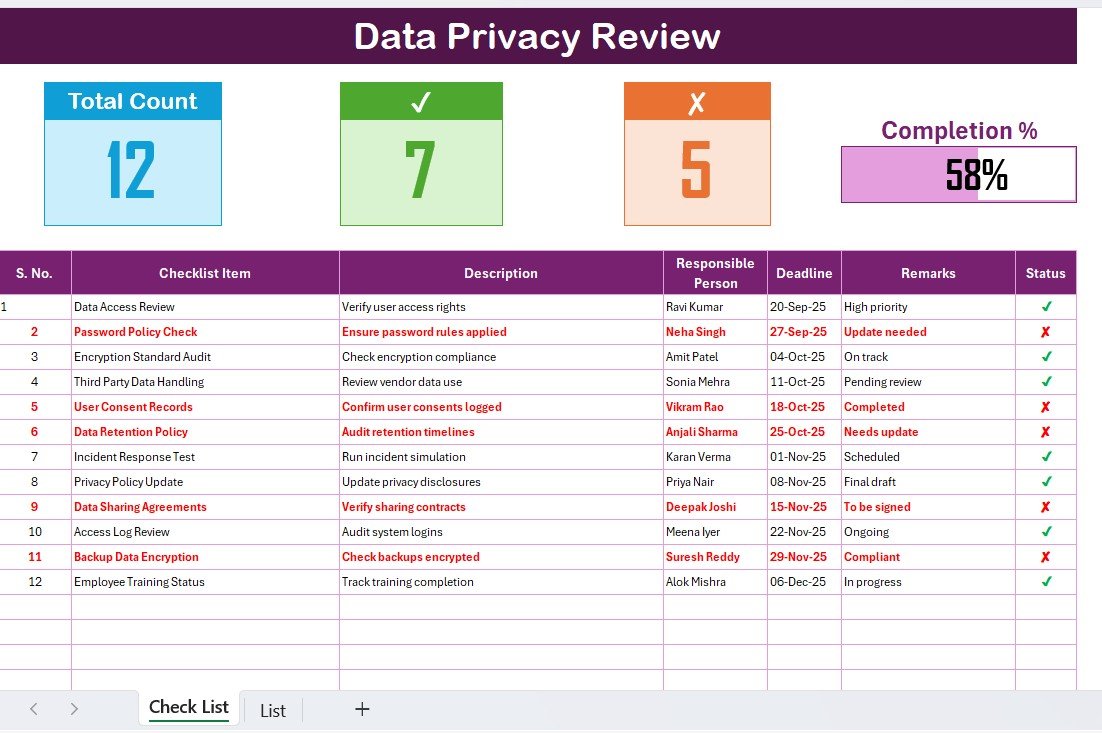
This is the main working sheet. It includes:
Top Section Overview
- Total Count of items
- Checked count
- Crossed count
- Progress bar showing the completion percentage
Checklist Table
- Columns: Serial No., Checklist Item, Description, Responsible Person, Deadline, Remarks, and Status
- Status field allows you to mark tasks as ✔ or ✘
This makes it easy to track progress at a glance.
List Sheet Tab
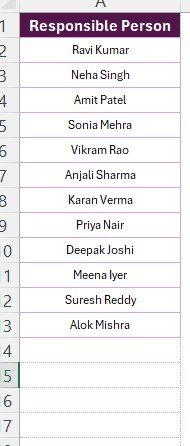
The secondary sheet captures the unique list of Responsible Persons. It is used to create drop-down menus in the main table, ensuring consistency and reducing data entry errors.
How to Use the Data Privacy Review Checklist in Excel
Using this template is simple, even for those with basic Excel skills. Here’s how you can get started:
-
Download and open the template in Excel.
-
Fill out the checklist items under the main table. Examples include “Verify access controls,” “Review data retention policies,” and “Update consent records.”
-
Assign responsibilities by selecting a name from the drop-down list of Responsible Persons.
-
Set deadlines to make sure tasks are completed on time.
-
Update the status of each task using ✔ or ✘.
-
Monitor progress through the top-section overview and progress bar.
This process ensures that every data privacy task is tracked and completed efficiently.
Advantages of a Data Privacy Review Checklist in Excel
Adopting an Excel-based checklist provides several benefits:
-
User-friendly: Excel is widely used, so no extra software or training is required.
-
Customizable: You can add or remove columns to suit your organization’s needs.
-
Visual progress tracking: Built-in progress bars and counts make monitoring easy.
-
Collaboration: The file can be shared with multiple stakeholders for accountability.
-
Low-cost solution: No need to invest in expensive compliance software.
-
Audit readiness: Provides documentation and evidence during internal or external audits.
These advantages make it a practical choice for organizations of all sizes.
Best Practices for the Data Privacy Review Checklist
Click to Purchases Data Privacy Review Checklist in Excel
To maximize the value of this template, follow these best practices:
-
Keep the checklist updated: Review and refresh checklist items regularly.
-
Assign clear responsibilities: Always link tasks to specific individuals.
-
Set realistic deadlines: Ensure timelines are achievable to avoid rushed work.
-
Monitor progress weekly: Don’t wait until the last minute—track tasks consistently.
-
Integrate with policies: Align checklist tasks with your organization’s privacy policy.
-
Encourage collaboration: Share the file with relevant departments for input and accountability.
-
Use conditional formatting: Highlight overdue tasks in red to prioritize urgent work.
Following these practices ensures the checklist remains reliable and effective.
Opportunities for Improvement
While Excel-based checklists are useful, organizations should also explore additional improvements:
-
Automation: Use macros or Power Automate to send reminders.
-
Integration: Link with HR or IT systems to automatically update tasks.
-
Cloud sharing: Store the checklist in a shared drive like OneDrive or Google Drive for real-time collaboration.
-
Regular audits: Schedule quarterly reviews to ensure the checklist evolves with changing regulations.
-
Advanced analytics: Use pivot tables and charts to visualize progress trends.
These enhancements can transform the checklist into a more powerful data privacy tool.
Real-World Use Cases
The Data Privacy Review Checklist in Excel can support different industries in various ways:
-
Healthcare: Ensure patient records comply with HIPAA requirements.
-
Finance: Monitor compliance with KYC and anti-fraud regulations.
-
Education: Protect student information under FERPA.
-
E-commerce: Safeguard customer payment details and personal information.
-
Government agencies: Track compliance with public data protection laws.
Each sector benefits by reducing risks and ensuring accountability.
Conclusion
Data privacy is no longer optional—it is a critical requirement for every organization. With rising cyber threats and strict regulations, businesses must adopt reliable tools to monitor compliance and safeguard sensitive information.
The Data Privacy Review Checklist in Excel offers a practical, cost-effective, and user-friendly solution. It not only helps you assign responsibilities and track progress but also provides documentation for audits and builds trust with stakeholders.
By adopting this checklist and following best practices, your organization can reduce risks, maintain compliance, and protect its most valuable asset—data.
Frequently Asked Questions (FAQs)
1. What is a Data Privacy Review Checklist?
A Data Privacy Review Checklist is a structured tool used to monitor, track, and ensure compliance with data protection policies and regulations.
2. Why should I use Excel for this checklist?
Excel is simple, flexible, and cost-effective. Most organizations already use it, which makes implementation quick and easy.
3. Can I customize the checklist template?
Yes, you can add, remove, or edit columns to match your organization’s requirements.
4. How often should I review the checklist?
It is best to review it at least monthly. However, some industries may require weekly or quarterly reviews depending on regulations.
5. Does this checklist replace professional compliance software?
No, it does not replace advanced compliance tools. Instead, it serves as a practical starting point or a complementary solution for smaller organizations.
6. Can multiple people update the checklist at the same time?
Yes, if you store the file in a shared location like OneDrive, Google Drive, or SharePoint, multiple users can collaborate in real time.
7. What happens if I miss updating tasks on the checklist?
Missed updates can lead to compliance gaps. That is why assigning responsibilities and setting deadlines is important.
8. Is this template suitable for all industries?
Yes, the checklist is customizable and works across industries including healthcare, finance, education, and retail.
Visit our YouTube channel to learn step-by-step video tutorials
Click to Purchases Data Privacy Review Checklist in Excel
Watch the step-by-step video tutorial: