Employee recognition plays a crucial role in building a motivated, loyal, and high-performing workforce. However, many organizations still manage recognition programs using emails, spreadsheets, or scattered reports. As a result, visibility drops, insights remain hidden, and leadership struggles to measure impact.
That is exactly where an Employee Recognition Dashboard in Power BI becomes a powerful solution.
In this detailed guide, you will learn what an Employee Recognition Dashboard in Power BI is, why it matters, how it works, and how each dashboard page helps organizations recognize employees more effectively. Moreover, you will explore its advantages, best practices, and frequently asked questions. By the end of this article, you will clearly understand how this dashboard transforms employee appreciation into actionable insights.
Click to buy Employee Recognition Dashboard in Power BI
What Is an Employee Recognition Dashboard in Power BI?
An Employee Recognition Dashboard in Power BI is an interactive and visual analytics tool designed to track, analyze, and monitor employee recognition data in real time.
Instead of relying on manual reports or disconnected systems, this dashboard centralizes all recognition metrics into one Power BI file. Consequently, HR teams, managers, and leadership gain a clear view of how recognition programs perform across departments, job roles, locations, and time periods.
This dashboard typically tracks:
- Total employee recognitions
- Award-wise recognition performance
- Department-wise recognition trends
- Job role-based recognition insights
- Branch and location-level recognition
- Reasons behind employee recognition
Because Power BI updates data dynamically, decision-makers always work with the latest insights.
Why Do Organizations Need an Employee Recognition Dashboard?
Employee recognition directly impacts engagement, productivity, retention, and workplace culture. However, without structured tracking, organizations cannot measure success or identify gaps.
An Employee Recognition Dashboard in Power BI solves these challenges by providing clarity, transparency, and accountability.
Here is why organizations increasingly adopt it:
- It creates visibility into recognition efforts
- It highlights high-performing teams and individuals
- It identifies departments or roles with low recognition
- It supports data-driven HR decisions
- It improves fairness and consistency in recognition
As a result, organizations move from ad-hoc appreciation to structured recognition programs.
How Does an Employee Recognition Dashboard in Power BI Work?
This dashboard works by connecting employee recognition data—such as awards, attendance records, innovation initiatives, and peer recognition—to Power BI.
Once data flows into the dashboard:
- Power BI processes and models the data
- KPIs calculate recognition counts and percentages
- Interactive slicers filter results instantly
- Visuals update automatically based on selections
Therefore, users can analyze recognition data by month, department, job role, branch, or recognition reason within seconds.
What Are the Key Pages of the Employee Recognition Dashboard in Power BI?
This dashboard consists of five powerful and insight-driven pages. Each page focuses on a different dimension of employee recognition.
Let us explore each page in detail.
What Does the Overview Page Show in the Employee Recognition Dashboard?
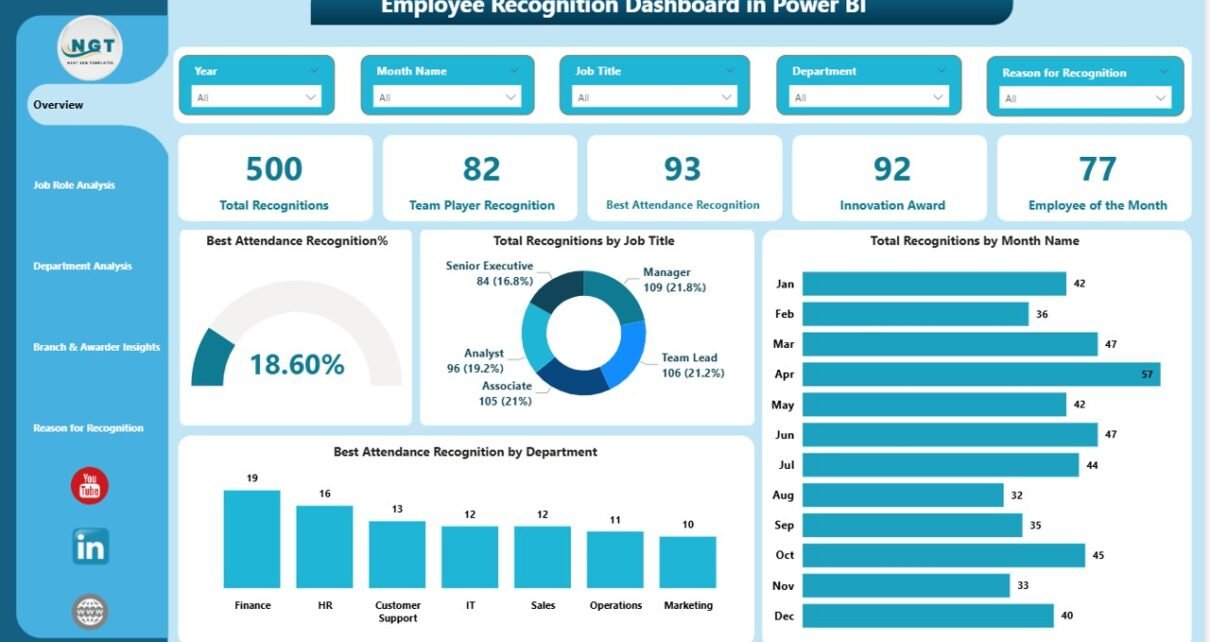
The Overview Page serves as the main entry point of the dashboard. It provides a high-level snapshot of employee recognition performance across the organization.
Key Highlights of the Overview Page
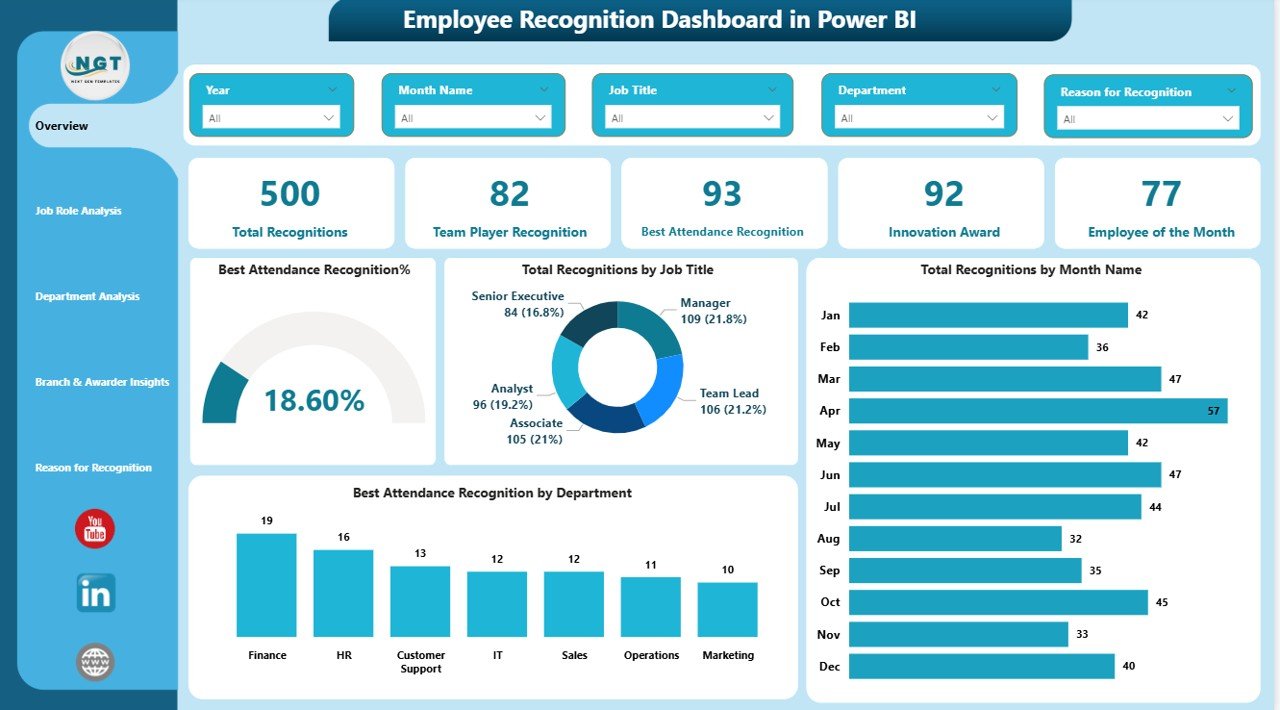
This page includes interactive slicers that allow users to filter data by time period, department, job role, or location. Because of this, leaders quickly tailor insights to their needs.
KPI Cards on the Overview Page
The dashboard displays five essential KPI cards:
- Total Recognitions
- Team Player Recognitions
- Best Attendance Recognition
- Innovation Award
- Employee of the Month
These cards instantly communicate recognition volume and distribution.
Visuals Available on the Overview Page
Additionally, this page includes key charts such as:
- Best Attendance Recognition %
- Total Recognitions by Month
- Best Attendance Recognition by Department
As a result, leadership identifies trends, seasonality, and departmental performance at a glance.
Click to buy Employee Recognition Dashboard in Power BI
How Does Job Role Analysis Improve Recognition Insights?
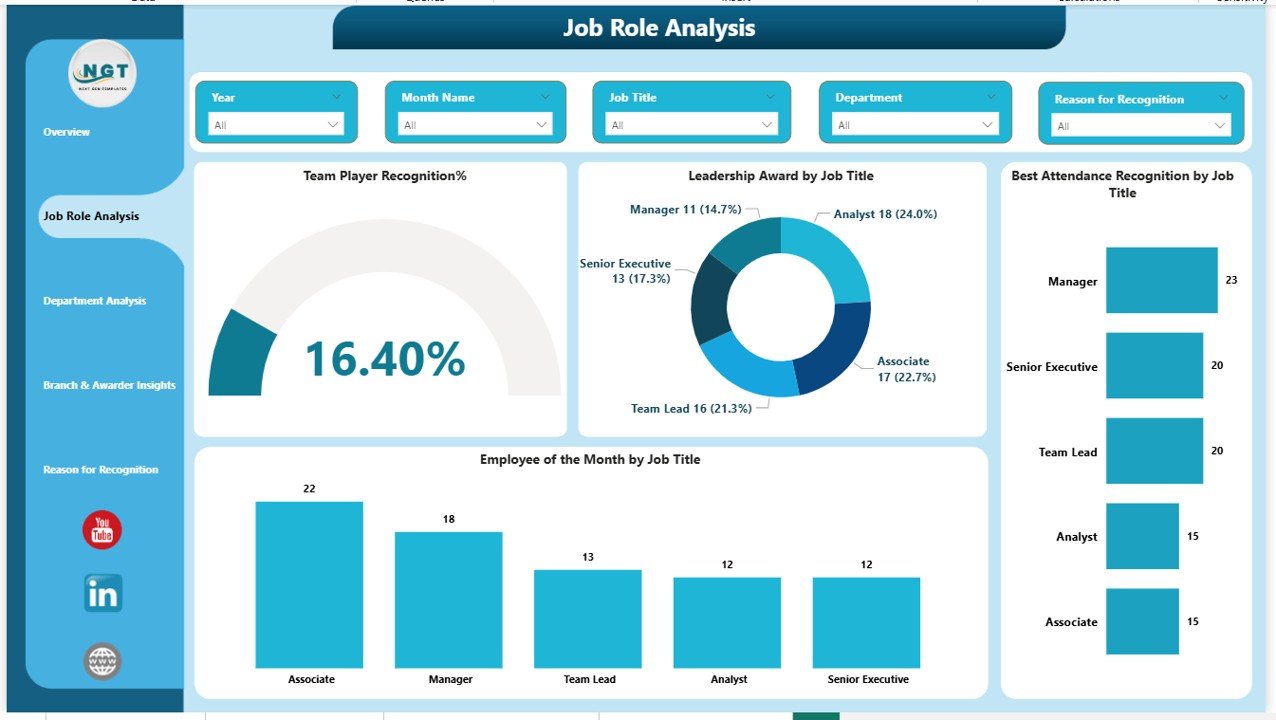
The Job Role Analysis Page focuses on how recognition distributes across different job titles and roles.
This page helps HR teams answer critical questions like:
- Which job roles receive the most recognition?
- Are leadership roles adequately recognized?
- Do frontline roles receive fair appreciation?
Key Visuals on the Job Role Analysis Page
This page includes four insightful charts:
- Team Player Recognition % by Job Title
- Leadership Award by Job Title
- Best Attendance Recognition by Job Title
- Employee of the Month by Job Title
Because of these visuals, organizations ensure recognition fairness across hierarchy levels.
Click to buy Employee Recognition Dashboard in Power BI
Why Is Department Analysis Important in Employee Recognition?
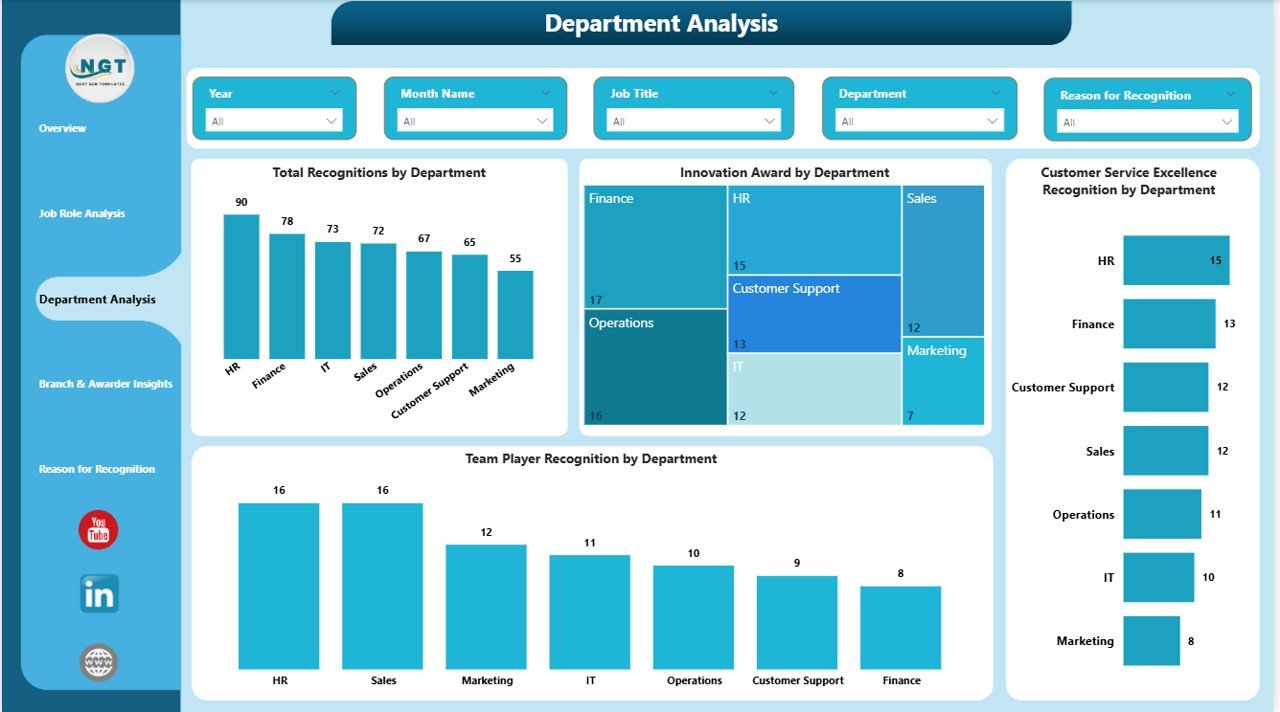
The Department Analysis Page focuses on departmental performance and engagement.
Departments often develop unique cultures. Therefore, analyzing recognition by department reveals valuable insights.
Key Visuals on the Department Analysis Page
This page includes four core visuals:
- Total Recognitions by Department
- Innovation Award by Department
- Customer Service Excellence by Department
- Team Player Recognition by Department
With these insights, HR leaders identify high-performing departments and areas that need improvement.
Click to buy Employee Recognition Dashboard in Power BI
How Do Branch & Awarder Insights Support Location-Based Decisions?
Organizations with multiple locations or branches need location-specific recognition analysis. That is where the Branch & Awarder Insights Page adds value.
What Does This Page Analyze?
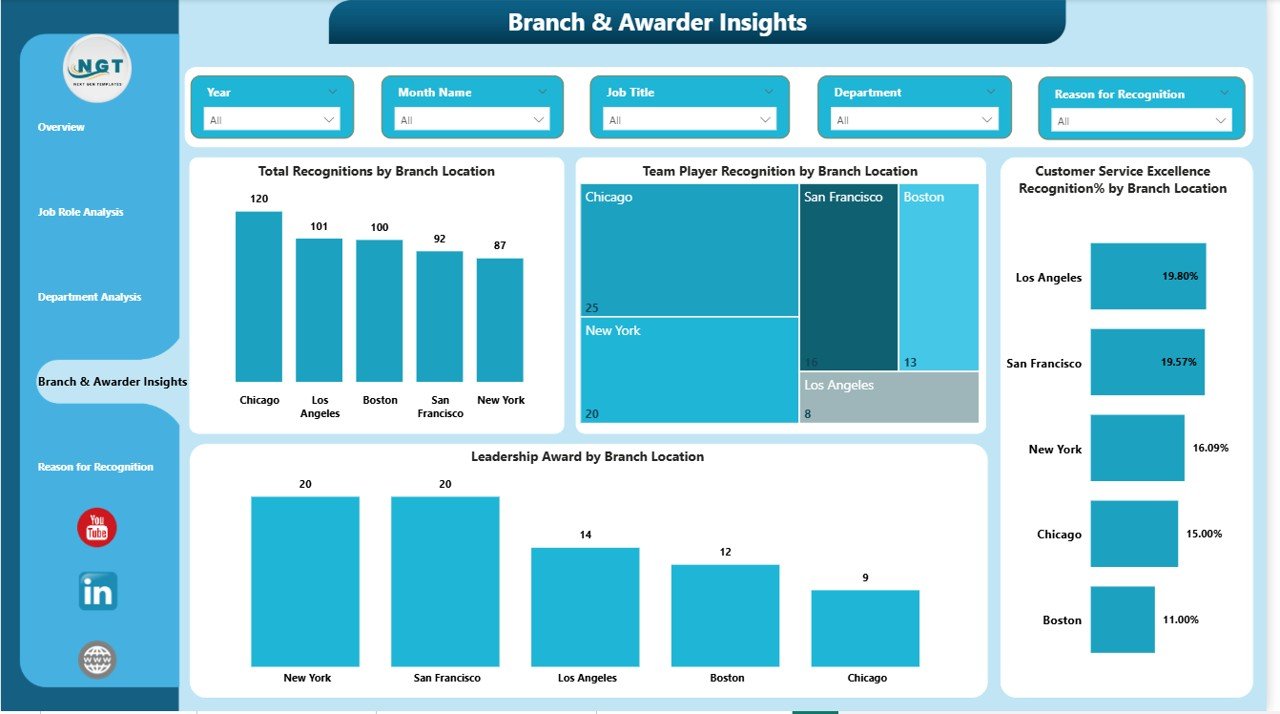
This page focuses on recognition distribution across branch locations and regions.
Key Visuals on the Branch & Awarder Insights Page
The dashboard includes the following visuals:
- Total Recognition by Branch Location
- Team Player Recognition by Branch Location
- Customer Service Excellence % by Branch Location
- Leadership Award by Branch Location
As a result, leadership compares recognition practices across locations and improves consistency.
Click to buy Employee Recognition Dashboard in Power BI
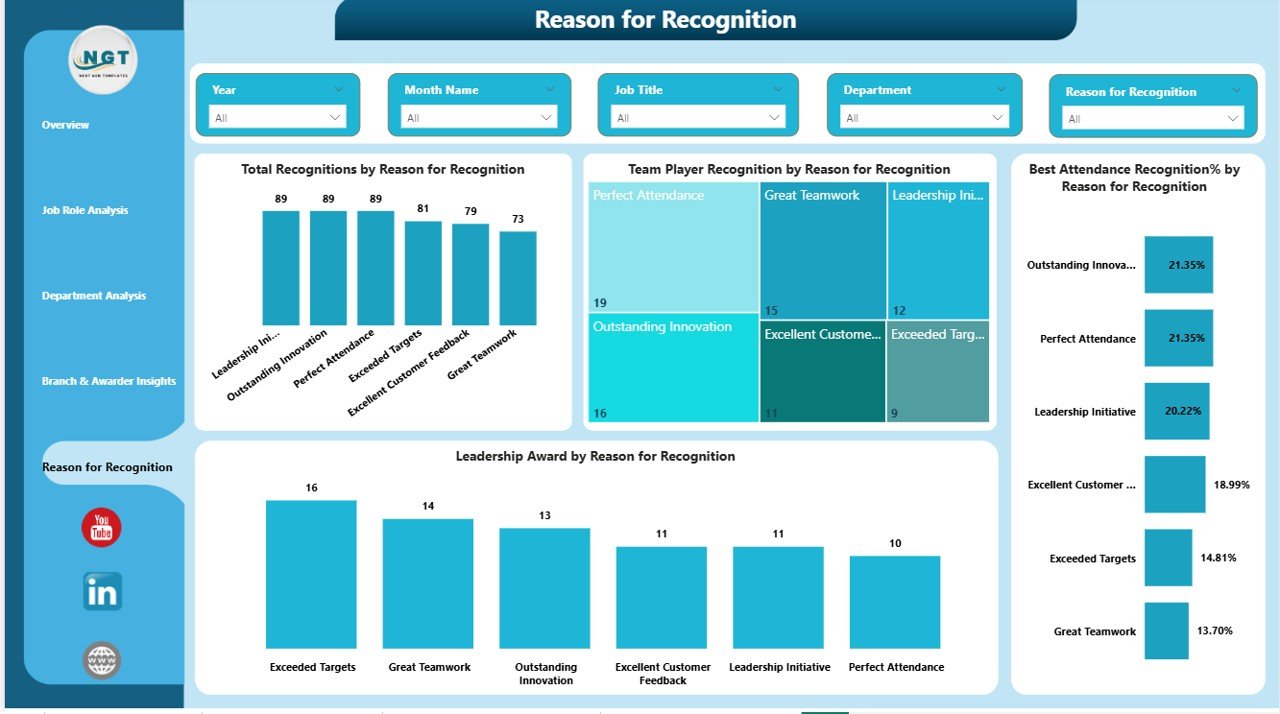
Why Analyze the Reasons for Employee Recognition?
Understanding why employees receive recognition matters as much as knowing who receives it. The Reason for Recognition Page answers this question clearly.
Key Visuals on the Reason for Recognition Page
This page includes the following visuals:
- Total Recognitions by Reason
- Team Player Recognition by Reason
- Best Attendance Recognition % by Reason
- Leadership Award by Reason
Therefore, organizations understand what behaviors they reward most and align recognition programs with company values.
Click to buy Employee Recognition Dashboard in Power BI
Advantages of Employee Recognition Dashboard in Power BI
An Employee Recognition Dashboard in Power BI delivers measurable benefits across HR, leadership, and employees.
Key Advantages
- Centralized Recognition Tracking
All recognition data stays in one dashboard. - Real-Time Insights
Data refreshes automatically for up-to-date reporting. - Fair and Transparent Recognition
Leaders ensure unbiased and consistent appreciation. - Improved Employee Engagement
Recognition visibility boosts morale and motivation. - Better Decision-Making
Data-driven insights replace assumptions. - Strategic Workforce Planning
HR aligns recognition with performance goals.
Best Practices for Employee Recognition Dashboard in Power BI
To maximize value, organizations should follow proven best practices.
Best Practices You Should Follow
- Define clear recognition criteria
- Standardize award categories
- Refresh data regularly
- Use consistent naming conventions
- Review dashboards monthly
- Share insights with leadership
- Encourage peer-to-peer recognition
- Align recognition with company values
When organizations follow these practices, recognition programs remain impactful and fair.
How Does This Dashboard Improve Employee Engagement?
Employee engagement increases when recognition feels visible, fair, and timely. This dashboard supports engagement by:
- Highlighting top contributors
- Encouraging healthy competition
- Recognizing effort beyond performance metrics
- Promoting transparency across teams
As a result, employees feel valued and motivated to perform better.
Who Can Use the Employee Recognition Dashboard in Power BI?
This dashboard serves multiple stakeholders, including:
- HR Teams
- People Analytics Teams
- Department Managers
- Business Leaders
- Operations Heads
Because Power BI offers interactive visuals, even non-technical users easily explore insights.
Conclusion: Why Employee Recognition Dashboard in Power BI Is a Must-Have Tool
Employee recognition drives culture, performance, and retention. However, without proper tracking, organizations miss opportunities to improve engagement.
An Employee Recognition Dashboard in Power BI transforms recognition data into meaningful insights. It provides visibility, fairness, and strategic direction. Moreover, it empowers organizations to reward the right behaviors consistently.
If your organization wants to move from manual recognition tracking to a structured, data-driven system, this dashboard becomes an essential solution.
Frequently Asked Questions (FAQs)
What is an Employee Recognition Dashboard in Power BI?
An Employee Recognition Dashboard in Power BI is an interactive reporting tool that tracks and analyzes employee recognition metrics across departments, roles, and locations.
Why should organizations use Power BI for employee recognition?
Power BI provides real-time insights, interactive visuals, and centralized reporting, making recognition tracking efficient and transparent.
Can this dashboard handle large organizations?
Yes, Power BI easily scales and supports large datasets, making it suitable for organizations of any size.
Does the dashboard support filters and slicers?
Yes, the dashboard includes slicers that allow users to filter by time, department, job role, and branch.
How often should recognition data be updated?
Organizations should update data weekly or monthly to maintain accuracy and relevance.
Can this dashboard improve employee engagement?
Yes, visibility and fairness in recognition directly improve employee morale and engagement.
Visit our YouTube channel to learn step-by-step video tutorials
Watch the step-by-step video tutorial:
Click to buy Employee Recognition Dashboard in Power BI