The esports industry has grown rapidly over the past decade. Professional gaming teams now compete in global tournaments, generate sponsorship revenue, attract millions of viewers, and operate like professional sports organizations. However, managing an esports team requires more than just talented players and exciting matches. Teams must track performance, analyze statistics, and make strategic decisions based on data.
Therefore, esports organizations increasingly rely on performance dashboards and KPI scorecards to monitor results and improve team performance.
One powerful tool that helps esports teams track their performance efficiently is the Esports Team KPI Scorecard in Excel. This ready-to-use template enables managers, analysts, and coaches to monitor key metrics, analyze trends, and evaluate player performance in a structured and visual way.
In this detailed guide, we will explore the Esports Team KPI Scorecard in Excel, its features, benefits, and best practices for using it effectively.
Click to buy Esports Team KPI Scorecard in Excel
What Is an Esports Team KPI Scorecard in Excel?
An Esports Team KPI Scorecard in Excel is a structured performance monitoring tool that tracks important esports metrics using Key Performance Indicators (KPIs).
These KPIs measure different aspects of esports team performance, such as:
- Match win rate
- Player performance statistics
- Tournament results
- Team coordination metrics
- Audience engagement
- Sponsorship performance
- Training efficiency
Because the scorecard organizes data clearly, team managers can quickly evaluate whether the team performs well or requires improvement.
Moreover, Excel provides powerful features such as:
- Data analysis tools
- Conditional formatting
- Dynamic charts
- Drop-down filters
- Automated calculations
As a result, esports organizations can monitor performance in real time and make smarter strategic decisions.
Why Do Esports Teams Need KPI Scorecards?
Many esports teams rely on scattered spreadsheets or manual reports to track performance. However, this approach creates several challenges.
For example:
- Managers struggle to analyze performance trends
- Coaches cannot easily compare targets and results
- Analysts waste time compiling reports
- Decision-makers lack clear insights
Therefore, teams need a centralized system that tracks all performance metrics in one place.
A KPI scorecard solves these problems because it organizes data clearly and provides instant performance insights.
Furthermore, when teams analyze KPIs regularly, they can:
- Identify strengths and weaknesses
- Improve training strategies
- Optimize team performance
- Increase competitive success
Key Features of the Esports Team KPI Scorecard in Excel
The Esports Team KPI Scorecard template includes multiple worksheets designed to manage performance data effectively.
This template contains four worksheets, each serving a specific purpose.
Scorecard Sheet – Main Performance Dashboard
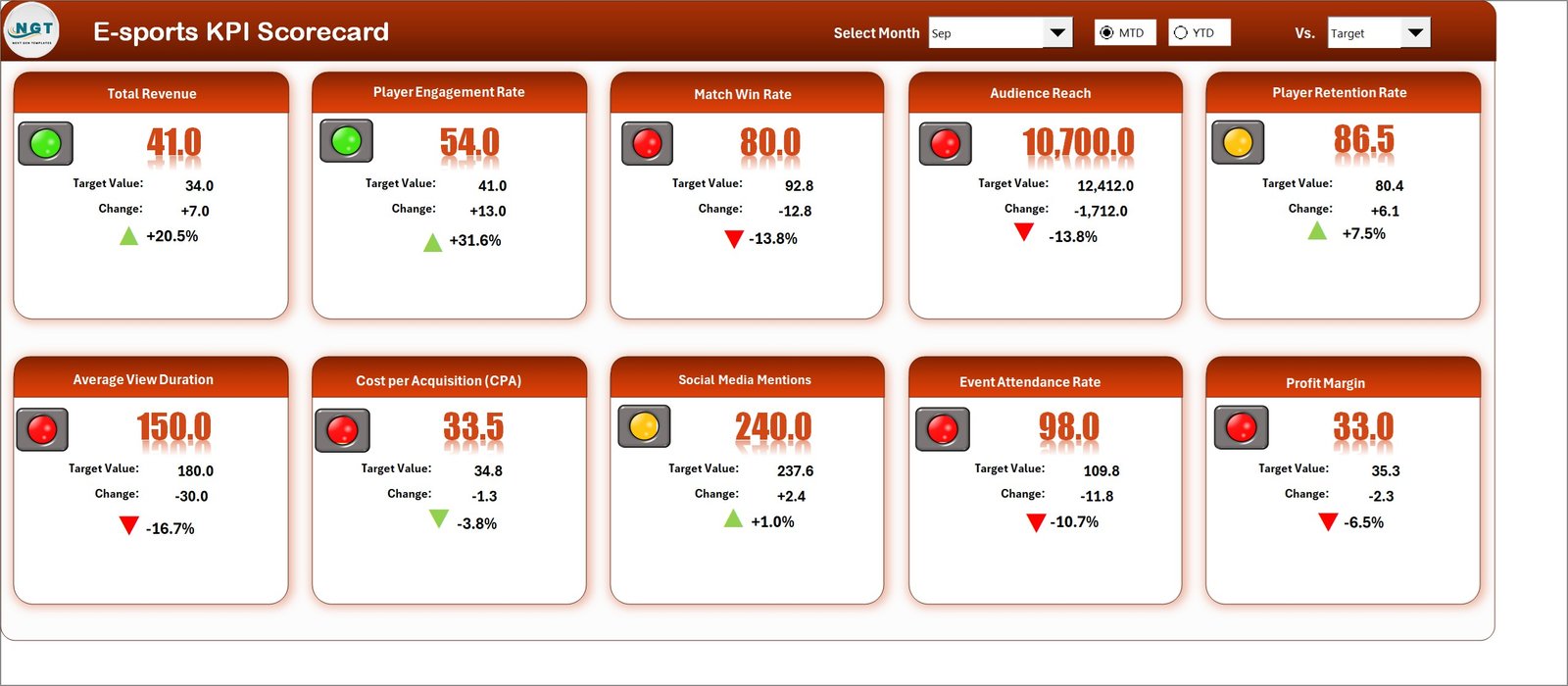
The Scorecard Sheet acts as the central dashboard where users can view overall KPI performance.
Because this sheet presents all important information in one place, managers can quickly analyze team performance.
Key Features of the Scorecard Sheet
- Dropdown Filters
Users can select the month, MTD (Month-to-Date), or YTD (Year-to-Date) to analyze performance. - Actual vs Target Comparison
The sheet displays actual KPI values compared with target values, allowing quick evaluation of team progress. - Visual Performance Indicators
Color-coded indicators highlight whether the team meets or misses targets.
For example:
- Green → Target achieved
- Yellow → Slight deviation
- Red → Performance below target
- Comprehensive KPI Overview
The dashboard displays all KPI details, including:
- KPI name
- KPI group
- MTD values
- YTD values
- Target values
- Previous year performance
- Multiple KPI Monitoring
The template allows users to monitor 10 KPIs simultaneously, making performance tracking efficient.
Because of these features, team managers can instantly understand overall performance.
Click to buy Esports Team KPI Scorecard in Excel
KPI Trend Sheet – Performance Trend Analysis
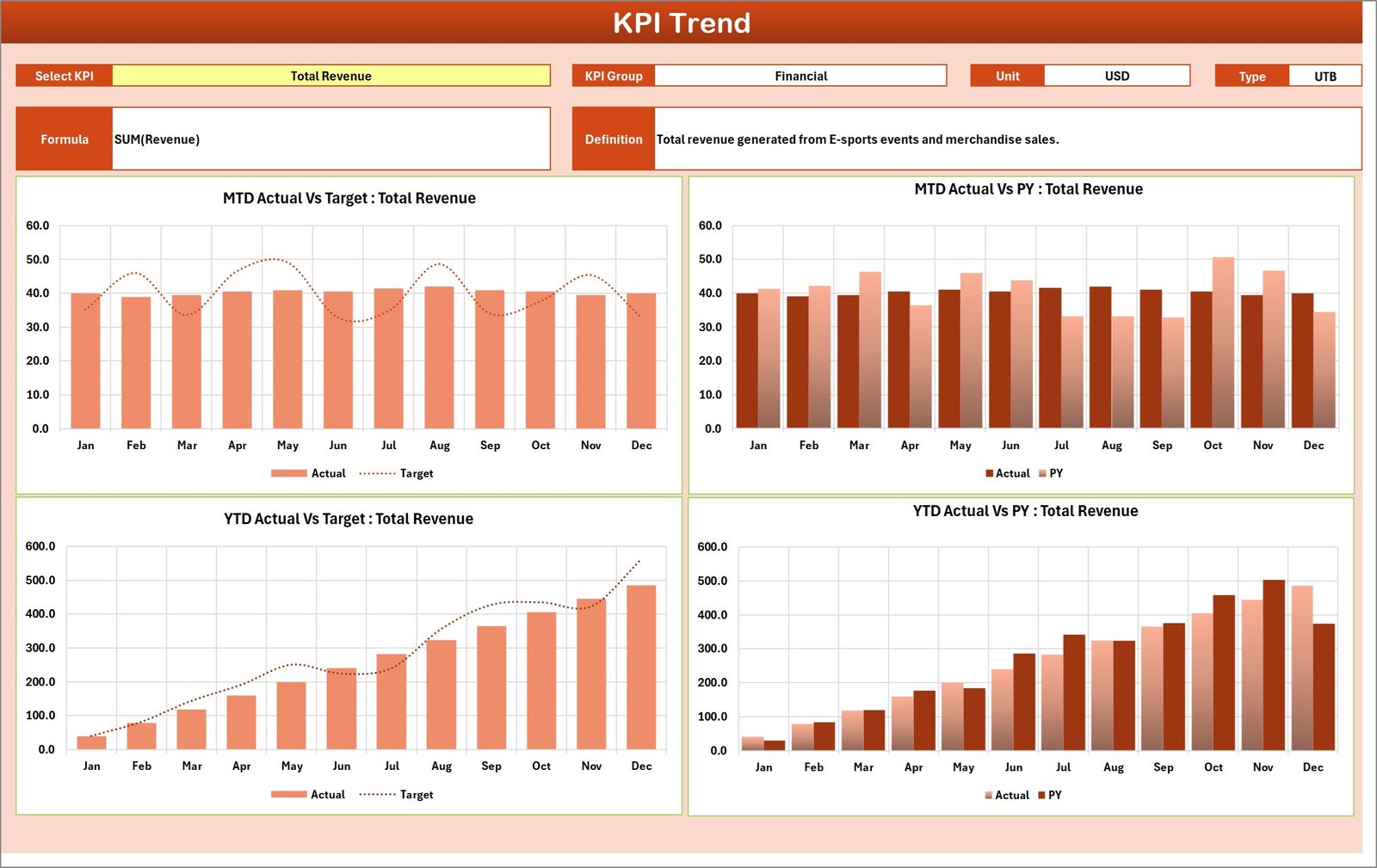
The KPI Trend Sheet helps users analyze how performance changes over time.
Instead of reviewing raw data, managers can visualize trends easily.
How the KPI Trend Sheet Works
Users select the KPI name from a dropdown menu available in cell C3.
Once selected, the sheet automatically displays:
- KPI Group
- KPI Unit
- KPI Type (Lower the Better or Upper the Better)
- KPI Formula
- KPI Definition
In addition, the sheet shows dynamic trend charts for:
- Actual performance
- Target performance
- Previous year numbers
These charts include both MTD and YTD trends.
Therefore, managers can easily answer important questions such as:
- Is performance improving or declining?
- Are players meeting targets consistently?
- How does current performance compare with last year?
As a result, teams can make strategic adjustments quickly.
Click to buy Esports Team KPI Scorecard in Excel
Input Data Sheet – Central Data Entry Area
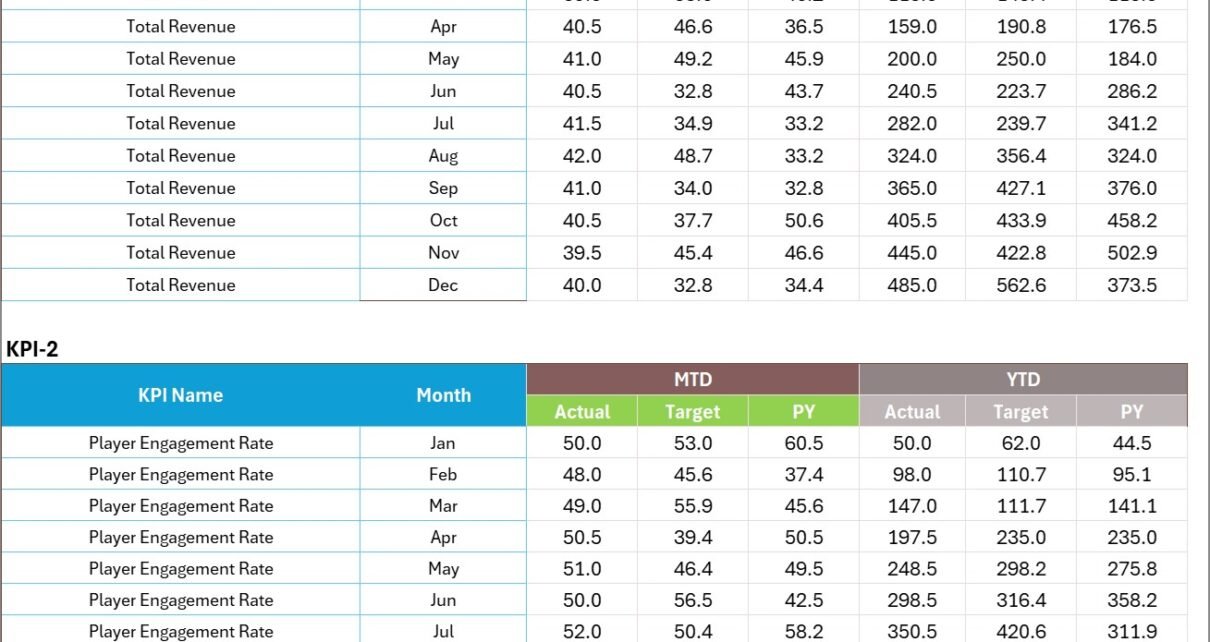
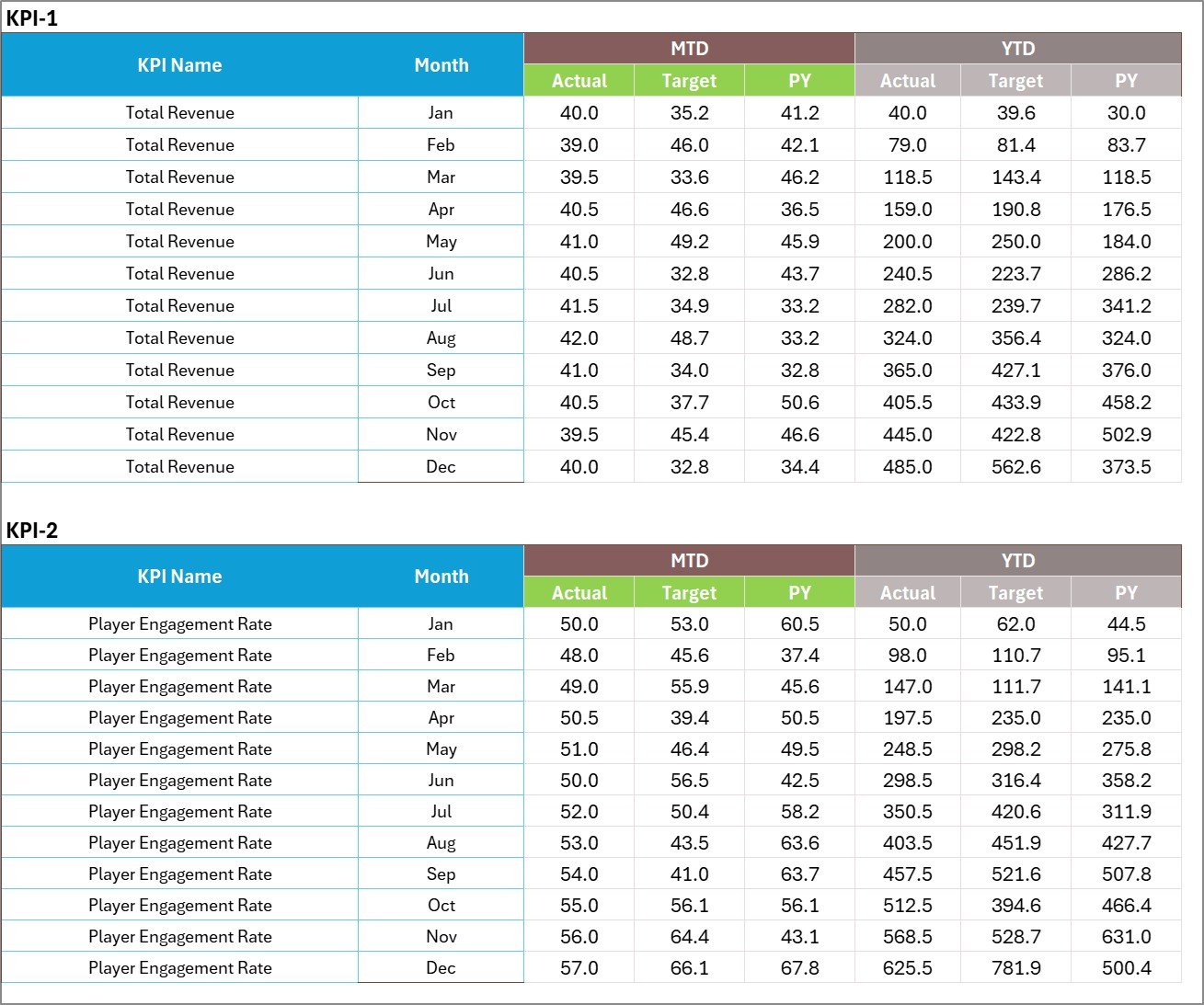
The Input Data Sheet stores all KPI data used by the scorecard.
This sheet functions as the data source for the entire dashboard.
Key Functions of the Input Data Sheet
- Data Entry
Users record actual values, targets, and other performance metrics. - Monthly Updates
Teams can update data regularly as new results become available. - Dynamic Scorecard Updates
Because the dashboard links directly to this sheet, all charts and KPIs update automatically. - Flexible Data Structure
The sheet allows users to add new records easily.
Therefore, the scorecard always reflects the latest performance results.
Click to buy Esports Team KPI Scorecard in Excel
KPI Definition Sheet – KPI Reference Guide
The KPI Definition Sheet acts as a documentation page for all KPIs.
This sheet ensures that everyone understands the meaning of each KPI.
Information Stored in the KPI Definition Sheet
The sheet includes the following columns:
- KPI Name
- KPI Group
- KPI Unit
- KPI Formula
- KPI Definition
Because this sheet defines each KPI clearly, it helps maintain consistency across the organization.
For example, analysts, managers, and coaches will interpret performance metrics in the same way.

Click to buy Esports Team KPI Scorecard in Excel
What KPIs Should Esports Teams Track?
Every esports team should monitor several performance indicators.
Although KPI selection depends on the game and team strategy, common esports KPIs include:
Team Performance KPIs
- Match Win Rate (%)
- Tournament Win Rate
- Average Match Duration
- Team Kill-Death Ratio
Player Performance KPIs
- Average Player KDA (Kills, Deaths, Assists)
- Accuracy Percentage
- Damage Per Match
- Reaction Time Metrics
Operational KPIs
- Training Hours per Week
- Strategy Practice Sessions
- Scrimmage Win Rate
Financial KPIs
- Sponsorship Revenue
- Prize Money Earned
- Merchandise Revenue
Audience Engagement KPIs
- Stream Viewership
- Social Media Engagement
- Fan Growth Rate
Tracking these KPIs helps teams understand both competitive performance and business success.
Advantages of Esports Team KPI Scorecard in Excel
Using a structured KPI scorecard offers many advantages for esports organizations.
- Better Performance Monitoring
The scorecard tracks multiple performance indicators in one place.
As a result, managers can evaluate performance quickly.
- Data-Driven Decision Making
When teams rely on data instead of assumptions, they make better decisions.
For example:
- Coaches adjust strategies
- Analysts identify performance gaps
- Managers plan recruitment
- Improved Team Strategy
Because the scorecard reveals performance trends, teams can refine their gameplay strategies.
- Clear Performance Accountability
KPIs clearly define performance expectations.
Therefore, players and coaches understand their targets.
- Faster Reporting
Managers no longer need to prepare reports manually.
Instead, the dashboard provides instant performance insights.
- Easy Customization
Excel allows users to customize KPIs based on:
- Game titles
- Team strategy
- Tournament format
How Does the Esports KPI Scorecard Improve Team Performance?
Esports teams constantly analyze gameplay and performance statistics.
However, without structured reporting, valuable insights remain hidden.
A KPI scorecard improves performance in several ways.
First, It Identifies Weak Areas
For example, if the team kill-death ratio decreases, coaches can analyze player positioning or strategy.
Second, It Tracks Improvement Over Time
Because the scorecard shows MTD and YTD trends, teams can measure progress.
Third, It Supports Strategic Planning
Managers can use KPI data to plan:
- Training schedules
- Player rotations
- Tournament participation
Best Practices for the Esports Team KPI Scorecard
To get the most value from the scorecard, teams should follow several best practices.
- Select the Right KPIs
Choose KPIs that directly impact team success.
Avoid tracking unnecessary metrics.
- Update Data Regularly
Update the input sheet frequently to keep the scorecard accurate.
For example:
- After each match
- After each tournament
- After training sessions
- Set Realistic Targets
Targets should motivate players but remain achievable.
Unrealistic targets may discourage the team.
- Use Visual Indicators Effectively
Conditional formatting helps users identify performance status instantly.
Therefore, use colors carefully to highlight results.
- Review Performance Weekly
Regular performance reviews help teams adjust strategies quickly.
- Align KPIs with Team Goals
Each KPI should support the team’s competitive objectives.
How to Use the Esports KPI Scorecard in Excel?
Using this template requires only a few simple steps.
Step 1 – Define KPIs
Enter KPI information in the KPI Definition sheet.
Step 2 – Enter Data
Add actual values and targets in the Input Data sheet.
Step 3 – Review Scorecard
Open the Scorecard sheet to monitor overall performance.
Step 4 – Analyze Trends
Use the KPI Trend sheet to analyze performance changes over time.
Step 5 – Adjust Strategy
Use insights from the dashboard to improve team strategy.
Why Excel Is a Great Tool for Esports KPI Tracking
Although many analytics platforms exist, Excel remains one of the best tools for KPI tracking.
Key Reasons
- Easy to use
- Flexible data structure
- Powerful formulas
- Dynamic charts
- Conditional formatting
- Wide accessibility
Moreover, teams do not require advanced programming knowledge to use Excel.
Therefore, even small esports organizations can implement KPI tracking easily.
Future of Data Analytics in Esports
The esports industry will continue to grow rapidly.
Consequently, data analytics will play an even larger role in team success.
Future esports analytics may include:
- AI-based performance analysis
- Real-time match analytics
- Player behavior tracking
- Advanced predictive models
However, KPI dashboards and scorecards will remain essential tools for performance monitoring.
Conclusion
The Esports Team KPI Scorecard in Excel provides a powerful solution for tracking esports performance in a structured and data-driven way.
Because the template includes Scorecard, KPI Trend, Input Data, and KPI Definition sheets, teams can easily monitor performance, analyze trends, and improve strategies.
Moreover, the dashboard allows managers to compare actual performance against targets, visualize performance trends, and identify improvement areas quickly.
Therefore, esports teams that adopt KPI scorecards gain a strong competitive advantage. They make smarter decisions, optimize player performance, and improve overall team success.
Frequently Asked Questions (FAQs)
What is a KPI scorecard in esports?
A KPI scorecard is a performance tracking tool that measures important esports metrics such as win rate, player performance, and tournament results.
Why should esports teams track KPIs?
Teams track KPIs to evaluate performance, improve strategy, and make data-driven decisions.
Can Excel handle esports performance analytics?
Yes. Excel provides powerful tools such as formulas, charts, and conditional formatting that help analyze esports data effectively.
How many KPIs should an esports team track?
Most teams track 8–15 key performance indicators to monitor performance without creating unnecessary complexity.
Is the Esports Team KPI Scorecard customizable?
Yes. Teams can modify KPIs, targets, formulas, and charts according to their requirements.
Visit our YouTube channel to learn step-by-step video tutorials
Watch the step-by-step video tutorial:
Click to buy Esports Team KPI Scorecard in Excel