In today’s highly competitive food industry, companies must maintain quality, safety, efficiency, and compliance at every stage of production. Packaging plays a critical role because it directly impacts product freshness, customer satisfaction, transportation safety, and brand reputation. Therefore, businesses need a structured way to monitor packaging performance continuously.
Many food manufacturing companies still rely on scattered spreadsheets or manual reporting systems. As a result, teams struggle to track performance trends, compare targets, and identify operational gaps quickly. Consequently, decision-making becomes slow and reactive instead of proactive.
To solve these challenges, organizations increasingly adopt KPI-driven monitoring systems. One powerful solution is the Food Packaging KPI Scorecard in Excel — a ready-to-use template designed to track, analyze, and improve packaging performance using measurable Key Performance Indicators (KPIs).
In this comprehensive guide, you will learn everything about the Food Packaging KPI Scorecard in Excel, including its structure, features, benefits, implementation process, best practices, and frequently asked questions.
Click to buy Food Packaging KPI Scorecard in Excel
What Is a Food Packaging KPI Scorecard in Excel?
A Food Packaging KPI Scorecard in Excel is an interactive performance monitoring tool that helps food manufacturers measure packaging efficiency using structured KPIs.
Instead of reviewing multiple reports separately, managers can view all packaging performance metrics in one centralized dashboard. Moreover, the scorecard automatically compares Actual vs Target values, helping teams understand whether performance meets expectations.
Because Excel remains widely used across industries, organizations can implement this solution quickly without investing in complex software.
Why Do Food Packaging Operations Need KPI Tracking?
Packaging operations involve multiple variables such as:
- Material usage
- Production speed
- Waste levels
- Machine efficiency
- Quality compliance
- Labor productivity
Without KPI tracking, companies cannot clearly identify performance gaps. However, when businesses monitor KPIs consistently, they can improve efficiency and reduce operational risks.
Why Is Packaging Performance Important in the Food Industry?
Food packaging does much more than protect products. It directly influences operational success.
Key Reasons Packaging KPIs Matter
- Ensures product safety and hygiene standards
- Reduces material waste and costs
- Improves production efficiency
- Maintains regulatory compliance
- Enhances customer satisfaction
- Supports sustainability initiatives
Therefore, companies that track packaging KPIs regularly achieve better operational control and higher profitability.
Overview of the Food Packaging KPI Scorecard Template
The Food Packaging KPI Scorecard in Excel provides a structured environment where users can monitor performance through automated calculations and visual insights.
This ready-to-use template contains four worksheets, each designed for a specific purpose.
Scorecard Sheet — The Main Performance Dashboard
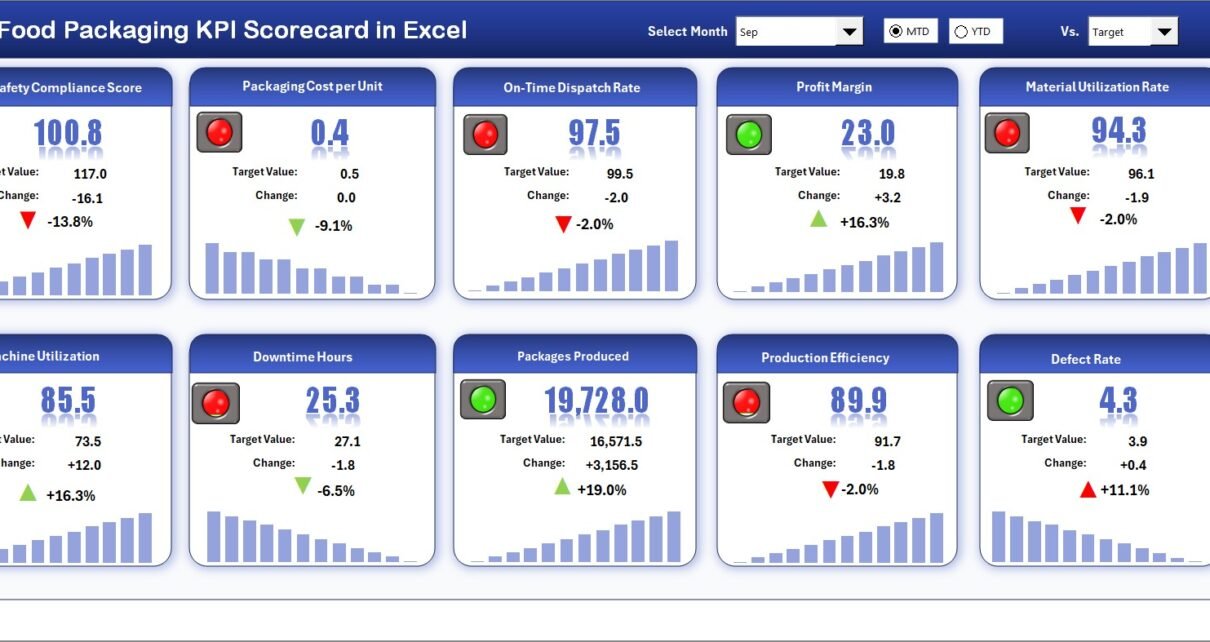
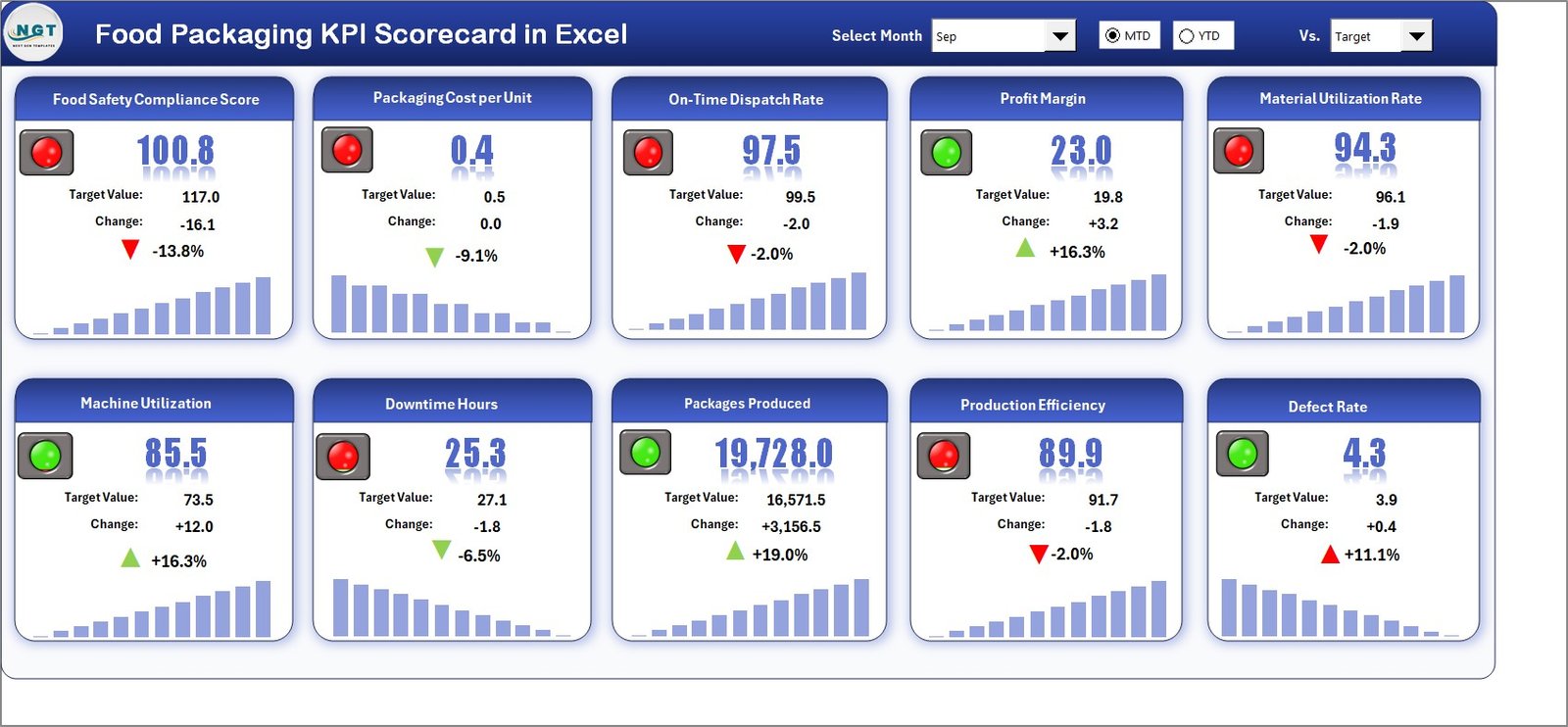
The Scorecard Sheet acts as the central interface of the template. Here, users can instantly review KPI performance without navigating multiple sheets.
Key Features of the Scorecard Sheet
Dropdown Menus
- Select Month for analysis
- Switch between MTD (Month-to-Date) and YTD (Year-to-Date) views
- Quickly analyze performance periods
Actual vs Target Comparison
- Displays performance against defined targets
- Helps managers identify underperforming KPIs immediately
Visual Indicators
- Color-coded conditional formatting
- Performance status visibility at a glance
- Faster decision-making
Comprehensive KPI Overview
- Shows all KPI information in one screen
- Includes MTD and YTD comparisons
10 KPIs in One View
- Enables quick performance review
- Eliminates manual data consolidation
Because everything appears on one screen, leaders can understand operational performance within seconds.
Click to buy Food Packaging KPI Scorecard in Excel
KPI Trend Sheet — Performance Analysis Over Time
While the scorecard shows current performance, the KPI Trend Sheet focuses on historical analysis.
How the KPI Trend Sheet Works
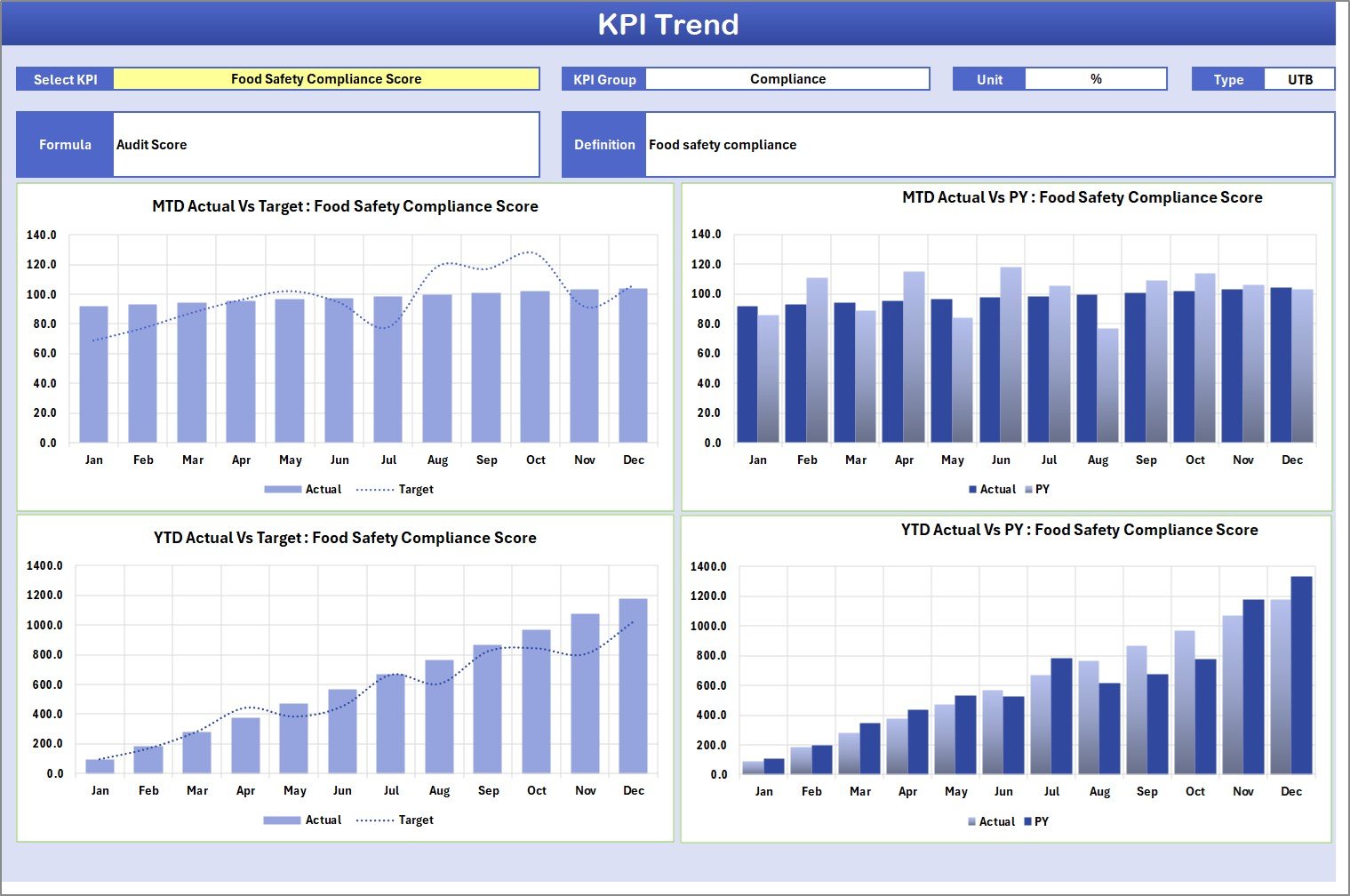
Users select a KPI from the dropdown available in cell C3, and the sheet automatically updates related information.
Information Displayed
- KPI Group
- KPI Unit
- KPI Type (Lower the Better / Upper the Better)
- KPI Formula
- KPI Definition
Additionally, the sheet displays trend charts for:
- Actual Values
- Target Values
- Previous Year (PY) Performance
Why Trend Analysis Matters
Trend analysis helps teams:
- Identify improvement patterns
- Detect recurring problems
- Forecast future performance
- Make data-driven decisions
Therefore, managers can move from reactive management to predictive planning.
Click to buy Food Packaging KPI Scorecard in Excel
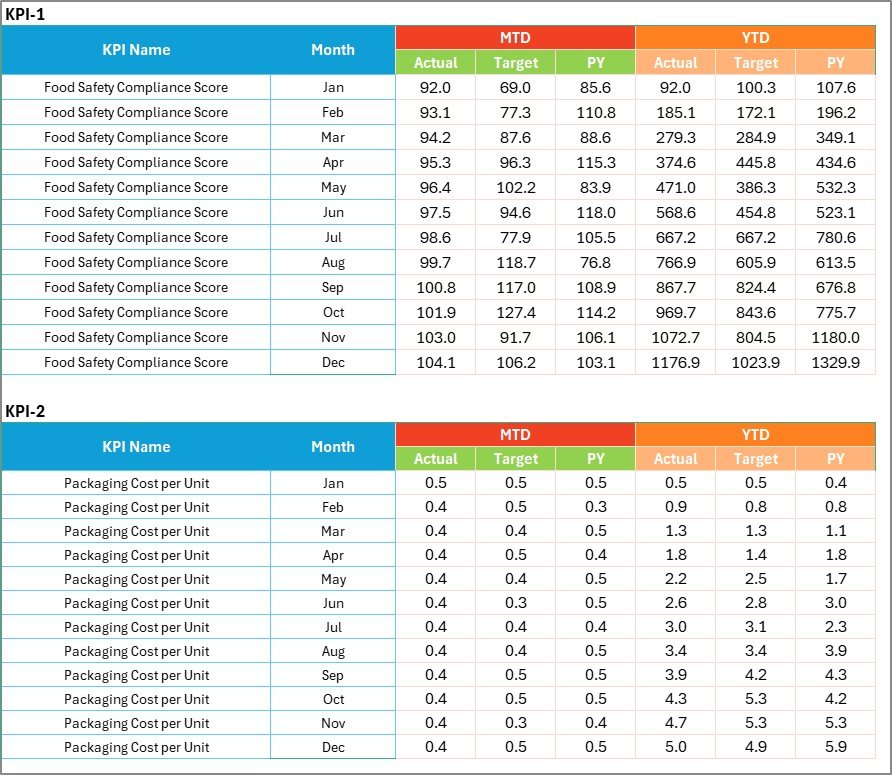
Input Data Sheet — Centralized Data Entry
The Input Data Sheet serves as the backbone of the entire scorecard.
Main Functions
- Enter actual KPI values
- Record targets and measurements
- Update performance results regularly
Because all calculations connect to this sheet, users only need to update data once.
Benefits of Centralized Data Entry
- Reduces errors
- Saves time
- Maintains data consistency
- Keeps dashboards automatically updated
As new results become available, teams simply update values, and the scorecard refreshes automatically.
Click to buy Food Packaging KPI Scorecard in Excel
KPI Definition Sheet — KPI Documentation Hub
The KPI Definition Sheet ensures clarity and standardization across teams.
Information Captured
- KPI Name
- KPI Group
- Unit of Measurement
- Formula
- KPI Definition
This sheet prevents confusion because every user understands how KPIs are calculated and interpreted.
Moreover, standardized definitions improve reporting accuracy across departments.

Click to buy Food Packaging KPI Scorecard in Excel
What KPIs Can You Track in a Food Packaging Scorecard?
Although organizations can customize KPIs, common food packaging KPIs include:
- Packaging Line Efficiency
- Packaging Waste Percentage
- Downtime Rate
- Packaging Accuracy Rate
- Defect Rate
- Units Packed per Hour
- Material Utilization Rate
- Cost per Package
- On-Time Packaging Completion
- Quality Compliance Score
Each KPI provides insight into operational efficiency and quality performance.
How Does the Food Packaging KPI Scorecard Improve Decision-Making?
When teams rely on manual reports, they often react too late. However, KPI scorecards provide real-time visibility.
Decision-Making Improvements
- Faster problem identification
- Data-driven planning
- Better resource allocation
- Improved production scheduling
- Performance accountability
Consequently, organizations achieve continuous improvement.
Advantages of Food Packaging KPI Scorecard in Excel
Implementing this scorecard delivers multiple operational benefits.
Improved Performance Visibility
Managers instantly understand performance status through visual indicators.
Faster Reporting
Automated calculations eliminate manual reporting tasks.
Better Operational Control
Teams monitor KPIs daily instead of waiting for monthly reports.
Easy Implementation
Excel familiarity reduces training requirements.
Cost-Effective Solution
Companies avoid expensive software investments.
Data Consistency
Centralized data prevents reporting discrepancies.
How to Implement the Food Packaging KPI Scorecard Successfully?
Organizations achieve better results when they follow a structured implementation approach.
Step-by-Step Implementation
- Define packaging KPIs aligned with business goals
- Enter KPI definitions in the KPI Definition sheet
- Set realistic performance targets
- Input historical data for baseline analysis
- Train team members on data entry procedures
- Review performance weekly or monthly
Because implementation remains simple, businesses can start using the scorecard immediately.
Best Practices for the Food Packaging KPI Scorecard
To maximize effectiveness, companies should follow proven best practices.
Keep KPIs Relevant
Track only metrics that influence operational outcomes.
Update Data Regularly
Consistent updates ensure accurate insights.
Use Clear Targets
Set measurable and achievable goals.
Review Trends Frequently
Analyze performance trends instead of single data points.
Standardize KPI Definitions
Ensure all departments interpret KPIs consistently.
Encourage Team Accountability
Share scorecard results with operational teams.
Common Challenges in Food Packaging Performance Tracking
Even with KPIs, organizations may face challenges.
Typical Issues
- Inconsistent data entry
- Unclear KPI definitions
- Too many performance metrics
- Lack of regular reviews
However, structured scorecards reduce these problems significantly.
How Does Excel Make KPI Tracking Easier?
Excel offers several advantages for performance monitoring.
Excel Capabilities
- Automated formulas
- Conditional formatting visuals
- Dropdown selections
- Dynamic charts
- Easy customization
Therefore, teams can maintain professional dashboards without advanced technical skills.
Who Can Benefit from the Food Packaging KPI Scorecard?
This template supports multiple roles across organizations.
Ideal Users
- Production Managers
- Packaging Supervisors
- Quality Assurance Teams
- Operations Managers
- Plant Heads
- Business Analysts
Because the interface remains simple, both technical and non-technical users can operate it easily.
How Does KPI Monitoring Support Continuous Improvement?
Continuous improvement requires measurable performance tracking.
When companies analyze KPI trends regularly:
- They identify inefficiencies early
- They implement corrective actions faster
- They measure improvement results clearly
As a result, operational performance improves consistently over time.
Future of KPI Scorecards in Food Manufacturing
Food manufacturing continues to evolve toward data-driven operations.
Modern KPI scorecards will increasingly integrate:
- Automation systems
- IoT machine data
- Predictive analytics
- Sustainability tracking metrics
However, Excel-based scorecards remain essential because they provide flexibility and accessibility.
Conclusion
The Food Packaging KPI Scorecard in Excel provides a powerful yet simple solution for monitoring packaging performance. Instead of managing disconnected reports, organizations gain a centralized system that delivers clarity, accuracy, and actionable insights.
By tracking Actual vs Target performance, analyzing KPI trends, and maintaining standardized definitions, businesses can improve efficiency, reduce waste, and maintain quality compliance.
Moreover, because the template uses Excel, companies can implement it quickly without additional investment. When teams follow best practices and update data consistently, the scorecard becomes a strategic tool for operational excellence.
Ultimately, organizations that measure performance effectively achieve stronger productivity, better decision-making, and sustainable growth.
Frequently Asked Questions (FAQs)
- What is a KPI scorecard in food packaging?
A KPI scorecard tracks packaging performance metrics such as efficiency, waste, and quality using measurable indicators.
- Why should food companies use KPI scorecards?
They provide clear performance visibility, improve decision-making, and help reduce operational inefficiencies.
- Can beginners use this Excel scorecard?
Yes. The template uses dropdowns and automated calculations, so beginners can use it easily.
- What does MTD and YTD mean?
- MTD: Month-to-Date performance
- YTD: Year-to-Date performance
- How often should KPI data be updated?
Organizations should update data weekly or monthly for accurate tracking.
- Can I customize KPIs in the template?
Yes. Users can modify KPI definitions and add new metrics based on business needs.
- Does the scorecard support trend analysis?
Yes. The KPI Trend sheet shows historical performance comparisons using charts.
- Is Excel suitable for professional KPI tracking?
Absolutely. Excel provides automation, visualization, and flexibility for performance monitoring.
Watch the step-by-step video tutorial:
Click to buy Food Packaging KPI Scorecard in Excel
Visit our YouTube channel to learn step-by-step video tutorials