Gym Fitness Business Dashboard in Excel is a professionally designed analytics template that empowers gym owners, fitness studio managers, and health club operators to track revenue, membership, engagement, and retention metrics across 5 interactive dashboard pages. Whether you run a single-location gym or manage a multi-branch fitness chain, this ready-to-use Excel dashboard gives you a complete picture of your business performance — powered by pivot tables that refresh with a single click.
👉 Click here to Purchase Gym Fitness Business Dashboard in Excel
Key Features of the Gym Fitness Business Dashboard in Excel
This Gym Fitness Business Dashboard in Excel is packed with features that make gym analytics effortless. It includes 5 interactive analysis pages, a structured data entry sheet, and a hidden support sheet that contains all the pivot tables driving the dashboard. The template tracks 8+ key metrics including Total Revenue, Total Active Members, Average Satisfaction Score, Total Monthly Fees, Total Operating Cost, Retention Rate, and Profit Margin. Multiple slicers on the Overview page let you filter instantly by membership type, location, month, and more — making it easy to slice through your gym data in seconds.
If you are looking for additional fitness analytics solutions, you might also want to explore the Fitness Studios Dashboard in Excel or the CrossFit Gym KPI Scorecard in Excel for specialized fitness tracking.
Dashboard Pages Explained
1. Overview Page
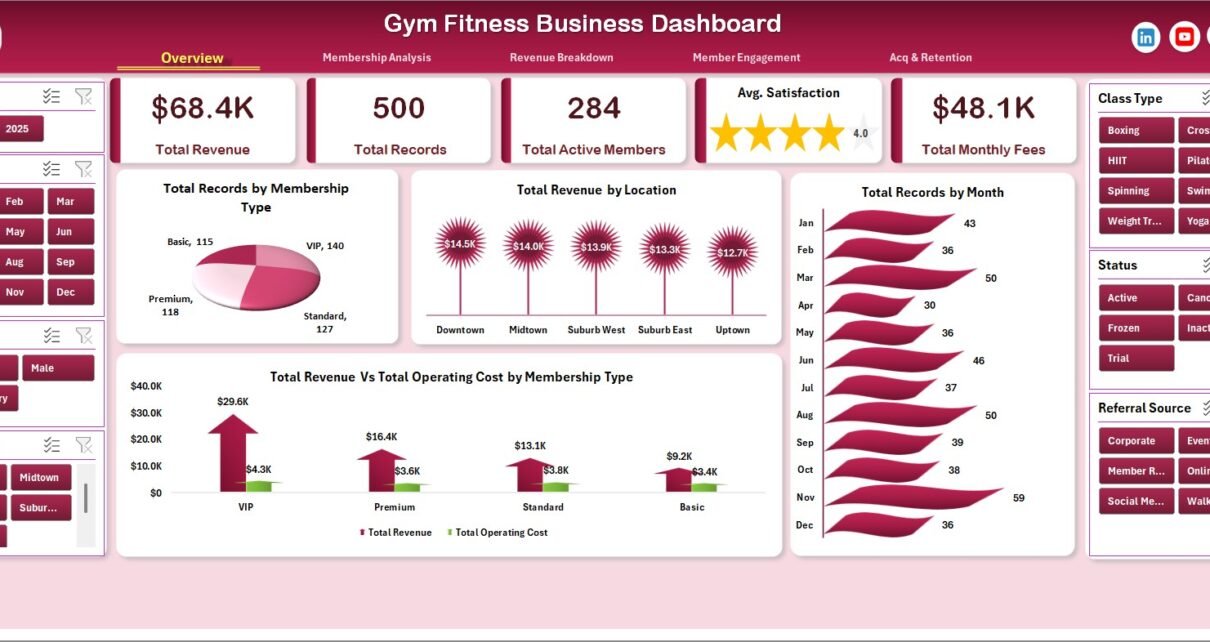
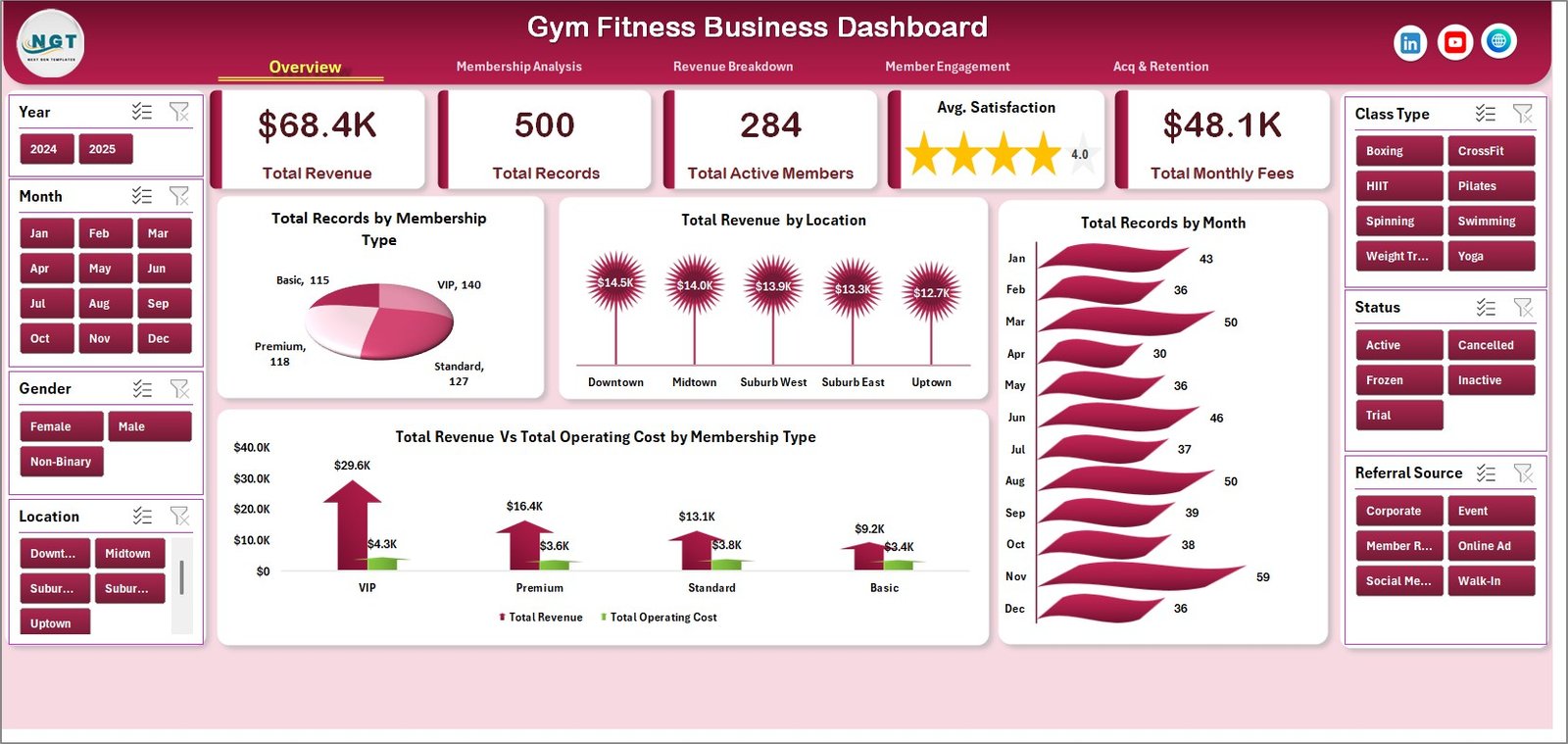
The Overview page serves as the command center of your gym analytics. At the top, you will find high-level KPI cards displaying Total Revenue, Total Records, Total Active Members, Avg Satisfaction, and Total Monthly Fees. Below the cards, interactive charts provide visual analysis of your gym data. The charts on this page include Total Records by Membership, Total Revenue by Location, Total Records by Month, and Total Revenue Vs Total Operating Cost by Membership Type. Multiple slicers allow you to apply filters and see the filtered dashboard instantly without any manual work.
Gym Fitness Business Dashboard
2. Membership Analysis
The Membership Analysis page dives deep into how different membership tiers perform across your gym locations. This sheet features Total Monthly Fees Vs Total PT Revenue by Membership Type, which helps you understand the revenue contribution from personal training across each plan. Avg. Satisfaction by Membership Type reveals which plans keep members happiest. Total Records by Gender provides demographic insights, and Total Monthly Fees Vs Total PT Revenue by Location allows you to compare membership performance across branches.
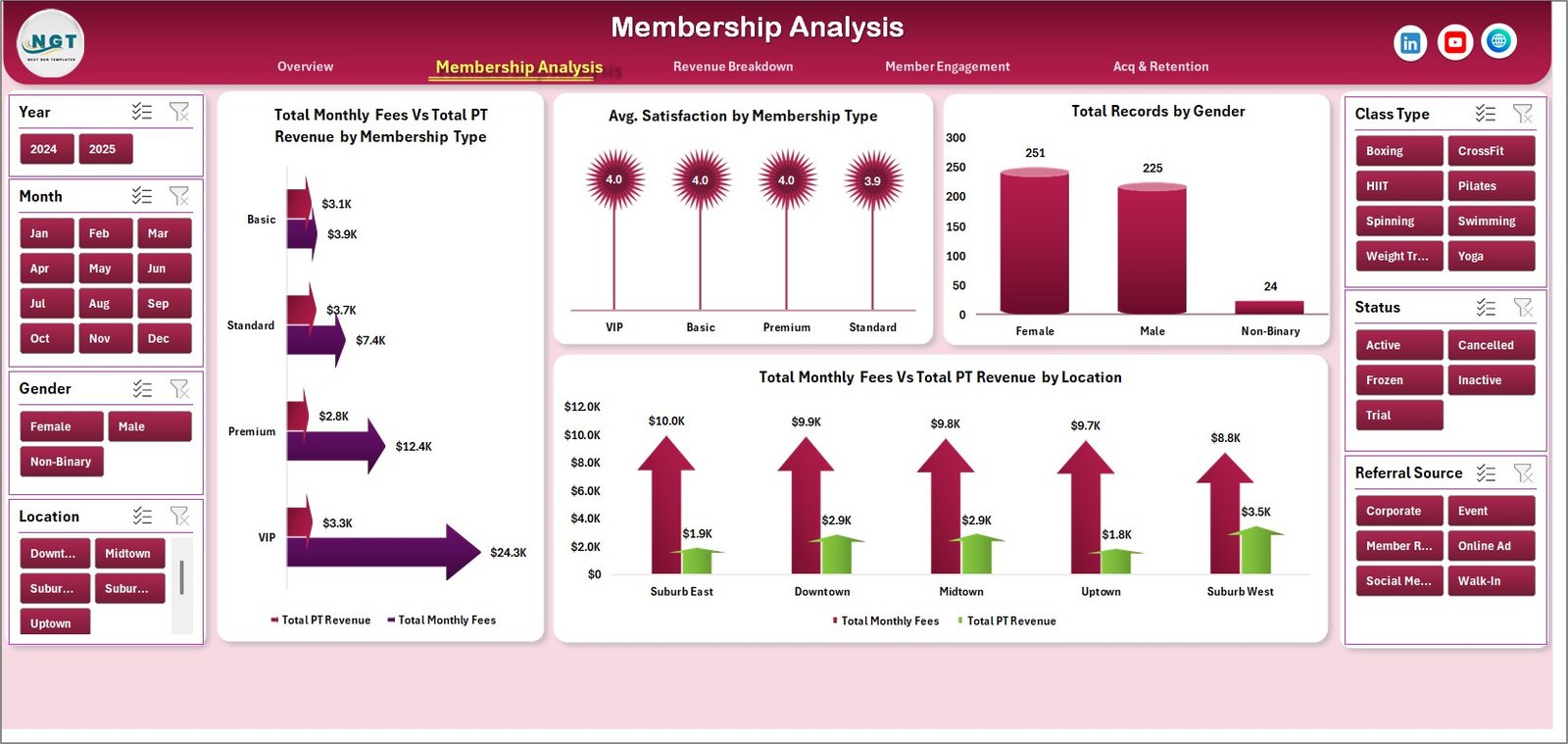
Membership Analysis
3. Revenue Breakdown
The Revenue Breakdown page helps you understand exactly where your gym’s income comes from and how it compares to operating costs. It includes Total Revenue by Class Type to identify your highest-earning fitness classes, Total Revenue by Referral Source to track which marketing channels bring in the most revenue, Total Revenue Vs Total Operating Cost by Year for long-term profitability analysis, and Avg. Attendance by Class Type to understand which classes attract the most members.
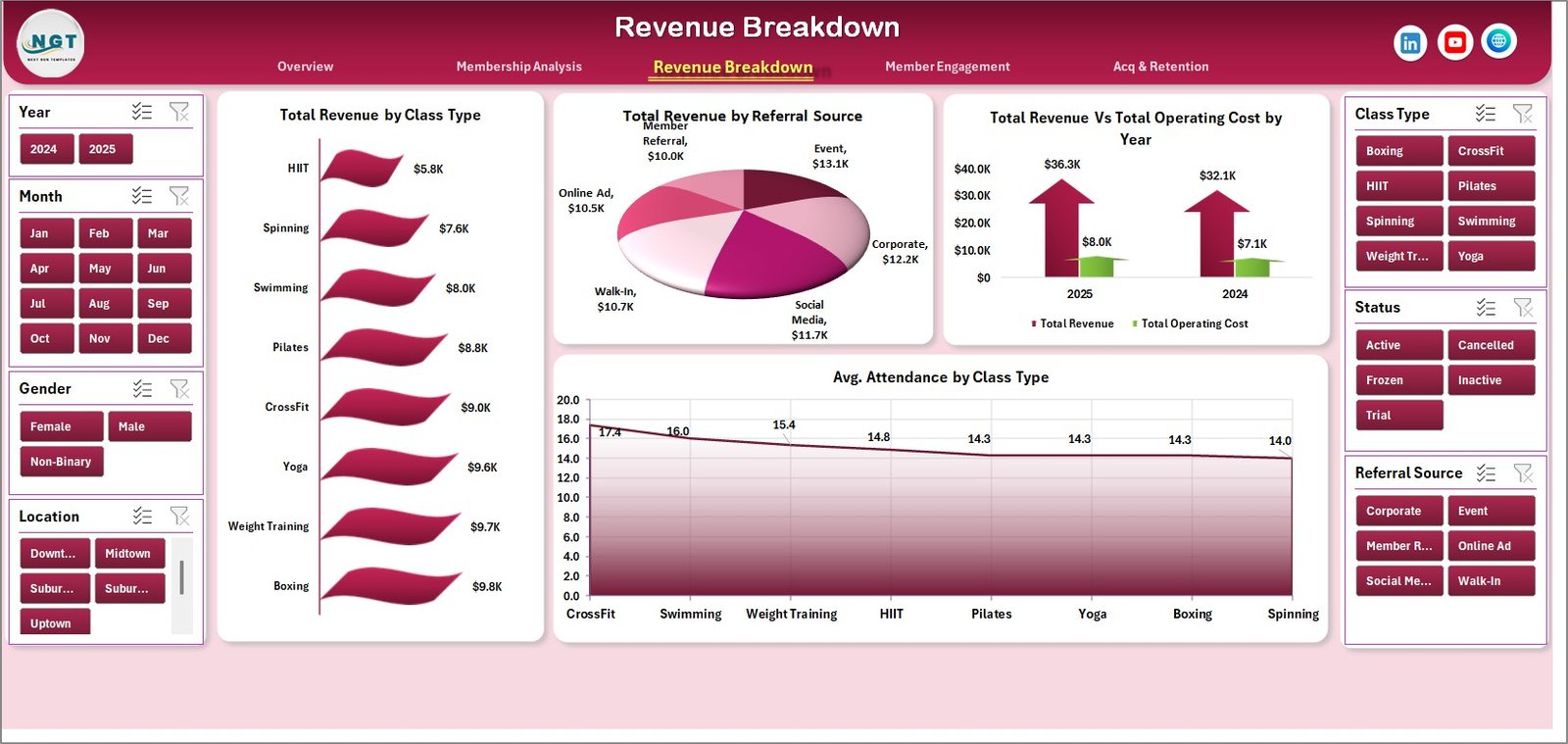
Revenue Breakdown
4. Member Engagement
Member engagement is the heartbeat of any successful gym business. This page features Avg. Satisfaction by Trainer, helping you identify your top-performing trainers and those who may need additional support. Avg. Attendance by Location reveals which branches have the most engaged membership base. Avg. Attendance by Membership Type shows which plans drive the most visits, and Total Active Members by Referral Source helps you understand which acquisition channels bring in the most engaged members.
👉 Click here to Purchase Gym Fitness Business Dashboard in Excel
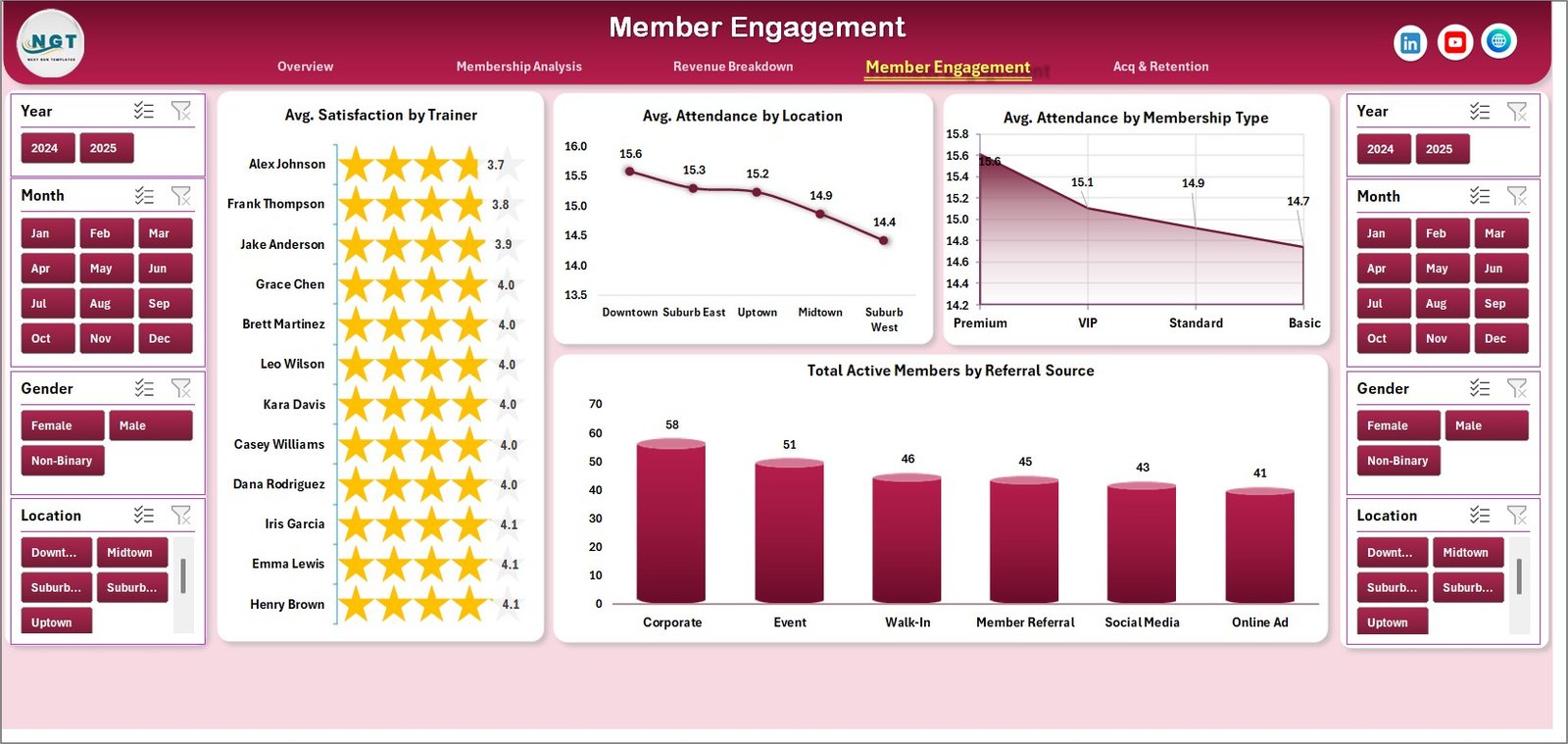
Member Engagement
5. Acquisition & Retention
The Acquisition and Retention page focuses on growth and member loyalty. Total Active Members by Month shows your membership growth trajectory over time. Retention Rate % by Location highlights which branches retain members best and which need improvement. Profit Margin % by Year gives you a clear picture of how your gym’s profitability has evolved, helping you make strategic decisions about expansion, pricing, and cost optimization.
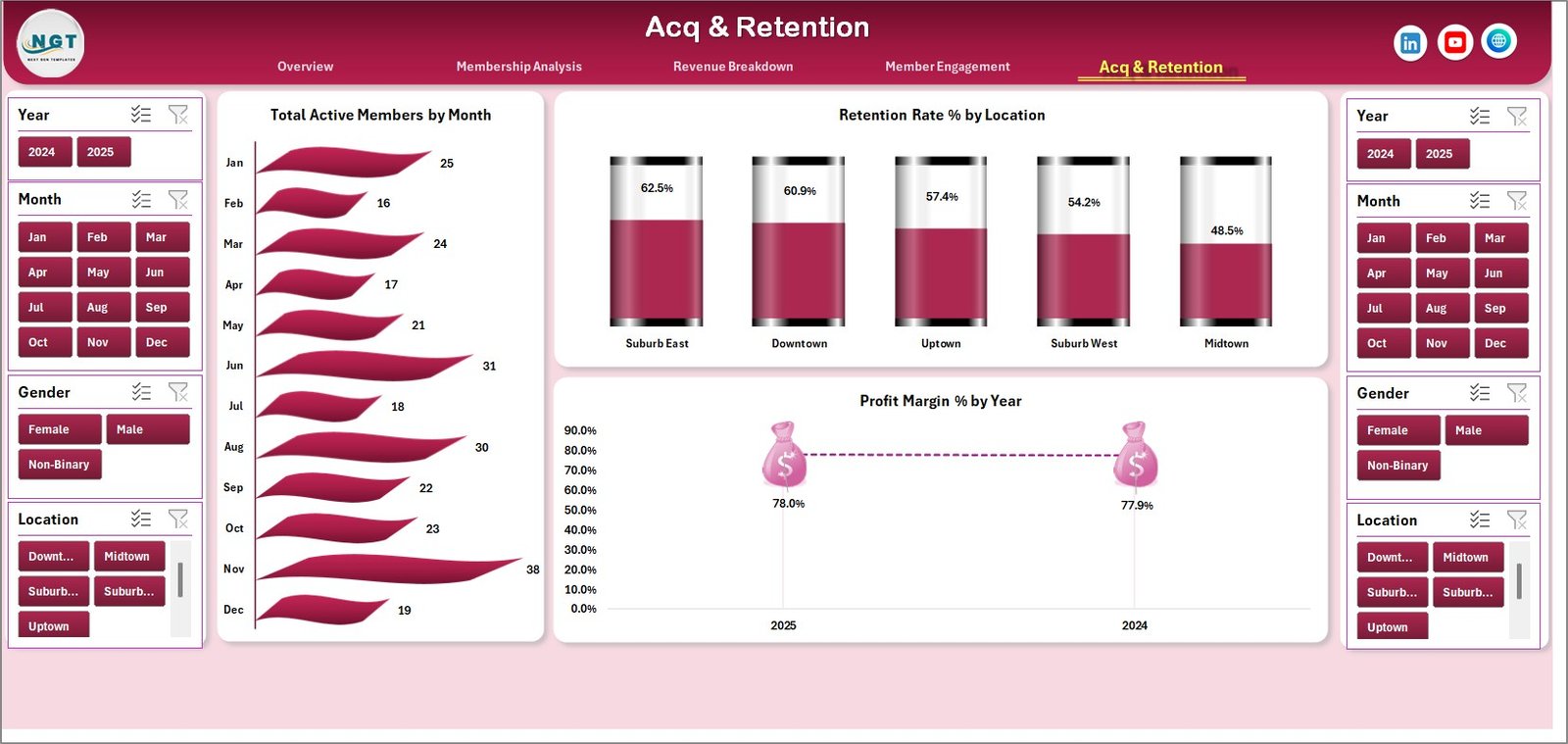
Acquisition & Retention
6. Data Sheet
The Data Sheet is where all your raw gym data lives. You simply need to add your membership records, revenue figures, attendance data, and satisfaction scores in the same structured format provided with the sample data. Each row represents a record with columns for all the dimensions and measures used across the dashboard.

Data Sheet Tab
7. Support Sheet
The Support Sheet contains multiple pivot tables that power the entire dashboard dynamically. After you update the data in the Data Sheet, simply go to the Data tab in the Excel ribbon and click Refresh All. Every pivot table will recalculate and every chart across all 5 dashboard pages will update automatically. You can keep this sheet hidden during day-to-day use.

Support Sheet Tab
Advantages of the Gym Fitness Business Dashboard in Excel
- All-in-One Analytics — Five dedicated analysis pages cover every critical dimension of gym management from revenue to retention
- No Excel Expertise Needed — Simply paste your data and click Refresh All; the pivot tables handle everything automatically
- Multi-Location Ready — Compare performance across multiple gym branches with location-based filters and charts
- Instant Filtering — Interactive slicers let you drill down by membership type, location, month, gender, and more
- Cost vs Revenue Clarity — Dedicated charts compare total revenue against operating costs by membership type and year
- Trainer Performance Tracking — Identify your best trainers by member satisfaction scores
- Professional Design — Clean, modern layout with consistent color schemes ready for presentations and stakeholder meetings
Opportunities for Improvement
👉 Click here to Purchase Gym Fitness Business Dashboard in Excel
- You could add conditional formatting to highlight KPI cards that fall below target thresholds for quick visual alerts
- Adding a monthly comparison view (Month-over-Month change) would help spot trends faster
- A dedicated trainer performance page with individual scorecards could provide more granular coaching insights
- Integration with a class scheduling tracker would enable capacity utilization analysis alongside the existing revenue metrics
Best Practices for Using This Gym Dashboard
- Update weekly or monthly — Add new records to the Data Sheet regularly and refresh to keep your analytics current
- Use slicers strategically — Filter by one dimension at a time to isolate specific insights without overwhelming yourself with data
- Compare locations — Use the location filters to identify top-performing and underperforming branches
- Track satisfaction trends — Monitor Avg Satisfaction by Trainer and Membership Type monthly to catch declining member experience early
- Present to stakeholders — The dashboard pages are presentation-ready and can be printed or screen-shared during management meetings
- Keep the Support Sheet hidden — This prevents accidental changes to the pivot tables that drive all your charts
Explore Relevant Templates
If you enjoyed this Gym Fitness Business Dashboard, explore more fitness and wellness templates from our collection of Excel Dashboard Templates:
- Fitness Studios Dashboard in Excel — Studio management analytics with class and instructor performance tracking
- CrossFit Gym KPI Scorecard in Excel — CrossFit-specific KPIs for WOD participation and athlete performance
- Fitness and Wellness Dashboard in Excel — Wellness-focused analytics for nutrition and activity tracking
- Fitness Industry KPI Scorecard in Google Sheets — Cloud-based fitness KPI tracking in Google Sheets
Frequently Asked Questions
What is the best Excel dashboard template for tracking gym business performance?
The Gym Fitness Business Dashboard in Excel is one of the most comprehensive gym analytics templates available. It tracks Total Revenue, Active Members, Satisfaction Scores, Monthly Fees, Operating Costs, Retention Rate, and Profit Margin across 5 interactive pages with dynamic slicers and pivot-powered automation.
How do I track gym membership revenue in Excel?
With this Gym Fitness Business Dashboard in Excel, you can track membership revenue by entering your data in the structured Data Sheet and clicking Refresh All. The dashboard automatically generates charts showing Total Revenue by Location, Total Monthly Fees Vs Total PT Revenue by Membership Type, and Revenue by Class Type.
Can I use this gym dashboard for multiple gym locations?
Yes. The Gym Fitness Business Dashboard supports multi-location analysis. You can filter by location using the interactive slicers on the Overview page, and dedicated charts compare Revenue by Location, Attendance by Location, and Retention Rate by Location across all your branches.
What gym KPIs does this Excel dashboard track?
This dashboard tracks 8+ gym KPIs including Total Revenue, Total Records, Total Active Members, Average Satisfaction, Total Monthly Fees, Total Operating Cost, Retention Rate %, and Profit Margin %. These KPIs are displayed across 5 interactive analysis pages.
Do I need to know VBA or advanced Excel to use this template?
No. The Gym Fitness Business Dashboard uses pivot tables and slicers — no VBA or macros required. Simply replace the sample data with your own records and click Refresh All in the Data tab to update the entire dashboard automatically.
How often should I update my gym dashboard data?
For best results, update your gym dashboard data weekly or monthly. Add new rows to the Data Sheet following the existing column format, then click Refresh All to recalculate all pivot tables and charts across all 5 pages.
Conclusion
The Gym Fitness Business Dashboard in Excel is an essential analytics tool for any gym owner or fitness business manager who wants data-driven insights without the complexity of BI tools. With 5 interactive pages, dynamic slicers, and pivot-powered automation, this template delivers professional-grade analytics that update with a single click. Download it today and start making smarter decisions for your gym business.
👉 Click here to Purchase Gym Fitness Business Dashboard in Excel
For more Excel dashboard tutorials and templates, visit our YouTube channel 👉 Youtube.com/@PK-AnExcelExpert
Also check out these related blog posts:
- Fitness Studios Dashboard in Excel
- CrossFit Gym KPI Scorecard in Excel
- Microsoft Power Query Documentation (External Resource)