Managing an interior design business requires more than creativity and design skills. You must also track timelines, budgets, client satisfaction, productivity, and profitability. However, many interior design firms still rely on scattered Excel sheets, manual reports, or gut feeling to measure performance. As a result, decision-making becomes slow, unclear, and reactive.
That is exactly where an Interior Design KPI Scorecard in Excel creates real value.
In this detailed and practical guide, you will learn what an Interior Design KPI Scorecard in Excel is, why it is important, how it works, its worksheet-wise structure, key KPIs, advantages, best practices, and frequently asked questions. By the end of this article, you will clearly understand how this ready-to-use Excel scorecard helps interior designers track performance and grow their business with confidence.
Click to Purchases Interior Design KPI Scorecard in Excel
What Is an Interior Design KPI Scorecard in Excel?
An Interior Design KPI Scorecard in Excel is a structured and visual performance monitoring tool designed to track key performance indicators (KPIs) related to interior design projects, operations, finances, and client satisfaction.
Instead of reviewing long reports or raw data, this scorecard presents all KPIs in a clean and easy-to-read format. Moreover, it uses Excel features such as dropdowns, formulas, conditional formatting, and charts to display performance clearly.
As a result, interior designers, project managers, and business owners gain instant clarity on how well their projects and teams perform.
Why Do Interior Design Firms Need a KPI Scorecard?
Interior design projects involve multiple moving parts. Therefore, tracking performance without a proper system becomes difficult. A KPI scorecard solves this problem by bringing everything together.
Here is why interior design firms need a KPI scorecard in Excel:
-
It helps monitor project timelines and delays
-
It tracks budget utilization and cost overruns
-
It measures client satisfaction and repeat business
-
It improves team productivity and accountability
-
It supports data-driven decisions instead of assumptions
Most importantly, it helps designers focus on both creativity and performance at the same time.
How Does an Interior Design KPI Scorecard in Excel Work?
The Interior Design KPI Scorecard in Excel works by converting raw KPI data into structured insights.
First, you enter actual and target values for each KPI in the Input Data sheet. Then, Excel formulas calculate MTD and YTD performance. After that, the scorecard compares actual performance against targets and previous year values.
Finally, visual indicators such as colors, arrows, and charts highlight performance gaps. Therefore, you can identify issues instantly and take corrective actions.
Click to Purchases Interior Design KPI Scorecard in Excel
What Are the Key Features of the Interior Design KPI Scorecard in Excel?
This ready-to-use Interior Design KPI Scorecard template includes four structured worksheets. Each sheet plays a specific role in performance tracking.
Let us explore them one by one.
1. Scorecard Sheet: How Does the Main Scorecard Work?
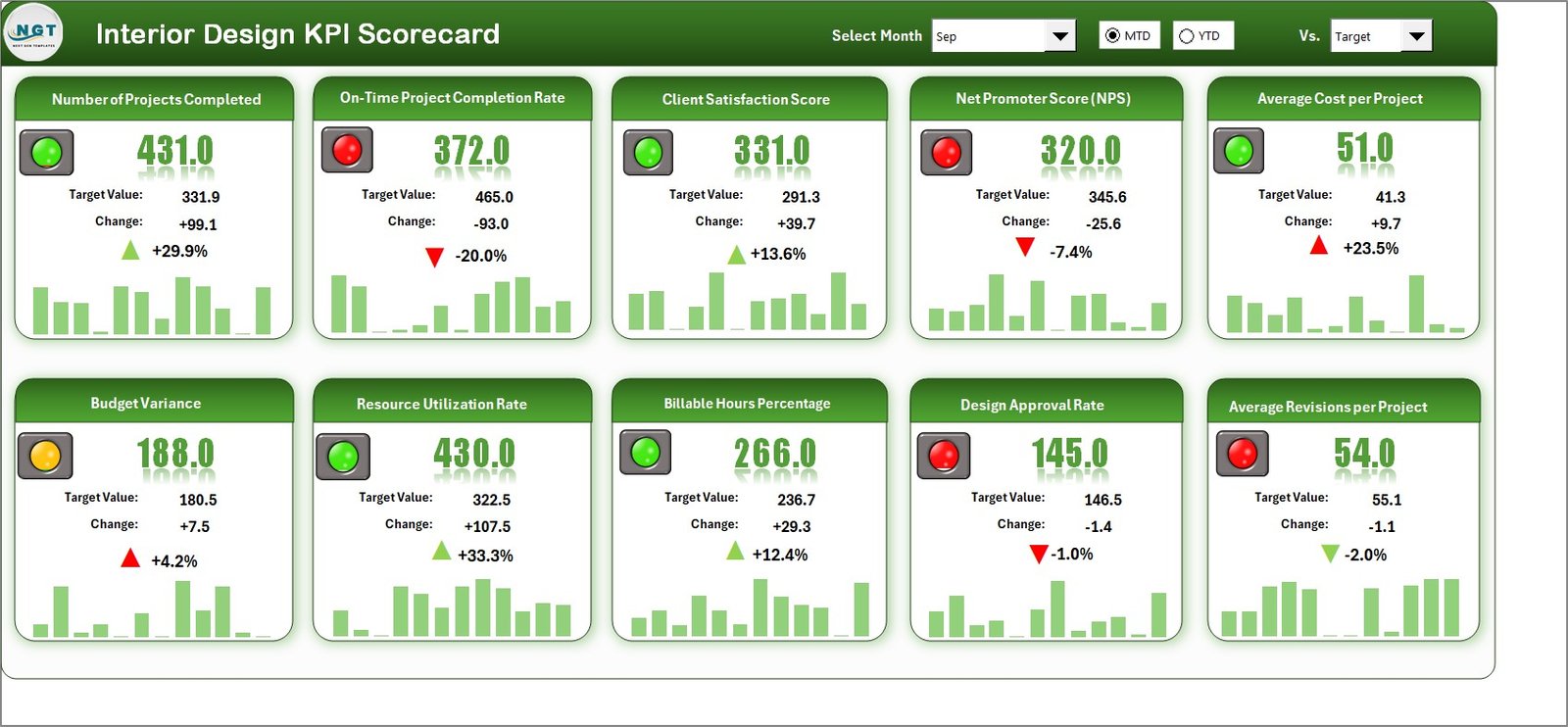
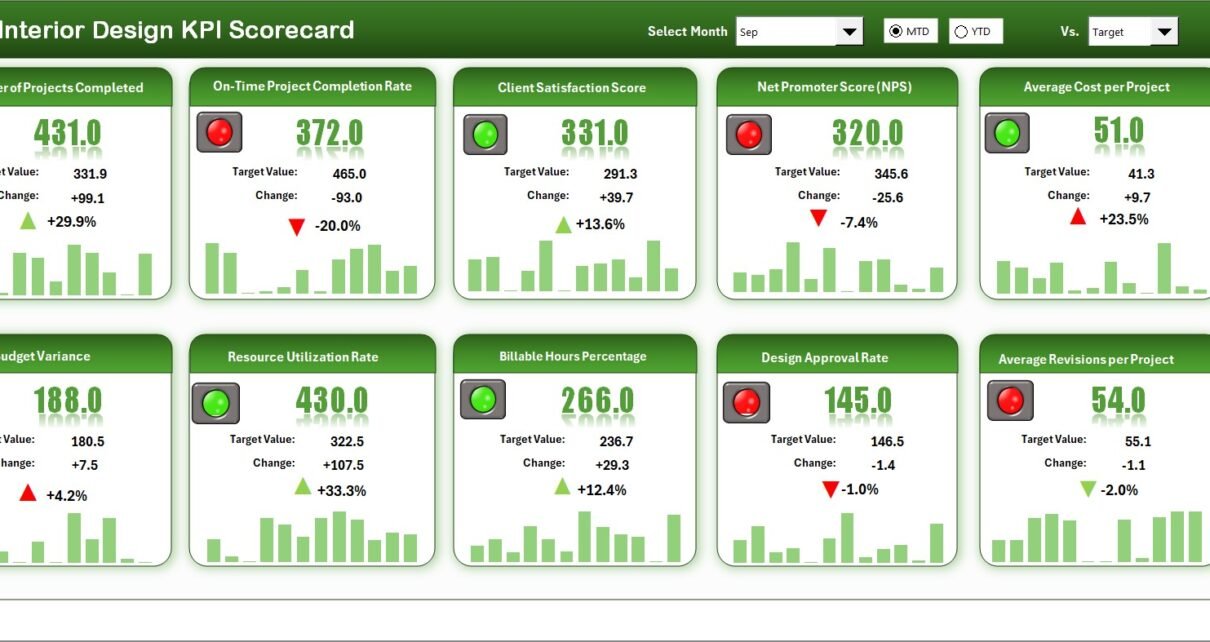
The Scorecard Sheet is the main interface of the KPI scorecard. It gives a complete snapshot of performance at a glance.
Key Features of the Scorecard Sheet
-
Dropdown Menus
You can select the month, MTD (Month-to-Date), or YTD (Year-to-Date). As soon as you change the selection, the entire scorecard updates automatically. -
Actual vs Target Comparison
This section compares actual performance with target values for each KPI. Therefore, you can easily identify overperformance or underperformance. -
Visual Indicators
Conditional formatting highlights performance using colors or icons. For example, green may indicate targets met, while red highlights missed targets. -
Comprehensive KPI Overview
The scorecard displays KPI group, unit, KPI type (LTB or UTB), and performance metrics in a single view.
As a result, decision-makers do not need to open multiple sheets or reports.
2. KPI Trend Sheet: How Can You Analyze KPI Trends?
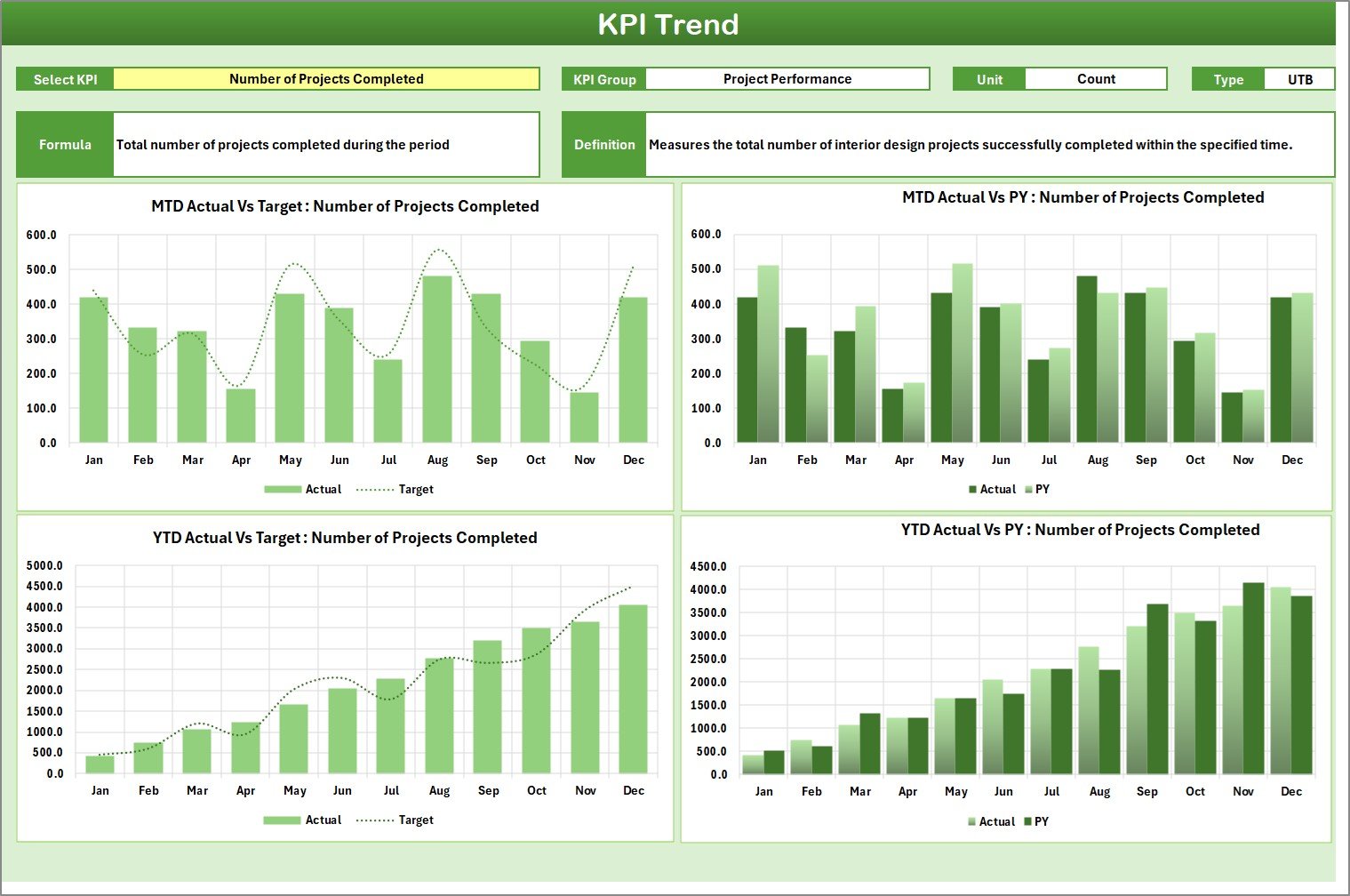
The KPI Trend Sheet focuses on performance analysis over time.
How the KPI Trend Sheet Works
-
You select a KPI name from the dropdown available in cell C3
-
The sheet automatically displays:
-
KPI Group
-
KPI Unit
-
KPI Type (Lower the Better or Upper the Better)
-
KPI Formula
-
KPI Definition
-
Trend Charts for Better Insights
In addition, this sheet shows MTD and YTD trend charts for:
-
Actual values
-
Target values
-
Previous Year (PY) values
Because of these charts, you can easily identify trends, seasonality, and performance patterns. Therefore, forecasting and planning become much easier.
Click to Purchases Interior Design KPI Scorecard in Excel
3. Input Data Sheet: Where Do You Enter KPI Data?
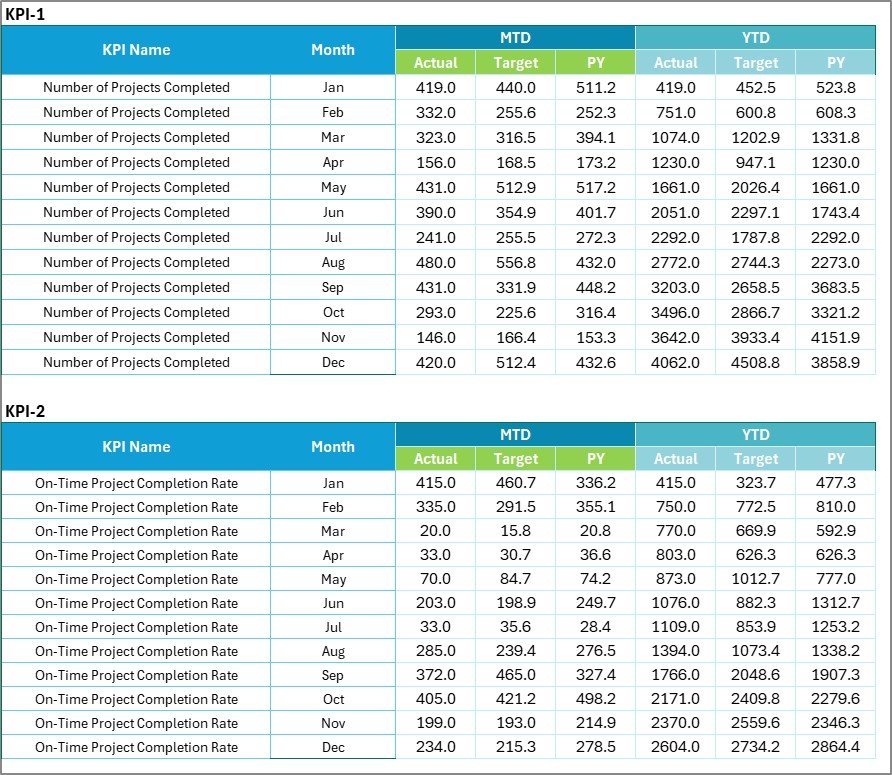
The Input Data Sheet acts as the data backbone of the scorecard.
Key Features of the Input Data Sheet
-
Centralized Data Entry
You record actual values, targets, and previous year numbers for each KPI. -
Easy Updates
You can update data monthly or daily without breaking formulas or visuals. -
Scalability
You can add new KPIs or time periods as your business grows.
Because of this flexibility, the scorecard always remains up to date and reliable.
4. KPI Definition Sheet: Why Is KPI Definition Important?
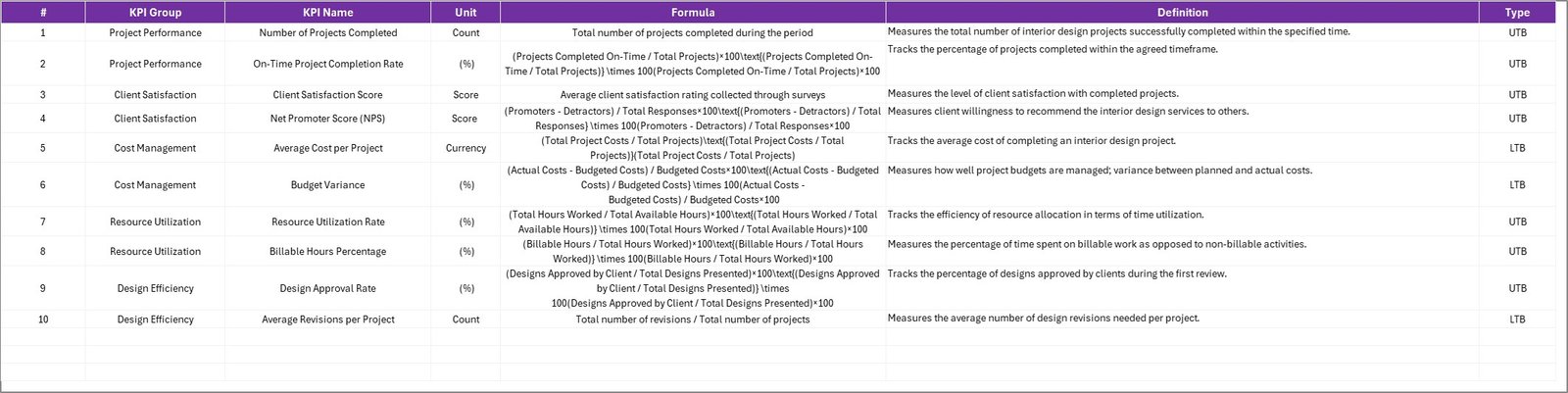
The KPI Definition Sheet ensures clarity and consistency.
What Information Does This Sheet Contain?
-
KPI Name
-
KPI Group
-
Unit of Measurement
-
KPI Formula
-
KPI Definition
This sheet acts as a reference guide for users. Therefore, everyone understands what each KPI measures and how calculations work.
Which KPIs Should You Track in an Interior Design KPI Scorecard?
Choosing the right KPIs is critical. Below are common KPI categories for interior design businesses.
Project Management KPIs
-
Project Completion Rate
-
On-Time Project Delivery %
-
Average Project Duration
-
Rework Percentage
Financial KPIs
-
Project Cost Variance
-
Budget Utilization %
-
Profit Margin per Project
-
Revenue per Client
Client Experience KPIs
-
Client Satisfaction Score
-
Repeat Client Rate
-
Client Complaint Rate
-
Referral Percentage
Productivity KPIs
-
Designer Utilization Rate
-
Average Design Revisions
-
Tasks Completed per Month
Tracking these KPIs helps maintain balance between creativity and efficiency.
Click to Purchases Interior Design KPI Scorecard in Excel
Advantages of Interior Design KPI Scorecard in Excel
Using an Interior Design KPI Scorecard in Excel offers several advantages.
Key Advantages
-
✔ Centralized performance tracking in one file
-
✔ Clear visibility of project and financial performance
-
✔ Easy customization without technical skills
-
✔ Cost-effective compared to advanced software
-
✔ Better accountability across teams
-
✔ Faster and smarter decision-making
Moreover, Excel familiarity reduces training time and resistance among users.
How Does This Scorecard Improve Decision-Making?
The scorecard replaces assumptions with data.
Because it shows actual vs target performance, managers can:
-
Identify delayed projects early
-
Control cost overruns
-
Improve client satisfaction
-
Optimize team workload
As a result, decisions become proactive rather than reactive.
Click to Purchases Interior Design KPI Scorecard in Excel
Who Can Use an Interior Design KPI Scorecard in Excel?
This scorecard suits multiple roles:
-
Interior Designers
-
Design Studio Owners
-
Project Managers
-
Operations Managers
-
Finance Teams
Even small interior firms can use it without hiring data analysts.
Best Practices for the Interior Design KPI Scorecard in Excel
To get the most value, you should follow best practices.
Best Practices
-
✔ Define clear KPI goals before implementation
-
✔ Update data regularly to maintain accuracy
-
✔ Limit KPIs to what truly matters
-
✔ Use consistent units and definitions
-
✔ Review trends monthly, not just numbers
-
✔ Share insights with your team
Following these practices ensures long-term success.
How Often Should You Review the KPI Scorecard?
Regular review ensures continuous improvement.
-
Daily: For critical project KPIs
-
Weekly: For operational performance
-
Monthly: For financial and strategic KPIs
Frequent reviews keep performance aligned with goals.
Common Mistakes to Avoid While Using KPI Scorecards
Avoid these mistakes to maintain accuracy:
-
Tracking too many KPIs
-
Ignoring data validation
-
Updating data irregularly
-
Using unclear KPI definitions
-
Focusing only on visuals and not insights
Avoiding these issues improves reliability and trust.
Can You Customize the Interior Design KPI Scorecard in Excel?
Yes, customization is one of its biggest strengths.
You can:
-
Add or remove KPIs
-
Modify KPI groups
-
Adjust targets
-
Change visuals and formats
Therefore, the scorecard grows along with your business.
Click to Purchases Interior Design KPI Scorecard in Excel
Conclusion: Why Should You Use an Interior Design KPI Scorecard in Excel?
An Interior Design KPI Scorecard in Excel transforms the way interior design firms track performance. Instead of guessing or relying on manual reports, you gain clear, structured, and actionable insights.
Because it combines data, visuals, and flexibility, this scorecard helps improve efficiency, profitability, and client satisfaction. Whether you manage a small studio or a growing design firm, this ready-to-use Excel scorecard becomes a powerful performance management tool.
Frequently Asked Questions (FAQs)
What is an Interior Design KPI Scorecard in Excel?
An Interior Design KPI Scorecard in Excel is a structured template that tracks and visualizes key performance indicators related to interior design projects, finances, and operations.
Is Excel suitable for KPI tracking in interior design?
Yes, Excel offers flexibility, affordability, and ease of use, making it ideal for KPI tracking in interior design businesses.
How many KPIs should an interior design firm track?
Most firms should track 10 to 20 meaningful KPIs to avoid data overload while maintaining clarity.
Can beginners use this KPI scorecard?
Yes, the scorecard uses simple Excel features and does not require advanced technical skills.
How often should KPI data be updated?
You should update KPI data regularly, preferably weekly or monthly, depending on the metric.
Can this scorecard be shared with teams?
Yes, you can easily share the Excel file with teams for transparency and collaboration.
Click to Purchases Interior Design KPI Scorecard in Excel
Visit our YouTube channel to learn step-by-step video tutorials