Legal compliance does not allow mistakes. Regulations change often. Audits arrive without warning. Moreover, penalties increase every year. Therefore, organizations must monitor compliance performance carefully.
However, many companies still track compliance using scattered spreadsheets and manual reports. As a result, leadership struggles to identify risk areas quickly.
So, how can you monitor legal compliance KPIs in a structured and simple way?
The answer is clear.
You need a Legal Compliance KPI Scorecard in Excel.
This ready-to-use Excel template centralizes compliance metrics, compares Actual vs Target values, and tracks Month-to-Date (MTD) and Year-to-Date (YTD) performance. Consequently, compliance teams gain visibility, control, and accountability.
Let us explore everything step by step.
Click to Purchases Legal Compliance KPI Scorecard in Excel
What Is a Legal Compliance KPI Scorecard in Excel?
A Legal Compliance KPI Scorecard in Excel is a structured performance tracking tool designed to monitor legal and regulatory metrics. It helps compliance officers measure how well the organization follows laws, policies, and internal procedures.
Instead of relying on static reports, you can:
-
Monitor compliance KPIs monthly
-
Compare Actual vs Target performance
-
Track Previous Year trends
-
Analyze KPI groups
-
Identify compliance gaps early
Because Excel updates calculations automatically, the scorecard provides real-time insights.
Why Do Organizations Need a Legal Compliance KPI Scorecard?
Compliance affects every department. HR handles employment laws. Finance follows regulatory reporting rules. IT ensures data protection compliance. Therefore, tracking performance becomes critical.
Without a KPI scorecard:
-
Risks remain hidden
-
Audit preparation becomes stressful
-
Compliance costs increase
-
Leadership lacks visibility
-
Teams react instead of preventing issues
On the other hand, structured KPI tracking ensures proactive risk management.
Click to Purchases Legal Compliance KPI Scorecard in Excel
Key Features of Legal Compliance KPI Scorecard in Excel
This ready-to-use template includes 4 structured worksheets. Each sheet plays a specific role.
Let us understand them clearly.
1️⃣ Scorecard Sheet – Where Do You View Overall Performance?
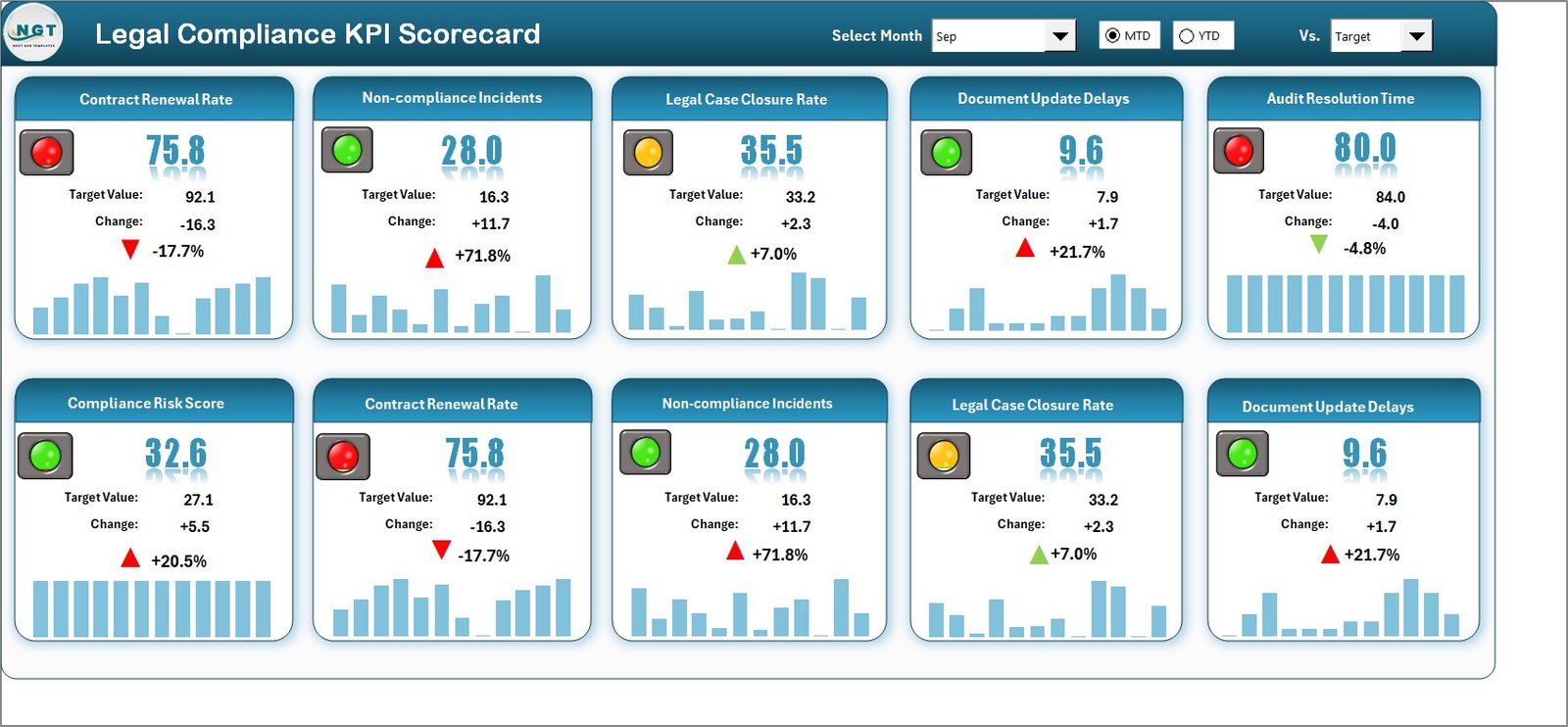
The Scorecard Sheet serves as the main interface.
🔹 Dropdown Menus
You can select:
-
Month
-
MTD (Month-to-Date)
-
YTD (Year-to-Date)
Because dropdowns control the entire sheet, the scorecard updates automatically.
🔹 Actual vs Target Comparison
The sheet displays:
-
Actual Values
-
Target Values
-
Target vs Actual comparison
-
Conditional formatting indicators
As a result, users can quickly see whether performance meets compliance standards.
🔹 Visual Indicators
Color-coded visuals and conditional formatting make it easy to identify:
-
Green (Target Achieved)
-
Red (Target Missed)
Therefore, decision-makers can detect compliance risks instantly.
🔹 Comprehensive KPI Overview
The scorecard provides:
-
MTD Actual vs Target
-
YTD Actual vs Target
-
Previous Year comparisons
Because you can analyze both short-term and long-term data, you gain a complete performance picture.
Click to Purchases Legal Compliance KPI Scorecard in Excel
2️⃣ KPI Trend Sheet – How Do You Analyze Trends?
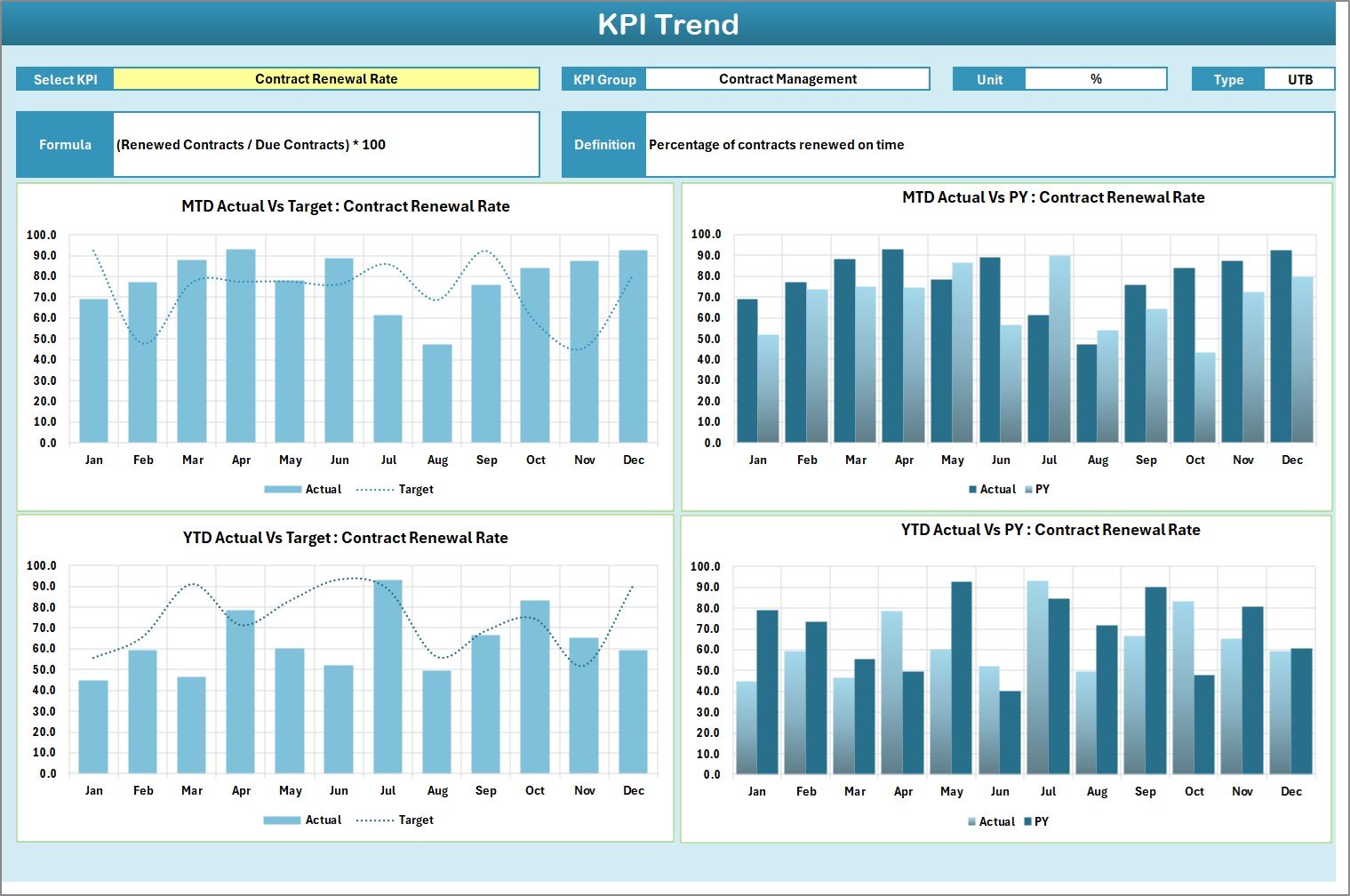
The KPI Trend Sheet allows detailed analysis.
On cell C3, you can select a KPI from a dropdown list.
Once selected, the sheet displays:
-
KPI Group
-
Unit of KPI
-
Type of KPI (Lower the Better / Upper the Better)
-
KPI Formula
-
KPI Definition
Additionally, the sheet shows:
-
MTD Trend Chart (Actual, Target, Previous Year)
-
YTD Trend Chart (Actual, Target, Previous Year)
Because trend charts highlight performance patterns, teams can take corrective action early.
Click to Purchases Legal Compliance KPI Scorecard in Excel
3️⃣ Input Data Sheet – Where Do You Enter KPI Data?
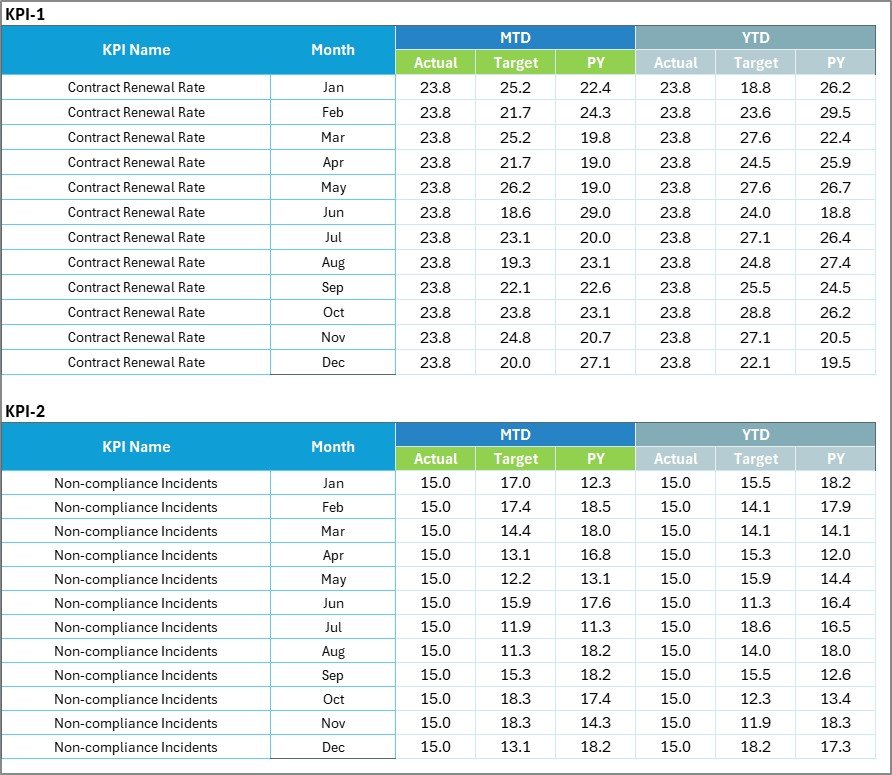
The Input Data Sheet stores all compliance numbers.
You can enter:
-
KPI Name
-
Month
-
Actual Value
-
Target Value
-
Other performance metrics
Because the scorecard pulls data directly from this sheet, updates reflect instantly.
Moreover, you can easily update monthly results without restructuring the template.
4️⃣ KPI Definition Sheet – Why Is Documentation Important?

The KPI Definition Sheet contains:
-
KPI Name
-
KPI Group
-
Unit
-
Formula
-
Definition
Because definitions remain centralized, everyone understands the measurement logic.
This structure reduces confusion during audits and internal reviews.
What KPIs Should a Legal Compliance Scorecard Include?
Although KPIs vary by industry, most organizations track the following:
🔹 Regulatory Compliance KPIs
-
Compliance Rate %
-
Audit Findings Count
-
Regulatory Violations Count
-
Policy Adherence Rate
🔹 Risk Management KPIs
-
Risk Assessment Completion Rate
-
Open Compliance Issues
-
Incident Resolution Time
-
Corrective Action Completion Rate
🔹 Training & Awareness KPIs
-
Employee Compliance Training Completion %
-
Policy Acknowledgment Rate
-
Awareness Program Participation Rate
🔹 Documentation & Reporting KPIs
-
Reporting Accuracy %
-
Documentation Timeliness
-
Compliance Review Frequency
Because structured measurement improves oversight, KPI tracking strengthens governance.
Click to Purchases Legal Compliance KPI Scorecard in Excel
Advantages of Legal Compliance KPI Scorecard in Excel
Now let us examine the real benefits.
1️⃣ Improves Risk Visibility
The scorecard highlights compliance gaps immediately. Therefore, teams act faster.
2️⃣ Simplifies Audit Preparation
Since data stays organized, audit readiness improves significantly.
3️⃣ Enhances Accountability
Each KPI links to measurable outcomes. Consequently, departments take responsibility.
4️⃣ Supports Data-Driven Decisions
Leaders rely on structured metrics instead of assumptions.
5️⃣ Saves Reporting Time
Instead of building monthly compliance reports manually, the scorecard calculates results automatically.
6️⃣ Encourages Continuous Improvement
Because you track trends over time, performance improves steadily.
How Does This Scorecard Strengthen Compliance Management?
This scorecard strengthens compliance by:
-
Identifying weak areas
-
Tracking corrective actions
-
Comparing performance year over year
-
Monitoring training completion
-
Measuring risk exposure
Therefore, organizations move from reactive compliance to proactive compliance.
Best Practices for the Legal Compliance KPI Scorecard
To maximize value, follow these best practices:
✅ Define Clear Compliance Objectives
Align KPIs with legal and regulatory requirements.
✅ Update Data Monthly
Consistency ensures accurate monitoring.
✅ Classify KPIs Correctly (LTB / UTB)
Define whether lower or higher values indicate better performance.
✅ Review Trends Regularly
Analyze both MTD and YTD charts.
✅ Limit KPIs to High-Impact Metrics
Avoid unnecessary complexity.
✅ Share Reports with Leadership
Transparency improves governance.
Who Should Use This Scorecard?
This template benefits:
-
Compliance Officers
-
Legal Teams
-
Risk Managers
-
Internal Audit Teams
-
Corporate Governance Leaders
-
HR and Regulatory Departments
Moreover, organizations in finance, healthcare, manufacturing, and IT can use it effectively.
Click to Purchases Legal Compliance KPI Scorecard in Excel
How to Implement the Legal Compliance KPI Scorecard in Excel?
Follow these steps:
-
Define compliance KPIs
-
Enter KPI definitions
-
Input monthly data
-
Set performance targets
-
Review results regularly
-
Conduct compliance meetings
Because structured tracking drives improvement, regular review ensures better compliance performance.
Conclusion
Legal compliance demands structure, accuracy, and consistency. However, without a clear monitoring system, organizations face unnecessary risks.
The Legal Compliance KPI Scorecard in Excel offers a practical solution. It centralizes compliance data, compares Actual vs Target values, and tracks performance trends effectively.
If your organization wants better compliance visibility, improved audit readiness, and measurable risk control, this Excel scorecard provides the right foundation.
Frequently Asked Questions with Answers
1. What is a Legal Compliance KPI Scorecard?
It is a structured Excel tool that tracks legal and regulatory performance metrics.
2. Can I customize the KPIs?
Yes. You can modify KPI names, targets, and definitions based on your requirements.
3. Does the scorecard support MTD and YTD analysis?
Yes. It tracks both Month-to-Date and Year-to-Date performance.
4. How often should I update the data?
You should update data monthly for accurate reporting.
5. What does LTB and UTB mean?
LTB means Lower the Better.
UTB means Upper the Better.
6. Is this template suitable for small businesses?
Yes. Both small businesses and large enterprises can use it effectively.
Click to Purchases Legal Compliance KPI Scorecard in Excel
Visit our YouTube channel to learn step-by-step video tutorials