The Manufacturing Production Management System V1.0 solves this problem. It helps teams manage production using a fully automated Excel- and VBA-based tool. The interface looks clean, the navigation feels smooth, and every form works in a structured way. As a result, you save time, reduce manual errors, and make the production workflow more efficient.
In this article, you will explore everything about this powerful tool. You will learn how it works, how each form supports your daily manufacturing tasks, and how this tool improves efficiency from day one. You will also see the advantages, opportunities for improvement, best practices, and answers to common questions.
What Is Manufacturing Production Management System V1.0?
The Manufacturing Production Management System V1.0 is a ready-to-use Excel and VBA-powered application built for manufacturing companies of all sizes. It manages production orders, machines, raw materials, suppliers, employees, quality control, inventory, expenses, and purchases from one place.
Because the tool runs on Excel with optimized VBA, you enjoy automation without the need for complex software. You can log in, navigate through forms, update records, view history, and export data in just a few clicks.
In short, this system works like a mini-ERP specifically designed for manufacturing.
Key Features of Manufacturing Production Management System V1.0
The system contains multiple forms and modules. Every section supports a different part of the manufacturing cycle. Let us look at the complete list of features.
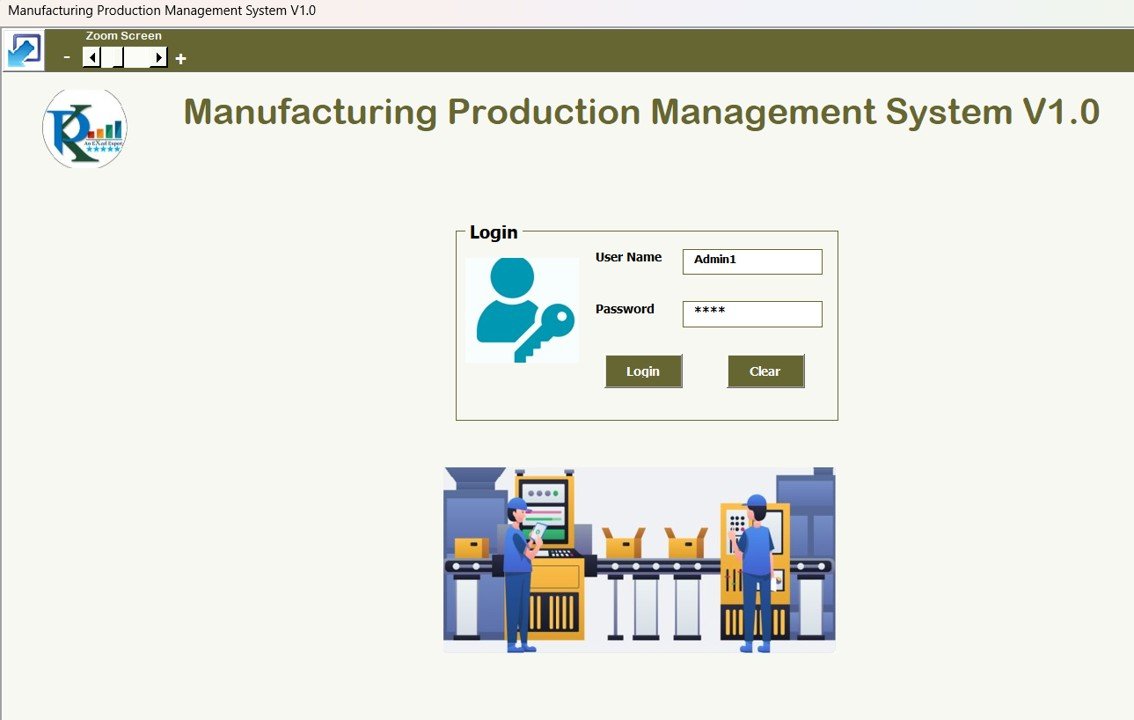
1. Login Form
The system starts with a secure login. You enter:
-
User ID: Admin1
-
Password: abcd
Once you log in, the tool moves you to the main form instantly. This login system keeps your data safe and prevents unauthorized access.
Click to Buy Manufacturing Production Management System V1.0
2. Main Form – Central Control Panel
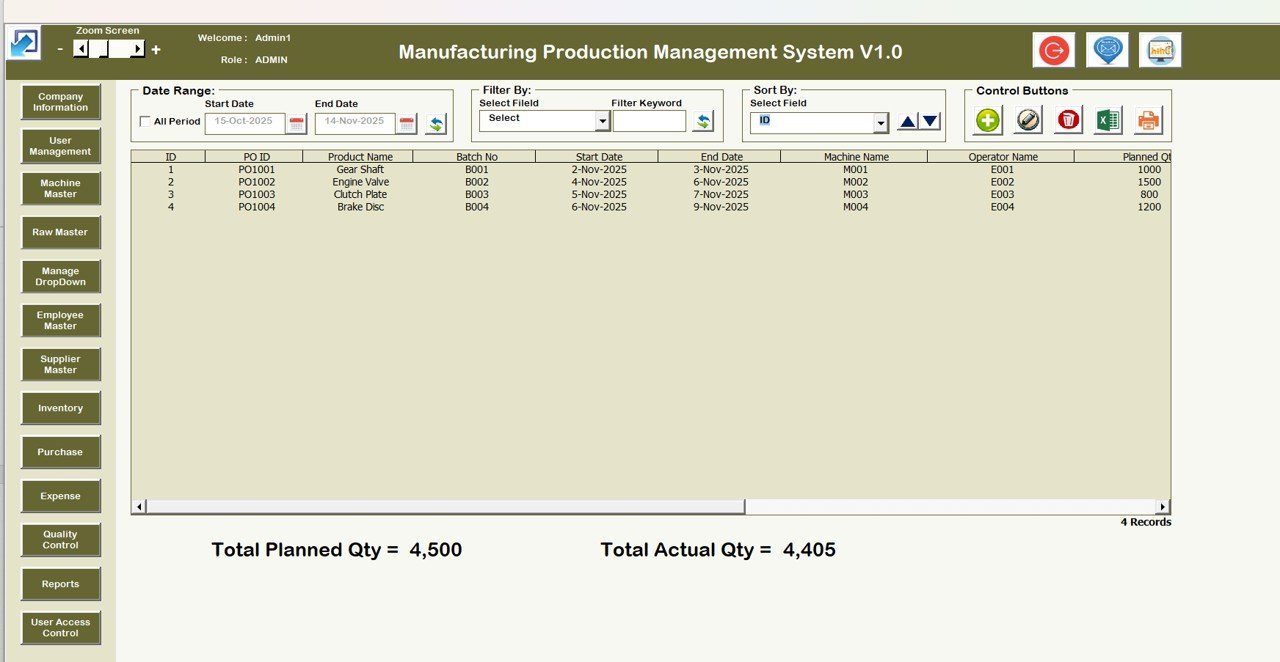
The Main Form works like the dashboard of the entire system. You control everything from here. The interface displays buttons, filters, list boxes, and navigation options.
Manufacturing Production Management System V1.0 List Box
The center area shows a List Box that displays all records from the selected module. You can scroll, filter, sort, or open records for editing.
Filters
You can filter the data:
-
By Date
-
By Any Selected Column
Filtering helps you find details quickly, which saves a lot of time.
Sort By
Sorting allows you to organize the list box:
-
Sort by Order
-
Sort by Machine
-
Sort by Supplier
-
Sort by Raw Material
-
Sort by Employee
-
Sort by Quality Status
You keep the data clean and easy to review.
Main Buttons on the Manufacturing Production Management System
The system includes five powerful action buttons:
- Update Existing Record
You can view and modify details of an existing production order or record. - Add New Record
You can add new orders, machines, employees, or suppliers with one click. - Delete Record
You can remove unwanted or old records quickly. - Export to Excel
You can export the complete list to a new Excel file for sharing or reporting.
Click to Buy Manufacturing Production Management System V1.0
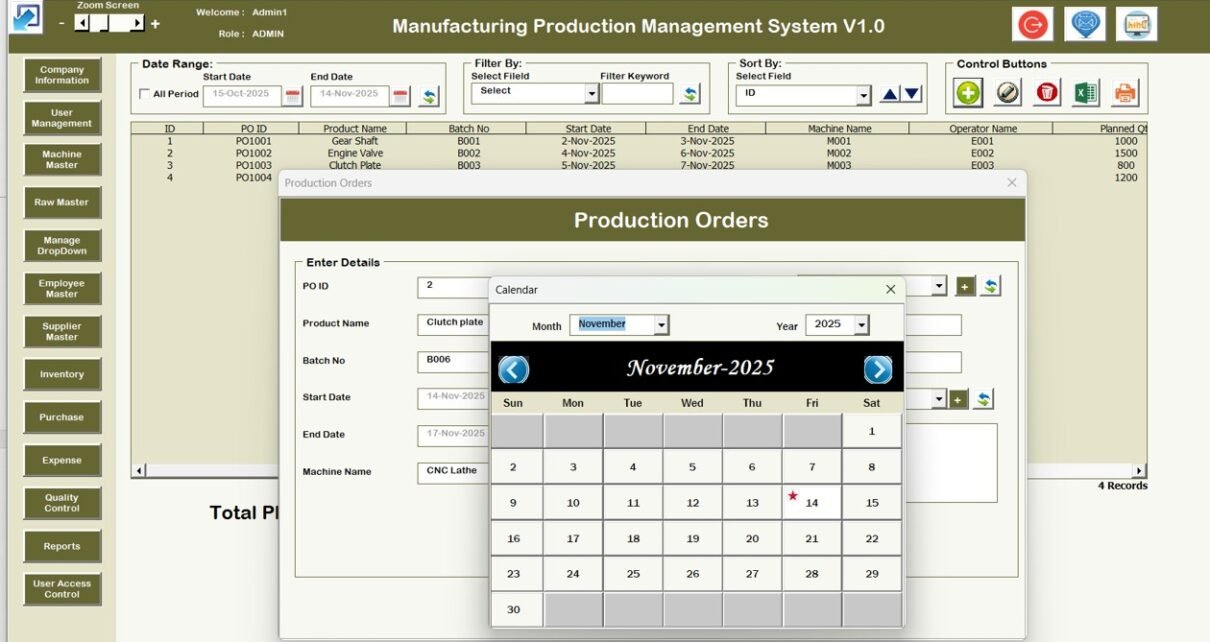
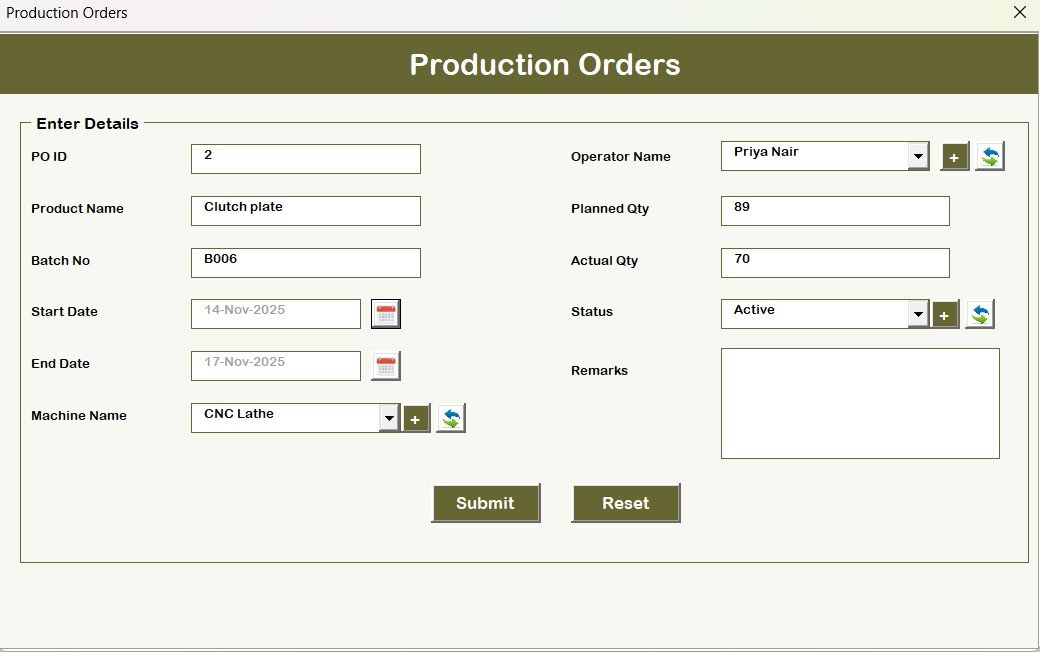
3. Production Orders Form
This form manages all production activities. You can enter:
Because everything stays in one place, you control production with clarity.
4. Machine Master
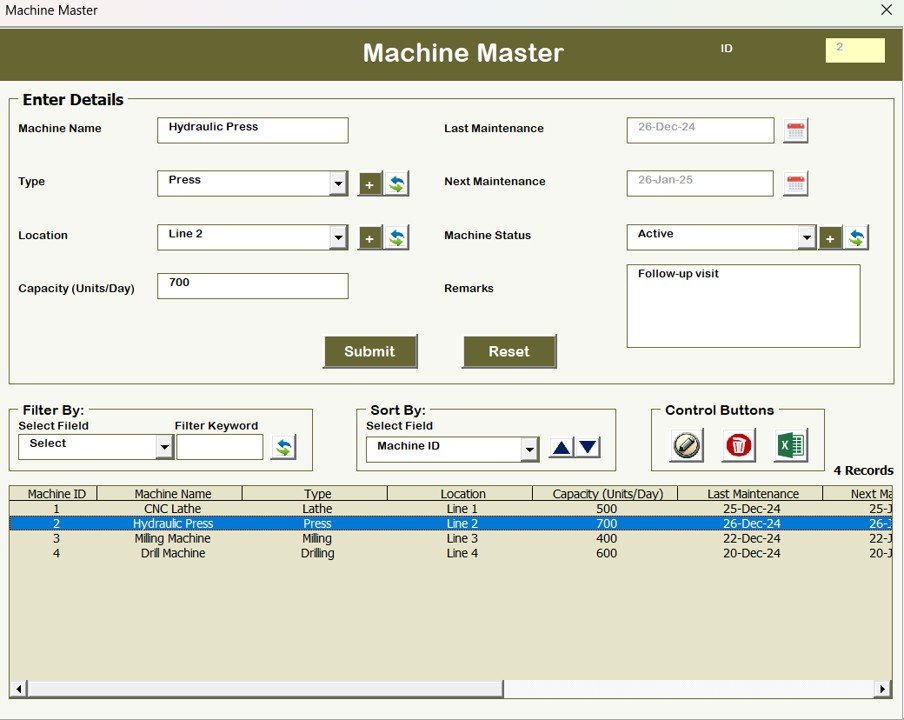
Machines play a crucial role in manufacturing. This form helps you track:
- Machine name
- Machine ID
- Capacity
- Status
- Maintenance details
When you maintain this data correctly, you reduce breakdowns and improve production output.
Click to Buy Manufacturing Production Management System V1.0
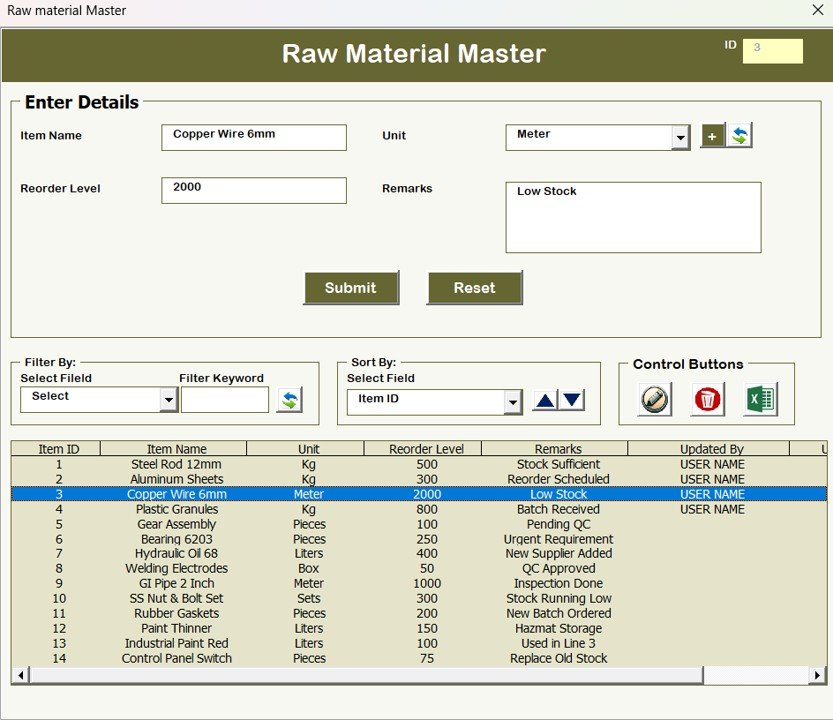
5. Raw Material Master
Raw materials drive the manufacturing workflow. This form stores:
With this, you prevent shortages and avoid delays.
6. Supplier Master
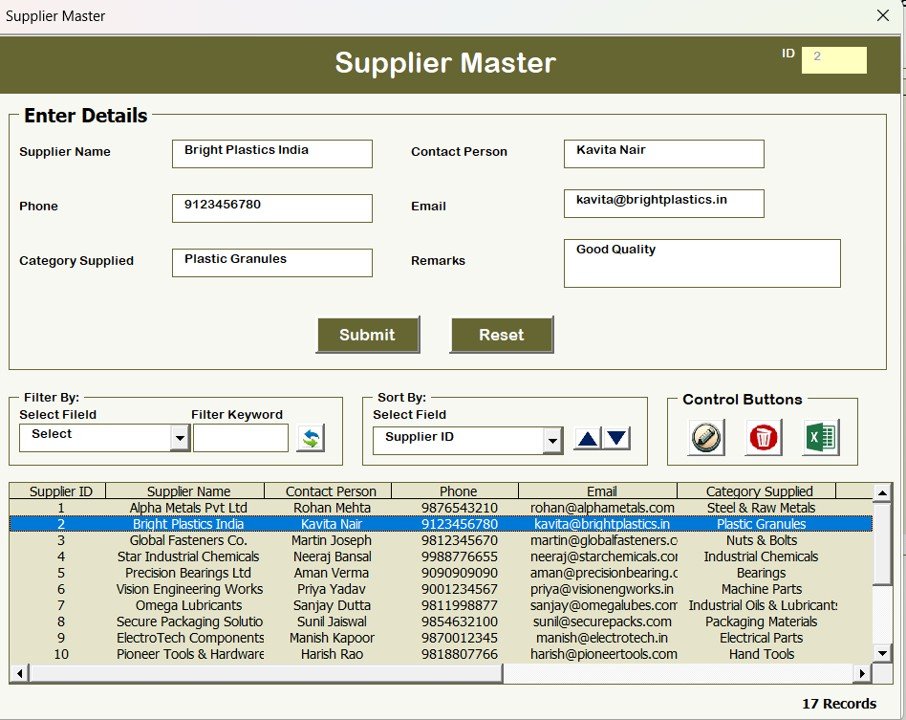
Suppliers support materials, machines, and services. This form helps you manage:
- Supplier name
- Contact details
- Address
- Products supplied
- Payment terms
As a result, you make better supplier decisions.
Click to Buy Manufacturing Production Management System V1.0
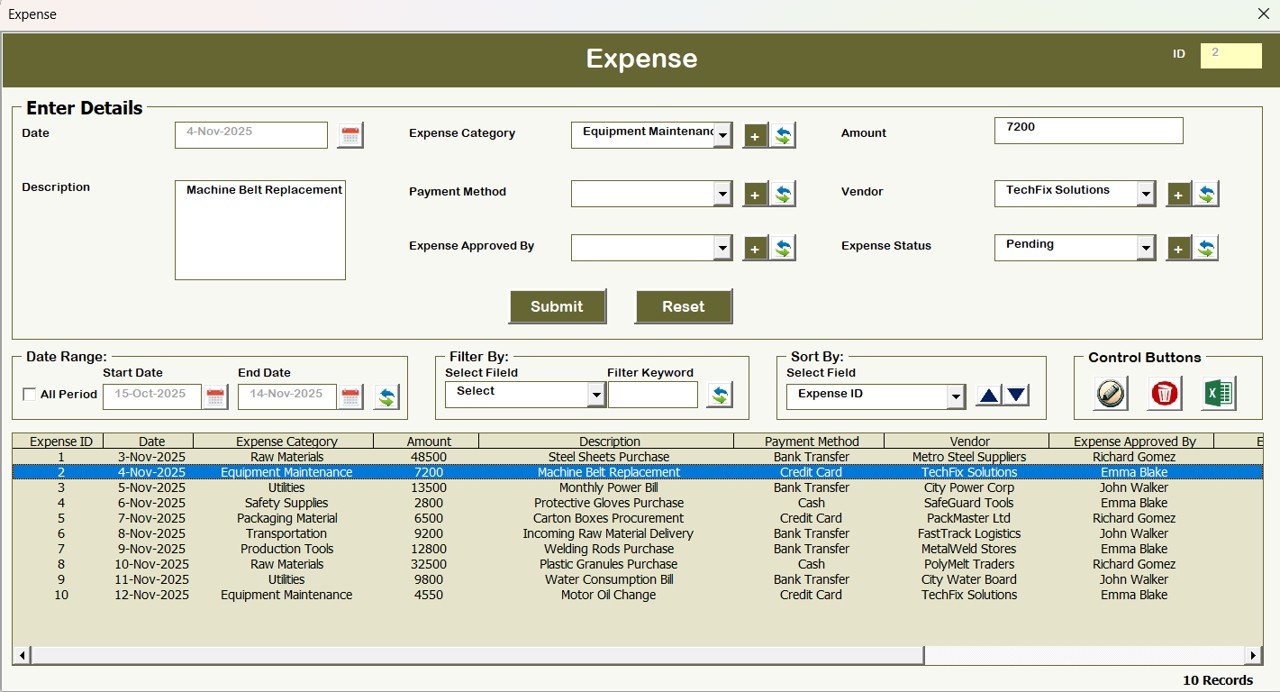
7. Expenses Form
Every production unit incurs expenses. This form records:
- Expense type
- Amount
- Date
- Description
- Department
This supports cost control and financial planning.
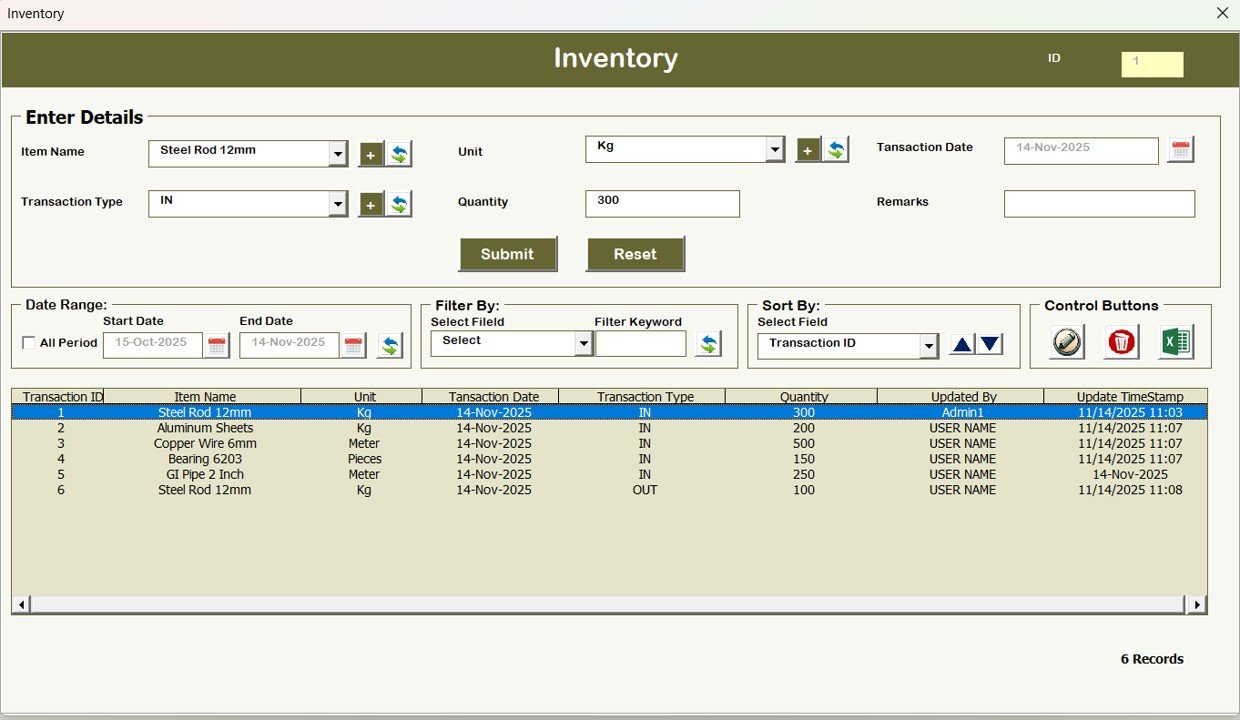
8. Inventory Form
Inventory management keeps production smooth. This form stores:
You get complete clarity on what you have and what you need.
Click to Buy Manufacturing Production Management System V1.0
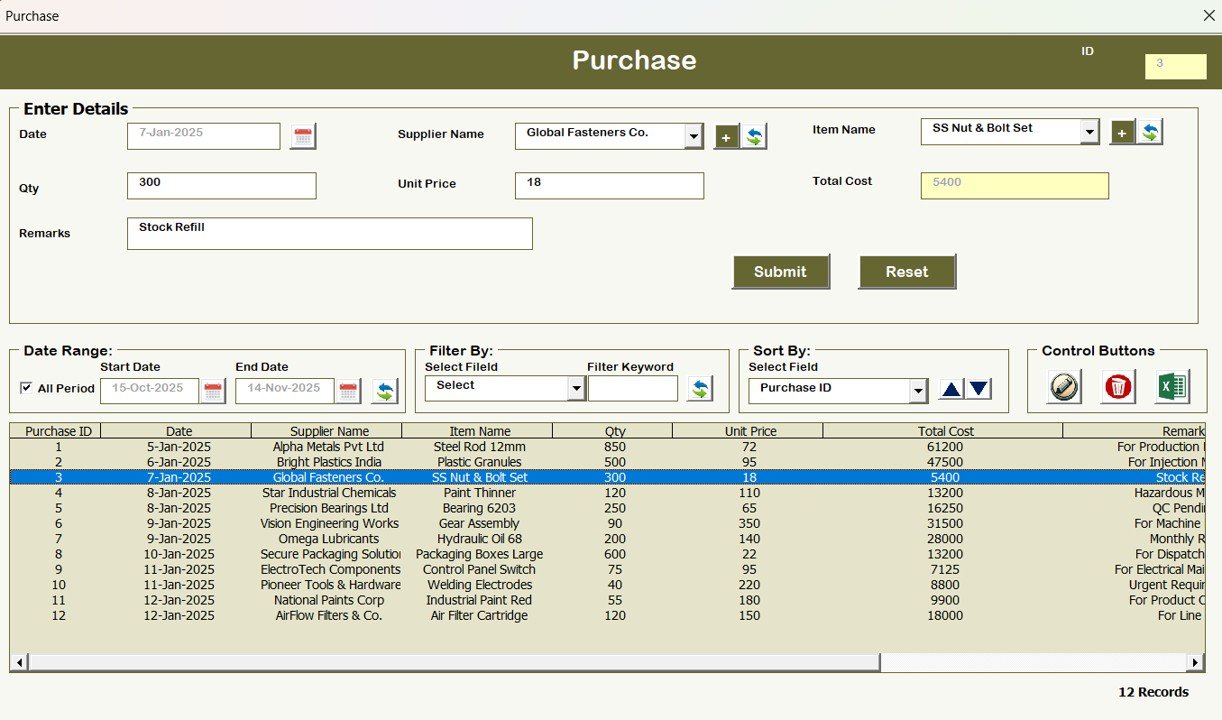
9. Purchase Form
Purchasing connects materials, suppliers, and production needs. This form includes:
- Purchase order number
- Supplier name
- Material purchased
- Quantity
- Price
- Delivery date
This reduces purchase delays and improves planning.
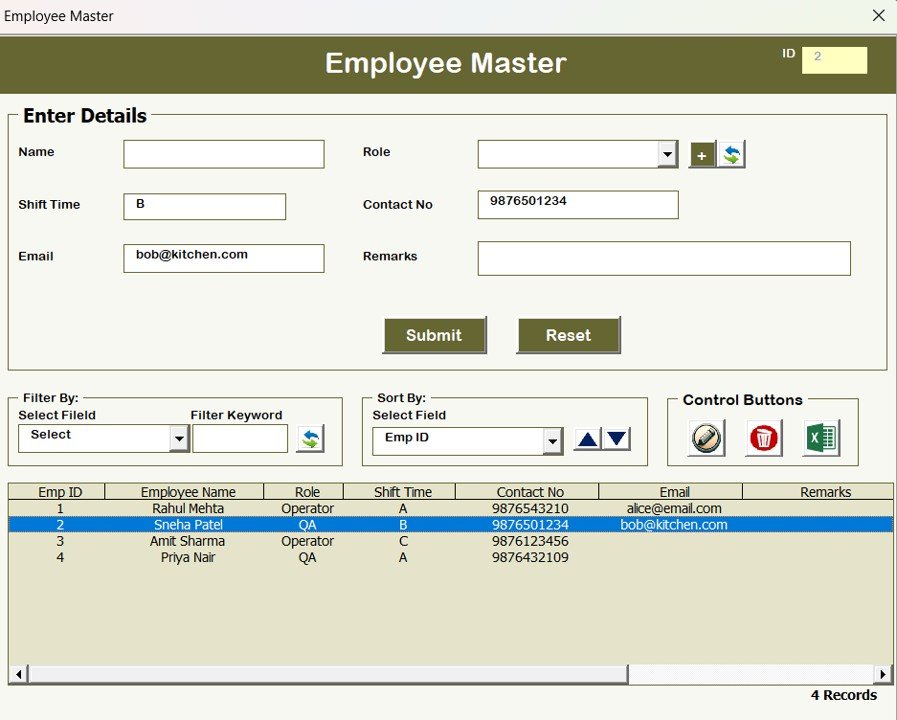
Employee Master
Employees support machines, materials, and production schedules. This form manages:
This simplifies workload management and employee planning.
Click to Buy Manufacturing Production Management System V1.0
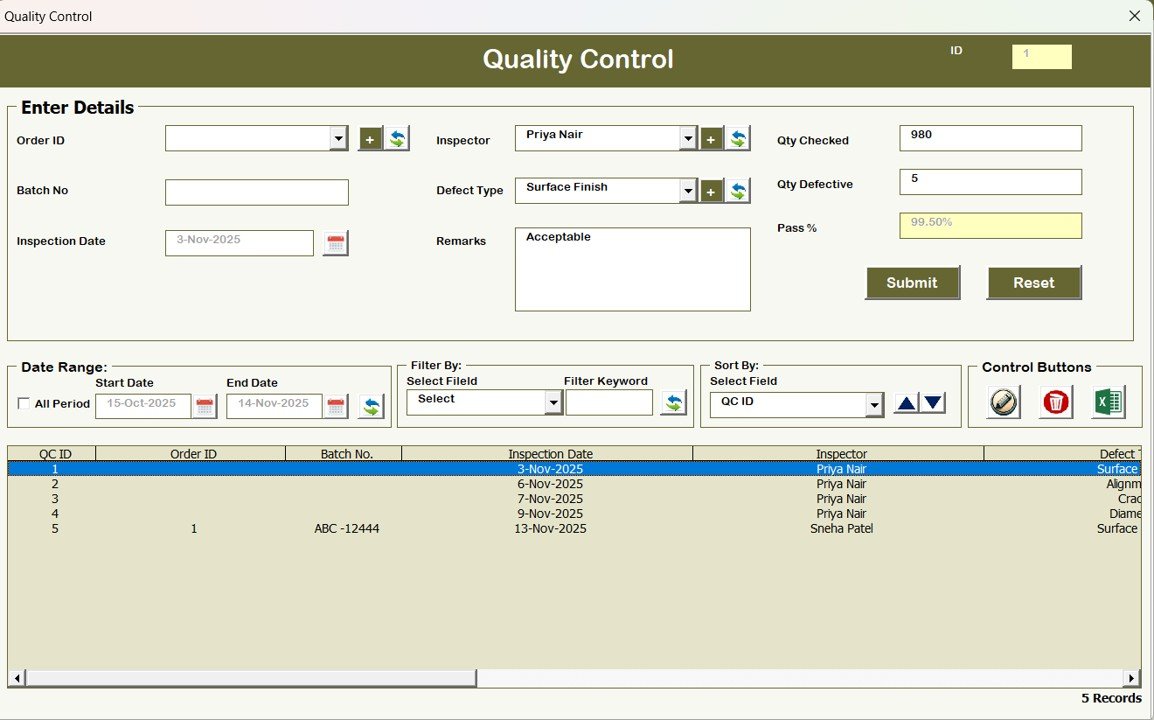
11. Quality Control Form
Quality control ensures product safety and reliability. This form stores:
-
QC test results
-
Inspected items
-
Defect types
-
Inspection date
-
Inspector name
-
QC status
With this, you maintain product quality and reduce rework.
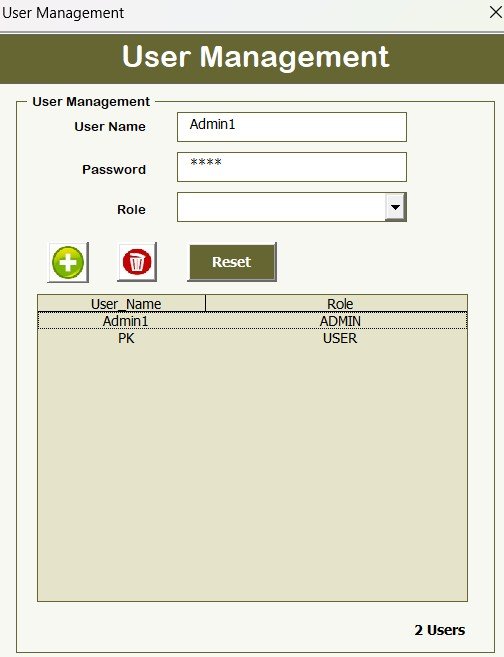
12. User Management
You open this form from the Main Page. It allows you to:
-
Add new users
-
Update user profiles
-
Delete users
-
Reset passwords
-
Change access permissions
This ensures safe and controlled use of the system.
Click to Buy Manufacturing Production Management System V1.0
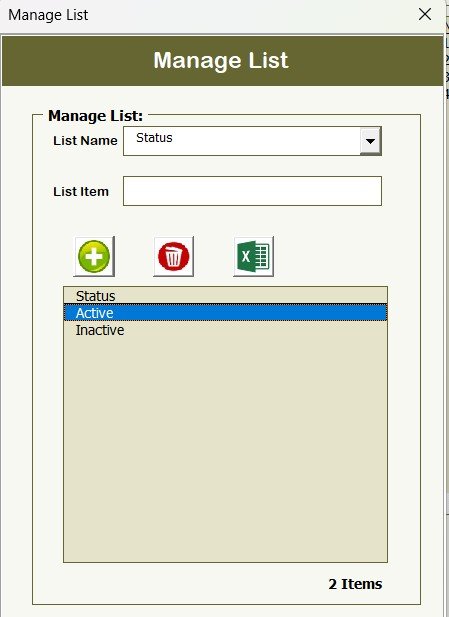
Manage List
This form manages dropdown list values used in different forms. You can:
-
Add new list values
-
Delete unwanted values
This keeps your system clean and error-free.
Manage User Access Control
You define who can access which module. This protects sensitive information and avoids misuse.
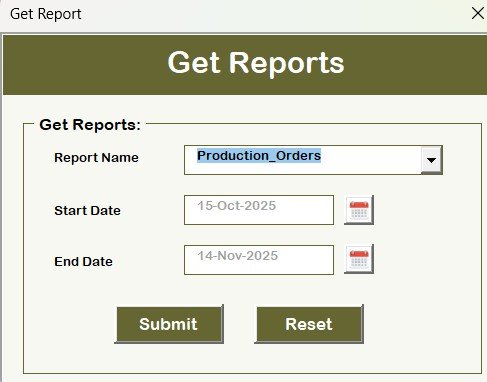
Reports
You can generate various reports such as:
-
Production order summary
-
Inventory status report
-
Purchase history report
-
QC report
-
Expense summary
Reports support decision-making and improve planning.
Click to Buy Manufacturing Production Management System V1.0
17. Logout
One click logs you out and keeps your system secure.
Advantages of Manufacturing Production Management System V1.0
The tool offers many benefits. Here are the most important advantages:
Saves Time: Every workflow moves faster because you can add, update, and track information instantly.
Reduces Manual Errors: Automation removes mistakes that usually happen with manual Excel work.
Improves Productivity: When you manage orders, machines, materials, and employees efficiently, productivity increases.
Enhances Decision-Making: Real-time data helps managers make better choices.
Strengthens Data Accuracy: Forms, drop-downs, and validations ensure clean and correct information.
Increases Transparency: The record history and logs give a clear view of all changes.
Eliminates Data Scattering: Everything stays inside one system, which improves organization.
Opportunities for Improvement in This System
Click to Buy Manufacturing Production Management System V1.0
Even though the tool performs well, you can improve it further. Here are some ideas:
Add Barcode Scanning: Barcode scanning can speed up inventory and raw material entry.
Add Automatic Alerts: Alerts for low stock, machine maintenance, or upcoming deadlines can boost efficiency.
Add Dashboard Visualization: Charts and KPI dashboards can improve overall data visibility.
Add Multi-User Cloud Sync: A cloud-based version can help multiple teams work together from different locations.
Add Mobile App Support: A simple mobile version can help operators enter data directly from the shop floor.
Best Practices for Using Manufacturing Production Management System V1.0
You get the best results when you follow these practices:
- Update Data Daily: Keep your production, inventory, and purchase entries updated every day.
- Review Machine Information Weekly: Track machine health, downtime, and maintenance schedules.
- Follow Accurate Raw Material Entry: Always enter correct stock values to avoid production delays.
- Use Quality Control Properly: Update QC details for every batch to maintain product standards.
- Train All Users: Train employees to use forms, buttons, and navigation correctly.
- Maintain Backup Files: Keep periodic backups for safety.
Conclusion
Click to Buy Manufacturing Production Management System V1.0
The Manufacturing Production Management System V1.0 helps manufacturing teams run operations smoothly. Because the tool uses Excel and VBA, you enjoy automation without learning new software. You manage production orders, machines, materials, suppliers, employees, inventory, QC, and reports from one platform.
When you update data daily and follow the best practices, this tool becomes a complete production management solution for any manufacturing business.
Frequently Asked Questions (FAQs)
1. What is Manufacturing Production Management System V1.0?
It is an Excel- and VBA-based tool that manages production orders, inventory, machines, suppliers, employees, QC, and expenses.
2. Do I need advanced technical skills to use this tool?
No. The interface feels simple, and anyone who knows basic Excel can use it easily.
3. Can I add new users to the system?
Yes. The User Management module allows you to add, update, delete, and reset users.
4. Can I export data from the system?
Yes. The Export to Excel option lets you export list box data into a new Excel file.
5. Does this tool store record history?
Yes. You can track every modification through the Show Record History section.
6. Can I use this tool for multiple production units?
Yes. You can use it for any manufacturing setup because the forms support all core operations.
7. Does it include quality control management?
Yes. The Quality Control form captures inspection results, defects, and QC status.
Visit our YouTube channel to learn step-by-step video tutorials
Click to Buy Manufacturing Production Management System V1.0