The mobile gaming industry grows faster than almost any other digital sector. Every day, millions of players install new games, make in-app purchases, and engage with content across multiple platforms. Because competition increases constantly, gaming companies must track performance accurately and quickly.
However, raw data alone does not help decision-making. Developers, product managers, and business teams need structured insights. That is exactly where a Mobile Gaming KPI Dashboard in Excel becomes an essential performance-tracking tool.
This article explains what a Mobile Gaming KPI Dashboard in Excel is, why gaming teams need it, how it works, its worksheet structure, key KPIs, advantages, best practices, and frequently asked questions. By the end, you will clearly understand how this dashboard helps gaming businesses grow smarter and faster.
Click to Purchases Mobile Gaming KPI Dashboard in Excel
What Is a Mobile Gaming KPI Dashboard in Excel?
A Mobile Gaming KPI Dashboard in Excel is a ready-to-use analytical tool designed to track, measure, and visualize key performance indicators for mobile games. Instead of relying on scattered reports or complex BI tools, teams use Excel to monitor performance in one structured file.
This dashboard converts raw numbers into:
-
Clear KPIs
-
Visual trends
-
Target comparisons
-
Month-to-date (MTD) and year-to-date (YTD) insights
Because Excel remains familiar to most teams, adoption becomes easy and fast.
Why Do Mobile Gaming Companies Need a KPI Dashboard?
Mobile gaming businesses operate in a highly dynamic environment. Player behavior changes frequently. Revenue patterns fluctuate. Engagement metrics rise and fall unexpectedly. Therefore, gaming teams must track performance continuously.
Without a KPI dashboard:
-
Teams depend on manual reports
-
Performance issues stay hidden
-
Target gaps appear too late
-
Decision-making slows down
On the other hand, a KPI dashboard provides clarity and structure.
Key Reasons to Use a Mobile Gaming KPI Dashboard
-
To track player engagement trends
-
To monitor revenue and monetization performance
-
To compare targets versus actual results
-
To evaluate performance against previous years
-
To support data-driven product decisions
As a result, gaming teams move from guesswork to insight-driven strategies.
Click to Purchases Mobile Gaming KPI Dashboard in Excel
How Does the Mobile Gaming KPI Dashboard in Excel Work?
This dashboard works entirely inside Excel while maintaining a clean separation between data input, analysis, and visualization.
Simple Working Process
-
You enter actual KPI values
-
You enter target KPI values
-
You enter previous year values
-
Excel calculates comparisons automatically
-
The dashboard updates instantly
Because of this structure, users avoid complex formulas on the dashboard page itself.
How Many Worksheets Are Included in the Dashboard?
The Mobile Gaming KPI Dashboard in Excel includes seven well-structured worksheets, each designed for a specific purpose.
What Is the Purpose of the Home Sheet?
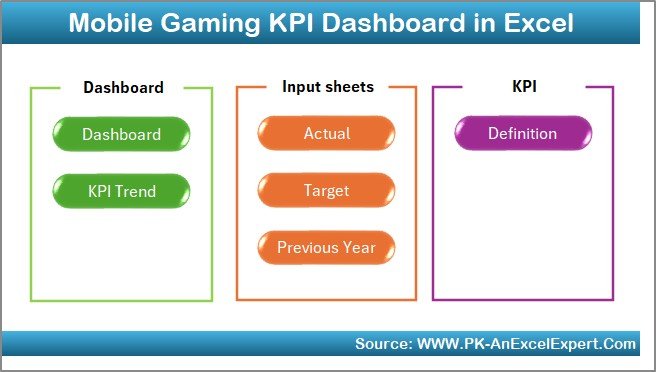
The Home Sheet acts as the navigation hub of the dashboard.
Key Features of the Home Sheet
-
Acts as an index page
-
Includes six navigation buttons
-
Allows one-click movement to other sheets
Because of this design, users move across the dashboard smoothly without confusion.
What Information Appears on the Dashboard Sheet?
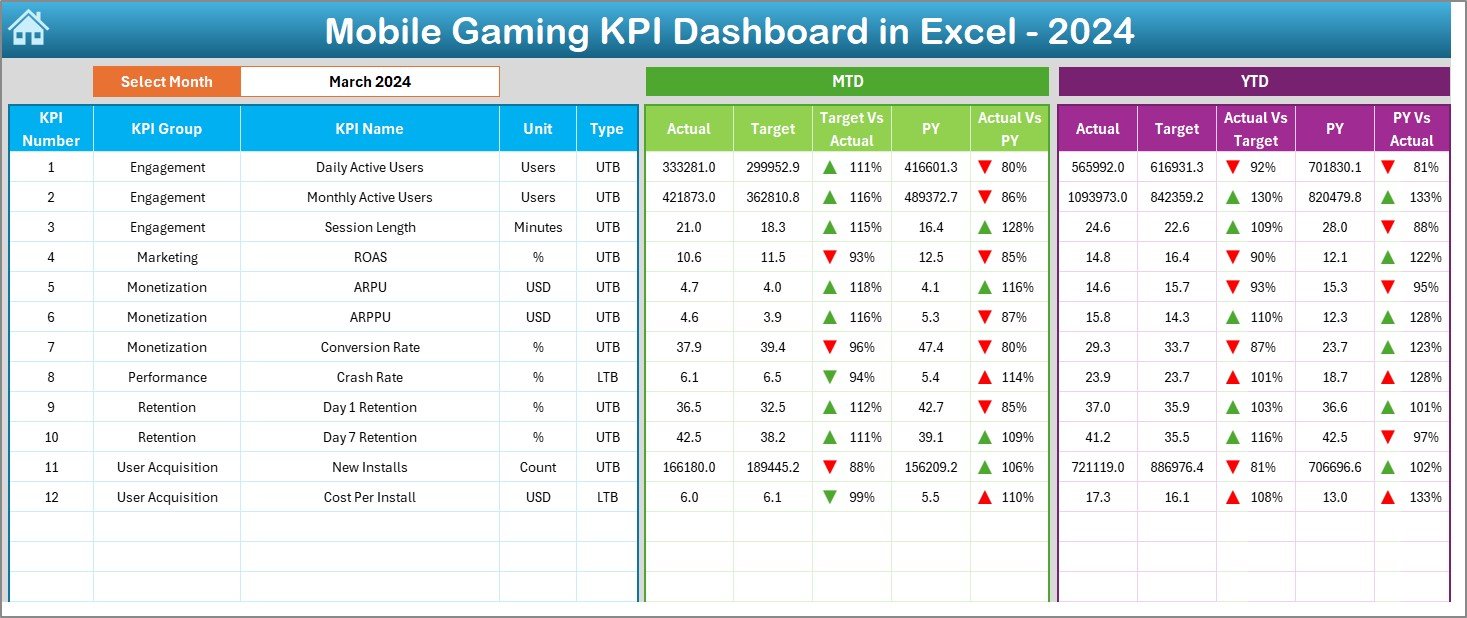
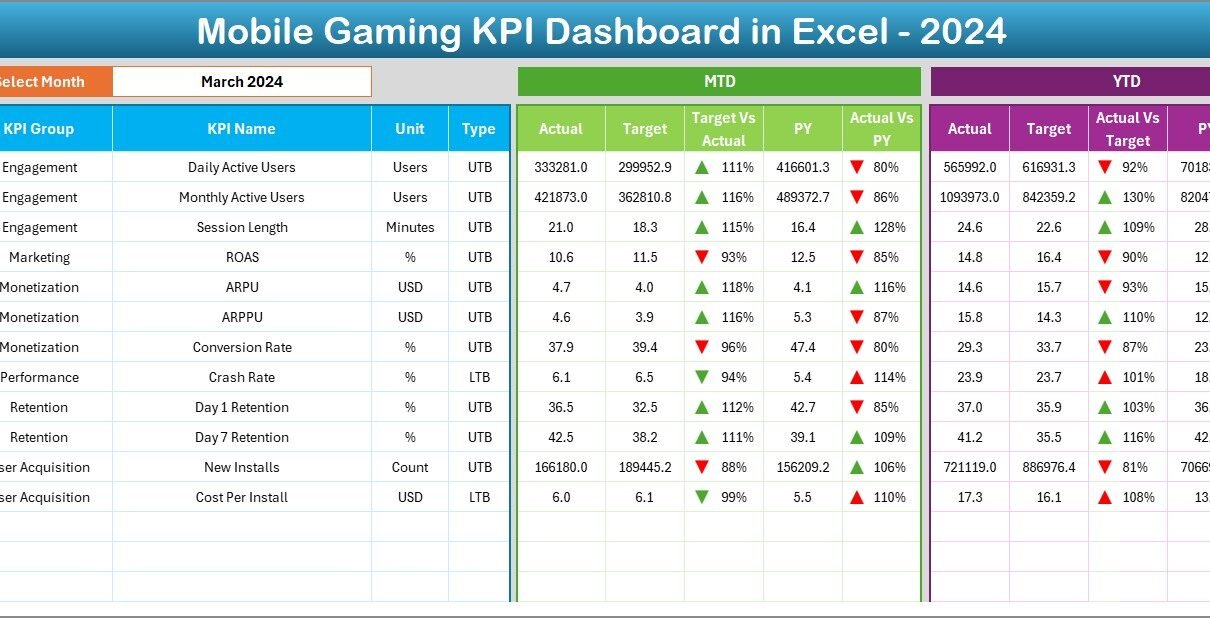
The Dashboard Sheet serves as the core analytical view. It displays all KPI performance metrics in one place.
Month Selection Control
-
Located at cell D3
-
Uses a drop-down list
-
Updates the entire dashboard dynamically
As soon as you change the month, all KPI values adjust automatically.
What KPIs Does the Dashboard Display?
The dashboard displays both MTD and YTD performance for each KPI.
MTD Metrics Shown
-
MTD Actual
-
MTD Target
-
MTD Previous Year
-
Target vs Actual (MTD)
-
PY vs Actual (MTD)
YTD Metrics Shown
-
YTD Actual
-
YTD Target
-
YTD Previous Year
-
Target vs Actual (YTD)
-
PY vs Actual (YTD)
Because the dashboard uses conditional formatting with up and down arrows, users instantly identify positive and negative performance.
How Does Conditional Formatting Improve Insight?
Conditional formatting uses:
🔼 Up arrows for positive performance
🔽 Down arrows for negative performance
This visual approach allows teams to spot trends instantly without reading numbers line by line.
Click to Purchases Mobile Gaming KPI Dashboard in Excel
What Is the KPI Trend Sheet Used For?
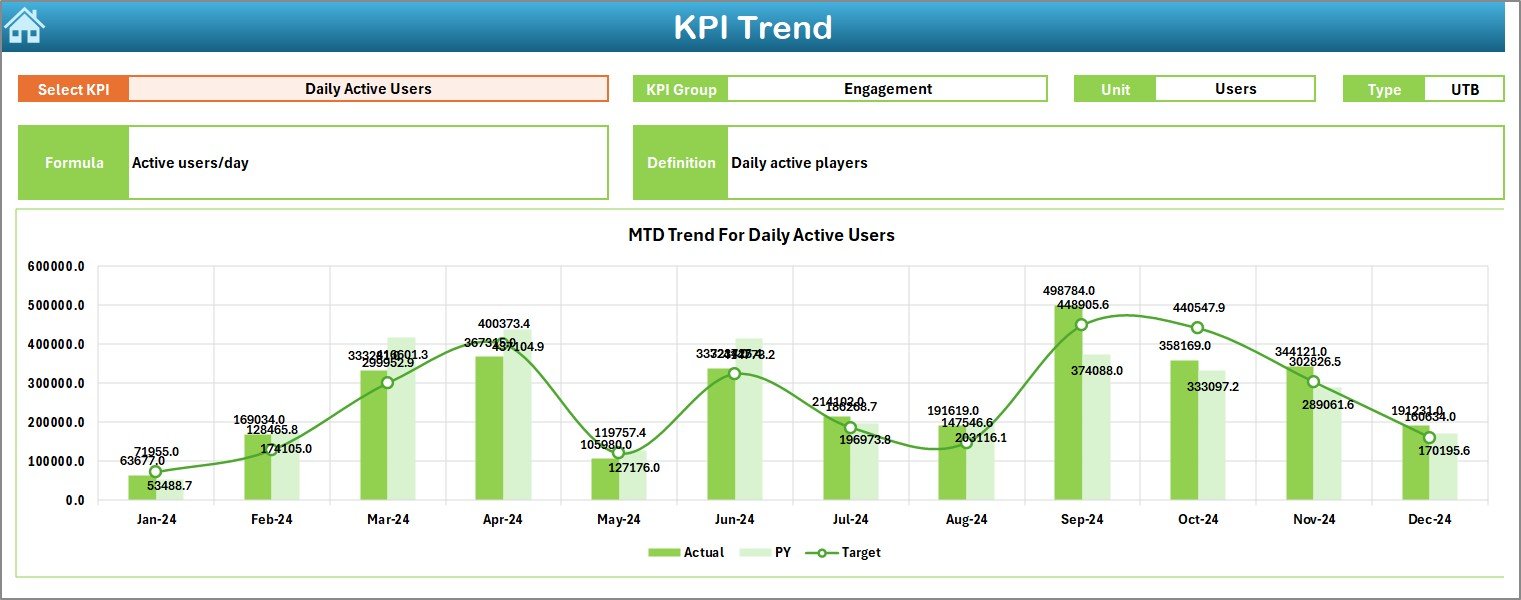
The KPI Trend Sheet focuses on detailed KPI-level analysis.
KPI Selection Control
-
KPI name selection at cell C3
-
Instantly updates all related information
What KPI Details Does the Trend Sheet Display?
Once you select a KPI, the sheet displays:
-
KPI Group
-
Unit of Measurement
-
KPI Type (Lower the Better or Upper the Better)
-
KPI Formula
-
KPI Definition
Because of this layout, users understand both what the KPI means and how it behaves.
What Charts Are Available on the KPI Trend Sheet?
The sheet includes two powerful trend charts:
-
MTD Trend Chart
-
YTD Trend Chart
Each chart compares:
-
Actual values
-
Target values
-
Previous year values
As a result, users analyze growth, decline, and consistency across time.
Click to Purchases Mobile Gaming KPI Dashboard in Excel
How Does the Actual Numbers Input Sheet Work?
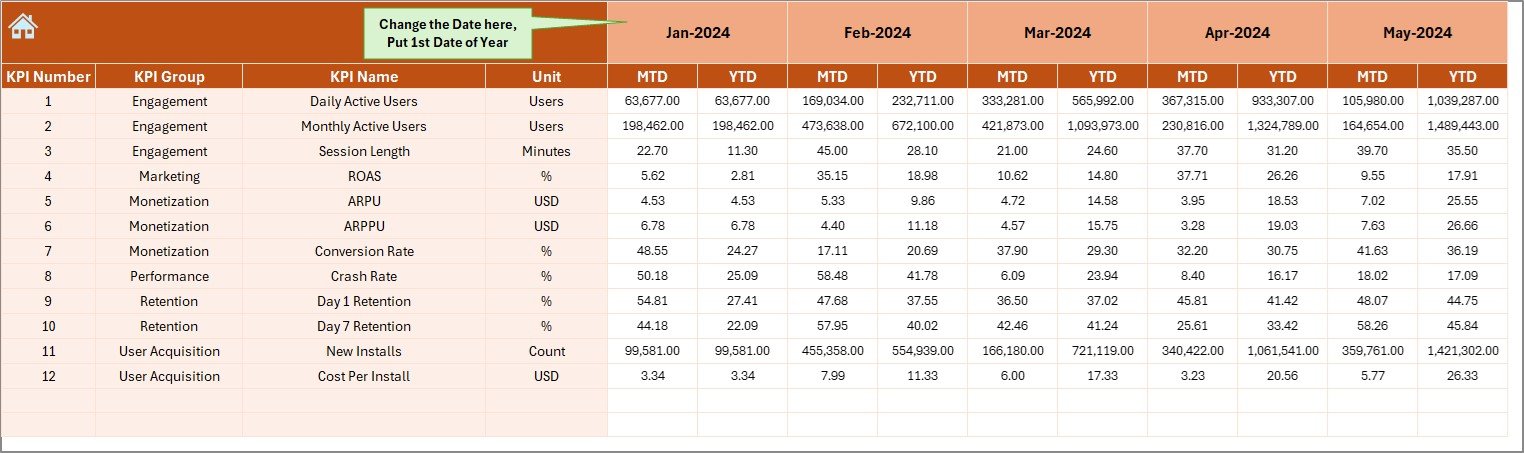
The Actual Numbers Input Sheet stores real performance data.
Key Input Controls
-
Month selector at cell E1
-
Enter the first month of the year in E1
-
Input MTD and YTD actual values
This structure ensures consistent time-based calculations.
What Is the Purpose of the Target Sheet?
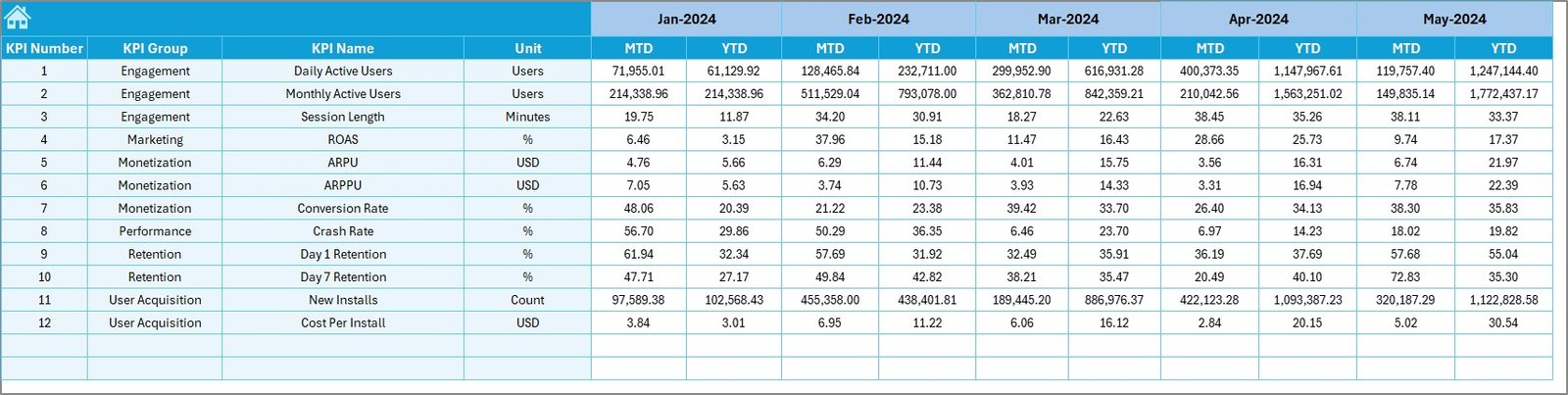
The Target Sheet captures planned performance goals.
Key Responsibilities of the Target Sheet
-
Store monthly MTD targets
-
Store cumulative YTD targets
-
Align targets with KPIs
Because targets remain separate from actuals, planning stays clean and flexible.
Why Is the Previous Year Number Sheet Important?
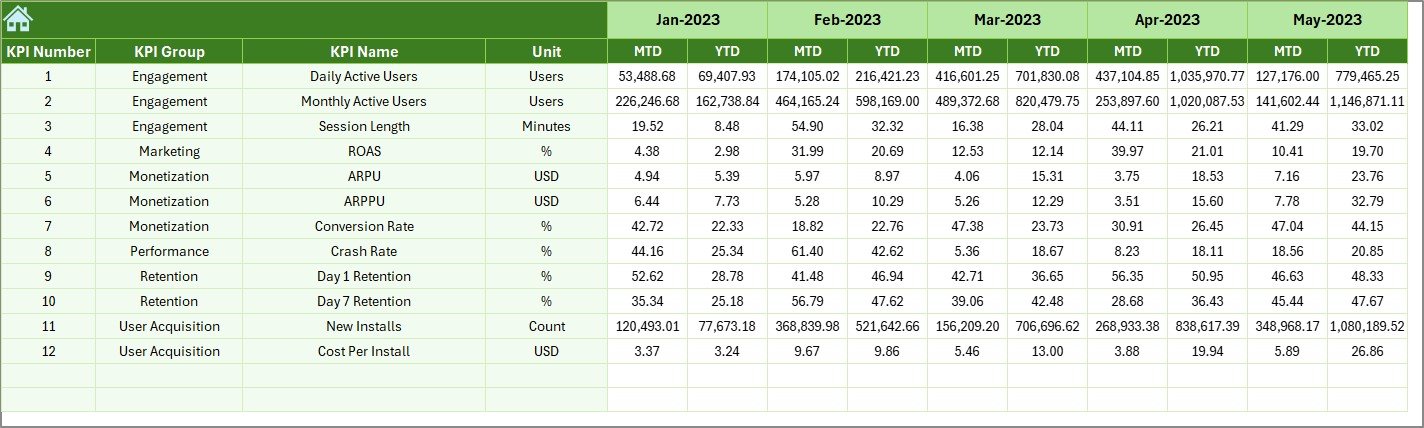
The Previous Year Number Sheet enables year-over-year comparison.
Key Benefits
-
Compare current performance with historical data
-
Identify growth patterns
-
Highlight declining KPIs early
This comparison helps teams measure progress realistically.
What Is Included in the KPI Definition Sheet?
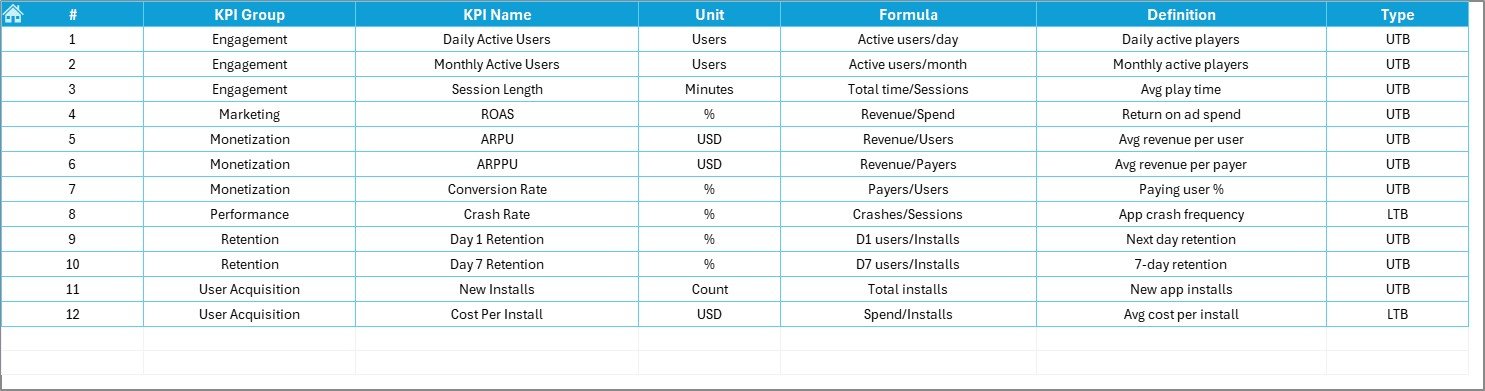
The KPI Definition Sheet ensures standardization and clarity.
Information Captured
-
KPI Name
-
KPI Group
-
Unit of Measurement
-
Formula
-
KPI Definition
Because all KPIs remain documented, confusion disappears across teams.
Which KPIs Can Mobile Gaming Teams Track Using This Dashboard?
The dashboard supports a wide range of gaming KPIs, such as:
-
Daily Active Users (DAU)
-
Monthly Active Users (MAU)
-
Retention Rate
-
Churn Rate
-
Average Revenue Per User (ARPU)
-
In-App Purchase Revenue
-
Session Length
-
Conversion Rate
Teams can add or remove KPIs easily as business needs evolve.
Advantages of Mobile Gaming KPI Dashboard in Excel
Why Should Gaming Teams Use This Dashboard?
This dashboard delivers both operational and strategic benefits.
Key Advantages
📊 Centralized KPI monitoring
🚀 Faster performance analysis
🎯 Clear target tracking
📈 Trend-based insights
🧠 Better decision-making
🧩 Excel-based flexibility
⏱️ Time-saving automation
Because the dashboard updates automatically, teams focus on insights instead of calculations.
Click to Purchases Mobile Gaming KPI Dashboard in Excel
How Does This Dashboard Support Business Growth?
The dashboard links data with action.
-
Product teams identify engagement drops early
-
Marketing teams track monetization success
-
Leadership reviews performance confidently
-
Operations teams improve planning accuracy
As a result, teams act faster and smarter.
Best Practices for the Mobile Gaming KPI Dashboard in Excel
To get maximum value, follow these best practices.
1. Define KPIs Clearly
Always define KPI logic before entering data. Clear definitions prevent misinterpretation.
2. Update Data Regularly
Update actuals, targets, and previous year numbers monthly.
3. Use Consistent Units
Keep units consistent across KPIs to avoid confusion.
4. Monitor Both MTD and YTD
MTD shows short-term performance, while YTD highlights long-term trends.
5. Review Target Misses Frequently
Focus on KPIs that miss targets and take corrective action early.
6. Avoid Manual Changes on Dashboard Sheet
Enter data only in input sheets to protect formulas.
7. Expand KPIs Gradually
Add new KPIs only when they align with business goals.
Click to Purchases Mobile Gaming KPI Dashboard in Excel
Who Should Use a Mobile Gaming KPI Dashboard in Excel?
This dashboard fits multiple roles:
-
Game developers
-
Product managers
-
Growth teams
-
Marketing analysts
-
Business leaders
-
Startup founders
Because Excel remains widely used, training requirements stay minimal.
Why Choose Excel Over Complex BI Tools?
Excel offers:
-
Familiar interface
-
Lower cost
-
Faster setup
-
High flexibility
-
Easy sharing
For many mobile gaming teams, Excel provides the perfect balance between power and simplicity.
Conclusion: Why This Dashboard Is Essential for Mobile Gaming Teams
Mobile gaming success depends on constant performance tracking. Without structured KPIs, teams lose visibility and momentum. A Mobile Gaming KPI Dashboard in Excel solves this problem by delivering clarity, consistency, and insight.
By combining MTD and YTD analysis, target comparisons, trend charts, and KPI definitions, this dashboard becomes a reliable decision-making tool. If you want better control over gaming performance without complexity, this dashboard offers the ideal solution.
Click to Purchases Mobile Gaming KPI Dashboard in Excel
Frequently Asked Questions (FAQs)
What is a Mobile Gaming KPI Dashboard in Excel?
It is an Excel-based dashboard that tracks key performance indicators for mobile games using MTD, YTD, target, and previous year comparisons.
Can non-technical users use this dashboard?
Yes. Users only need to enter data in structured sheets.
Can I add new KPIs to the dashboard?
Yes. You can add new KPIs by updating the input and definition sheets.
Does the dashboard support year-over-year analysis?
Yes. It compares current year performance with previous year values.
Does the dashboard update automatically?
Yes. Once you update the input sheets, the dashboard updates instantly.
Is this dashboard suitable for startups?
Absolutely. It works well for both startups and large gaming studios.
Can this dashboard track multiple games?
Yes. With proper KPI grouping, you can track multiple games within one file.
Click to Purchases Mobile Gaming KPI Dashboard in Excel
Visit our YouTube channel to learn step-by-step video tutorials