Nanotechnology continues to transform modern industries. Today, companies use nanomaterials in electronics, healthcare, energy storage, coatings, aerospace, and advanced manufacturing. However, as nanomaterial production grows, organizations must measure performance accurately to maintain quality, safety, efficiency, and innovation.
Many research labs and manufacturing companies still track nanomaterial performance using scattered spreadsheets and manual reports. As a result, managers struggle to evaluate productivity, analyze trends, and make fast decisions. Moreover, inconsistent reporting often creates confusion between research teams, quality departments, and leadership.
Therefore, organizations increasingly adopt structured KPI dashboards to monitor performance in a centralized and visual way. One powerful solution is the Nanomaterials KPI Dashboard in Excel.
Click to Purchases Nanomaterials KPI Dashboard in Excel
In this comprehensive guide, you will learn what a Nanomaterials KPI Dashboard in Excel is, why organizations need it, how it works, its structure, advantages, best practices, and frequently asked questions. Additionally, you will understand how this ready-to-use dashboard converts raw operational data into meaningful insights.
What Is a Nanomaterials KPI Dashboard in Excel?
A Nanomaterials KPI Dashboard in Excel is a ready-to-use performance monitoring tool designed to track key operational, research, production, and quality metrics related to nanomaterial processes.
Instead of reviewing multiple reports, users can monitor all critical KPIs in one centralized dashboard. Consequently, decision-makers quickly understand performance trends and take corrective action without delay.
The dashboard uses Excel features such as:
-
Dynamic dropdown selections
-
Automated calculations
-
KPI comparison metrics
-
Trend visualization charts
-
Conditional formatting indicators
Because Excel remains widely accessible, organizations can implement this dashboard without expensive software investments.
Why Do Organizations Need a Nanomaterials KPI Dashboard?
Nanomaterial operations involve complex variables. For example, particle size distribution, synthesis yield, purity levels, defect rates, and production efficiency must stay within strict limits.
Without structured monitoring:
-
Teams lose visibility into performance trends.
-
Quality risks increase.
-
Production delays become frequent.
-
Research outcomes become harder to evaluate.
However, when organizations implement a KPI dashboard, they gain clear visibility into operations.
Key Reasons to Use a KPI Dashboard
-
Centralized performance monitoring
-
Faster research evaluation
-
Improved manufacturing efficiency
-
Data-driven decision making
-
Better collaboration between departments
Therefore, the dashboard becomes a strategic management tool rather than just a reporting file.
What KPIs Can Be Tracked in a Nanomaterials Dashboard?
A well-designed dashboard tracks measurable indicators that reflect operational success. Although KPIs vary by organization, most nanomaterial companies monitor the following categories:
1. Production KPIs
-
Synthesis Yield Rate
-
Batch Success Ratio
-
Production Cycle Time
-
Material Utilization Efficiency
2. Quality KPIs
-
Particle Size Consistency
-
Purity Percentage
-
Defect Rate
-
Contamination Incidents
3. Research & Development KPIs
-
Experiment Success Rate
-
Innovation Index
-
Prototype Conversion Rate
-
Research Cycle Duration
4. Safety & Compliance KPIs
-
Safety Incident Frequency
-
Exposure Compliance Rate
-
Environmental Compliance Score
5. Financial KPIs
-
Cost per Batch
-
Revenue per Product Line
-
Operational Efficiency Ratio
By tracking these indicators together, organizations gain a complete operational picture.
Click to Purchases Nanomaterials KPI Dashboard in Excel
How Does the Nanomaterials KPI Dashboard in Excel Work?
The dashboard works through structured data input and automated calculations. Users enter monthly data, while Excel formulas automatically update visual insights.
First, users input numbers. Then, the dashboard calculates comparisons. Finally, charts and indicators display performance results instantly.
Because of this workflow, reporting becomes faster and more reliable.
Structure of the Nanomaterials KPI Dashboard in Excel
This ready-to-use template contains 7 structured worksheets, each serving a specific purpose.
1️⃣ Home Sheet – Navigation Control Center
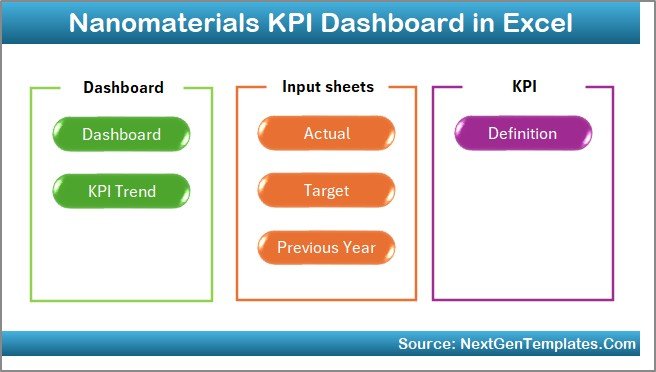
The Home Sheet acts as an index page.
It includes:
-
Six navigation buttons
-
Quick access to all sheets
-
User-friendly interface
Therefore, users can move between sections without searching manually.
2️⃣ Dashboard Sheet – Main Performance Overview
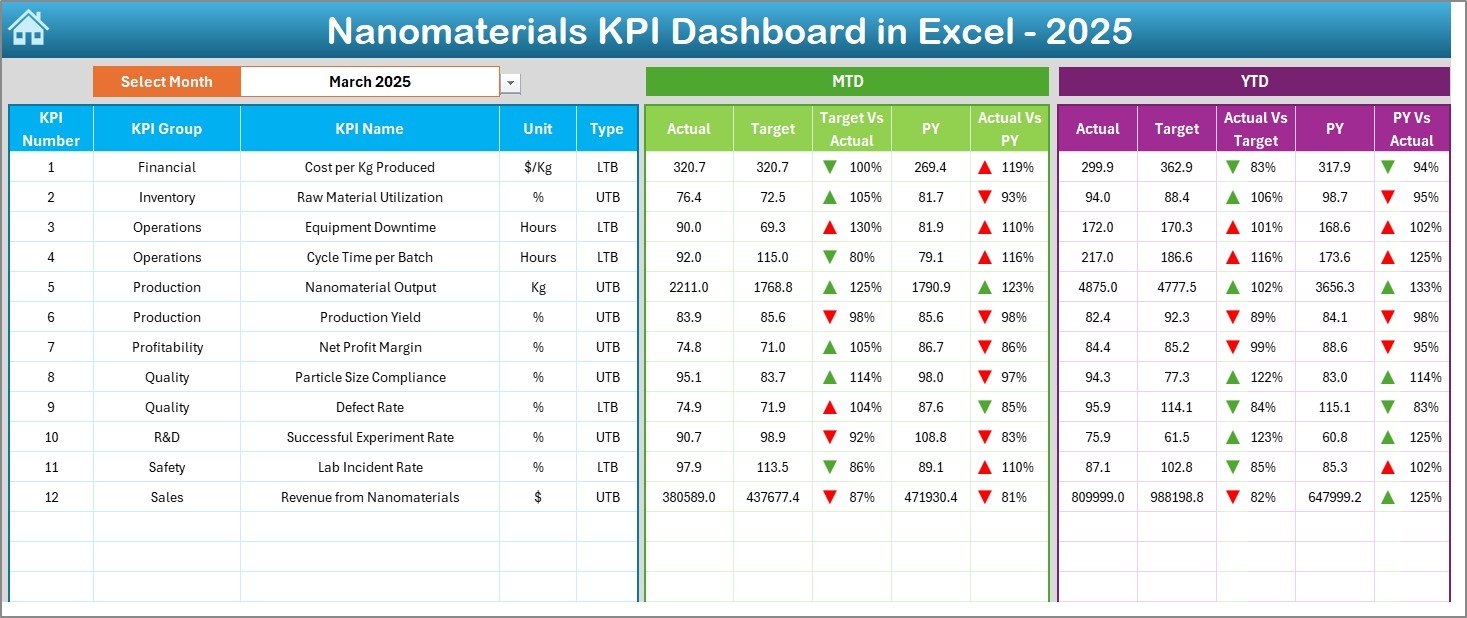
The Dashboard Sheet represents the core of the system.
Here, users view all KPI information in one place.
Key Features
-
Month selection dropdown in cell D3
-
Automatic dashboard updates
-
MTD and YTD performance comparison
-
Conditional formatting indicators
The dashboard displays:
-
MTD Actual vs Target
-
Previous Year vs Actual
-
Up/down arrows for performance status
-
YTD comparisons for deeper analysis
As a result, managers instantly identify strong and weak performance areas.
Click to Purchases Nanomaterials KPI Dashboard in Excel
3️⃣ KPI Trend Sheet – Performance Analysis Over Time
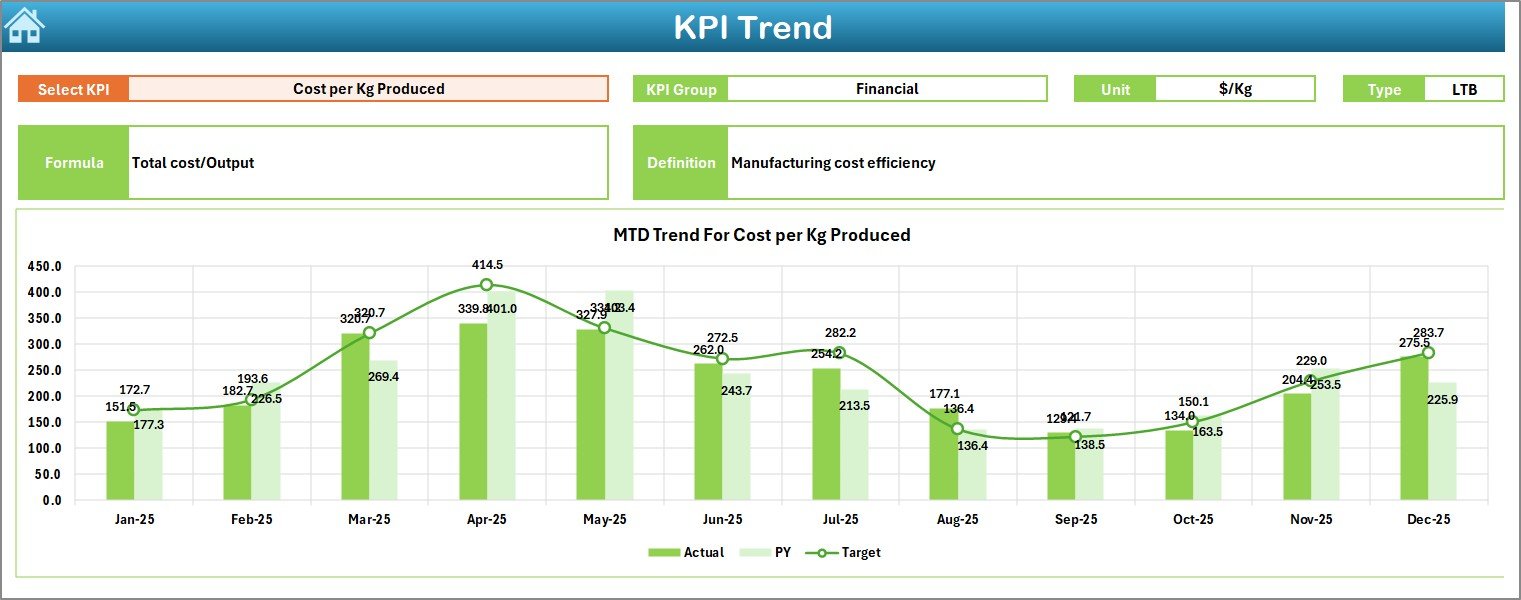
The KPI Trend Sheet focuses on detailed KPI evaluation.
Users select a KPI from the dropdown in cell C3.
The sheet displays:
-
KPI Group
-
KPI Unit
-
KPI Type (Lower the Better / Upper the Better)
-
KPI Formula
-
KPI Definition
Additionally, the sheet includes:
-
MTD Trend Chart
-
YTD Trend Chart
-
Actual vs Target vs Previous Year comparison
Therefore, teams analyze long-term performance patterns easily.
4️⃣ Actual Numbers Input Sheet – Data Entry Area
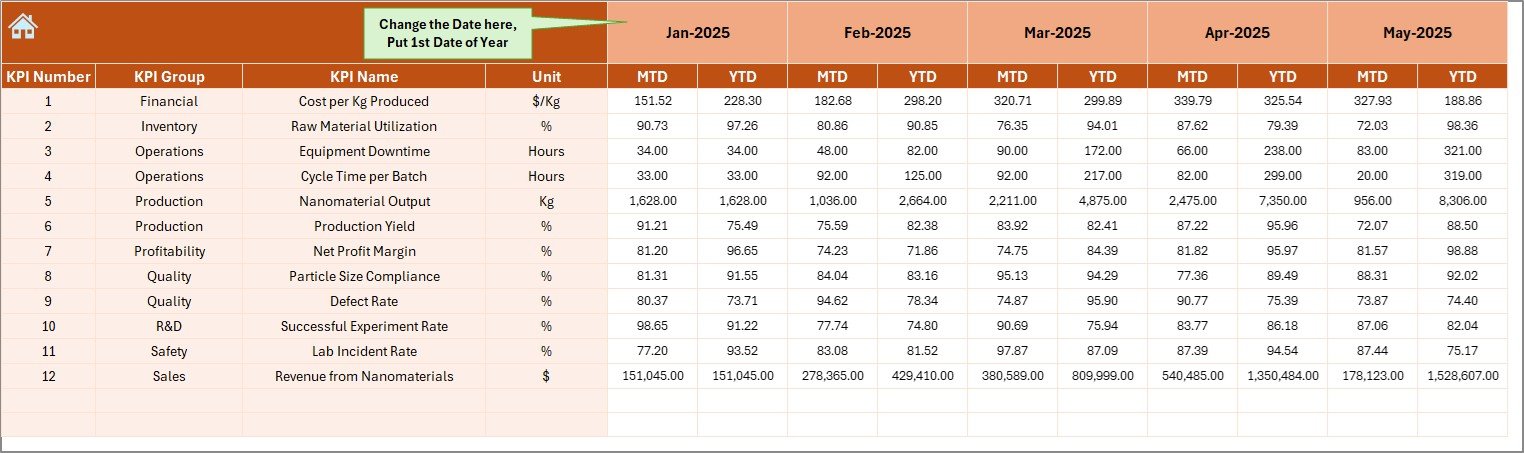
This sheet allows users to input real performance numbers.
Key functionality:
-
Enter MTD and YTD values
-
Select starting month in cell E1
-
Flexible yearly tracking
Once users enter data, the dashboard updates automatically.
5️⃣ Target Sheet – Goal Planning
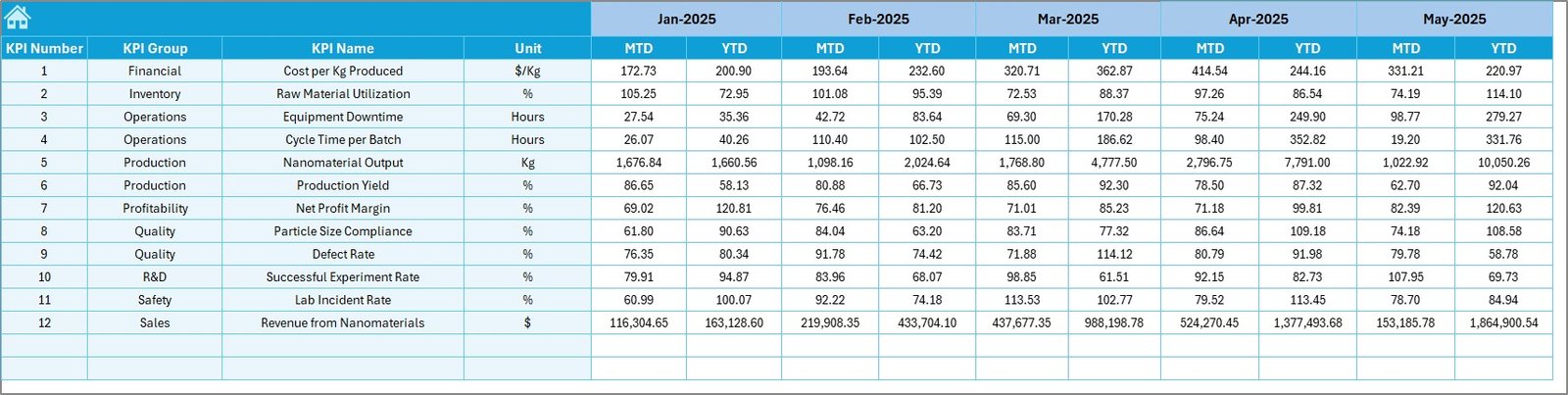
In this sheet, users define KPI targets.
They must enter:
-
Monthly MTD targets
-
YTD targets for each KPI
Because targets remain centralized, performance comparisons stay accurate.
6️⃣ Previous Year Numbers Sheet – Historical Benchmarking
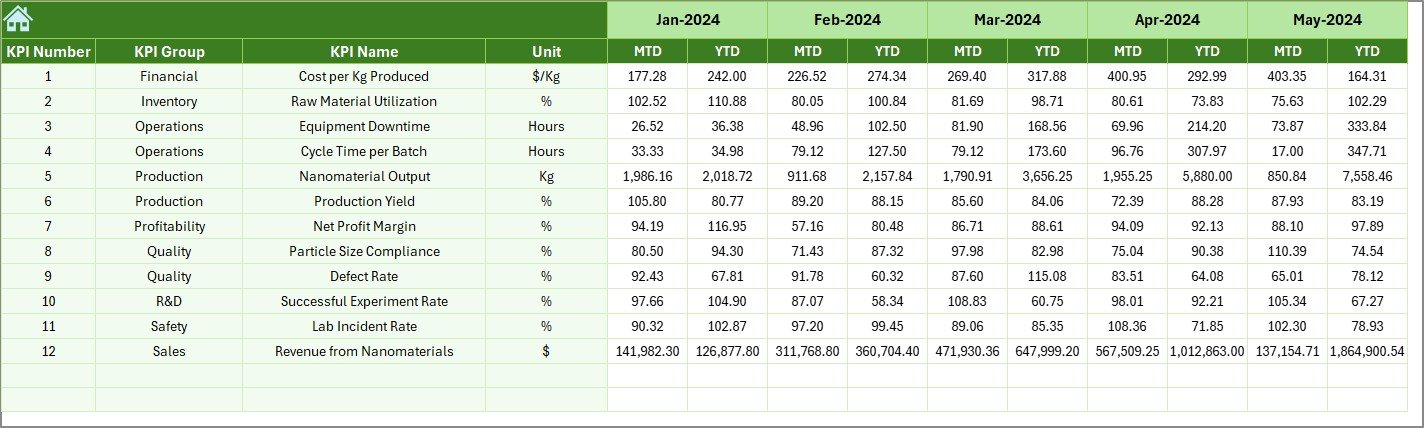
Historical comparison improves decision quality.
This sheet stores:
-
Previous year KPI data
-
Comparable performance metrics
Consequently, teams evaluate growth and improvement trends effectively.
Click to Purchases Nanomaterials KPI Dashboard in Excel
7️⃣ KPI Definition Sheet – KPI Documentation Hub
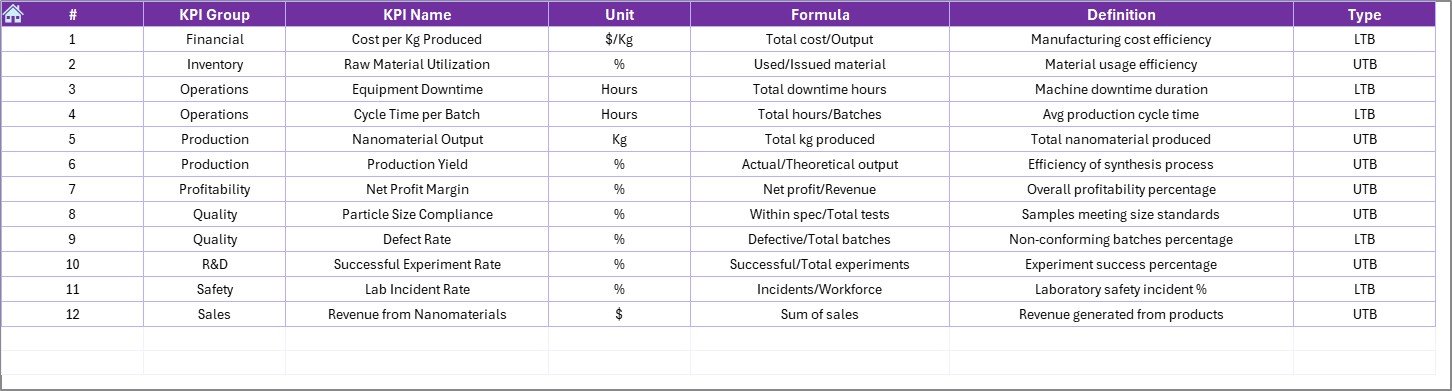
The KPI Definition Sheet ensures clarity and consistency.
Users define:
-
KPI Name
-
KPI Group
-
Unit of Measurement
-
Formula
-
KPI Definition
This structure eliminates confusion and standardizes reporting across teams.
How to Use the Nanomaterials KPI Dashboard Step-by-Step?
Step 1: Define KPIs
Start by entering KPI details in the KPI Definition sheet.
Step 2: Set Targets
Add monthly targets in the Target Sheet.
Step 3: Enter Historical Data
Input previous year values for benchmarking.
Step 4: Input Actual Numbers
Update monthly performance data.
Step 5: Select Month
Choose a month from the dashboard dropdown.
Step 6: Analyze Trends
Review KPI trends and comparisons.
As a result, performance monitoring becomes systematic and consistent.
Advantages of Nanomaterials KPI Dashboard in Excel
Organizations gain multiple benefits when they implement this dashboard.
✅ Centralized Performance Monitoring
All KPIs appear in one dashboard. Therefore, users avoid switching between files.
✅ Faster Decision Making
Real-time updates allow managers to act immediately.
✅ Improved Data Accuracy
Structured inputs reduce reporting errors.
✅ Better Trend Analysis
Historical and current comparisons reveal performance direction.
✅ User-Friendly Interface
Even non-technical users can operate the dashboard easily.
✅ Cost-Effective Solution
Excel eliminates the need for expensive analytics platforms.
How Does This Dashboard Improve Nanomaterial Operations?
The dashboard improves operations in several ways.
First, it increases transparency across departments. Next, it standardizes reporting formats. Moreover, it helps leadership track innovation outcomes.
Because teams monitor performance regularly, they detect issues earlier and implement solutions faster.
Consequently, organizations improve both research productivity and manufacturing efficiency.
Best Practices for the Nanomaterials KPI Dashboard
To maximize results, organizations should follow proven practices.
✔ Select Meaningful KPIs
Choose KPIs that align with business goals.
✔ Update Data Regularly
Enter data monthly to maintain accuracy.
✔ Maintain KPI Definitions
Ensure everyone understands KPI formulas.
✔ Use Trend Analysis Frequently
Review trends instead of focusing only on single months.
✔ Compare with Historical Data
Use previous year benchmarks for realistic evaluation.
✔ Train Users Properly
Provide guidance so teams use the dashboard consistently.
Common Challenges and How to Overcome Them
Click to Purchases Nanomaterials KPI Dashboard in Excel
Challenge 1: Inconsistent Data Entry
Solution: Standardize input processes.
Challenge 2: Too Many KPIs
Solution: Focus on high-impact metrics.
Challenge 3: Lack of Analysis
Solution: Schedule regular performance reviews.
Challenge 4: Poor KPI Definitions
Solution: Maintain clear documentation in the KPI Definition sheet.
Who Can Use the Nanomaterials KPI Dashboard?
This dashboard serves multiple industries and roles.
Suitable Users
-
Nanotechnology manufacturers
-
Research laboratories
-
Materials science companies
-
Semiconductor producers
-
Energy storage companies
-
Quality assurance teams
-
Operations managers
Because Excel supports customization, organizations can adapt the dashboard easily.
Why Excel Remains Ideal for KPI Dashboards?
Although advanced analytics tools exist, Excel continues to dominate business reporting.
Reasons Include:
-
Easy customization
-
Wide availability
-
No coding required
-
Flexible calculations
-
Quick implementation
Therefore, Excel provides both simplicity and analytical power.
Future of KPI Monitoring in Nanotechnology
Nanotechnology continues to evolve rapidly. Consequently, performance monitoring will become even more important.
Future dashboards may integrate:
-
Automated data collection
-
AI-based predictions
-
Real-time IoT integration
-
Advanced analytics models
However, structured KPI dashboards will always remain the foundation of performance management.
Conclusion
The Nanomaterials KPI Dashboard in Excel provides a powerful yet simple way to monitor nanotechnology performance. Instead of relying on scattered reports, organizations gain a centralized platform for tracking KPIs, analyzing trends, and improving decision-making.
Moreover, the dashboard simplifies data management while enhancing operational visibility. Because it combines automation, visualization, and structured inputs, teams can focus more on innovation and less on reporting tasks.
Ultimately, organizations that measure performance consistently achieve better efficiency, higher quality standards, and stronger research outcomes. Therefore, implementing a Nanomaterials KPI Dashboard becomes a strategic step toward operational excellence.
Frequently Asked Questions (FAQs)
Click to Purchases Nanomaterials KPI Dashboard in Excel
1. What is a Nanomaterials KPI Dashboard?
It is an Excel-based tool used to monitor and analyze nanomaterial performance using measurable KPIs.
2. Can beginners use this dashboard?
Yes. The dashboard uses simple Excel functionality and requires no advanced technical skills.
3. What does MTD and YTD mean?
-
MTD: Month-to-Date performance
-
YTD: Year-to-Date performance
4. Can I customize the KPIs?
Yes. You can modify KPI names, formulas, and targets according to your organization.
5. Does the dashboard support historical comparison?
Yes. It includes a previous year sheet for performance benchmarking.
6. How often should data be updated?
You should update data monthly for accurate analysis.
7. Is Excel suitable for professional KPI dashboards?
Absolutely. Excel provides flexible calculations, automation, and visualization features suitable for business reporting.
Visit our YouTube channel to learn step-by-step video tutorials