Managing offer letters manually often creates unnecessary delays, errors, and confusion. However, many organizations still rely on scattered Excel files, emails, and folders to handle offer letters. As a result, HR teams struggle with tracking candidates, updating records, maintaining history, and generating reports.
That is exactly where the Offer Letter Management System V1.0 in Excel VBA becomes a powerful solution.
This ready-to-use Excel VBA tool helps HR teams, recruiters, and small to mid-sized organizations manage offer letters, candidates, recruiters, positions, and user access in one centralized system. Moreover, it eliminates repetitive tasks while improving accuracy and control.
In this detailed article, you will learn what the Offer Letter Management System V1.0 in Excel VBA is, how it works, why it matters, and how each feature supports smooth hiring operations. Additionally, you will explore its advantages, best practices, and frequently asked questions.
Click to buy Offer Letter Management System V1.0 in Excel VBA
What Is an Offer Letter Management System in Excel VBA?
An Offer Letter Management System in Excel VBA is a structured hiring and offer-tracking solution built entirely inside Microsoft Excel using VBA (Visual Basic for Applications).
Instead of maintaining multiple spreadsheets or manual documents, this system centralizes all offer-related data into one secure, interactive Excel file. As a result, HR teams can:
- Manage candidates efficiently
- Track offer details accurately
- Control user access securely
- Maintain record history transparently
- Export reports instantly
Because it runs on Excel VBA, the system feels familiar while delivering application-like functionality.
Why Do Organizations Need an Offer Letter Management System?
Hiring processes involve multiple stakeholders, timelines, and documents. However, manual offer letter handling creates common problems.
Common Challenges Without a System
- Offer letters get misplaced or duplicated
- Candidate details remain inconsistent
- Recruiter performance becomes difficult to track
- Access control remains weak
- Reporting takes too much time
Therefore, organizations need a structured system that simplifies offer letter management without investing in costly HR software.
What Makes Offer Letter Management System V1.0 in Excel VBA Different?
This tool focuses on simplicity, control, and automation. Instead of complex installations or subscriptions, you get a ready-to-use Excel file that runs on your desktop.
Moreover, the system uses:
- Login-based access
- Role-based permissions
- Centralized data storage
- User-friendly forms
- Automated exports
As a result, HR teams gain control without technical complexity.
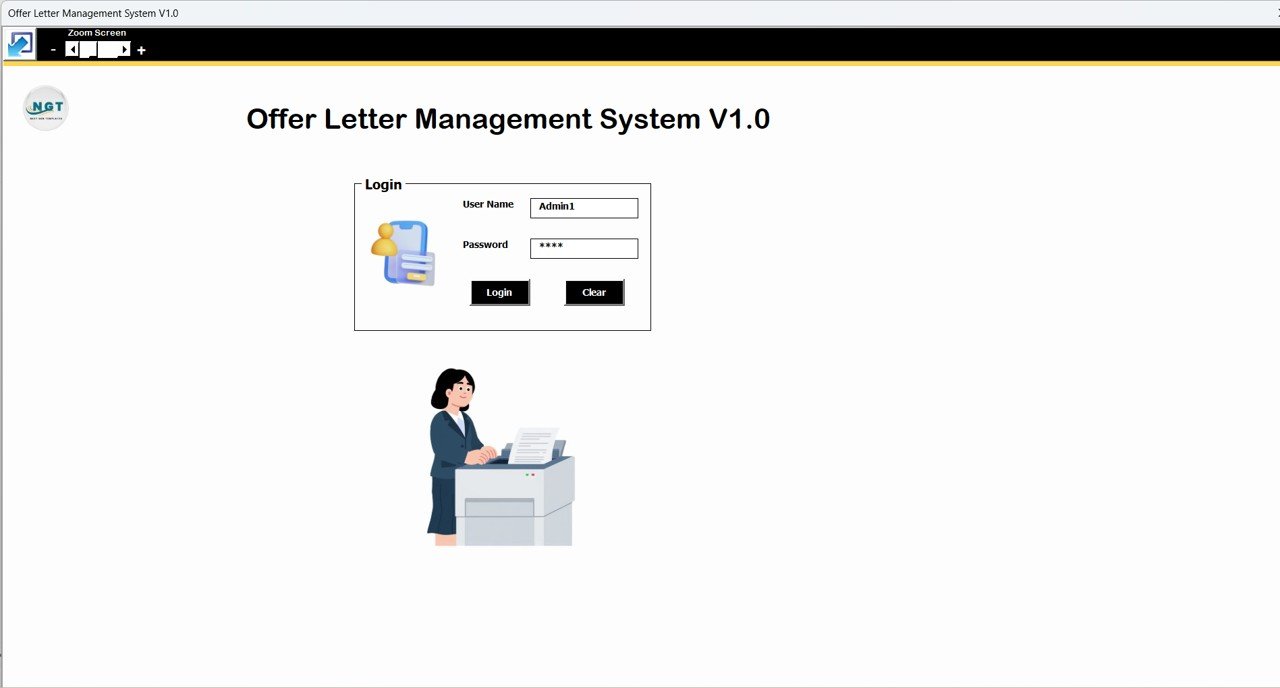
How Does the Login System Work in Offer Letter Management System?
Security plays a critical role in HR systems. Therefore, this tool starts with a Login Form.
Login Form Overview
The login form allows users to enter credentials and access the system based on their role.
Default Login Credentials
Admin Role
- Username: Admin1
- Password: abcd
User Role
- Username: User1
- Password: abcd
After successful login, the system redirects users to the Main Form, where all operations begin.
Click to buy Offer Letter Management System V1.0 in Excel VBA
What Is the Main Form and Why Is It Important?
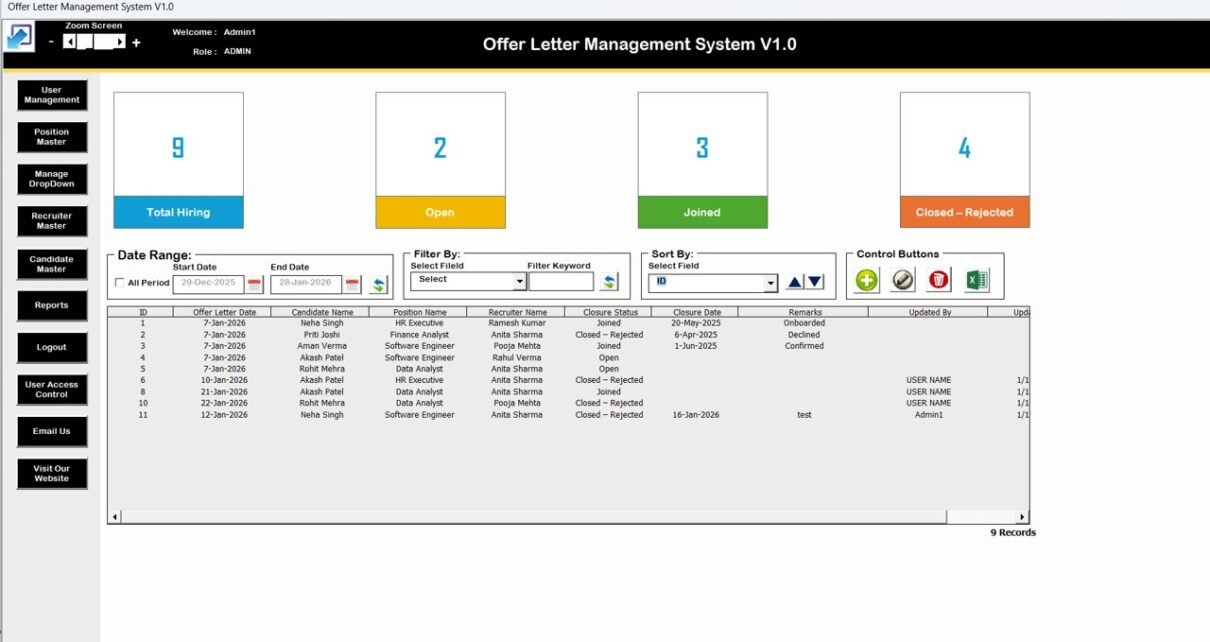
The Main Form acts as the control center of the Offer Letter Management System. From this screen, users manage records, apply filters, sort data, and perform actions.
List Box – Central Data Display
At the center of the Main Form, a List Box displays all relevant records clearly. This list updates automatically as users add, update, or delete data.
Filters for Quick Data Search
Above the list box, filters allow users to:
- Filter records by date range
- Filter data by selected columns
Consequently, users can find records instantly.
Sort Feature for Organized Viewing
The Sort By option allows users to arrange records in ascending or descending order. Therefore, reviewing large datasets becomes effortless.
What Are the Control Buttons and How Do They Help?
The control buttons provide direct actions for managing records.
Add New Record
- Opens the data entry form
- Allows users to create new offer letter records
- Saves data directly to the list box
Update Existing Record
- Requires selecting a record from the list box
- Opens the form with existing data
- Allows editing and updating details
- Also opens on double-clicking a record
Delete Record
- Deletes the selected record permanently
- Prevents clutter and duplication
Show Record History
- Displays complete modification history
- Helps track who changed what and when
- Improves accountability and audit readiness
Export to Excel
- Exports list box data to a new Excel file
- Enables sharing and offline analysis

Click to buy Offer Letter Management System V1.0 in Excel VBA
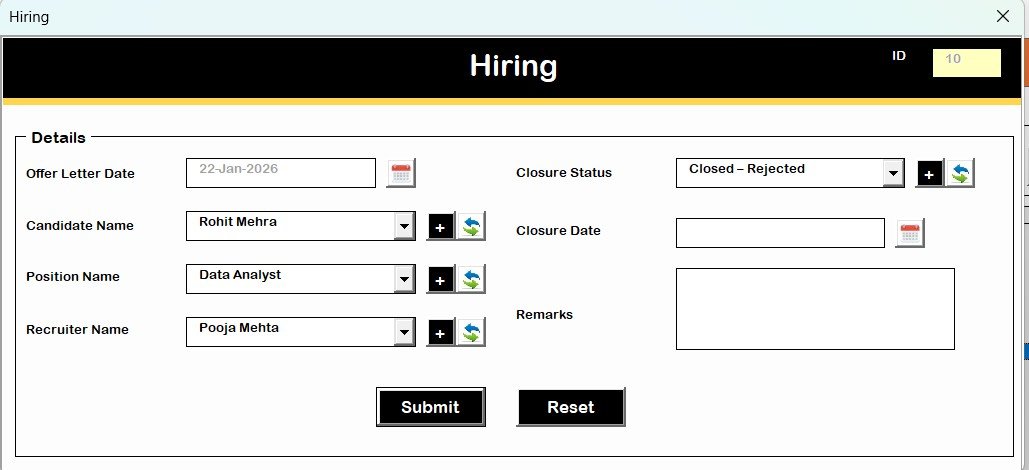
What Is the Hiring Form and How Does It Work?
The Hiring Form serves as the main data entry screen.
Purpose of Hiring Form
- Add new offer letter records
- Update existing candidate details
- Maintain clean and structured data
This form opens when users click Add New Record or Update Existing Record. After submitting, the system refreshes the list box automatically.
Click to buy Offer Letter Management System V1.0 in Excel VBA
What Is the Navigation Menu and Why Does It Matter?
The left-side Navigation Menu Bar provides access to all system modules. This layout ensures smooth navigation and faster operations.
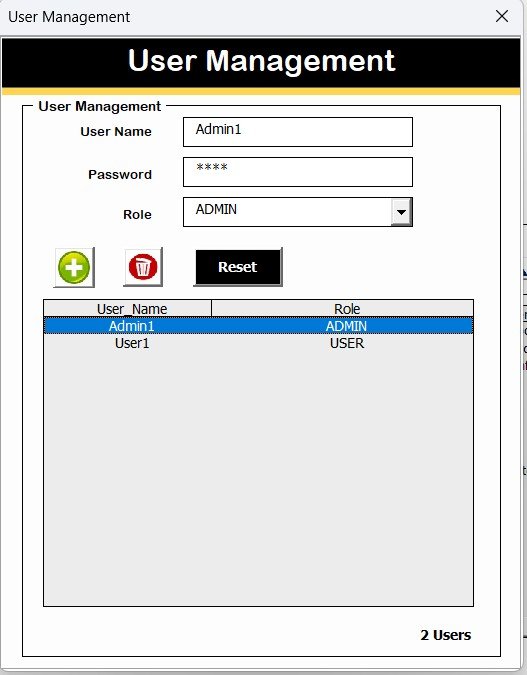
How Does User Management Work in This System?
The User Management module allows administrators to manage system users.
Key User Management Features
- Add new users
- Update user details
- Delete users
- Reset passwords
- Change existing passwords
As a result, administrators maintain full control over system access.
Click to buy Offer Letter Management System V1.0 in Excel VBA
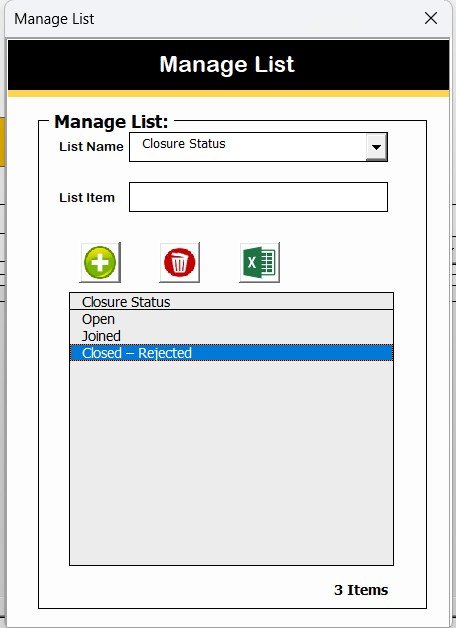
What Is Manage List and How Is It Used?
The Manage List module allows users to manage dropdown values and master lists.
Key Functions
- Add new list items
- Delete unused items
This feature ensures consistency across forms.
Click to buy Offer Letter Management System V1.0 in Excel VBA
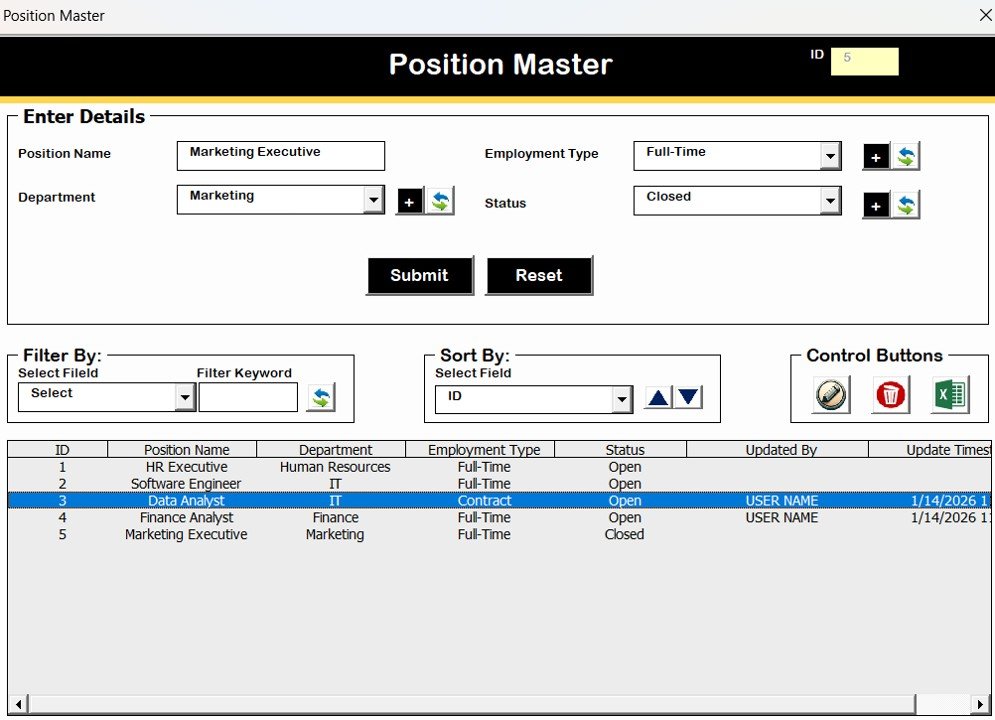
How Does Position Master Help HR Teams?
The Position Master stores all job position details.
Benefits of Position Master
- Centralized position records
- Consistent job titles
- Faster data entry
- Accurate reporting
Therefore, recruiters avoid mismatched or duplicate position names.
Click to buy Offer Letter Management System V1.0 in Excel VBA
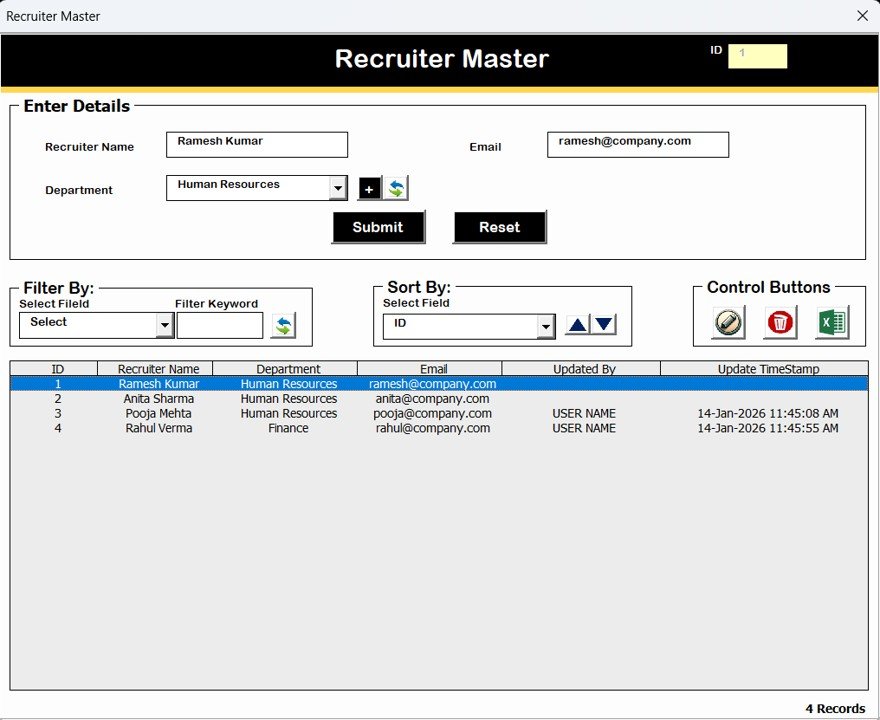
What Is Recruiter Master and Why Is It Important?
The Recruiter Master module stores recruiter details.
Why Recruiter Master Matters
- Tracks recruiter involvement
- Enables recruiter-wise analysis
- Supports accountability
Consequently, HR leaders gain better visibility into hiring efforts.
Click to buy Offer Letter Management System V1.0 in Excel VBA
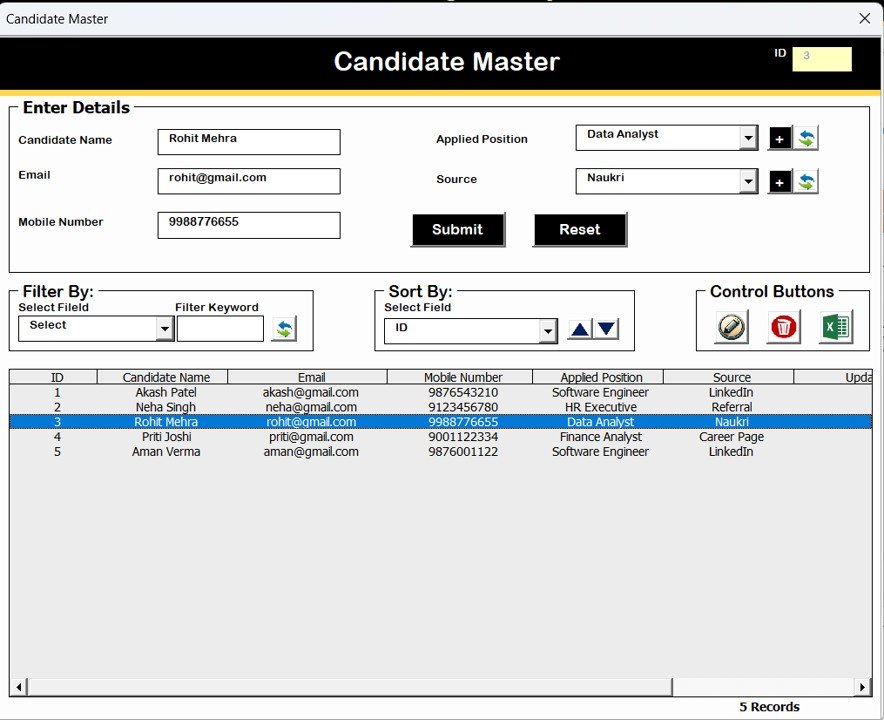
How Does Candidate Master Improve Data Accuracy?
The Candidate Master module stores candidate information separately.
Key Advantages
- Centralized candidate data
- Reduced duplication
- Faster offer processing
As a result, hiring teams maintain clean and reliable records.
Click to buy Offer Letter Management System V1.0 in Excel VBA
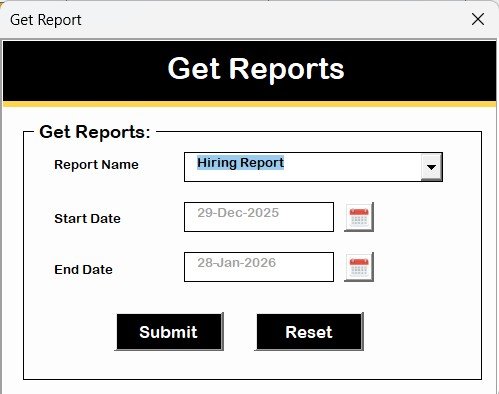
How Does the Reports Module Support Decision-Making?
The Reports module allows users to generate Excel reports for a selected date range.
Reporting Benefits
- Instant Excel output
- Flexible date selection
- Ready for sharing and review
Therefore, HR teams save time on manual reporting.
Click to buy Offer Letter Management System V1.0 in Excel VBA
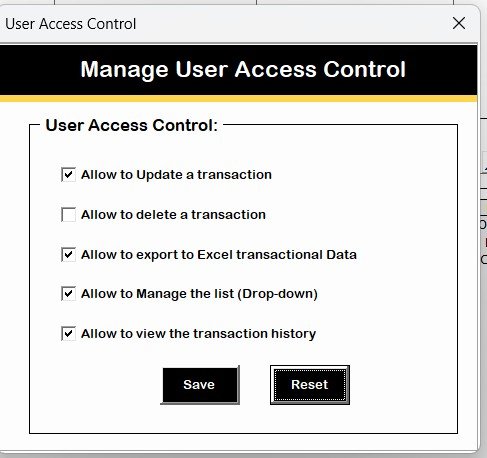
What Is User Access Control and Why Is It Critical?
The Manage User Access Control module allows admins to assign permissions.
Key Highlights
- Visible only to Admin users
- Checkbox-based access control
- Role-specific feature access
As a result, sensitive actions remain restricted.
Click to buy Offer Letter Management System V1.0 in Excel VBA
What Happens When Users Logout?
The Logout button:
- Saves all data securely
- Closes forms properly
- Prevents data loss
Thus, the system ensures safe exits.
How Do Email and Website Buttons Help Users?
Email Us Button
- Displays support email ID
- Allows users to request help or customization
Visit Our Website Button
- Opens the official website
- Promotes additional tools and templates
System Compatibility and Technical Requirements
Important Compatibility Highlights
- Works on Windows 10 and above
- Requires Microsoft Excel 2010 or later
- Works only on Excel Desktop Application
- Does not work on Mobile or Tablet
- Not compatible with Mac OS
These requirements ensure smooth performance and stability.
Advantages of Offer Letter Management System V1.0 in Excel VBA
- Saves Time and Effort
The system automates repetitive HR tasks. Therefore, teams focus on hiring rather than paperwork.
- Improves Data Accuracy
Centralized forms and masters reduce errors and duplication.
- Enhances Security
Login-based access and role control protect sensitive data.
- Requires No Extra Software
Runs entirely inside Excel, which most organizations already use.
- Easy to Customize
VBA-based design allows future enhancements.
Best Practices for Offer Letter Management System in Excel VBA
- Maintain Strong Passwords
Always update default passwords after setup.
- Assign Role-Based Access Carefully
Give users access only to required modules.
- Update Master Data Regularly
Keep Position, Recruiter, and Candidate Masters clean.
- Export Reports Periodically
Create backups and share insights with stakeholders.
- Train Users Briefly
A short walkthrough ensures correct usage and avoids errors.
Conclusion
The Offer Letter Management System V1.0 in Excel VBA delivers a practical, secure, and efficient way to manage hiring and offer letters without complex HR software. By combining Excel familiarity with VBA automation, this tool simplifies operations while maintaining control and accuracy.
For organizations that want a cost-effective, ready-to-use, and customizable solution, this system proves to be an excellent choice.
Frequently Asked Questions (FAQs)
- Can beginners use this Offer Letter Management System?
Yes. The interface remains user-friendly and intuitive.
- Does this system work on Excel Online?
No. It works only on the Excel Desktop application.
- Can we customize this tool?
Yes. VBA allows easy customization.
- Is data stored securely?
Yes. Login and access control protect data.
- Can multiple users use the system?
Yes, with defined user roles and permissions.
Watch the step-by-step video tutorial:
Visit our YouTube channel to learn step-by-step video tutorials
Click to buy Offer Letter Management System V1.0 in Excel VBA