Launching a product feels exciting. However, it also brings pressure, deadlines, and multiple moving parts. Teams must coordinate marketing, sales, operations, inventory, pricing, communication, and customer support at the same time. If even one task slips, the entire launch can suffer.
So, how can you manage every task clearly and avoid costly mistakes?
You need a Product Launch Monitoring Checklist in Excel.
This ready-to-use checklist template helps you track tasks, assign responsibilities, monitor deadlines, and measure launch progress in one structured sheet. Moreover, it gives you instant visibility into what is completed and what still needs attention. Therefore, you can launch your product confidently and professionally.
In this complete guide, you will learn:
-
What a Product Launch Monitoring Checklist in Excel is
-
Why every business needs it
-
Detailed explanation of both worksheets
-
Advantages of using this checklist
-
Best practices for launch management
-
Frequently Asked Questions with Answers
Let us explore everything step by step.
Click to Purchases Product Launch Monitoring Checklist in Excel
What Is a Product Launch Monitoring Checklist in Excel?
A Product Launch Monitoring Checklist in Excel is a structured task management template designed to track all activities related to a product launch.
Instead of using scattered notes and emails, you can:
-
List all launch tasks
-
Assign responsible persons
-
Set deadlines
-
Track status using ✔ or ✘
-
Monitor overall progress
Because Excel allows flexibility and customization, you can adjust the checklist based on your product type and industry. At the same time, you can keep everything organized in one place.
Why Is a Product Launch Checklist Important?
Many product launches fail because teams miss critical steps. Although companies invest heavily in product development, they often underestimate execution planning.
Without a structured checklist:
-
Deadlines get missed
-
Marketing campaigns delay
-
Inventory coordination fails
-
Communication gaps increase
-
Accountability becomes unclear
However, when you use a Product Launch Monitoring Checklist:
-
You maintain clarity
-
You reduce confusion
-
You assign clear responsibility
-
You track real progress
-
You improve launch success rate
Therefore, a simple checklist can protect your entire launch strategy.
How Is the Product Launch Monitoring Checklist Structured?
This template contains 2 worksheets. Each worksheet serves a specific purpose.
Let us examine them in detail.
Click to Purchases Product Launch Monitoring Checklist in Excel
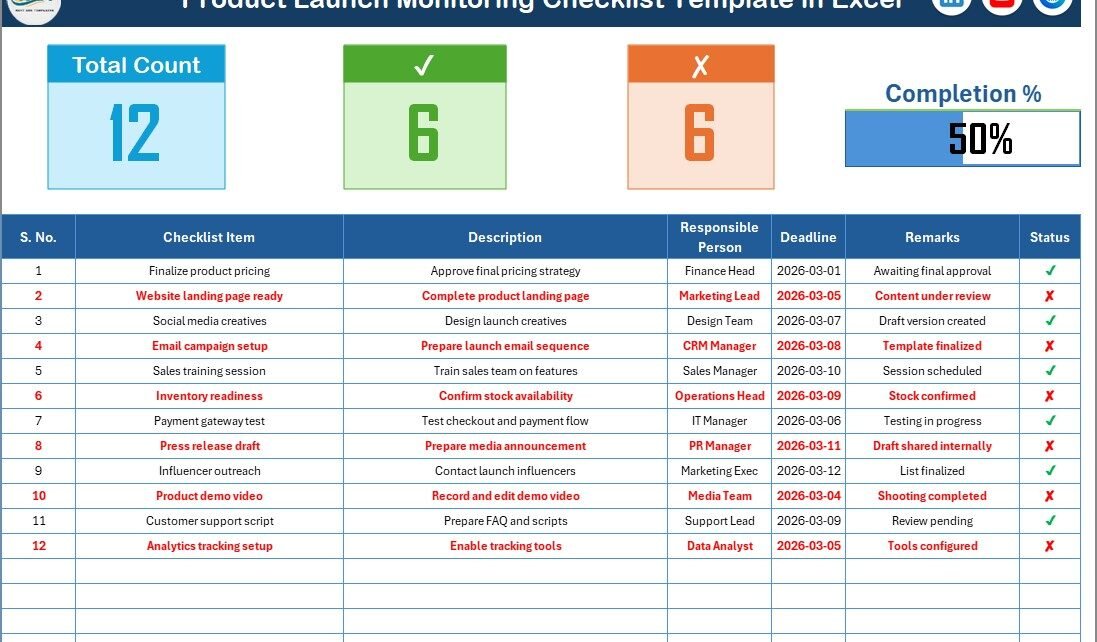
1️⃣ Product Launch Monitoring Checklist Sheet (Main Sheet)
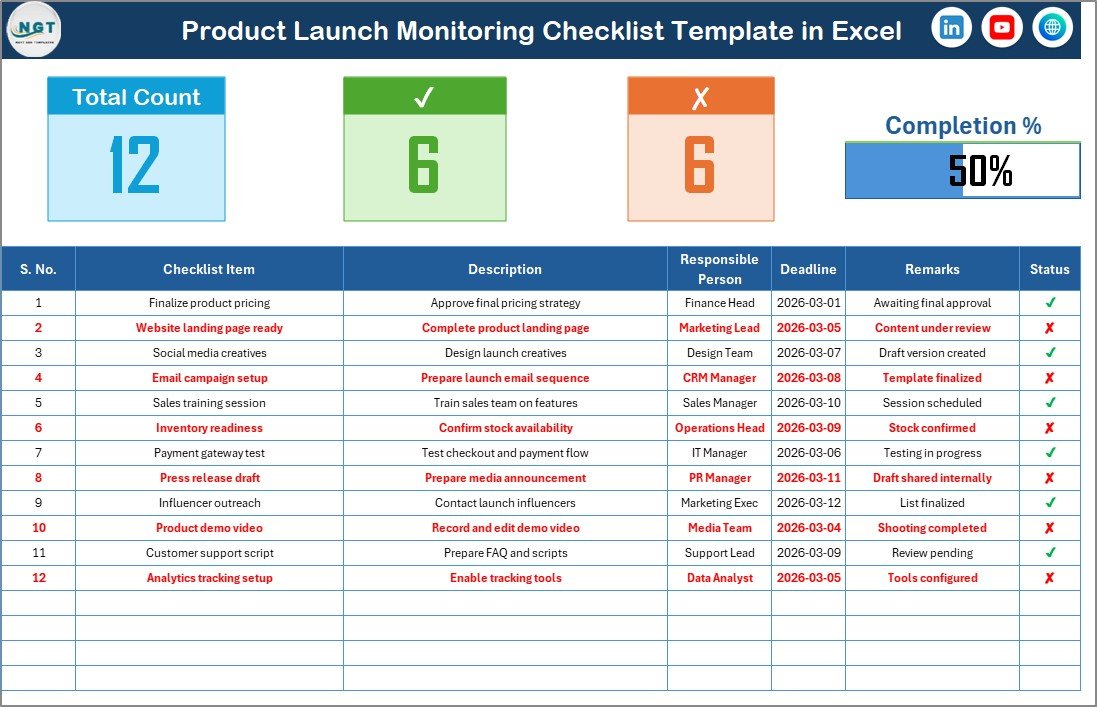
This sheet acts as the core management page.
Top Section – Launch Overview
At the top of the sheet, you will see key monitoring indicators:
-
Total Count of Tasks
-
Checked Count (Completed Tasks)
-
Crossed Count (Pending Tasks)
-
Progress Bar showing Checked %
Because of this section, you can instantly evaluate launch progress.
For example:
-
If progress shows 80%, you know the launch stands near completion.
-
If progress shows 40%, you must accelerate task execution.
Therefore, this visual summary keeps leadership informed.
Click to Purchases Product Launch Monitoring Checklist in Excel
Checklist Table – The Heart of the Template
Below the top section, you will find the main checklist table.
Here are the columns included:
-
Serial No.
-
Checklist Item
-
Description
-
Responsible Person
-
Deadline
-
Remarks
-
Status (✔ or ✘)
Let us understand each column.
Serial No.
This column maintains order and structure. It helps you track tasks systematically.
Checklist Item
This column lists the task name.
Examples:
-
Finalize product pricing
-
Approve marketing creatives
-
Confirm inventory stock
-
Train customer support team
-
Publish website landing page
Description
This column explains the task in detail.
For example:
Instead of writing “Marketing Campaign,” you can describe:
“Launch paid social media campaign across LinkedIn, Instagram, and Google Ads.”
Because of this clarity, teams understand expectations clearly.
Responsible Person
This column assigns ownership.
When you assign a responsible person:
-
Accountability increases
-
Delays reduce
-
Follow-ups become easier
You can select names from a drop-down list connected to the second worksheet.
Deadline
This column defines the completion date.
Because deadlines remain visible, teams prioritize tasks better.
Remarks
This column allows additional notes.
For example:
-
“Waiting for vendor approval.”
-
“Budget under review.”
-
“Content revision required.”
Status (✔ or ✘)
This column tracks task completion.
-
✔ indicates completed
-
✘ indicates pending
When you change status, the top section updates automatically.
As a result, progress percentage changes dynamically.
Click to Purchases Product Launch Monitoring Checklist in Excel
2️⃣ List Sheet Tab – Why Is It Important?
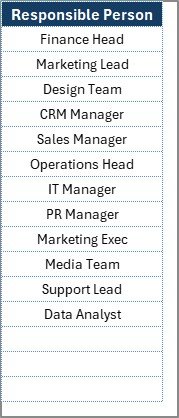
The second worksheet stores the unique list of Responsible Persons.
This sheet:
-
Creates drop-down options in the main checklist
-
Prevents duplicate name entries
-
Maintains clean data
Because of this structured approach, you avoid typing errors and inconsistencies.
Click to Purchases Product Launch Monitoring Checklist in Excel
What Tasks Should You Include in a Product Launch Checklist?
Although each business differs, most product launches require tasks in the following categories.
Product Preparation
-
Final product testing
-
Quality assurance check
-
Packaging approval
-
SKU creation
Marketing Preparation
-
Landing page creation
-
Email campaign setup
-
Social media announcement
-
Press release draft
-
Influencer collaboration
Sales Preparation
-
Sales team training
-
Pricing strategy approval
-
Discount structure setup
-
CRM configuration
Operations
-
Inventory confirmation
-
Shipping partner coordination
-
Warehouse readiness
-
Customer service readiness
Financial Setup
-
Cost finalization
-
Budget tracking
-
Profit margin review
Because you organize tasks by category, launch planning becomes systematic.
Click to Purchases Product Launch Monitoring Checklist in Excel
Advantages of Product Launch Monitoring Checklist in Excel
Now let us explore its key advantages.
1. Clear Visibility
You can see every launch task in one sheet. Therefore, you eliminate confusion.
2. Accountability
When you assign responsible persons, team ownership improves significantly.
3. Progress Tracking
The progress bar provides instant performance visibility.
4. Deadline Monitoring
Since deadlines remain visible, teams avoid last-minute panic.
5. Easy Customization
You can:
-
Add more columns
-
Include priority levels
-
Adjust formatting
-
Expand task categories
6. Cost-Effective Solution
Excel eliminates the need for expensive launch management tools.
How Can This Checklist Improve Launch Success?
This template improves launch execution in multiple ways.
Better Coordination
When all departments share one document, communication improves.
Faster Issue Resolution
You can identify delayed tasks quickly and act immediately.
Reduced Risk
You prevent missed tasks that can damage brand image.
Improved Team Discipline
Structured monitoring creates professional work culture.
Best Practices for the Product Launch Monitoring Checklist
To maximize effectiveness, follow these best practices.
1. Define Tasks Early
Create the checklist at least 60–90 days before launch.
2. Break Large Tasks into Small Steps
Instead of writing “Marketing Campaign,” divide it into smaller tasks.
3. Set Realistic Deadlines
Avoid unrealistic timelines that create pressure.
4. Review Checklist Weekly
Conduct weekly review meetings to track progress.
5. Update Status Regularly
Ensure team members update ✔ and ✘ consistently.
6. Keep Responsible Person Clear
Assign only one responsible person per task.
7. Monitor Progress Percentage
Use the progress bar as a leadership indicator.
How to Implement This Checklist Successfully?
Follow these steps:
-
List all launch activities
-
Categorize tasks
-
Assign responsible persons
-
Set deadlines
-
Enter tasks into Excel template
-
Monitor weekly progress
-
Conduct final readiness review
Because you follow a structured method, execution becomes smooth.
Click to Purchases Product Launch Monitoring Checklist in Excel
Who Can Use This Product Launch Monitoring Checklist?
This template suits:
-
Startups launching new products
-
E-commerce businesses
-
SaaS companies
-
Manufacturing firms
-
Marketing agencies
-
Entrepreneurs
-
Product managers
Whether you launch a physical product or digital service, this checklist keeps everything organized.
Conclusion: Why Should You Use a Product Launch Monitoring Checklist in Excel?
Product launches involve coordination, timing, and accountability. However, without structure, teams lose control.
The Product Launch Monitoring Checklist in Excel provides:
-
Centralized task tracking
-
Clear accountability
-
Deadline monitoring
-
Visual progress tracking
-
Easy customization
Therefore, you can execute your launch with confidence, clarity, and control.
If you want to reduce risk and improve launch success rate, this Excel checklist offers a simple yet powerful solution.
Click to Purchases Product Launch Monitoring Checklist in Excel
Frequently Asked Questions with Answers
1. What is a Product Launch Monitoring Checklist in Excel?
It is a structured Excel template that tracks all tasks related to a product launch.
2. Can I customize the checklist?
Yes. You can add, remove, or modify columns and tasks easily.
3. How does the progress bar work?
The progress bar calculates the percentage of completed tasks based on ✔ status.
4. Can I assign multiple responsible persons?
You can, but assigning one responsible person improves accountability.
5. Is this checklist suitable for digital product launches?
Yes. It works for both physical and digital product launches.
6. Do I need advanced Excel knowledge?
No. Basic Excel knowledge is enough to use this template effectively.
7. Can small businesses use this template?
Yes. Small businesses benefit greatly from structured launch planning.
Click to Purchases Product Launch Monitoring Checklist in Excel
Visit our YouTube channel to learn step-by-step video tutorials