Retail planning involves managing promotions, campaigns, store activities, events, and deadlines throughout the year. However, when retailers rely on scattered notes, emails, or basic spreadsheets, planning becomes confusing and error-prone. As a result, teams miss important dates, campaigns overlap, and execution suffers.
That is exactly where a Retail Planning Calendar in Excel becomes an essential business tool.
This ready-to-use Excel calendar helps retailers plan, organize, and track all retail activities in one structured and interactive workbook. Instead of juggling multiple files, teams gain complete visibility across annual, monthly, and daily planning views.
In this detailed and SEO-friendly guide, you will learn what a Retail Planning Calendar in Excel is, how it works, why it matters, and how each worksheet supports efficient retail planning. Moreover, you will explore its advantages, best practices, and frequently asked questions. By the end of this article, you will clearly understand how this Excel calendar simplifies retail planning and improves execution.
Click to Purchases Retail Planning Calendar in Excel
What Is a Retail Planning Calendar in Excel?
A Retail Planning Calendar in Excel is a structured and interactive calendar template designed to plan and manage retail events, promotions, campaigns, and operational activities.
Instead of using manual calendars or static planners, this Excel-based calendar provides dynamic views such as annual, monthly, and daily planning. As a result, retail managers and teams can track all important activities in one place.
This calendar typically helps plan:
-
Retail promotions and sales campaigns
-
Store events and launches
-
Marketing activities
-
Operational deadlines
-
Team and store schedules
Because it is built in Excel, it remains flexible, familiar, and easy to customize.
Why Do Retail Businesses Need a Planning Calendar?
Retail operations run on tight timelines. Therefore, even small planning gaps can impact sales and customer experience.
A Retail Planning Calendar helps businesses:
-
Maintain a clear planning structure
-
Avoid missed events or overlapping campaigns
-
Improve coordination across teams
-
Track activities visually
-
Execute plans on time
Moreover, a centralized calendar ensures everyone works with the same information.
Click to Purchases Retail Planning Calendar in Excel
Introduction to Retail Planning Calendar in Excel (Ready-to-Use Template)
The Retail Planning Calendar in Excel is a professionally designed and ready-to-use calendar template built specifically for retail planning needs.
This template allows you to:
-
Plan retail activities across the year
-
Switch between annual, monthly, and daily views
-
Add, update, and delete events easily
-
Highlight weekends and important days
-
Maintain a structured event database
Since everything works inside Excel, users do not need any additional tools or technical skills.
Key Features of Retail Planning Calendar in Excel
Below are the key features that make this calendar powerful and user-friendly.
🗓️ Multiple Planning Views
View retail plans using annual, monthly, and daily calendar layouts.
🎨 Theme Customization
Change the entire workbook theme using predefined color options.
📌 Event Highlighting
Highlight weekends and important events automatically.
➕ Easy Event Management
Add, update, or delete events using simple buttons and forms.
📂 Centralized Event Database
Store all event details in one structured sheet.
Click to Purchases Retail Planning Calendar in Excel
Worksheets Included in Retail Planning Calendar in Excel
This template includes five well-designed worksheets, each serving a specific planning purpose.
1. Home Sheet – Navigation Hub
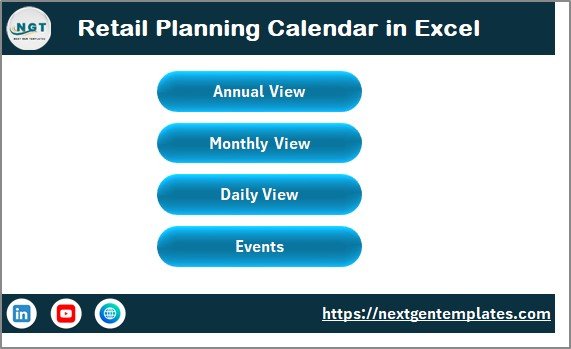
The Home Sheet acts as an index page for the entire calendar.
Key Features of Home Sheet
-
Annual View button
-
Monthly View button
-
Daily View button
-
Events button
These buttons allow quick navigation to the required planning view. As a result, users move across the calendar effortlessly.
2. Annual View Sheet – Year-at-a-Glance Planning

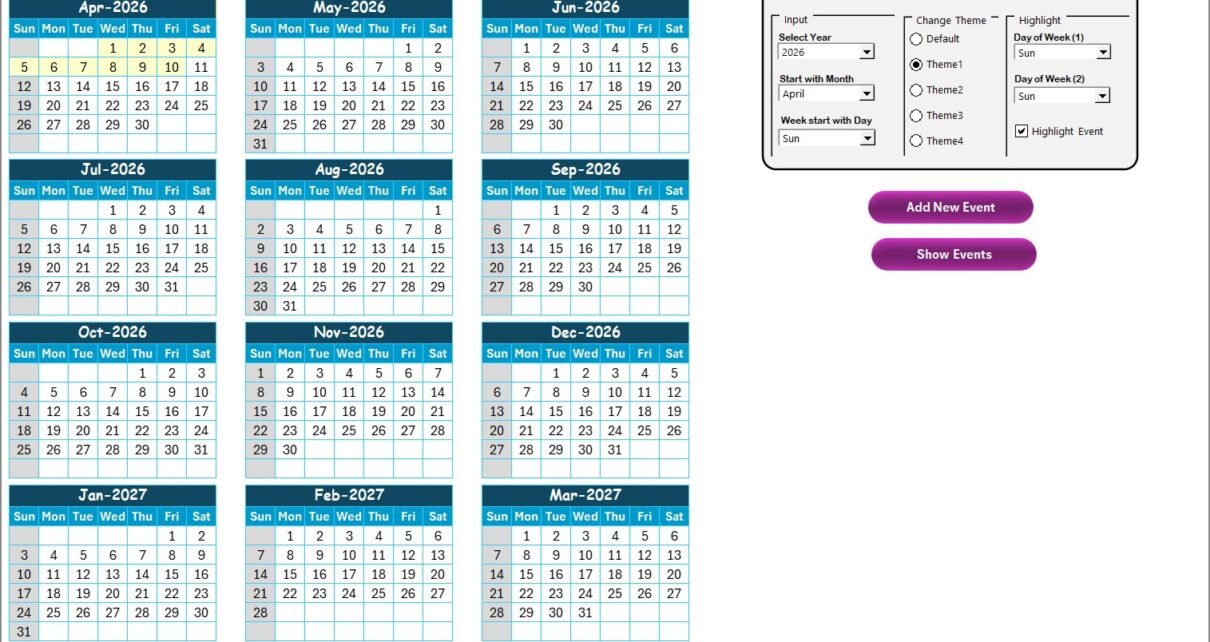
The Annual View Sheet displays all 12 months in a single view.
Control Panel Features
The control panel on this sheet includes three main groups.
🧾 Input Group
-
Select the Year to update the calendar automatically
-
Change the starting month of the calendar
-
Set the starting day of the week
This flexibility helps align the calendar with business requirements.
🎨 Change Theme Group
Choose from five predefined color themes to apply across the entire workbook.
🔦 Highlight Group
-
Select two days of the week to highlight
-
Highlight weekends such as Saturday and Sunday
-
Enable event highlighting to mark event dates in yellow
This makes important days stand out clearly.
Event Buttons in Annual View
➕ Add New Event Button
Select a date and click this button to open the Add New Event form. After entering details, the event appears on the selected date.
👁️ Show Event Button
Click this button to view all events scheduled for the selected date.
Click to Purchases Retail Planning Calendar in Excel
3. Monthly View Sheet – Focused Monthly Planning
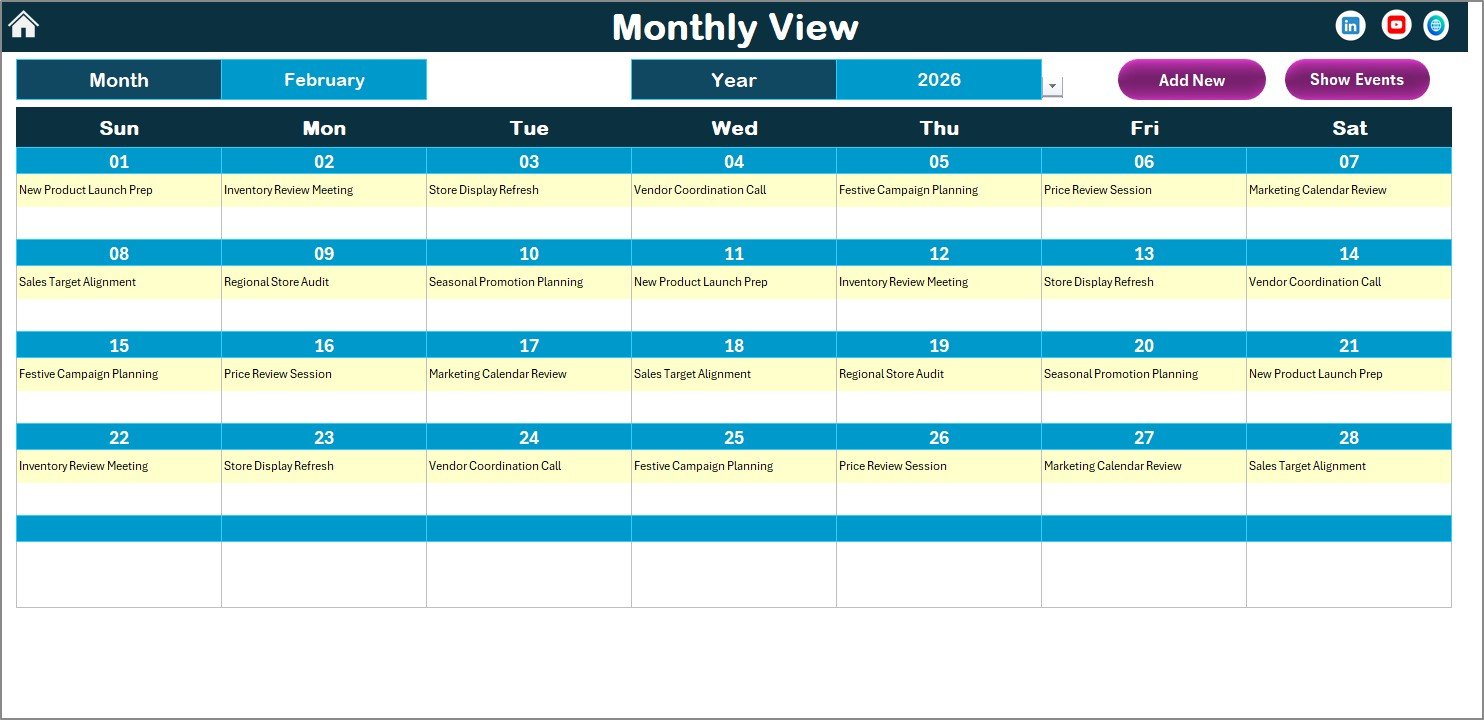
The Monthly View Sheet displays a single calendar for the selected month.
Key Features of Monthly View
-
Select Month and Year from the top
-
Automatically refresh calendar based on selection
-
Display one event per date
-
Show “more than 1…” when multiple events exist
This view helps retail teams focus on monthly execution.
Event Management Buttons
-
Add New Event: Add events for the selected date
-
Show Event: View all events for the selected date
4. Daily View Sheet – Detailed Event Tracking
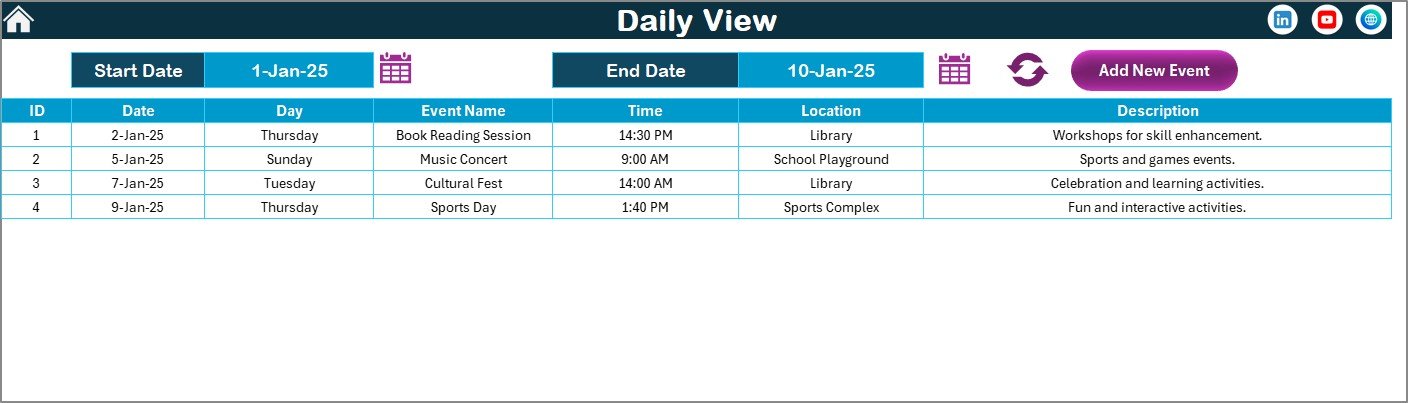
The Daily View Sheet provides a detailed list of events for a selected date range.
How Daily View Works
-
Select Start Date and End Date using calendar icons
-
Click Refresh to load events for the selected range
-
View detailed event information in a tabular format
Add New Event Button
Use this button to add new events directly from the Daily View.
This sheet supports operational-level planning and tracking.
Click to Purchases Retail Planning Calendar in Excel
5. Events Sheet – Central Event Database
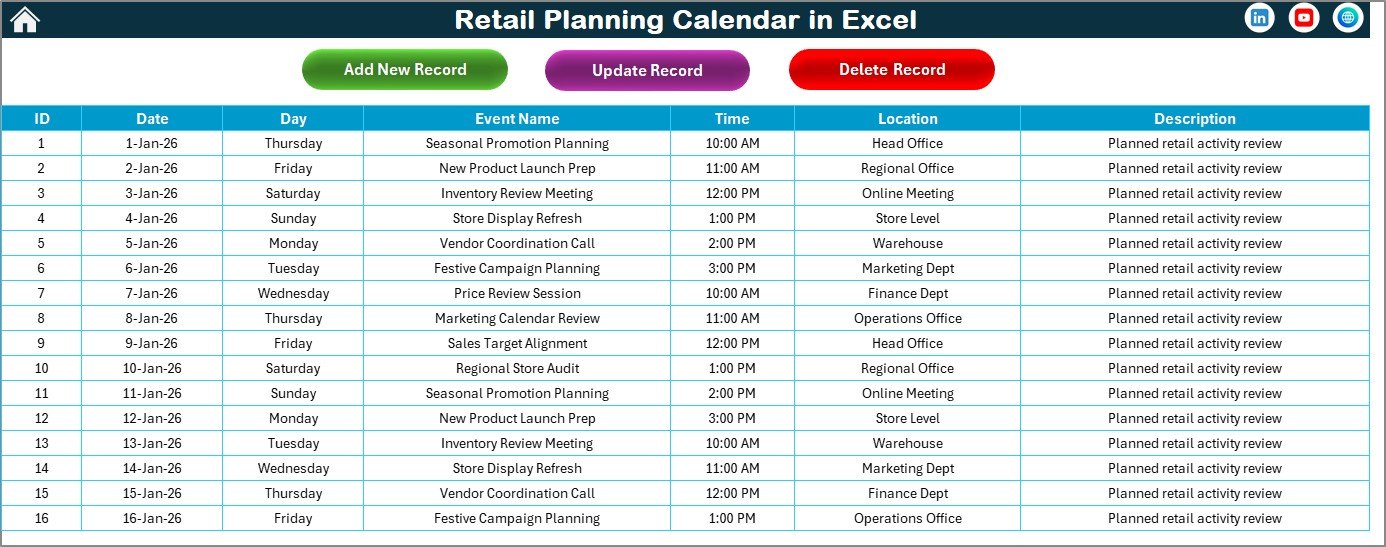
The Events Sheet stores all event records and acts as the backend database.
Information Stored in Events Sheet
-
ID (auto-generated)
-
Date of event
-
Day of event
-
Event Name
-
Time
-
Location
-
Short Description
This structured database ensures clean and organized data.
Event Management Buttons
➕ Add New Record
Add a new event using the event form.
✏️ Update Existing Record
Select an event ID to edit existing event details.
🗑️ Delete Record
Remove an event by selecting its ID.
How Does Retail Planning Calendar in Excel Improve Planning?
By combining multiple planning views with structured event management, this calendar improves planning accuracy and execution.
-
Teams gain full visibility of retail activities
-
Planning errors reduce significantly
-
Events stay organized and traceable
-
Execution becomes timely and efficient
Therefore, retail planning shifts from reactive to proactive.
Advantages of Retail Planning Calendar in Excel
Using this calendar offers several important benefits.
✅ Centralized Planning
All retail activities stay in one Excel file.
✅ Improved Visibility
Annual, monthly, and daily views provide clarity.
✅ Easy Event Control
Add, edit, or delete events without complexity.
✅ Customizable Design
Themes and highlights improve usability.
✅ Excel-Based Simplicity
No additional software required.
Best Practices for Using Retail Planning Calendar in Excel
Follow these best practices to get maximum value.
📌 Update Events Regularly
Keep the event database current.
📌 Use Highlights Effectively
Highlight weekends and key retail days.
📌 Maintain Clear Event Descriptions
Use short and meaningful descriptions.
📌 Review Calendar Weekly
Ensure upcoming activities stay on track.
📌 Limit Duplicate Events
Avoid overlapping or repeated entries.
Click to Purchases Retail Planning Calendar in Excel
Who Can Use Retail Planning Calendar in Excel?
This calendar is ideal for:
-
Retail store managers
-
Merchandising teams
-
Marketing teams
-
Operations managers
-
Multi-store retail businesses
Anyone with basic Excel knowledge can use it easily.
Conclusion
The Retail Planning Calendar in Excel is a practical and powerful tool for managing retail activities efficiently.
Instead of relying on fragmented planning methods, this ready-to-use Excel calendar provides a structured, visual, and interactive planning solution. With annual, monthly, and daily views, along with easy event management, retail teams gain clarity, control, and consistency.
If you want to improve retail planning, reduce missed events, and streamline execution, this Excel calendar is the right choice.
Frequently Asked Questions (FAQs)
❓ What is a Retail Planning Calendar in Excel?
It is an Excel-based calendar used to plan and manage retail events and activities.
❓ Can I customize the calendar year and layout?
Yes, you can change the year, starting month, and starting day of the week.
❓ Can I add multiple events on the same date?
Yes, the calendar supports multiple events per date.
❓ Is this calendar suitable for multiple stores?
Yes, you can use it for single or multiple retail locations.
❓ Do I need advanced Excel skills?
No, basic Excel knowledge is sufficient.
Click to Purchases Retail Planning Calendar in Excel
Visit our YouTube channel to learn step-by-step video tutorials