Managing money effectively is one of the most important life skills. Whether you want to save for a house, vacation, emergency fund, or retirement, having a clear plan makes all the difference. However, without proper tracking, savings often become inconsistent and goals remain incomplete.
So, how can you plan, track, and achieve your savings goals efficiently?
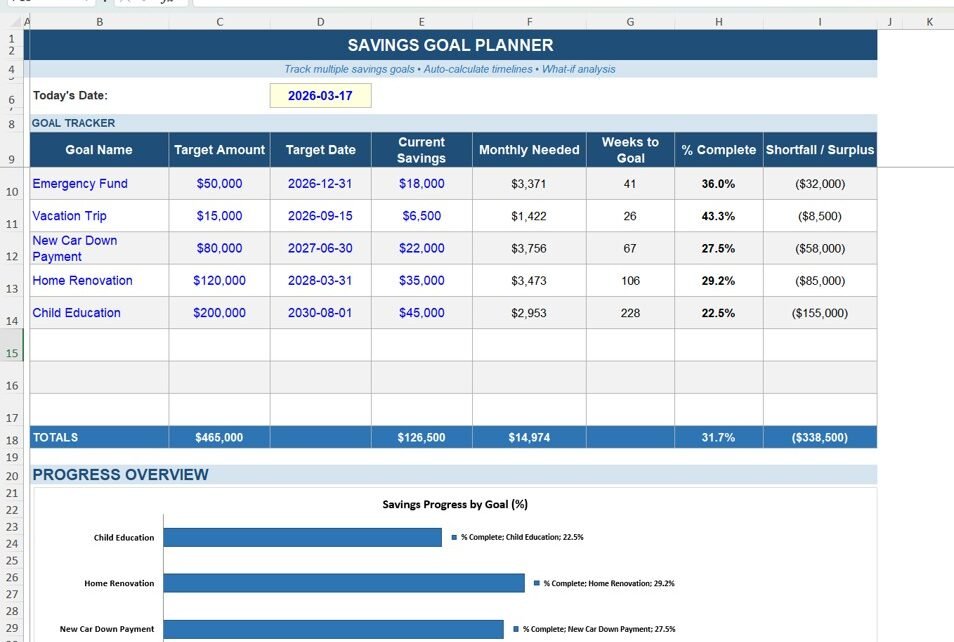
Savings Goal Planner in Excel.
This powerful, ready-to-use Excel template helps you set financial targets, track progress, and stay disciplined with your savings. Moreover, it transforms your financial data into clear insights so you can make better decisions.
In this detailed guide, you will learn everything about this planner, including its features, structure, advantages, best practices, and frequently asked questions.
What is a Savings Goal Planner in Excel?
A Savings Goal Planner in Excel is a structured financial tool designed to help you plan and monitor your savings goals over time.
Instead of manually calculating your savings, this planner allows you to:
- 💰 Set clear financial goals
- 📅 Track monthly savings progress
- 📊 Compare planned vs actual savings
- 🎯 Monitor goal completion percentage
- 📈 Analyze savings trends
Therefore, you stay organized and focused on achieving your financial goals.
Why Do You Need a Savings Goal Planner?
Click to Buy Savings Goal Planner in Excel
Saving money without a plan often leads to failure. Therefore, a structured planner becomes essential.
Here’s why this planner is important:
- It helps you stay disciplined with savings
- It provides clear financial visibility
- It improves budgeting and planning
- It motivates you to achieve goals faster
- It reduces financial stress
In short, it turns your financial dreams into achievable targets.
Key Features of Savings Goal Planner in Excel
This planner includes multiple sections that make savings tracking simple and effective.
1. Dashboard Sheet – Overview of Your Savings
Te Dashboard Sheet provides a quick summary of your savings performance.
Key Highlights:
- Total Savings Goal
- Amount Saved So Far
- Remaining Amount
- Goal Completion Percentage
Why It Matters:
Because it gives you a clear snapshot, you can instantly know how close you are to your goal.
2. Monthly Savings Tracker – Track Progress
Click to Buy Savings Goal Planner in Excel
This section allows you to record your monthly savings.
Includes:
- Month-wise savings entries
- Planned vs actual savings
- Monthly variance
Benefit:
You can easily identify months where you saved less or more.
3. Goal Planning Section – Define Your Targets
Here, you define your savings goals.
Includes:
- Goal Name (e.g., Car, Vacation, Emergency Fund)
- Target Amount
- Start Date
- End Date
Importance:
Because clear goals increase your chances of success.
4. Progress Tracking – Visual Insights
This section provides charts and visuals.
Includes:
- Savings trend chart
- Goal completion progress bar
- Monthly comparison charts
5. Expense & Income Tracking (Optional)
Click to Buy Savings Goal Planner in Excel
Some planners include income and expense tracking.
Includes:
- Monthly income
- Expenses
- Net savings

Click to Buy Savings Goal Planner in Excel
Advantages of Savings Goal Planner in Excel
Using this planner offers multiple benefits:
1. Better Financial Discipline
You can track your savings regularly.
2. Clear Goal Visibility
You always know your progress.
3. Improved Budgeting
You can manage income and expenses effectively.
4. Motivation to Save
Progress tracking keeps you motivated.
5. Easy Customization
You can modify it based on your needs.
6. Offline Accessibility
You can use it anytime without internet
Opportunities for Improvement
Click to Buy Savings Goal Planner in Excel
You can enhance this planner further:
- Create a mobile-friendly version
- Add reminders for savings
- Include automated calculations with VBA
- Add advanced financial charts
- Integrate with bank data
Best Practices for the Savings Goal Planner in Excel
To get the best results, follow these best practices:
1. Set Realistic Goals
Avoid setting overly ambitious targets.
2. Track Regularly
Update your savings every week or month.
3. Automate Savings
Set automatic transfers to your savings account.
4. Review Progress
Analyze your progress frequently.
5. Adjust When Needed
Modify your plan based on financial changes.
6. Stay Consistent
Consistency is key to achieving goals.
Who Can Benefit from This Planner?
Click to Buy Savings Goal Planner in Excel
This planner is useful for:
- Professionals
- Students
- Families
- Entrepreneurs
- Anyone planning savings goals
How Does This Planner Improve Financial Health?
This planner improves financial health in several ways:
- Encourages consistent savings
- Reduces unnecessary spending
- Improves financial awareness
- Helps achieve long-term goals
- Builds financial confidence
Conclusion
Click to Buy Savings Goal Planner in Excel
The Savings Goal Planner in Excel is a powerful tool that helps you take control of your finances. It simplifies savings tracking, improves discipline, and helps you achieve your financial goals faster.
Moreover, with its structured approach and visual insights, it turns complex financial planning into a simple and enjoyable process.
If you want to achieve your financial dreams, this planner is the perfect solution.
Click to Buy Savings Goal Planner in Excel
Visit our YouTube channel to learn step-by-step video tutorials