Managing employee shifts manually using registers, emails, or scattered Excel sheets often leads to confusion, scheduling conflicts, data errors, and wasted administrative time. As organizations grow, shift planning becomes more complex and difficult to control.
That is exactly where Shift Scheduling Management System V1.0 in Excel VBA delivers exceptional value.
This ready-to-use, Excel and VBA-based solution transforms Microsoft Excel into a powerful shift scheduling application. It allows organizations to manage employees, shifts, users, access controls, and reports from one centralized file—without investing in expensive workforce management software.
If you are looking for a simple, secure, and cost-effective Shift Scheduling Management System, this tool is built specifically for you.
Click to Purchases Shift Scheduling Management System V1.0
What Is Shift Scheduling Management System V1.0?
Shift Scheduling Management System V1.0 is a desktop-based Excel VBA application designed to automate and control shift scheduling operations.
Instead of juggling multiple files or manual processes, this tool helps you:
-
Create and manage shift schedules
-
Maintain employee and shift master data
-
Control user access with roles
-
Generate Excel reports instantly
-
Secure your data with login authentication
All operations are performed inside Microsoft Excel using VBA, making it easy to use while still being powerful and flexible.
Why Do You Need a Shift Scheduling Management System?
Manual shift scheduling creates several challenges:
-
Overlapping or missing shifts
-
Difficulty tracking employee schedules
-
No role-based access control
-
Time-consuming reporting
-
High dependency on manual follow-ups
This Excel VBA-based Shift Scheduling Management System solves these problems by providing automation, structure, security, and visibility in one file.
Key Features of Shift Scheduling Management System V1.0
1. Login Form (Role-Based Access)

The system starts with a secure Login Form, ensuring controlled access.
Default Login Credentials:
Admin Role
-
Username:
Admin1 -
Password:
abcd
User Role
-
Username:
User1 -
Password:
abcd
After entering valid credentials and clicking Login (or pressing Enter), the user is redirected to the main dashboard.
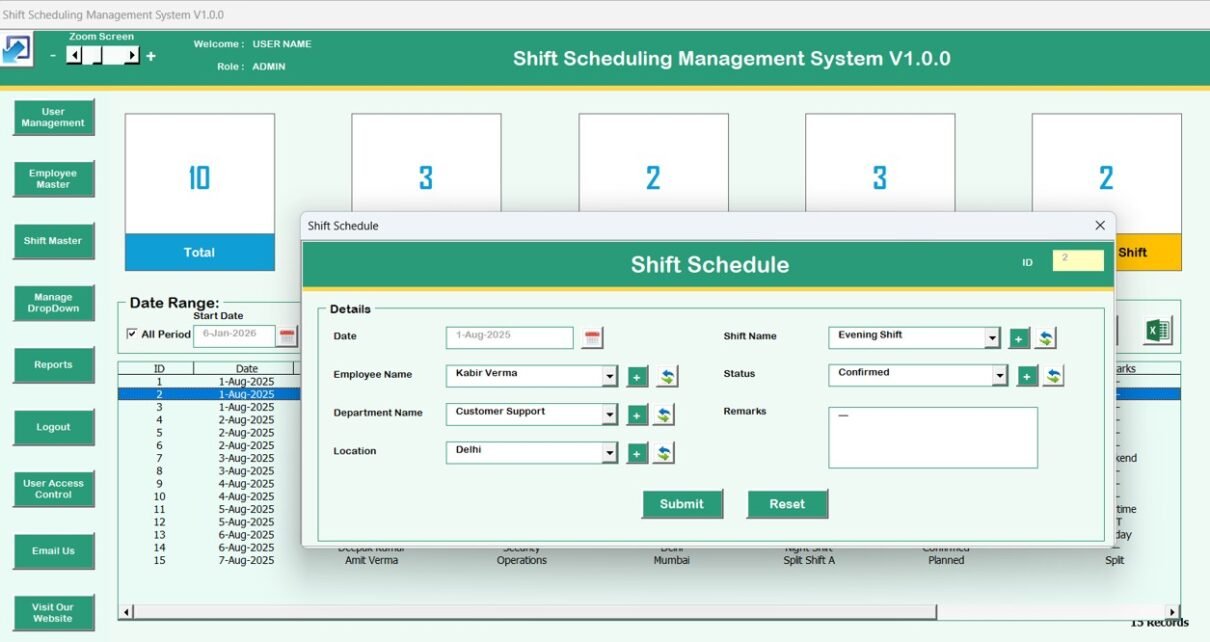
2. Shift Schedule

This is the core working screen of the system. From here, users can manage all shift scheduling activities.
List Box (Central Data View)
-
Displays all relevant shift scheduling records
-
Allows quick selection and review of data
-
Click to Purchases Shift Scheduling Management System V1.0
Filters
-
Filter records by date range
-
Filter data by selected columns
Sort Feature
-
Sort shift records easily based on selected fields
Control Buttons
-
Add New Record – Add a new shift schedule
-
Update Existing Record – Edit a selected record (via button or double-click)
-
Delete Record – Remove unwanted records safely
-
Export to Excel – Export displayed records into a new Excel file instantly
3. Data Entry Form (Add / Update Records)
This form opens when:
-
Clicking Add New Record
-
Clicking Update Existing Record
It allows you to:
-
Add new shift details
-
Update existing shift schedules
-
Submit changes securely into the system
Navigation Menu Features (Left-Side Panel)
The left navigation menu gives you full control over the system.
1. Firm Information
-
Store and update your organization details
-
Information is saved securely inside the system
2. User Management

-
Add new users
-
Update user details
-
Delete users
-
Reset passwords
-
Change passwords directly
-
Click to Purchases Shift Scheduling Management System V1.0
3. Manage List

-
Maintain dropdown lists used across the system
-
Add or delete list values easily
4. Shift Master

-
Define and manage different shift types
-
Centralized shift configuration
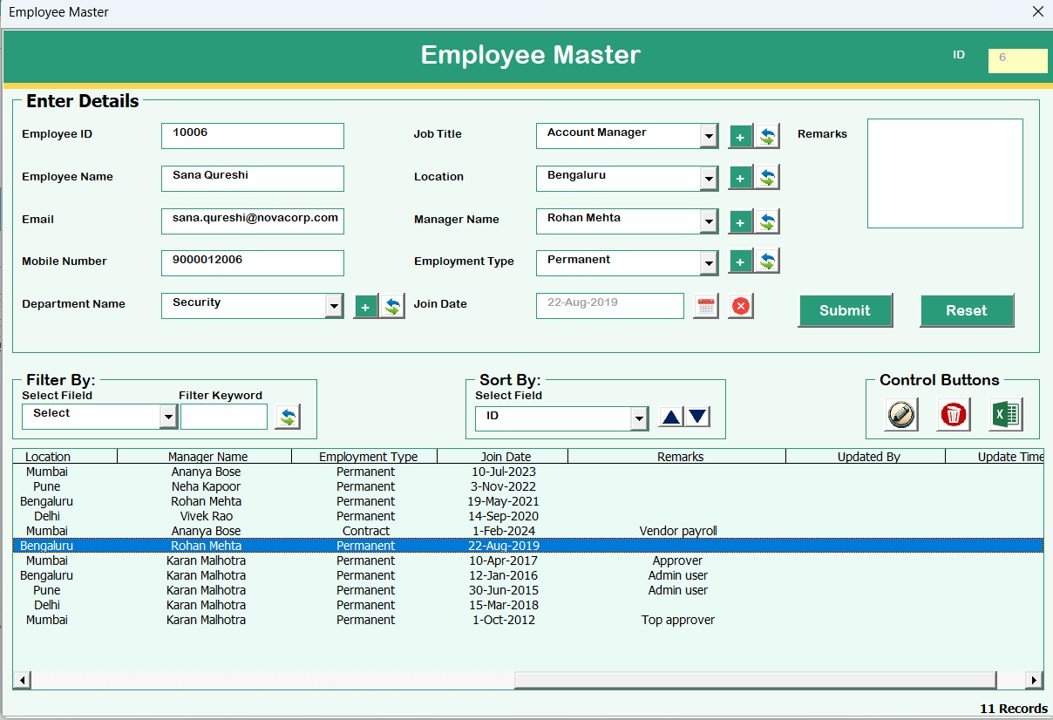
5. Employee Master
-
Maintain employee details
-
Link employees with shifts easily
6. Reports

-
Generate reports in Excel format
-
Select custom date ranges
-
Ideal for management reviews and audits
-
Click to Purchases Shift Scheduling Management System V1.0
7. Manage User Access Control

-
Assign screen-level access to user roles
-
Only visible to Admin users
-
Enhances security and control
8. Logout
-
Saves all data automatically
-
Closes forms and Excel file safely
9. Email Us
-
Displays support email ID
-
Useful for customization or technical help
10. Visit Our Website
-
Opens our website directly
-
Explore and purchase more ready-to-use tools
System Compatibility (Important Highlights)
⚠️ Please review compatibility before using the tool:
-
✅ Compatible with Windows 10 and above
-
✅ Requires Microsoft Excel 2010 or above
-
✅ Works only on Microsoft Excel Desktop application
-
❌ Not supported on Mobile or Tablet devices
-
❌ Not compatible with Mac operating system
Advantages of Shift Scheduling Management System V1.0
-
✅ Eliminates manual shift scheduling errors
-
✅ Centralized and structured data management
-
✅ Secure login and role-based access control
-
✅ Easy-to-use Excel interface
-
✅ No recurring subscription cost
-
✅ Fast Excel report generation
-
✅ Ideal for small and mid-sized organizations
Opportunities for Improvement
-
🔹 Can be customized further based on industry-specific needs
-
🔹 Additional reports can be added on request
-
🔹 Integration with attendance systems (custom development)
Best Practices for Using This Tool
-
✔ Maintain accurate Employee and Shift Master data
-
✔ Assign proper user roles and access controls
-
✔ Generate reports regularly for monitoring
-
✔ Export data periodically for backups
-
✔ Use Admin access responsibly
Who Should Use This Tool?
This Shift Scheduling Management System is perfect for:
-
Hospitals and clinics
-
Manufacturing units
-
Security agencies
-
Retail stores
-
Call centers
-
Facilities management companies
-
Small and medium enterprises
Final Thoughts
Shift Scheduling Management System V1.0 in Excel VBA is a powerful yet easy-to-use solution for organizations that want automation without complexity. It brings structure, security, and efficiency to shift scheduling—using a tool your team already knows: Microsoft Excel.
Visit our YouTube channel to learn step-by-step video tutorials