Introduction
The Stem Cell Banks KPI Dashboard is a comprehensive, ready-to-use Excel template designed to help stem cell banks monitor and analyze their key performance indicators (KPIs) effectively. This dashboard provides an intuitive way to track monthly and yearly performance against targets, visualize trends, and manage KPI data at a glance.
Key Features of Stem Cell Banks KPI Dashboard
- Seven well-structured worksheets to cover all the monitoring aspects.
- Interactive selections such as drop-down menus for months and KPIs.
- Conditional formatting with up/down arrows to visualize performance vs. targets and previous year data quickly.
- Separate sheets to input actual, target, and previous year data for streamlined data management.
- KPI definitions with formulas, units, and type indicators for clarity.
- Trend charts to track MTD (Month-To-Date) and YTD (Year-To-Date) performance visually.
- User-friendly navigation enabled by a Home sheet with buttons to access all key sheets.
Dashboard Pages Explanation
1. Home Sheet
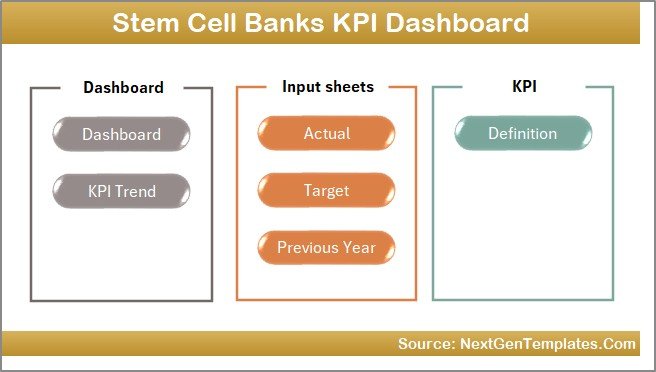
This is the index page containing six buttons that allow quick jumps to the respective sheets within the dashboard. Serving as a central navigation hub, it ensures ease of access to each part of the dashboard.
 Home Page
2. Dashboard Sheet
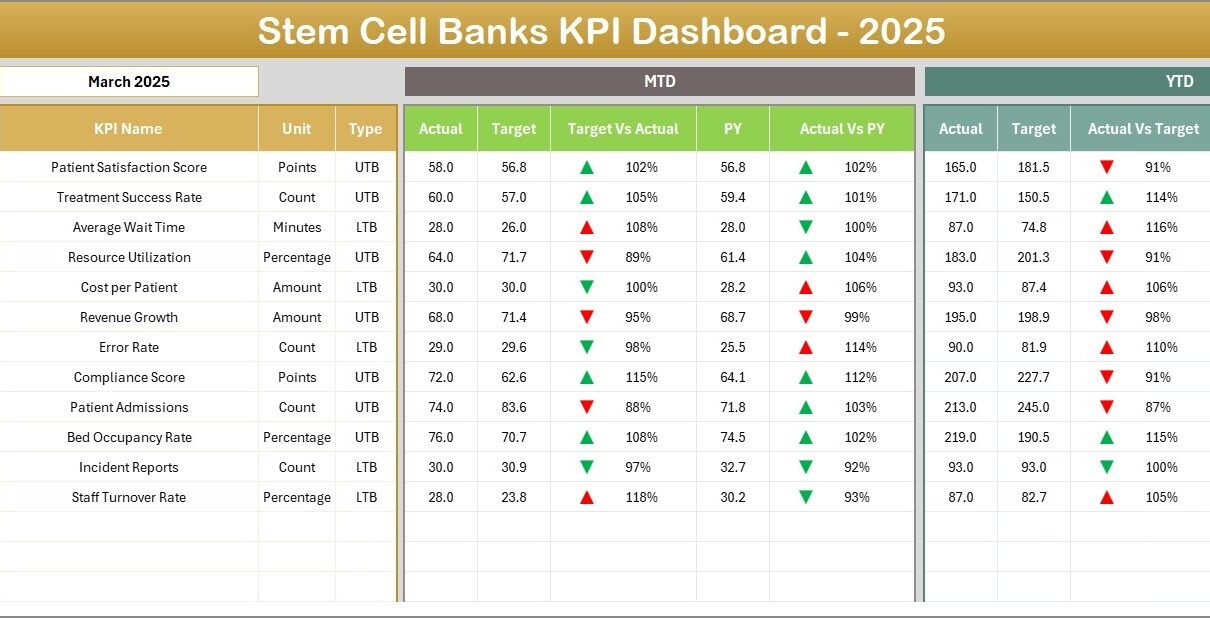
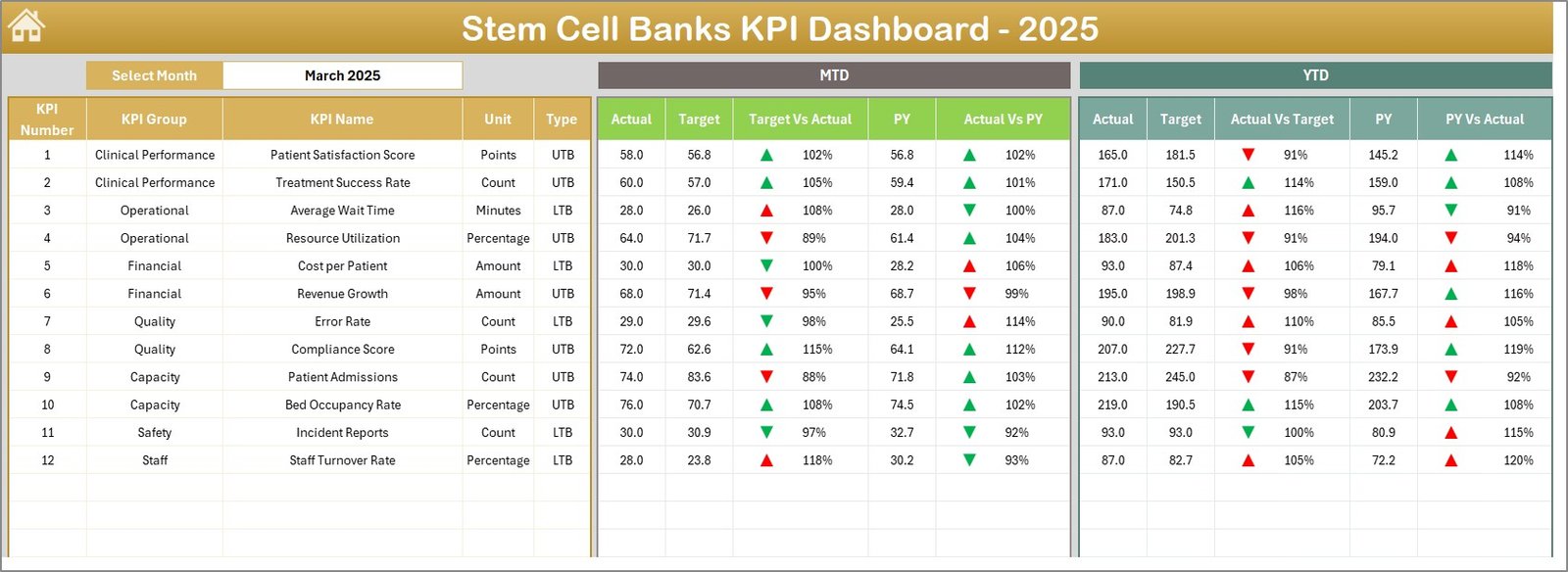
This is the core sheet showcasing all KPIs for the selected month. Users can select a month from a drop-down at cell D3, which dynamically updates the displayed data.
- Displays MTD Actual, Target, and Previous Year numbers.
- Shows Target vs. Actual and Previous Year vs. Actual comparisons with conditional formatting arrows.
- Presents YTD values with corresponding comparisons and formatting.
 Stem Cell Banks KPI Dashboard
3. KPI Trend Sheet
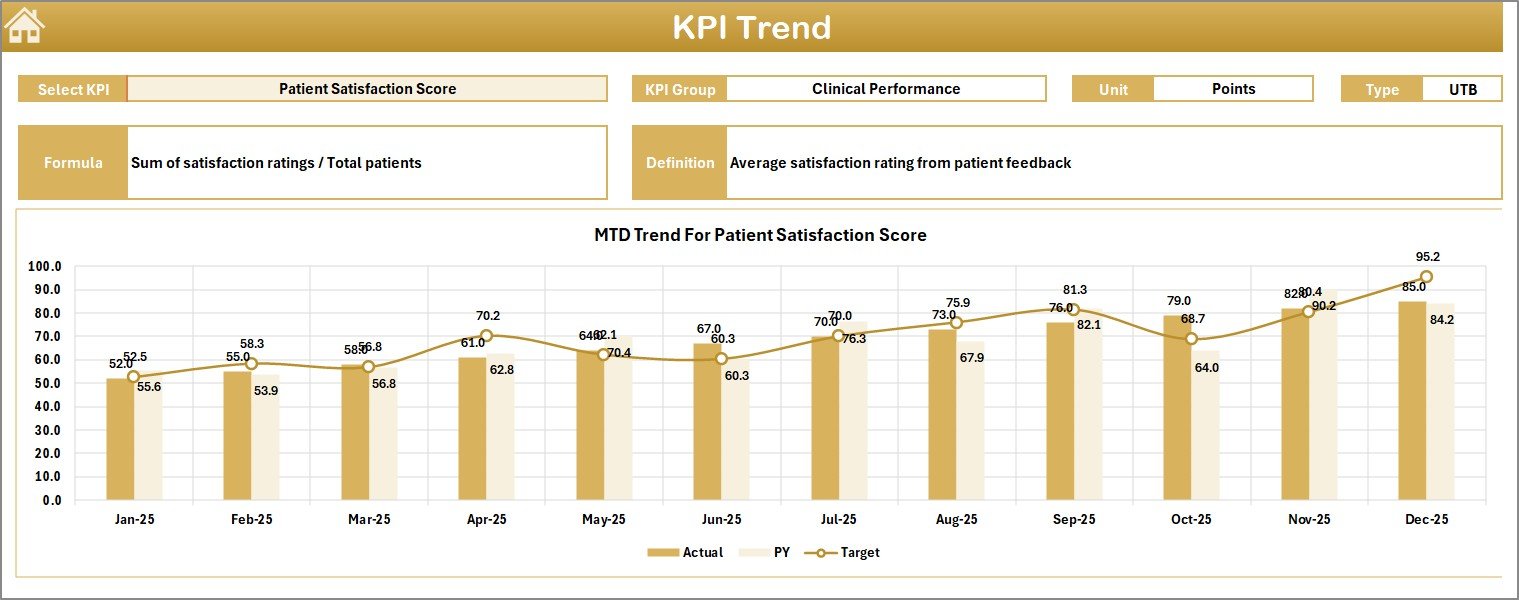
On this sheet, users select a KPI name from the drop-down menu at C3. It displays essential KPI details:
- KPI Group
- Unit of KPI
- Type of KPI (Lower The Better or Upper The Better)
- Formula and Definition
The sheet also presents trend charts for MTD and YTD Actual, Target, and Previous Year values to facilitate performance comparisons over time.
 KPI Trend Sheet
4. Actual Numbers Input Sheet
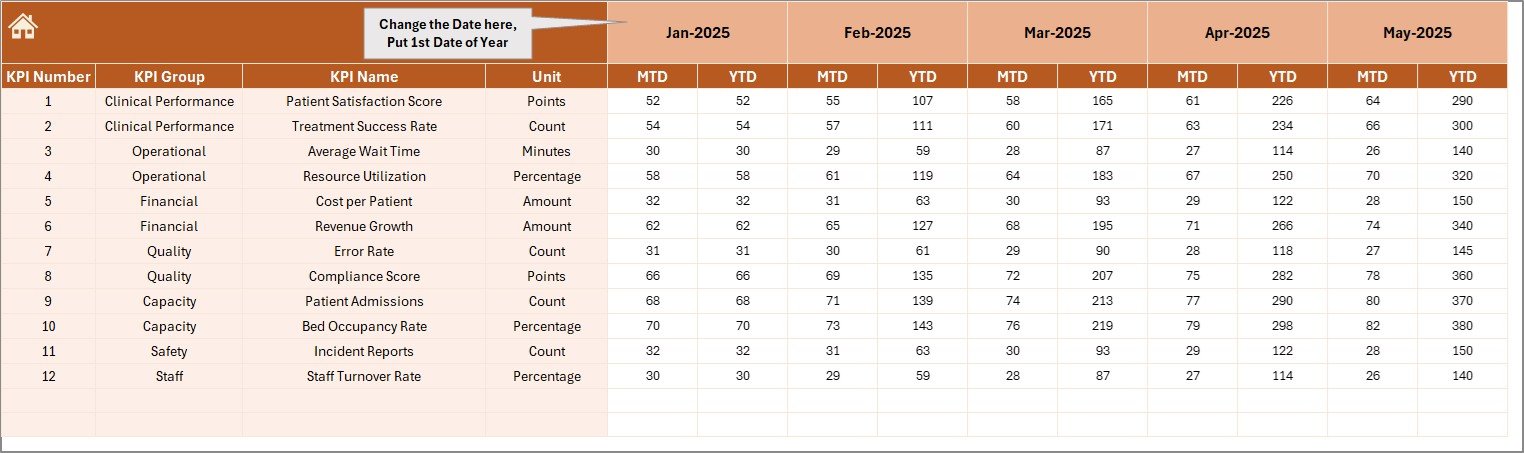
This sheet is designed for entering the actual MTD and YTD values for selected months.
- The first month of the fiscal year can be set via cell
E1. - Users input actual performance data for each KPI across months.
 Actual Numbers Input Sheet
5. Target Number Input Sheet
This sheet is set for entering the monthly target numbers for each KPI. It includes target values for both MTD and YTD.
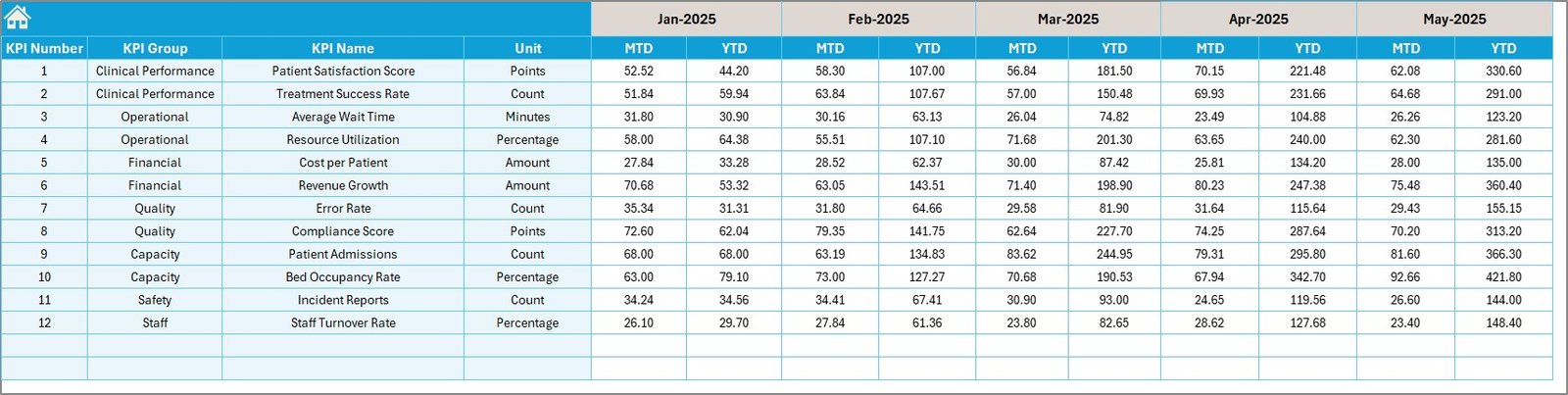 Target Number Input Sheet
6. Previous Year Number Sheet
This sheet captures the previous year’s performance data, structured similarly to the current year’s actual numbers, enabling meaningful year-over-year comparisons.
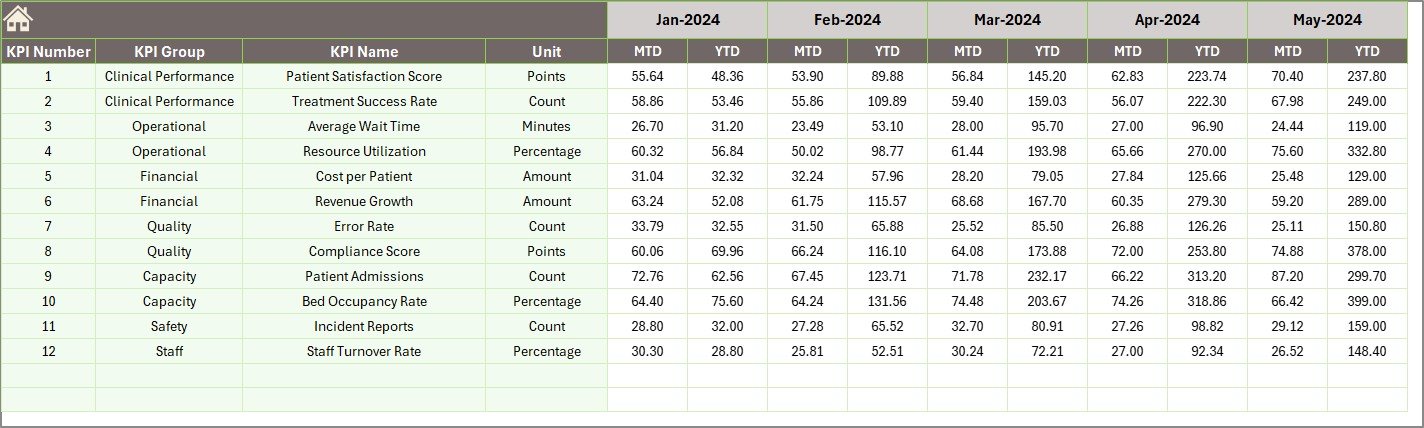 Previous Year Number Input Sheet
7. KPI Definition Sheet
This sheet stores comprehensive KPI metadata to provide context on each metric.
- KPI Name
- KPI Group
- Unit
- Formula
- KPI Definition
- KPI Type as LTB (Lower The Better) or UTB (Upper The Better)
 KPI Definition Sheet
Advantages of Stem Cell Banks KPI Dashboard
- Dynamic Data Visualization: Easily track performance through interactive charts and conditional formatting.
- User-Friendly Interface: Simple navigation with clear button-driven menus improves usability.
- Customizable: Update KPI definitions, formulas, and targets as per the evolving requirements of the stem cell bank.
- Efficient Data Management: Separate sheets for actuals, targets, and previous year data streamline data entry and updates.
- Enhanced Decision-Making: Real-time comparisons and trends support better operational and strategic decisions.
Opportunities for Improvement
Click to Buy Stem Cell Banks KPI Dashboard in Excel
- Integrate automated data import from lab systems or ERP to reduce manual input errors.
- Add predictive analytics features to forecast KPI trends.
- Enhance mobile responsiveness or convert dashboard to web-based tools for remote access.
- Incorporate more detailed drill-down reports for individual KPI elements.
Best Practices
- Regularly update input sheets for actual, target, and previous year data to keep the dashboard relevant.
- Use the KPI Definition sheet to maintain clarity across departments.
- Train staff on navigating through the dashboard and interpreting KPI trends carefully.
- Review and adjust KPI targets periodically based on operational changes and business objectives.
FAQs
Click to Buy Stem Cell Banks KPI Dashboard in Excel
How do I select the month to view data on the dashboard?
Simply use the drop-down menu on cell D3 in the Dashboard sheet to select your desired month. The entire dashboard updates automatically.
Can I add more KPIs to the dashboard?
Yes, by adding new KPI definitions in the KPI Definition sheet and updating the input sheets, you can extend the dashboard to accommodate additional KPIs.
Is this dashboard suitable for stem cell banks of all sizes?
Absolutely. This template is designed to be scalable and adaptable to small, medium, and large stem cell banking operations.
Does the dashboard support real-time data automation?
The current template requires manual input. However, advanced automation can be integrated with Excel power tools or VBA macros depending on your requirements.
Conclusion
Click to Buy Stem Cell Banks KPI Dashboard in Excel
The Stem Cell Banks KPI Dashboard offers an organized, interactive, and visually appealing way to monitor your critical KPIs. Its versatile structure ensures you can track month-to-date and year-to-date performances effectively, compare against targets and previous year data, and keep key stakeholders informed with actionable insights. By implementing this dashboard, stem cell banks can enhance their performance analysis and make informed data-driven decisions.
For more insights and a detailed walkthrough, visit our website.
Visit our YouTube channel to watch the demo.
Click to Buy Stem Cell Banks KPI Dashboard in Excel