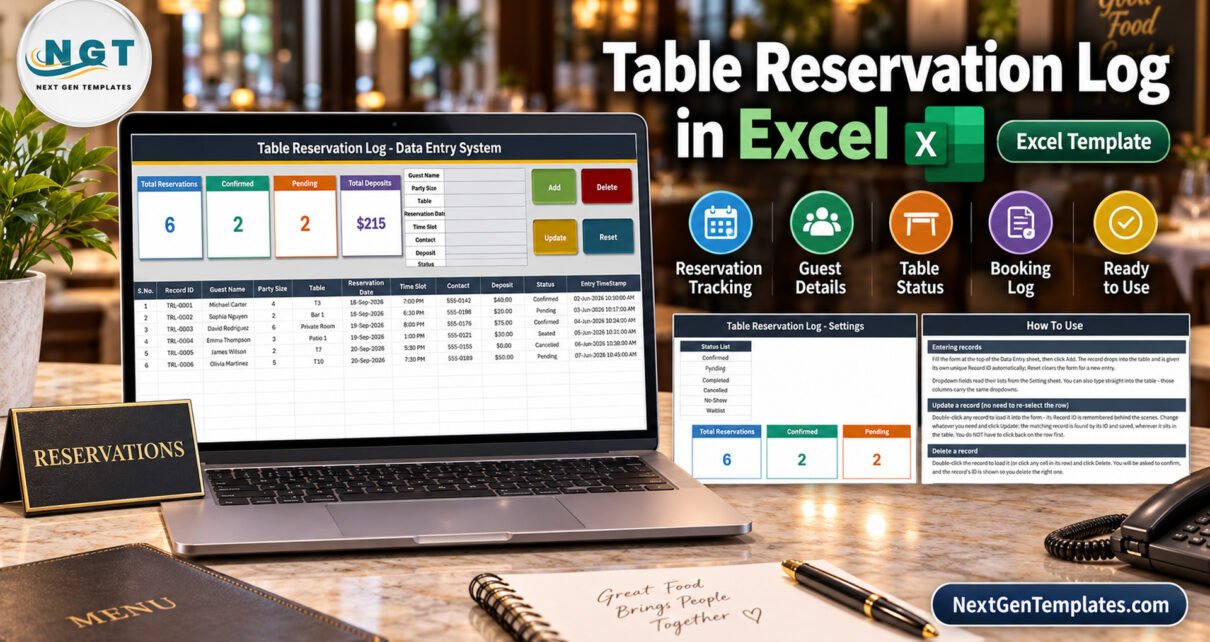
Table Reservation Log Data Entry System in Excel is a focused VBA workbook for restaurants, cafes, bistros, and small hospitality teams that need a clear internal booking register without a monthly software bill. It records Guest Name, Party Size, Table, Reservation Date, Time Slot, Contact, Deposit, and Status, then assigns a unique Record ID and entry timestamp to every saved row.
The workbook combines a guided form, four working buttons, editable dropdown lists, and four live cards on one Windows Excel file. It is designed for one responsible operator or a single shared workstation. It is not an online booking engine, table-availability service, POS, payment system, or multi-user database.
Download the Table Reservation Log Data Entry System in Excel
Key Features of the Table Reservation Log Data Entry System in Excel
- Seven reservation inputs: Guest Name, Party Size, Table, Reservation Date, Time Slot, Contact, Deposit, and Status are entered from the same panel.
- Four VBA actions: Add, Update, Delete, and Reset handle the daily record workflow without requiring staff to write formulas.
- Double-click-to-edit: double-click a booking to load it into the form. The workbook remembers the Record ID so Update changes the intended record even after sorting or repositioning.
- Four summary cards: Total Reservations, Confirmed, Pending, and Total Deposits recalculate from the register.
- Controlled dropdowns: table names, time slots, and statuses come from editable lists on the Setting sheet.
- Automatic audit details: every saved booking receives a TRL-style Record ID and Entry TimeStamp.
The result is an excel table reservation template that brings structure to bookings taken by phone, message, email, or at the host desk while remaining honest about what Excel cannot replace.
Workbook Sheets Explained
Data Entry
Data Entry is the working screen. Four cards sit beside the form, the Add, Delete, Update, and Reset buttons are immediately visible, and the records table keeps the guest, booking, deposit, status, and timestamp fields together. The sample file demonstrates six bookings with confirmed, pending, seated, and cancelled statuses.
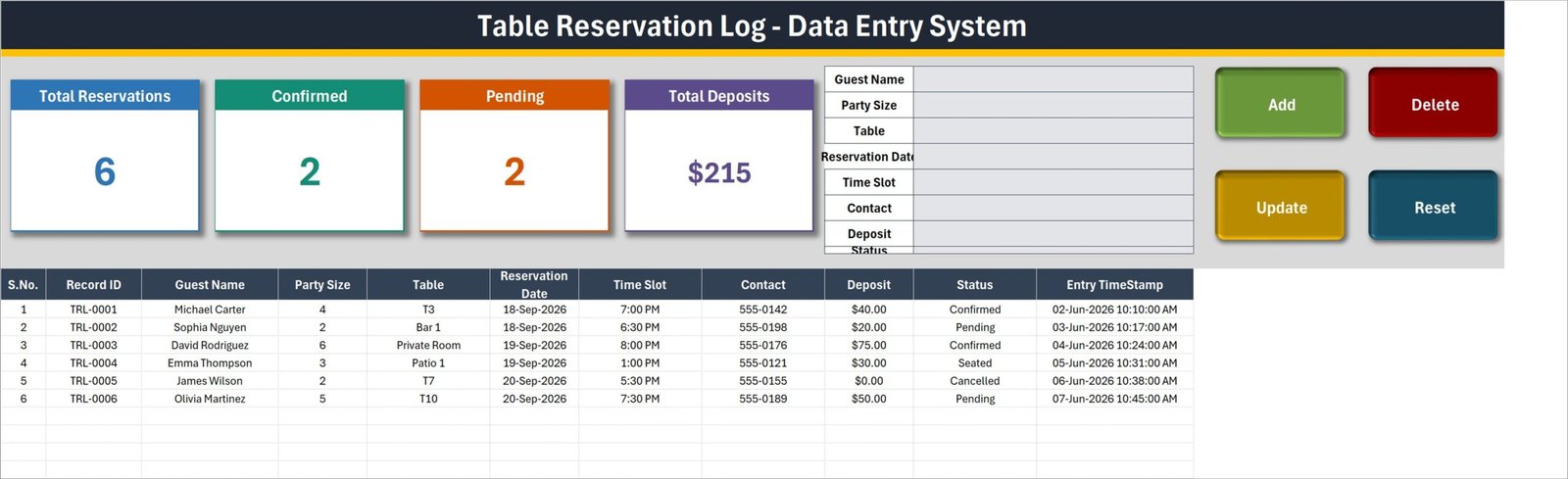
The Data Entry sheet combines the form, summary cards, action buttons, and reservation register.
Setting
Setting holds the three lists that control consistent data entry. The supplied Table List includes T1-T10, Patio 1, Patio 2, Bar 1, and Private Room. The Time Slot List covers lunch and dinner examples from 11:30 AM to 9:00 PM. The Status List includes Confirmed, Pending, Seated, Completed, Cancelled, No-Show, and Waitlist. Owners can replace these examples with the exact terms used by their venue.
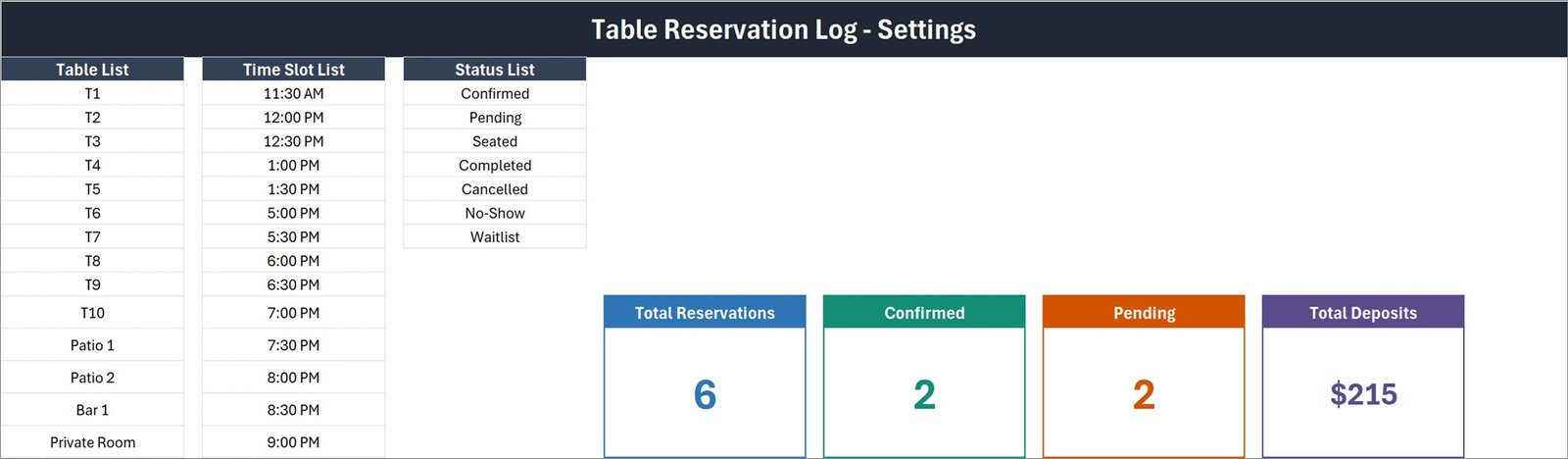
Edit the lists once and the reservation dropdowns use the updated values.
Instructions and Get More Templates
Instructions explains how to enter, update, delete, and reset a record, how the linked cards work, how to edit dropdowns, and why macros must be enabled. Get More Templates provides catalogue and tutorial links without affecting the reservation workflow.
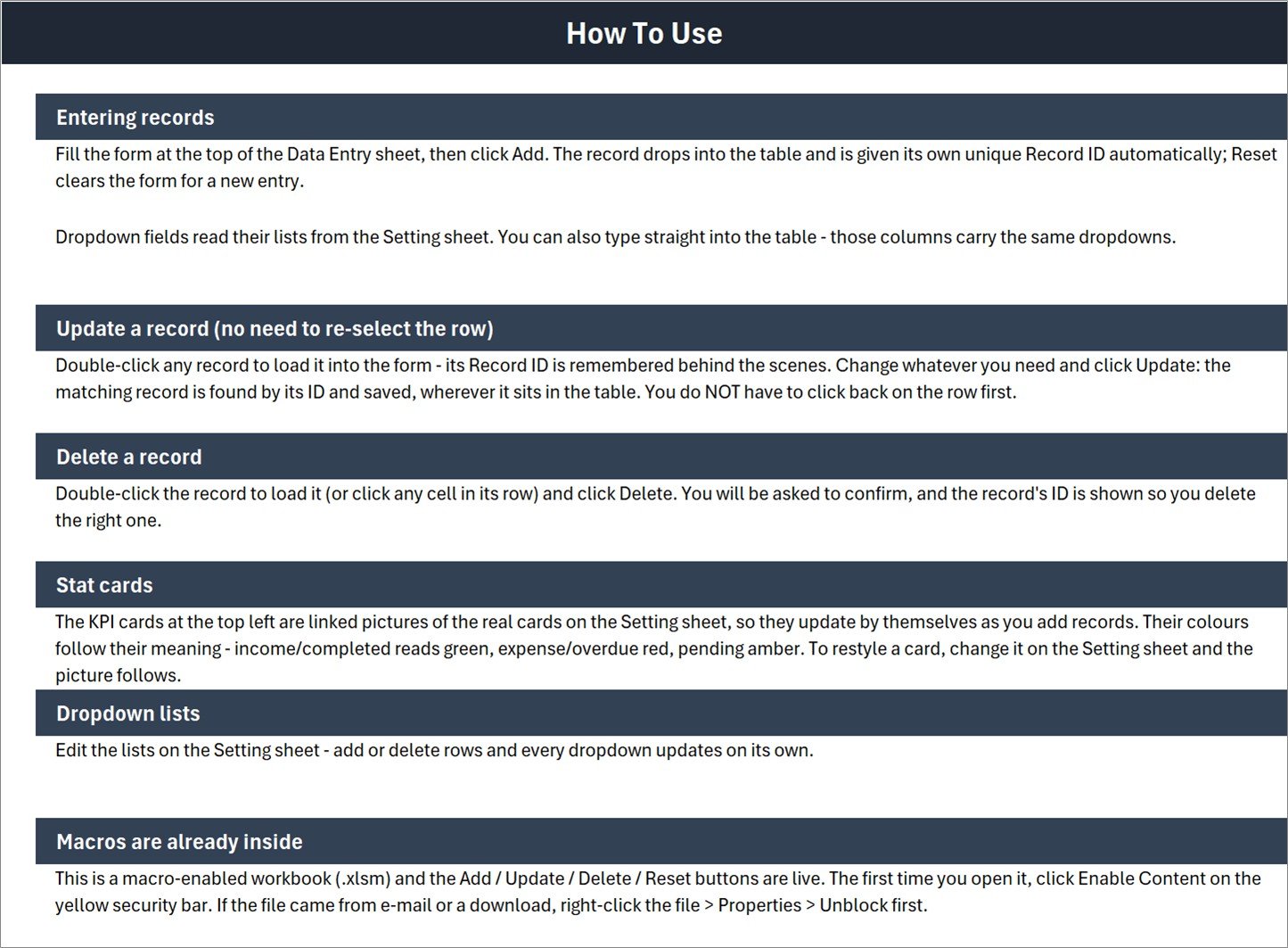
The instructions sheet documents the buttons, dropdowns, summary cards, and macro setup.
Table Reservation Log Data Entry System in Excel vs. Google Sheets vs. Paid Reservation SaaS – Feature Comparison
| Feature | This template | Google Sheets alternative | Paid reservation SaaS |
|---|---|---|---|
| Purchase model | One-time download | Free to build manually | Monthly or annual subscription |
| Core platform | Desktop Excel for Windows | Web browser | Cloud/web/mobile |
| Offline operation | Yes | Limited | Usually no |
| Add/update/delete buttons | Included VBA workflow | Requires Apps Script or manual rows | Included |
| Editable tables and slots | Included | Possible to build | Plan-dependent |
| Customer self-booking page | No | No by default | Usually yes |
| Live conflict prevention | No | No by default | Usually yes |
| Several simultaneous users | No | Yes | Yes |
| Payments and automated messages | No | No by default | Often available |
Who Should Use This Template
This restaurant reservation log in excel is suitable for an independent restaurant host, cafe manager, small bistro, private dining coordinator, club, or event venue that receives bookings directly and wants a structured internal record. It works best when one person maintains the file at a time.
It is not suitable when customers must see or choose live availability, when the venue needs automatic table assignment, when multiple staff members must edit together, or when reservations must connect to a website, POS, calendar, payments, email, SMS, or WhatsApp. A dedicated reservation service or multi-user application is the better option for those requirements.
Real-World Use Cases
Phone and message bookings
A host records the guest, party size, preferred table, date, time, contact number, deposit, and current status while speaking with the customer.
Private room deposits
A restaurant manager uses the Total Deposits card to review deposits captured in the register for private-room bookings, then completes any accounting or payment reconciliation in the venue’s proper financial system.
Waitlist and seating progress
A cafe can adapt the status list to Pending, Confirmed, Seated, Completed, Cancelled, No-Show, and Waitlist, helping one operator see how reservations progress through service.
Advantages of the Table Reservation Log Data Entry System in Excel
The main advantage is controlled simplicity. The table booking register in excel keeps the booking form, current totals, and saved register on one screen. Staff use dropdowns for repeatable fields, while the buttons make common record actions visible. Because it runs locally, a temporary internet outage does not stop the host desk from recording a phone booking.
The second advantage is ownership. The venue can edit its table names, serving slots, and status language without opening a vendor settings portal or paying for more users. The downloaded workbook remains available for the buyer to use and adapt within Excel.
Opportunities for Improvement
The template deliberately stops at structured record keeping. It does not include a floor plan, capacity rules, overlapping-time conflict alerts, online booking forms, reminder messages, guest history, payment processing, or real-time multi-user access. It also does not validate phone numbers or guarantee that a table is free. High-volume venues should treat this as a lightweight log, not as a replacement for a commercial reservation platform.
The excel vba reservation system also depends on desktop Excel for Windows. Excel for the web and Google Sheets cannot run its VBA buttons, and Excel for Mac is not supported for this workflow.
Best Practices
- Replace the sample table, time-slot, and status lists before entering live bookings.
- Use one controlled copy of the workbook and assign one owner per shift.
- Keep regular dated backups, especially before deleting old records.
- Never store payment-card details in the Contact or Deposit fields.
- Use status values consistently so the Confirmed and Pending cards remain meaningful.
- Review the reservation register before seating guests because the workbook does not prevent conflicts.
For safe setup, read Microsoft’s official guidance on enabling or disabling macros in Microsoft 365 files.
Explore Relevant Templates
- Restaurant Order Data Entry System in Excel covers order capture after guests are seated.
- Hotel Booking Agent Data Entry System in Excel applies a similar form-and-register pattern to accommodation bookings.
- Restaurants and Food Services Dashboard in Excel is a broader analytical template for restaurant performance.
Frequently Asked Questions
What does the Table Reservation Log Data Entry System in Excel track?
It tracks Guest Name, Party Size, Table, Reservation Date, Time Slot, Contact, Deposit, and Status, plus an automatic Record ID and Entry TimeStamp.
Do I need to enable macros?
Yes. Add, Update, Delete, Reset, and double-click editing depend on VBA macros in desktop Excel for Windows.
Can customers book directly through this workbook?
No. Staff use the workbook to log reservations received through other channels.
Can I customize table names and time slots?
Yes. Both lists, plus the status list, are editable on the Setting sheet.
Does the workbook prevent double-booking?
No. It records what the operator enters and does not include a scheduling conflict engine.
Can several staff members edit it simultaneously?
No. Use one operator or one shared workstation at a time.
What is included in the download?
The ZIP contains one macro-enabled .xlsm workbook with Data Entry, Setting, Instructions, and Get More Templates sheets.
About the Author
Built by PK – Microsoft Certified Professional with 15+ years of Excel, Google Sheets, and Power BI experience. Founder of NextGenTemplates, reaching 300K+ subscribers across YouTube channels. Every template is hand-built and tested before release.
Conclusion
The Table Reservation Log Data Entry System in Excel is a practical step up from a handwritten booking diary when one person needs a consistent guest-and-table register. Its real value is straightforward: seven booking inputs, four record actions, three editable dropdown lists, four summary cards, and one clean records table.
If that matches your operating model, download the Table Reservation Log Data Entry System in Excel, configure the Setting sheet, enable macros, and begin with a fresh copy for your venue.
For more Excel tutorials and ready-to-use business templates, visit PK: An Excel Expert on YouTube.