Running a thrift store requires more than passion and good inventory. You need clarity, control, and continuous performance tracking. However, many thrift store owners and managers still rely on scattered spreadsheets, manual calculations, and delayed reports. As a result, they struggle to understand what works, what needs improvement, and where profits leak.
That is exactly where a Thrift Stores KPI Dashboard in Excel becomes a powerful solution.
In this detailed article, you will learn what a Thrift Stores KPI Dashboard in Excel is, how it works, why it matters, and how you can use it to improve decision-making. Moreover, this guide explains every worksheet, highlights advantages, shares best practices, and answers the most common questions at the end.
Click to buy Thrift Stores KPI Dashboard in Excel
What Is a Thrift Stores KPI Dashboard in Excel?
A Thrift Stores KPI Dashboard in Excel is a structured performance monitoring tool that helps thrift store owners track key performance indicators (KPIs) in one centralized place. Instead of reviewing multiple sheets or reports, you get a clear snapshot of store performance using automated calculations, visual indicators, and trend analysis.
Moreover, this dashboard transforms raw operational data into meaningful insights. You can track sales efficiency, inventory movement, donation trends, pricing effectiveness, and operational costs without complex software.
Because it uses Excel, you can also customize it easily. In addition, you can share it with your team without extra licenses or technical barriers.
Why Do Thrift Stores Need KPI Dashboards?
Thrift stores operate on thin margins. Therefore, small inefficiencies can create large financial impacts. Without KPIs, you manage blindly. However, with a KPI dashboard, you manage with clarity.
Here is why KPI dashboards matter for thrift stores:
- They help you monitor performance daily, monthly, and yearly
- They show gaps between targets and actual results
- They highlight trends before problems grow
- They support data-driven decisions instead of assumptions
- They save time spent on manual reporting
Because of these reasons, thrift stores that track KPIs consistently often outperform those that do not.
What Makes the Thrift Stores KPI Dashboard in Excel Unique?
This Thrift Stores KPI Dashboard in Excel focuses on simplicity, automation, and actionable insights. It does not overwhelm users with unnecessary complexity. Instead, it delivers clarity.
Below are the core design principles of this dashboard:
- Single-click navigation
- Monthly and Year-to-Date (YTD) analysis
- Target vs Actual comparisons
- Previous Year (PY) benchmarking
- Conditional formatting for instant insights
- Easy data entry and maintenance
As a result, both small and medium thrift stores can use this dashboard effectively.
What Are the Key Worksheets in the Thrift Stores KPI Dashboard in Excel?
This dashboard contains 7 well-structured worksheets, each designed for a specific purpose. Together, they create a complete KPI monitoring system.
Summary Page
The Summary Page acts as the index and navigation hub of the dashboard.
Key Highlights of the Summary Page:
- Contains 6 navigation buttons
- Allows quick movement to each worksheet
- Improves user experience and efficiency
- Eliminates scrolling or manual searching
Because of this design, even non-technical users can navigate the dashboard confidently.

Click to buy Thrift Stores KPI Dashboard in Excel
Dashboard Sheet
The Dashboard Sheet is the heart of the Thrift Stores KPI Dashboard in Excel.
Key Features of the Dashboard Sheet:
- Month selection using a drop-down in cell D3
- Automatic update of all KPIs based on the selected month
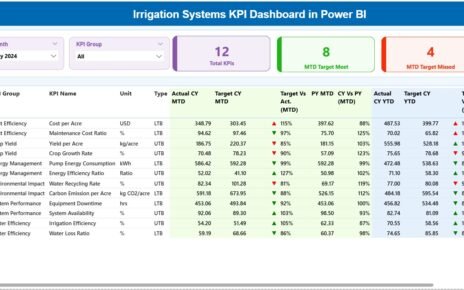
- Displays MTD (Month-to-Date) data
- Displays YTD (Year-to-Date) data
- Shows Actual, Target, and Previous Year values
Performance Comparisons Included:
- Target vs Actual
- Previous Year vs Actual
Visual Indicators:
- Conditional formatting
- Up and down arrows for quick performance signals
Because of these features, users can instantly identify overperforming and underperforming KPIs.

Click to buy Thrift Stores KPI Dashboard in Excel
Trend Sheet
The Trend Sheet focuses on KPI-level analysis over time.
How the Trend Sheet Works:
- Select a KPI name from the drop-down in cell C3
- View KPI details instantly
KPI Information Displayed:
- KPI Group
- KPI Unit
- KPI Type (Lower the Better or Upper the Better)
- KPI Formula
- KPI Definition
Trend Analysis Included:
- MTD trend chart
- YTD trend chart
- Comparison of Actual, Target, and Previous Year values
As a result, you can identify long-term patterns instead of relying only on single-month results.

Click to buy Thrift Stores KPI Dashboard in Excel
Actual Numbers
The Actual Numbers Input Sheet handles real performance data entry.
Key Features:
- Enter MTD and YTD actual values
- Change the active month using cell E1
- Enter the first month of the year once
- Keep the structure consistent throughout the year
Because of this design, data entry remains clean and controlled. Moreover, it reduces calculation errors.

Click to buy Thrift Stores KPI Dashboard in Excel
Target Sheet
The Target Sheet Tab allows you to define performance expectations.
What You Do in This Sheet:
- Enter target values for each KPI
- Define targets for both MTD and YTD
- Update targets monthly or annually
As a result, you can measure success objectively and motivate your team with clear goals.

Click to buy Thrift Stores KPI Dashboard in Excel
Previous Year Number Sheet
The Previous Year Number Sheet supports benchmarking and comparison.
Key Benefits:
- Store last year’s KPI values
- Compare current performance with historical results
- Identify seasonal trends
- Measure improvement or decline accurately
Because thrift store performance often changes seasonally, this sheet becomes extremely valuable.

Click to buy Thrift Stores KPI Dashboard in Excel
KPI Definition Sheet
The KPI Definition Sheet acts as a reference guide for the entire dashboard.
Information Stored in This Sheet:
- KPI Name
- KPI Group
- KPI Unit
- KPI Formula
- KPI Definition
This sheet ensures consistency and clarity. As a result, every stakeholder understands what each KPI means and how it gets calculated.

Click to buy Thrift Stores KPI Dashboard in Excel
Advantages of Thrift Stores KPI Dashboard in Excel
Using a Thrift Stores KPI Dashboard in Excel delivers multiple benefits for store owners and managers.
Key Advantages:
- Centralized KPI tracking
- Real-time performance visibility
- Easy-to-use Excel interface
- No need for expensive BI tools
- Faster decision-making
- Reduced manual reporting effort
- Improved accountability
- Better goal alignment
Moreover, Excel dashboards offer flexibility that many cloud tools lack.
How Does This Dashboard Improve Decision-Making?
This dashboard supports better decisions because it focuses on clarity.
- It shows where targets miss expectations
- It highlights improving and declining trends
- It compares current performance with history
- It supports monthly and annual planning
Because of these insights, thrift store managers can act quickly and confidently.
Best Practices for the Thrift Stores KPI Dashboard in Excel
To get the best results, follow these best practices:
- Update Data Regularly
Always update actual numbers on a fixed schedule. Consistency improves accuracy.
- Set Realistic Targets
Avoid unrealistic targets. Instead, align goals with historical data.
- Review Trends Monthly
Do not rely only on single-month numbers. Trend analysis reveals the real story.
- Keep KPI Definitions Clear
Update the KPI Definition Sheet whenever KPIs change.
- Limit KPI Overload
Track only meaningful KPIs. Too many KPIs reduce focus.
- Use Conditional Formatting Wisely
Visual indicators should guide action, not confuse users.
Who Can Benefit from a Thrift Stores KPI Dashboard in Excel?
This dashboard suits multiple roles:
- Thrift store owners
- Store managers
- Finance teams
- Operations managers
- Regional supervisors
- Non-profit retail organizations
Because Excel is widely available, adoption remains easy.
How Does This Dashboard Support Growth?
Growth requires visibility. This dashboard provides that visibility.
- It shows where margins improve
- It identifies cost inefficiencies
- It highlights top-performing categories
- It supports expansion planning
As a result, thrift stores can grow sustainably.
Conclusion: Why Every Thrift Store Needs a KPI Dashboard in Excel
A Thrift Stores KPI Dashboard in Excel transforms how you manage performance. Instead of reacting late, you act early. Instead of guessing, you analyze. Instead of drowning in data, you gain clarity.
With structured worksheets, automated comparisons, and clear visuals, this dashboard becomes an essential management tool. Moreover, it fits perfectly into existing Excel workflows.
If you want better control, smarter decisions, and consistent growth, this dashboard is not optional. It is essential.
Frequently Asked Questions (FAQs)
What KPIs should a thrift store track?
A thrift store should track sales efficiency, inventory turnover, donation conversion, pricing effectiveness, operating costs, and profit margins.
Can beginners use this Thrift Stores KPI Dashboard in Excel?
Yes, beginners can use it easily because it uses simple navigation, drop-downs, and clear instructions.
How often should I update the dashboard?
You should update actual numbers monthly. However, frequent reviews improve accuracy and insights.
Can I customize KPIs in this dashboard?
Yes, you can modify KPIs easily using the KPI Definition Sheet and target inputs.
Does this dashboard support year-over-year comparison?
Yes, the Previous Year Number Sheet enables detailed year-over-year analysis.
Do I need advanced Excel skills to use this dashboard?
No, basic Excel knowledge is enough. The dashboard handles calculations automatically.
Visit our YouTube channel to learn step-by-step video tutorials
Watch the step-by-step video tutorial:
Click to buy Thrift Stores KPI Dashboard in Excel