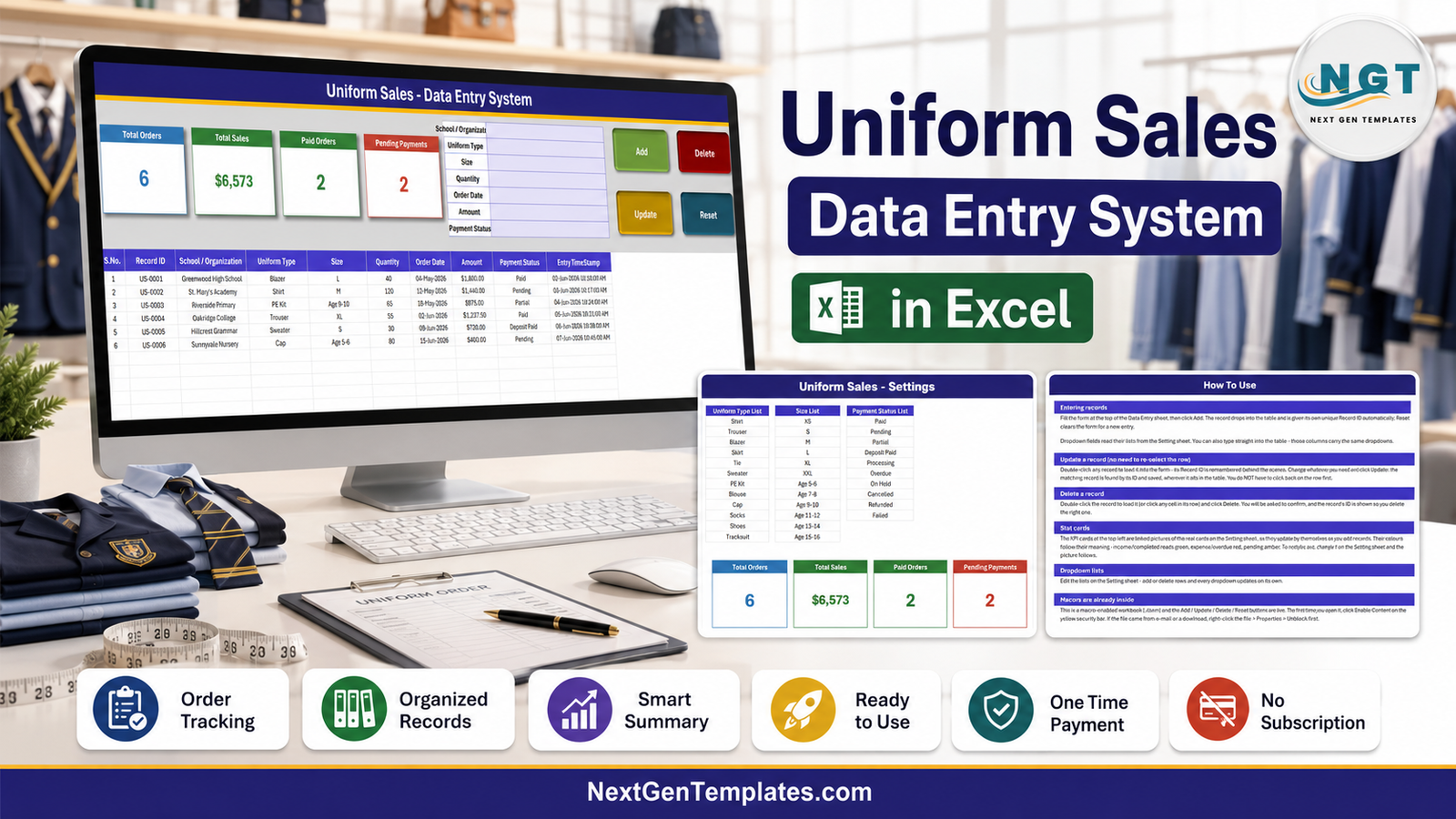
The Uniform Sales Data Entry System in Excel runs an entire uniform order book from a 7-field VBA form with 4 action buttons, feeding a 10-column register and 4 live KPI cards. Every order gets an automatic Record ID in the US-0001 format and an Entry TimeStamp, and all three dropdown lists are editable from a single Setting sheet. The sample workbook ships with six orders, twelve uniform types, twelve sizes and ten payment statuses.
Uniform selling is a seasonal scramble. A school office takes several hundred orders in the six weeks around the start of term; a schoolwear supplier juggles bulk purchase orders from a dozen schools at once. Most of it ends up in a notebook, a WhatsApp thread, or a spreadsheet that somebody re-formats every August. The awkward part is never the sale itself — it is remembering which blazer was a Deposit Paid, which PE kit order was cancelled, and what the term is actually worth so far. This system treats each order as a record with an ID rather than a line in a grid, and keeps the running totals on screen while you work.
Key Features of the Uniform Sales Data Entry System in Excel
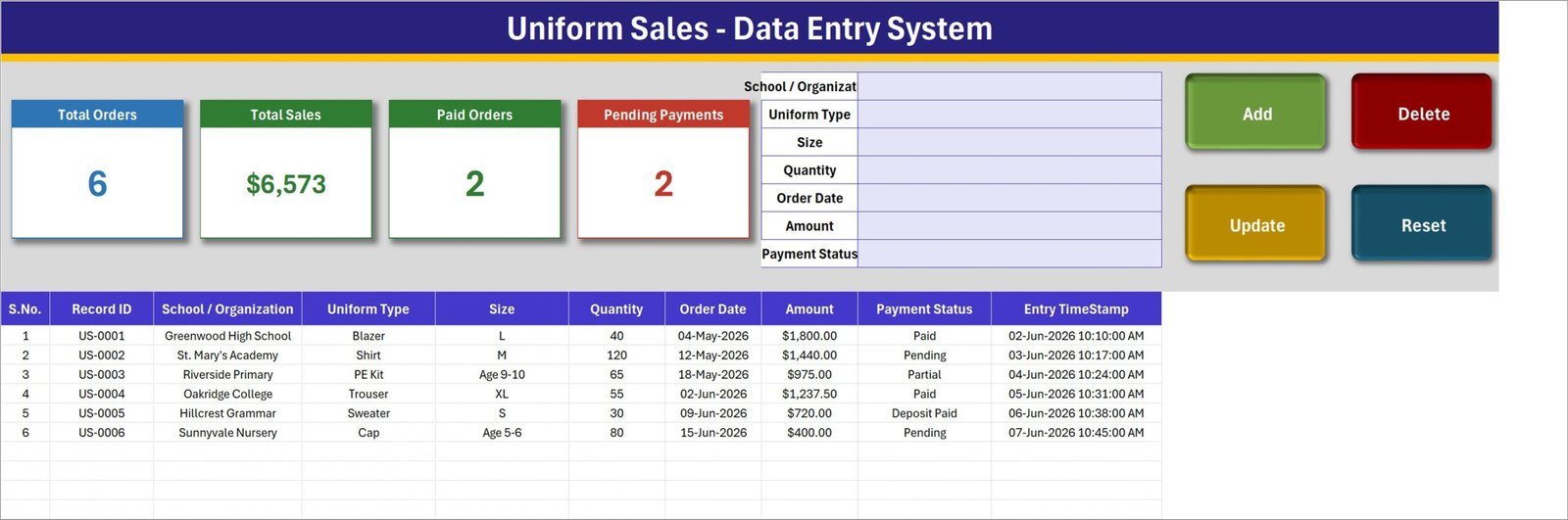
- A seven-field entry form — School / Organization, Uniform Type, Size, Quantity, Order Date, Amount and Payment Status — sitting at the top of the Data Entry sheet with Add, Delete, Update and Reset buttons beside it.
- Automatic Record IDs. Each order is stamped US-0001, US-0002 and so on at the moment of creation, alongside an Entry TimeStamp showing exactly when it was logged.
- Four live KPI cards — Total Orders, Total Sales, Paid Orders and Pending Payments — rendered as linked pictures of real cards on the Setting sheet, so they refresh on their own and can be restyled in one place.
- Twelve uniform types ready to go: Shirt, Trouser, Blazer, Skirt, Tie, Sweater, PE Kit, Blouse, Cap, Socks, Shoes and Tracksuit.
- Twelve sizes across two conventions. XS, S, M, L, XL and XXL for adult and staff sizing, plus age bands from Age 5-6 through Age 15-16 for primary and secondary pupils — both in the same list, so nothing needs a workaround.
- Ten payment statuses: Paid, Pending, Partial, Deposit Paid, Processing, Overdue, On Hold, Cancelled, Refunded and Failed. Uniform money arrives in instalments, and the status list reflects that.
- Update by ID, not by row. Double-click a record to load it into the form; the system remembers its ID, so clicking Update finds and saves the right order wherever it now sits in the table.
- Confirmed deletes. Delete shows you the Record ID and asks before removing anything.
- A 10-column register — S.No., Record ID, School / Organization, Uniform Type, Size, Quantity, Order Date, Amount, Payment Status and Entry TimeStamp — that you can sort and filter like any Excel table.
- Everything offline. One macro-enabled .xlsm file, no account, no internet, no vendor holding your order book.
Template Structure
Sheet 1: Data Entry
The sheet you actually work in. Total Orders, Total Sales, Paid Orders and Pending Payments cards run along the top left, the seven-field form sits to their right, and the four VBA buttons — Add, Delete, Update, Reset — are stacked at the far right in green, red, gold and teal. Below the header band, the register lists every order: the sample data runs from a Greenwood High School blazer order through to a Sunnyvale Nursery cap order, across sizes L, M, Age 9-10, XL, S and Age 5-6, with a mix of Paid, Pending, Partial and Deposit Paid statuses.
Sheet 2: Setting
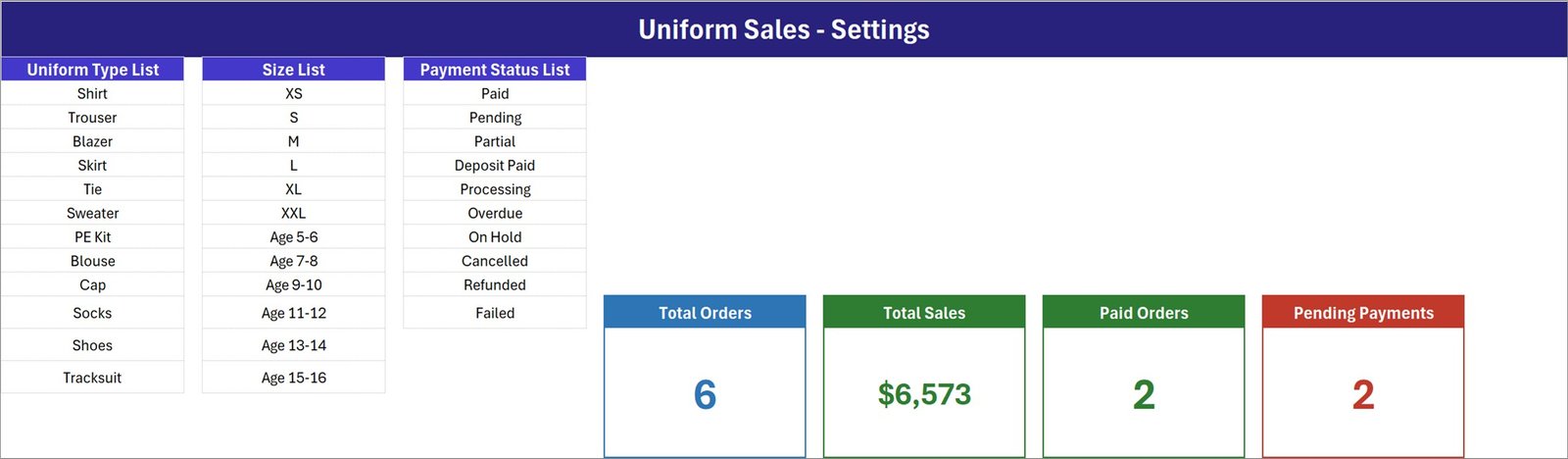
The configuration sheet. Three vertical lists define everything the dropdowns offer: Uniform Type List (Shirt, Trouser, Blazer, Skirt, Tie, Sweater, PE Kit, Blouse, Cap, Socks, Shoes, Tracksuit), Size List (XS, S, M, L, XL, XXL, then Age 5-6, Age 7-8, Age 9-10, Age 11-12, Age 13-14, Age 15-16) and Payment Status List (Paid, Pending, Partial, Deposit Paid, Processing, Overdue, On Hold, Cancelled, Refunded, Failed). The four live KPI cards that the Data Entry sheet mirrors are also built here — Total Orders counts the records, Total Sales adds up the Amount column, and Paid Orders and Pending Payments count the orders at each of those two statuses.
Sheet 3: Instructions (How To Use)
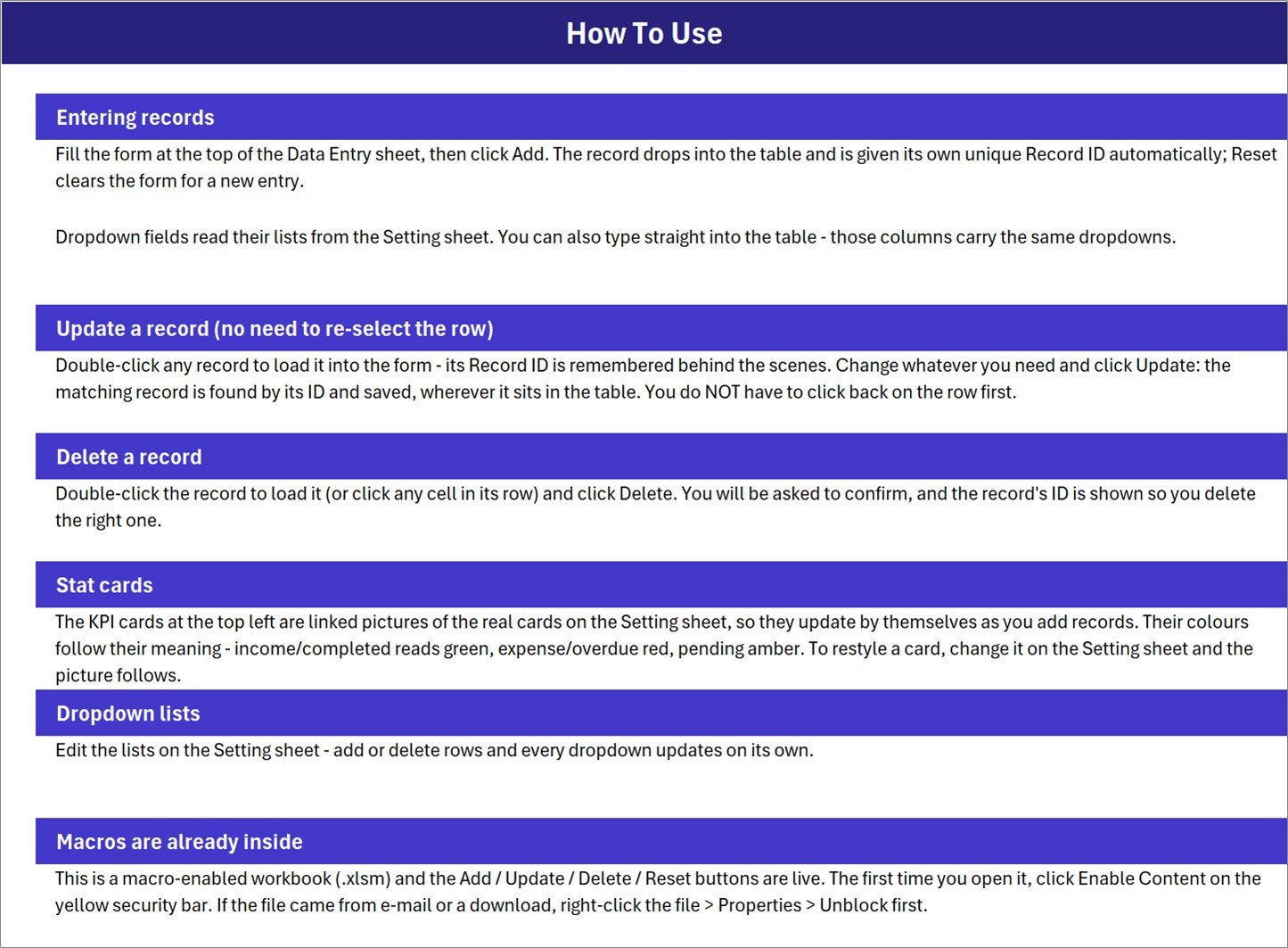
An in-workbook guide covering six topics: entering records, updating a record without re-selecting the row, deleting safely, how the stat cards are wired to the Setting sheet, editing the dropdown lists, and enabling macros the first time you open the file (including the right-click, Properties, Unblock step for files that arrived by email or download). A fourth sheet, Get More Templates, points back to the rest of the catalogue.
Uniform Sales Data Entry System vs. a Google Sheets Order Log vs. Retail POS Software — Feature Comparison
| Feature | Uniform Sales Data Entry System | Google Sheets Order Log | Retail POS / Order Software |
|---|---|---|---|
| Cost | $6.99 one-time | Free | $29-99 per till per month |
| Platform | Microsoft Excel, offline | Browser only, needs internet | Cloud SaaS, often with hardware |
| Setup time | Under 10 minutes | 1-2 hours to build from scratch | Days, plus onboarding |
| Guided entry form | 7-field VBA form with 4 buttons | Type directly into cells | Yes |
| Automatic record IDs | Yes — US-0001 format | Manual or formula | Yes |
| School age-band sizing | Built in — Age 5-6 to Age 15-16 | You build it | Rarely, without customisation |
| Part-payment statuses | 10 statuses incl. Partial, Deposit Paid | You build it | Yes |
| Works with no internet | Yes | No | No |
| Takes card payments / prints invoices | No | No | Yes |
| Deducts stock automatically | No | No | Yes |
| Data stays on your machine | Yes — one .xlsm file | Stored in Google Drive | Vendor servers |
| Year-1 cost | $6.99 total | $0 | $348-1,188 per till |
For a school office, uniform shop or workwear supplier that needs a proper order register and a running sales figure — without a till, a subscription or a stock engine — this sits in the sweet spot.
Who Should Use This Template
Perfect for:
- School offices and PTA-run uniform shops taking orders from parents each term
- Schoolwear and uniform suppliers logging bulk orders from several schools at once
- Corporate workwear vendors recording branded shirt, tie and blazer orders by organisation
- Anyone chasing part-paid orders who needs Partial, Deposit Paid and Overdue as real statuses
- Anyone who wants Add / Update / Delete behaviour without building a database
Not a fit if:
- You need a point of sale — this takes no payments and prints no invoices or receipts
- You need stock levels to fall as orders are entered; there is no inventory sheet here
- You are on Mac Excel or Google Sheets — the buttons depend on Windows VBA
- You expect Amount to calculate itself from Quantity and a unit price
- Several people need to edit the same file at the same time
Real-World Use Cases
Farida runs the uniform shop at a 900-pupil secondary school. Between July and September she takes several hundred orders across blazers, ties, PE kits and sweaters. Each order goes in under the family name with its size, quantity and amount, and the Pending Payments card tells her every morning how many parents still owe before term starts. Nothing is chased twice, because the status on the record is the only list she keeps.
Devon supplies schoolwear to eleven primary schools. Each bulk order is logged against the school name, so filtering the register by School / Organization gives him that school’s full order history in one click. Deposit Paid and Partial keep the half-settled purchase orders visible instead of buried in a notebook, and Total Sales gives him the season’s figure without a pivot table.
Priya handles branded workwear for a facilities company. New starters need shirts and ties in adult sizes, and the same register handles them because the Size List carries XS to XXL alongside the school age bands. When an order is cancelled she sets the status to Cancelled rather than deleting it, so the month-end figures still reconcile against what was actually delivered.
Advantages of the Uniform Sales Data Entry System
A form beats a notebook. Typing orders into a hand-formatted sheet invites blank sizes, three spellings of the same school and statuses nobody agrees on. A seven-field form with three dropdowns makes bad data much harder to enter in the first place.
Editing does not break the file. Because Update and Delete resolve records by ID rather than by row number, you can sort the register by school, filter it by uniform type or insert rows without any risk that the next edit hits the wrong order.
Sizing that matches the trade. Very few generic order templates ship with both letter sizes and school age bands. Having Age 5-6 through Age 15-16 sitting beside XS to XXL is the difference between a list you use and a list you rebuild.
Payment reality, not payment theory. Ten statuses cover deposits, part-payments, holds, refunds and failures — the states uniform money actually passes through between an order form in July and a full settlement in October.
The numbers are free. Total Orders, Total Sales, Paid Orders and Pending Payments are always current without anybody refreshing a pivot or dragging a formula down.
It costs $6.99 once. A retail order platform at $29-99 per till per month reaches $348-1,188 in year one. This is a single file you buy once and keep.
Opportunities for Improvement
Honest limitations. It is not a point of sale: there is no payment capture, no cash drawer, no receipt and no invoice. If a parent pays at a counter, you record that they paid — the money moves somewhere else.
It also does not manage stock. Entering an order for forty blazers does not reduce a blazer balance anywhere, because there is no inventory sheet in the workbook. It is a sales and payment register, and pairing it with a separate stock list is the honest workaround.
Amount is typed rather than calculated. That is deliberate — bulk school rates, mixed baskets and negotiated discounts all break a simple quantity-times-price formula — but it does mean the figure is only as good as the person entering it.
Finally, it is Windows-Excel-bound and single-user. The VBA behind Add, Update, Delete and Reset will not run in Google Sheets, Mac Excel support for this style of workbook is unreliable, and two people cannot take orders in the same file at the same time.
Best Practices
- Configure the Setting sheet before you enter anything. Get your garments, size chart and statuses right first and every subsequent order is consistent.
- Trim the Payment Status List to the states you really use. Ten options is a starting menu, not a requirement; four or five well-understood statuses beat ten that people guess at.
- Never delete a cancelled order. Set the status to Cancelled instead — the record is worth more than the tidiness when you reconcile the term.
- Use School / Organization consistently. One agreed spelling per school or family makes filtering the register genuinely useful.
- Keep the file unblocked and macros enabled so the buttons work every time. See Microsoft’s guidance on enabling macros in Microsoft 365 files if your organisation locks this down.
- Save a fresh copy each academic year. One workbook per year keeps the register short and the Total Sales card meaningful.
- Back the file up. It is one .xlsm holding your whole order book — treat it like the database it is.
Explore Relevant Templates
- Online Order Tracker Data Entry System in Excel — the same order-register pattern for web orders and deliveries.
- Customer Credit (Udhaar) Data Entry System in Excel — for the accounts that never settle on the day.
- Membership Card Data Entry System in Excel — built the same way, for cards and renewals instead of orders.
- Class Schedule Data Entry System in Excel — the timetable side of the same school office.
- Fashion and Apparel Dashboard in Google Sheets — the same garment sales data presented as a full dashboard.
- Tailor Shop and Stitching Management System Web App — a full multi-user system when a workbook is no longer enough.
Related reading on this blog: Online Order Tracker Data Entry System in Excel and Customer Credit (Udhaar) Data Entry System in Excel, which uses the same form-and-cards structure for outstanding balances.
Frequently Asked Questions
What does the Uniform Sales Data Entry System record?
The Uniform Sales Data Entry System stores 10 fields per order — S.No., Record ID, School / Organization, Uniform Type, Size, Quantity, Order Date, Amount, Payment Status and Entry TimeStamp — entered through a seven-field form and written to a running register.
Do I need to enable macros?
Yes. The Uniform Sales Data Entry System is a macro-enabled .xlsm workbook, and Add, Update, Delete and Reset are VBA procedures. Click Enable Content the first time you open it, and unblock the file via right-click and Properties if it came from email or a download.
Is this a point-of-sale system?
No. It is an order register. The Uniform Sales Data Entry System does not take card payments, open a cash drawer, or print invoices or receipts. It records what was ordered, by whom, for how much, and whether it has been paid.
Does it track uniform stock levels?
No. Adding an order does not deduct anything from an inventory balance, because there is no stock sheet in this workbook. The Uniform Sales Data Entry System is a sales and payment register, deliberately kept to that job.
Can I add my own uniform types and sizes?
Yes. Every dropdown reads the Setting sheet. Add or remove rows in the Uniform Type List, Size List or Payment Status List and the Uniform Sales Data Entry System updates all of its dropdowns automatically, in the form and in the table columns.
Does the Amount calculate itself from Quantity?
No. Amount is the order value you enter, which keeps bulk discounts, mixed baskets and negotiated school rates possible. The Total Sales card then sums that column across every record in the register.
How long does setup take?
Under 10 minutes. Unzip, enable macros, replace the three dropdown lists on the Setting sheet with your own garments, sizes and statuses, then delete the six sample orders. The Uniform Sales Data Entry System is ready at that point.
Does it work on Mac or in Google Sheets?
The Uniform Sales Data Entry System is built for Microsoft Excel on Windows. The register and dropdowns will open elsewhere, but the Add, Update, Delete and Reset buttons rely on Windows VBA and will not run in Google Sheets.
About the Author
Built by PK — Microsoft Certified Professional with 15+ years of Excel, Google Sheets, and Power BI experience. Founder of NextGenTemplates, reaching 300K+ subscribers across YouTube channels. Every template is hand-built and tested before release.
Conclusion
The Uniform Sales Data Entry System in Excel treats a term’s uniform orders the way they should be treated — as records with IDs, statuses and timestamps, not as lines in a notebook. A seven-field form, four working buttons, four self-updating cards and three lists you control cover the whole job of keeping a uniform shop’s order book straight, offline, in one file.
🛒 Click here to Purchase the Uniform Sales Data Entry System in Excel
Instant download · One-time payment · No subscription · Lifetime access
For step-by-step walkthroughs of this and other Excel VBA tools, visit Youtube.com/@PK-AnExcelExpert.
Last updated: August 2026