The Customer Credit (Udhaar) Data Entry System in Excel turns a blank spreadsheet into a structured credit ledger that records 6 fields per entry, shows 3 live KPI cards — Total Credit, Total Paid, and Outstanding — and stores up to 200 timestamped records. Every total recalculates with SUMIF logic the moment you click Add, so you always know exactly how much udhaar is still owed.
Most shopkeepers still track customer credit in a paper bahi-khata or a messy spreadsheet, where a single wrong row throws off the balance. This guide shows how the Customer Credit (Udhaar) Data Entry System in Excel fixes that with a guided form, four one-click VBA buttons, and conditional-sum KPIs that never break — all fully offline on your own computer.
Key Features of the Customer Credit (Udhaar) Data Entry System in Excel
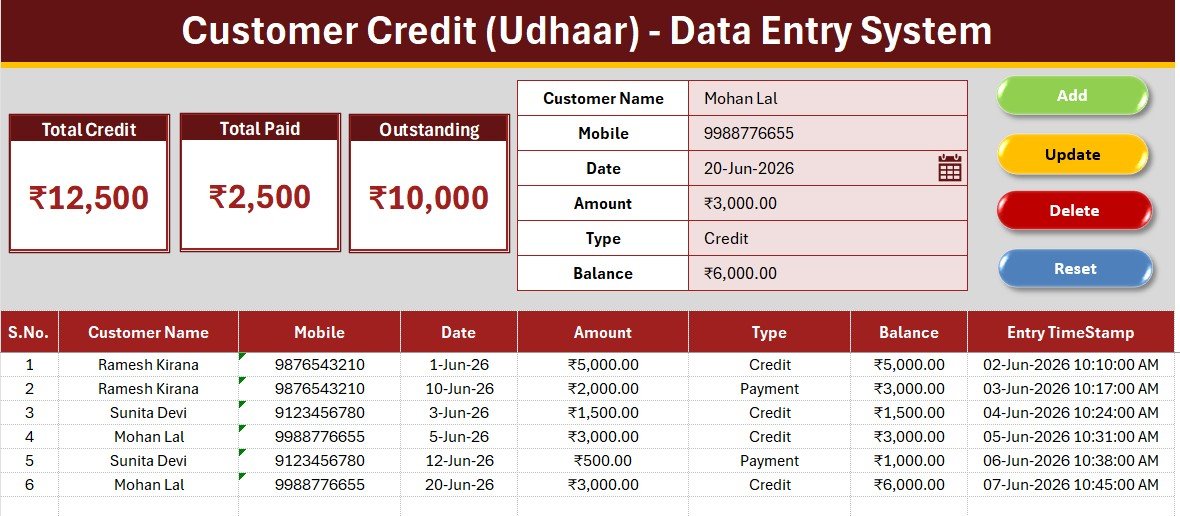
This template records Customer Name, Mobile, Date, Amount, Type (Credit or Payment), and Balance for every entry. The three KPI cards on the Data Entry sheet recalculate automatically, so your outstanding udhaar is always current.
- Guided entry form — Bold labels and tinted input cells keep every credit and payment record consistent and stop missed fields.
- Live Total Credit, Total Paid and Outstanding cards — Total Credit and Total Paid are conditional SUMIF totals on the Type column, and Outstanding is Total Credit minus Total Paid, so one mislabelled row never distorts your balance.
- One-click VBA buttons — Add, Update, Delete, and Reset run from a clean macro module, with no manual copy and paste.
- Editable Type dropdown — The Credit and Payment list lives on the Setting sheet and feeds the Type field through a named range.
- Rupee-ready — Ships with ₹ formatting and switches to dollar, euro, or pound in one Format Cells change.
- Audit-ready records — Auto-numbered rows with entry timestamps give a clean, time-stamped history of every customer’s udhaar and repayments.
Template Structure Explained
The workbook has four sheets: Data Entry, Setting, Instructions, and Get More Templates. The three views below show the everyday workflow.
Data Entry Dashboard — Form, Live KPIs and Buttons
The home screen pairs the six-field entry form with the three KPI cards for Total Credit, Total Paid, and Outstanding, plus the Add, Update, Delete, and Reset buttons for every record action.
Customer Credit Records Table with Running Balance
Every saved entry drops into an auto-numbered records table with a timestamp. As credit and payment rows are added, the KPI cards above recalculate so your Outstanding balance is always correct.

Setting Sheet — Editable Type Dropdown List
The Setting sheet holds the Credit and Payment Type list. Add or rename a value here and the Type dropdown updates automatically, with no formula edits.
Customer Credit System (Excel) vs Google Sheets vs Khatabook or OkCredit
| Feature | Customer Credit System (Excel) | Google Sheets Tracker | Khatabook / OkCredit |
|---|---|---|---|
| Cost | $5.99 one-time | Free but build it yourself | Free app, paid premium tiers |
| Platform | Microsoft Excel | Browser + Google account | Mobile app (Android / iOS) |
| Setup time | Under 5 minutes | Hours to design | Phone signup + onboarding |
| Works fully offline | Yes | No | No, needs internet sync |
| One-click Add / Update / Delete | Yes, VBA buttons | Manual rows | Yes |
| Live Total Credit / Paid / Outstanding cards | Yes | Build formulas yourself | Yes |
| Editable Type dropdown | Yes | Manual setup | Fixed |
| Data stays on your device | Yes | Cloud | Cloud |
| Year-1 cost for one shop | $5.99 total | $0 + your time | Free to paid premium plans |
For shopkeepers and small businesses that want private, offline udhaar tracking without a monthly app fee, the Customer Credit (Udhaar) Data Entry System in Excel sits in the sweet spot.
Who Should Use This Template
Perfect for:
- Kirana stores, medical shops, and small retailers who give regular customers goods on udhaar.
- Freelancers, contractors, and service providers tracking who still owes them money.
- Anyone who wants a private, offline credit ledger instead of a phone app that needs sign-in.
Not a fit if:
- You need multi-user cloud access with live collaboration across devices.
- You want automatic SMS payment reminders sent to customers.
- Your organization blocks macros and cannot enable VBA.
Real-World Use Cases
Suresh runs a neighbourhood kirana store. He logs every customer who takes goods on udhaar as Credit and every repayment as Payment, then reads Total Credit, Total Paid, and Outstanding off the KPI cards at the end of each day — without paying for a credit app.
Meena owns a small tailoring business. She records advance work as Credit and customer settlements as Payment through the form, uses the Mobile column to call clients with high balances, and reviews the records table each week to see how much money is still outstanding.
Arjun manages a hardware shop with dozens of regulars. He pairs this with his Purchase Entry Data Entry System in Excel so both his supplier purchases and his customer credit live in matching, easy-to-use workbooks.
Advantages of the Customer Credit (Udhaar) Data Entry System in Excel
The biggest advantage is reliability. Because Total Credit and Total Paid use the SUMIF function on the Type column, your Outstanding figure is always Total Credit minus Total Paid — it can never drift the way a hand-typed running balance does.
It is also genuinely private and offline. Unlike cloud credit apps, every customer’s name, mobile number, and balance stays on your own computer, with no account, no sync, and no monthly fee. For many shopkeepers, keeping that data off a third-party server is reason enough to switch.
Opportunities for Improvement
This is a single-file Excel tool, so it has honest limits. It does not send automatic SMS or WhatsApp reminders, it is not multi-user in real time, and the Balance column is entered by you rather than auto-calculated per customer. Shops that need automated reminders or a shared cloud ledger will outgrow it — though for a private, one-time-purchase udhaar book, those trade-offs are reasonable.
Best Practices
- Use a consistent Type value — always “Credit” or “Payment” — so the SUMIF cards stay accurate.
- Record the Mobile number for every customer so you can quickly follow up on high balances.
- Enter one transaction per row rather than combining several, which keeps the records table easy to audit.
- Back up the workbook weekly, since the data lives only on your device.
Explore Relevant Templates
If you track money in and out, pair this with the Income and Expense Data Entry System in Excel and the Daily Expense Tracker Data Entry System in Excel. Shops managing stock will also like the Medicine Stock Data Entry System in Excel. You can buy the credit ledger itself on the Customer Credit (Udhaar) Data Entry System product page.
Frequently Asked Questions
What does the Customer Credit (Udhaar) Data Entry System in Excel track?
It tracks Customer Name, Mobile, Date, Amount, Type, and Balance for every entry, with live Total Credit, Total Paid, and Outstanding cards that update automatically as you add records.
How is Outstanding calculated?
Outstanding is Total Credit minus Total Paid. Both totals are SUMIF sums on the Type column, so one mislabelled row never distorts your balance in the Customer Credit (Udhaar) Data Entry System in Excel.
How long does setup take?
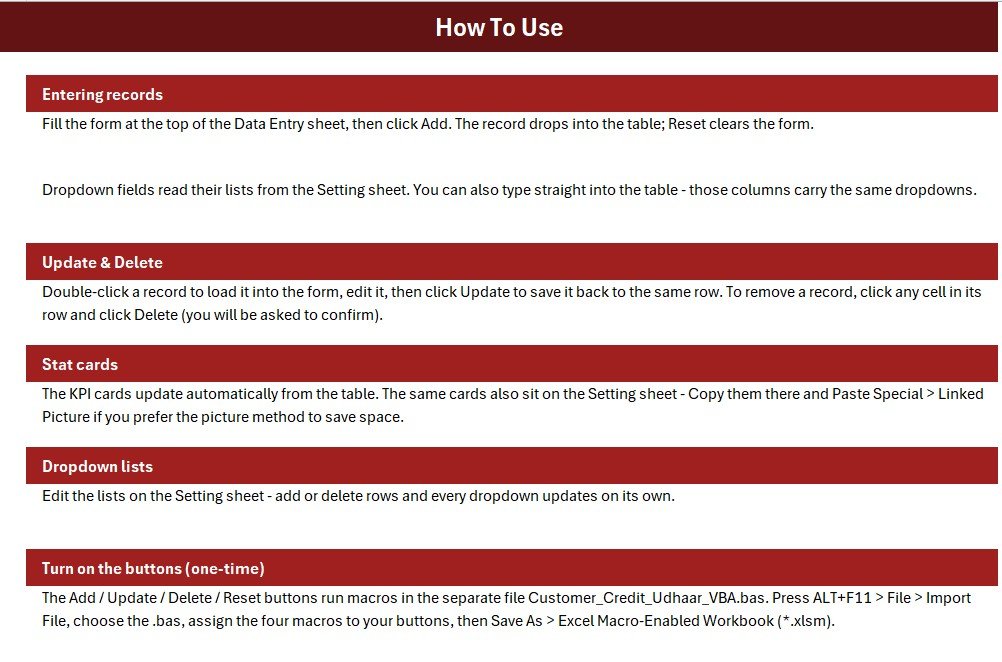
Under 5 minutes. Enable macros, import the VBA module once, assign the four buttons, save as a macro-enabled workbook, and start logging credit and payments.
Can I change the currency from rupees?
Yes. The template ships with ₹ formatting and switches to dollar, euro, pound, or any symbol through Format Cells in seconds.
How does this compare to Khatabook or OkCredit?
Khatabook and OkCredit are mobile apps that need a phone signup and internet sync. This Customer Credit (Udhaar) Data Entry System in Excel is a one-time $5.99 purchase that works fully offline and keeps every customer’s data on your own device.
Is it a one-time purchase?
Yes. One-time payment, lifetime access, free updates, no subscription, and no per-user fees.
About the Author
Built by PK a Microsoft Certified Professional with 15+ years of Excel, Google Sheets, and Power BI experience. Founder of NextGenTemplates, reaching 300K+ subscribers across YouTube channels. Every template is hand-built and tested before release.
Conclusion
If you are tired of a paper bahi-khata or a fragile spreadsheet, the Customer Credit (Udhaar) Data Entry System in Excel gives you a reliable, private, offline credit ledger with live Outstanding totals and one-click record management.
✅ Instant download · One-time payment · No subscription. For step-by-step video tutorials, visit YouTube.com/@PK-AnExcelExpert.
Last updated: June 2026