The wood and furniture manufacturing industry runs on precision, timing, and cost control. Every delay increases expenses. Every wrong production decision reduces profit. Moreover, customer expectations continue to grow. Therefore, manufacturers must track performance carefully and consistently.
However, many factories still depend on scattered Excel sheets. As a result, managers waste time compiling reports. Furthermore, leaders struggle to identify which product type earns more profit. At the same time, regional revenue trends often remain unclear.
So, how can wood and furniture manufacturers track everything in one centralized system?
The answer is simple.
Click to Purchases Wood and Furniture Manufacturing Dashboard in Power BI
You need a Wood and Furniture Manufacturing Dashboard in Power BI.
This ready-to-use Power BI dashboard transforms raw production and financial data into interactive visuals. In addition, it helps factory owners, production managers, and finance teams monitor profit, cost, revenue, and delivery performance instantly.
In this detailed guide, you will learn:
-
What the Wood and Furniture Manufacturing Dashboard in Power BI is
-
Why manufacturers need it
-
A complete explanation of all 5 dashboard pages
-
Advantages of using this dashboard
-
Best practices for implementation
-
Frequently Asked Questions with answers
Let us explore everything step by step.
What Is a Wood and Furniture Manufacturing Dashboard in Power BI?
A Wood and Furniture Manufacturing Dashboard in Power BI is a structured performance monitoring solution designed specifically for wood processing units and furniture factories.
It helps businesses:
-
Track on-time delivery performance
-
Monitor profit and profit margin
-
Analyze production cost
-
Compare revenue by region
-
Evaluate performance by product type
-
Assess performance by wood type
-
Review production line efficiency
-
Analyze monthly trends
Instead of checking multiple spreadsheets, you can review everything on one interactive platform. Moreover, Power BI updates visuals instantly when you change filters. Therefore, decision-making becomes faster and more accurate.
Why Do Wood and Furniture Manufacturers Need This Dashboard?
Furniture manufacturing includes raw material procurement, cutting, assembly, finishing, packaging, and delivery. Each stage affects cost and profitability. However, without a centralized reporting system, you may face serious challenges.
Common Problems Without a Dashboard
-
Delayed reporting
-
Manual calculation errors
-
Poor visibility of production cost
-
Inconsistent margin tracking
-
No regional comparison
-
No product-level profitability insights
On the other hand, when you use a structured Power BI dashboard, you gain complete visibility.
Therefore, you can:
-
Identify high-profit products
-
Detect cost-heavy production lines
-
Improve delivery performance
-
Compare revenue across regions
-
Increase overall profit margin
Complete Explanation of All 5 Dashboard Pages
This Wood and Furniture Manufacturing Dashboard in Power BI contains 5 interactive pages. Each page focuses on a specific area of performance analysis.
Let us understand each page in detail.
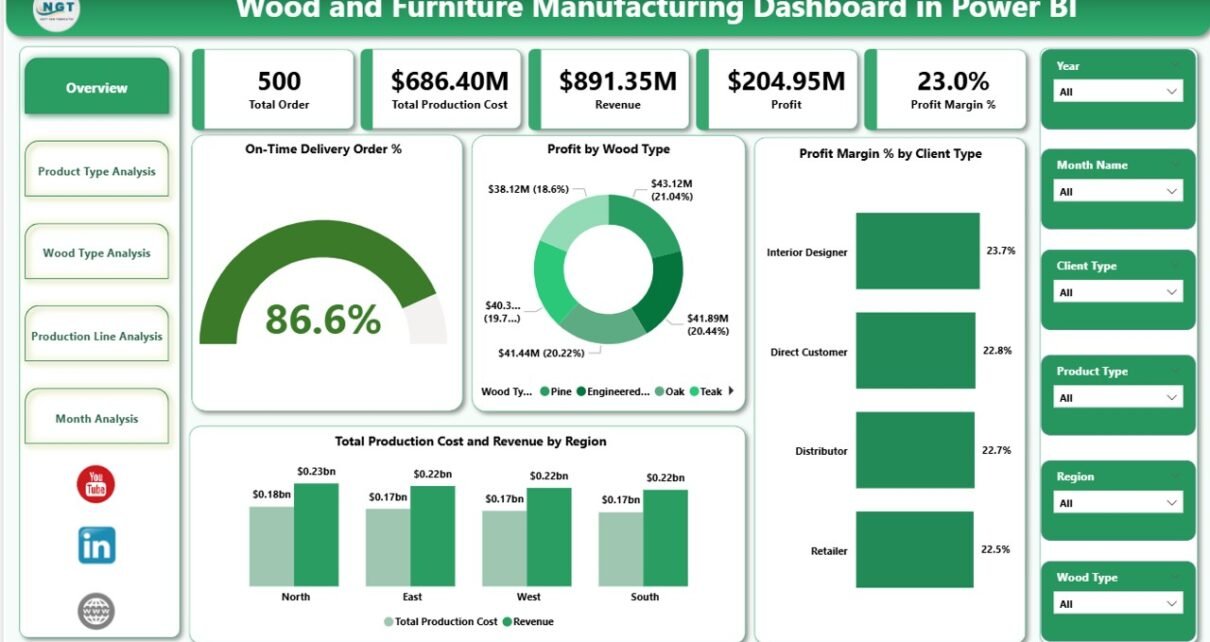
1️⃣ Overview Page – What Does the Big Picture Look Like?
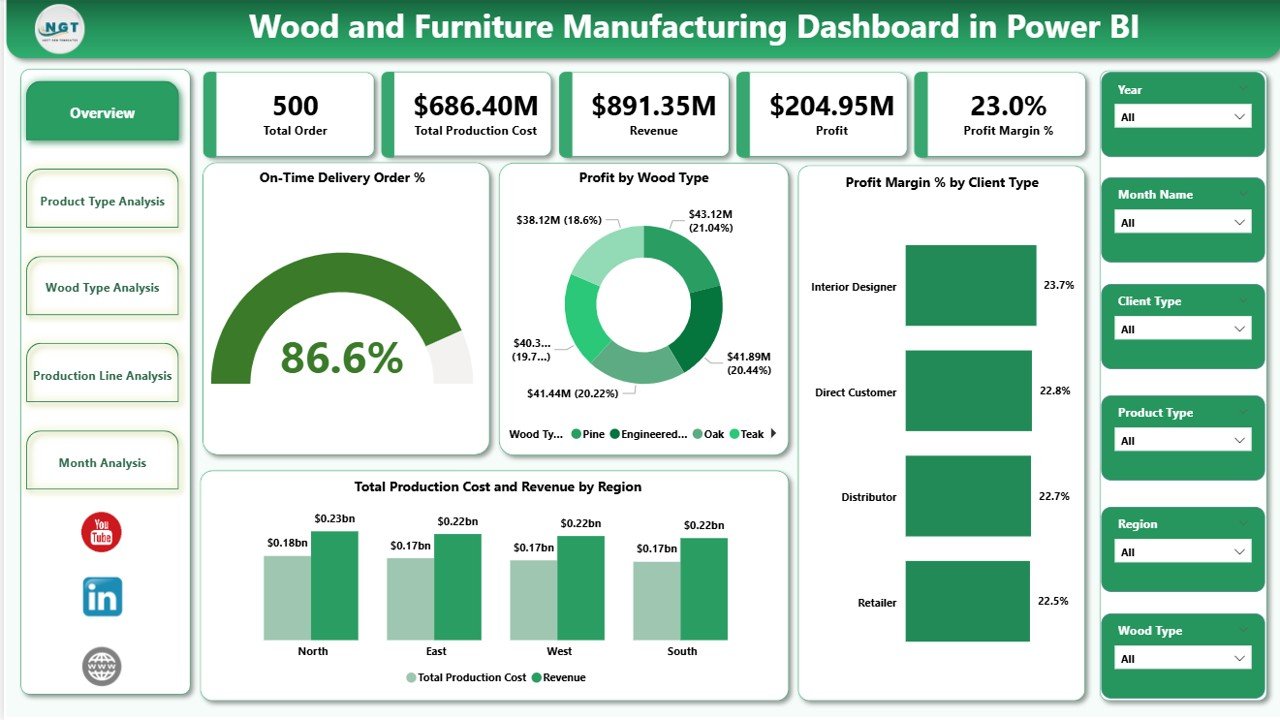
The Overview Page acts as the command center of the dashboard. It provides a quick summary of business performance.
Key Features of the Overview Page
This page includes slicers (filters) at the top. These slicers allow you to filter data by:
-
Month
-
Region
-
Product Type
-
Wood Type
-
Production Line
-
Client Type
Once you select any filter, all visuals update instantly.
Key KPI Cards on the Overview Page
You will see 5 KPI cards:
-
On-Time Delivery Order %
-
Profit by Wood Type
-
Profit Margin % by Client Type
-
Total Production Cost
-
Revenue by Region
These cards give a quick performance summary. Therefore, management can instantly evaluate overall business health.
Why Is the Overview Page Important?
-
It provides immediate clarity
-
It reduces reporting time
-
It supports fast executive decisions
-
It highlights performance gaps
As a result, leaders can take corrective actions without delay.
2️⃣ Product Type Analysis – Which Product Brings More Profit?
Furniture factories produce different product categories such as:
-
Chairs
-
Tables
-
Cabinets
-
Beds
-
Sofas
-
Office Furniture
However, not every product type generates equal profit.
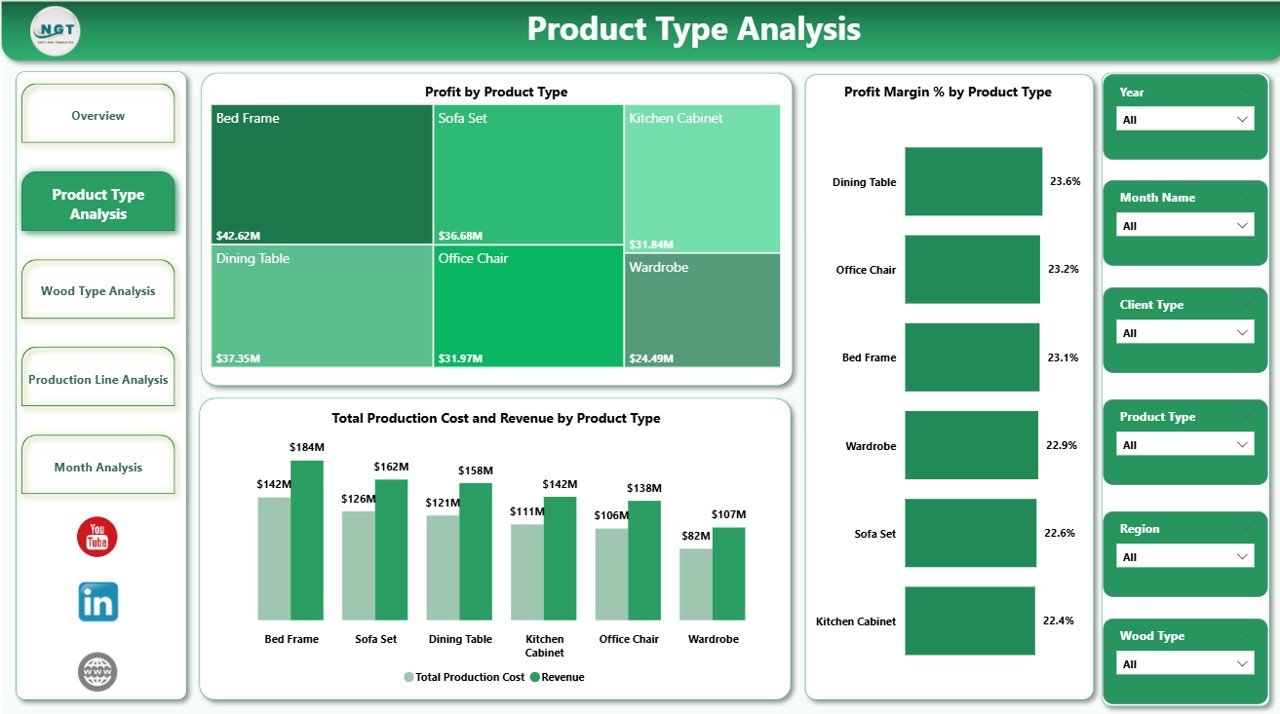
Therefore, the Product Type Analysis page helps you understand product-level performance.
Charts Included on This Page
-
Profit by Product Type
-
Profit Margin % by Product Type
-
Total Production Cost and Revenue by Product Type
What Insights Can You Gain?
-
Identify top-performing product types
-
Compare cost vs revenue for each category
-
Detect low-margin products
-
Improve pricing strategy
For example, if cabinets generate high revenue but low margin, then you can review production cost or pricing.
Click to Purchases Wood and Furniture Manufacturing Dashboard in Power BI
Moreover, if office furniture shows strong margin growth, then you can increase production capacity for that category.
3️⃣ Wood Type Analysis – Which Wood Type Drives Maximum Returns?
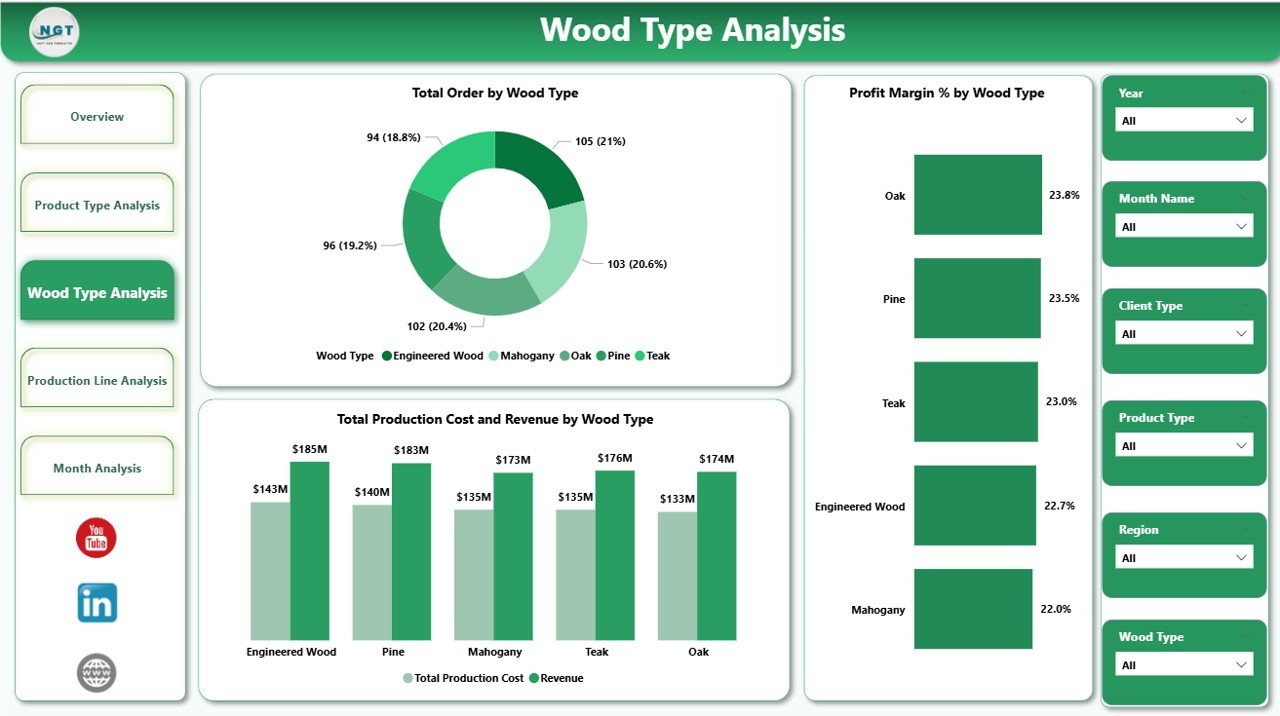
Wood type plays a major role in cost and profitability. Different woods such as:
-
Teak
-
Oak
-
Pine
-
Walnut
-
Mahogany
-
MDF
have different procurement costs and selling prices.
Therefore, this page focuses on wood-level analysis.
Charts Included
-
Total Orders by Wood Type
-
Profit Margin % by Wood Type
-
Total Production Cost and Revenue by Wood Type
Why Is Wood Type Analysis Important?
-
Helps optimize raw material purchasing
-
Identifies high-margin wood types
-
Supports pricing decisions
-
Controls raw material waste
For instance, if teak generates high margin but limited orders, then marketing teams can promote teak-based products more aggressively.
On the other hand, if MDF shows high order volume but low margin, then you can negotiate supplier rates.
4️⃣ Production Line Analysis – Which Production Line Performs Better?
Furniture factories often operate multiple production lines:
-
Cutting Line
-
Assembly Line
-
Finishing Line
-
Polishing Line
-
Packaging Line
Each line contributes differently to overall cost and profit.
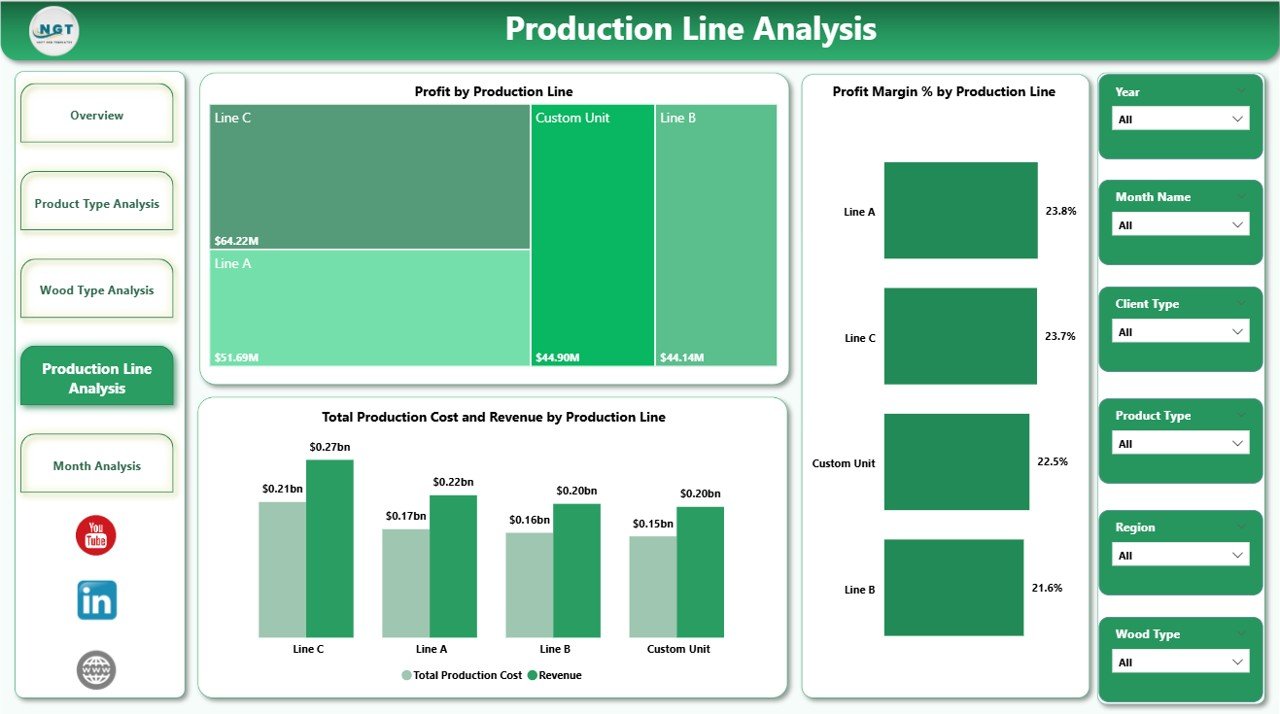
Therefore, this page helps you measure line-level efficiency.
Charts Included
-
Profit by Production Line
-
Profit Margin % by Production Line
-
Total Production Cost and Revenue by Production Line
Key Benefits of Production Line Analysis
-
Identify inefficient production lines
-
Compare cost structure
-
Improve operational planning
-
Reduce production waste
For example, if the finishing line shows higher cost than expected, then managers can review labor efficiency or material usage.
Moreover, this page supports lean manufacturing strategies.
5️⃣ Month Analysis – How Does Performance Change Over Time?
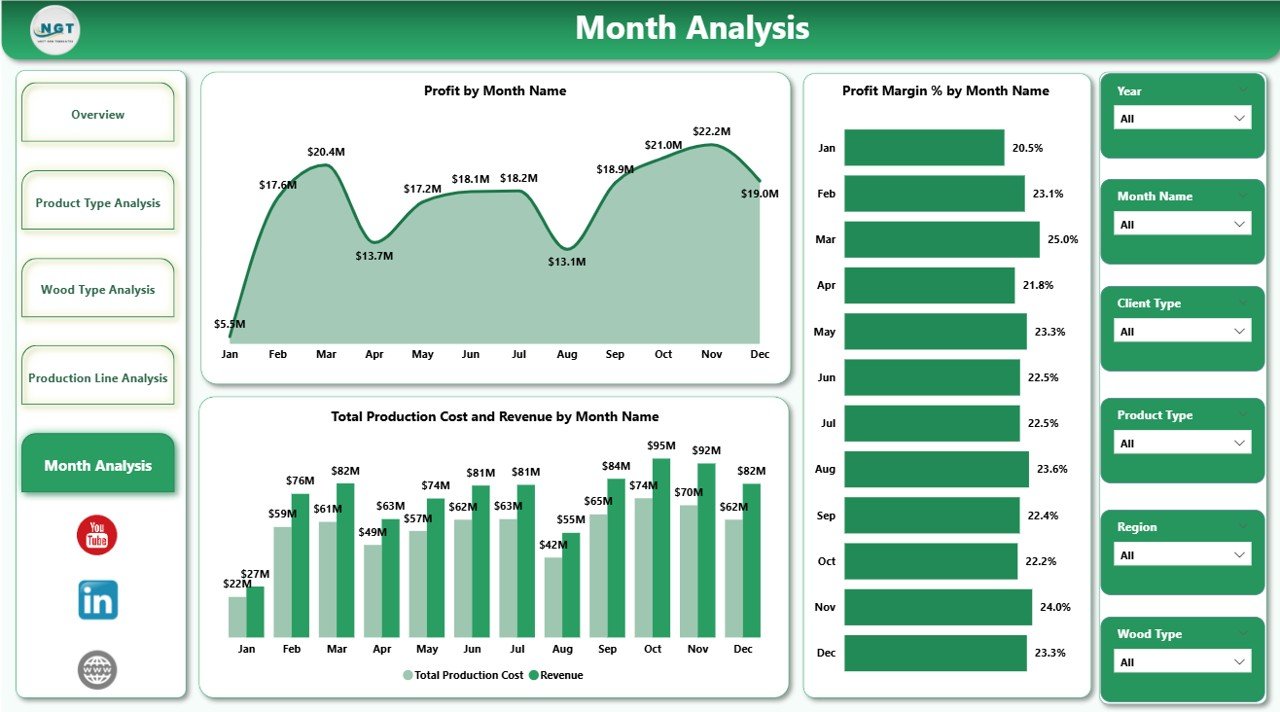
Monthly performance tracking ensures sustainable growth.
Therefore, this page focuses on time-based analysis.
Charts Included
-
Profit by Month
-
Profit Margin % by Month
-
Total Production Cost and Revenue by Month
Why Month Analysis Matters
-
Identifies seasonal trends
-
Tracks growth patterns
-
Measures monthly improvement
-
Supports budget planning
For instance, if sales peak during festive seasons, then management can increase production before demand rises.
Additionally, if profit margin drops in certain months, then finance teams can investigate cost spikes.
Click to Purchases Wood and Furniture Manufacturing Dashboard in Power BI
Advantages of Wood and Furniture Manufacturing Dashboard in Power BI
Using this dashboard provides several business advantages.
🚀 Better Decision Making
You see real-time performance insights. Therefore, you make data-driven decisions instead of assumptions.
📊 Improved Profitability Tracking
You monitor profit and margin across product types, wood types, and production lines. As a result, you focus on high-return areas.
⏳ Time Saving Reporting
You eliminate manual Excel consolidation. Moreover, Power BI refreshes data automatically.
🌍 Regional Performance Visibility
You compare revenue by region. Therefore, you identify strong and weak markets.
📦 Enhanced Production Planning
You analyze production cost trends. Consequently, you optimize resource allocation.
📈 Clear Monthly Growth Monitoring
You track month-wise trends. Thus, you maintain steady growth.
How Does This Dashboard Improve Operational Control?
This dashboard improves operational control in several ways.
First, it connects production and financial data. Therefore, managers gain a complete performance picture.
Second, it uses interactive slicers. As a result, users can filter data instantly.
Third, it displays profit margin clearly. Thus, leaders can focus on margin improvement instead of only revenue growth.
Moreover, the dashboard encourages accountability. Each production line and product type shows measurable performance. Consequently, teams take responsibility.
Best Practices for the Wood and Furniture Manufacturing Dashboard in Power BI
To get maximum value, you must follow best practices.
1️⃣ Maintain Clean Data Structure
Keep your Excel data organized with consistent columns such as:
-
Date
-
Product Type
-
Wood Type
-
Production Line
-
Client Type
-
Revenue
-
Production Cost
-
Delivery Status
Clean data ensures accurate visuals.
2️⃣ Update Data Regularly
Update production and financial data monthly or weekly. Therefore, management always sees current performance.
3️⃣ Use Clear KPI Definitions
Define profit, profit margin, and cost clearly. Consequently, everyone understands the metrics.
4️⃣ Monitor Low Margin Areas
Focus on low-performing segments. Then, improve pricing or reduce cost.
5️⃣ Share Dashboard Across Departments
Allow production, sales, and finance teams to access the dashboard. As a result, collaboration improves.
6️⃣ Review Monthly Trends Consistently
Analyze month-wise performance regularly. Therefore, you avoid sudden surprises.
Click to Purchases Wood and Furniture Manufacturing Dashboard in Power BI
Who Can Benefit from This Dashboard?
This dashboard benefits:
-
Factory Owners
-
Production Managers
-
Finance Managers
-
Supply Chain Managers
-
Regional Sales Heads
-
Business Analysts
If you manage wood processing or furniture manufacturing operations, this dashboard supports your daily decision-making.
How Does Power BI Make This Dashboard Powerful?
Power BI enhances the dashboard with:
-
Interactive slicers
-
Drill-down capability
-
Dynamic visuals
-
Real-time data refresh
-
Clean visual layout
Moreover, Power BI handles large datasets easily. Therefore, growing businesses can scale without difficulty.
Conclusion
Wood and furniture manufacturing requires precision, cost control, and timely delivery. However, traditional reporting methods slow down growth. Moreover, scattered spreadsheets create confusion.
On the other hand, the Wood and Furniture Manufacturing Dashboard in Power BI centralizes all performance metrics.
It tracks:
-
Profit
-
Profit Margin
-
Production Cost
-
Revenue
-
Delivery Performance
-
Product Type Performance
-
Wood Type Analysis
-
Production Line Efficiency
-
Monthly Trends
Therefore, it transforms raw data into clear insights.
If you want better visibility, stronger profitability, and improved operational control, this dashboard provides the perfect solution.
Frequently Asked Questions with Answers
1. What data do I need to use this dashboard?
You need structured Excel data including product type, wood type, production cost, revenue, delivery status, and month details.
2. Can I customize this dashboard?
Yes. You can add new KPIs, adjust slicers, and modify visuals according to your business needs.
3. Does this dashboard support monthly analysis?
Yes. The Month Analysis page tracks profit, margin, cost, and revenue monthly.
4. Can small furniture factories use this dashboard?
Yes. Both small and large manufacturers can use it effectively.
5. How does this dashboard improve profit margin?
It highlights low-margin areas. Therefore, management can reduce cost or adjust pricing.
6. Do I need advanced Power BI knowledge?
No. You can use the ready-to-use version easily. However, basic Power BI knowledge helps with customization.
7. Can I track delivery performance?
Yes. The Overview page shows On-Time Delivery Order % clearly.
8. Why should I choose Power BI over Excel?
Power BI provides interactive visuals, dynamic filtering, and better data handling compared to static Excel reports.
Visit our YouTube channel to learn step-by-step video tutorials