Launching a product feels exciting. However, excitement alone does not guarantee success. A single missed task can delay timelines, affect marketing impact, or even damage your brand reputation.
Therefore, you need structure.
More importantly, you need a system that keeps every task visible and accountable.
That is exactly where the Product Launch Review Checklist in Excel becomes powerful.
This ready-to-use template helps you track every activity, monitor progress, and ensure nothing gets missed before launch day.
In this complete guide, you will learn:
-
What a Product Launch Review Checklist in Excel is
-
Why every business needs a launch checklist
-
Detailed explanation of both worksheets
-
How to use the template effectively
-
Advantages of Product Launch Review Checklist in Excel
-
Best Practices for the Product Launch Review Checklist
-
Frequently Asked Questions with Answers
Let us explore everything step by step.
Click to Purchases Product Launch Review Checklist in Excel
What Is a Product Launch Review Checklist in Excel?
A Product Launch Review Checklist in Excel is a structured task-tracking template designed to monitor all pre-launch activities.
Instead of relying on emails, sticky notes, or memory, you can:
-
List all launch tasks
-
Assign responsibilities
-
Set deadlines
-
Track completion status
-
Monitor overall progress
Because Excel offers flexibility and automation, you can easily customize the checklist based on your product type and launch strategy.
Why Do You Need a Product Launch Review Checklist?
Many businesses underestimate the complexity of product launches. However, product launches involve multiple departments.
For example:
-
Product development
-
Marketing
-
Sales
-
Operations
-
Finance
-
Customer support
If one team delays their task, the entire launch timeline suffers.
Therefore, a structured checklist helps you:
-
Avoid missed tasks
-
Improve coordination
-
Increase accountability
-
Reduce last-minute stress
-
Ensure on-time launch
In short, this checklist becomes your launch control system.
Click to Purchases Product Launch Review Checklist in Excel
What Are the Worksheets in the Product Launch Review Checklist Template?
This ready-to-use template contains two worksheets:
1️⃣ Product Launch Review Checklist (Main Sheet)
2️⃣ List Sheet
Let us understand both sheets clearly.
1️⃣ Product Launch Review Checklist Sheet – The Main Tracking Page
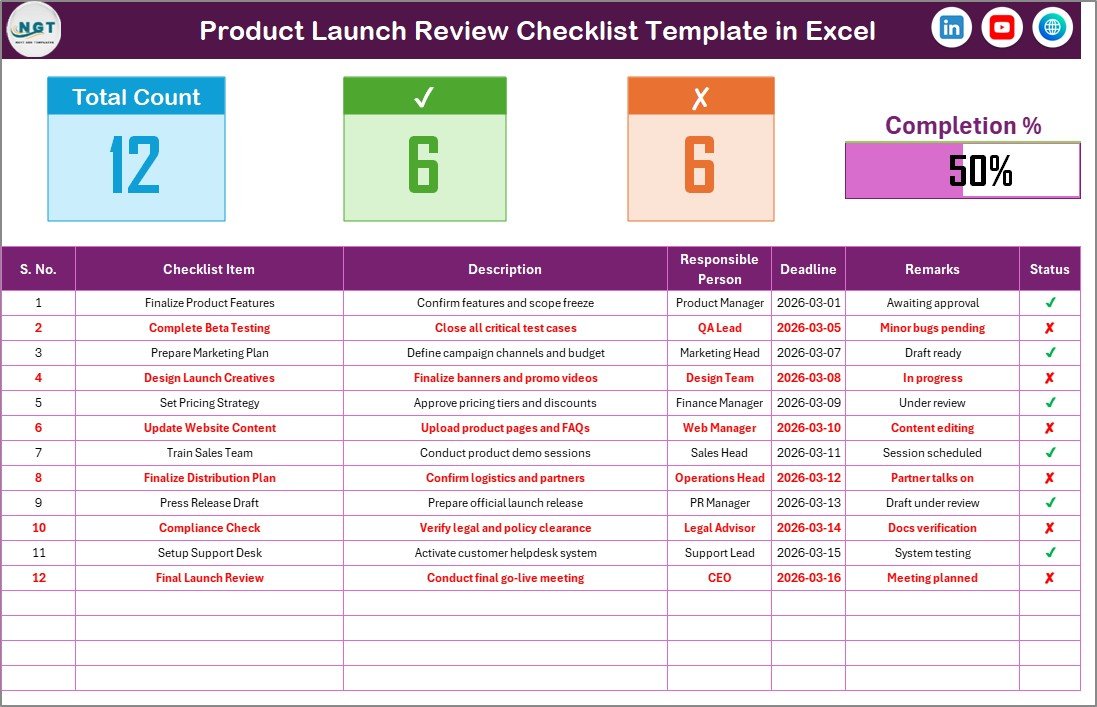
This sheet captures all checklist information and progress details.
It contains two main sections:
-
Top Summary Section
-
Checklist Table
🔹 Top Section – Instant Launch Overview
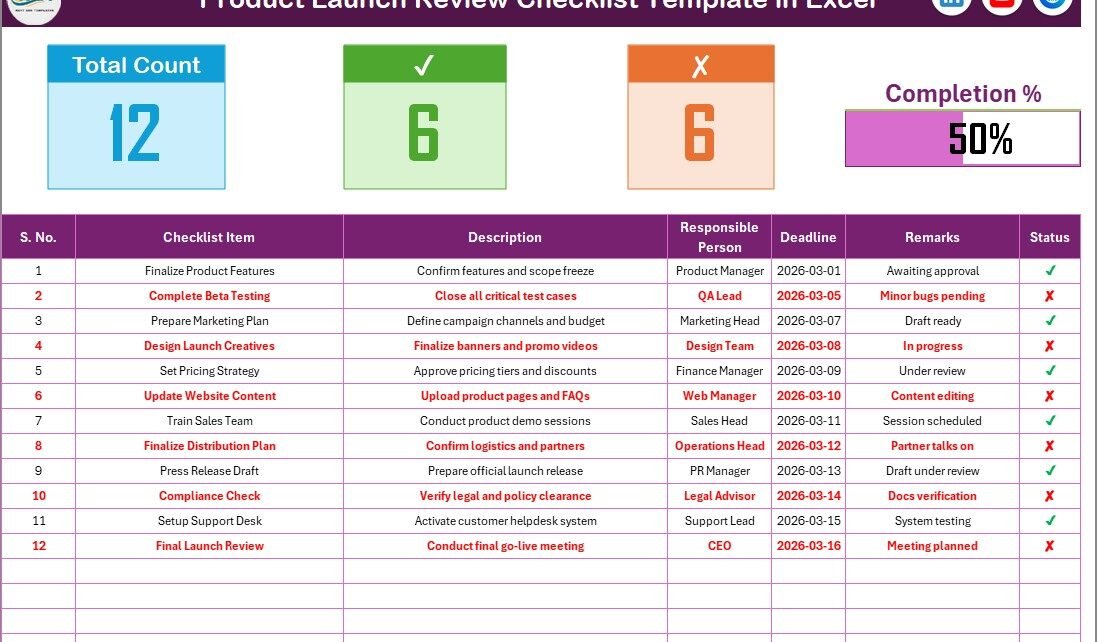
At the top of the sheet, you will find key launch metrics:
-
Total Task Count
-
Checked Count
-
Crossed Count
-
Progress Bar (Checked %)
Because of this summary section:
-
You instantly know how many tasks remain.
-
You measure launch readiness quickly.
-
You visualize progress clearly.
For example:
If the progress bar shows 85%, you know the launch remains close to completion. However, if it shows 40%, you still have major work pending.
Therefore, this section provides instant clarity.
🔹 Checklist Table – The Core of the Template
Below the summary section, you will find the main checklist table.
You can update the status as:
-
✔ (Completed)
-
✘ (Pending or Not Completed)
This table contains the following columns:
-
Serial No.
-
Checklist Item
-
Description
-
Responsible Person
-
Deadline
-
Remarks
-
Status
How Each Column Helps
✅ Serial No.
Maintains sequence and structured tracking.
✅ Checklist Item
Defines the specific task clearly.
✅ Description
Explains what needs to be done.
✅ Responsible Person
Assigns accountability to a team member.
✅ Deadline
Ensures timely completion.
✅ Remarks
Allows additional comments or updates.
✅ Status
Shows whether the task is completed or pending.
Because of this structure, you maintain full control over launch activities.
Click to Purchases Product Launch Review Checklist in Excel
2️⃣ List Sheet – Responsible Person Drop-Down Setup
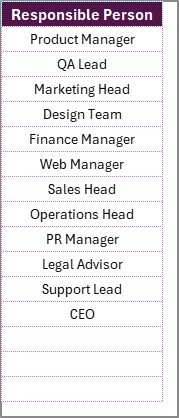
The List sheet captures the unique list of Responsible Persons.
This list helps create a drop-down selection in the main checklist table.
Therefore:
-
You avoid typing errors.
-
You maintain standardized names.
-
You simplify data entry.
As a result, reporting becomes clean and professional.
Click to Purchases Product Launch Review Checklist in Excel
How to Use the Product Launch Review Checklist in Excel?
Using this template remains simple and efficient.
Follow these steps:
Step 1: List All Launch Tasks
Include tasks such as:
-
Final product testing
-
Pricing approval
-
Website update
-
Social media announcement
-
Email campaign setup
-
Sales team training
-
Inventory readiness
-
Customer support preparation
Step 2: Assign Responsible Persons
Use the drop-down list to assign tasks clearly.
Because accountability improves performance, this step remains crucial.
Step 3: Set Deadlines
Define realistic deadlines for each task.
Deadlines keep the team focused and organized.
Step 4: Update Status Regularly
Mark tasks as ✔ once completed.
If tasks remain incomplete, keep them as ✘ and review during meetings.
Step 5: Monitor Progress Bar
Track overall completion percentage using the progress bar.
This helps leadership quickly assess readiness.
What Tasks Should Be Included in a Product Launch Review Checklist?
To ensure a smooth launch, include tasks across multiple departments.
🔹 Product Readiness Tasks
-
Final product approval
-
Quality testing
-
Packaging verification
-
Compliance checks
🔹 Marketing Tasks
-
Landing page creation
-
Social media campaigns
-
Influencer outreach
-
Press release publication
🔹 Sales Tasks
-
Sales training session
-
Pricing strategy approval
-
Distributor communication
🔹 Operations Tasks
-
Inventory confirmation
-
Shipping setup
-
Vendor coordination
🔹 Customer Support Tasks
-
FAQ preparation
-
Support team briefing
-
CRM setup
By including cross-functional tasks, you reduce launch risk.
Click to Purchases Product Launch Review Checklist in Excel
Advantages of Product Launch Review Checklist in Excel
Now let us explore the key advantages.
✅ 1. Centralized Task Tracking
You manage all launch activities in one structured file.
✅ 2. Clear Accountability
Each task includes a responsible person. Therefore, confusion reduces significantly.
✅ 3. Visual Progress Monitoring
The progress bar gives instant launch readiness visibility.
✅ 4. Simple Status Control
You only mark ✔ or ✘. Therefore, usage remains easy for all team members.
✅ 5. Customizable Structure
You can add or remove tasks based on product type.
✅ 6. Improved Team Coordination
Because everyone sees the same checklist, communication improves.
✅ 7. Reduced Launch Risk
When you track tasks systematically, you reduce costly errors.
How Does This Checklist Improve Launch Success?
A product launch includes many moving parts. Without structure, small mistakes create big problems.
However, this checklist:
-
Prevents missed marketing activities
-
Ensures inventory readiness
-
Aligns sales and support teams
-
Reduces last-minute chaos
-
Improves launch confidence
As a result, your launch becomes smoother and more professional.
Click to Purchases Product Launch Review Checklist in Excel
Best Practices for the Product Launch Review Checklist
To maximize results, follow these best practices.
🔹 1. Start Early
Begin preparing the checklist at least 30–60 days before launch.
🔹 2. Break Tasks into Smaller Steps
Instead of writing “Prepare Marketing,” break it into smaller actions.
🔹 3. Review Weekly
Conduct weekly review meetings to update task status.
🔹 4. Assign One Owner Per Task
Avoid assigning multiple people to one task. Single ownership improves accountability.
🔹 5. Update Deadlines If Required
If priorities change, update deadlines immediately.
🔹 6. Keep the Checklist Clean
Avoid cluttering the table with unnecessary tasks.
Who Can Use This Template?
This template works perfectly for:
-
Startups
-
Product Managers
-
Marketing Teams
-
E-commerce Businesses
-
SaaS Companies
-
Manufacturing Businesses
-
Consultants
If you plan any new product launch, this checklist becomes essential.
Click to Purchases Product Launch Review Checklist in Excel
Why Choose Excel for Launch Checklist Management?
You might ask, why Excel?
Because Excel offers:
-
Easy customization
-
No additional software cost
-
Familiar interface
-
Shareable format
-
Simple automation
Therefore, Excel remains a powerful business tool.
Conclusion: Launch with Confidence and Control
A successful product launch requires planning, coordination, and discipline.
The Product Launch Review Checklist in Excel provides:
-
Structured task management
-
Accountability tracking
-
Deadline monitoring
-
Progress visibility
Because of this system, you reduce risk and increase launch success.
Instead of guessing, you track.
Instead of reacting, you plan.
When you use this checklist consistently, you build a professional launch process that delivers results every time.
Click to Purchases Product Launch Review Checklist in Excel
Frequently Asked Questions (FAQs)
❓ What is the purpose of the Product Launch Review Checklist?
It helps track and manage all tasks required before launching a product.
❓ Can I customize the checklist items?
Yes. You can add, remove, or modify tasks based on your product type.
❓ How does the progress bar work?
The progress bar calculates the percentage of completed tasks marked with ✔.
❓ Can multiple team members use this file?
Yes. You can share it via email or cloud storage for team collaboration.
❓ Is this template suitable for small businesses?
Yes. It works perfectly for startups and small teams.
Click to Purchases Product Launch Review Checklist in Excel
Visit our YouTube channel to learn step-by-step video tutorials
Watch the step-by-step video tutorial: