Launching a product without proper documentation often leads to missed tasks, confusion, and costly delays. However, when teams use a structured checklist, they stay organized and confident throughout the launch journey. Therefore, businesses that want smooth and professional product releases must adopt a reliable tracking system.
The Product Launch Documentation Checklist in Excel solves this challenge by giving teams a ready-to-use, structured, and easy-to-manage checklist template. Moreover, it helps you monitor responsibilities, deadlines, and completion status in one centralized place.
In this detailed guide, you will learn everything about this powerful Excel checklist template, including its features, benefits, best practices, and frequently asked questions. So, let’s dive in.
Click to Purchases Product Launch Documentation Checklist in Excel
What Is a Product Launch Documentation Checklist in Excel?
A Product Launch Documentation Checklist in Excel is a structured tracking tool that helps teams manage and monitor all documentation tasks required for a successful product launch. Instead of relying on scattered notes or emails, teams can track every activity in one organized Excel file.
Furthermore, this ready-to-use template allows project managers, product teams, and marketing departments to:
-
Track required launch documents
-
Assign responsibilities
-
Monitor deadlines
-
Measure completion progress
-
Avoid last-minute surprises
As a result, organizations gain better visibility and control over their launch process.
Click to Purchases Product Launch Documentation Checklist in Excel
Why Do Teams Need a Product Launch Documentation Checklist?
Product launches involve many moving parts. Without a proper checklist, teams often miss critical documentation steps. Consequently, this can delay approvals, confuse stakeholders, and impact the launch timeline.
Here is why teams strongly benefit from this Excel checklist:
-
First, it creates clarity across departments
-
Next, it improves accountability
-
Additionally, it reduces launch risks
-
Moreover, it ensures compliance and readiness
-
Finally, it saves valuable time
Therefore, using a structured checklist becomes essential for any professional product launch.
Key Features of the Product Launch Documentation Checklist Template
This ready-to-use Excel template includes smart automation and a clean structure. Let’s explore each component in detail.
📊 Worksheet Structure
In this template, you will find 2 well-designed worksheets that work together seamlessly.
Click to Purchases Product Launch Documentation Checklist in Excel
1️⃣ Product Launch Documentation Checklist Sheet (Main Sheet)
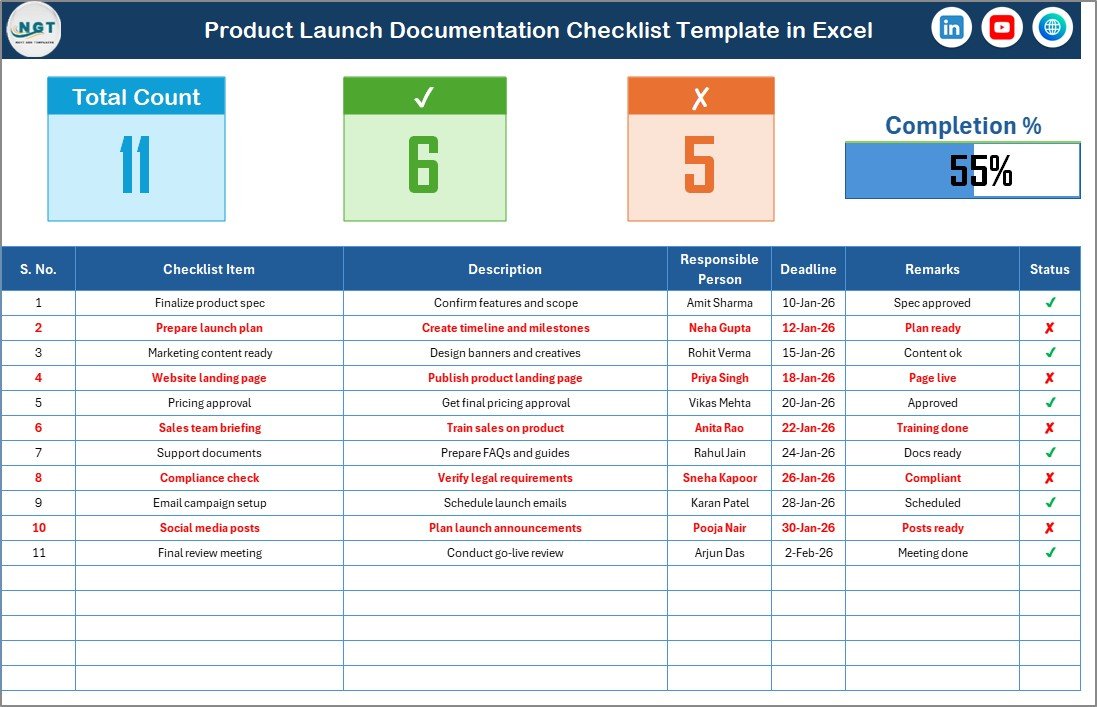
This sheet acts as the command center of the template. Here, you capture and monitor all checklist activities.
🔝 Top Section Overview
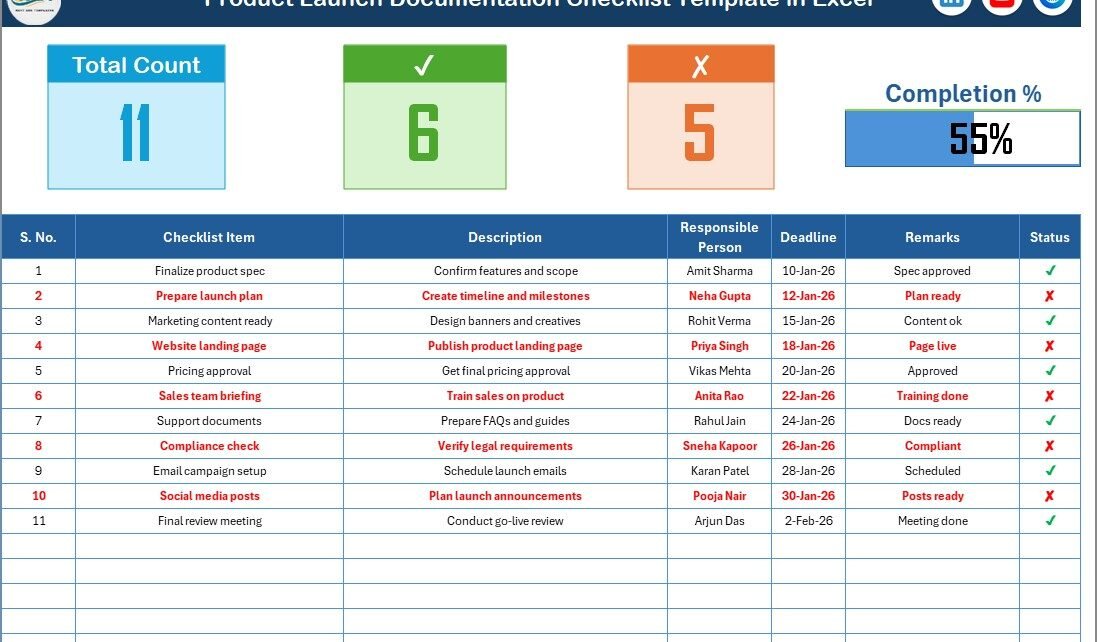
At the top of the main sheet, the dashboard provides instant performance visibility. As soon as you update the status, the summary updates automatically.
It includes:
-
Total Count
-
Checked Count
-
Crossed Count
-
Progress Bar for Checked %
Because of this visual summary, managers can quickly understand launch readiness without scanning the entire table.
✅ Checklist Table (Core Working Area)
This section forms the heart of the template. Here, users update the status of each documentation task.
How it works:
-
Change status to ✔ for completed
-
Change status to ✘ for pending
Immediately, the progress metrics update. Therefore, teams always see real-time completion levels.
📋 Columns Included in the Checklist Table
The template uses a well-structured format to ensure clarity and accountability.
Columns:
-
Serial No.
-
Checklist Item
-
Description
-
Responsible Person
-
Deadline
-
Remarks
-
Status
Because of this structured design, teams can track every documentation requirement with precision.
📑 List Sheet Tab
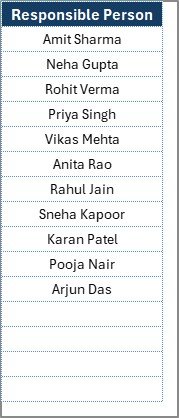
The second worksheet supports the main checklist.
Purpose of the List Sheet:
-
Stores unique Responsible Person names
-
Creates dropdown validation in the main table
-
Maintains data consistency
-
Reduces manual typing errors
As a result, users can assign tasks quickly and accurately.
Click to Purchases Product Launch Documentation Checklist in Excel
How Does the Product Launch Documentation Checklist Work?
Many users wonder whether the template requires advanced Excel skills. Fortunately, it does not. The template follows a simple workflow.
Step-by-Step Usage
Step 1: Enter checklist items
Step 2: Assign responsible persons from the dropdown
Step 3: Set deadlines
Step 4: Update status using ✔ or ✘
Step 5: Monitor the progress bar
Because the template automates calculations, users only need to update the status field.
Click to Purchases Product Launch Documentation Checklist in Excel
Advantages of Product Launch Documentation Checklist in Excel
Using this template delivers powerful operational benefits. Let’s explore them.
🚀 Improved Launch Readiness
The checklist ensures that teams never overlook critical documentation tasks. Therefore, your launch preparation becomes more reliable and structured.
🎯 Better Accountability
Since each task includes a responsible person, ownership becomes crystal clear. Consequently, teams complete tasks faster and with more discipline.
⏱️ Significant Time Savings
Instead of building trackers from scratch, teams can start immediately. Moreover, automated counts and progress bars eliminate manual tracking work.
📊 Real-Time Progress Visibility
The dynamic summary section shows completion status instantly. Because of this, managers can take corrective action early.
🔄 Standardized Process
Organizations can reuse the template for multiple launches. As a result, teams maintain consistency across projects.
🧩 Easy Customization
Excel allows quick modifications. Therefore, you can add columns, change labels, or adapt the checklist to your workflow.
Who Should Use This Template?
This checklist serves a wide range of professionals. In fact, any team involved in product releases can benefit.
Ideal users include:
-
Product Managers
-
Project Managers
-
Marketing Teams
-
PMO Offices
-
Startup Founders
-
Operations Teams
-
Compliance Teams
If your organization launches products, this template will support your workflow.
Click to Purchases Product Launch Documentation Checklist in Excel
Best Practices for the Product Launch Documentation Checklist
To get maximum value, teams should follow proven best practices. Let’s review them.
✅ Keep the Checklist Updated Regularly
Update task status immediately after completion. This habit ensures the progress bar reflects the true situation.
✅ Assign Clear Ownership
Always assign one responsible person per task. Otherwise, confusion may delay execution.
✅ Set Realistic Deadlines
Choose achievable deadlines based on workload. When teams set practical timelines, they maintain steady progress.
✅ Review the Dashboard Frequently
Managers should check the top summary daily or weekly. Because of this, they can detect delays early.
✅ Standardize Naming Conventions
Use consistent naming for checklist items and responsible persons. This practice improves reporting clarity.
✅ Protect Formula Cells
Lock calculation cells to avoid accidental edits. Consequently, the template remains reliable.
✅ Use Filters for Large Checklists
If your checklist grows, apply Excel filters. This approach helps teams focus on pending items quickly.
Common Mistakes to Avoid
Even powerful templates require proper usage. Therefore, avoid these common errors.
-
Ignoring status updates
-
Assigning multiple owners to one task
-
Setting unrealistic deadlines
-
Editing formula cells accidentally
-
Not reviewing progress regularly
By avoiding these mistakes, teams maintain high checklist accuracy.
Click to Purchases Product Launch Documentation Checklist in Excel
How This Template Improves Product Launch Success
A successful product launch depends on execution discipline. However, many teams struggle because they lack visibility.
This Excel checklist changes that situation.
Here is how it drives success:
-
First, it creates a single source of truth
-
Next, it improves cross-team coordination
-
Additionally, it highlights bottlenecks early
-
Moreover, it increases accountability
-
Finally, it ensures documentation completeness
Therefore, organizations that adopt structured launch checklists consistently deliver smoother launches.
Click to Purchases Product Launch Documentation Checklist in Excel
Can You Customize the Product Launch Checklist in Excel?
Yes, absolutely. One of the biggest strengths of this template lies in its flexibility.
You can easily:
-
Add new checklist items
-
Insert priority columns
-
Include document links
-
Add conditional formatting
-
Expand responsible person lists
-
Modify the progress bar
Because Excel offers full control, the template adapts to any industry or workflow.
When Should You Use This Checklist?
Teams can use this template at multiple stages of the product lifecycle.
Best use cases include:
-
Pre-launch documentation review
-
Go-to-market preparation
-
Compliance verification
-
Marketing readiness checks
-
Internal approval tracking
-
Post-launch audit preparation
In short, whenever documentation matters, this checklist delivers value.
Conclusion
A product launch requires precision, coordination, and complete documentation control. However, manual tracking methods often create confusion and delays. Therefore, smart teams rely on structured tools that simplify execution.
The Product Launch Documentation Checklist in Excel provides exactly that advantage. With its automated summary, structured table, and easy dropdown management, it empowers teams to track every launch task confidently.
Moreover, the template improves accountability, enhances visibility, and reduces launch risk. As a result, organizations can move from reactive firefighting to proactive launch management.
If you want smoother launches and better control, this Excel checklist becomes an essential part of your toolkit.
Click to Purchases Product Launch Documentation Checklist in Excel
Frequently Asked Questions (FAQs)
❓ What is the purpose of the Product Launch Documentation Checklist in Excel?
The checklist helps teams track and manage all required documentation tasks for a product launch. It ensures nothing important gets missed.
❓ Do I need advanced Excel skills to use this template?
No. The template uses simple dropdowns and status updates. Therefore, even beginners can use it easily.
❓ Can I add more checklist items?
Yes. You can insert additional rows or columns anytime. Excel allows full customization.
❓ How does the progress bar update?
The progress bar updates automatically when you change the Status column to ✔ or ✘.
❓ Can multiple teams use this template?
Yes. Teams across departments can collaborate using the same checklist. However, assign clear ownership to avoid confusion.
❓ Is this template suitable for startups?
Absolutely. Startups benefit greatly because the template provides structure without expensive software.
❓ Can I track overdue tasks?
Yes. You can apply conditional formatting on the Deadline column to highlight overdue items.
Click to Purchases Product Launch Documentation Checklist in Excel
Visit our YouTube channel to learn step-by-step video tutorials