Subscription-based businesses continue to grow across industries. SaaS platforms, membership services, streaming companies, online learning platforms, and subscription box businesses rely heavily on recurring revenue models. Therefore, tracking performance consistently becomes essential for long-term success.
However, many subscription businesses still analyze performance using scattered reports and manual calculations. As a result, they struggle to monitor churn rate, recurring revenue, customer growth, and profitability clearly.
So, how can subscription businesses measure performance efficiently?
The answer is simple.
You need a Subscription Business KPI Scorecard in Excel.
This ready-to-use Excel KPI scorecard helps subscription companies monitor key performance indicators in one structured dashboard. Moreover, it enables MTD and YTD comparisons, trend analysis, and target monitoring. Consequently, you gain better insights, improved forecasting, and smarter decision-making.
In this comprehensive guide, you will learn:
-
What a Subscription Business KPI Scorecard in Excel is
-
Why subscription businesses need KPI tracking
-
Detailed explanation of all worksheets
-
Important subscription KPIs to monitor
-
Advantages of Subscription Business KPI Scorecard in Excel
-
Best Practices for implementation
-
Frequently Asked Questions
Let us explore everything step by step.
Click to Purchases Subscription Business KPI Scorecard in Excel
📈 What Is a Subscription Business KPI Scorecard in Excel?
A Subscription Business KPI Scorecard in Excel is a performance management tool designed to track recurring revenue metrics and operational performance.
Instead of reviewing multiple reports, you can:
-
Compare Actual vs Target performance
-
Analyze Month-to-Date (MTD) results
-
Review Year-to-Date (YTD) performance
-
Monitor KPI trends visually
-
Understand business health instantly
Because the scorecard centralizes data, decision-makers gain clear performance visibility.
Click to Purchases Subscription Business KPI Scorecard in Excel
💼 Why Do Subscription Businesses Need KPI Scorecards?
Subscription businesses depend on recurring customers rather than one-time sales. Therefore, monitoring customer behavior becomes critical.
Without structured KPI tracking, companies may face:
-
High customer churn
-
Revenue leakage
-
Poor retention visibility
-
Inaccurate forecasting
-
Slow decision-making
A KPI scorecard solves these problems.
Benefits of KPI tracking:
-
Improves revenue predictability
-
Enhances customer retention
-
Identifies growth opportunities
-
Tracks operational efficiency
-
Supports strategic planning
Moreover, visual scorecards simplify performance analysis for leadership teams.
Click to Purchases Subscription Business KPI Scorecard in Excel
What Are the Worksheets in the Subscription Business KPI Scorecard in Excel?
This template includes 4 structured worksheets:
1️⃣ Scorecard Sheet
2️⃣ KPI Trend Sheet
3️⃣ Input Data Sheet
4️⃣ KPI Definition Sheet
Let us understand each sheet in detail.
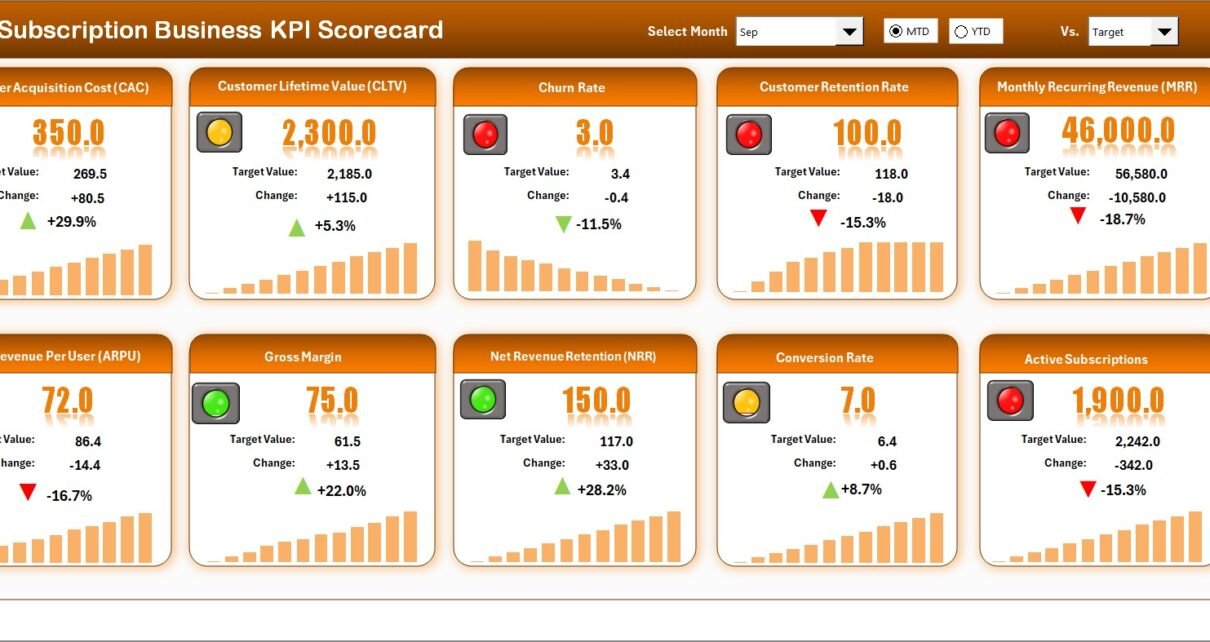
🧾 1️⃣ Scorecard Sheet – Main KPI Performance Dashboard
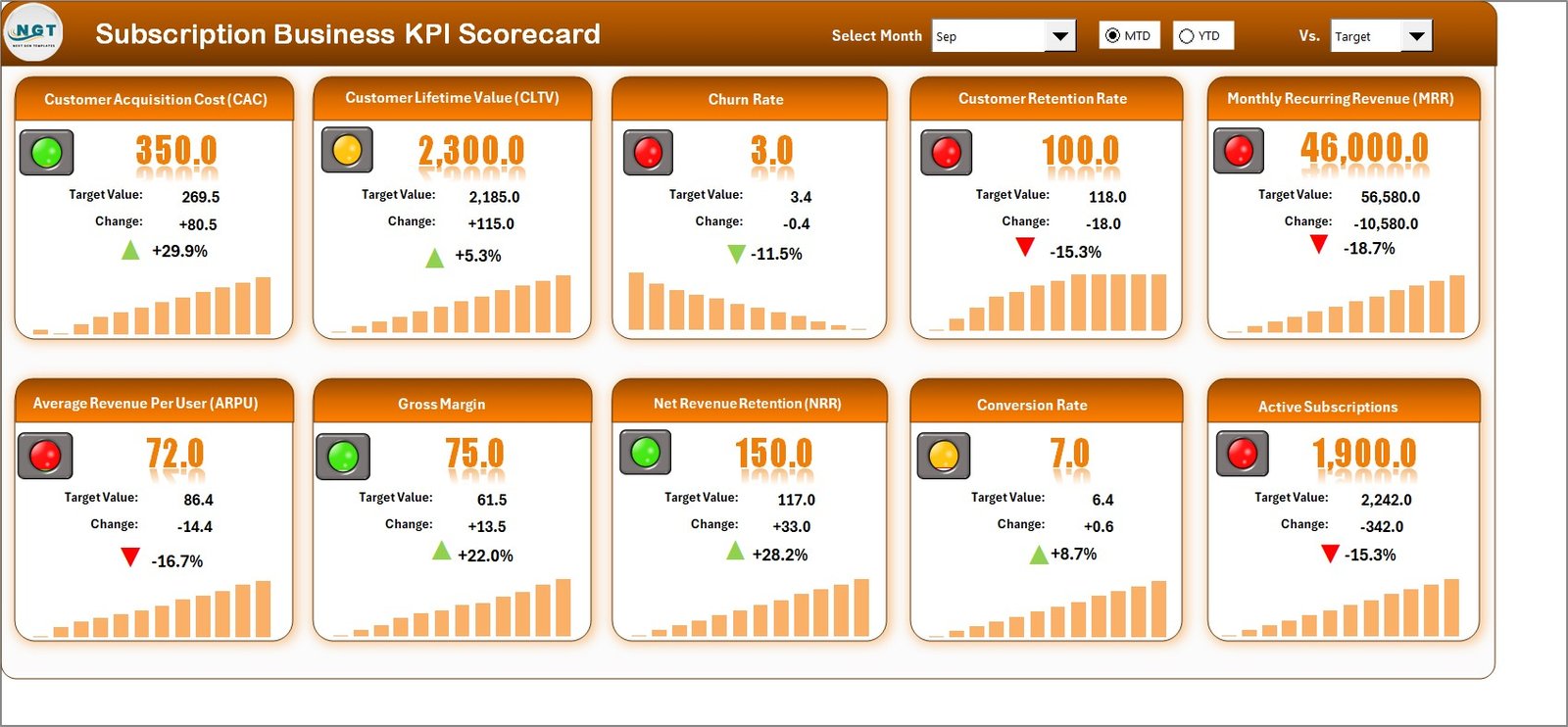
The Scorecard Sheet acts as the primary interface.
Here, you can monitor all KPI performance in one screen.
🔽 Dropdown Menu Features
The scorecard includes dropdown selections that allow you to:
-
Select Month
-
Choose MTD or YTD view
Once selected, the entire scorecard updates automatically.
📊 Actual vs Target Comparison
The dashboard compares:
-
Actual KPI values
-
Target KPI values
Therefore, you can immediately identify performance gaps.
🎯 Visual Performance Indicators
Conditional formatting highlights performance using colors and indicators.
This helps you:
-
Detect underperforming KPIs quickly
-
Recognize strong performance areas
-
Focus on improvement actions
📋 Comprehensive KPI Overview
The scorecard displays:
-
KPI Name
-
KPI Group
-
Performance values
-
MTD and YTD comparisons
Because of this structured overview, performance monitoring becomes effortless.
Click to Purchases Subscription Business KPI Scorecard in Excel
📉 2️⃣ KPI Trend Sheet – Performance Trend Analysis
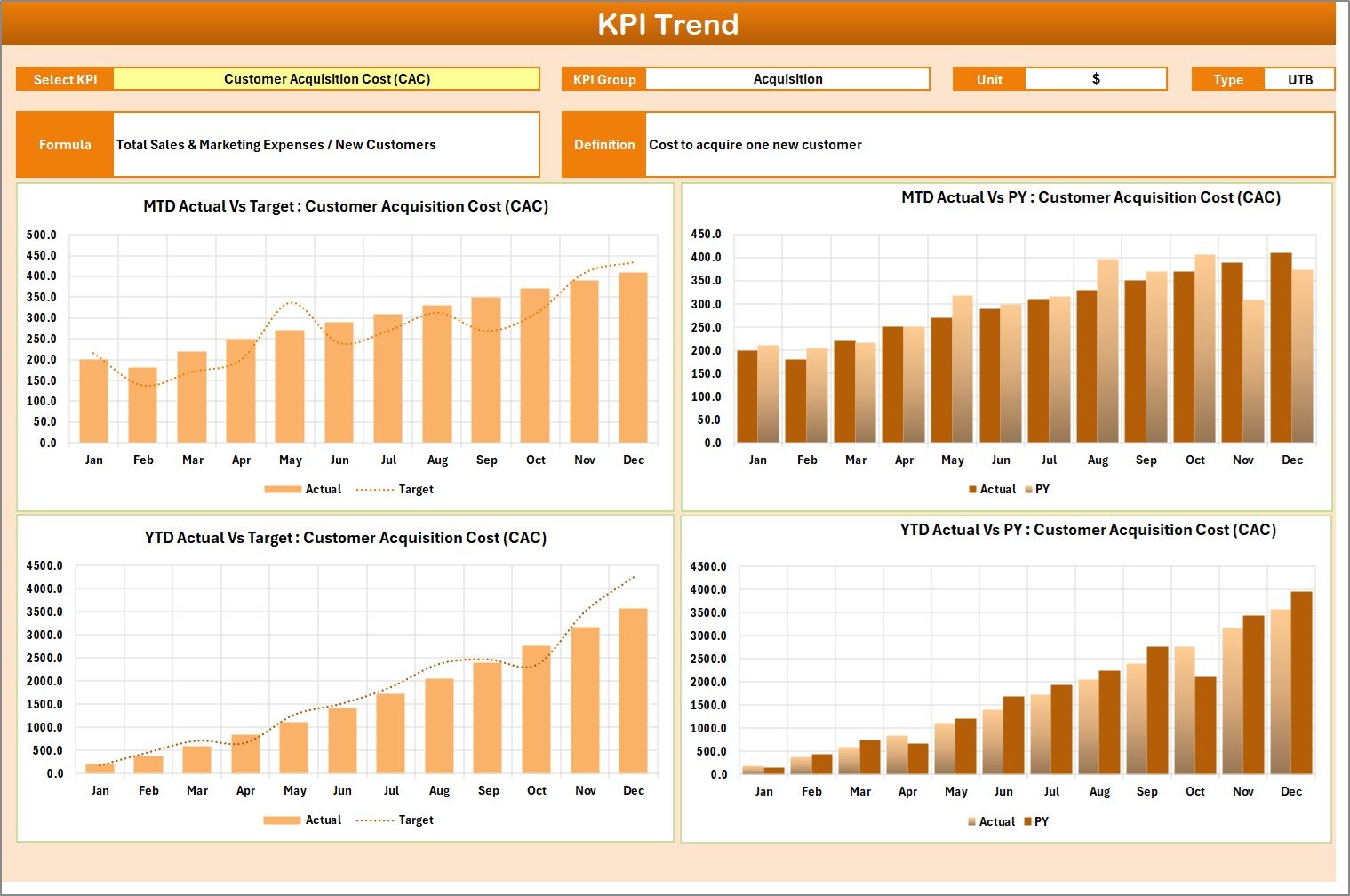
The KPI Trend Sheet provides deeper insights into KPI behavior.
On cell C3, you can select a KPI from a dropdown list.
Once selected, the sheet displays:
-
KPI Group
-
Unit of KPI
-
KPI Type (Lower the Better or Upper the Better)
-
KPI Formula
-
KPI Definition
📊 Trend Charts Included
-
MTD Trend Chart
-
YTD Trend Chart
-
Actual vs Target vs Previous Year comparison
These charts help you analyze performance patterns over time.
Therefore, you can identify growth trends and seasonal fluctuations easily.
Click to Purchases Subscription Business KPI Scorecard in Excel
🧮 3️⃣ Input Data Sheet – Data Entry Section
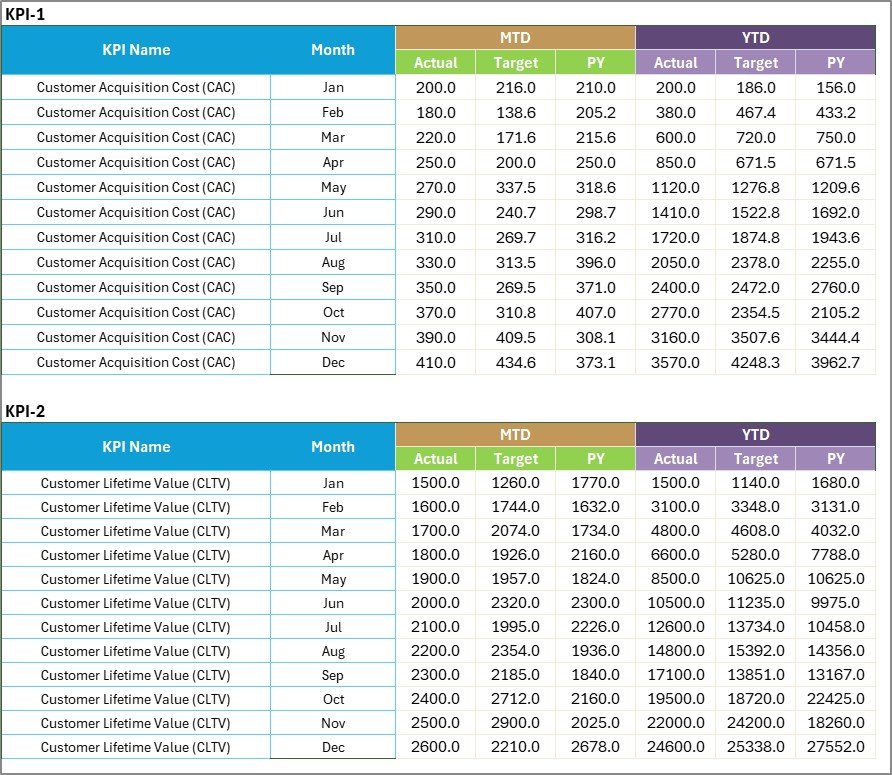
The Input Data Sheet is where all KPI data gets entered.
Key Functions:
-
Record Actual values
-
Enter Target values
-
Update metrics regularly
Because this sheet controls dashboard calculations, keeping data accurate ensures reliable insights.
Flexibility Advantage
You can update data anytime as new results become available. Consequently, the scorecard always reflects current performance.
📚 4️⃣ KPI Definition Sheet – KPI Framework

This sheet stores the KPI structure.
You enter:
-
KPI Name
-
KPI Group
-
Unit
-
Formula
-
KPI Definition
This ensures consistency across reporting and improves understanding among teams.
🔑 Important KPIs for Subscription Businesses
Subscription businesses should track customer, revenue, and operational metrics.
💰 Revenue KPIs
-
Monthly Recurring Revenue (MRR)
-
Annual Recurring Revenue (ARR)
-
Average Revenue per User (ARPU)
-
Revenue Growth Rate
👥 Customer KPIs
-
Customer Acquisition Rate
-
Customer Retention Rate
-
Churn Rate
-
Active Subscribers
📊 Engagement KPIs
-
Usage Frequency
-
Feature Adoption Rate
-
Renewal Rate
⚙️ Financial Efficiency KPIs
-
Customer Acquisition Cost (CAC)
-
Customer Lifetime Value (CLV)
-
CLV to CAC Ratio
Tracking these KPIs helps maintain sustainable growth.
Click to Purchases Subscription Business KPI Scorecard in Excel
⭐ Advantages of Subscription Business KPI Scorecard in Excel
The KPI scorecard offers multiple benefits.
✅ Centralized Performance Monitoring
Track all KPIs in one dashboard.
✅ Easy Data Entry
Update metrics quickly using the input sheet.
✅ Automated Comparisons
Instant Actual vs Target analysis.
✅ Trend Visibility
Charts reveal performance patterns clearly.
✅ Better Decision-Making
Managers rely on real-time insights.
✅ Fully Customizable
Adapt KPIs based on business model.
Click to Purchases Subscription Business KPI Scorecard in Excel
🛠️ Best Practices for Subscription Business KPI Scorecard in Excel
Follow these best practices to maximize value.
✔️ Update Data Regularly
Enter KPI results monthly.
✔️ Define Clear Targets
Use historical data for realistic targets.
✔️ Monitor Churn Closely
Customer retention drives subscription success.
✔️ Review Trends Monthly
Identify early warning signs.
✔️ Align KPIs with Business Goals
Focus only on meaningful metrics.
✔️ Train Teams on KPI Definitions
Ensure consistent interpretation.
Click to Purchases Subscription Business KPI Scorecard in Excel
📊 How Does This Scorecard Drive Business Growth?
This scorecard helps subscription companies:
-
Predict revenue accurately
-
Improve retention strategies
-
Optimize marketing spend
-
Enhance customer experience
-
Identify growth opportunities faster
Because decisions rely on measurable data, businesses reduce uncertainty and scale confidently.
🏁 Conclusion
Subscription businesses thrive on consistent performance tracking. Without structured analytics, growth becomes unpredictable.
The Subscription Business KPI Scorecard in Excel provides:
-
Centralized KPI monitoring
-
MTD and YTD comparisons
-
Visual performance indicators
-
Trend analysis charts
-
Structured KPI definitions
Moreover, it transforms raw data into actionable insights.
If you want to improve retention, increase recurring revenue, and manage performance professionally, this KPI scorecard offers the perfect solution.
Track smarter. Analyze better. Grow faster. 📊🚀
Click to Purchases Subscription Business KPI Scorecard in Excel
❓ Frequently Asked Questions (FAQs)
1. Who can use this KPI scorecard?
SaaS companies, subscription platforms, membership businesses, and recurring revenue models can use it.
2. Do I need advanced Excel skills?
No. Basic Excel knowledge is enough for data entry and analysis.
3. Can I customize KPIs?
Yes. You can modify KPI definitions and add new metrics.
4. How often should I update the scorecard?
You should update it monthly for accurate tracking.
5. Does this template support forecasting?
Yes. Trend analysis helps predict future performance.
6. Can I use this for multiple subscription products?
Yes. You can expand KPI groups for multiple offerings.
Click to Purchases Subscription Business KPI Scorecard in Excel
Visit our YouTube channel to learn step-by-step video tutorials