The automotive parts manufacturing industry operates in a highly competitive and precision-driven environment. Manufacturers must manage production efficiency, quality standards, machine utilization, delivery timelines, inventory levels, and operational costs simultaneously. However, many factories still depend on disconnected spreadsheets and manual reporting processes. As a result, managers struggle to obtain real-time performance visibility.
So, how can automotive parts manufacturers monitor operations effectively without investing in expensive ERP or analytics software?
The answer is simple — Automotive Parts Manufacturing KPI Dashboard in Excel.
This powerful, ready-to-use dashboard helps manufacturers track key performance indicators (KPIs), compare targets with actual performance, and analyze trends using a structured and easy-to-use Excel environment.
In this comprehensive guide, you will learn everything about the Automotive Parts Manufacturing KPI Dashboard in Excel, including features, benefits, implementation methods, best practices, and frequently asked questions.
Click to Purchases Automotive Parts Manufacturing KPI Dashboard in Excel
What Is an Automotive Parts Manufacturing KPI Dashboard in Excel?
An Automotive Parts Manufacturing KPI Dashboard in Excel is a centralized performance monitoring tool designed specifically for automotive component manufacturers. It allows production managers, plant heads, and operational teams to measure manufacturing performance using measurable KPIs.
Instead of reviewing multiple reports separately, users can analyze all operational metrics from one interactive dashboard.
Because Excel offers flexibility and familiarity, organizations can implement this solution quickly without complex software installation.
The dashboard helps manufacturers:
-
Track production efficiency
-
Monitor quality performance
-
Compare actual vs target metrics
-
Analyze monthly and yearly trends
-
Improve decision-making using data insights
-
Identify operational bottlenecks early
Moreover, the dashboard converts raw production data into meaningful visuals that support faster and smarter decisions.
Why Do Automotive Parts Manufacturers Need KPI Tracking?
Manufacturing environments generate large amounts of operational data every day. However, without structured KPI tracking, data alone cannot improve performance.
Common challenges manufacturers face:
-
Lack of centralized reporting
-
Delayed performance analysis
-
Manual calculations causing errors
-
Difficulty comparing historical performance
-
Limited visibility into production efficiency
-
Slow corrective action processes
Therefore, organizations need a structured monitoring system. A KPI dashboard solves these challenges by transforming data into actionable insights.
Furthermore, consistent KPI monitoring ensures continuous improvement across departments.
Click to Purchases Automotive Parts Manufacturing KPI Dashboard in Excel
How Does an Automotive KPI Dashboard Improve Manufacturing Operations?
A well-designed KPI dashboard creates transparency across production processes. As soon as managers access the dashboard, they understand operational performance instantly.
Key operational improvements include:
-
Faster performance evaluation
-
Better production planning
-
Improved resource utilization
-
Reduced downtime
-
Enhanced quality control
-
Accurate forecasting
Consequently, teams spend less time preparing reports and more time improving operations.
Click to Purchases Automotive Parts Manufacturing KPI Dashboard in Excel
Key Features of Automotive Parts Manufacturing KPI Dashboard in Excel
This ready-to-use dashboard includes 7 structured worksheets, each designed for a specific purpose. Together, they create a complete performance management system.
1️⃣ Home Sheet — Central Navigation Hub

The Home Sheet acts as an index page.
Here, users find six navigation buttons that allow quick movement between worksheets. Instead of searching through multiple tabs, users can jump directly to required sections.
Benefits of the Home Sheet:
-
Easy navigation
-
User-friendly interface
-
Faster access to reports
-
Improved usability
As a result, even non-technical users can operate the dashboard confidently.
2️⃣ Dashboard Sheet — Main Performance Overview
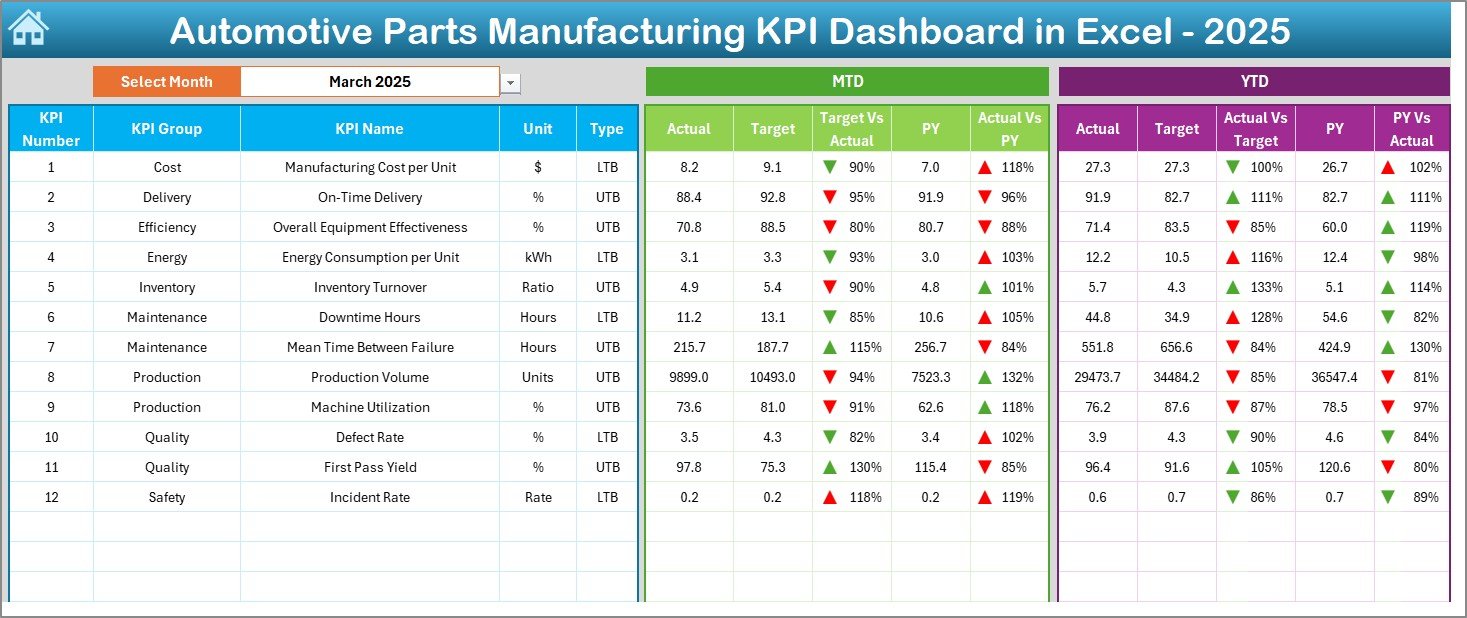
The Dashboard Sheet serves as the core reporting interface.
Here, users view consolidated KPI performance across the organization.
Key Functionalities:
-
Month selection dropdown (Cell D3)
-
Automatic dashboard updates based on selected month
-
MTD (Month-To-Date) analysis
-
YTD (Year-To-Date) analysis
-
Target vs Actual comparison
-
Previous Year vs Actual comparison
-
Conditional formatting with up/down arrows
Because visuals update dynamically, managers immediately identify performance gaps.
Metrics Displayed:
-
MTD Actual vs Target
-
MTD Previous Year comparison
-
YTD Actual vs Target
-
YTD Previous Year comparison
Therefore, decision-makers gain both short-term and long-term insights.
Click to Purchases Automotive Parts Manufacturing KPI Dashboard in Excel
3️⃣ KPI Trend Sheet — Performance Analysis Over Time
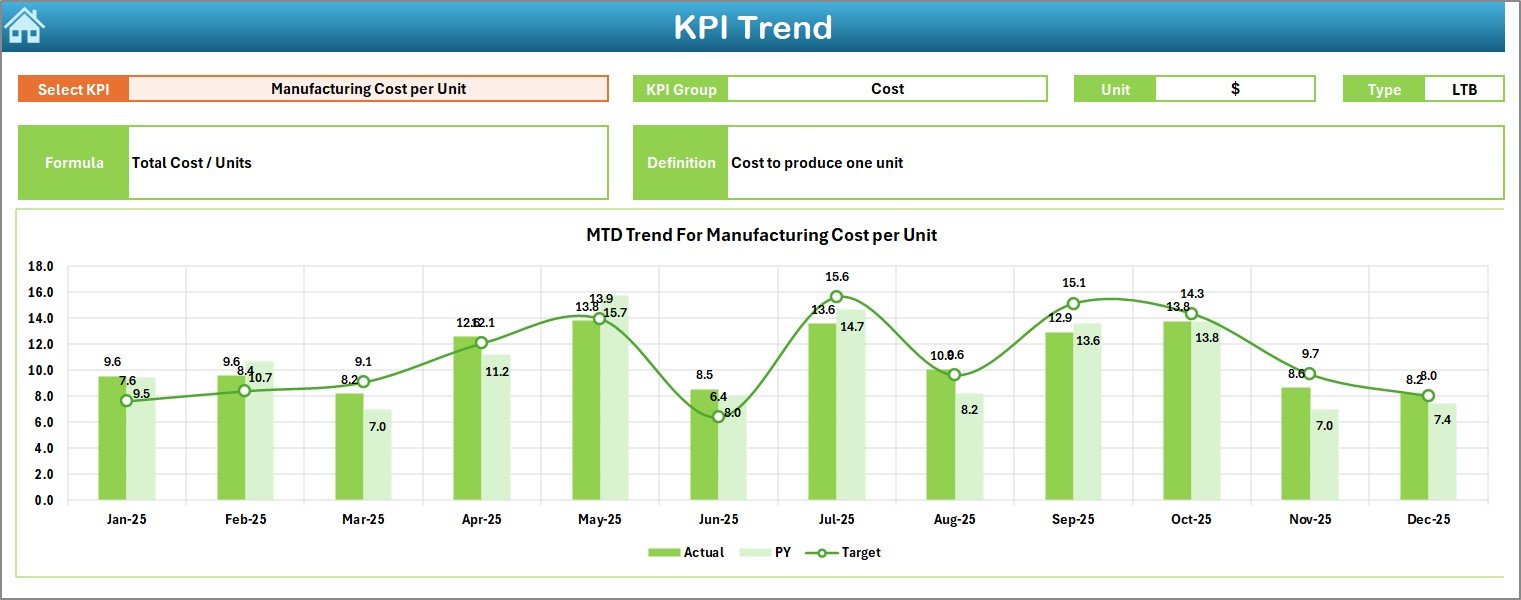
The KPI Trend Sheet enables detailed KPI-level analysis.
Users can select any KPI from the dropdown in cell C3.
Once selected, the dashboard displays:
-
KPI Group
-
KPI Unit
-
KPI Type (Higher Better / Lower Better)
-
KPI Formula
-
KPI Definition
-
Trend charts for MTD and YTD
Additionally, charts compare:
-
Actual values
-
Target values
-
Previous year performance
This feature helps managers analyze trends and detect performance patterns quickly.
4️⃣ Actual Numbers Input Sheet — Data Entry Interface
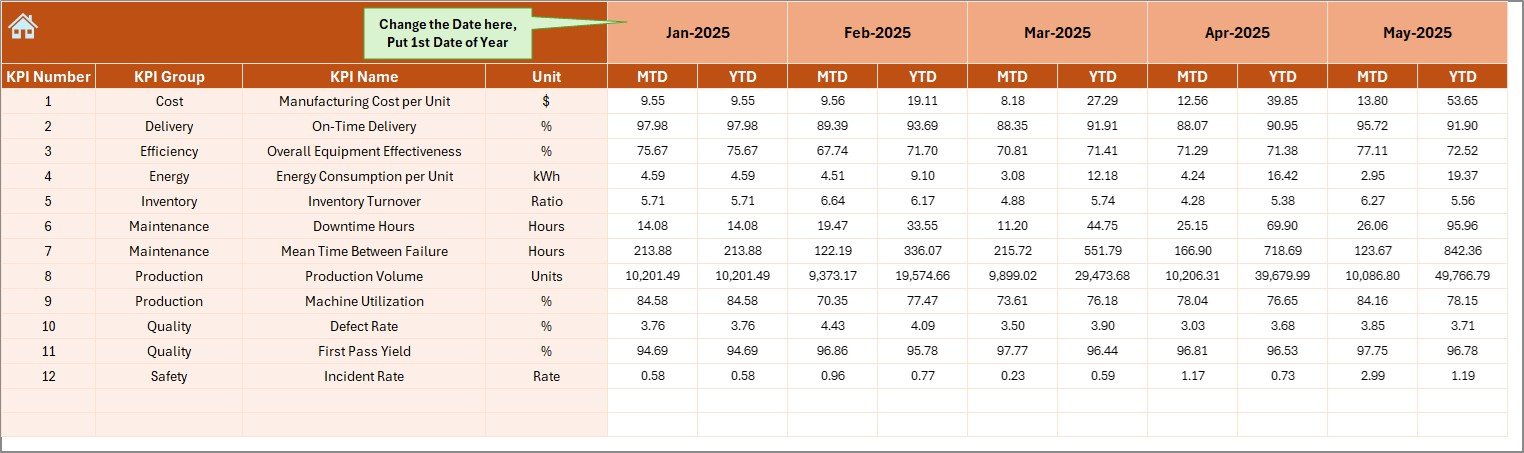
This sheet serves as the primary data input area.
Users enter monthly performance data here.
How it works:
-
Select the starting month in cell E1
-
Enter MTD and YTD actual numbers
-
Dashboard updates automatically
Because data entry remains centralized, accuracy improves significantly.
Click to Purchases Automotive Parts Manufacturing KPI Dashboard in Excel
5️⃣ Target Sheet — Goal Setting Structure

The Target Sheet allows organizations to define KPI targets.
Users enter:
-
Monthly targets
-
MTD targets
-
YTD targets
Setting targets ensures teams align operational goals with business objectives.
Moreover, performance tracking becomes measurable and objective.
6️⃣ Previous Year Numbers Sheet — Historical Comparison

Historical data plays a critical role in performance evaluation.
In this sheet, users enter previous-year KPI values. The dashboard then compares historical performance against current results.
This comparison helps organizations:
-
Evaluate growth
-
Measure improvement
-
Identify recurring issues
-
Set realistic targets
7️⃣ KPI Definition Sheet — KPI Documentation Center

The KPI Definition Sheet works as a KPI knowledge base.
Users enter:
-
KPI Name
-
KPI Group
-
Unit of Measurement
-
KPI Formula
-
KPI Definition
Because documentation stays centralized, teams maintain consistency in KPI interpretation.
Click to Purchases Automotive Parts Manufacturing KPI Dashboard in Excel
What KPIs Should Automotive Parts Manufacturers Track?
Although KPIs vary by organization, manufacturers commonly track the following metrics:
Production KPIs
-
Production Volume
-
Machine Utilization Rate
-
Cycle Time
-
Overall Equipment Effectiveness (OEE)
Quality KPIs
-
Defect Rate
-
Rejection Percentage
-
First Pass Yield
-
Customer Complaints
Delivery KPIs
-
On-Time Delivery Rate
-
Order Fulfillment Time
Cost KPIs
-
Manufacturing Cost per Unit
-
Scrap Cost
-
Labor Efficiency
Inventory KPIs
-
Inventory Turnover
-
Stock Accuracy
-
Raw Material Availability
Tracking these KPIs ensures balanced operational performance.
Click to Purchases Automotive Parts Manufacturing KPI Dashboard in Excel
Advantages of Automotive Parts Manufacturing KPI Dashboard in Excel
Implementing this dashboard provides several operational and strategic benefits.
✅ Centralized Performance Monitoring
Managers access all KPIs in one place, which simplifies reporting.
✅ Real-Time Decision Making
Since the dashboard updates instantly, leaders make faster decisions.
✅ Improved Operational Efficiency
Teams identify inefficiencies quickly and take corrective action.
✅ Cost-Effective Solution
Excel eliminates the need for expensive BI systems.
✅ Easy Customization
Organizations can add or modify KPIs anytime.
✅ Historical Performance Tracking
Year-over-year comparisons support strategic planning.
✅ User-Friendly Interface
Even beginners can use the dashboard without advanced training.
Click to Purchases Automotive Parts Manufacturing KPI Dashboard in Excel
How to Implement the Automotive KPI Dashboard Successfully?
Implementation becomes simple when organizations follow a structured approach.
Step-by-Step Implementation:
-
Define manufacturing KPIs clearly.
-
Enter KPI definitions in the KPI Definition Sheet.
-
Input monthly targets.
-
Add previous-year data.
-
Start entering actual performance numbers.
-
Review dashboard insights regularly.
Additionally, involve department heads during KPI selection to ensure alignment.
Click to Purchases Automotive Parts Manufacturing KPI Dashboard in Excel
Best Practices for the Automotive Parts Manufacturing KPI Dashboard in Excel
Following best practices ensures maximum dashboard effectiveness.
✔ Define Clear KPI Ownership
Assign responsibility for each KPI to specific teams.
✔ Update Data Regularly
Enter data weekly or monthly to maintain accuracy.
✔ Keep KPIs Relevant
Avoid tracking too many metrics. Focus on impactful indicators.
✔ Use Standard Definitions
Ensure everyone understands KPI calculations consistently.
✔ Review Trends Frequently
Analyze trends instead of relying only on current numbers.
✔ Align KPIs with Business Goals
Every KPI should support organizational objectives.
✔ Train Users Properly
Provide basic guidance so teams use the dashboard correctly.
Click to Purchases Automotive Parts Manufacturing KPI Dashboard in Excel
How Does This Dashboard Support Data-Driven Decision Making?
Data-driven organizations outperform competitors because they rely on measurable insights rather than assumptions.
This dashboard supports decisions by:
-
Highlighting performance gaps
-
Showing trend patterns
-
Comparing targets with results
-
Providing historical context
-
Enabling proactive planning
Therefore, managers shift from reactive management to proactive leadership.
Who Can Benefit from This Dashboard?
Several roles within automotive manufacturing benefit directly.
Production Managers
Monitor efficiency and output.
Plant Managers
Evaluate overall operational performance.
Quality Managers
Track defect trends and quality metrics.
Supply Chain Teams
Analyze delivery and inventory performance.
Senior Leadership
Review strategic performance indicators quickly.
Why Choose Excel Instead of Complex Software?
Although enterprise systems offer advanced analytics, Excel provides unmatched flexibility.
Excel Advantages:
-
No additional software cost
-
Easy deployment
-
High customization capability
-
Familiar interface
-
Quick implementation
-
Offline accessibility
Therefore, small and medium manufacturers especially benefit from Excel-based solutions.
Click to Purchases Automotive Parts Manufacturing KPI Dashboard in Excel
Future Improvements You Can Add to the Dashboard
Organizations can enhance the dashboard further by adding:
-
Automated data imports
-
Power Query integration
-
Advanced charts
-
Department-level dashboards
-
Predictive analysis
-
Automated alerts
These upgrades transform the dashboard into a powerful analytics platform.
Conclusion
The Automotive Parts Manufacturing KPI Dashboard in Excel provides a practical and powerful solution for monitoring manufacturing performance. Instead of managing scattered reports, organizations gain a centralized system that tracks KPIs, analyzes trends, and compares performance efficiently.
Moreover, the dashboard improves visibility, accountability, and operational control. Because it operates inside Microsoft Excel, implementation remains simple and cost-effective.
Ultimately, manufacturers that adopt structured KPI monitoring achieve higher productivity, better quality outcomes, and stronger business growth.
Click to Purchases Automotive Parts Manufacturing KPI Dashboard in Excel
Frequently Asked Questions (FAQs)
1. What is the purpose of an Automotive Parts Manufacturing KPI Dashboard?
The dashboard helps manufacturers monitor operational performance using measurable KPIs in a centralized Excel environment.
2. Can small manufacturers use this dashboard?
Yes. Small and medium manufacturers benefit greatly because Excel requires no expensive software investment.
3. Do I need advanced Excel skills to use it?
No. The dashboard uses simple inputs and automated calculations.
4. How often should data be updated?
Organizations should update data monthly or weekly depending on reporting needs.
5. Can I customize KPIs?
Yes. Users can add, remove, or modify KPIs easily.
6. Does the dashboard support historical comparison?
Yes. It compares current performance with previous-year data.
7. Is this dashboard suitable for multiple plants?
Yes. You can consolidate data from multiple plants into one dashboard.
8. Why are KPI trends important?
Trend analysis helps identify improvement patterns and recurring problems over time.
Click to Purchases Automotive Parts Manufacturing KPI Dashboard in Excel
Visit our YouTube channel to learn step-by-step video tutorials