Inventory management plays a critical role in every business that handles physical products. Whether you operate a warehouse, retail store, manufacturing unit, or distribution center, accurate inventory records ensure smooth operations and financial accuracy. Therefore, conducting regular inventory audits becomes essential for maintaining control and preventing losses.
However, many organizations still manage inventory audits using manual notes or unstructured spreadsheets. As a result, teams miss tasks, overlook discrepancies, and struggle to track audit progress.
So, how can businesses conduct inventory audits systematically without investing in complex audit software?
The answer is simple — Inventory Audit To-Do List Checklist in Excel.
This ready-to-use Excel checklist helps organizations plan, track, and complete inventory audit activities using a structured and easy-to-use format.
In this comprehensive guide, you will learn everything about the Inventory Audit To-Do List Checklist in Excel, including features, benefits, implementation steps, best practices, and frequently asked questions.
Click to Purchases Inventory Audit To-Do List Checklist in Excel
What Is an Inventory Audit To-Do List Checklist in Excel?
An Inventory Audit To-Do List Checklist in Excel is a structured task management tool designed to organize and monitor inventory audit activities.
Instead of tracking audit tasks across multiple documents, users manage all checklist items within one centralized Excel sheet.
Because the template uses simple status tracking and automation features, teams can monitor audit progress easily.
The checklist helps organizations:
-
Track inventory audit tasks
-
Assign responsibilities
-
Monitor deadlines
-
Measure audit progress
-
Improve accountability
-
Ensure audit completion
Consequently, businesses conduct audits more efficiently and accurately.
Click to Purchases Inventory Audit To-Do List Checklist in Excel
Why Do Businesses Need an Inventory Audit Checklist?
Inventory audits ensure stock accuracy, prevent shrinkage, and support financial reporting. However, without a structured checklist, audits become chaotic.
Common audit challenges include:
-
Missing audit steps
-
Lack of task ownership
-
Poor deadline tracking
-
Manual progress monitoring
-
Inconsistent audit procedures
-
Communication gaps between teams
Therefore, organizations require a standardized checklist that guides audit activities step by step.
Moreover, structured audits reduce operational risks and improve compliance.
Click to Purchases Inventory Audit To-Do List Checklist in Excel
Key Features of Inventory Audit To-Do List Checklist in Excel
This ready-to-use template includes two structured worksheets, designed to simplify audit management.
1️⃣ Inventory Audit To-Do List Checklist Sheet — Main Working Area
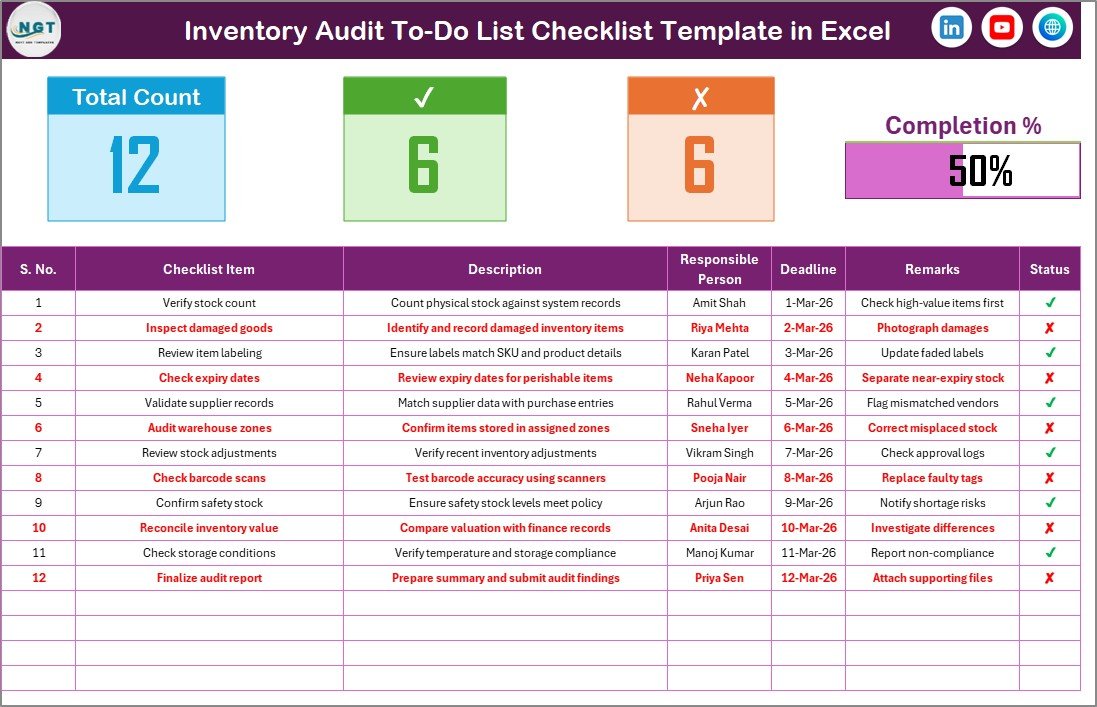
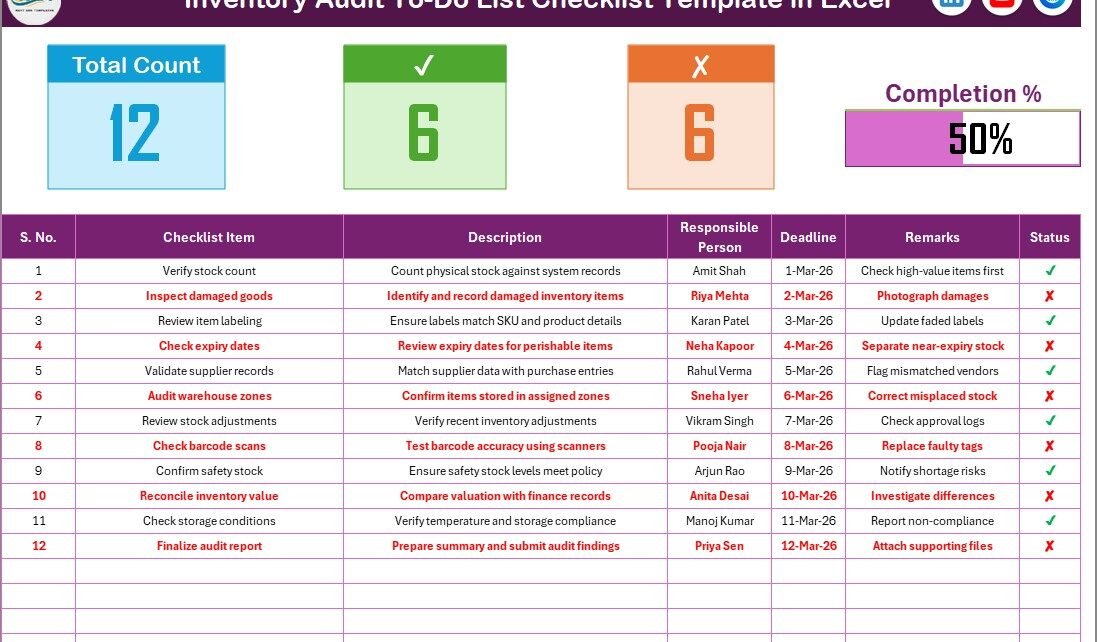
The Checklist Sheet serves as the primary interface where users manage audit activities.
Top Section — Audit Summary Dashboard
At the top of the sheet, users see an audit overview section.
This section displays:
-
Total Count – Total checklist items
-
Checked Count – Completed tasks
-
Crossed Count – Pending or rejected tasks
-
Progress Bar – Completion percentage visualization
Because the progress bar updates automatically, teams instantly understand audit status.
Checklist Table — Task Management Section
The checklist table forms the core of the template.
Users simply update the task status using ✔ or ✘ symbols.
Columns Included:
-
Serial No. – Task sequence number
-
Checklist Item – Audit task name
-
Description – Task explanation
-
Responsible Person – Assigned team member
-
Deadline – Task completion date
-
Remarks – Additional notes
-
Status – ✔ (Completed) or ✘ (Pending)
This structured format ensures every audit activity remains documented and traceable.
Click to Purchases Inventory Audit To-Do List Checklist in Excel
2️⃣ List Sheet — Responsible Person Database

The List Sheet stores a unique list of responsible persons.
This list creates a dropdown menu in the main checklist table.
Benefits:
-
Standardized data entry
-
Reduced typing errors
-
Consistent naming conventions
-
Faster task assignment
Therefore, the checklist remains organized and accurate.
How Does the Inventory Audit Checklist Improve Audit Efficiency?
A structured checklist transforms complex audit processes into manageable steps.
Key improvements include:
-
Clear task visibility
-
Defined responsibilities
-
Better deadline management
-
Real-time progress tracking
-
Reduced audit delays
-
Improved team coordination
As a result, audits become faster and more reliable.
What Tasks Can Be Included in an Inventory Audit Checklist?
Organizations can customize checklist items based on audit requirements.
Pre-Audit Tasks
-
Prepare inventory records
-
Freeze stock movement
-
Assign audit teams
-
Verify item master data
Physical Verification Tasks
-
Count inventory items
-
Verify product condition
-
Check storage locations
-
Identify damaged stock
Reconciliation Tasks
-
Compare physical vs system inventory
-
Investigate discrepancies
-
Adjust stock records
Reporting Tasks
-
Prepare audit report
-
Obtain approvals
-
Document findings
-
Implement corrective actions
Tracking these tasks ensures a complete audit process.
Click to Purchases Inventory Audit To-Do List Checklist in Excel
Advantages of Inventory Audit To-Do List Checklist in Excel
✅ Structured Audit Process
Every audit step remains documented.
✅ Improved Accountability
Assigned responsibilities prevent confusion.
✅ Real-Time Progress Monitoring
Automatic progress tracking improves visibility.
✅ Easy Customization
Users modify checklist items easily.
✅ Cost-Effective Solution
Excel eliminates expensive audit software.
✅ User-Friendly Design
Teams adopt the checklist quickly.
✅ Better Compliance Support
Structured audits improve regulatory compliance.
How to Implement the Inventory Audit Checklist Successfully?
Follow these simple steps:
-
List all audit tasks in the checklist table.
-
Assign responsible persons using dropdown.
-
Define deadlines for each task.
-
Update task status regularly.
-
Monitor progress using summary section.
-
Review completed audits for improvements.
Additionally, conduct regular review meetings during audits.
Click to Purchases Inventory Audit To-Do List Checklist in Excel
Best Practices for the Inventory Audit To-Do List Checklist in Excel
✔ Define Clear Audit Objectives
Understand what the audit intends to verify.
✔ Assign Task Ownership
Each checklist item should have a responsible person.
✔ Update Status Daily
Frequent updates maintain accuracy.
✔ Use Realistic Deadlines
Avoid unrealistic timelines.
✔ Maintain Detailed Remarks
Document observations clearly.
✔ Review Progress Regularly
Monitor completion percentage.
✔ Standardize Audit Procedures
Use the same checklist for consistency.
How Does This Checklist Support Better Inventory Control?
The checklist helps organizations:
-
Detect stock discrepancies early
-
Reduce inventory shrinkage
-
Improve record accuracy
-
Strengthen internal controls
-
Enhance audit transparency
-
Support financial reporting accuracy
Therefore, inventory management becomes more reliable.
Click to Purchases Inventory Audit To-Do List Checklist in Excel
Who Can Benefit from This Checklist?
-
Warehouse Managers
-
Inventory Controllers
-
Retail Businesses
-
Manufacturing Companies
-
Logistics Teams
-
Internal Audit Departments
Each role gains better visibility into audit activities.
Why Choose Excel for Inventory Audit Management?
Excel offers several advantages:
-
Easy implementation
-
Flexible customization
-
Familiar interface
-
No additional cost
-
Quick updates
-
Offline usability
Therefore, Excel remains one of the most practical tools for audit management.
Future Enhancements You Can Add
You can enhance the checklist by adding:
-
Automated reminders
-
Audit dashboards
-
Conditional alerts
-
Power BI integration
-
Risk scoring system
These enhancements improve audit intelligence further.
Conclusion
The Inventory Audit To-Do List Checklist in Excel provides a simple yet powerful solution for managing inventory audits efficiently. Instead of relying on manual tracking methods, organizations gain a structured checklist that improves accountability, visibility, and audit completion rates.
Moreover, the template simplifies audit workflows while maintaining accuracy and transparency. Because it operates entirely within Excel, businesses can implement it instantly without additional investment.
Ultimately, companies that adopt structured audit checklists achieve stronger inventory control, better compliance, and improved operational efficiency.
Click to Purchases Inventory Audit To-Do List Checklist in Excel
Frequently Asked Questions (FAQs)
What is an Inventory Audit To-Do List Checklist?
It is an Excel-based checklist used to manage and track inventory audit tasks.
Can I customize checklist items?
Yes. You can modify or add tasks based on audit requirements.
Do I need advanced Excel skills?
No. The template is simple and user-friendly.
How does the progress bar work?
It updates automatically based on completed checklist items.
Can multiple users use this checklist?
Yes. Teams can collaborate using shared files.
Is this suitable for small businesses?
Yes. It works for businesses of all sizes.
Can I track deadlines?
Yes. Each task includes a deadline column.
Does it help with compliance audits?
Yes. Structured tracking improves audit documentation.
Click to Purchases Inventory Audit To-Do List Checklist in Excel
Visit our YouTube channel to learn step-by-step video tutorials