Financial management requires constant monitoring, regular reviews, and organized record keeping. Businesses, finance teams, and individuals must ensure that financial tasks such as audits, reconciliations, tax reviews, and reporting happen on time. However, many organizations struggle to track these activities because they rely on scattered spreadsheets, emails, or manual reminders.
As a result, financial maintenance tasks often get delayed or overlooked. Missed financial reviews can lead to compliance issues, reporting errors, or operational risks. Therefore, companies need a structured system that tracks financial activities clearly and ensures accountability.
A Financial Maintenance Checklist in Excel provides a simple yet powerful solution. It helps organizations track financial tasks, assign responsibilities, monitor progress, and maintain financial discipline.
Instead of managing multiple files or relying on memory, finance teams can manage all financial maintenance activities in one structured Excel template.
In this article, we will explore everything you need to know about the Financial Maintenance Checklist in Excel, including its features, advantages, best practices, and practical use cases.
Click to buy Financial Maintenance Checklist in Excel
What is a Financial Maintenance Checklist in Excel?
A Financial Maintenance Checklist in Excel is a structured template that helps organizations track financial tasks and ensure they complete them on time.
Financial departments perform many recurring activities such as:
- Monthly account reconciliation
- Budget review
- Cash flow monitoring
- Tax compliance verification
- Financial reporting
- Vendor payment review
- Internal financial audits
Without a structured checklist, teams may forget important tasks or complete them late.
Therefore, a financial checklist acts as a task management system for financial operations.
Excel provides a perfect platform for building this system because it offers:
- Data organization tools
- Progress tracking features
- Simple automation
- Customizable templates
As a result, organizations can maintain financial discipline and improve operational efficiency.
Why Do Businesses Need a Financial Maintenance Checklist?
Financial operations require consistency and accuracy. Even small errors can create major financial problems.
However, companies often struggle with financial maintenance because tasks involve multiple team members and deadlines.
A Financial Maintenance Checklist solves this problem by creating a structured workflow.
Here are some key reasons why businesses need it.
Ensures Financial Accountability
When organizations assign financial tasks to specific individuals, accountability improves significantly.
For example:
- Account reconciliation assigned to accounting manager
- Budget monitoring assigned to finance analyst
- Compliance verification assigned to internal auditor
Because responsibilities remain clearly defined, teams complete tasks on time.
Improves Financial Compliance
Many financial activities involve legal compliance requirements.
For instance:
- Tax filing deadlines
- Financial reporting obligations
- Regulatory compliance reviews
A checklist ensures that teams never miss these critical deadlines.
Reduces Financial Errors
Manual financial processes often create mistakes.
However, when teams follow a structured checklist, they complete tasks systematically. As a result, the risk of financial errors decreases.
Increases Operational Efficiency
Financial departments often manage dozens of tasks every month.
A checklist simplifies workflow management. Consequently, teams can focus on financial analysis instead of administrative tracking.
Key Features of the Financial Maintenance Checklist in Excel
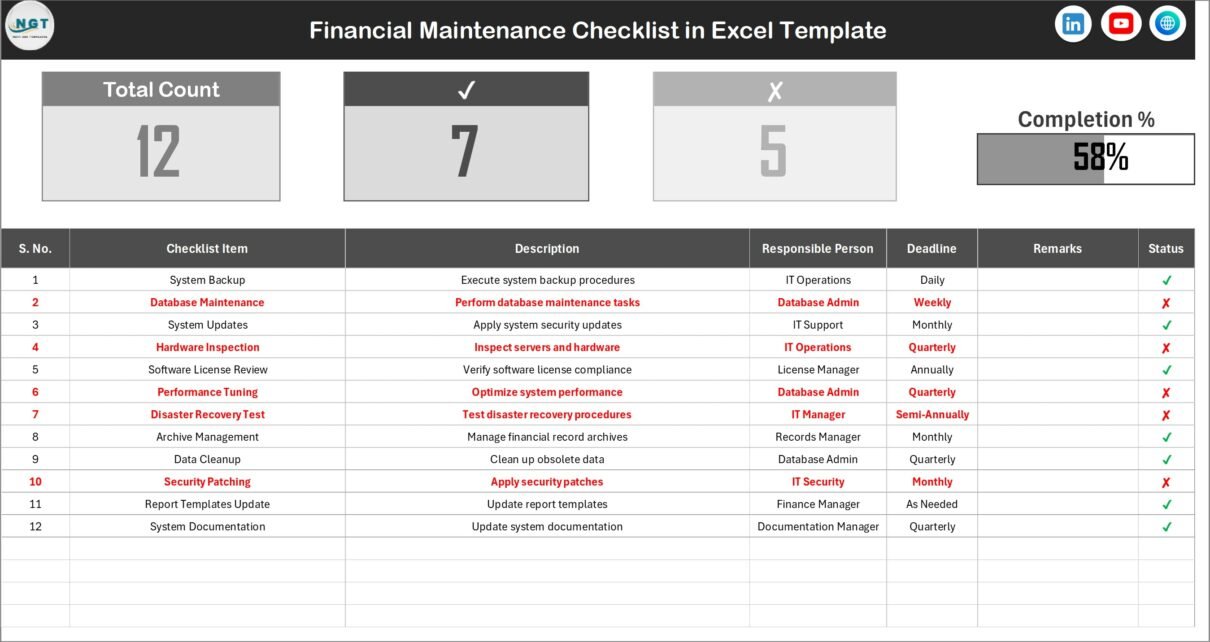
The Financial Maintenance Checklist Template in Excel includes several useful features that help finance teams track and manage tasks efficiently.
The template contains two worksheets, each serving a specific purpose.
- Financial Maintenance Checklist Sheet
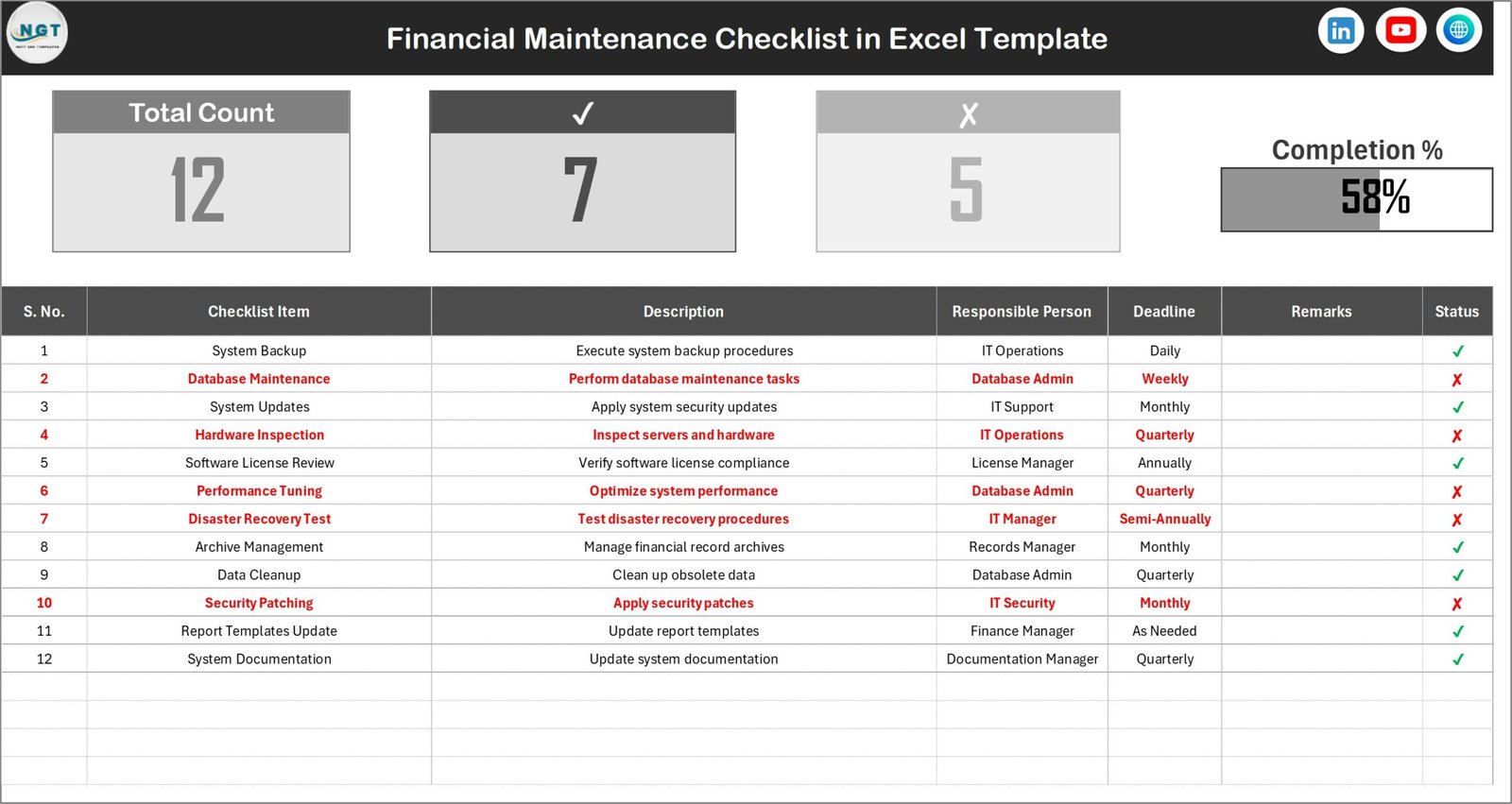
This sheet acts as the main working sheet where users manage financial maintenance activities.
Top Section
The top section provides a quick summary of checklist progress.
It includes the following indicators:
- Total Count – Total number of checklist tasks
- Checked Count – Completed tasks
- Crossed Count – Pending tasks
- Progress Bar – Percentage of completed tasks
Because of these indicators, users can instantly monitor financial maintenance progress.
Checklist Table
The checklist table acts as the core component of the template.
Users enter financial tasks and update their completion status.
The table contains the following columns:
- Serial No. – Unique identifier for each checklist item
- Checklist Item – Name of the financial task
- Description – Details about the task
- Responsible Person – Person assigned to complete the task
- Deadline – Task completion date
- Remarks – Additional notes or comments
- Status – Task status (✔ for completed, ✘ for pending)
Because the structure remains simple and clear, finance teams can update it easily.
Click to buy Financial Maintenance Checklist in Excel
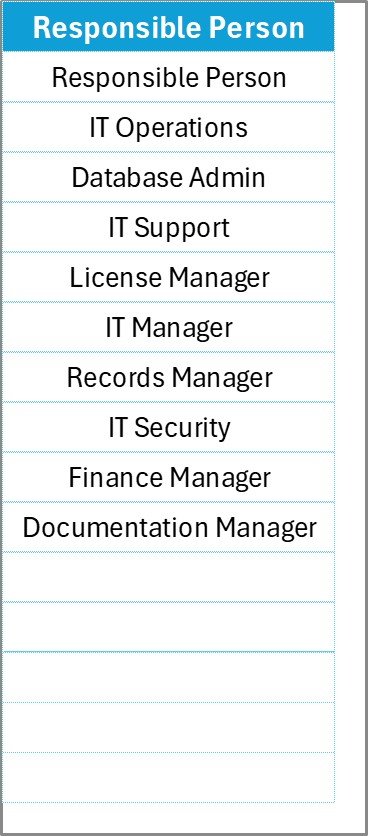
List Sheet Tab
The List sheet supports the main checklist sheet.
In this sheet, users maintain a unique list of responsible persons.
This list helps create a drop-down menu in the checklist table.
As a result:
- Users can select names quickly
- Data remains consistent
- Typing errors decrease
Therefore, the template maintains clean and organized data.
Click to buy Financial Maintenance Checklist in Excel
How Does the Financial Maintenance Checklist in Excel Work?
Using the checklist template remains extremely simple. Users can start tracking financial tasks within minutes.
Follow these steps to use the template effectively.
Step 1: Enter Financial Tasks
First, list all financial maintenance activities in the Checklist Item column.
Examples include:
- Monthly bank reconciliation
- Accounts payable review
- Budget variance analysis
- Payroll verification
- Tax compliance check
Step 2: Assign Responsible Persons
Next, assign each task to a responsible person.
Because the template uses a dropdown list, users can select names quickly.
Step 3: Set Deadlines
After assigning tasks, define the deadline for each activity.
This step helps teams prioritize tasks and avoid delays.
Step 4: Update Task Status
Once a team member completes a task, they simply change the status column.
Use:
- for completed tasks
- for pending tasks
As soon as the status changes, the progress indicators update automatically.
Step 5: Monitor Progress
The top section displays the progress bar and task summary.
Managers can instantly see:
- Total tasks
- Completed tasks
- Pending tasks
- Completion percentage
Consequently, financial managers gain better visibility into financial maintenance activities.
Advantages of Financial Maintenance Checklist in Excel
A Financial Maintenance Checklist offers several benefits for businesses and finance professionals.
Below are some of the most important advantages.
- Improves Financial Organization
Financial tasks remain organized in a structured table.
As a result, finance teams can track every activity easily.
- Enhances Task Visibility
Managers can instantly see which tasks are completed and which remain pending.
Therefore, decision-makers can take action quickly.
- Increases Team Accountability
Because each task has an assigned responsible person, accountability improves across the finance team.
- Saves Time
Instead of searching through multiple files or emails, teams can manage all financial tasks in one place.
- Supports Financial Planning
When organizations track financial maintenance activities regularly, they can plan audits, reviews, and reporting cycles more efficiently.
Opportunities for Improvement in Financial Maintenance Checklists
Although a financial checklist improves financial operations, organizations can enhance its effectiveness by implementing additional improvements.
Automate Financial Tracking
Companies can integrate Excel with other financial systems to automate data updates.
Add Conditional Formatting
Conditional formatting can highlight overdue tasks or pending activities.
This feature improves visibility and prioritization.
Create Dashboard Reporting
Organizations can build a dashboard that summarizes financial checklist progress.
This allows managers to monitor multiple checklists across departments.
Integrate With Financial Calendars
Combining checklists with financial calendars ensures better planning of recurring financial tasks.
Best Practices for the Financial Maintenance Checklist
To maximize the effectiveness of the checklist template, organizations should follow several best practices.
- Define Clear Financial Tasks
Checklist items must remain clear and specific.
For example, instead of writing “Financial review”, use “Monthly bank reconciliation review”.
- Assign Responsible Owners
Each task should have a clear owner.
This prevents confusion and improves accountability.
- Update the Checklist Regularly
Teams must update the checklist frequently.
Outdated checklists reduce reliability.
- Review Progress Weekly
Managers should review checklist progress weekly.
Regular monitoring ensures timely completion.
- Maintain Data Accuracy
Always maintain accurate task descriptions, deadlines, and responsible persons.
Clean data ensures reliable financial tracking.
Who Can Use a Financial Maintenance Checklist?
Many professionals and organizations can benefit from this template.
These include:
- Finance departments
- Accounting teams
- Financial consultants
- Small business owners
- Corporate finance managers
- Internal auditors
- Compliance officers
Therefore, the checklist serves a wide range of financial management needs.
Real-World Use Cases of Financial Maintenance Checklist
Many organizations use financial maintenance checklists for different purposes.
Some examples include:
Monthly Financial Reviews
Companies track tasks such as reconciliation, expense verification, and reporting.
Audit Preparation
Internal auditors use checklists to ensure documentation readiness.
Tax Compliance Tracking
Finance teams track tax deadlines and reporting requirements.
Budget Monitoring
Financial analysts monitor budget updates and variance analysis tasks.
Why Excel is Ideal for Financial Maintenance Tracking
Excel remains one of the most widely used financial tools in the world.
Several reasons make Excel ideal for checklist management.
- Easy to use
- Flexible structure
- Customizable templates
- Powerful formulas
- Data validation tools
- Compatibility with other financial systems
Because of these advantages, Excel continues to be a preferred platform for financial management tools.
Conclusion
Financial maintenance activities play a critical role in ensuring financial accuracy, compliance, and operational efficiency.
However, organizations often struggle to manage these tasks when they rely on unstructured processes.
A Financial Maintenance Checklist in Excel provides a practical solution by organizing financial activities in a structured and trackable format.
With features such as progress tracking, task assignment, and deadline monitoring, this checklist improves financial accountability and transparency.
Therefore, businesses that implement a financial checklist can strengthen their financial management processes and reduce operational risks.
Frequently Asked Questions (FAQs)
What is a Financial Maintenance Checklist?
A Financial Maintenance Checklist is a structured list of financial tasks that organizations track to ensure timely completion of financial activities.
Why should businesses use a Financial Maintenance Checklist in Excel?
Businesses use it because it helps track financial tasks, assign responsibilities, monitor deadlines, and ensure compliance.
Can small businesses use this checklist?
Yes. Small businesses benefit significantly because the checklist simplifies financial task management.
What types of tasks can be included in the checklist?
Organizations can include tasks such as:
- Account reconciliation
- Budget review
- Financial reporting
- Expense monitoring
- Compliance verification
How does the progress tracking work in the template?
The template calculates completed tasks and displays progress using a progress bar and summary indicators.
Is Excel suitable for financial task management?
Yes. Excel offers flexible data management, formulas, and customization features that make it ideal for financial checklists.
Watch the step-by-step video tutorial:
Visit our YouTube channel to learn step-by-step video tutorials
Click to buy Financial Maintenance Checklist in Excel