Street lighting services play a vital role in maintaining safe and functional urban environments. Well-managed lighting infrastructure improves road safety, reduces accidents, enhances public security, and supports smart city initiatives. Because cities expand rapidly, municipal authorities must constantly monitor street lighting performance, maintenance activities, and operational efficiency.
However, many municipalities still rely on manual reports and scattered spreadsheets to track lighting operations. As a result, decision-makers struggle to monitor key performance indicators, analyze maintenance efficiency, and evaluate service performance.
Therefore, organizations need a centralized analytics solution that can monitor all street lighting service metrics in one place. This is where the Street Lighting Services KPI Dashboard in Power BI becomes extremely valuable.
The Street Lighting Services KPI Dashboard in Power BI is a powerful business intelligence solution that helps municipalities and infrastructure teams monitor operational KPIs, evaluate performance trends, and improve maintenance efficiency. Because Power BI provides dynamic visualization and real-time analytics, managers can quickly understand service performance and make informed decisions.
In this comprehensive guide, you will learn everything about the Street Lighting Services KPI Dashboard in Power BI, including its features, benefits, implementation strategies, and best practices.
Click to Purchases Street Lighting Services KPI Dashboard in Power BI
What Is a Street Lighting Services KPI Dashboard in Power BI?
A Street Lighting Services KPI Dashboard in Power BI is an interactive analytics dashboard designed to track key performance indicators related to public street lighting operations.
This dashboard consolidates operational data from multiple sources and converts it into visual reports, charts, and performance indicators.
As a result, municipal authorities can monitor:
-
Street lighting maintenance performance
-
Service request resolution rates
-
Operational costs and efficiency
-
Performance trends over time
-
Target vs actual performance metrics
-
Year-over-year service improvements
Because Power BI supports advanced visualization and filtering capabilities, managers can easily analyze data and identify performance gaps.
Why Do Municipalities Need a Street Lighting KPI Dashboard?
Managing thousands of street lights across a city requires careful monitoring and efficient planning. Without proper analytics tools, municipal departments face several challenges.
Common challenges include:
-
Difficulty tracking lighting maintenance performance
-
Limited visibility into operational KPIs
-
Slow performance reporting
-
Lack of centralized data analysis
-
Difficulty comparing current and previous year performance
Because of these challenges, city managers cannot quickly identify service issues or improvement opportunities.
However, a Power BI KPI Dashboard solves these problems by providing a centralized monitoring platform.
With this dashboard, organizations can:
-
Monitor performance targets
-
Analyze maintenance efficiency
-
Compare current and historical performance
-
Track monthly service trends
-
Improve operational planning
Consequently, municipalities can improve street lighting service quality and operational efficiency.
Click to Purchases Street Lighting Services KPI Dashboard in Power BI
Key Features of the Street Lighting Services KPI Dashboard in Power BI
The Street Lighting Services KPI Dashboard in Power BI includes three powerful pages that provide detailed insights into street lighting performance.
Each page focuses on a specific aspect of KPI analysis.
Summary Page – Main Performance Dashboard
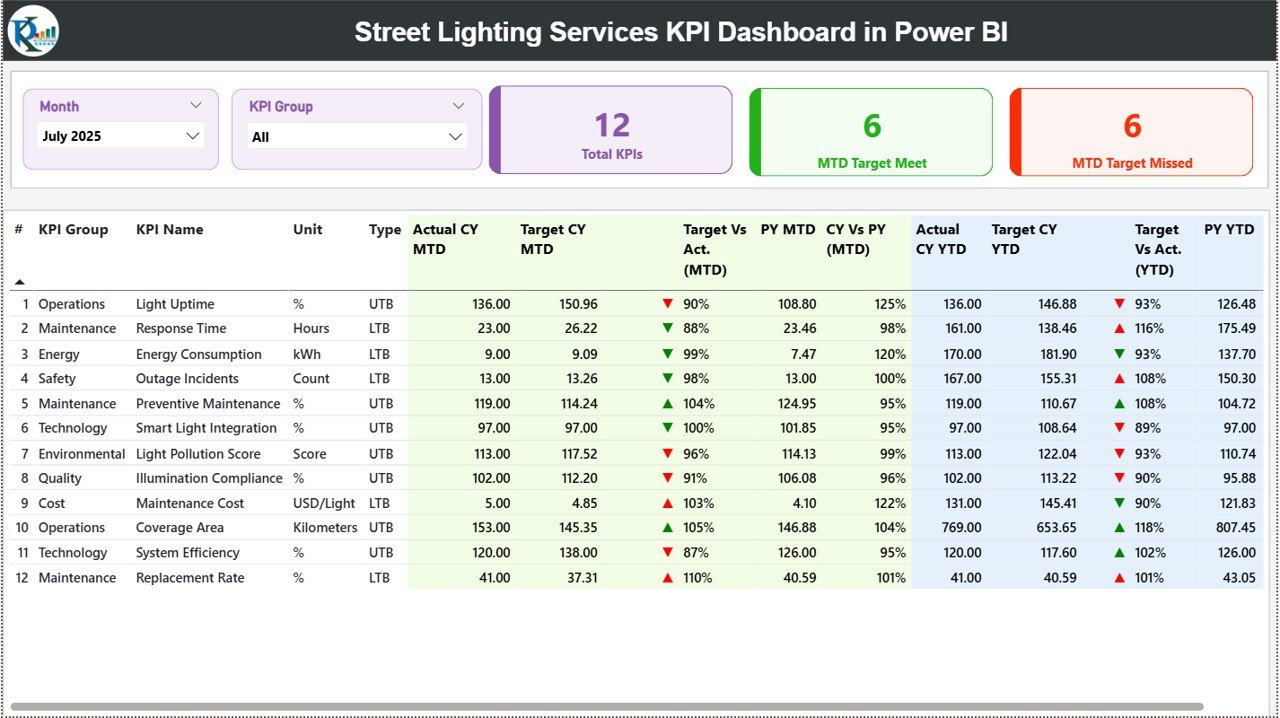
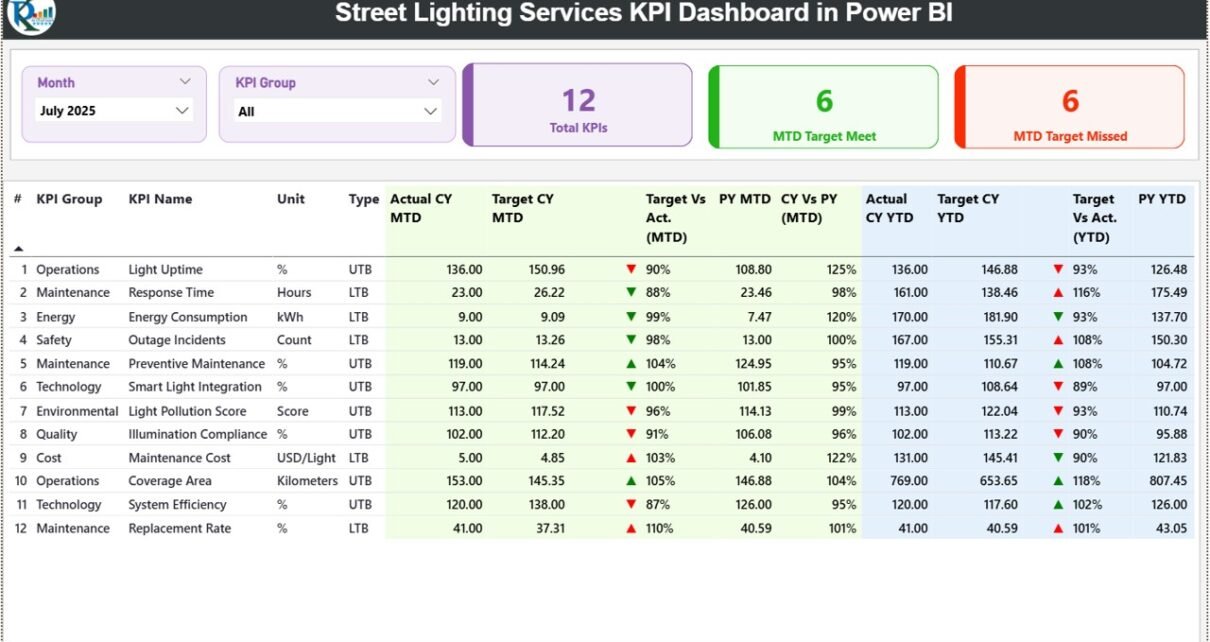
The Summary Page serves as the primary dashboard where users can monitor overall KPI performance.
This page provides a high-level overview of service performance across multiple KPIs.
At the top of the page, users can apply interactive slicers such as:
-
Month
-
KPI Group
These slicers allow users to filter the dashboard dynamically.
KPI Cards
The Summary Page includes three key performance indicator cards:
-
Total KPIs Count – Displays the total number of KPIs being tracked.
-
MTD Target Meet Count – Shows the number of KPIs that achieved the monthly target.
-
MTD Target Missed Count – Displays the number of KPIs that failed to meet the target.
These KPI cards provide a quick overview of overall performance.
Detailed KPI Table
Below the KPI cards, the dashboard displays a detailed table containing KPI performance data.
The table includes the following columns:
KPI Information
-
KPI Number – Sequence number of the KPI
-
KPI Group – Category of the KPI
-
KPI Name – Name of the performance metric
-
Unit – Measurement unit of the KPI
-
Type – Indicates whether the KPI is
-
LTB (Lower the Better)
-
UTB (Upper the Better)
-
Month-to-Date (MTD) Metrics
The dashboard displays the following MTD performance indicators:
-
Actual CY MTD – Current year actual value for MTD
-
Target CY MTD – Target value for the month
-
MTD Icon – ▲ and ▼ icons with green and red colors indicating KPI status
-
Target vs Actual (MTD) – Percentage comparison of actual vs target
-
PY MTD – Previous year MTD value
-
CY vs PY (MTD) – Comparison between current year and previous year performance
These metrics help managers quickly understand monthly performance trends.
Year-to-Date (YTD) Metrics
The dashboard also includes Year-to-Date performance analysis.
Displayed metrics include:
-
Actual CY YTD – Current year YTD actual value
-
Target CY YTD – Target YTD value
-
YTD Icon – ▲ and ▼ indicators showing KPI status
-
Target vs Actual (YTD) – Percentage comparison of actual vs target
-
PY YTD – Previous year YTD value
-
CY vs PY (YTD) – Comparison of current and previous year YTD values
These metrics allow organizations to track long-term performance progress.
Click to Purchases Street Lighting Services KPI Dashboard in Power BI
KPI Trend Page – Performance Trend Analysis
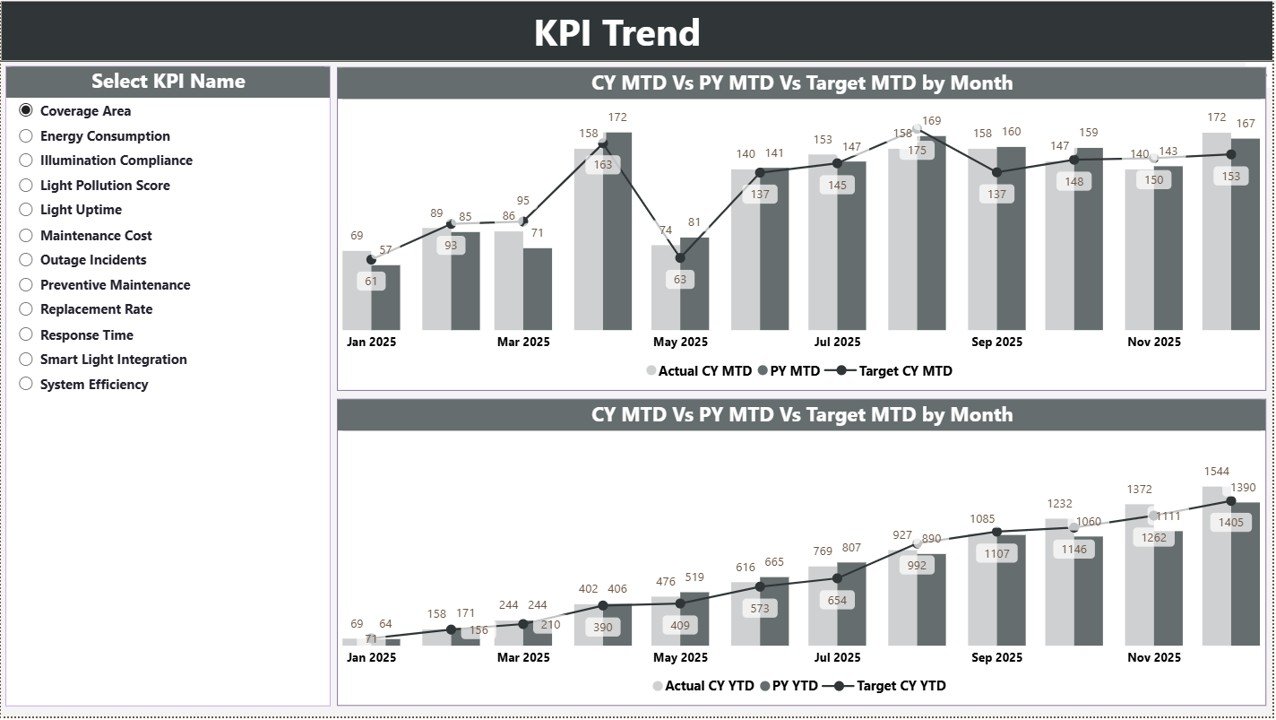
The KPI Trend Page focuses on analyzing KPI performance trends over time.
This page helps users evaluate how KPIs perform across months.
On the left side of the page, users can select the KPI Name using a slicer.
Once a KPI is selected, the dashboard automatically updates the visualizations.
Charts Included
The KPI Trend page displays two combo charts:
MTD Trend Chart
This chart shows:
-
Current Year Actual values
-
Previous Year values
-
Target values
The chart allows users to evaluate monthly performance against targets.
YTD Trend Chart
This chart displays:
-
Current Year YTD actual performance
-
Previous Year YTD performance
-
Target YTD values
As a result, users can analyze long-term KPI performance trends.
Because these charts combine multiple data series, they provide a comprehensive view of performance.
Click to Purchases Street Lighting Services KPI Dashboard in Power BI
KPI Definition Page – KPI Details
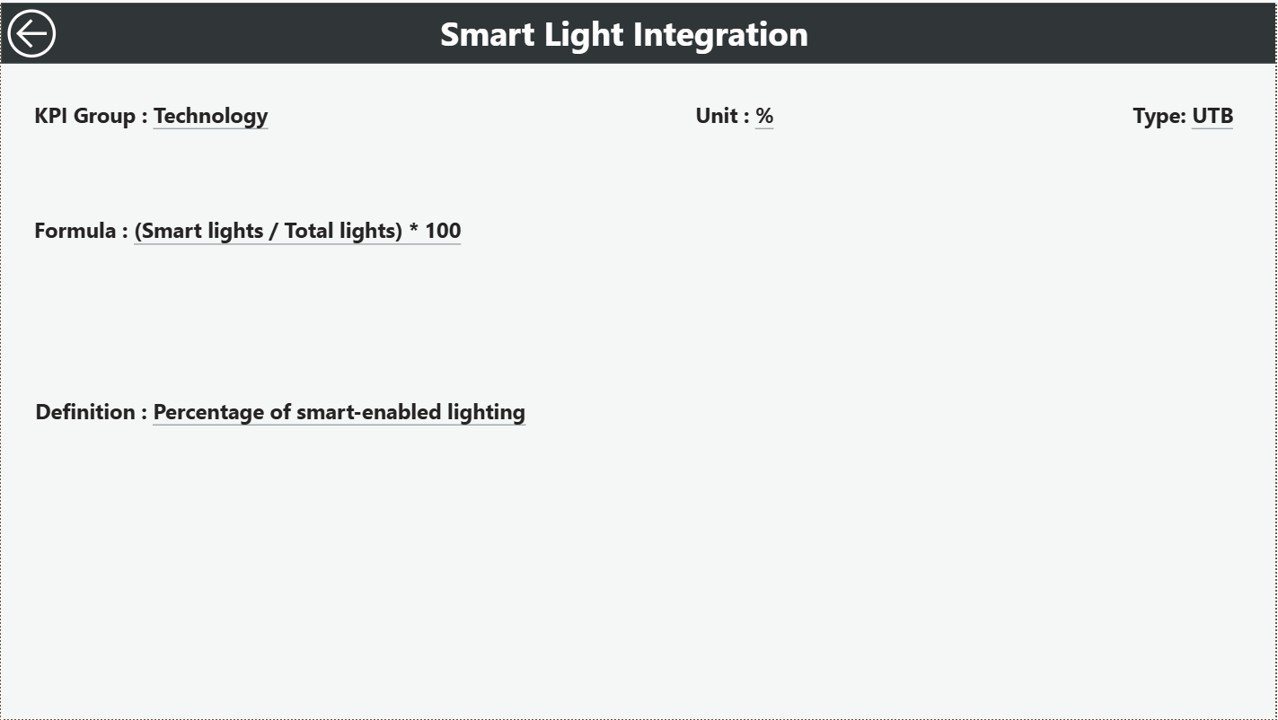
The KPI Definition Page provides detailed information about each KPI.
This page is configured as a drill-through page and remains hidden from the main navigation.
Users can access this page by drilling through from the Summary Page.
Once opened, the page displays detailed KPI information such as:
-
KPI Formula
-
KPI Definition
-
KPI Category
This information helps users understand how each KPI works.
To return to the main dashboard, users simply click the Back Button located at the top left corner.
Excel Data Source for the Dashboard
The Street Lighting Services KPI Dashboard in Power BI uses Excel as the data source.
The Excel file contains three input worksheets where users must enter the data.
Input Actual Sheet – Actual KPI Data
The Input Actual Sheet stores actual performance data.
Users must enter the following information:
-
KPI Name
-
Month (first date of the month)
-
MTD Value
-
YTD Value
Once this data is entered, Power BI automatically updates the dashboard.
Input Target Sheet – KPI Target Data
The Input Target Sheet contains target values for each KPI.
Users must enter:
-
KPI Name
-
Month
-
Target MTD value
-
Target YTD value
These targets allow the dashboard to calculate performance comparisons.
KPI Definition Sheet – KPI Metadata
The KPI Definition Sheet stores detailed KPI information.
Users must enter the following fields:
-
KPI Number
-
KPI Group
-
KPI Name
-
Unit
-
Formula
-
KPI Definition
-
KPI Type (LTB or UTB)
This structured data allows Power BI to generate dynamic analytics.
Click to Purchases Street Lighting Services KPI Dashboard in Power BI
Advantages of Street Lighting Services KPI Dashboard in Power BI
Implementing this dashboard offers several benefits for municipalities and infrastructure departments.
Centralized KPI Monitoring
The dashboard consolidates all street lighting KPIs in one place.
Real-Time Performance Insights
Power BI visualizations help managers quickly identify performance trends.
Faster Decision Making
Clear KPI indicators allow leaders to make faster operational decisions.
Historical Performance Comparison
Year-over-year analysis helps organizations evaluate improvements.
Improved Operational Efficiency
Managers can detect service gaps and allocate resources more effectively.
Better Target Tracking
Target vs actual metrics help organizations measure progress accurately.
Opportunities for Improvement in Street Lighting Analytics
Although the dashboard provides strong analytical capabilities, organizations can enhance it further.
Integrate IoT Smart Lighting Data
Smart lighting systems generate real-time performance data.
Add Energy Consumption KPIs
Energy monitoring helps reduce electricity costs.
Monitor Maintenance Response Time
Tracking repair response time improves service quality.
Use Predictive Analytics
Advanced analytics can predict lighting failures before they occur.
Click to Purchases Street Lighting Services KPI Dashboard in Power BI
Best Practices for Street Lighting KPI Dashboard in Power BI
Organizations should follow these best practices to maximize dashboard effectiveness.
Define Clear KPIs
Important KPIs may include:
-
Lighting uptime
-
Fault repair time
-
Energy consumption
-
Maintenance completion rate
Maintain Data Accuracy
Accurate input data ensures reliable performance reports.
Update Data Regularly
Regular data updates ensure the dashboard reflects the latest performance.
Use Interactive Filters
Slicers help users explore performance trends quickly.
Train Staff on Dashboard Usage
Proper training ensures teams use analytics effectively.
How to Implement the Dashboard Successfully
Organizations can implement this dashboard using the following process.
Step 1 – Define Performance Metrics
Identify important street lighting KPIs.
Step 2 – Collect Operational Data
Gather data from maintenance systems and infrastructure databases.
Step 3 – Store Data in Excel
Enter KPI data into structured Excel sheets.
Step 4 – Connect Excel to Power BI
Import Excel data into Power BI Desktop.
Step 5 – Build Visualizations
Create KPI cards, charts, and interactive filters.
Step 6 – Publish Dashboard
Finally, publish the dashboard to Power BI Service.
Conclusion
Street lighting systems are essential for urban safety and infrastructure development. Because cities rely on efficient lighting services, municipalities must carefully monitor maintenance performance and operational efficiency.
The Street Lighting Services KPI Dashboard in Power BI provides a powerful solution for analyzing service performance and tracking KPIs.
This dashboard converts complex operational data into visual insights, allowing managers to monitor performance, evaluate trends, and improve decision-making.
By implementing this dashboard, organizations can enhance operational efficiency, improve service quality, and support smart city infrastructure development.
Click to Purchases Street Lighting Services KPI Dashboard in Power BI
Frequently Asked Questions (FAQs)
What is a Street Lighting KPI Dashboard?
A Street Lighting KPI Dashboard is an analytics tool used to monitor lighting service performance, maintenance efficiency, and operational KPIs.
Why should municipalities use Power BI dashboards?
Power BI dashboards provide powerful data visualization and interactive analytics for infrastructure management.
What KPIs are important for street lighting services?
Common KPIs include:
-
Lighting uptime
-
Maintenance response time
-
Energy consumption
-
Fault resolution time
Can Power BI connect to Excel data?
Yes. Power BI can easily connect to Excel files and update dashboards automatically.
Is Power BI suitable for municipal infrastructure analytics?
Yes. Power BI provides scalable analytics capabilities that help municipalities monitor infrastructure performance.
Click to Purchases Street Lighting Services KPI Dashboard in Power BI
Visit our YouTube channel to learn step-by-step video tutorials