Introduction
The Music Festival KPI Scorecard is a specially designed tool to help event organizers monitor and evaluate the performance of their music festivals efficiently. Whether you are tracking attendance, revenue, social media engagement, or operational KPIs, this ready-to-use KPI Scorecard template provides a comprehensive overview of all critical metrics in a streamlined format.
By leveraging this scorecard, you can make informed decisions, spot trends early, and ensure your music festival runs smoothly and successfully year after year.
Key Features of Music Festival KPI Scorecard
- Multi-sheet Design: Features four interactive worksheets for efficient data input, analysis, and tracking.
- Dynamic Dropdown Menus: Quickly filter data by Month, Month-to-Date (MTD), and Year-to-Date (YTD).
- Actual vs Target Comparison: Monitor achieved values against set goals to assess performance.
- Visual Performance Indicators: Easy-to-understand color codes and conditional formatting provide instant insights.
- Trend Analysis: View MTD and YTD trends with line charts to visualize progress over time.
- KPI Definitions and Formulas: Detailed KPI definitions ensure clarity for each tracked metric.
- Flexible Data Entry: Seamlessly update data to keep the scorecard current and relevant.
Dashboard Pages Explanation
1. Scorecard Sheet
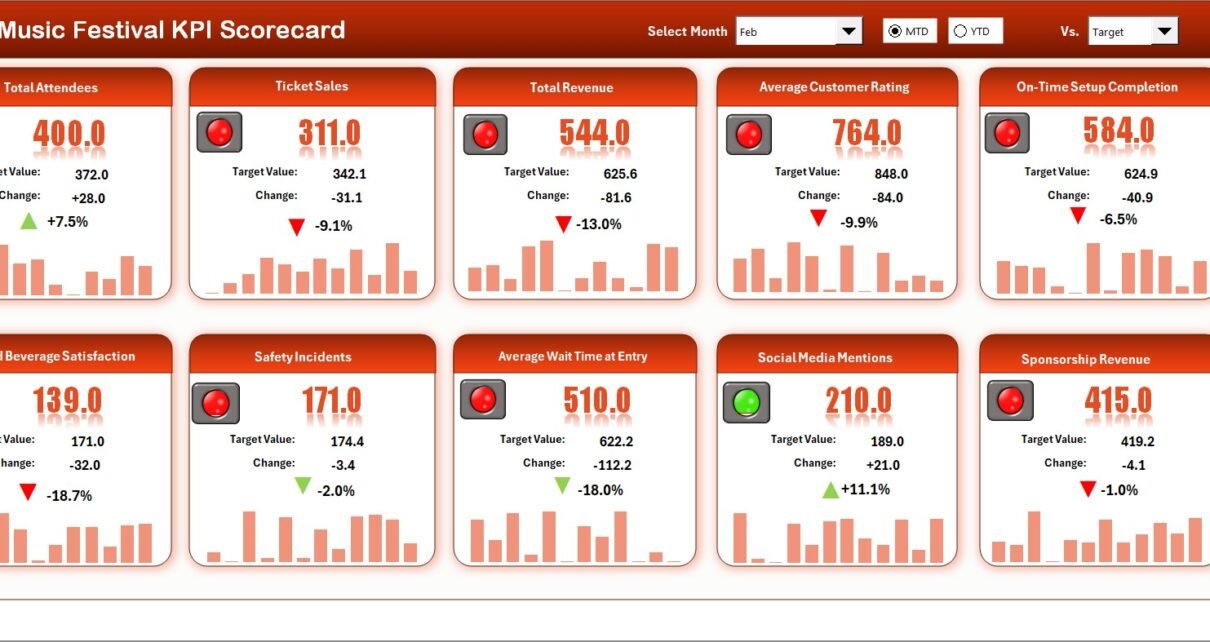
The Scorecard Sheet acts as the main interface where you monitor the overall KPI performance of your music festival.
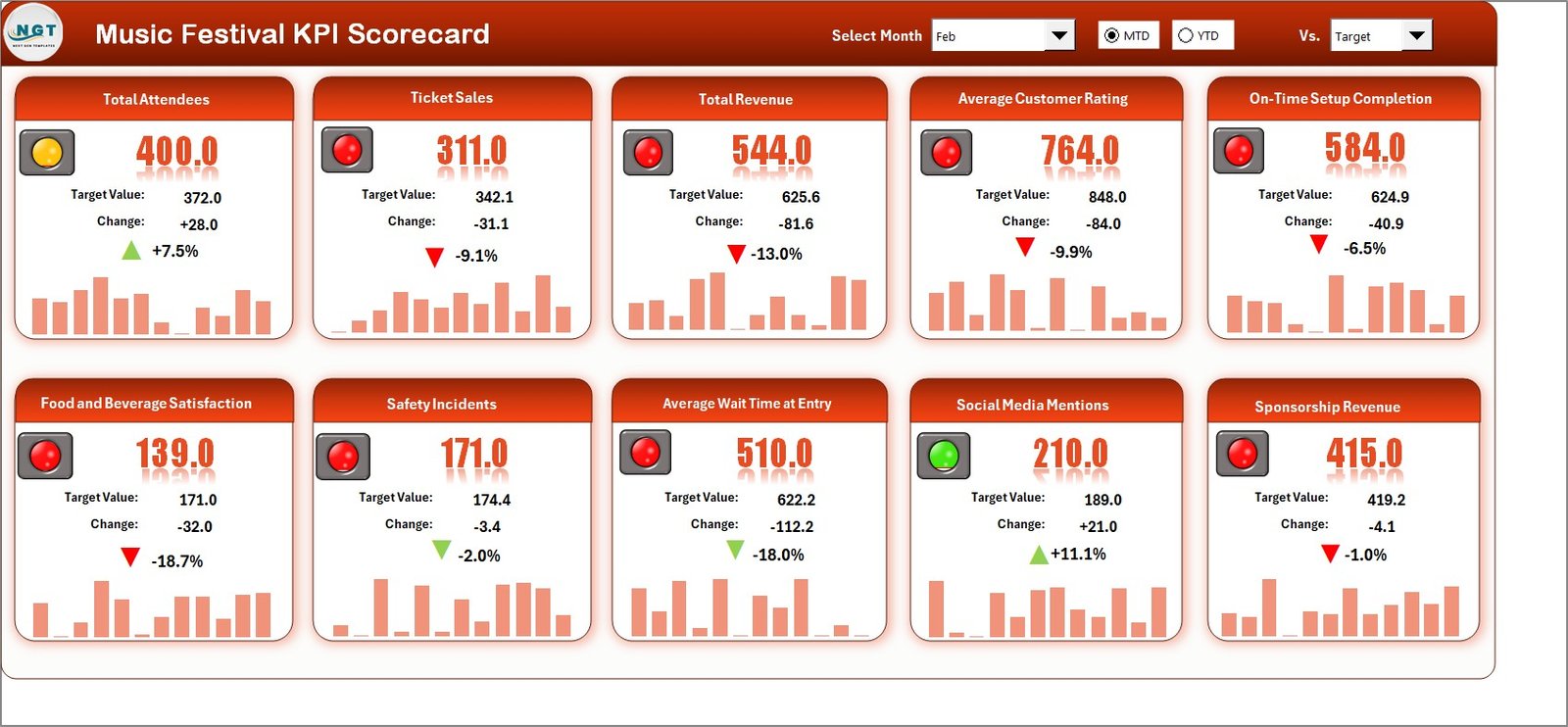
- Dropdown Menus: Easily select the month, MTD, or YTD for focused performance analysis.
- Actual vs Target Values: Directly compare your KPIs’ actual results against their targets.
- Visual Indicators: Color-coded formatting quickly highlights KPIs meeting or missing targets.
- Comprehensive KPI Overview: View all relevant information including MTD and YTD comparisons on one sheet.
2. KPI Trend Sheet
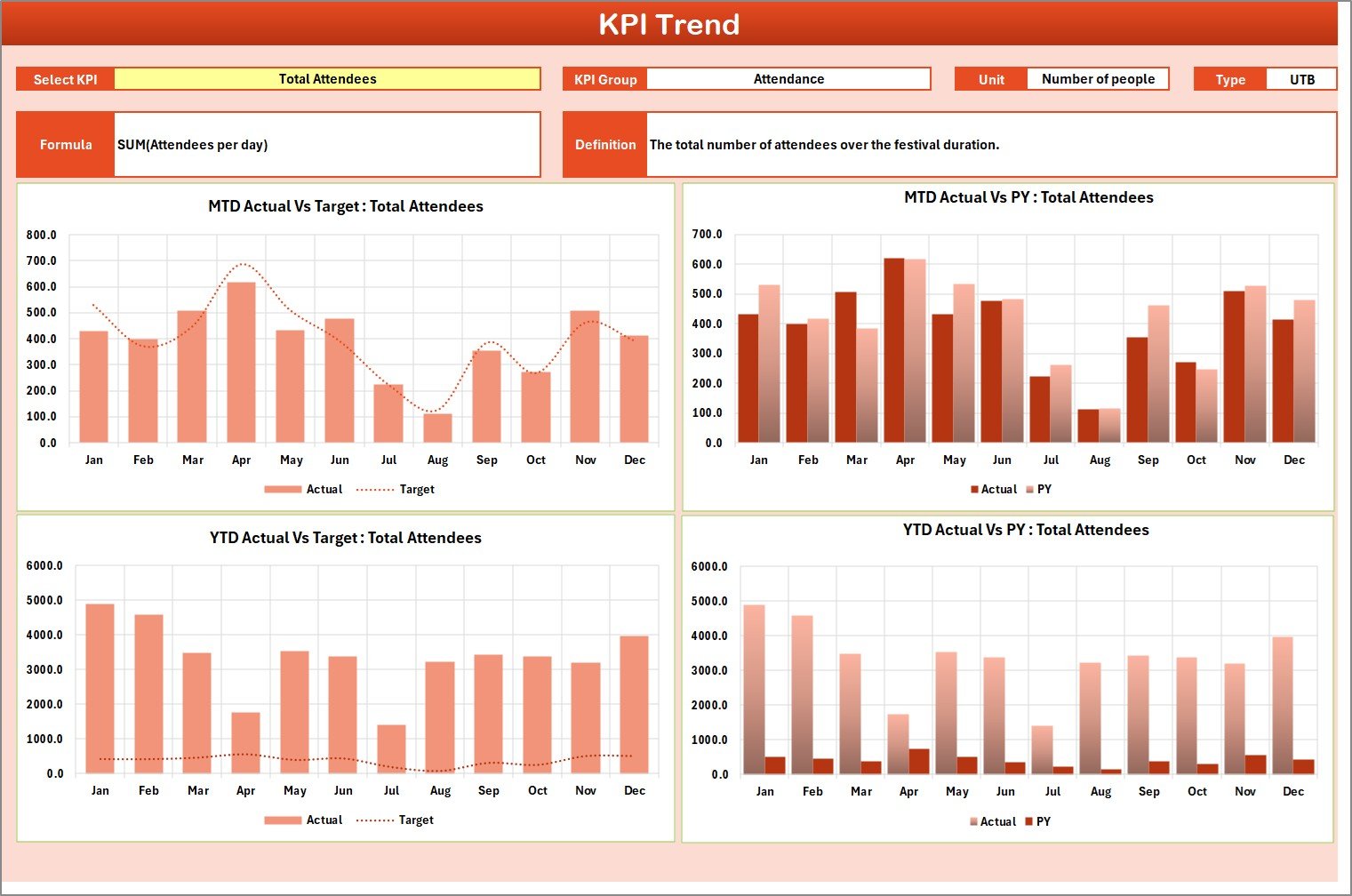
This sheet allows you to analyze trends for individual KPIs over time, helping identify performance patterns and growth opportunities.
KPI Trend Sheet
Click to Buy Music Festival KPI Scorecard in Excel
- KPI Selection: Choose any KPI using the dropdown in cell C3 for detailed analysis.
- KPI Details: View KPI Group, Unit, Type (whether lower or upper values are better), calculation formula, and definition.
- Trend Charts: See MTD and YTD line charts comparing Actual, Target, and Previous Year (PY) data for insightful visualization.
3. Input Data Sheet
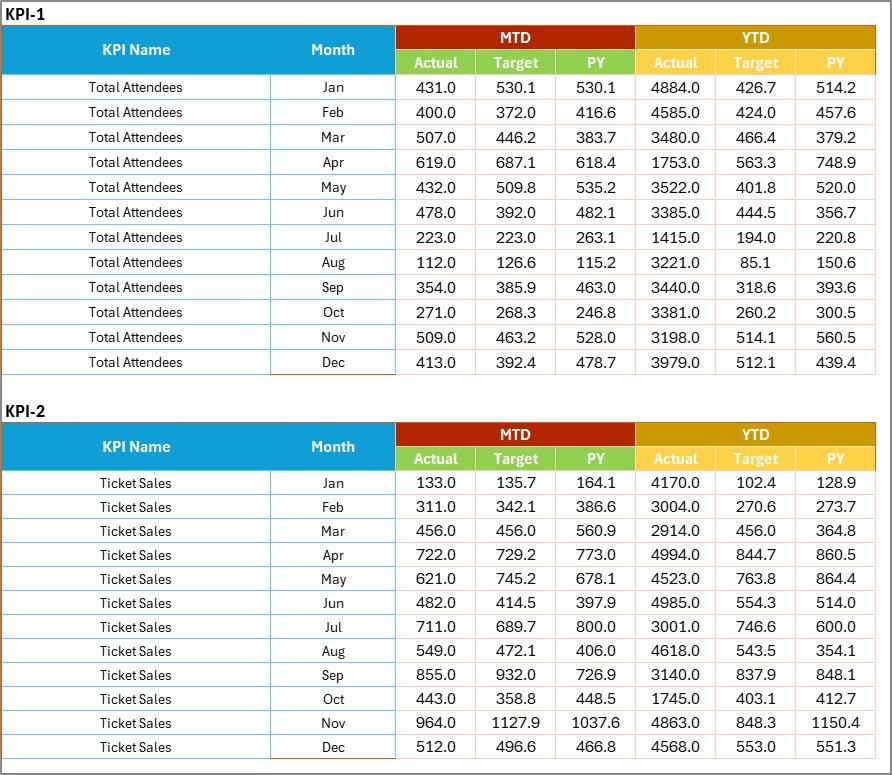
This worksheet is where you input the raw data crucial for KPIs, making it the backbone of the entire scorecard system.
Input Data Sheet
- Data Entry: Record actual values, set targets, and track other important metrics easily.
- Flexibility: Update data continuously as new event or performance results become available.
4. KPI Definition Sheet Tab
This sheet tab serves as a reference to ensure consistency and clarity in KPI tracking.

KPI Definition sheet tab
Click to Buy Music Festival KPI Scorecard in Excel
- Enter and maintain details such as KPI Name, KPI Group, Unit of measurement, Formula, and a comprehensive definition.
Advantages of Music Festival KPI Scorecard
- Time-Saving: Quickly access all vital KPI data in a single dashboard without the need for multiple reports.
- Improved Decision-Making: Data-driven insights facilitate smarter decisions to improve festival success.
- Clear Communication: Share performance updates with team members and stakeholders easily.
- Customization: Adapt the scorecard to include additional KPIs relevant to your event’s unique requirements.
Opportunities for Improvement
Click to Buy Music Festival KPI Scorecard in Excel
- Integrate Real-Time Data Feeds: Link scorecards directly to ticketing and social media platforms for automatic updates.
- Mobile Compatibility: Develop mobile-friendly versions for quick access on-the-go.
- Advanced Analytics: Add predictive analytics capabilities to forecast trends and enable proactive planning.
Best Practices
- Regular Updates: Keep KPI data current by updating the Input Data Sheet promptly.
- Clear Definitions: Ensure everyone understands KPI definitions to avoid confusion.
- Consistent Review: Use the KPI Trend Sheet monthly to analyze performance fluctuations and adjust strategies.
- Stakeholder Engagement: Share the scorecard regularly with the team to foster transparency and collaborative improvement.
FAQs
Click to Buy Music Festival KPI Scorecard in Excel
What KPIs are included in the Music Festival KPI Scorecard?
The scorecard typically includes attendance numbers, ticket sales, revenue, social media engagement, onsite sales, and operational efficiency metrics.
Can I customize the KPI Scorecard for my festival?
Yes, the template is flexible and can be tailored by adding or modifying KPIs according to your festival’s specific needs.
Is prior Excel knowledge required?
The scorecard is designed for ease of use, with dropdowns and visual aids minimizing the need for advanced Excel skills.
Conclusion
Click to Buy Music Festival KPI Scorecard in Excel
The Music Festival KPI Scorecard is an essential tool for event organizers who want to closely monitor critical performance areas. Its intuitive layout, comprehensive data tracking, and powerful visualizations provide a clear roadmap to running more successful and profitable music festivals. By implementing this ready-to-use scorecard template, you can efficiently measure what matters, react swiftly to changes, and elevate the experience for attendees and stakeholders alike.
Leverage the power of data today to make your next music festival your best one yet!
For more information and related resources, visit Microsoft Excel official support.
Visit our YouTube channel to watch the demo.
Click to Buy Music Festival KPI Scorecard in Excel