Managing a catering business without reliable analytics is like cooking without a recipe — you might get results, but you won’t know why. The Catering Services Dashboard in Power BI solves that problem by consolidating event performance, revenue trends, cuisine profitability, and customer behavior data across 5 purpose-built interactive pages.
Built for catering business owners, event managers, and hospitality operations teams, this Power BI template connects to a structured Excel data file. Simply update your data, hit Refresh in Microsoft Power BI Desktop, and every chart, KPI card, and slicer updates instantly — no formulas to maintain, no pivot tables to rebuild.
Whether you handle corporate luncheons, wedding banquets, or large multi-venue events, this dashboard gives you a single source of truth across all your catering data. You can also explore the companion Catering Services Dashboard in Excel if you prefer working entirely within Microsoft Excel.
👉 Download the Catering Services Dashboard in Power BI →
Dashboard Pages at a Glance
1. Overview Page
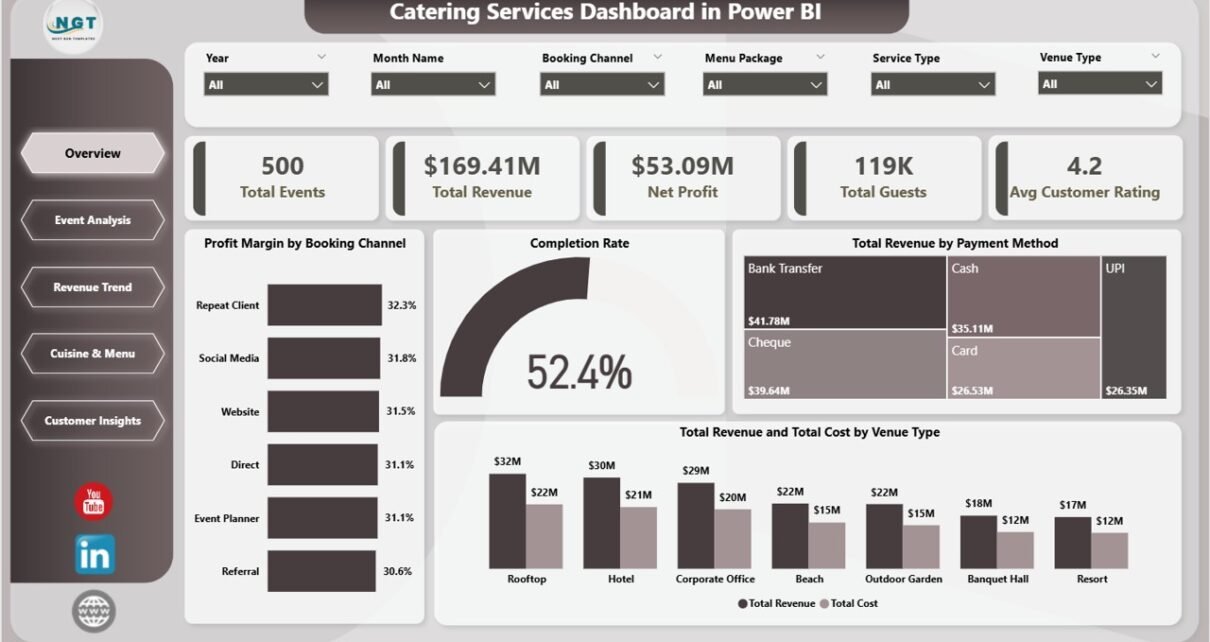
The Overview page sits at the top of the dashboard and gives catering managers a high-level operational snapshot. Five KPI cards display Total Events, Total Revenue, Net Profit, Total Guests, and Avg Customer Rating, making it easy to assess business health in under a minute. Below the cards, four analytical charts — Profit Margin by Booking Channel, Completion Rate, Total Revenue by Payment Method, and Total Revenue and Total Cost by Venue Type — provide actionable context. Multiple slicers across the top of the page let you filter all visuals simultaneously by date range, venue, event type, or booking channel.
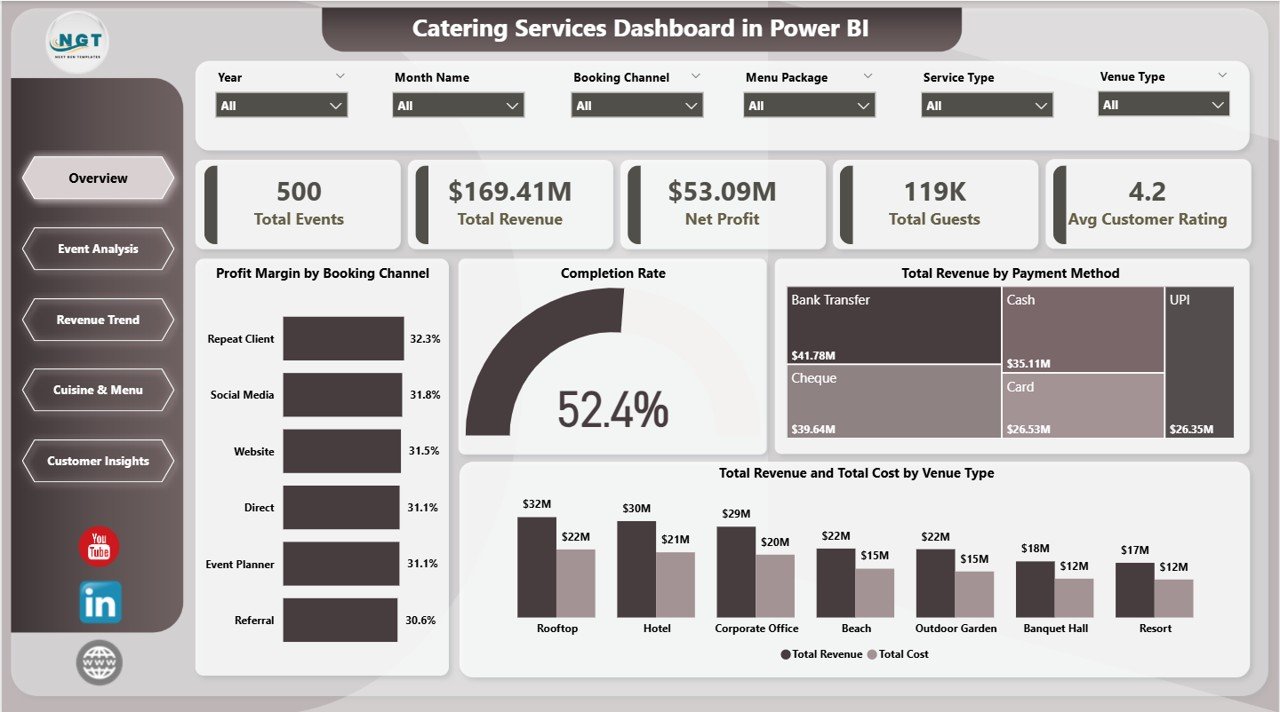
Catering Services Dashboard in Power BI – Overview Page
2. Event Analysis
The Event Analysis page breaks down performance by event category and venue, with three targeted charts: Total Revenue by Event Type, Net Profit by Venue Type, and Total Revenue by Service Type. This view helps operations managers identify which event formats — corporate dinners, weddings, birthday parties — are most profitable and which venue types deliver the best cost-to-revenue ratio. Use it to guide decisions around event acceptance and pricing strategy.
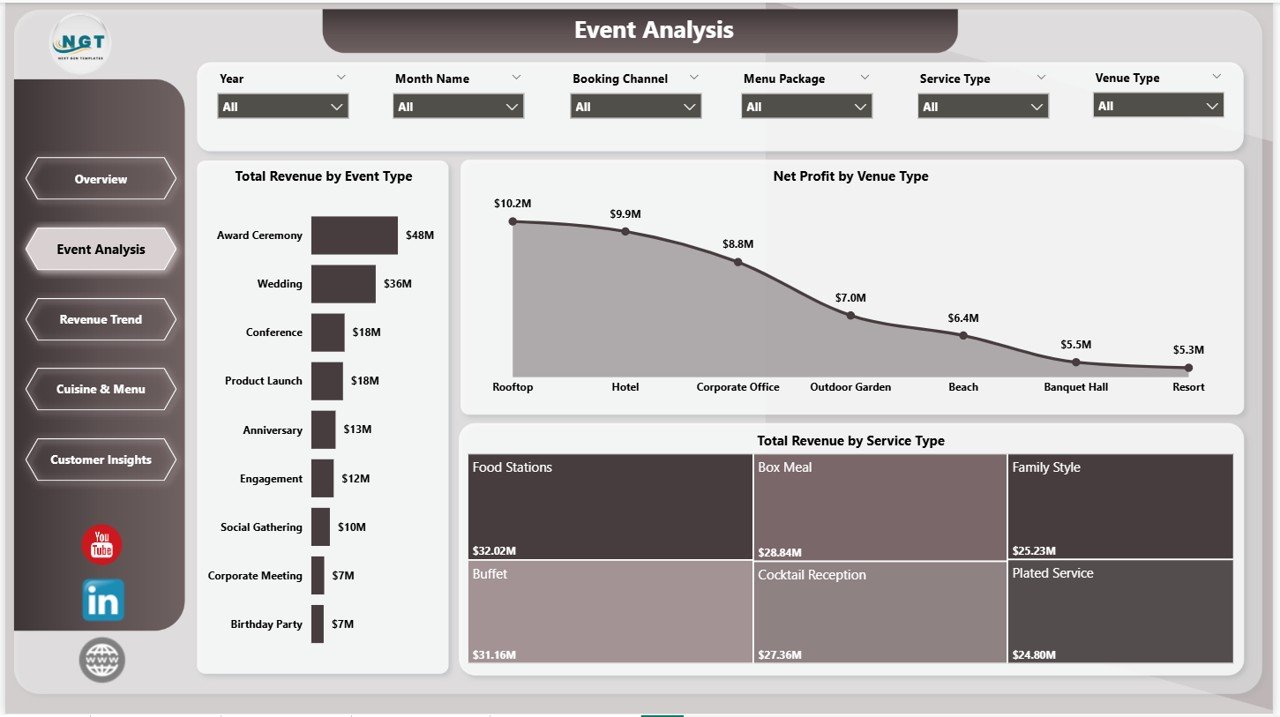
Catering Services Dashboard in Power BI – Event Analysis
3. Revenue Trend
The Revenue Trend page provides month-by-month financial analysis across three charts: Profit Margin by Month Name, Total Revenue by Payment Status, and Total Revenue by Month Name. This page is essential for identifying seasonal revenue spikes — many catering businesses see concentrated bookings in Q4 and wedding season — and for tracking payment collection performance across pending, paid, and overdue statuses.
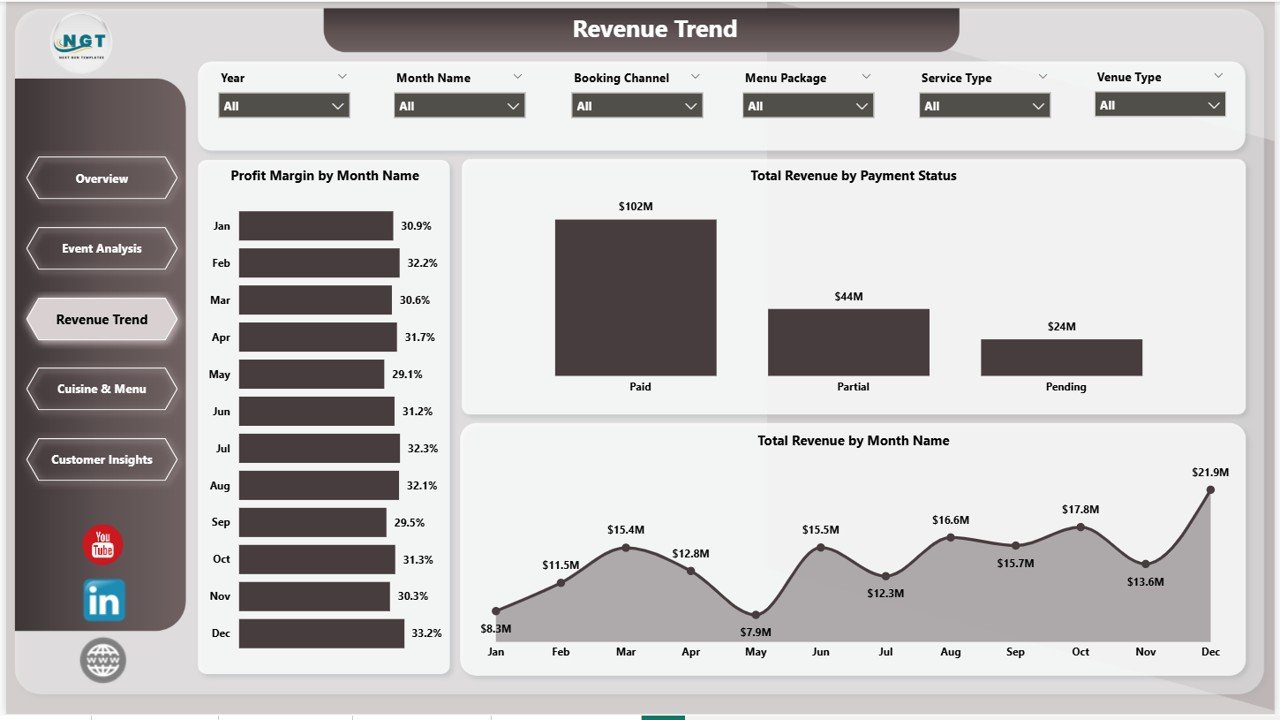
Catering Services Dashboard in Power BI – Revenue Trend
4. Cuisine & Menu
The Cuisine & Menu page is one of the most unique features of this template — few catering dashboards go this deep into food profitability. Three charts analyze Avg Customer Rating by Cuisine, Net Profit by Menu Package, and Total Revenue and Total Cost by Cuisine. Menu designers and executive chefs can use this data to retire low-rated, low-margin cuisines and double down on what guests love and what earns the most profit per event.
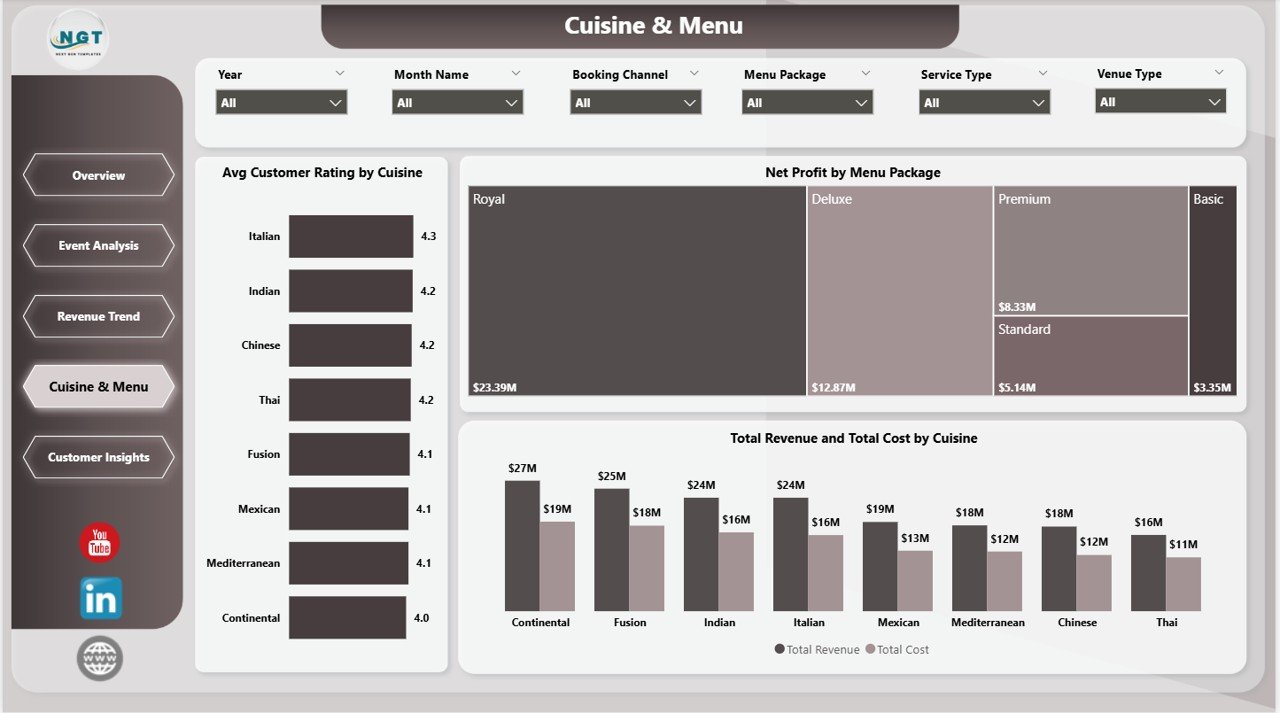
Catering Services Dashboard in Power BI – Cuisine & Menu
5. Customer Insights
The Customer Insights page focuses on where bookings come from and how clients pay. Three charts show Total Revenue by Booking Channel, Net Profit by Payment Method, and Total Events by Booking Channel. This intelligence tells marketing teams which acquisition channels are driving revenue, not just volume — a direct booking may generate higher profit than an agency referral even at equal ticket size.
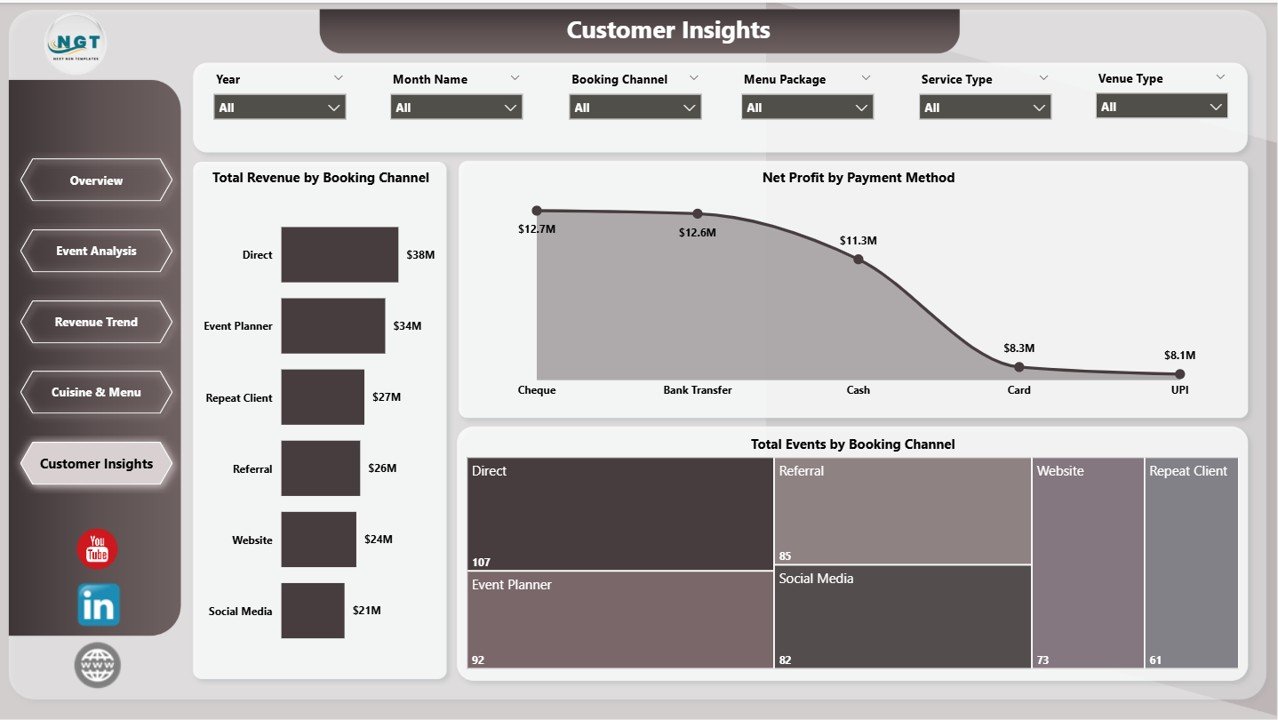
Catering Services Dashboard in Power BI – Customer Insights
Key Features
- ✅ 5 interactive Power BI pages covering all core catering analytics areas
- ✅ 5 KPI cards — Total Events, Total Revenue, Net Profit, Total Guests, Avg Customer Rating
- ✅ Dynamic slicers for date range, event type, venue type, booking channel, and payment method
- ✅ Cuisine profitability analysis — net profit and avg rating by cuisine type
- ✅ Booking channel revenue breakdown — identify your most profitable acquisition sources
- ✅ Monthly revenue trend with payment status tracking
- ✅ Venue type cost comparison — total revenue vs total cost side by side
- ✅ Excel Data.xlsx input file included — no DAX or Power Query knowledge needed
- ✅ Compatible with Power BI Desktop (free to download from Microsoft)
- ✅ Shareable via Power BI Service for team collaboration
Who Should Use This Dashboard?
- Catering business owners tracking event profitability, revenue mix, and guest volume
- Event managers who need booking channel and venue cost data in one view
- Hospitality operations teams monitoring completion rates and payment collection
- Menu planners and executive chefs optimizing cuisine offerings by profit margin
- Finance teams in the food and beverage sector building executive-level reports
What’s Inside the Download
- 📁 Catering-Services-Dashboard-in-Power-BI.pbix — the complete, fully-designed Power BI file
- 📊 Data.xlsx — structured Excel input file pre-mapped to the dashboard’s data model
- 📄 Instructions PDF — step-by-step guide for setup, data entry, and customization
How to Set Up the Dashboard
- Download and extract the ZIP file from NextGenTemplates
- Open Data.xlsx and enter or paste your real catering event records
- Open the .pbix file in Power BI Desktop
- Click Refresh in the Home ribbon — your data loads into every visual automatically
- Use the slicers to filter by date, venue, event type, or booking channel
- Optionally publish to Power BI Service to share with your team
Explore More Power BI Dashboard Templates
If you work across the hospitality and F&B space, you may also find these related dashboards from our Power BI collection useful:
- Food Delivery Dashboard in Power BI — track order volumes, delivery performance, and revenue by channel
- Bakery Business Dashboard in Power BI — monitor product sales, margins, and customer trends for bakery operations
- Catering Services Dashboard in Excel — the Excel version of this same template for teams working without Power BI
Frequently Asked Questions
Is Power BI Desktop free to use?
Yes. Power BI Desktop is completely free to download and use locally. You can download it directly from the Microsoft Power BI website. A paid Power BI Pro subscription is only required if you want to share reports via Power BI Service with other users.
Can I connect this dashboard to my own catering data?
Absolutely. The included Data.xlsx file is pre-structured to match the dashboard’s data model. Replace the sample rows with your real event records — same column headers, same sheet names — then open the .pbix file and click Refresh. Every chart and KPI updates automatically.
Does this dashboard work on Mac?
Power BI Desktop is a Windows-only application. Mac users have two options: use Power BI Service through a browser (limited authoring capabilities) or run Power BI Desktop inside a Windows virtual machine such as Parallels.
Can I add more pages or visuals to this dashboard?
Yes. Since this is a standard .pbix file, you can open it in Power BI Desktop and add or modify pages, visuals, and measures just like any other Power BI report. The data model is fully unlocked.
Is there a catering dashboard for Google Sheets?
We currently offer Excel and Power BI versions of the Catering Services Dashboard. For Google Sheets dashboard templates across other business domains, visit the NextGenTemplates Google Sheets collection.
Get the Catering Services Dashboard in Power BI
Ready to turn your catering event data into a clear, interactive business intelligence dashboard? Download the Catering Services Dashboard in Power BI from NextGenTemplates today and get instant visibility into your revenue, margins, cuisine performance, and customer acquisition channels.
👉 Download the Catering Services Dashboard in Power BI →
🎓 Watch the full setup tutorial on YouTube: @PK-AnExcelExpert