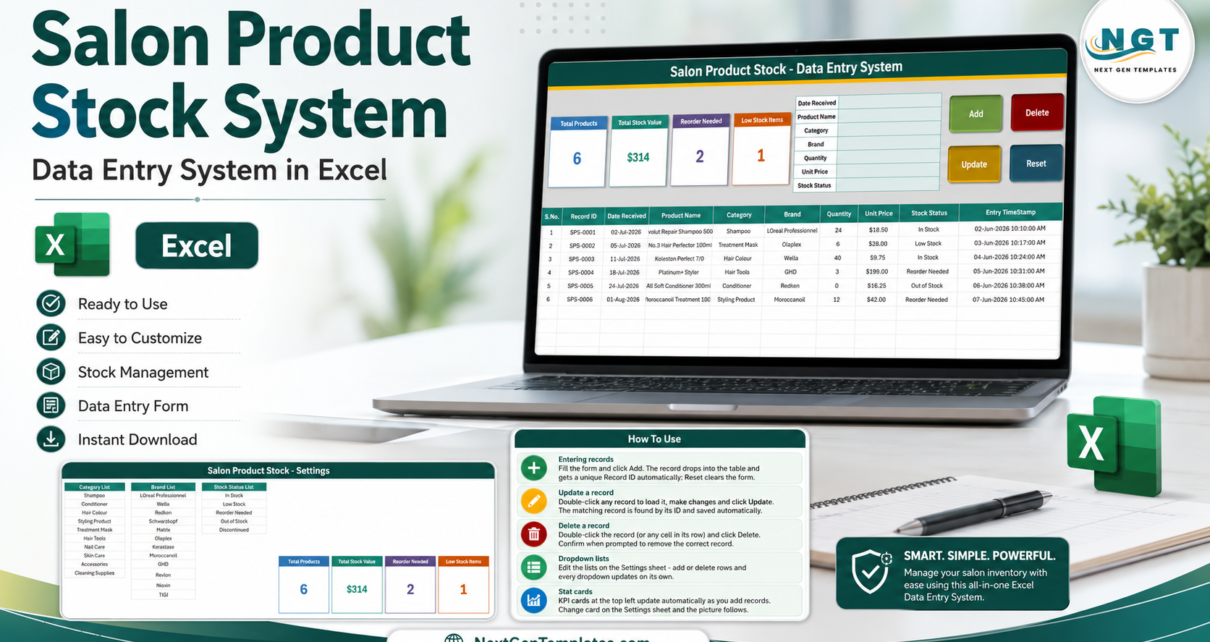
Salon Product Stock Data Entry System in Excel turns a desktop workbook into a structured stock register with 7 input fields, 4 live cards, 4 VBA buttons, and automatic Record IDs. It is designed for salons, barbershops, nail studios, spas, and beauty rooms that need an offline product list without a subscription platform. The workbook stores every record in a table with quantity, unit price, status, received date, and entry timestamp. It also separates editable Category, Brand, and Stock Status lists onto a Settings sheet, helping teams use consistent names instead of free-typing a different label each time.
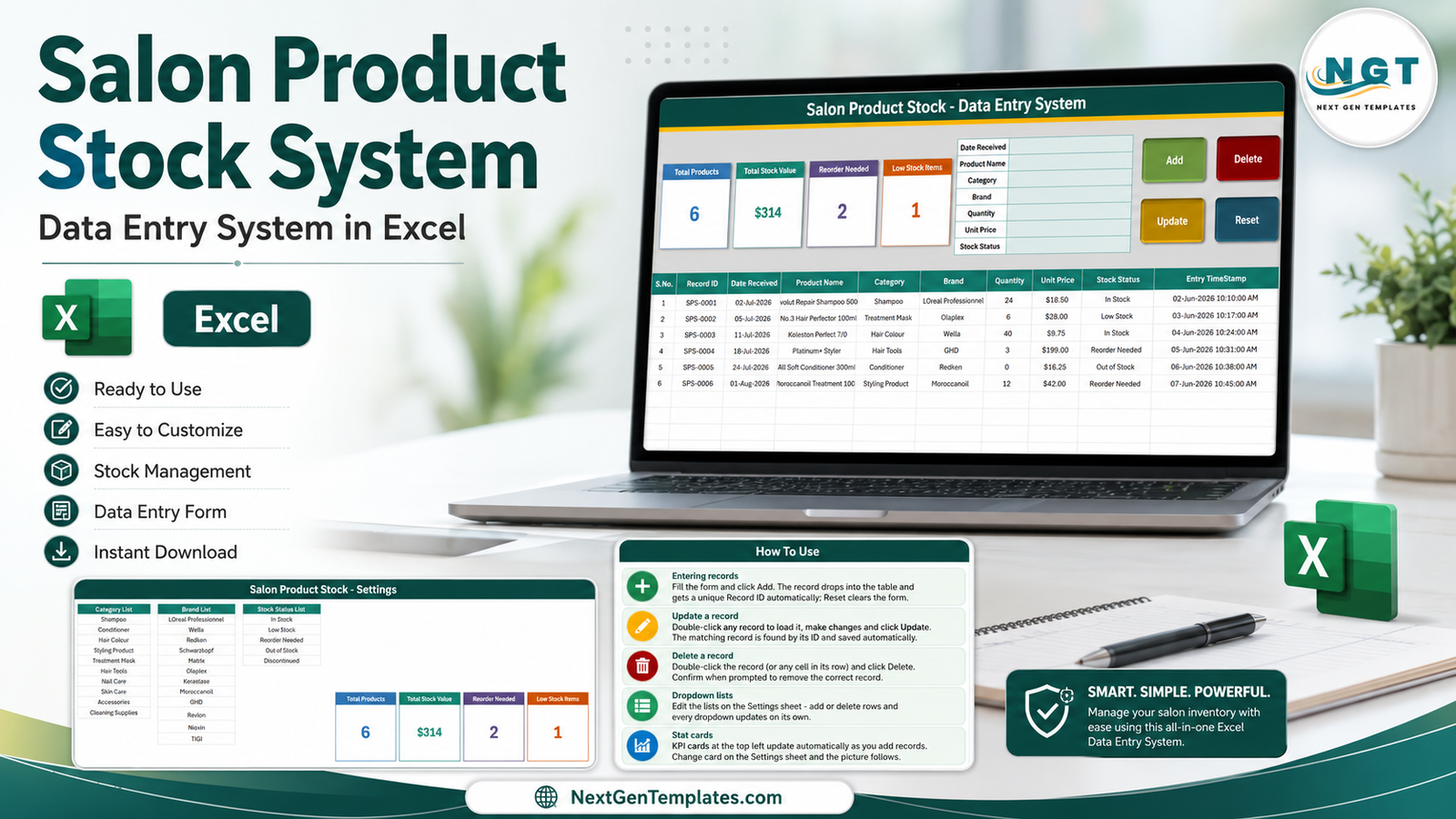
Salon Product Stock System with the main form, settings lists, and built-in instructions
This is a macro-enabled .xlsm workbook for Microsoft Excel on Windows. It is not a cloud inventory application, POS, barcode scanner, or automated purchasing system. Its value is narrower and practical: give a small salon a repeatable way to enter, update, delete, and review stock records on the PC it already uses.
Key Features of Salon Product Stock Data Entry System in Excel
Seven-field salon stock form
The input panel captures Date Received, Product Name, Category, Brand, Quantity, Unit Price, and Stock Status. These are the fields a small salon needs to record a delivery or add an existing shelf item to the register. Category, Brand, and Stock Status use lists maintained on the Settings sheet.
Add, Update, Delete, and Reset buttons
Four colour-coded buttons run the record workflow. Add sends the completed form to the next table row. Reset clears the form for the next item. Double-clicking an existing record loads it back into the form; Update saves changes against the remembered Record ID. Delete asks for confirmation and shows the ID, reducing the risk of removing the wrong row.
Automatic IDs and timestamps
The data table contains S.No., Record ID, and Entry TimeStamp fields in addition to the seven user-entered values. A unique Record ID is important because product names can repeat or change. The saved ID gives the update and delete routines a more dependable way to locate the intended record.
Four live stock cards
The workbook shows Total Products, Total Stock Value, Reorder Needed, and Low Stock Items. In the sample file, six products produce a displayed stock value of $314, with two items labelled Reorder Needed and one labelled Low Stock. These are demonstration figures only; the cards change as the buyer replaces the sample data.
Editable business lists
The Settings sheet includes ten example categories, eleven brands, and five stock statuses. A salon can replace these with its own vocabulary. For example, a nail studio might use Gel Polish, Acrylic, Nail Art, Tools, and Cleaning Supplies, while a barber shop might prefer Shampoo, Styling Product, Beard Care, Clippers, and Accessories.
Workbook Sheets Explained
Data Entry System sheet
The main screen puts the KPI cards on the left, the seven-field form in the centre, and the action buttons on the right. Below them, the records table keeps the form data visible for checking and editing. Sample rows include shampoo, treatment mask, hair colour, hair tools, conditioner, and styling products across several brands and stock states.
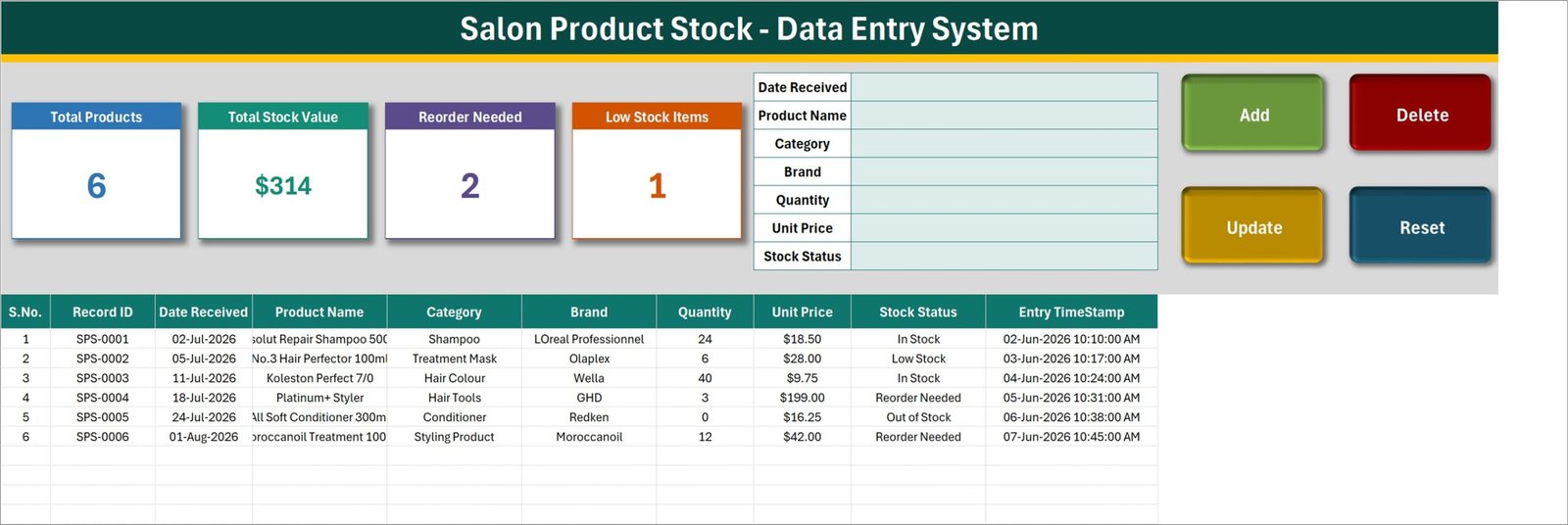
Main data-entry sheet with seven inputs and four action buttons
Settings sheet
The Settings sheet acts as the workbook’s control list. Category List includes salon-oriented examples such as Shampoo, Conditioner, Hair Colour, Styling Product, Treatment Mask, Hair Tools, Nail Care, Skin Care, Accessories, and Cleaning Supplies. Brand List and Stock Status List sit beside it. The four cards are also maintained here and shown as linked pictures on the main sheet.
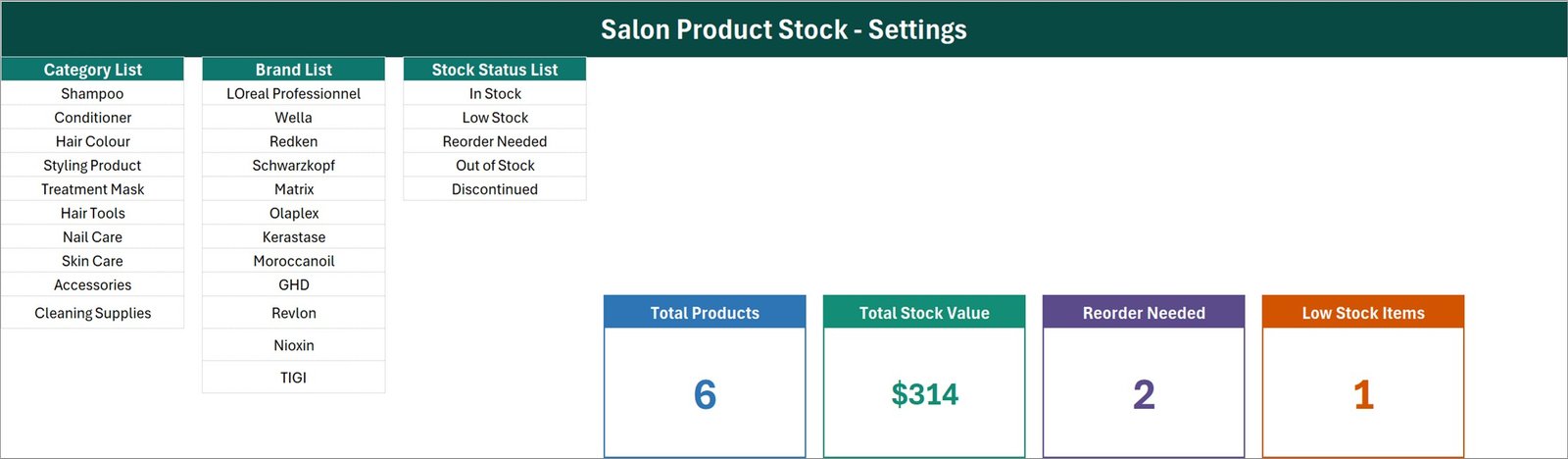
Settings sheet for categories, brands, statuses, and card formatting
How To Use sheet
The instruction page covers entering records, updating a row without selecting it again, deleting with confirmation, maintaining the linked cards, editing dropdown lists, and enabling macros. The VBA is already inside the workbook. If a downloaded file is blocked by Windows, the guide explains how to use file Properties and Unblock before opening it.
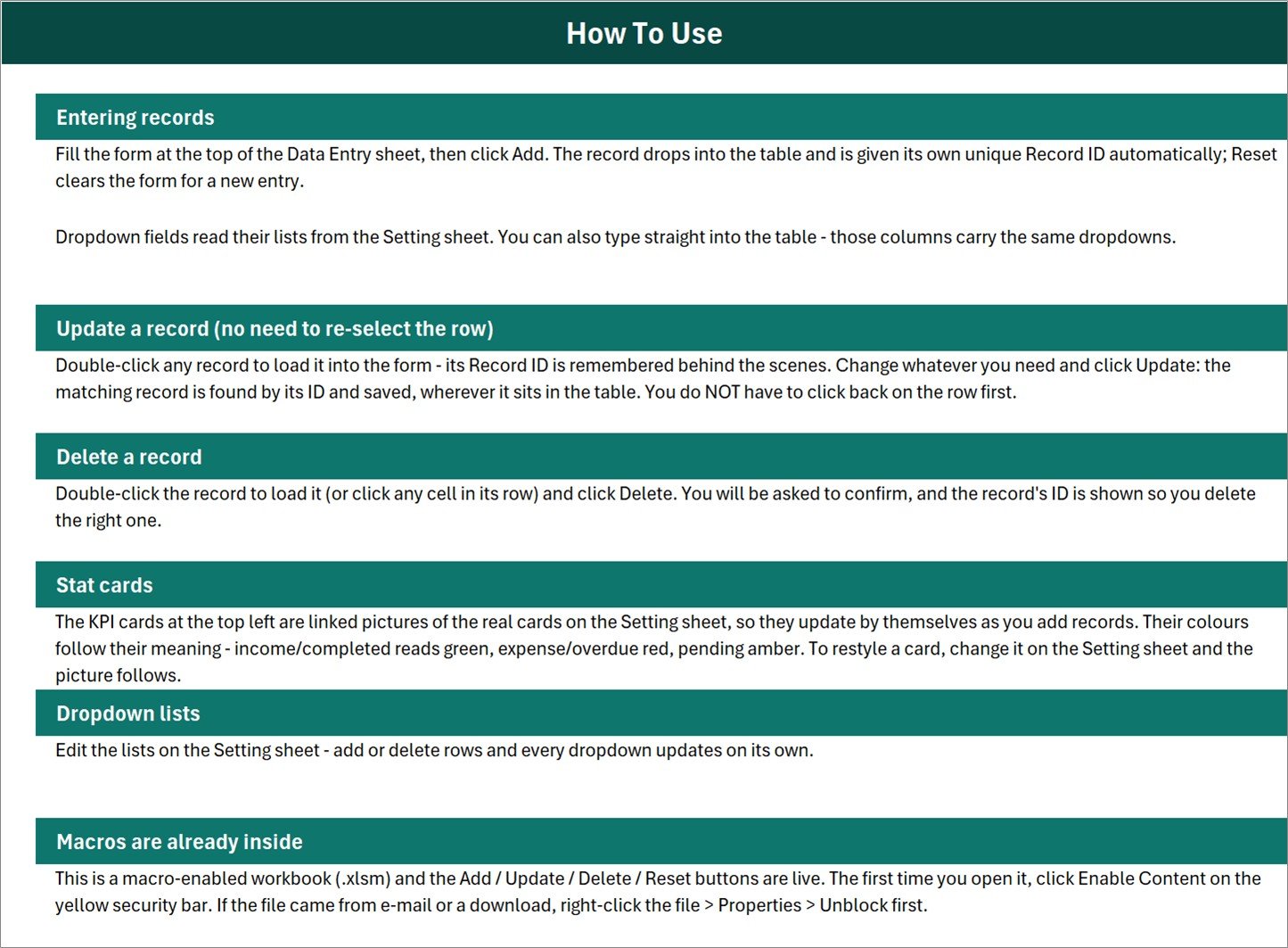
Built-in guide for the complete stock-record workflow
Salon Product Stock Data Entry System in Excel vs. Google Sheets vs. Paid Inventory SaaS – Feature Comparison
| Feature | This Excel system | Google Sheets stock file | Paid inventory SaaS |
|---|---|---|---|
| Purchase model | $6.99 one-time sale price | Free if self-built | Recurring plan |
| Primary platform | Excel desktop on Windows | Browser or mobile app | Vendor browser or app |
| Record controls | Add, Update, Delete, Reset macros | Manual rows unless scripted | Usually included |
| Offline operation | Yes | Limited offline mode | Usually requires internet |
| Real-time collaboration | Not intended for concurrent editors | Native sharing | Plan dependent |
| Custom fields and lists | Editable workbook and Settings sheet | Editable sheet and validation | Configuration depends on provider |
| Low-stock visibility | Status list plus live cards | Requires formulas or scripts | Often automated |
| Barcode, POS, and purchasing | Not included | Not included by default | Available in selected products |
The Excel option fits one active desktop user who wants control of the file and does not need integrations. Google Sheets is stronger when several people must edit at once. Paid software becomes more appropriate when a business needs barcode scanning, point-of-sale transactions, purchase orders, supplier automation, multiple locations, permissions, or integrations.
Who Should Use This Template
- Independent hair salons tracking back-bar and retail products
- Barbershops maintaining stock for shampoos, oils, styling products, and tools
- Nail studios logging polishes, gels, treatments, consumables, and accessories
- Spa reception or storeroom staff recording received products and stock status
- Small beauty retailers that want an offline Excel register on one Windows PC
It is not the right choice for multi-branch chains, concurrent teams, automatic stock deduction from appointments, expiry-lot management, accounting, online storefront synchronization, or regulated inventory controls. Those needs require a broader application and a documented operating process.
Real-World Use Cases
Weekly replenishment review
Meera checks the Reorder Needed and Low Stock cards before contacting suppliers. She filters the records by status, confirms current shelf quantities, and uses the table as the starting point for a manual order.
Receiving a salon delivery
Daniel records the received date, product, brand, quantity, and unit price as cartons are opened. The automatic ID and timestamp create a clean trace of when each row entered the workbook.
Customizing a specialist product range
Aisha runs a nail studio, so she replaces the sample category list with Gel Polish, Acrylic, Builder Gel, Nail Art, Tools, and Cleaning Supplies. The form then uses the studio’s own language for future entries.
Advantages of Salon Product Stock Data Entry System in Excel
- Low learning curve: Users interact with a form and visible buttons instead of editing formulas.
- Consistent labels: Three Settings lists reduce spelling differences across categories, brands, and statuses.
- Fast record correction: Double-clicking a row loads it for editing, and the remembered Record ID supports the update.
- Local ownership: The workbook stays in the buyer’s folder and does not require an online account.
- Clear scope: It focuses on salon product stock records rather than trying to imitate an ERP.
Opportunities for Improvement
The workbook deliberately remains simple. A buyer may later add supplier name, SKU, reorder quantity, minimum level, expiry date, location, or notes if those fields are important. Adding them safely requires updating the form, table, and VBA together. Barcode scanning, automatic purchase orders, email alerts, multi-user permissions, and branch consolidation are not included and should be treated as separate development projects.
The stock cards depend on the status values assigned to each record. The workbook does not infer a reorder point from quantity alone. Users should define what Low Stock and Reorder Needed mean in their own business process and apply those statuses consistently.
Best Practices
- Keep one product naming convention, including size or variant where needed.
- Use the Settings sheet for approved categories, brands, and statuses.
- Back up the .xlsm file before making structural changes.
- Test Add, Update, Delete, and Reset after changing any table or VBA-related layout.
- Protect the workbook from untrusted macros. Microsoft explains how macro security works in its official macro security guidance.
- Review the Reorder Needed and Low Stock records on a fixed weekly schedule.
- Archive periodic copies if the file becomes an important operational record.
Explore Relevant Templates
- Salon Appointment Data Entry System in Excel for bookings, services, stylists, and appointment status.
- Purchase and GRN Data-Entry System in Excel for goods receiving and purchase records.
- Beauty Products Distributor Management Tracker in Google Sheets for collaborative sales, stock, orders, and expiry views.
- Beauty Products Distributor Management System Web App for a browser-based login workflow.
- Browse more Excel VBA tools.
Frequently Asked Questions
Are the macros already installed?
Yes. The download contains a macro-enabled .xlsm workbook with working Add, Update, Delete, and Reset buttons. Enable content when Excel prompts you.
Which Excel version should I use?
Use desktop Microsoft Excel on Windows for the intended VBA workflow. Excel Online does not run VBA macros, and Mac compatibility is not promised for this Windows-oriented automation.
What does Total Stock Value represent?
It summarizes the recorded quantity and unit-price data in the workbook. It is an operational estimate from the entries, not an accounting valuation or audited financial figure.
Will the system place supplier orders automatically?
No. Reorder Needed and Low Stock are status-based indicators. The workbook does not email suppliers, create purchase orders, or place orders.
Can several employees edit it at the same time?
It is best used by one active desktop user. A shared Google Sheets tracker or web application is more suitable for concurrent editing.
Does it track product expiry or batches?
No. The current form does not include expiry date, batch number, or lot number. Those fields would need a customized build.
Is this a POS system?
No. It does not process payments, print receipts, scan barcodes, calculate tax, or deduct stock from a sale automatically.
About the Author
Built by PK – Microsoft Certified Professional with 15+ years of Excel, Google Sheets, and Power BI experience. Founder of NextGenTemplates, reaching 300K+ subscribers across YouTube channels. Every template is hand-built and tested before release.
Conclusion
The Salon Product Stock Data Entry System in Excel is a focused offline tool for entering salon products, maintaining clean lists, correcting records, and seeing simple low-stock and reorder counts. It does not replace a POS, purchasing platform, or multi-location inventory system. For the salon that needs one structured workbook and working buttons, that narrow scope is the point.
View the Salon Product Stock Data Entry System in Excel and download the ready-to-use workbook.
For practical Excel tutorials, visit YouTube.com/@PKAnExcelExpert.
Last updated: August 18, 2026