Agricultural machinery plays a vital role in modern farming. Farmers, agricultural equipment dealers, service centers, and agribusiness companies rely heavily on tractors, harvesters, seeders, irrigation machines, and other farming equipment to improve productivity and efficiency. However, managing agricultural machinery operations generates large amounts of data. Companies must track machinery sales, service costs, downtime hours, warranty claims, dealer performance, and customer demand.
Without a structured system, organizations often struggle to analyze this information. As a result, decision-makers cannot easily identify high-performing machinery models, evaluate service costs, monitor regional demand, or analyze sales trends.
Therefore, organizations need a centralized analytics solution that converts operational data into clear insights. This is exactly where the Agricultural Machinery Dashboard in Excel becomes extremely powerful.
Click to Purchases Agricultural Machinery Dashboard in Excel
The Agricultural Machinery Dashboard in Excel is a ready-to-use analytical solution designed to help businesses monitor machinery sales performance, analyze service costs, track downtime, and evaluate customer trends. Because Excel provides powerful tools such as pivot tables, pivot charts, slicers, and automated calculations, users can easily transform raw data into interactive dashboards.
In this comprehensive guide, you will learn everything about the Agricultural Machinery Dashboard in Excel, including its structure, features, advantages, and best practices.
What Is an Agricultural Machinery Dashboard in Excel?
An Agricultural Machinery Dashboard in Excel is a visual reporting tool that helps organizations track and analyze key performance metrics related to agricultural machinery operations.
Instead of manually reviewing multiple spreadsheets and reports, managers can use this dashboard to quickly understand business performance. In addition, interactive charts and slicers allow users to filter data based on machinery type, region, customer category, or month.
Consequently, businesses can identify patterns, detect problems early, and make better strategic decisions.
The dashboard typically monitors several important metrics, such as:
-
Machinery sales performance
-
Service and maintenance costs
-
Dealer sales targets
-
Warranty claims by model
-
Customer category performance
-
Downtime hours of machines
-
Regional sales performance
Because Excel dashboards update dynamically, users only need to refresh the data sheet to view updated insights.
Why Do Agricultural Businesses Need a Machinery Dashboard?
Agricultural machinery manufacturers and dealers deal with several operational challenges. For example, they must monitor machine performance, track customer demand, analyze dealer performance, and manage maintenance costs.
However, many companies still rely on manual spreadsheets. As a result, they often face the following problems:
-
Difficulty tracking machinery sales performance
-
Lack of visibility into maintenance costs
-
Poor monitoring of equipment downtime
-
Limited analysis of regional demand
-
Inefficient tracking of warranty claims
Therefore, organizations need a structured analytics solution.
An Agricultural Machinery Dashboard in Excel solves these problems because it organizes all operational data into a single interactive interface.
As a result, managers can easily monitor performance and make data-driven decisions.
Key Features of the Agricultural Machinery Dashboard in Excel
The dashboard includes multiple analytical pages that allow users to explore data from different perspectives. Each page focuses on specific performance indicators.
Let us explore the major features of this dashboard.
Click to Purchases Agricultural Machinery Dashboard in Excel
Page Navigator for Easy Dashboard Navigation
The dashboard includes a Page Navigator located on the left side. This feature allows users to switch between different analysis pages easily.
Instead of scrolling through multiple sheets manually, users can simply click the page name to navigate.
This improves usability and saves time.
Overview Page: What Insights Does the Main Dashboard Provide?
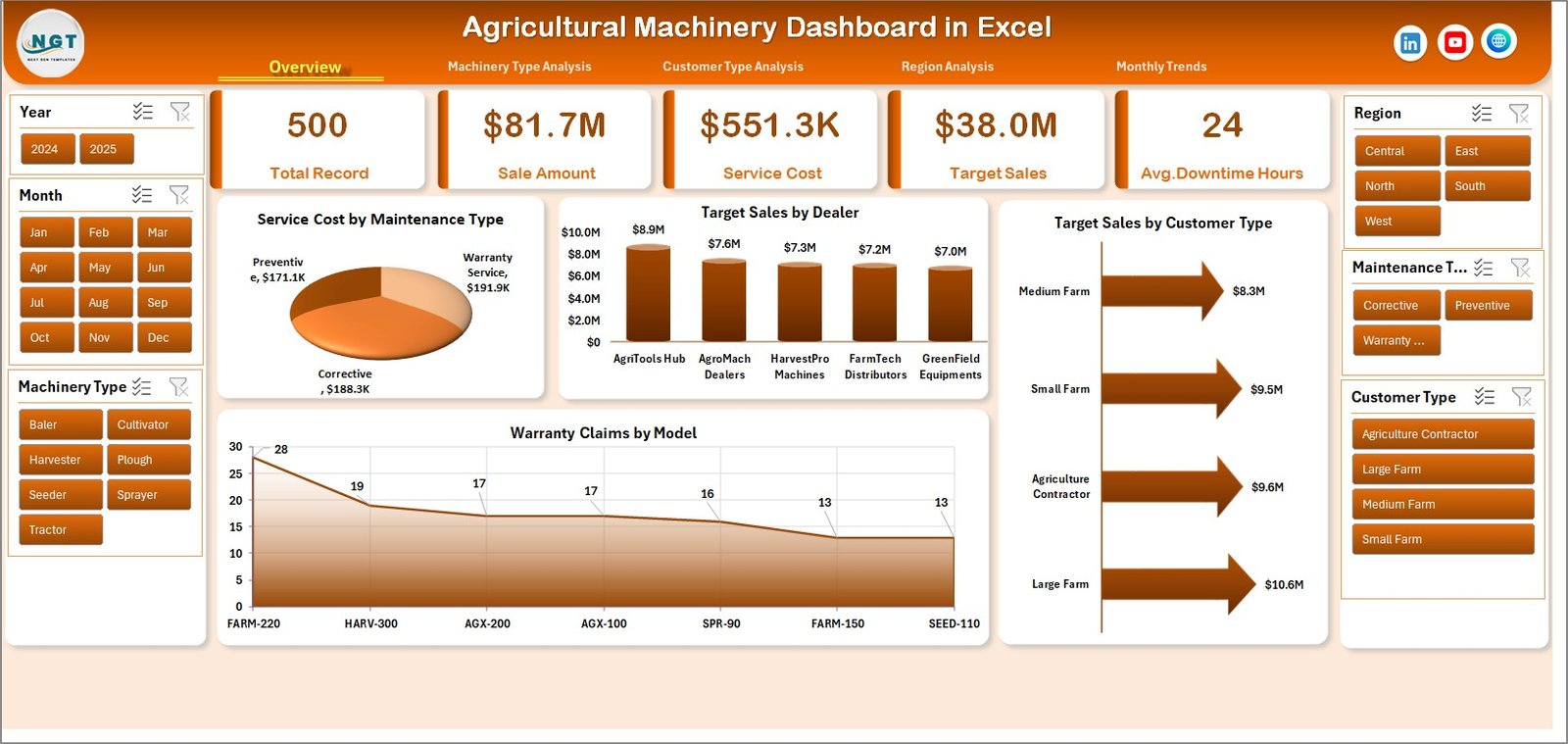
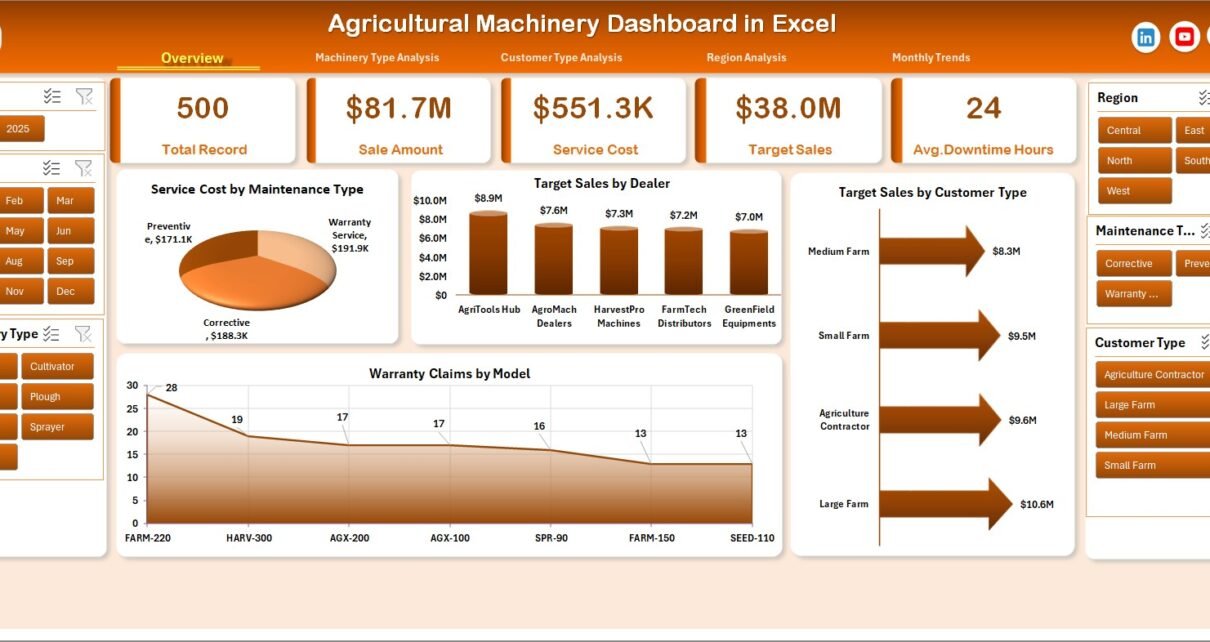
The Overview Page acts as the central summary of the entire dashboard. It gives users a quick snapshot of overall machinery performance.
On the right side of the dashboard, users can use slicers to filter data dynamically.
KPI Cards
The overview page contains four key performance indicator cards that highlight important metrics.
These cards typically summarize the overall operational performance of the business.
Charts on the Overview Page
The overview page contains the following analytical charts:
Service Cost by Maintenance Type
This chart shows how service expenses vary across different maintenance types. For example, preventive maintenance may cost less than corrective maintenance.
Target Sales by Dealer
This chart helps businesses monitor dealer performance against sales targets. As a result, managers can identify top-performing dealers.
Target Sales by Customer Type
This analysis shows which customer categories generate the highest target sales. For example, commercial farms may purchase more equipment compared to small-scale farmers.
Warranty Claims by Model
This chart highlights machinery models with the highest warranty claims. Consequently, product teams can investigate potential quality issues.
Machinery Type Analysis: How Does Each Equipment Category Perform?
Click to Purchases Agricultural Machinery Dashboard in Excel

The Machinery Type Analysis Page focuses on analyzing performance based on equipment categories.
Agricultural companies typically sell multiple types of machines, such as:
-
Tractors
-
Harvesters
-
Seeders
-
Irrigation machines
-
Sprayers
Therefore, businesses must analyze performance at the machinery type level.
Charts in Machinery Type Analysis
Service Cost by Machinery Type
This chart helps companies identify machines that require higher maintenance costs.
Target Sales by Machinery Type
This analysis shows the expected sales targets for each equipment category.
Sales Amount by Machinery Type
This chart highlights which machines generate the highest revenue.
Total Records by Machinery Type
This chart shows the number of transactions recorded for each machinery category.
As a result, managers can easily understand product demand.
Customer Type Analysis: Which Customers Drive Machinery Sales?

Different customer categories have different purchasing behavior. Some customers may require large agricultural machines, while others may purchase small equipment.
The Customer Type Analysis Page helps organizations analyze customer behavior.
Charts in Customer Type Analysis
Service Cost by Customer Type
This chart shows which customer groups generate higher service costs.
Sales Amount by Customer Type
This analysis helps businesses identify the most profitable customer segments.
Average Downtime Hours by Customer Type
This metric highlights machinery downtime experienced by different customers.
Total Records by Customer Type
This chart displays the total number of transactions for each customer category.
Therefore, businesses can improve customer service strategies.
Region Analysis: Which Regions Generate the Highest Machinery Sales?
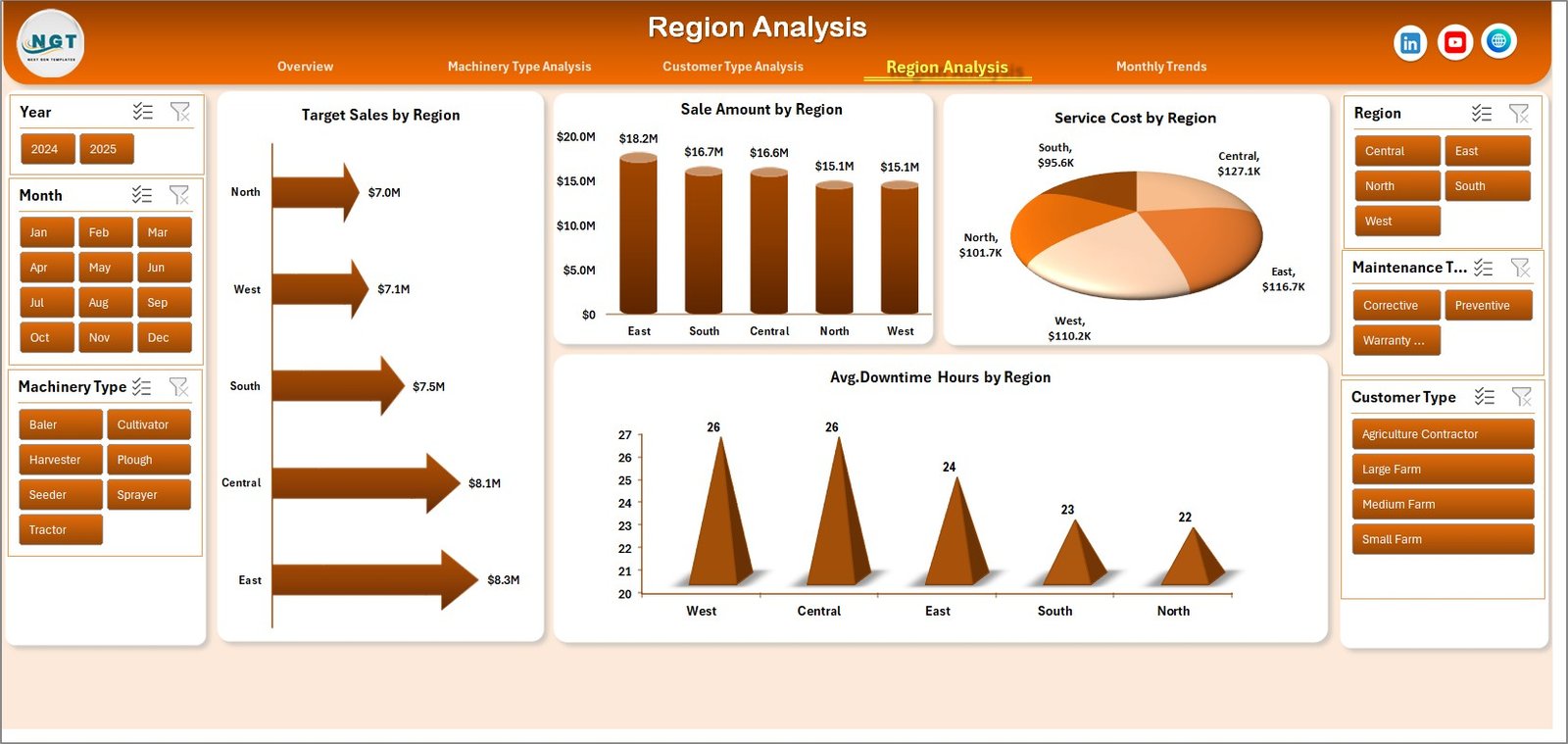
Agricultural demand varies significantly across regions. Climate conditions, soil type, and farming practices all influence machinery demand.
Therefore, regional analysis becomes extremely important.
Charts in Region Analysis
Service Cost by Region
This chart helps identify regions with higher machinery service costs.
Sales Amount by Region
This analysis highlights regions that generate the highest revenue.
Average Downtime Hours by Region
This chart helps businesses identify regions where machinery experiences more operational downtime.
Target Sales by Region
This metric helps sales teams track regional sales performance.
Consequently, companies can improve regional marketing strategies.
Click to Purchases Agricultural Machinery Dashboard in Excel
Month Analysis: How Do Machinery Sales Change Over Time?
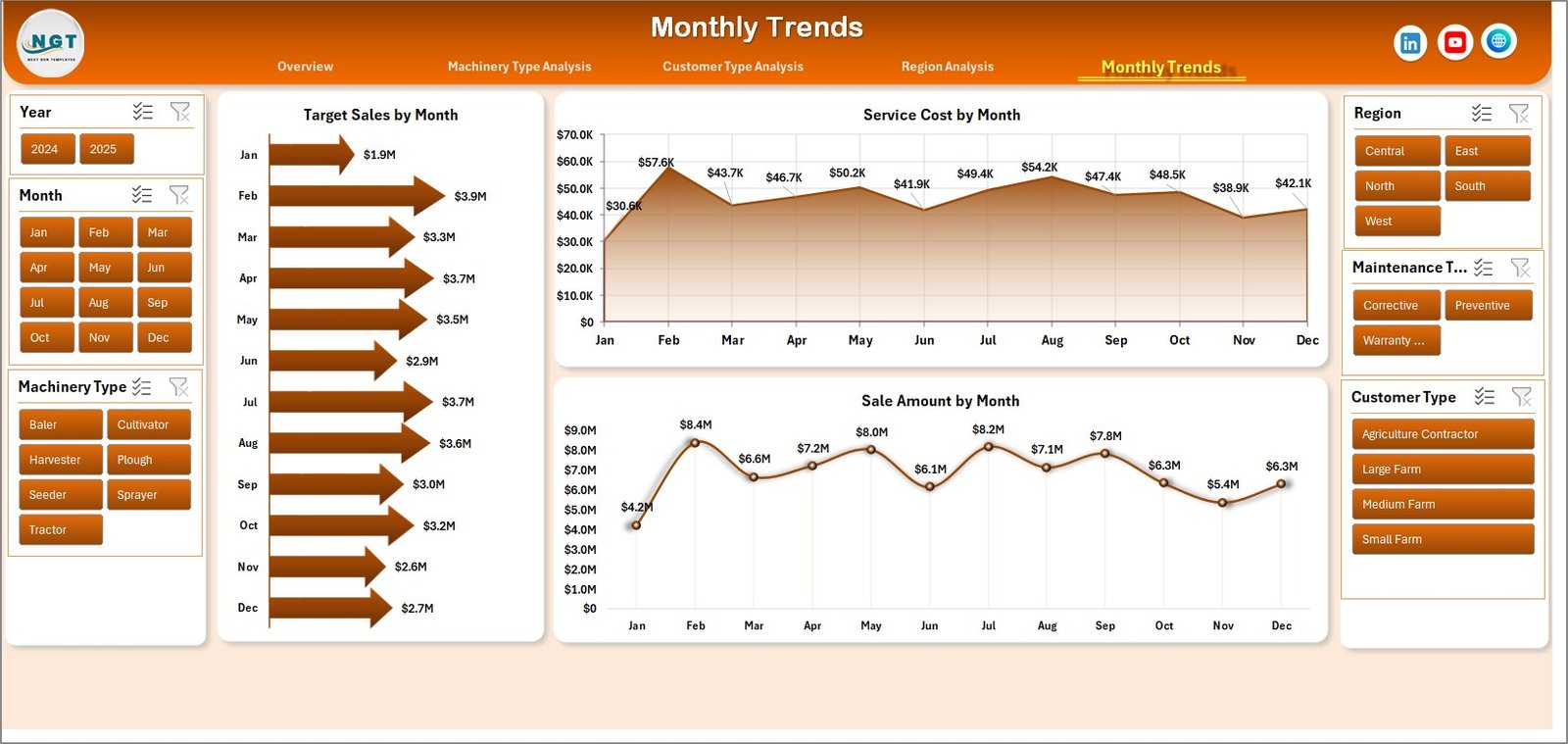
Seasonality plays a major role in agricultural machinery demand. For example, farmers often purchase equipment before planting or harvesting seasons.
The Month Analysis Page helps businesses analyze monthly trends.
Charts in Month Analysis
Service Cost by Month
This chart highlights how maintenance costs change throughout the year.
Sales Amount by Month
This analysis shows monthly revenue trends.
Target Sales by Month
This chart compares actual sales performance with monthly targets.
Therefore, managers can plan inventory and marketing strategies more effectively.
What Are the Data Sheets and Support Sheets?
The dashboard also includes additional sheets that power the analytics.
Data Sheet
The Data Sheet stores raw operational data. This sheet typically contains information such as:
-
Machinery ID
-
Machinery type
-
Dealer name
-
Region
-
Customer type
-
Sales amount
-
Service cost
-
Downtime hours
-
Warranty claims
-
Date and month
Excel pivot tables use this data to generate charts and dashboard insights.
Support Sheet
The Support Sheet contains helper tables, lists, and formulas used to build the dashboard.
For example, it may include:
-
Dropdown lists
-
Pivot tables
-
Calculations
-
Mapping tables
These elements support dashboard functionality.
Advantages of the Agricultural Machinery Dashboard in Excel
Organizations gain several benefits from implementing this dashboard.
1. Centralized Data Analysis
The dashboard consolidates multiple datasets into a single interface. Therefore, managers no longer need to review multiple spreadsheets.
2. Better Decision Making
Interactive charts provide clear insights. As a result, businesses can make faster and smarter decisions.
3. Improved Machinery Performance Monitoring
Companies can track service costs, downtime hours, and warranty claims. Consequently, they can improve equipment reliability.
4. Dealer Performance Tracking
The dashboard helps monitor dealer sales targets and performance. Therefore, companies can optimize dealer networks.
5. Regional Market Insights
Regional analysis allows businesses to understand geographic demand patterns.
6. Customer Segmentation Analysis
Companies can identify which customer types generate the most revenue.
7. Seasonal Sales Monitoring
Monthly analysis helps businesses understand seasonal demand fluctuations.
Click to Purchases Agricultural Machinery Dashboard in Excel
Best Practices for the Agricultural Machinery Dashboard in Excel
To get maximum value from this dashboard, organizations should follow certain best practices.
Keep Data Updated Regularly
Users should update the data sheet frequently. This ensures the dashboard reflects current business performance.
Use Consistent Data Formats
All dates, numeric values, and categories should follow consistent formats. This prevents calculation errors.
Maintain Clean Data
Remove duplicate records and incorrect entries. Clean data improves dashboard accuracy.
Use Pivot Tables Efficiently
Pivot tables help summarize large datasets quickly. Therefore, businesses should structure data properly for pivot analysis.
Apply Clear Chart Labels
Charts should include clear titles and axis labels. This improves dashboard readability.
Monitor KPIs Frequently
Managers should review dashboard metrics regularly to detect performance changes early.
How Can Businesses Use This Dashboard for Strategic Planning?
Agricultural machinery companies can use the dashboard in multiple strategic areas.
Sales Strategy
Sales teams can identify top-performing machinery models and high-demand regions.
Service Optimization
Service departments can monitor machines that generate higher maintenance costs.
Product Improvement
Manufacturers can analyze warranty claims to improve product quality.
Customer Experience
Customer analysis helps businesses improve after-sales support.
Inventory Planning
Monthly trends help businesses prepare for seasonal demand.
Conclusion
The Agricultural Machinery Dashboard in Excel provides a powerful solution for monitoring machinery sales, service performance, customer behavior, and regional demand.
Because agricultural businesses generate large volumes of operational data, manual analysis becomes extremely difficult. However, this dashboard transforms raw data into meaningful insights through interactive charts and structured analytics.
As a result, managers can quickly identify trends, monitor equipment performance, analyze customer demand, and track dealer sales targets.
Therefore, agricultural machinery manufacturers, dealers, and service providers can significantly improve operational efficiency by using this dashboard.
In today’s data-driven agricultural industry, businesses that rely on analytics gain a competitive advantage. Consequently, implementing an Agricultural Machinery Dashboard in Excel helps organizations make smarter decisions and achieve sustainable growth.
Frequently Asked Questions (FAQs)
What is an Agricultural Machinery Dashboard in Excel?
An Agricultural Machinery Dashboard in Excel is an analytical tool that helps organizations track machinery sales, service costs, downtime hours, and warranty claims using interactive charts and pivot tables.
Who can use the Agricultural Machinery Dashboard?
Several professionals can benefit from this dashboard, including:
-
Agricultural machinery manufacturers
-
Equipment dealers
-
Service managers
-
Agribusiness companies
-
Farm equipment distributors
What data is required to build this dashboard?
Typical data includes:
-
Machinery type
-
Dealer name
-
Region
-
Customer type
-
Sales amount
-
Service cost
-
Downtime hours
-
Warranty claims
-
Transaction date
-
Click to Purchases Agricultural Machinery Dashboard in Excel
Can beginners use this dashboard?
Yes. Because the dashboard uses Excel pivot tables and slicers, beginners can easily update and use it without advanced technical skills.
Can the dashboard be customized?
Yes. Businesses can easily customize charts, KPIs, and filters based on their operational requirements.
Visit our YouTube channel to learn step-by-step video tutorials