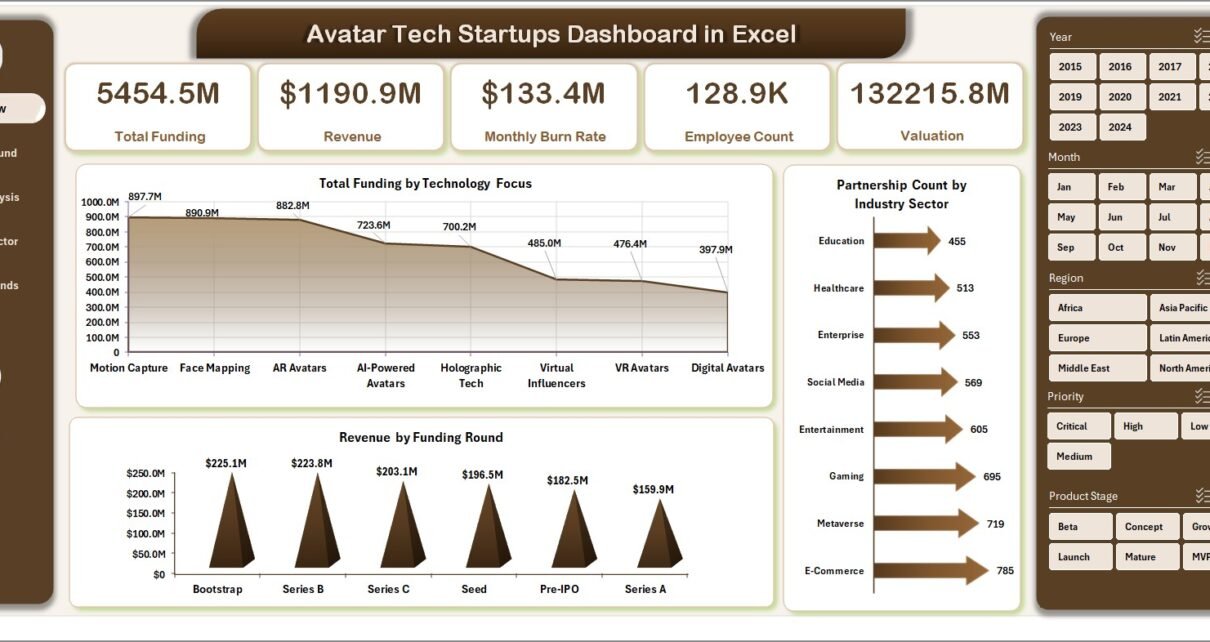
In today’s fast-paced tech world, startups grow quickly. However, managing data across funding, revenue, partnerships, and customer acquisition becomes challenging. Many founders and analysts struggle to track everything in one place. As a result, decision-making becomes slow and unclear.
That’s exactly where the Avatar Tech Startups Dashboard in Excel becomes a powerful solution.
This ready-to-use dashboard helps you track, analyze, and optimize startup performance in a structured and visual way. Moreover, it transforms complex data into simple insights, so you can make smarter business decisions faster.
In this detailed guide, you will learn everything about this dashboard, including its features, structure, advantages, best practices, and FAQs.
Click to Purchases Avatar Tech Startups Dashboard in Excel
📊 What is the Avatar Tech Startups Dashboard in Excel?
The Avatar Tech Startups Dashboard in Excel is an interactive reporting tool designed to monitor startup performance across multiple business areas.
Instead of using multiple spreadsheets, you can manage everything in one centralized dashboard. Therefore, you save time, reduce errors, and improve data visibility.
This dashboard allows you to track:
-
💰 Total Funding
-
📈 Revenue Growth
-
🤝 Partnerships
-
💡 Technology Focus
-
🌍 Regional Performance
-
🧑💼 Customer Acquisition Cost
-
🏢 Industry Sector Insights
As a result, you get a complete view of your startup ecosystem in one place.
🤔 Why Do Tech Startups Need a Dashboard?
Click to Purchases Avatar Tech Startups Dashboard in Excel
Startups generate a huge amount of data daily. However, without proper tools, it becomes difficult to understand what is working.
Moreover, many startups still rely on manual reports. Because of that, they face several challenges:
-
❌ Data scattered across multiple sheets
-
❌ No real-time performance tracking
-
❌ Difficulty in analyzing funding and revenue
-
❌ Poor decision-making due to lack of insights
Therefore, a structured dashboard becomes essential.
With the Avatar Tech Startups Dashboard in Excel:
-
You centralize all your data
-
You visualize trends easily
-
You identify growth opportunities quickly
🧭 Key Features of Avatar Tech Startups Dashboard in Excel
This dashboard comes with a powerful and user-friendly design. Let’s explore its core features.
🔹 Page Navigator
The dashboard includes a Page Navigator on the left side. Therefore, users can easily switch between different analysis pages without confusion.
🔹 Interactive Filters (Slicers)
Each page includes slicers on the right side. As a result:
-
You can filter data instantly
-
You can analyze specific segments
-
You can customize reports based on your needs
🔹 Multi-Page Analytical Structure
This dashboard contains 5 powerful pages. Each page focuses on a specific area of startup performance.
📑 Dashboard Structure Explained (5 Powerful Pages)
Click to Purchases Avatar Tech Startups Dashboard in Excel
📌 1. Overview Page – Quick Snapshot of Startup Performance
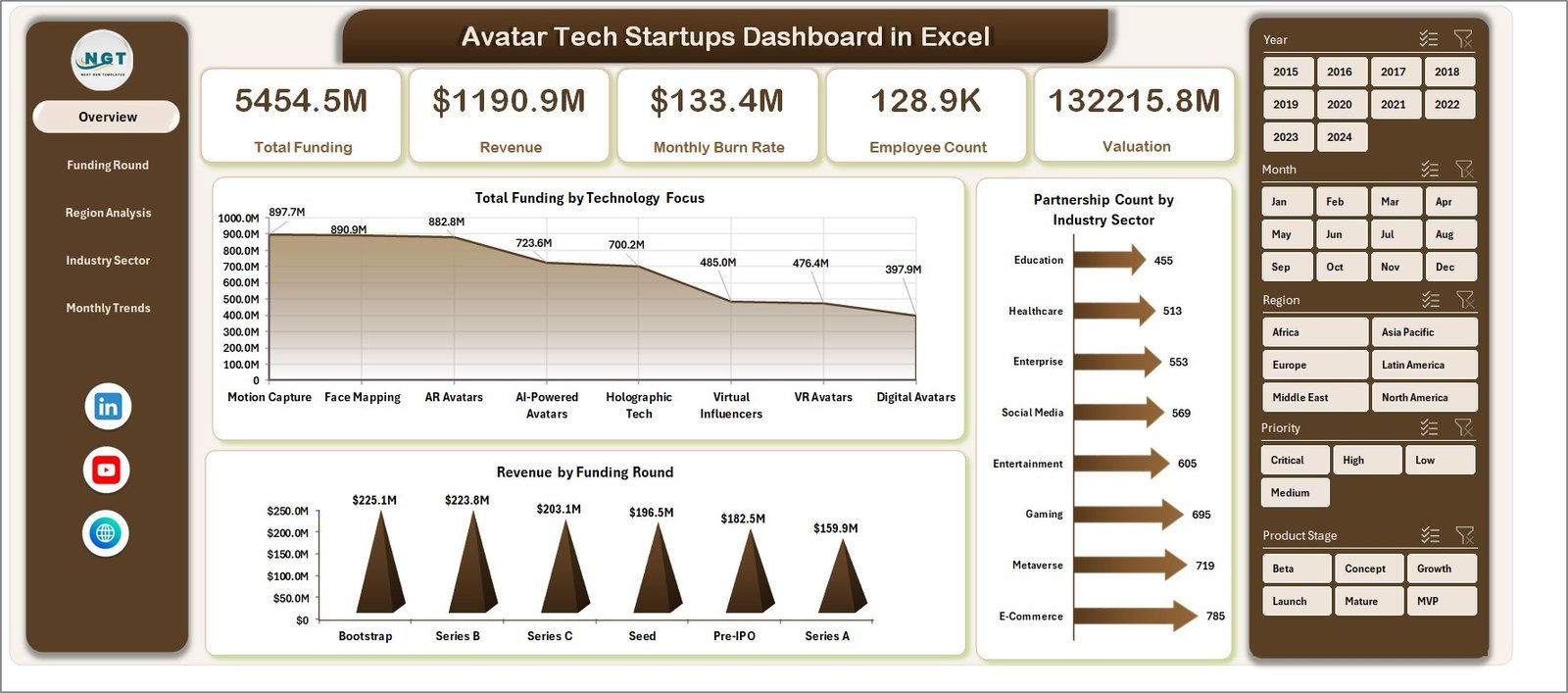
The Overview Page gives you a high-level summary.
Key Highlights:
-
📊 4 KPI Cards
-
📈 Charts:
-
Total Funding by Technology Focus
-
Partnership Count by Industry Sector
-
Revenue by Funding Round
-
Why It Matters:
This page helps you understand the overall performance quickly. Therefore, you can identify trends at a glance.
💰 2. Funding Round Analysis – Deep Dive into Investment Trends
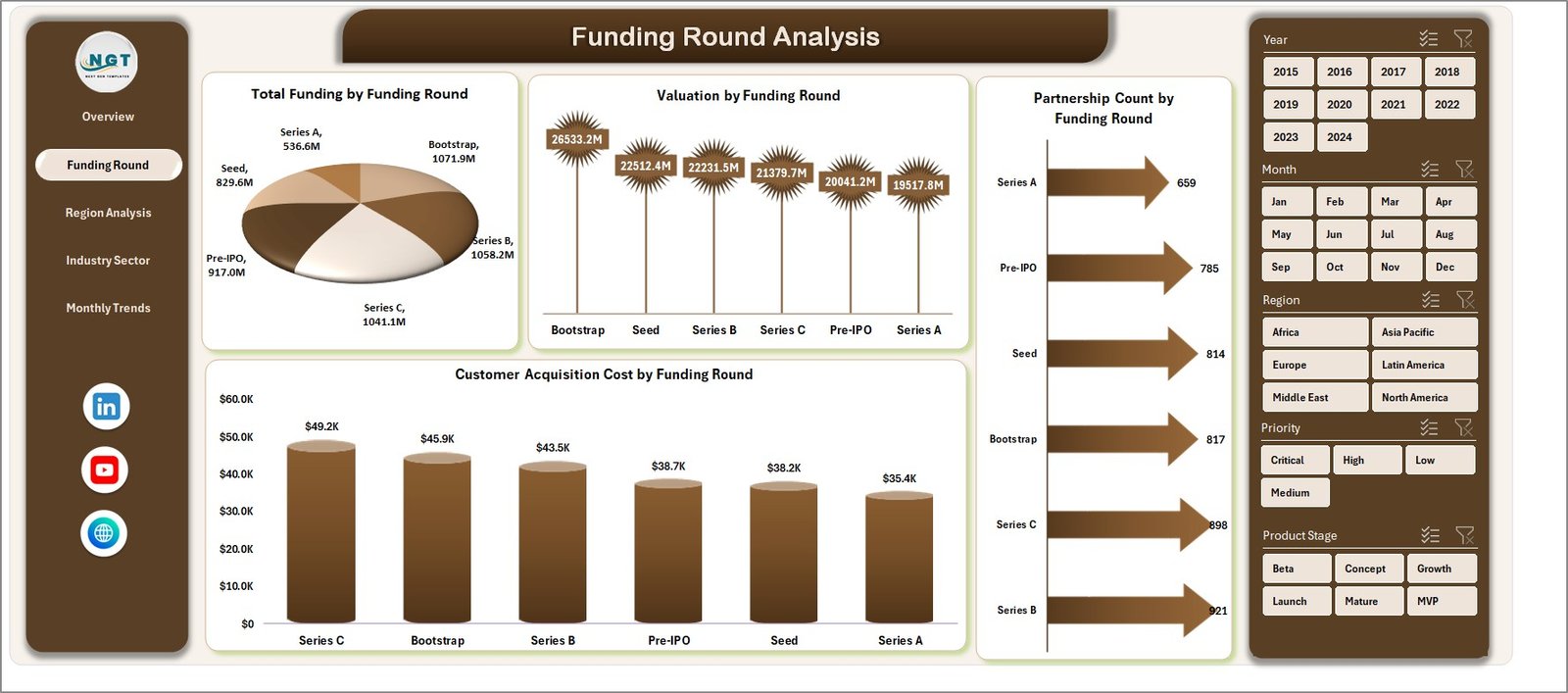
The Funding Round Analysis Page focuses on funding performance.
Charts Included:
-
Total Funding by Funding Round
-
Partnership Count by Funding Round
-
Valuation by Funding Round
-
Customer Acquisition Cost by Funding Round
Why It Matters:
You can analyze how each funding round impacts your startup. Moreover, you can track investor performance and funding efficiency.
🌍 3. Region Analysis – Understand Geographic Performance
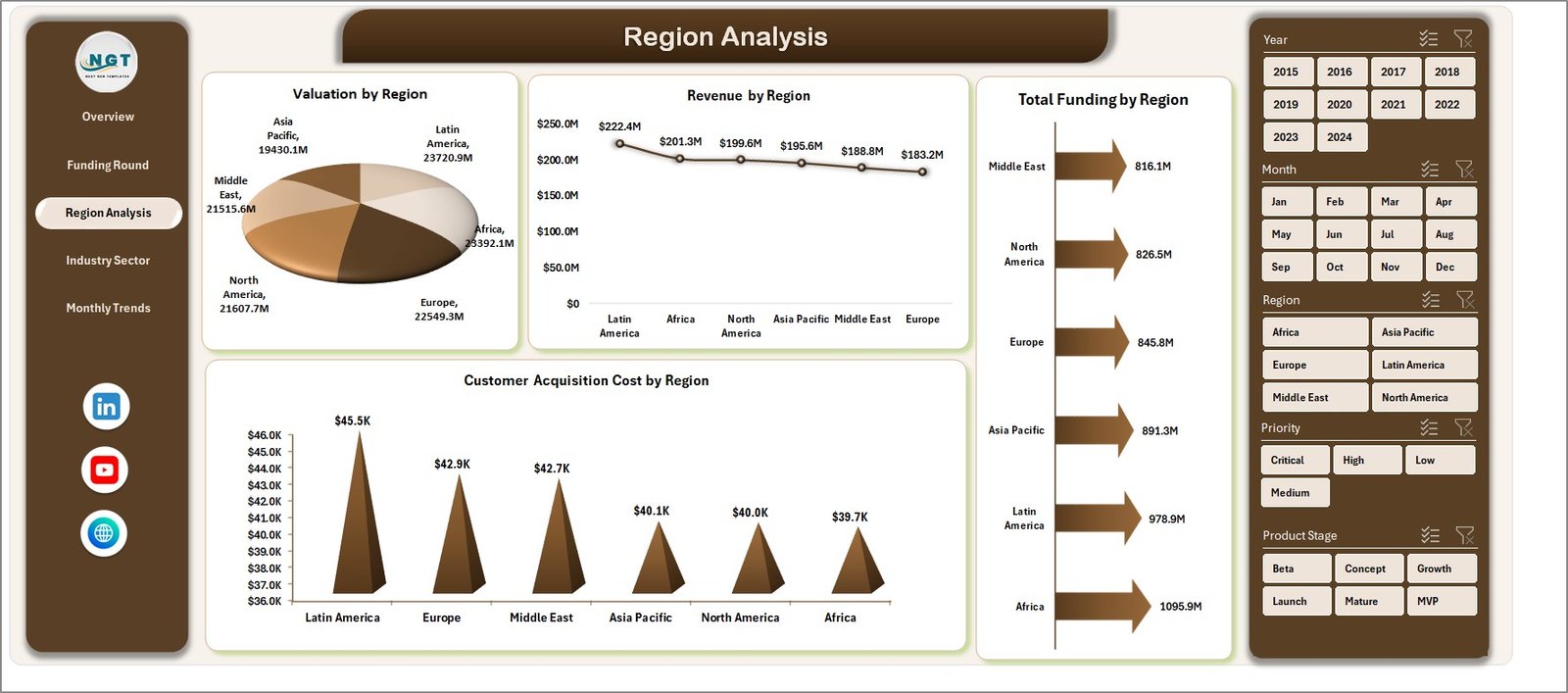
The Region Analysis Page helps you evaluate performance across different regions.
Charts Included:
-
Total Funding by Region
-
Valuation by Region
-
Customer Acquisition Cost by Region
-
Revenue by Region
Why It Matters:
You can identify high-performing regions. As a result, you can focus your expansion strategies effectively.
Click to Purchases Avatar Tech Startups Dashboard in Excel
🏢 4. Industry Sector Analysis – Track Market Segments
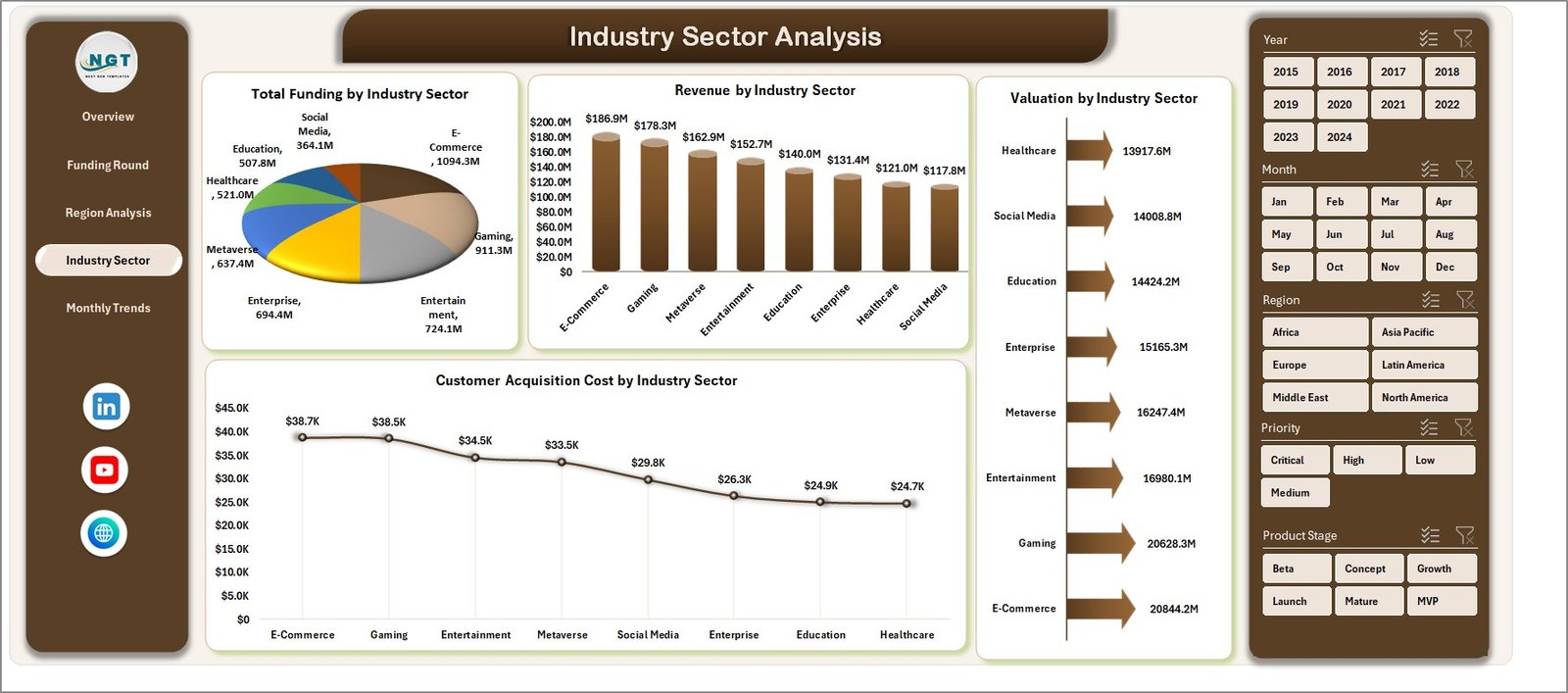
The Industry Sector Analysis Page provides insights into different sectors.
Charts Included:
-
Total Funding by Industry Sector
-
Valuation by Industry Sector
-
Customer Acquisition Cost by Industry Sector
-
Revenue by Industry Sector
Why It Matters:
You can identify which industries perform best. Therefore, you can align your strategy with profitable sectors.
📅 5. Month Analysis – Monitor Growth Over Time
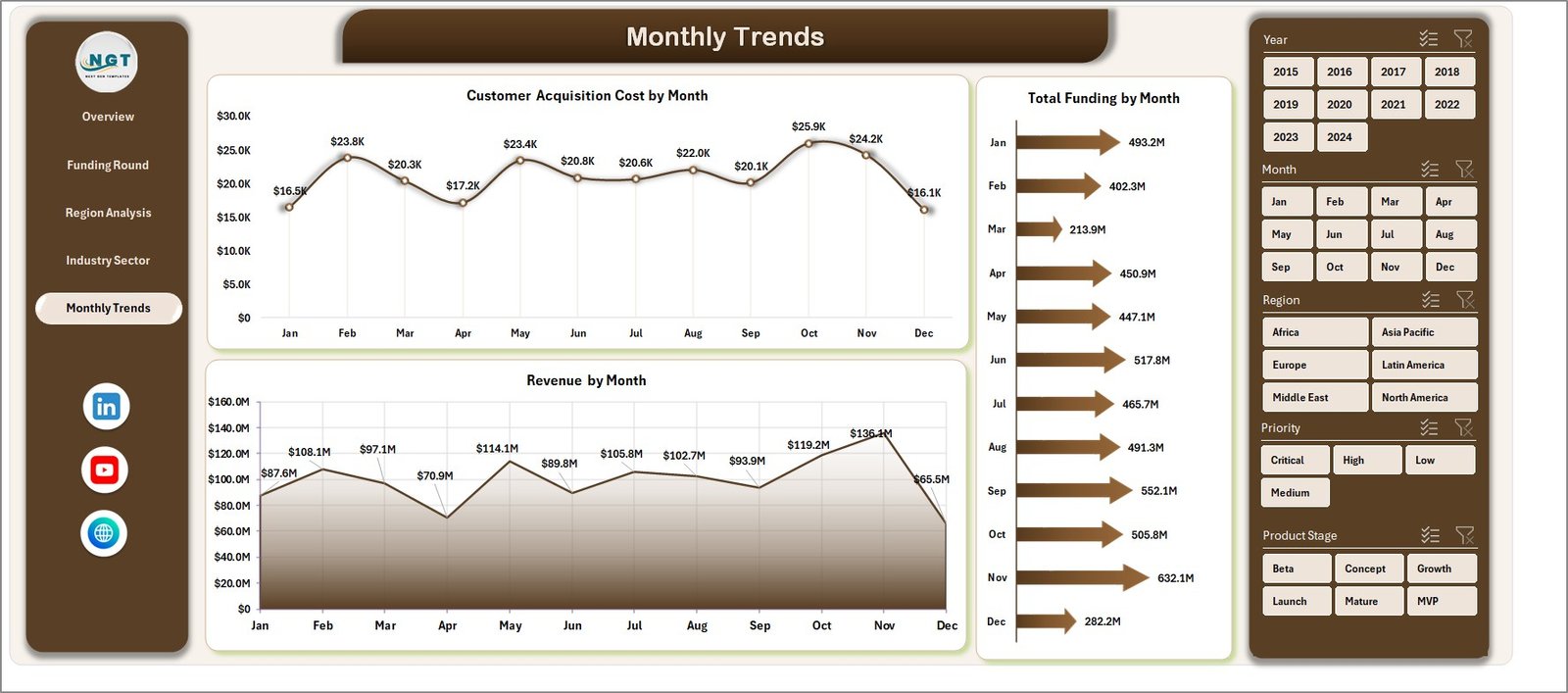
The Month Analysis Page focuses on time-based trends.
Charts Included:
-
Total Funding by Month
-
Customer Acquisition Cost by Month
-
Revenue by Month
Why It Matters:
You can track monthly performance trends. As a result, you can identify growth patterns and seasonal changes.
Click to Purchases Avatar Tech Startups Dashboard in Excel
📂 Supporting Sheets in the Dashboard
📄 Data Sheet
The Data Sheet stores all raw data used in the dashboard.
-
You enter startup data here
-
The dashboard updates automatically
Therefore, it ensures accuracy and consistency.
⚙️ Support Sheet
The Support Sheet helps in backend calculations and data structuring.
-
It supports formulas and pivot tables
-
It improves dashboard performance
🚀 Advantages of Avatar Tech Startups Dashboard in Excel
Using this dashboard offers several benefits. Let’s explore them.
✅ 1. Centralized Data Management
You can manage all startup data in one place. Therefore, you eliminate confusion and duplication.
✅ 2. Better Decision-Making
You get clear insights through charts and KPIs. As a result, you make faster and smarter decisions.
✅ 3. Time-Saving
Instead of creating reports manually, the dashboard automates everything. Therefore, you save valuable time.
✅ 4. Easy to Use
The dashboard uses simple Excel features. So, even beginners can use it easily.
✅ 5. Real-Time Insights
Once you update the data, the dashboard updates automatically. Therefore, you always see the latest information.
✅ 6. Improved Business Strategy
You can identify strengths and weaknesses. As a result, you can improve your business strategy effectively.
Visit our YouTube channel to learn step-by-step video tutorials