Cyber threats continue to grow every day. Organizations now face ransomware attacks, phishing attempts, insider threats, and data breaches more frequently than ever before. Therefore, companies must not only protect their systems but also measure how effectively they respond to cyber incidents.However, many cybersecurity teams still rely on scattered reports and manual tracking. As a result, decision-makers struggle to understand response efficiency, identify weak areas, and improve security strategies.This is exactly where a Cyber Incident Response KPI Scorecard in Excel becomes powerful. It transforms raw cybersecurity data into structured performance insights. Moreover, it helps organizations monitor incident response performance using measurable Key Performance Indicators (KPIs).
In this comprehensive guide, you will learn everything about the Cyber Incident Response KPI Scorecard in Excel, including its structure, features, benefits, best practices, implementation approach, and frequently asked questions.
Click to buy Cyber Incident Response KPI Scorecard In Excel
What Is a Cyber Incident Response KPI Scorecard in Excel?
A Cyber Incident Response KPI Scorecard in Excel is a ready-to-use performance monitoring tool designed to track and evaluate cybersecurity incident response activities using measurable KPIs.
Instead of reviewing multiple reports, teams can monitor all incident response metrics in one centralized scorecard. Consequently, security managers gain faster insights and make better decisions.
The scorecard allows organizations to:
- Track response time and resolution efficiency
- Compare actual performance against targets
- Analyze Month-to-Date (MTD) and Year-to-Date (YTD) results
- Monitor trends using visual charts
- Maintain structured cybersecurity reporting
Because Excel remains widely accessible, organizations can implement this system quickly without investing in complex software.
Why Do Organizations Need a Cyber Incident Response KPI Scorecard?
Cybersecurity teams handle hundreds of alerts every month. Yet without performance measurement, improvement becomes difficult.
Common Challenges Without KPI Tracking
- Lack of visibility into incident response efficiency
- Delayed decision-making
- Inconsistent reporting methods
- Difficulty identifying recurring threats
- Poor accountability across teams
Therefore, organizations need structured KPI monitoring.
A KPI scorecard solves these problems by creating measurable accountability.
How Does a Cyber Incident Response KPI Scorecard Work?
The scorecard collects operational cybersecurity data and converts it into meaningful performance insights.
Here is the workflow:
- Enter incident data into the input sheet.
- Define KPIs and measurement formulas.
- Compare actual values with targets.
- Analyze MTD and YTD performance.
- Review trends and visual indicators.
- Take corrective action based on insights.
As a result, teams move from reactive security to proactive cybersecurity management.
Key Features of the Cyber Incident Response KPI Scorecard in Excel
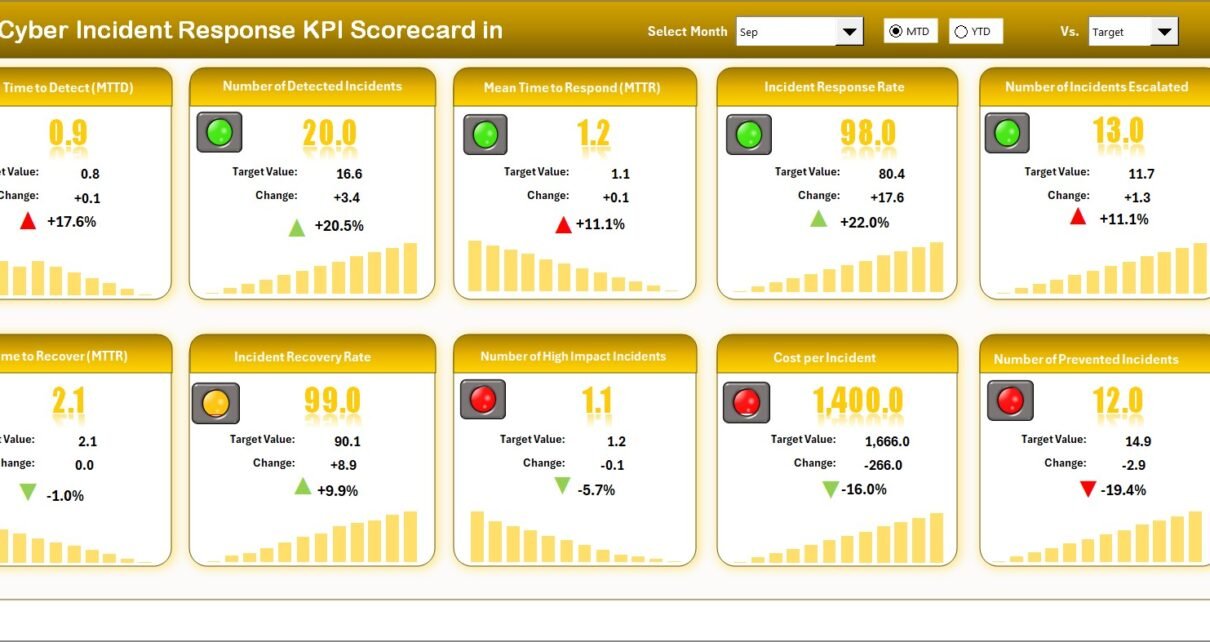
This ready-to-use template includes four structured worksheets, each designed for a specific purpose.
Scorecard Sheet – The Main Performance Dashboard
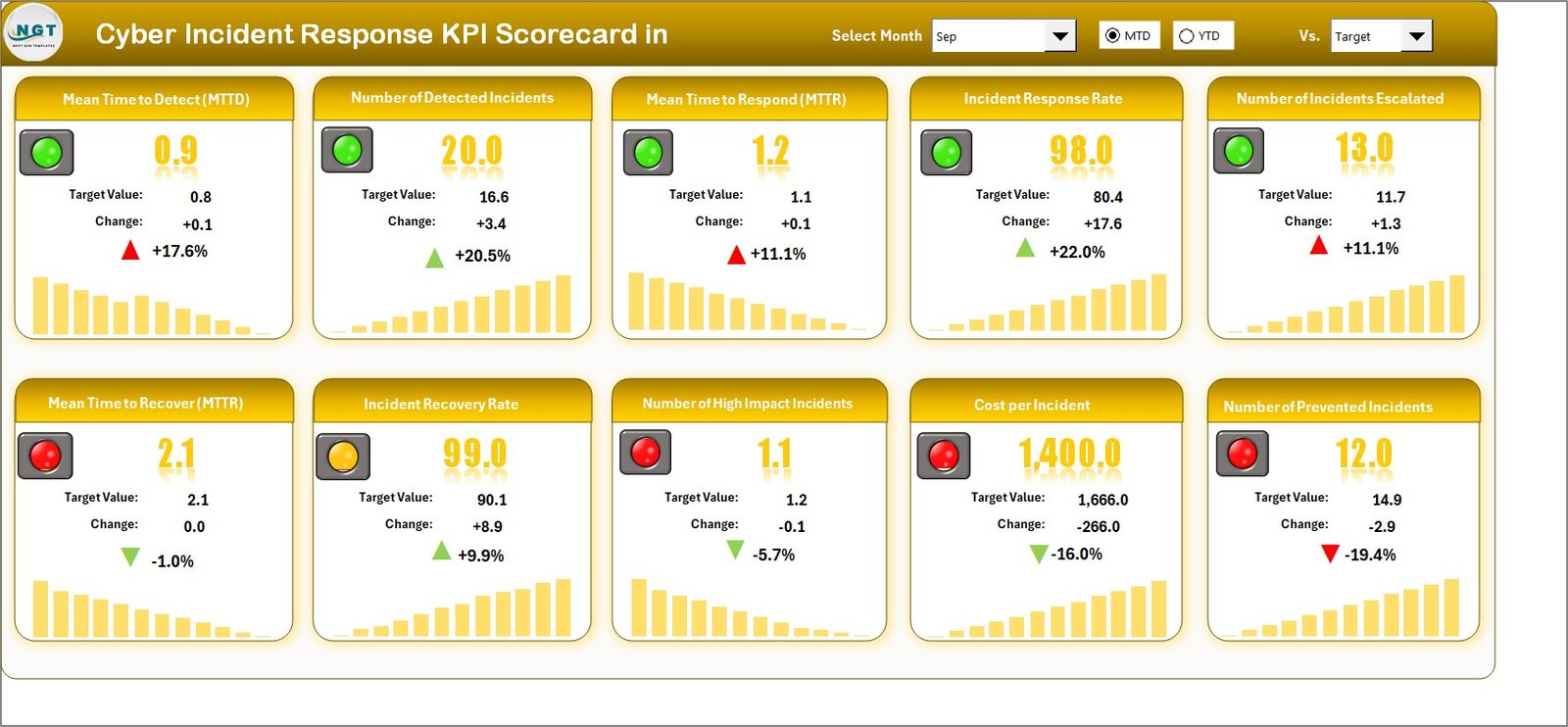
The Scorecard Sheet acts as the primary interface where users view overall KPI performance.
Key Functionalities
- Dropdown Menus
- Select Month
- Switch between MTD and YTD analysis
- Actual vs Target Comparison
- Quickly evaluate performance gaps.
- Visual Indicators
- Color-coded formatting highlights performance status.
- Comprehensive KPI Overview
- Displays all critical information in one place.
- 10 KPIs Displayed in One View
- Enables quick executive-level monitoring.
Why This Sheet Matters
Security leaders need instant visibility. Therefore, this sheet provides a clear snapshot of incident response effectiveness.
Click to buy Cyber Incident Response KPI Scorecard In Excel
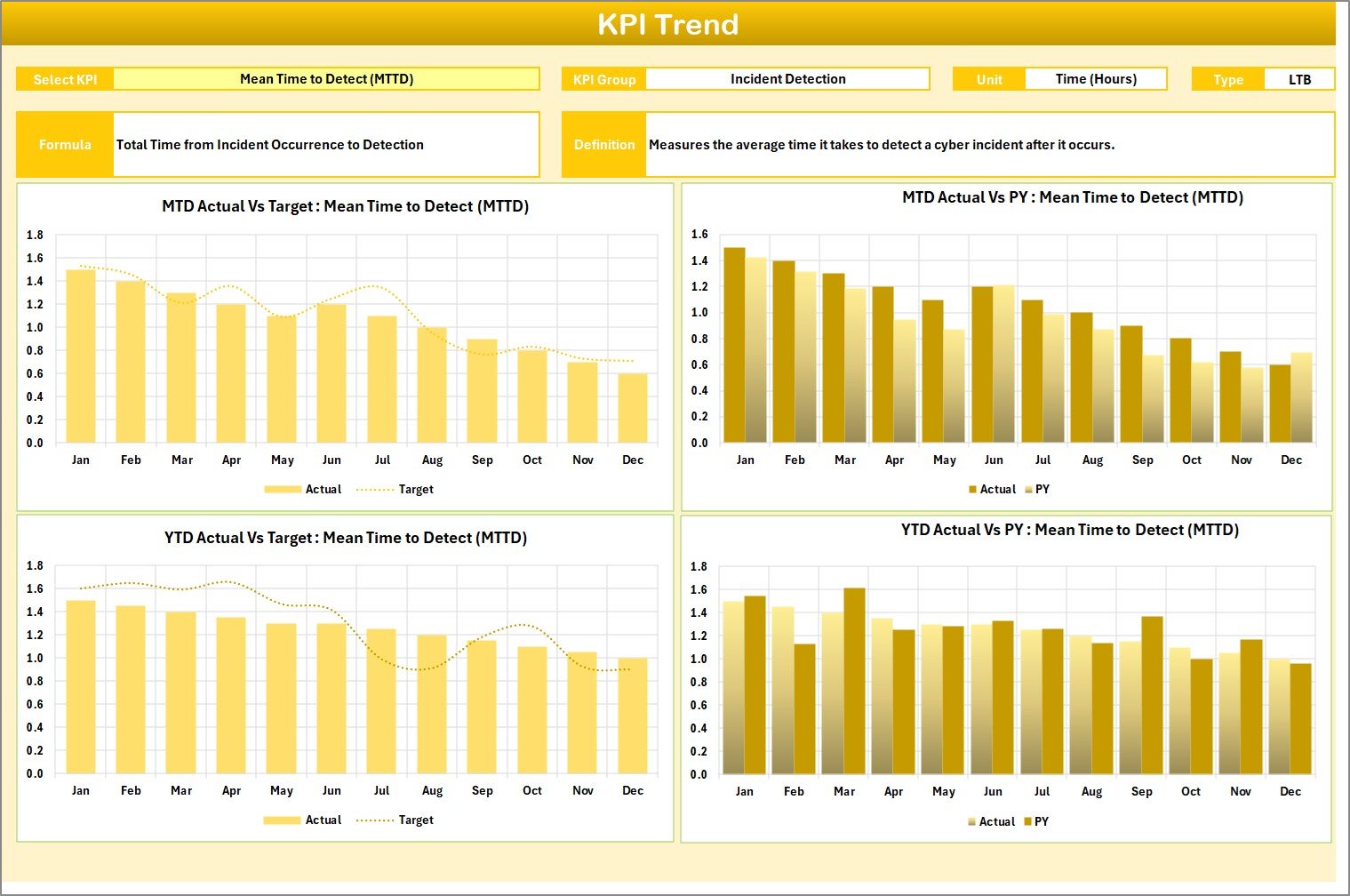
KPI Trend Sheet – Performance Analysis Over Time
The KPI Trend Sheet provides detailed analytical insights.
Users can select a KPI from the dropdown in Cell C3, and the system automatically updates performance details.
Information Displayed
- KPI Group
- KPI Unit
- KPI Type (Lower the Better / Upper the Better)
- KPI Formula
- KPI Definition
Trend Visualization
The sheet also displays:
- MTD Trend Chart
- YTD Trend Chart
- Actual vs Target vs Previous Year comparison
Because trends reveal patterns, organizations can detect performance improvement or decline quickly.
Click to buy Cyber Incident Response KPI Scorecard In Excel
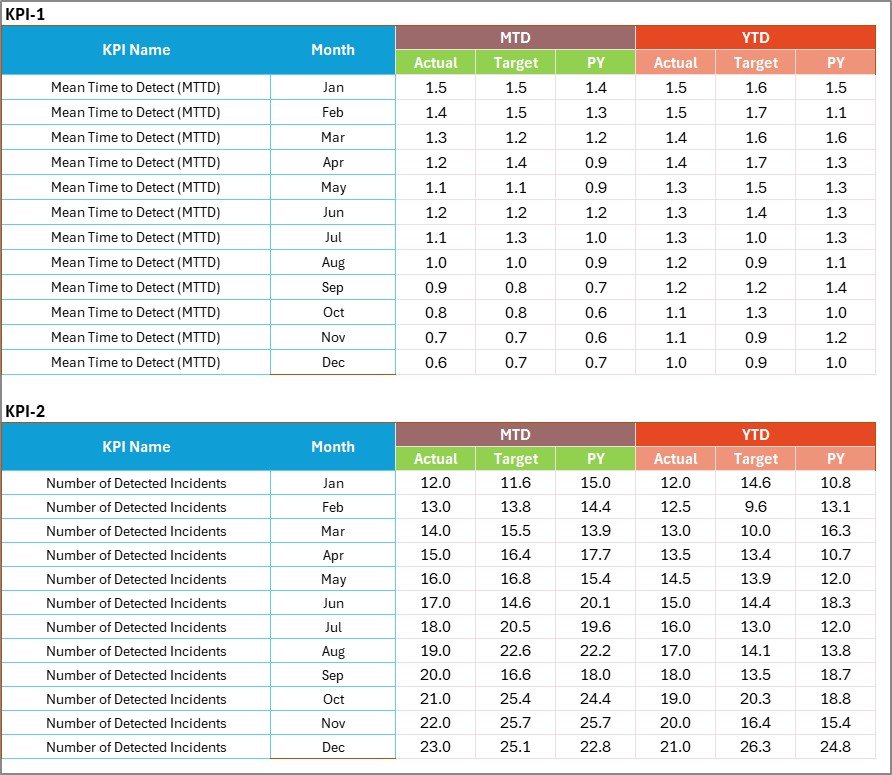
Input Data Sheet – Centralized Data Entry
The Input Data Sheet serves as the data backbone of the scorecard.
Main Functions
- Record actual KPI values
- Enter targets
- Update monthly performance
- Maintain accurate reporting
Whenever users update data, dashboards refresh automatically. Consequently, reports always remain current.
Click to buy Cyber Incident Response KPI Scorecard In Excel
KPI Definition Sheet – Standardizing Metrics
Consistency remains critical in cybersecurity reporting. Therefore, the KPI Definition Sheet standardizes all KPIs.
Fields Included
- KPI Name
- KPI Group
- Unit
- Formula
- KPI Definition
This structure ensures every team member understands how KPIs are measured.

Click to buy Cyber Incident Response KPI Scorecard In Excel
What KPIs Can You Track in a Cyber Incident Response Scorecard?
Organizations can customize KPIs based on security objectives. However, common cybersecurity KPIs include:
- Mean Time to Detect (MTTD)
- Mean Time to Respond (MTTR)
- Mean Time to Contain
- Incident Resolution Time
- Number of Security Incidents
- False Positive Rate
- SLA Compliance Rate
- Patch Response Time
- Incident Escalation Rate
- Threat Containment Efficiency
These KPIs provide measurable insights into operational readiness.
How to Use the Cyber Incident Response KPI Scorecard in Excel?
Using the scorecard requires only a few simple steps.
Step 1: Define KPIs
Enter KPI details in the KPI Definition sheet.
Step 2: Enter Data
Add monthly actual values and targets in the Input Data sheet.
Step 3: Select Analysis Period
Choose Month and MTD/YTD options using dropdown menus.
Step 4: Review Performance
Analyze visual indicators and comparisons.
Step 5: Monitor Trends
Use charts to identify improvement areas.
Step 6: Take Action
Implement corrective measures based on insights.
Advantages of Cyber Incident Response KPI Scorecard in Excel
Organizations benefit significantly from structured KPI monitoring.
Improved Decision-Making
Leaders gain real-time visibility into cybersecurity performance.
Faster Incident Response
Teams identify delays and optimize workflows quickly.
Standardized Reporting
Everyone follows the same KPI definitions.
Cost-Effective Solution
Excel eliminates expensive software implementation.
Data-Driven Security Strategy
Performance insights guide long-term planning.
Better Accountability
Teams understand performance expectations clearly.
How Does KPI Tracking Improve Cybersecurity Performance?
KPI tracking creates continuous improvement cycles.
First, It Identifies Weak Points
Teams detect slow response processes immediately.
Next, It Enables Performance Benchmarking
Organizations compare current performance with targets.
Then, It Encourages Accountability
Employees track measurable goals.
Finally, It Supports Strategic Planning
Management allocates resources effectively.
Thus, KPI scorecards transform cybersecurity operations into measurable systems.
Best Practices for the Cyber Incident Response KPI Scorecard
To achieve maximum value, organizations should follow proven practices.
- Define Clear KPIs
Avoid vague metrics. Instead, create measurable indicators.
- Update Data Regularly
Frequent updates ensure accurate insights.
- Use Realistic Targets
Unrealistic goals reduce motivation.
- Review Trends Monthly
Regular analysis helps detect issues early.
- Align KPIs with Security Objectives
Each KPI should support business risk reduction.
- Train Team Members
Ensure users understand KPI definitions.
- Automate Data Collection When Possible
Automation reduces manual errors.
Who Can Benefit from This KPI Scorecard?
Many roles benefit from structured cybersecurity performance monitoring.
Ideal Users Include:
- Cybersecurity Analysts
- SOC Teams
- IT Managers
- Risk Management Professionals
- Compliance Officers
- CISOs
- Managed Security Service Providers
Because the template uses Excel, both small and large organizations can adopt it easily.
Why Use Excel for Cyber Incident Response KPI Tracking?
Many organizations ask this question.
Excel Offers Several Advantages:
- Easy customization
- Familiar interface
- No additional licensing cost
- Fast implementation
- Flexible reporting structure
- Compatibility with existing systems
Therefore, Excel remains a practical solution for KPI monitoring.
Future of Cybersecurity KPI Monitoring
Cybersecurity continues evolving rapidly. As threats grow sophisticated, organizations must adopt data-driven monitoring systems.
Future trends include:
- Automated KPI dashboards
- AI-driven incident prediction
- Real-time threat analytics
- Integration with SIEM tools
- Predictive cybersecurity reporting
However, KPI scorecards remain the foundation for performance measurement.
Conclusion
Cybersecurity no longer depends only on tools and technologies. Instead, success depends on how efficiently teams respond to incidents.
The Cyber Incident Response KPI Scorecard in Excel provides a structured, practical, and powerful way to measure performance. It centralizes KPI tracking, simplifies reporting, and improves decision-making.
Moreover, organizations gain visibility into response efficiency, identify weaknesses faster, and continuously improve security operations.
By implementing this scorecard, businesses move toward proactive cybersecurity management rather than reactive incident handling.
Frequently Asked Questions (FAQs)
- What is a Cyber Incident Response KPI Scorecard?
It is an Excel-based tool that tracks cybersecurity incident response performance using measurable KPIs.
- Who should use this scorecard?
Cybersecurity teams, IT managers, SOC analysts, and compliance professionals can use it.
- Can I customize KPIs in the template?
Yes. You can add or modify KPIs based on organizational requirements.
- What is the difference between MTD and YTD?
- MTD measures performance for the current month.
- YTD measures performance from the start of the year.
- Does the scorecard update automatically?
Yes. When you update input data, charts and performance indicators refresh automatically.
- Why is KPI tracking important in cybersecurity?
KPI tracking helps organizations measure response efficiency, identify risks, and improve security strategies.
- Is Excel suitable for cybersecurity reporting?
Yes. Excel provides flexibility, accessibility, and cost-effective reporting for KPI monitoring.
- How many KPIs should organizations track?
Most organizations track 8–15 critical KPIs to maintain focus and clarity.
Visit our YouTube channel to learn step-by-step video tutorials
Watch the step-by-step video tutorial:
Click to buy Cyber Incident Response KPI Scorecard In Excel