In today’s digital world, data privacy is no longer optional. Every organization collects, stores, and processes sensitive information. However, many companies still struggle to measure how well they protect that data. As a result, risks increase, compliance gaps appear, and trust declines.So, how can you monitor your data privacy performance in a structured way?You need a Data Privacy KPI Scorecard in Excel.
This ready-to-use template helps you track, measure, and improve your privacy performance using clear KPIs. Moreover, it gives you instant visibility into Month-to-Date (MTD) and Year-to-Date (YTD) results. Therefore, you can make better decisions and reduce privacy risks quickly.
In this complete guide, you will learn:
- What a Data Privacy KPI Scorecard in Excel is
- Why organizations need it
- Detailed explanation of all worksheets
- Advantages of using this scorecard
- Best practices for implementation
- Frequently asked questions
Click to buy Data Privacy KPI Scorecard In Excel
What Is a Data Privacy KPI Scorecard in Excel?
A Data Privacy KPI Scorecard in Excel is a structured performance tracking system designed to monitor privacy-related metrics.
Instead of reviewing scattered reports, you can:
- Track data breach incidents
- Monitor compliance rates
- Measure training completion
- Analyze response times
- Compare actual vs target values
- Review previous year performance
In other words, this scorecard transforms raw privacy data into actionable insights.
Furthermore, it allows you to select a specific month and instantly review MTD and YTD performance. Consequently, you stay in control of your privacy management strategy.
Why Do Organizations Need a Data Privacy KPI Scorecard?
Today, data protection laws such as GDPR, HIPAA, and other regional regulations demand strong privacy governance. However, without measurable KPIs, teams often operate blindly.
Here is why a KPI scorecard matters:
- Improves Compliance Monitoring
You can track regulatory requirements clearly. As a result, you reduce compliance risk.
- Enhances Risk Management
You identify weak areas early. Therefore, you prevent costly data breaches.
- Builds Customer Trust
When you monitor privacy performance, you show responsibility. Consequently, customers trust your brand.
- Supports Better Decisions
Leaders rely on numbers, not assumptions. Thus, they take corrective actions faster.
- Saves Time
Instead of preparing manual reports every month, you use an automated Excel dashboard.
Clearly, organizations that track privacy KPIs perform better and reduce risk exposure.
What Are the Key Features of the Data Privacy KPI Scorecard in Excel?
This ready-to-use template includes four well-structured worksheets. Each sheet plays a specific role.
Let us understand them one by one.
Scorecard Sheet
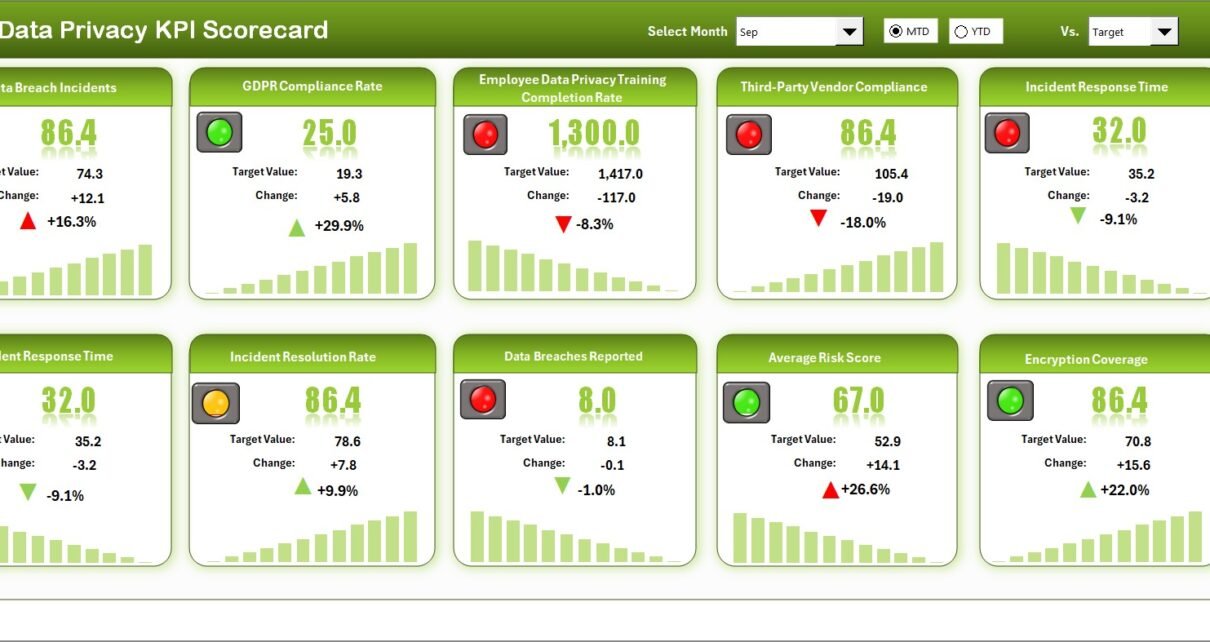
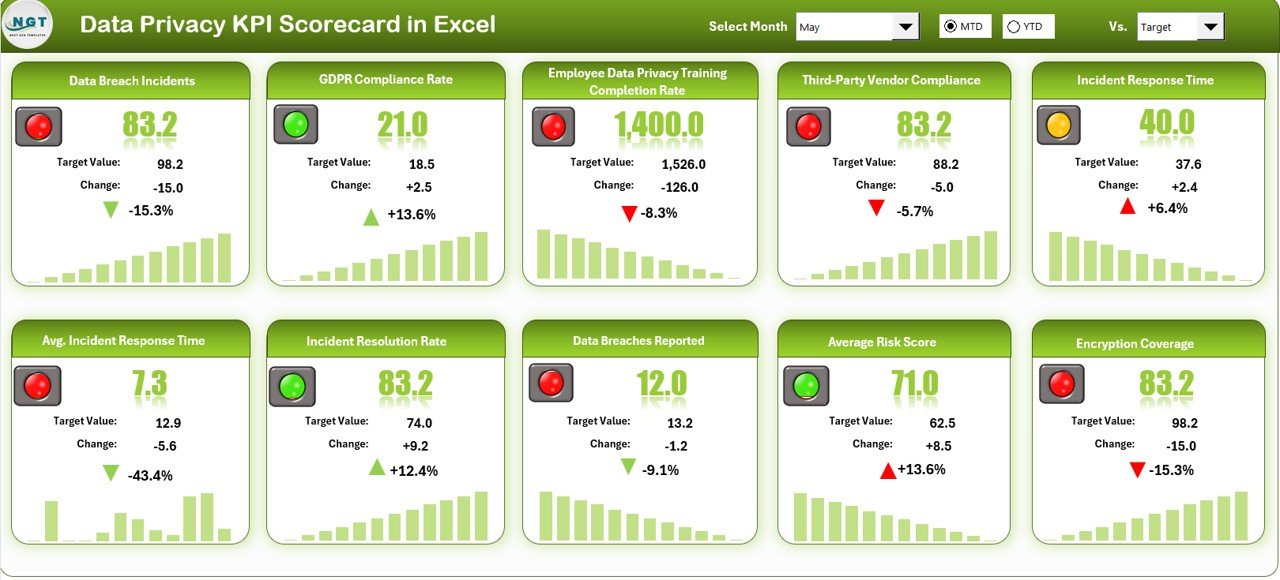
The Scorecard Sheet acts as the main dashboard. It shows KPI performance in one clean interface.
Key Features:
Dropdown Menus
You can select:
- Month
- MTD (Month-to-Date)
- YTD (Year-to-Date)
As soon as you change the selection, the entire scorecard updates automatically.
Actual vs Target Comparison
You can instantly compare actual results with target values. Therefore, you know whether performance meets expectations.
Visual Indicators
The template uses color-coded visuals and conditional formatting:
- Green for good performance
- Red for below target
- Arrows to show improvement or decline
Thus, you identify performance gaps quickly.
Comprehensive KPI Overview
You can view all relevant KPI information in one place:
- MTD Actual
- MTD Target
- Previous Year comparison
- YTD Actual
- YTD Target
Moreover, the sheet displays 10 KPIs in one view, which makes performance analysis simple and structured.
Click to buy Data Privacy KPI Scorecard In Excel
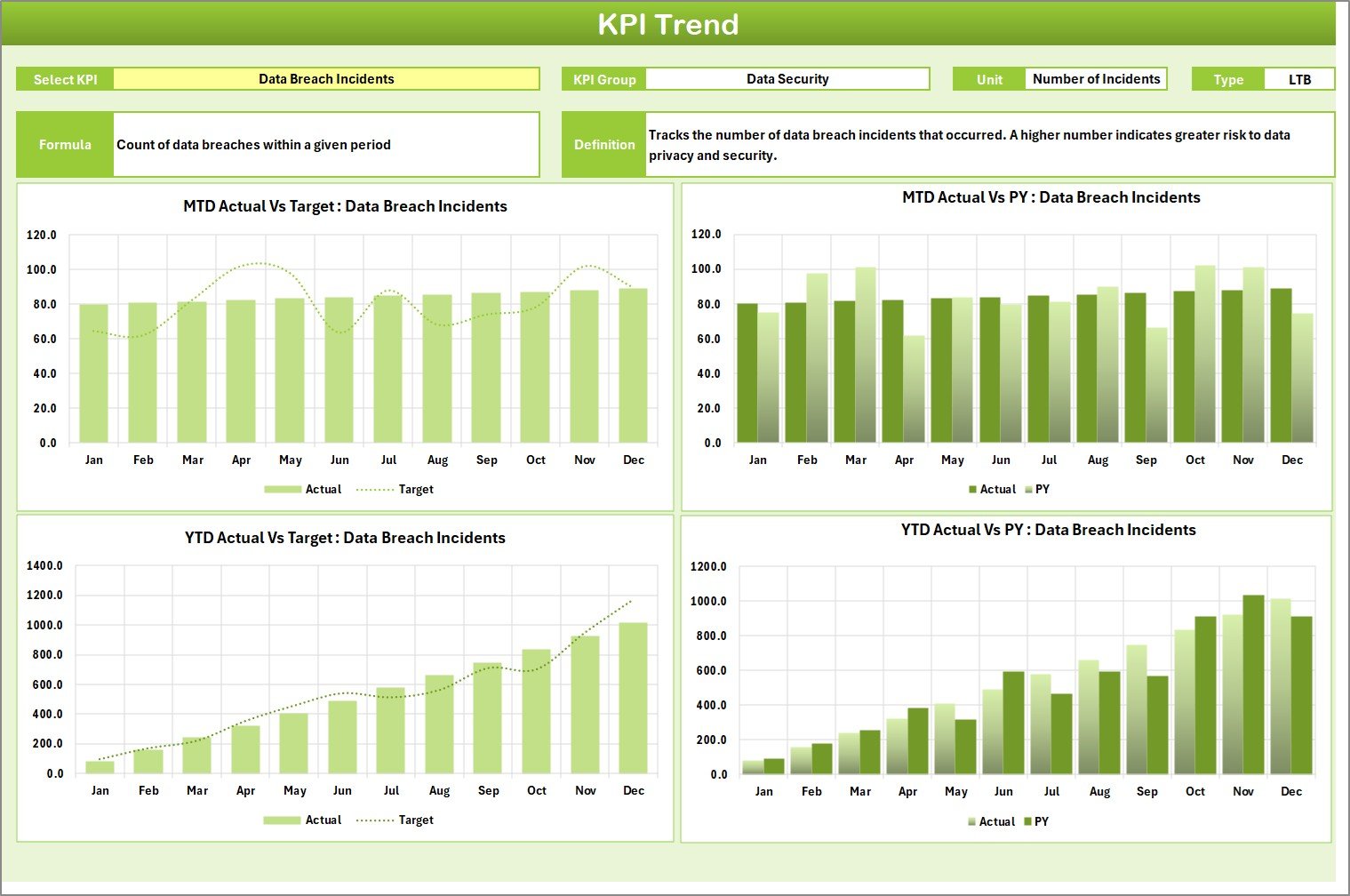
KPI Trend Sheet
The KPI Trend Sheet helps you analyze historical performance.
Key Functionalities:
- Select KPI name from dropdown (Cell C3)
- View KPI Group
- See Unit of measurement
- Identify KPI Type (Lower the Better or Upper the Better)
- Review Formula
- Read Definition
Additionally, you can see:
- MTD trend chart (Actual vs Target vs Previous Year)
- YTD trend chart (Actual vs Target vs Previous Year)
Therefore, you can track progress over time instead of reviewing only current performance.
Click to buy Data Privacy KPI Scorecard In Excel
Input Data Sheet
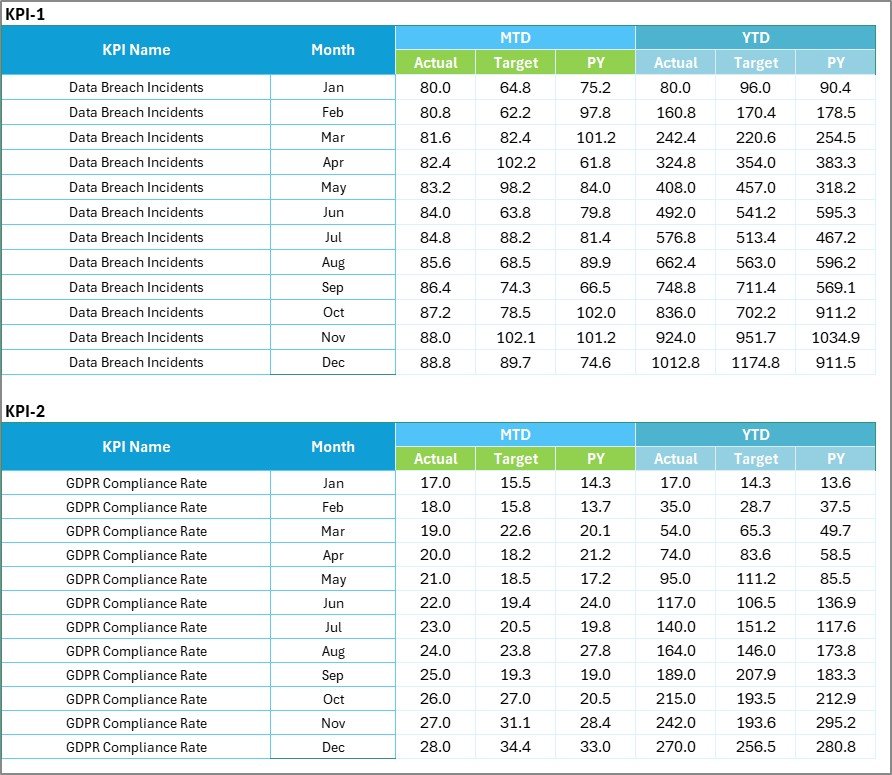
The Input Data Sheet works as the data entry center.
Features:
- Enter Actual values
- Enter Target values
- Record Previous Year numbers
- Update monthly data
Whenever new results become available, you update this sheet. As a result, the scorecard refreshes automatically.
Thus, you always work with current data.
Click to buy Data Privacy KPI Scorecard In Excel
KPI Definition Sheet
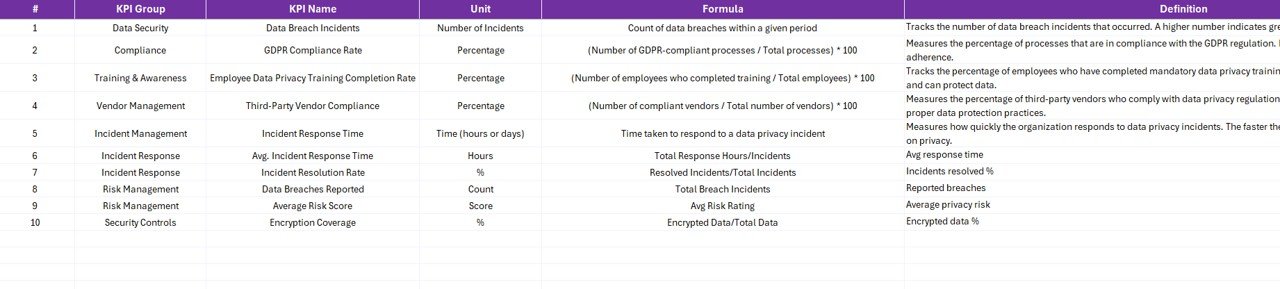
The KPI Definition Sheet stores all KPI details.
You must enter:
- KPI Name
- KPI Group
- Unit
- Formula
- KPI Definition
- KPI Type (LTB or UTB)
This sheet ensures clarity and consistency.
For example:
- Data Breach Incidents – Lower the Better
- Training Completion Rate – Upper the Better
Because every KPI includes a formula and definition, confusion reduces significantly.
Click to buy Data Privacy KPI Scorecard In Excel
What KPIs Can You Track in a Data Privacy Scorecard?
Here are common KPIs you can include:
- Number of Data Breach Incidents
- Data Subject Request Response Time
- Privacy Training Completion Rate
- Compliance Audit Score
- Third-Party Risk Assessment Coverage
- Encryption Coverage Percentage
- Data Retention Compliance Rate
- Incident Resolution Time
- Security Awareness Score
- Policy Review Completion Rate
You can customize KPIs according to your organization’s needs.
Advantages of Data Privacy KPI Scorecard in Excel
Now let us discuss the major advantages.
Centralized Privacy Monitoring
You track all KPIs in one file. Therefore, you eliminate scattered reporting.
Easy to Use
Excel provides a familiar interface. As a result, teams adopt it quickly.
Real-Time Updates
Once you enter new data, the dashboard updates instantly.
Clear Visual Insights
Color indicators help you understand performance without complex analysis.
Cost-Effective Solution
Unlike expensive software, Excel offers a budget-friendly option.
Better Accountability
Each KPI includes targets. Consequently, teams stay responsible for results.
Supports Audit Preparation
When auditors request evidence, you can share structured reports immediately.
How to Implement a Data Privacy KPI Scorecard Successfully?
Implementation matters. Therefore, follow these steps carefully.
Step 1: Define Clear KPIs
Select measurable privacy indicators. Avoid vague metrics.
Step 2: Assign Ownership
Each KPI must have a responsible person.
Step 3: Set Realistic Targets
Targets must challenge teams but remain achievable.
Step 4: Update Data Regularly
Enter data monthly. Otherwise, analysis becomes outdated.
Step 5: Review Performance
Conduct monthly or quarterly review meetings.
Best Practices for the Data Privacy KPI Scorecard
To maximize value, follow these best practices:
Keep KPIs Limited
Do not overload the scorecard. Focus on 8–12 strong KPIs.
Use Clear Definitions
Every KPI must include a short and clear explanation.
Monitor Trends
Do not rely only on current month performance. Analyze trends.
Align with Regulations
Ensure KPIs reflect legal requirements.
Automate Where Possible
Use formulas and conditional formatting to reduce manual work.
Communicate Results
Share insights with leadership and compliance teams.
How Does This Scorecard Improve Data Privacy Culture?
A KPI scorecard does more than track numbers.
It creates:
- Transparency
- Accountability
- Continuous improvement
- Awareness across departments
When teams see measurable results, they take privacy seriously. Consequently, your organization builds a strong privacy culture.
Conclusion
Data privacy stands at the center of modern business operations. However, without measurement, improvement becomes impossible.
The Data Privacy KPI Scorecard in Excel provides a structured, easy-to-use solution. It centralizes performance tracking, simplifies reporting, and supports compliance management.
Moreover, it allows you to compare MTD and YTD performance, analyze trends, and identify gaps instantly.
If you want to reduce risk, strengthen compliance, and build customer trust, this scorecard offers the perfect starting point.
Start tracking. Start improving. Start protecting data effectively.
Frequently Asked Questions with Answers
- What is a Data Privacy KPI Scorecard?
It is a structured Excel template that tracks privacy-related performance indicators.
- How many KPIs should I include?
You should include 8–12 key KPIs to maintain clarity.
- Can I customize the KPIs?
Yes, you can modify KPI names, formulas, and targets according to your needs.
- What does LTB and UTB mean?
LTB means Lower the Better. UTB means Upper the Better.
- How often should I update the scorecard?
You should update it monthly for accurate analysis.
- Does this template support trend analysis?
Yes, the KPI Trend sheet shows MTD and YTD charts for performance tracking.
- Is Excel suitable for privacy management?
Yes, Excel works well for structured KPI tracking, especially for small to mid-sized organizations.
- Can this scorecard help during audits?
Yes, because it provides organized and documented performance data.
Visit our YouTube channel to learn step-by-step video tutorials
Watch the step-by-step video tutorial:
Watch the step-by-step video tutorial:
Click to buy Data Privacy KPI Scorecard In Excel