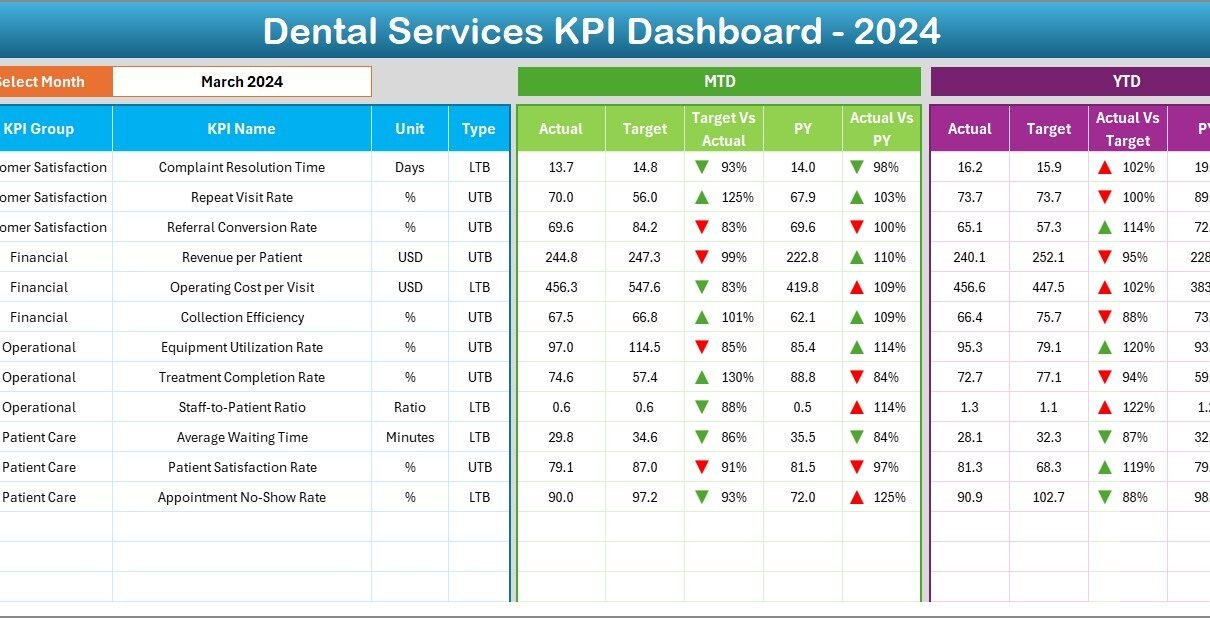
The modern dental industry operates in a data-driven environment where understanding performance metrics is key to success. From patient satisfaction to treatment efficiency and financial outcomes, every decision counts. Yet, many dental clinics still struggle to consolidate their data effectively.
The Dental Services KPI Dashboard in Excel is designed to solve that problem. It provides a structured, easy-to-use system for tracking key performance indicators (KPIs), analyzing trends, and improving overall clinic operations. Whether you manage a single dental office or an entire chain of clinics, this Excel-based dashboard helps you visualize data and make informed decisions that improve service quality and profitability.
Click to Purchases Dental Services KPI Dashboard in Excel
🧭 What Is a Dental Services KPI Dashboard?
A Dental Services KPI Dashboard is a digital performance management tool that helps you monitor critical aspects of your dental practice. Built in Microsoft Excel, it combines patient, operational, and financial data into an interactive and visually engaging scorecard.
It allows you to:
-
Evaluate monthly performance metrics.
-
Compare actual results against targets and previous years.
-
Visualize trends and identify improvement areas.
-
Support decision-making through color-coded visuals and charts.
This dashboard turns routine data into actionable insights, ensuring your clinic remains efficient, compliant, and patient-focused.
🧩 Structure of the Dental Services KPI Dashboard in Excel
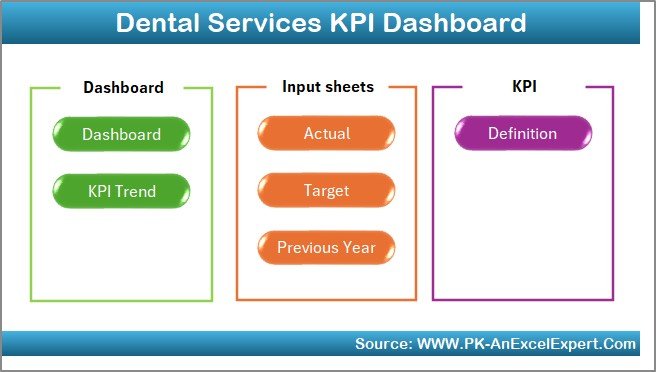
The Dental Services KPI Dashboard is structured across seven worksheets, each designed for a specific purpose. Together, they form a complete system for performance monitoring and reporting.
1️⃣ Home Sheet – Central Navigation Hub
The Home sheet acts as the central navigation page.
It contains six interactive buttons that take you directly to each section of the dashboard. This design simplifies navigation and provides an organized entry point for users.
Key Features:
-
Easy access to all sections through clickable buttons.
-
Professional layout with color themes aligned with healthcare branding.
-
Space to add your clinic name, logo, and reporting period.
Why It Matters:
A well-organized home page saves time and ensures that team members can find what they need quickly.
2️⃣ Dashboard Sheet – Comprehensive KPI Overview
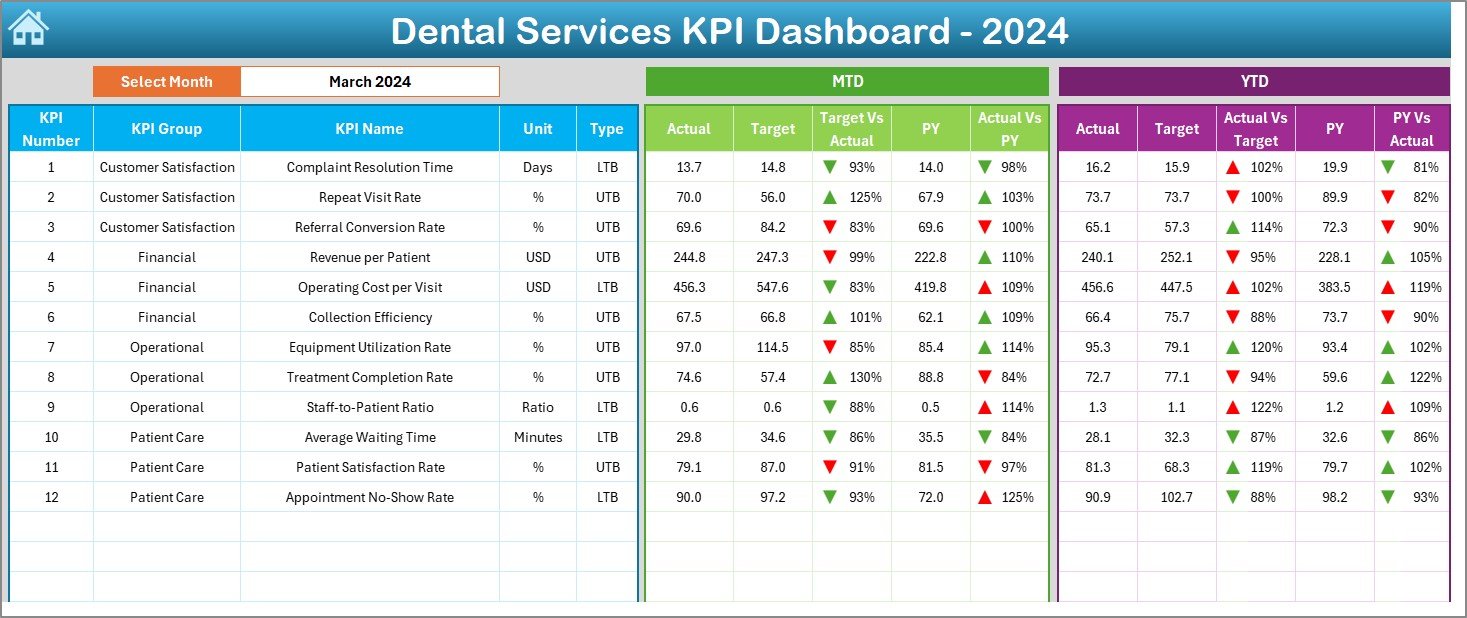
The Dashboard sheet is the heart of the workbook — your main analytical view.
On this sheet:
-
Choose a Month from the dropdown menu in cell D3.
-
The dashboard instantly updates to display monthly KPI data.
-
You can view MTD (Month-to-Date) and YTD (Year-to-Date) numbers side by side.
Displayed Information:
-
MTD Actual vs Target with arrows showing performance direction.
-
YTD Actual vs Target for cumulative results.
-
Previous Year comparisons for both MTD and YTD.
-
Color-coded conditional formatting (green for improvement, red for decline).
Example KPIs Displayed:
-
Total Patients Served
-
Treatment Completion Rate
-
Appointment Cancellations
-
Average Revenue per Patient
-
Patient Satisfaction Score
Why It Matters:
This page gives management a quick overview of how the clinic performs operationally and financially.
3️⃣ KPI Trend Sheet – Performance Over Time
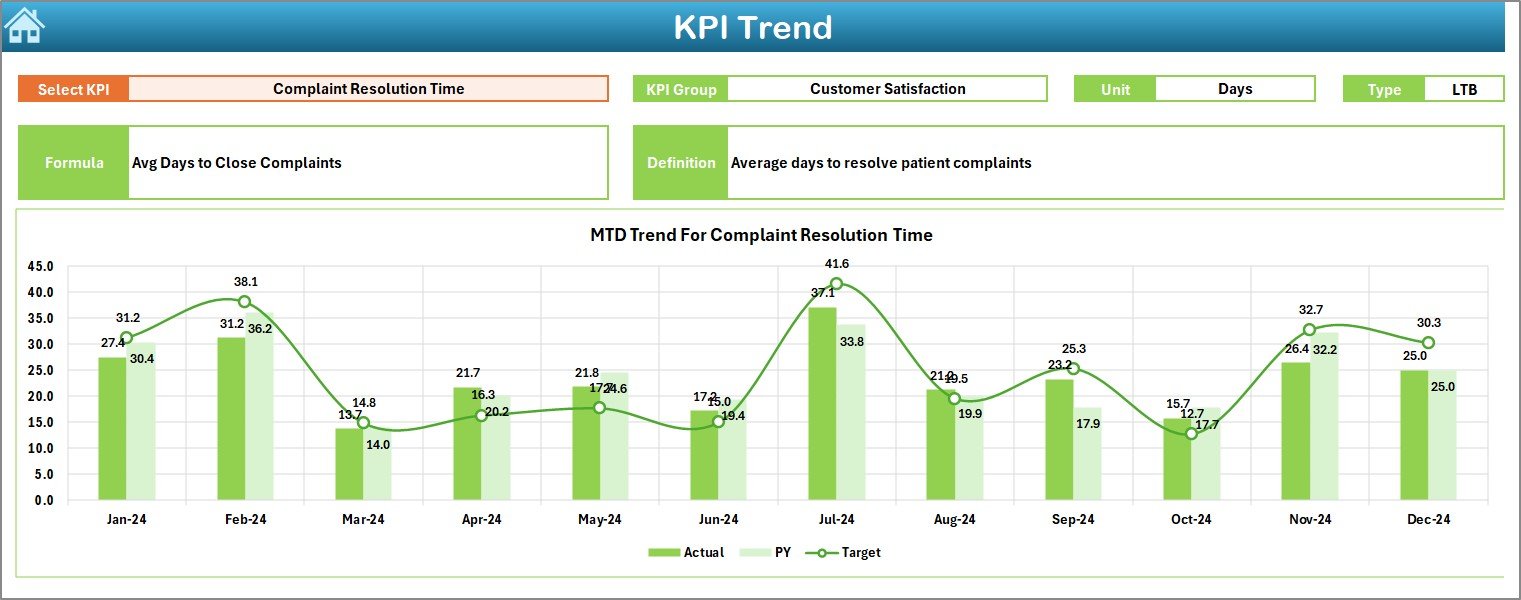
The KPI Trend sheet focuses on time-based analysis. You can select any KPI from the dropdown in cell C3 to visualize its performance across months.
Key Elements:
-
Displays KPI Group, Unit, Formula, Definition, and Type (Upper or Lower the Better).
-
Shows trend charts for MTD and YTD Actual, Target, and Previous Year values.
-
Ideal for identifying seasonal variations or consistent performance gaps.
Why It Matters:
Understanding trends allows clinics to forecast better and plan resource allocation for future demand or challenges.
4️⃣ Actual Numbers Input Sheet – Real Data Entry
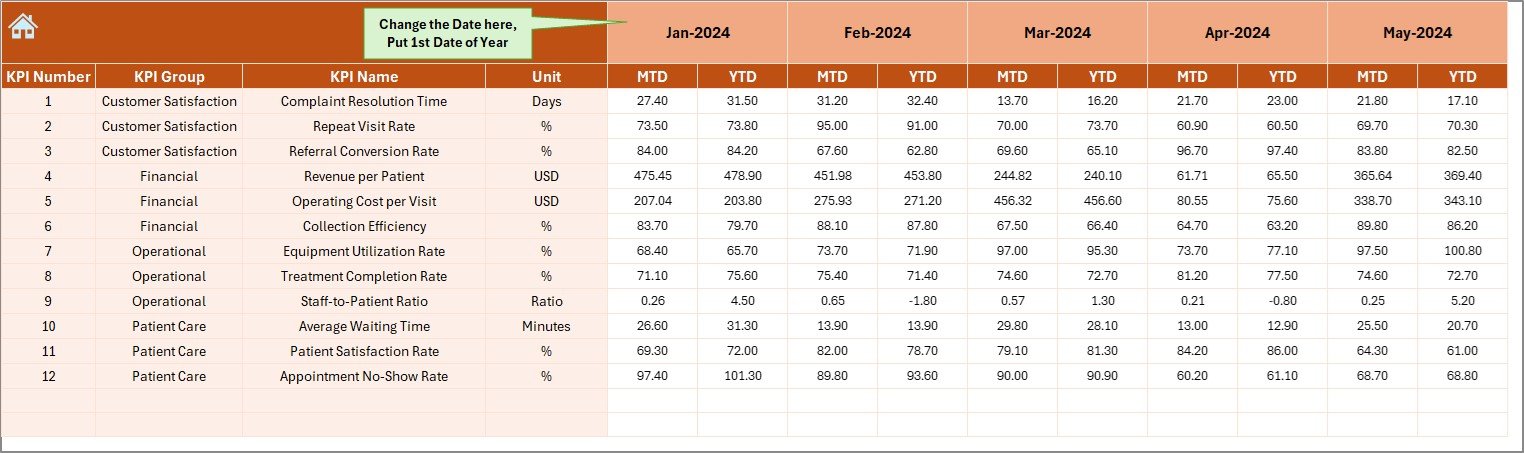
The Actual Numbers Input sheet is where monthly operational data is recorded.
Here, you can enter MTD and YTD values for each KPI.
Key Features:
-
Input fields for each month (editable and dynamic).
-
Month selection via cell E1 for flexible year setup.
-
Supports both clinical (e.g., patient visits) and financial KPIs (e.g., revenue).
Why It Matters:
Accurate data entry ensures reliable dashboard results. It also provides traceability for audits and reporting.
5️⃣ Target Sheet – Define Goals Clearly
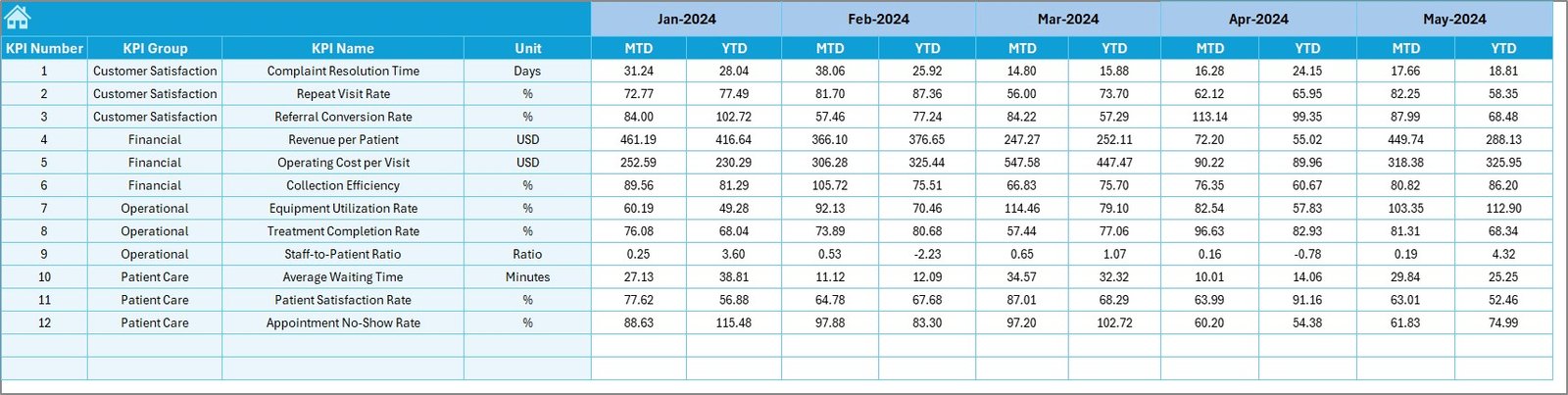
This sheet stores the target values for each KPI.
You can define monthly and annual benchmarks to track performance against goals.
Key Features:
-
Set MTD and YTD targets for every KPI.
-
Align targets with past performance, industry standards, or business goals.
-
Serve as the foundation for comparison and variance analysis.
Why It Matters:
Without targets, KPIs lose their context. This sheet gives your performance data a clear direction.
6️⃣ Previous Year Numbers Sheet – Historical Comparison
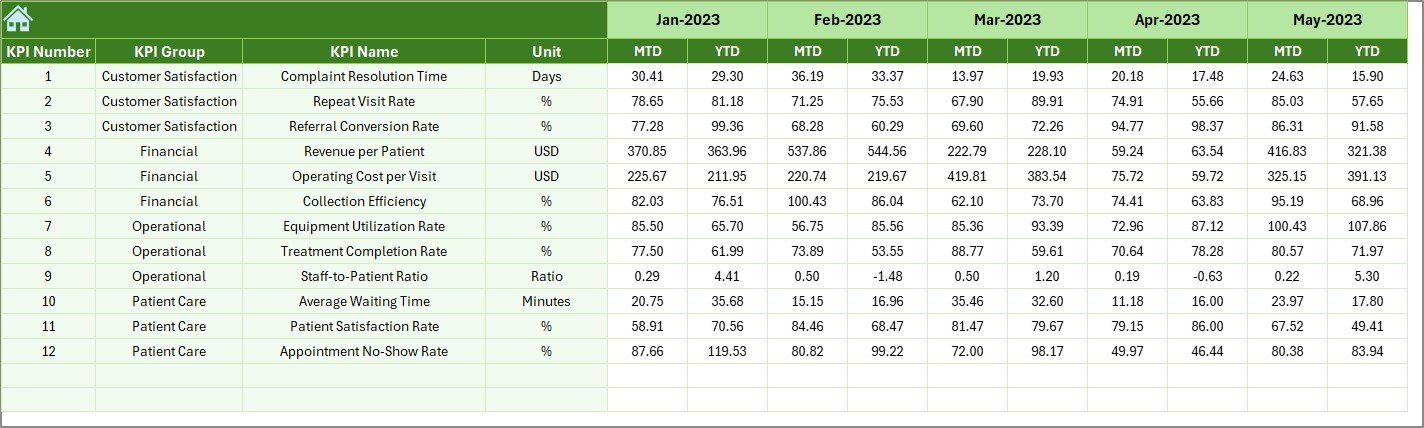
The Previous Year Numbers sheet holds data from the prior year.
It mirrors the structure of the current year’s data for accurate trend analysis.
Key Features:
-
Stores MTD and YTD figures for the previous year.
-
Used for performance comparisons and growth tracking.
-
Helps evaluate whether the clinic is improving year-over-year.
Why It Matters:
Comparing past and present performance provides valuable perspective and helps set realistic future targets.
7️⃣ KPI Definition Sheet – Clear Understanding of Metrics
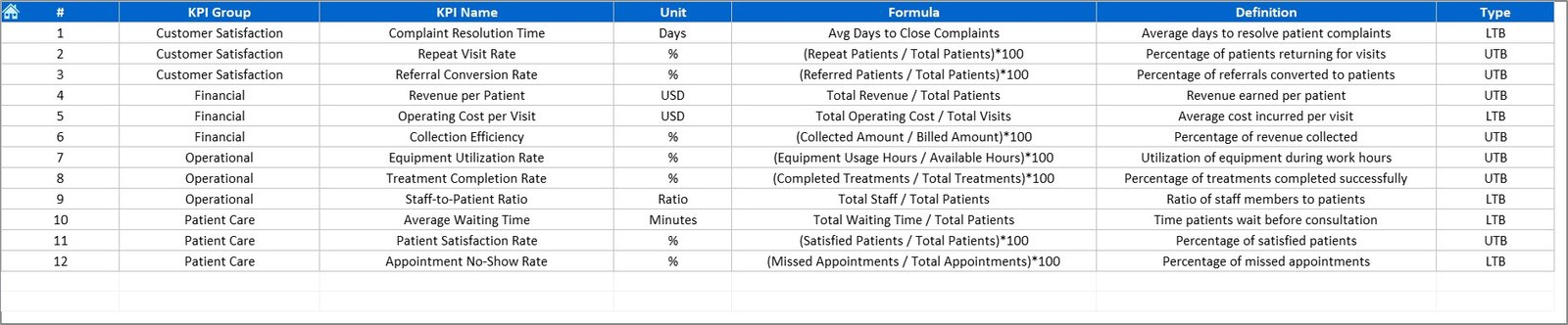
The KPI Definition sheet documents every KPI used in the dashboard.
Includes:
-
KPI Name
-
KPI Group (e.g., Financial, Clinical, Patient Experience)
-
Unit of Measurement
-
Formula for calculation
-
Definition and type (LTB or UTB)
Why It Matters:
This sheet enhances clarity and consistency across all team members, ensuring that every stakeholder understands what each metric represents.
Click to Purchases Dental Services KPI Dashboard in Excel
💡 Why You Need a Dental KPI Dashboard
Running a dental clinic involves juggling multiple responsibilities — patient care, staff performance, inventory management, and finances. Without a proper monitoring tool, it’s easy to lose track of what matters most.
The Dental Services KPI Dashboard helps bridge this gap by:
-
📊 Providing a holistic view of performance.
-
💸 Highlighting areas of waste and inefficiency.
-
👩⚕️ Supporting data-driven decisions for better patient care.
-
🕒 Saving time on manual reporting.
-
📈 Driving continuous improvement and accountability.
💎 Advantages of Dental Services KPI Dashboard in Excel
✅ Centralized Monitoring
All KPIs — clinical, financial, and operational — are consolidated into one Excel file.
✅ Easy Comparison
Track Actual vs Target vs Previous Year in real-time.
✅ Customization
Add, remove, or modify KPIs based on your clinic’s needs.
✅ Data Visualization
Use trend charts, arrows, and color-coded indicators for quick understanding.
✅ Time Efficiency
Automate monthly reporting using formulas and dropdown selections.
✅ Cost-Effective
No expensive software required — Excel is accessible to all staff.
⚙️ Step-by-Step Guide to Using the Dashboard
-
Open the Home Sheet and navigate to your desired section.
-
Define KPI Definitions in the KPI Definition sheet.
-
Enter Monthly Data in the Actual Numbers sheet.
-
Set Targets in the Target sheet.
-
Add Previous Year Data for comparison.
-
Review Dashboard Sheet for monthly and yearly performance.
-
Analyze Trends in the KPI Trend sheet.
-
Refine KPIs periodically for better alignment with business goals.
🔍 Opportunities for Improvement
Even the best dashboards can evolve. Here’s how you can make this one even more powerful:
-
🔄 Automate Data Updates with macros or Power Query.
-
📊 Integrate with Power BI for interactive online visualization.
-
🧾 Add Departmental Filters (e.g., Orthodontics, Surgery, General Dentistry).
-
📈 Include Forecasting Models to predict future trends.
-
📧 Generate Monthly Reports Automatically for leadership review.
🧭 Best Practices for Dental KPI Dashboard in Excel
💡 1. Keep KPIs SMART
Define metrics that are Specific, Measurable, Achievable, Relevant, and Time-bound.
💡 2. Update Data Regularly
Monthly updates ensure accurate insights for management decisions.
💡 3. Protect Critical Cells
Lock formulas and use dropdown lists to prevent accidental edits.
💡 4. Validate Input Data
Use Excel’s data validation feature to avoid incorrect entries.
💡 5. Visualize Effectively
Use conditional formatting and trend charts to make the data more understandable.
💡 6. Align KPIs with Strategy
Ensure each metric directly supports your clinic’s goals (growth, satisfaction, efficiency).
💡 7. Involve the Team
Share dashboard results with staff to improve accountability and engagement.
🦷 Real-World Impact
A well-maintained Dental KPI Dashboard transforms how clinics operate. For example:
-
A dental chain used it to reduce cancellation rates by 20%.
-
Another clinic tracked equipment utilization and cut idle chair time by 15%.
-
A third used satisfaction tracking to improve Google review scores by 25%.
These examples show how the right KPIs can lead to measurable results.
🏁 Conclusion
The Dental Services KPI Dashboard in Excel provides a structured, visual, and insightful way to measure performance. By combining financial, clinical, and operational data into one central file, dental managers can track trends, benchmark results, and take corrective action proactively.
It’s simple to use, adaptable to different clinic sizes, and eliminates manual reporting tasks — making it a must-have tool for any modern dental practice.
By embracing KPI tracking, your clinic can ensure better patient outcomes, operational efficiency, and sustained growth.
Click to Purchases Dental Services KPI Dashboard in Excel
❓ Frequently Asked Questions (FAQs)
1. What is a Dental Services KPI Dashboard?
It’s an Excel-based tool that tracks clinical, operational, and financial metrics to monitor dental clinic performance.
2. What KPIs should a dental clinic track?
Some common KPIs include patient satisfaction, appointment cancellations, treatment completion rates, and revenue per patient.
3. How often should I update the dashboard?
Update it monthly for accuracy and use the YTD summary for long-term analysis.
4. Can I customize the KPIs in this Excel template?
Yes, the dashboard is fully editable. You can add or remove KPIs as per your needs.
5. Is this dashboard suitable for multiple clinics?
Absolutely. You can add a “Clinic” or “Branch” column to manage multiple locations.
6. How can this dashboard help improve performance?
It highlights gaps between targets and actual results, enabling timely interventions to boost clinic efficiency and profitability.
7. Do I need advanced Excel skills to use it?
No. It’s user-friendly and includes dropdowns, automatic calculations, and pre-formatted visuals.
Click to Purchases Dental Services KPI Dashboard in Excel
Visit our YouTube channel to learn step-by-step video tutorials
Watch the step-by-step video tutorial: