In today’s interconnected financial ecosystem, the quality control and resilience of the supply chain have become more vital than ever. Unexpected disruptions, such as logistics delays, market fluctuations, or compliance issues, can cause major financial setbacks. To mitigate such risks, finance teams need proactive planning, monitoring, and event scheduling tools that help ensure every critical process stays on track.
That’s where the Finance Quality Control Supply Chain Resilience Calendar in Excel comes in. This ready-to-use Excel calendar provides a centralized platform to plan, track, and manage all finance-related supply chain quality activities — from audits and inspections to vendor reviews and risk assessments.
This article will walk you through the complete structure of the template, its features, benefits, and best practices. By the end, you’ll understand how this tool helps strengthen financial oversight and supply chain stability with simplicity and precision.
What Is the Finance Quality Control Supply Chain Resilience Calendar in Excel?
The Finance Quality Control Supply Chain Resilience Calendar in Excel is a pre-designed template that helps professionals monitor and manage all events related to quality assurance, finance, and risk control in the supply chain.
It combines financial monitoring with quality control scheduling, giving users a visual overview of tasks, deadlines, and risk mitigation activities across departments or regions. Since it is built entirely in Excel, anyone can use it without additional software — making it both accessible and customizable.
This calendar ensures that all compliance checks, audits, and supplier evaluations are planned and executed on time, keeping financial processes resilient and well-coordinated.
Click to Purchases Finance Quality Control Supply Chain Resilience Calendar in Excel
Key Features of the Calendar
This Excel calendar template is designed with efficiency and interactivity in mind. It includes five major worksheets: Home, Annual View, Monthly View, Daily View, and Events. Let’s explore each in detail.
1️⃣ Home Sheet Tab
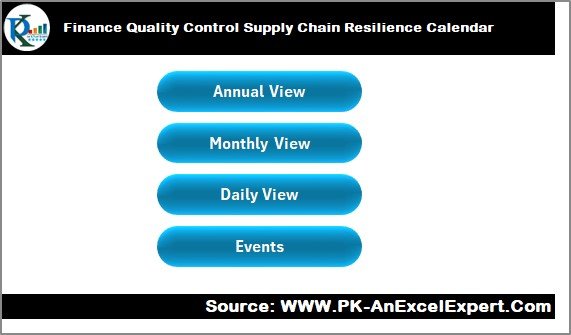
The Home sheet acts as a control center for the entire workbook.
Features include:
-
🟩 Navigation Buttons: Four buttons let you instantly move to the respective pages — Annual View, Monthly View, Daily View, and Events.
-
🟩 Snapshot Area: A section that displays key summary visuals or shortcuts, helping you understand your current workflow at a glance.
This intuitive navigation makes the workbook easy to use even for first-time users.
2️⃣ Annual View Sheet Tab
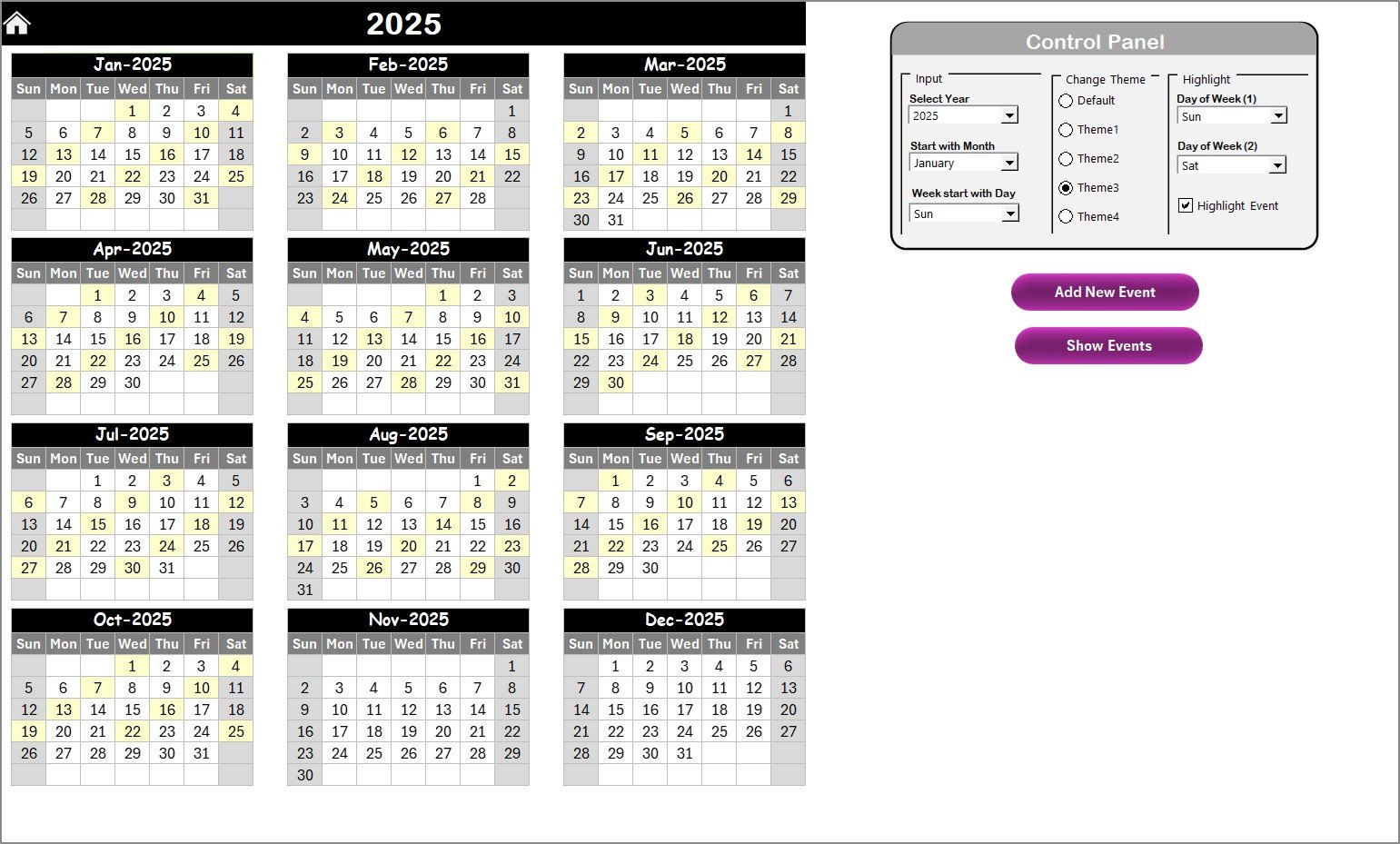
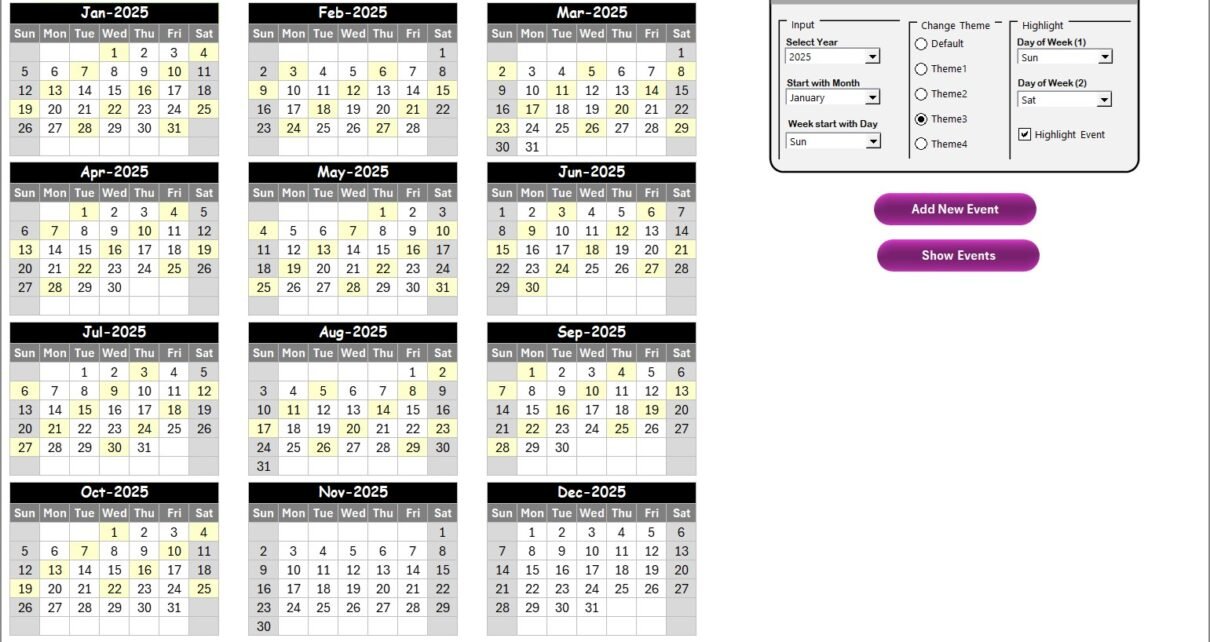
The Annual View sheet displays all 12 months of the year on one screen, offering a bird’s-eye view of planned activities throughout the year.
Highlights include:
-
🎛 Control Panel: The top section of the sheet contains three key groups:
-
Input Group:
-
Select the year, starting month, and starting day of the week (for instance, Monday or Sunday).
-
The entire calendar updates automatically based on your selections.
-
-
Change Theme Group:
-
Choose from five pre-defined color themes to match your corporate style or reporting preferences.
-
-
Highlight Group:
-
Highlight specific days like Saturday or Sunday in grey.
-
Activate the “Highlight Event” checkbox to automatically mark scheduled events in yellow on the calendar.
-
-
-
🗓 Add New Event Button:
-
Select any date on the calendar and click this button to open a pop-up event form. Fill in details such as event name, time, and description, and submit — the event automatically appears on the chosen date.
-
-
🔍 Show Event Button:
-
Click this to display all events scheduled on a selected date, ensuring you never miss important finance or quality meetings.
-
This sheet allows finance and supply chain managers to track yearly patterns — for example, recurring audits or quarterly compliance checks.
3️⃣ Monthly View Sheet Tab
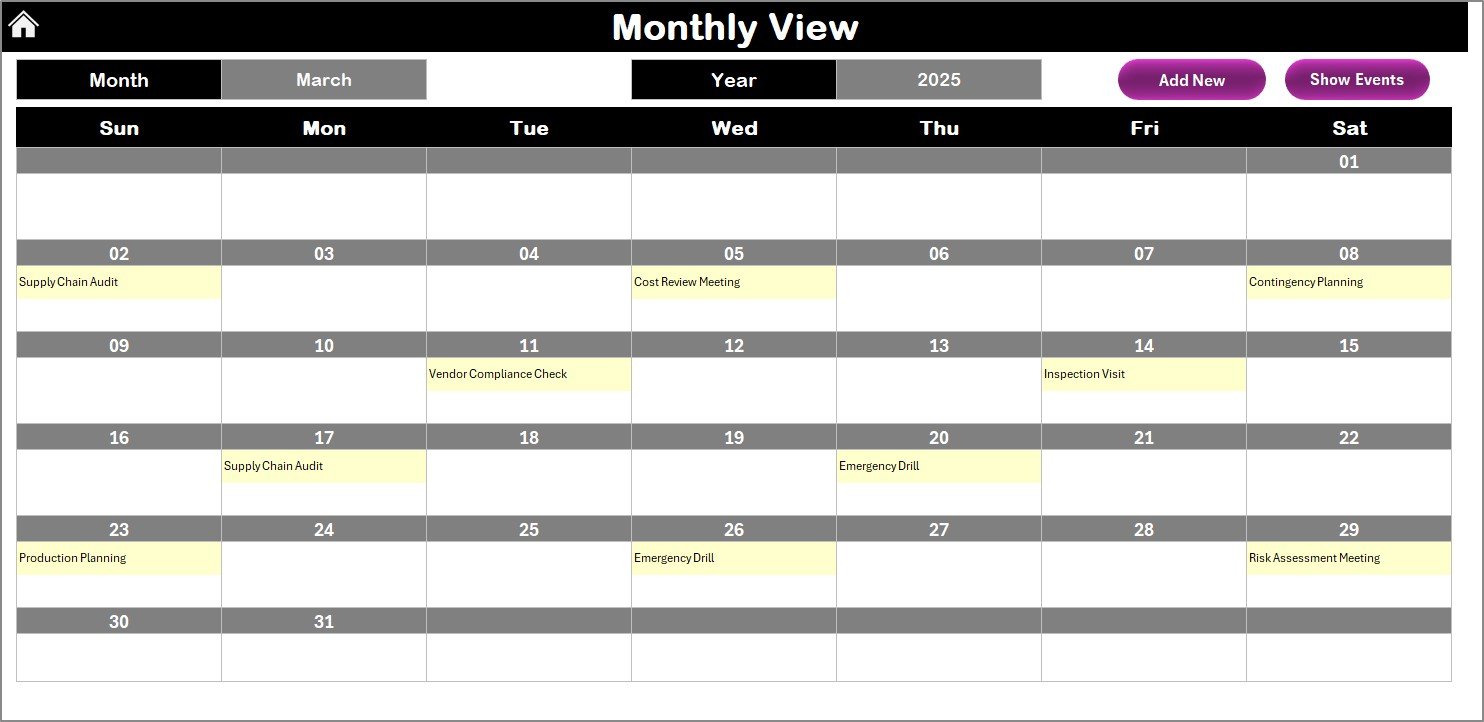
The Monthly View sheet provides a focused look at one month at a time.
Key Features:
-
📅 Select Month and Year from drop-downs to instantly update the calendar.
-
📝 Each date displays the first scheduled event, while multiple events show a “more than 1…” indicator for clarity.
-
🧭 Add New Event Button: Quickly add an event for any selected date.
-
👀 Show Event Button: View a list of all events scheduled on a particular day.
This view helps in short-term planning — for example, monitoring monthly supplier evaluations, budget reviews, or quality inspections.
4️⃣ Daily View Sheet Tab
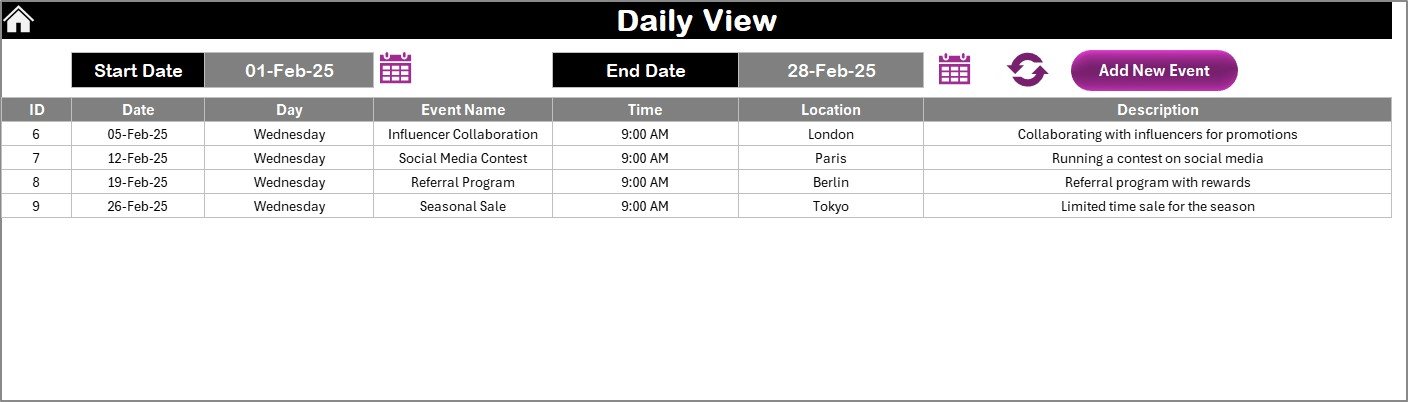
The Daily View tab provides a detailed list of events for a specific date range.
You can:
-
⏱ Enter a Start Date and End Date using calendar pickers.
-
🔄 Click Refresh to view all relevant events within that period.
-
➕ Use Add New Event to schedule new activities directly from this view.
This sheet is ideal for tracking daily operational activities like financial reconciliations, shipment inspections, or vendor follow-ups.
5️⃣ Events Sheet Tab
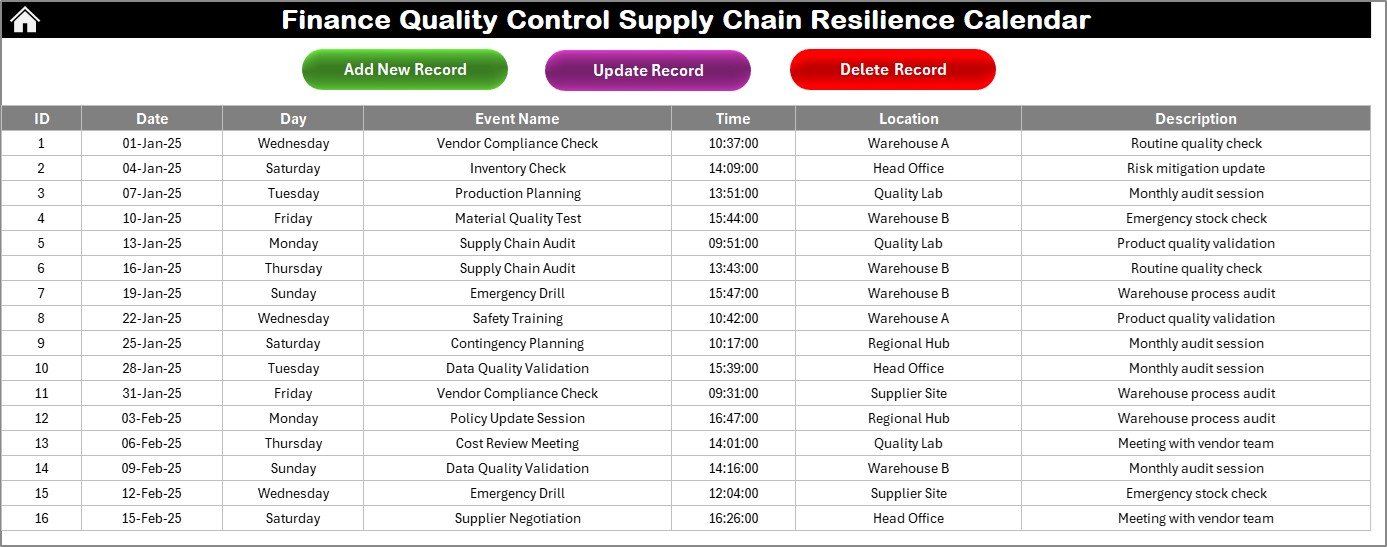
The Events sheet functions as the database that stores all event details.
Columns include:
-
ID: Auto-generated event number
-
Date: Event date
-
Day: Day of the week (e.g., Monday)
-
Event Name: Description of the event
-
Time: Scheduled time
-
Location: Venue or meeting link
-
Description: Short explanation of the event purpose
Buttons available:
-
🆕 Add New Record: Opens the event form for entering new details.
-
✏️ Update Existing Record: Select an ID to load event data, edit it, and save the changes.
-
❌ Delete Record: Remove any outdated or canceled event by selecting its ID.
This makes it easy to maintain clean and accurate data for all supply chain quality control activities.
Click to Purchases Finance Quality Control Supply Chain Resilience Calendar in Excel
Why Use the Finance Quality Control Supply Chain Resilience Calendar?
Supply chain resilience isn’t just about maintaining inventory — it’s about ensuring financial processes, quality checks, and vendor evaluations stay consistent despite disruptions.
Here’s why this Excel-based calendar is a must-have:
-
✅ Centralized Management: Keep all quality control and finance-related activities in one place.
-
✅ Automation & Flexibility: Automatically update the calendar and highlight important events.
-
✅ Visual Overview: Gain instant insight into annual, monthly, or daily schedules.
-
✅ Improved Collaboration: Share the workbook with teams for real-time visibility.
-
✅ Customizable Format: Tailor colors, date settings, and layout to fit your organization’s needs.
Advantages of Finance Quality Control Supply Chain Resilience Calendar
Let’s explore the key advantages of using this Excel calendar:
🌐 1. Enhanced Financial Oversight
The calendar provides a structured timeline for tracking budget reviews, audit schedules, and vendor payments. Finance teams can quickly spot delays and act before risks escalate.
🧩 2. Strengthened Supply Chain Coordination
By syncing finance and supply chain events in one view, teams can align cost control activities with supplier assessments, ensuring quality and resilience go hand-in-hand.
💼 3. Improved Decision-Making
With all critical dates visible in one dashboard, managers can make informed decisions backed by clear timelines and data visibility.
🔁 4. Real-Time Updates
Any change in the “Events” sheet automatically reflects across all views — Annual, Monthly, and Daily — ensuring consistency and accuracy.
⚙️ 5. Easy Customization
Since the template is Excel-based, users can easily modify fields, add columns (e.g., Risk Category, Priority Level), or integrate it with existing reporting systems.
Click to Purchases Finance Quality Control Supply Chain Resilience Calendar in Excel
How to Use the Calendar Effectively
Follow these steps to make the most of this powerful Excel calendar:
-
Start on the Home Page: Use the navigation buttons to familiarize yourself with each section.
-
Set the Year and Starting Month in the Annual View.
-
Add Important Financial and Quality Events using the Add New Event button.
-
Check Monthly and Daily Views to plan short-term and day-to-day activities.
-
Highlight Key Dates such as review meetings, vendor audits, or compliance checks.
-
Refresh the Daily View after adding new data to ensure updated insights.
-
Use Color Themes to categorize events — for instance, blue for finance and green for quality control.
Opportunities for Improvement
While the template is robust, there are opportunities to enhance its value:
-
🧮 Add KPI Integration: Link with dashboards showing metrics like On-Time Audit % or Vendor Compliance Rate.
-
📊 Include Automated Charts: Visualize event frequency by department or month.
-
📤 Enable Email Reminders: Use VBA or Power Automate to send upcoming event alerts.
-
📱 Make It Mobile-Friendly: Adjust layout for Excel mobile app viewing.
-
🔗 Connect to Power BI: Create live dashboards for top-management reporting.
Best Practices for the Finance Quality Control Supply Chain Resilience Calendar
To maximize results and maintain consistency, follow these best practices:
✅ Maintain Accurate Data
Always enter the correct date, time, and description for each event. Consistent data ensures the reliability of your reports.
✅ Categorize Events
Use color codes or labels for different event types like Audit, Vendor Visit, Finance Review, etc.
✅ Review Regularly
Schedule a monthly review session to clean outdated events and ensure all upcoming activities are visible.
✅ Backup Data
Save your Excel file to cloud storage (e.g., OneDrive or Google Drive) to prevent accidental loss.
✅ Automate Repetitive Entries
If you have recurring audits or financial reviews, use Excel formulas or macros to duplicate and adjust entries easily.
✅ Integrate with Other Tools
Link this Excel template with Power BI, Outlook Calendar, or Google Sheets to improve coordination between departments.
Real-World Use Cases
Organizations across industries can benefit from this Excel calendar, including:
-
🏭 Manufacturing Companies: To monitor supplier performance and production audits.
-
💰 Financial Institutions: To schedule compliance reviews and reporting deadlines.
-
🏢 Corporate Offices: To align cross-departmental finance and quality activities.
-
🚚 Logistics Firms: To track shipment inspections and cost control checks.
-
🧪 Pharma & Healthcare: To manage quality validations and procurement checks.
Conclusion
The Finance Quality Control Supply Chain Resilience Calendar in Excel is more than just a date tracker — it’s a strategic planning tool that strengthens the connection between finance, operations, and quality control.
By visualizing annual, monthly, and daily events, teams can proactively identify risks, ensure compliance, and maintain cost efficiency.
Whether you’re managing supplier audits, budget approvals, or quality inspections, this Excel calendar helps you stay organized, resilient, and always prepared for the next challenge.
Click to Purchases Finance Quality Control Supply Chain Resilience Calendar in Excel
Frequently Asked Questions (FAQs)
1️⃣ What is the purpose of this Excel calendar?
It helps finance and supply chain teams schedule, track, and monitor quality control activities, ensuring all critical events occur on time.
2️⃣ Can I customize the template?
Yes. You can modify themes, fields, and date formats or add your company’s branding.
3️⃣ How do I add new events?
Select a date and click on the “Add New Event” button. Fill out the form with event details and click Submit.
4️⃣ Is this template suitable for non-finance teams?
Absolutely! While designed for finance quality control, it can also be adapted for HR, operations, or project management.
5️⃣ Can I integrate it with Power BI or Outlook?
Yes. With minor adjustments, you can link the Excel database to Power BI for dashboards or sync events with Outlook Calendar.
6️⃣ Does it work on Mac or Google Sheets?
The Excel version works on both Windows and Mac. You can also import it into Google Sheets with slight adjustments.
7️⃣ How can I highlight weekends automatically?
Use the Highlight Group options on the Annual View to mark specific days like Saturday or Sunday in grey.
8️⃣ Can I view multiple events per day?
Yes. The Monthly View displays “more than 1…” when multiple events exist for a date, and the Daily View shows the full list.
9️⃣ Is any coding knowledge required?
No. The calendar uses built-in Excel formulas and buttons — no advanced VBA skills needed.
🔟 Who can benefit most from this tool?
Finance professionals, quality managers, auditors, and supply chain analysts who need a simple yet effective scheduling system.
Click to Purchases Finance Quality Control Supply Chain Resilience Calendar in Excel
Visit our YouTube channel to learn step-by-step video tutorials