Managing healthcare staff schedules requires precision, coordination, and flexibility. Hospitals and clinics operate 24/7. Doctors, nurses, technicians, and support staff must follow structured duty rosters. However, many healthcare facilities still rely on manual scheduling or scattered spreadsheets. As a result, shift conflicts increase, staff availability becomes unclear, and patient care may suffer.
So, how can you manage staff duty schedules clearly and efficiently?
You need a Healthcare Staff Duty Calendar in Excel.
This ready-to-use Excel calendar helps you plan annual schedules, monitor monthly duties, track daily events, and manage healthcare staff assignments in one structured workbook. Moreover, it provides visual control panels, event management forms, and theme customization. Therefore, you can improve scheduling accuracy and reduce administrative stress.
In this complete guide, you will learn:
-
What a Healthcare Staff Duty Calendar in Excel is
-
Why healthcare facilities need it
-
Detailed explanation of all 5 worksheets
-
Key advantages of using this calendar
-
Best practices for healthcare scheduling
-
Frequently Asked Questions with Answers
Let us explore everything step by step.
Click to Purchases Healthcare Staff Duty Calendar in Excel
What Is a Healthcare Staff Duty Calendar in Excel?
A Healthcare Staff Duty Calendar in Excel is a structured scheduling template designed for hospitals, clinics, and healthcare centers. It allows administrators to manage annual, monthly, and daily schedules while tracking important events and staff duties.
Instead of using multiple files, you can:
-
Plan yearly schedules
-
Manage monthly duty assignments
-
Track daily events
-
Add, update, or delete staff duty records
-
Highlight weekends or specific days
-
Customize themes
Because the template runs in Excel, you can easily adapt it to your facility’s needs.
Why Do Healthcare Organizations Need a Staff Duty Calendar?
Healthcare facilities never stop operating. Therefore, scheduling mistakes can lead to serious consequences.
Without structured scheduling:
-
Double shifts may occur
-
Staff shortages may happen
-
Overtime costs may increase
-
Communication gaps may arise
-
Patient services may get affected
However, when you use a Healthcare Staff Duty Calendar:
-
You centralize scheduling
-
You avoid shift overlap
-
You track events clearly
-
You improve accountability
-
You reduce administrative workload
As a result, your healthcare operations run smoothly.
Click to Purchases Healthcare Staff Duty Calendar in Excel
How Is the Healthcare Staff Duty Calendar Structured?
This template contains 5 worksheets, each designed to serve a specific function.
Let us review them in detail.
1️⃣ Home Sheet – Central Navigation Hub
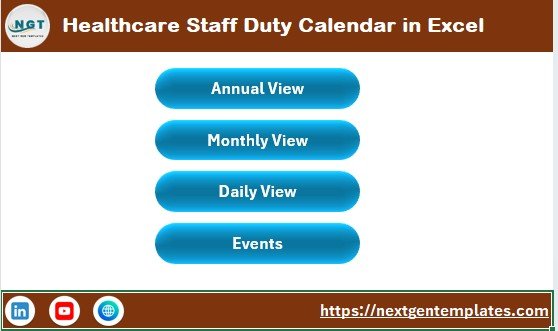
The Home Sheet acts as the index page.
Here, you will find 4 navigation buttons:
-
Annual View
-
Monthly View
-
Daily View
-
Events
Because of these buttons, you can move between sheets instantly. Therefore, workflow becomes faster and more organized.
Click to Purchases Healthcare Staff Duty Calendar in Excel
2️⃣ Annual View Sheet – Complete Year Overview
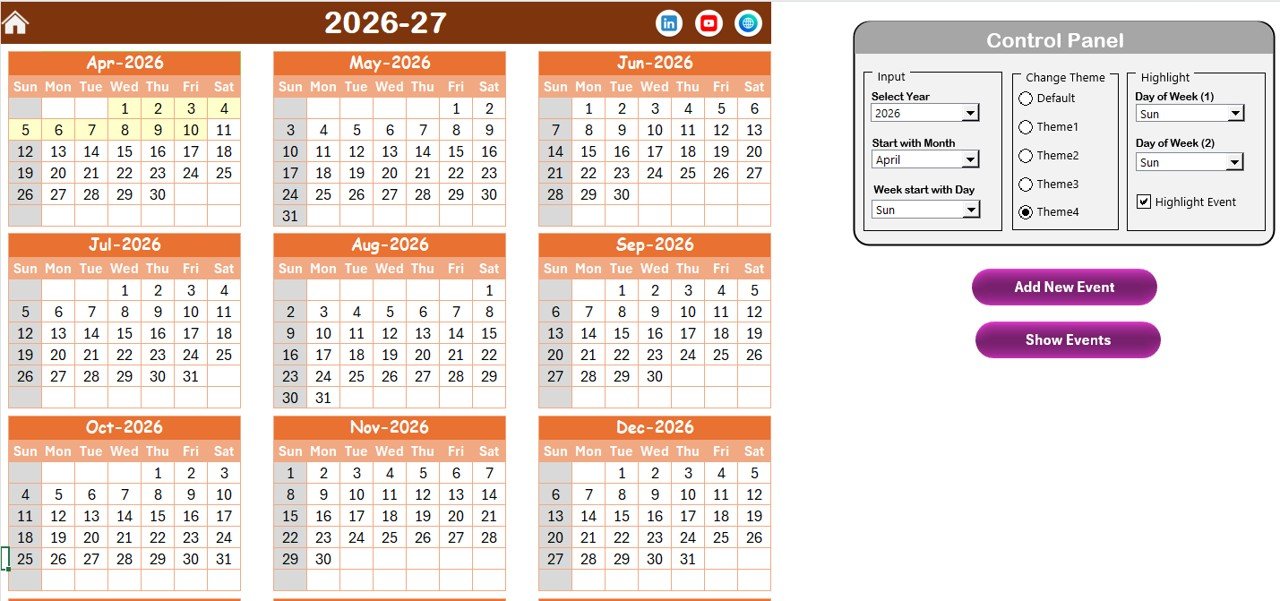
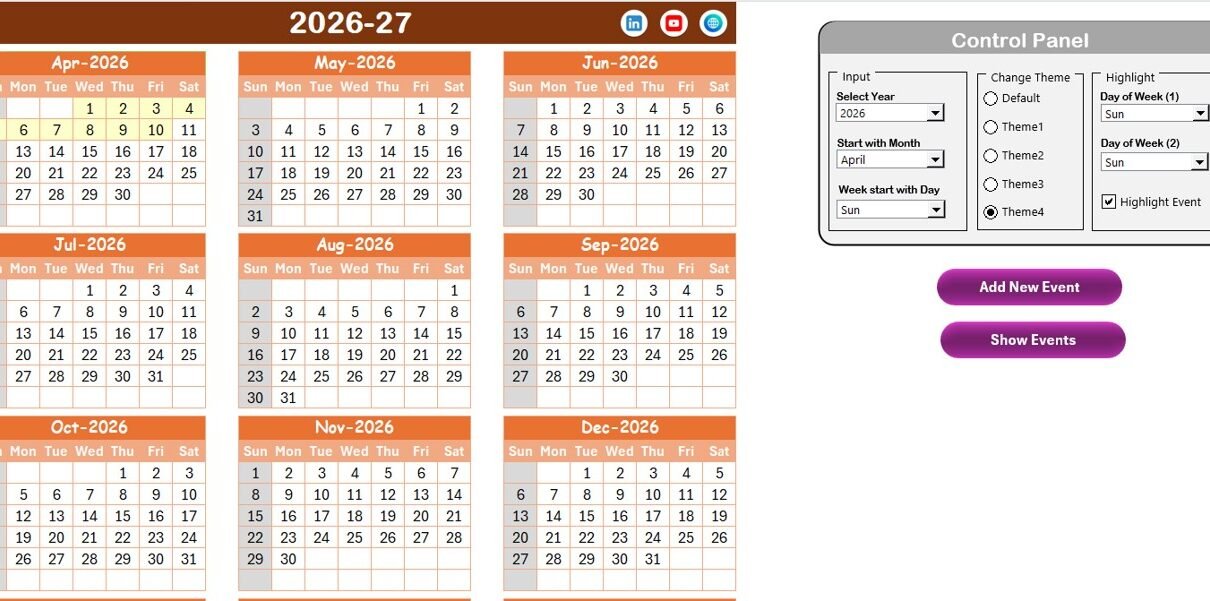
The Annual View Sheet displays all 12 months in one page.
This view helps administrators plan long-term schedules efficiently.
Control Panel Features
At the top, you will see a powerful control panel divided into three groups.
🔹 Input Group
Here, you can:
-
Select the Year
-
Change the starting month
-
Change the starting day of the week
When you update these settings, the calendar adjusts automatically.
🔹 Change Theme Group
You can choose from 5 color themes.
Once selected, the theme applies to the entire workbook. Therefore, you can match your hospital branding or personal preference.
🔹 Highlight Group
You can:
-
Highlight Day of Week (1)
-
Highlight Day of Week (2)
For example, you can highlight Saturday and Sunday in grey.
Additionally, you can check the Highlight Event box to display events in yellow.
Therefore, important dates become visually clear.
Annual View Buttons
Add New Event Button
To add a new event:
-
Select a date
-
Click the button
-
Fill in event details
-
Click submit
The event will appear on the selected date automatically.
Show Event Button
To view events for a selected date, simply click this button.
Click to Purchases Healthcare Staff Duty Calendar in Excel
3️⃣ Monthly View Sheet – Focused Monthly Planning
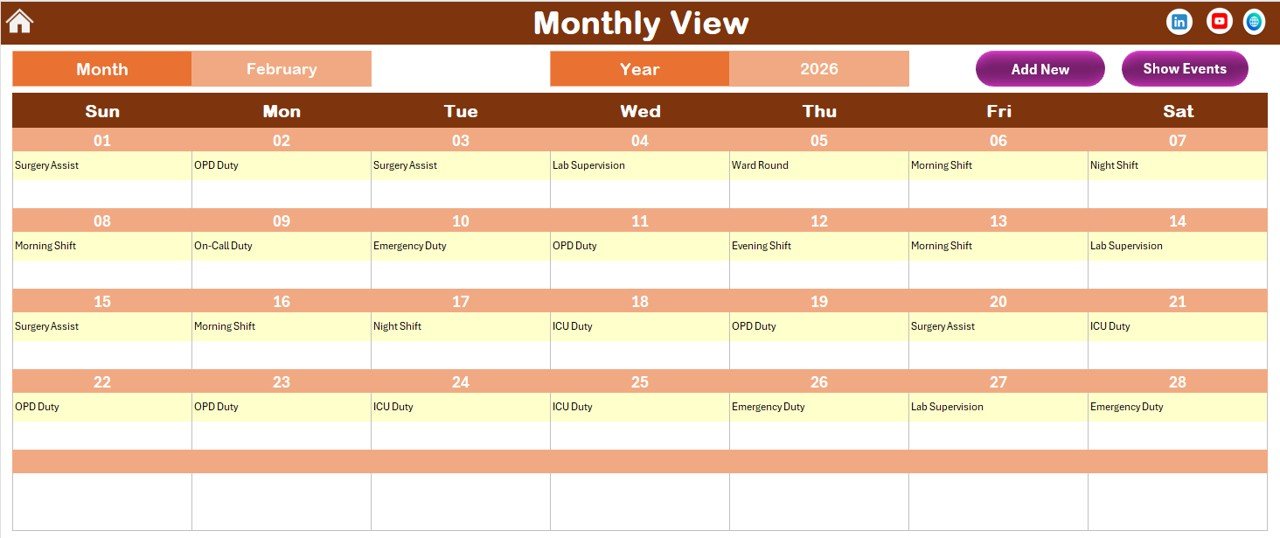
The Monthly View Sheet displays one month at a time.
At the top, you can select:
-
Month
-
Year
The calendar updates automatically based on your selection.
If a date has:
-
One event → It displays directly
-
More than one event → It shows “more than 1…”
This feature keeps the calendar clean and organized.
Monthly View Buttons
Add New Event Button
You can add events directly from the monthly view.
Show Event Button
You can view event details for the selected date easily.
Click to Purchases Healthcare Staff Duty Calendar in Excel
4️⃣ Daily View Sheet – Detailed Event Tracking

The Daily View Sheet shows event details within a selected date range.
At the top, you can enter:
-
Start Date
-
End Date
Use the calendar icon to select the range.
After selecting the range, click Refresh to display updated data.
This view helps administrators:
-
Review weekly schedules
-
Monitor staff assignments
-
Track upcoming duties
Additionally, the Add New Event button allows quick entry of new records.
Click to Purchases Healthcare Staff Duty Calendar in Excel
5️⃣ Events Sheet – The Database Center
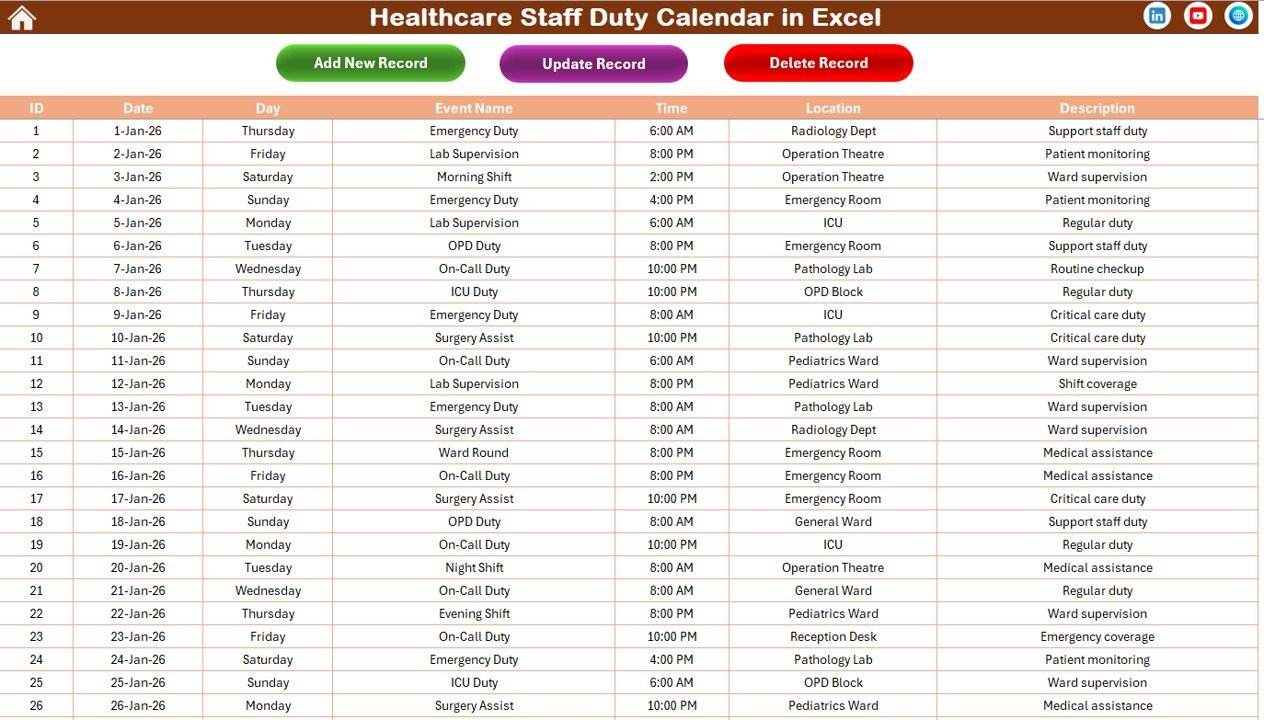
The Events Sheet stores all event data.
This sheet works as the database of the calendar.
Data Columns Included
-
ID (Auto-generated)
-
Date
-
Day
-
Event Name
-
Time
-
Location
-
Description
Because data remains structured, retrieval becomes easy.
Event Management Buttons
Add New Record
Opens the event form to enter new event details.
Update Existing Record
Select the ID you want to update. Then modify details and submit.
Delete Record
Select the ID and delete the record permanently.
This feature ensures clean and updated scheduling records.
Click to Purchases Healthcare Staff Duty Calendar in Excel
Advantages of Healthcare Staff Duty Calendar in Excel
Now let us explore the key advantages.
1️⃣ Centralized Scheduling
You can manage annual, monthly, and daily schedules in one workbook.
2️⃣ Visual Planning
The annual and monthly views provide clear visual layouts.
3️⃣ Easy Event Management
Add, update, and delete events easily using buttons.
4️⃣ Customizable Themes
You can apply different color themes to match your branding.
5️⃣ Weekend and Event Highlighting
Highlighting improves visibility of important days.
6️⃣ Efficient Staff Coordination
Clear scheduling reduces confusion and improves teamwork.
7️⃣ Cost-Effective Solution
You avoid expensive scheduling software.
How Does This Calendar Improve Healthcare Operations?
This calendar improves operations in multiple ways.
Better Shift Planning
You prevent overlapping shifts and staffing shortages.
Improved Communication
All team members refer to one shared schedule.
Reduced Administrative Work
Automation reduces manual data entry.
Enhanced Patient Care
Proper scheduling ensures adequate staffing at all times.
Best Practices for Healthcare Staff Duty Calendar
To maximize effectiveness, follow these best practices.
1. Update Events Immediately
Enter new events as soon as they get confirmed.
2. Review Calendar Weekly
Conduct weekly schedule reviews.
3. Use Highlight Feature Wisely
Highlight critical days such as holidays or emergency drills.
4. Maintain Clean Database
Delete outdated events regularly.
5. Train Administrative Staff
Ensure staff understand how to add and update events.
6. Backup Data Regularly
Keep backup copies to prevent data loss.
Click to Purchases Healthcare Staff Duty Calendar in Excel
Who Can Use This Healthcare Staff Duty Calendar?
This template suits:
-
Hospitals
-
Clinics
-
Diagnostic Centers
-
Nursing Homes
-
Medical Colleges
-
Healthcare NGOs
Whether you manage a small clinic or a large hospital, this calendar provides clarity and structure.
Click to Purchases Healthcare Staff Duty Calendar in Excel
Conclusion: Why Should You Use a Healthcare Staff Duty Calendar in Excel?
Healthcare scheduling demands precision and coordination. However, manual methods increase risk and confusion.
The Healthcare Staff Duty Calendar in Excel provides:
-
Annual, monthly, and daily views
-
Event management forms
-
Customizable themes
-
Highlight options
-
Centralized event database
Therefore, you can manage healthcare staff duties efficiently and confidently.
If you want structured scheduling without expensive software, this Excel calendar offers a powerful and practical solution.
Click to Purchases Healthcare Staff Duty Calendar in Excel
Frequently Asked Questions with Answers
1. What is a Healthcare Staff Duty Calendar in Excel?
It is an Excel template designed to manage healthcare staff schedules and events.
2. Can I customize the year and starting month?
Yes. You can change the year and starting month from the control panel.
3. Can I highlight weekends?
Yes. You can select specific days to highlight.
4. How do I add new events?
Select a date and click the Add New Event button.
5. Can I update existing records?
Yes. Use the Update Existing Record button in the Events sheet.
6. Is this suitable for large hospitals?
Yes. Both small clinics and large hospitals can use it.
7. Do I need advanced Excel skills?
No. Basic Excel knowledge is enough to operate this template.
Click to Purchases Healthcare Staff Duty Calendar in Excel
Visit our YouTube channel to learn step-by-step video tutorials