Marketing teams work in a fast-paced environment. Every day, they receive multiple requests for brochures, presentations, banners, social media creatives, videos, and email templates. However, when teams track these requests through emails, chats, or unstructured spreadsheets, confusion increases. Deadlines slip. Priorities clash. Accountability disappears.
That is exactly why the Marketing Collateral Request Tracker in Excel becomes a powerful and practical solution.
In this in-depth article, you will learn what a Marketing Collateral Request Tracker in Excel is, how it works, why marketing teams need it, its full worksheet structure, features, advantages, best practices, and frequently asked questions. By the end, you will clearly understand how this Excel and VBA-based tool transforms marketing operations and improves productivity.
Click to Purchases Marketing Collateral Request Tracker in Excel
What Is a Marketing Collateral Request Tracker in Excel?
A Marketing Collateral Request Tracker in Excel is a ready-to-use Excel and VBA-based tool that helps marketing teams capture, manage, track, and analyze all marketing collateral requests in one centralized system.
Instead of relying on emails, WhatsApp messages, or verbal requests, this tracker records every request in a structured format. As a result, teams gain complete visibility into request status, priority, target audience, purpose, department, and collateral type.
Moreover, since the tool uses Excel as the backend, teams can adopt it instantly without investing in complex software or expensive subscriptions.
Why Do Marketing Teams Need a Marketing Collateral Request Tracker?
Marketing operations involve multiple stakeholders. Sales teams request pitch decks. HR requests employer branding materials. Product teams request launch creatives. Leadership demands reports. Without a structured request tracker, chaos grows quickly.
Common Problems Without a Request Tracker
-
Requests arrive through multiple channels
-
Teams miss deadlines due to unclear priorities
-
No visibility into workload and pending requests
-
Duplicate requests waste time and effort
-
Reporting becomes manual and inaccurate
However, when teams use a Marketing Collateral Request Tracker in Excel, they eliminate these problems. Instead, they work with clarity, structure, and accountability.
How Does a Marketing Collateral Request Tracker in Excel Work?
This tracker combines Excel sheets, VBA forms, dashboards, and user management to create a complete request management system.
First, users log in securely. Next, they submit requests using a structured data entry form. Then, the system stores data automatically and refreshes dashboards in real time. Finally, managers analyze trends and workload using visual charts.
As a result, marketing teams gain both operational control and strategic insights.
Click to Purchases Marketing Collateral Request Tracker in Excel
Key Features of the Marketing Collateral Request Tracker in Excel
Let us now explore the detailed features of this ready-to-use tool.
Login Form: How Does Secure Access Work?
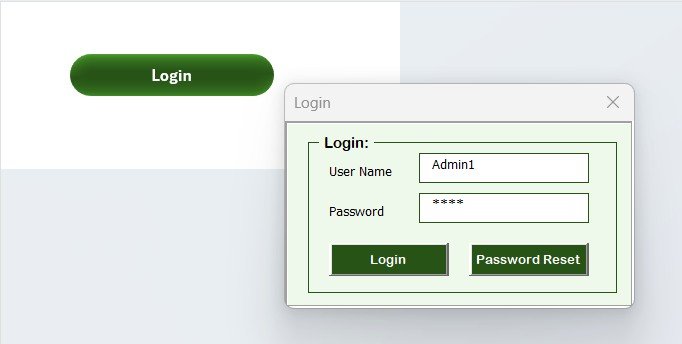
The tool starts with a Login Form, which controls access and improves data security.
Login Form Highlights
-
Enter User ID (Admin1) and Password (abcd)
-
Click the Login button or press Enter
-
Access the main form instantly after validation
Because of this login system, unauthorized users cannot access sensitive marketing data.
Main Form: What Can You Manage from the Main Screen?
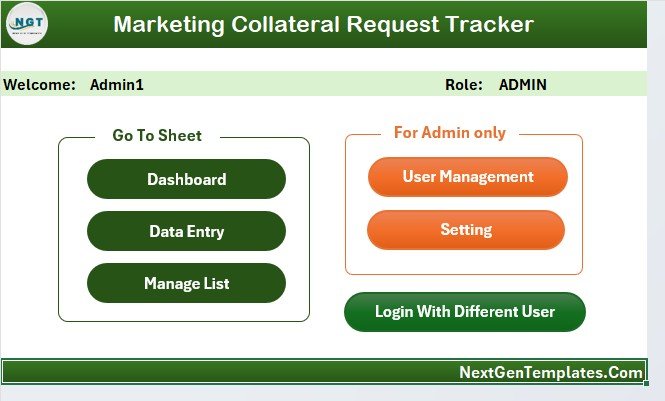
After logging in, the Main Form appears. This screen acts as the control center of the entire tool.
From this form, users can:
-
Navigate to dashboards
-
Manage data entry
-
Access user management
-
Configure settings
Moreover, the intuitive design ensures that even non-technical users can operate the tool confidently.
Dashboard Sheet Tab: How Does the Visual Analysis Work?
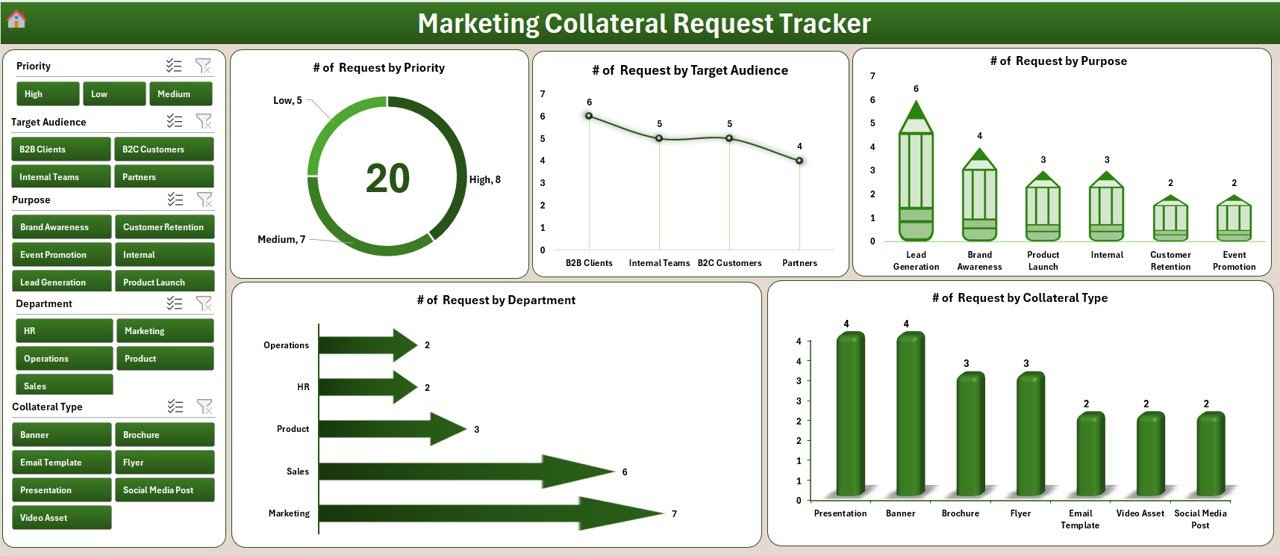
The Dashboard Sheet provides instant insights into marketing request activity.
Dashboard Slicers
The dashboard includes 5 interactive slicers, which allow dynamic filtering:
-
Priority
-
Target Audience
-
Purpose
-
Department
-
Collateral Type
With these slicers, users can analyze requests from multiple perspectives instantly.
Dashboard Charts
The dashboard displays 5 powerful charts:
-
📊 Number of Requests by Priority
-
📊 Number of Requests by Target Audience
-
📊 Number of Requests by Purpose
-
📊 Number of Requests by Department
-
📊 Number of Requests by Collateral Type
As a result, marketing managers can quickly identify workload distribution, high-priority demands, and recurring request types.
Data Entry Sheet Tab: How Do You Add, Update, or Delete Requests?
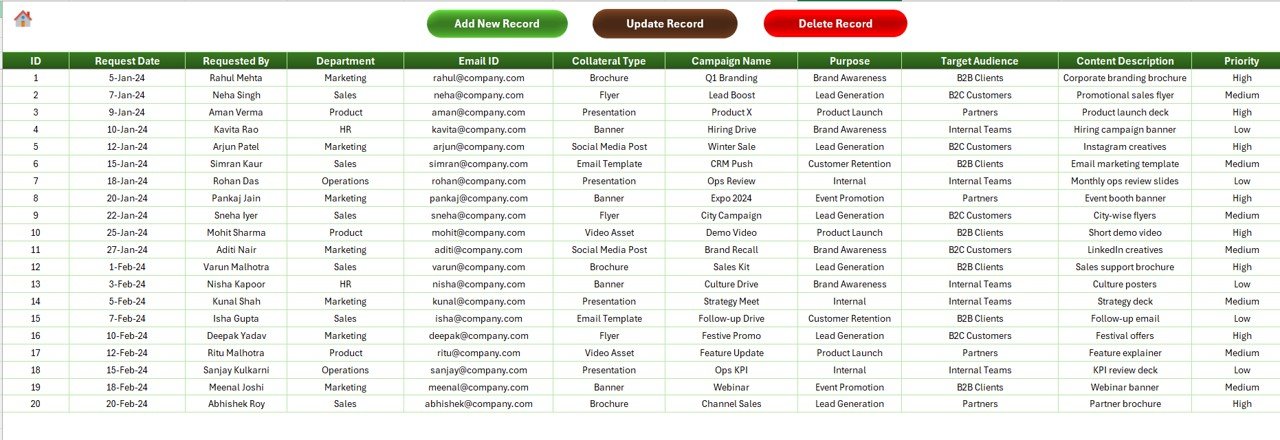
The Data Entry Sheet simplifies request management using buttons and forms.
Available Buttons on Data Entry Sheet
Add New Record: How Does It Work?
-
Click Add New Record
-
A data entry form opens
-
Fill in request details
-
Click Submit
The system immediately saves the record and refreshes the dashboard automatically.
Update Record: How Can You Edit Existing Requests?
-
Select the Request ID
-
Click Update Record
-
The same form opens with prefilled data
-
Modify required fields
-
Click Submit
This process ensures quick corrections and updates.
Delete Record: How Do You Remove a Request?
-
Select the Request ID
-
Click Delete Record
-
Confirm deletion
-
Click to Purchases Marketing Collateral Request Tracker in Excel
The system removes the record safely and updates dashboards instantly.
Manage List Sheet Tab: Why Is List Management Important?
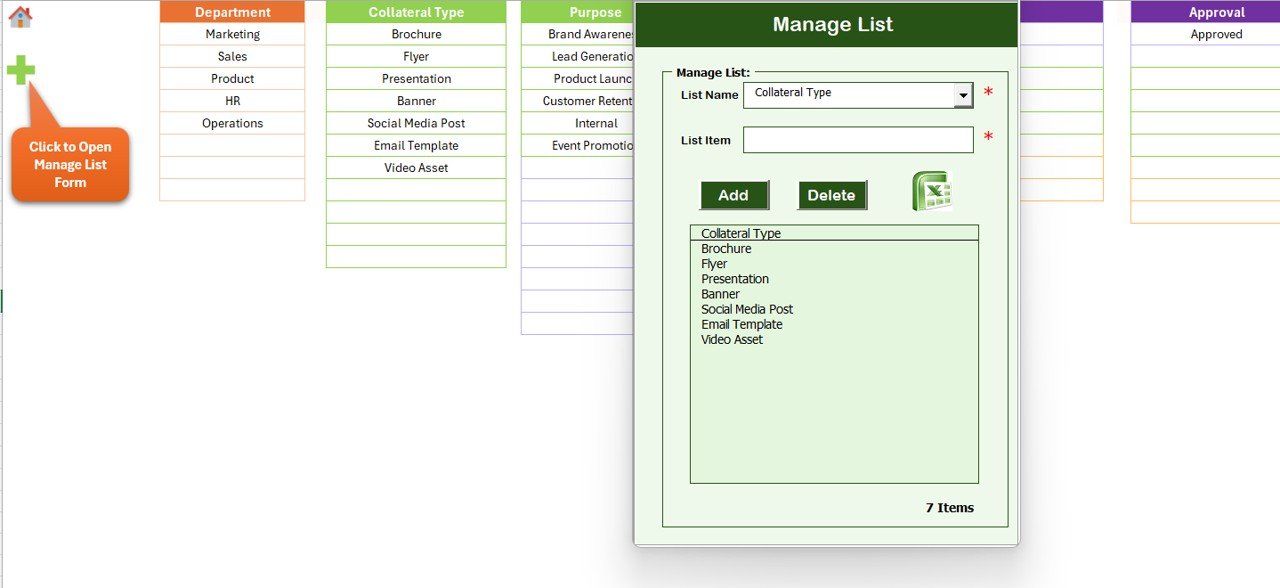
The Manage List Sheet allows you to control dropdown values used in data entry forms.
What Can You Manage Here?
-
Priority list
-
Target audience list
-
Department list
-
Purpose list
-
Collateral type list
Using Add and Delete buttons, you can update lists without editing VBA code. Consequently, the tool stays flexible and scalable.
Support Sheet Tab: What Is Its Purpose?
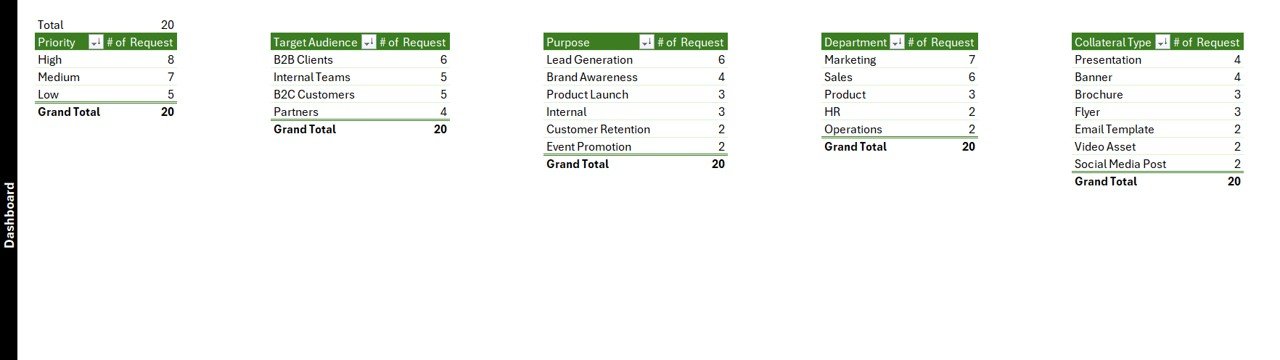
The Support Sheet contains pivot tables that feed dashboard charts.
You do not need to modify anything on this sheet. In fact, you can hide it completely to avoid accidental changes.
This design keeps the backend clean while ensuring fast dashboard performance.
User Management: How Does Multi-User Control Work?
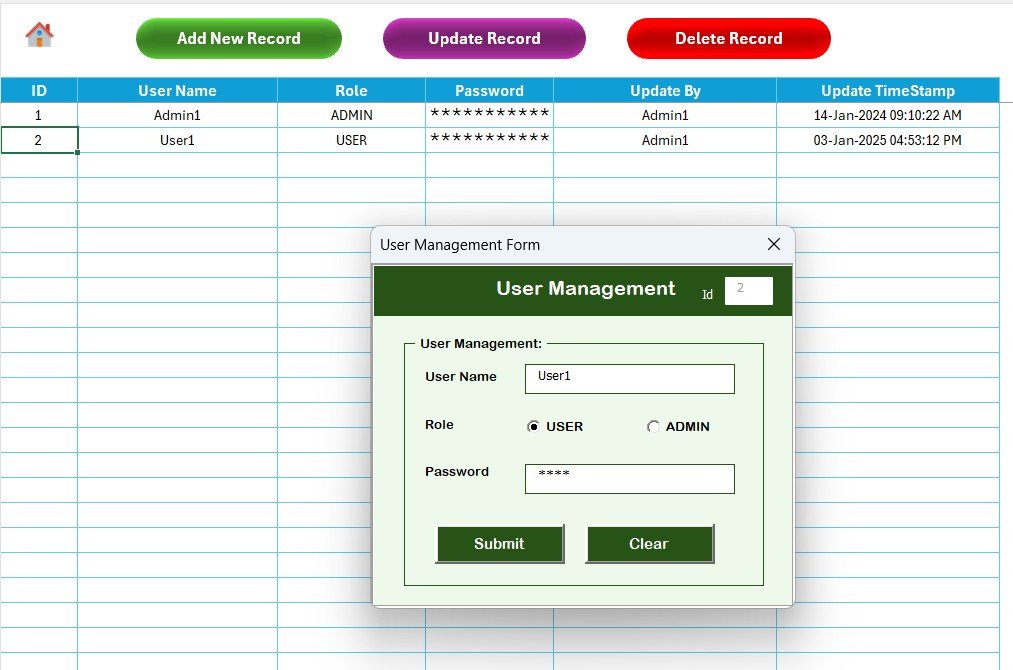
The User Management feature allows administrators to manage users securely.
User Management Capabilities
-
Add new users
-
Update existing users
-
Delete users
-
Change passwords
Because of this feature, teams can assign access responsibly and maintain data integrity.
Settings Sheet: Why Is It Useful?
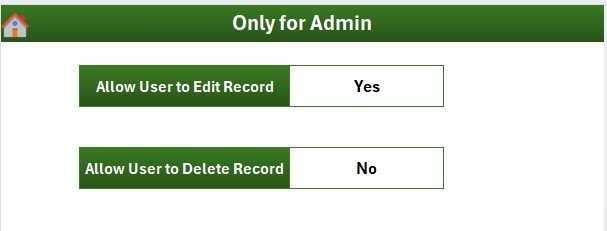
The Settings Sheet allows administrators to configure system-level options. This flexibility ensures the tracker adapts to different team structures and workflows.
Login with Different User: How Does Role-Based Access Help?
Users can log in with different credentials. As a result, teams can implement role-based access and accountability.
Advantages of Marketing Collateral Request Tracker in Excel
Now let us explore the major benefits of using this tool.
Centralized Request Management
The tracker stores all requests in one location. Therefore, teams no longer search emails or chats.
Improved Visibility and Transparency
Dashboards show real-time request status. As a result, managers know exactly what is pending and what is complete.
Better Priority Control
With priority-based tracking, teams focus on high-impact requests first.
Faster Turnaround Time
Structured forms eliminate confusion. Consequently, teams deliver faster.
Enhanced Accountability
Each request links to clear details. Therefore, ownership becomes obvious.
No Additional Software Cost
Since the tool uses Excel and VBA, organizations avoid recurring subscription costs.
Click to Purchases Marketing Collateral Request Tracker in Excel
Best Practices for the Marketing Collateral Request Tracker in Excel
To get the best results, teams should follow these proven best practices.
Define Clear Request Categories
First, define standardized categories for collateral types and purposes. This clarity improves reporting accuracy.
Train Users Properly
Next, train users on how to submit complete and accurate requests.
Review Dashboard Regularly
Also, review dashboard insights weekly to manage workload proactively.
Maintain User Access Control
Moreover, update user permissions regularly to ensure security.
Back Up the File Frequently
Finally, schedule regular backups to avoid data loss.
How Does This Tool Improve Marketing Productivity?
This tracker reduces manual coordination. It removes guesswork. It improves planning. As a result, marketing teams focus more on creativity and strategy rather than administration.
Who Can Use a Marketing Collateral Request Tracker in Excel?
This tool works perfectly for:
-
Corporate marketing teams
-
Digital marketing agencies
-
Branding teams
-
Internal communications teams
-
Product marketing teams
-
Startups and enterprises
Conclusion: Why Should You Use a Marketing Collateral Request Tracker in Excel?
The Marketing Collateral Request Tracker in Excel offers a simple yet powerful way to manage marketing requests efficiently. It combines structured data entry, secure access, real-time dashboards, and user management into one ready-to-use solution.
Instead of struggling with emails and manual follow-ups, marketing teams gain clarity, speed, and control. Therefore, this tool becomes an essential asset for any organization that values productivity and accountability.
Frequently Asked Questions (FAQs)
What is a Marketing Collateral Request Tracker in Excel?
It is an Excel and VBA-based tool that helps teams track and manage marketing collateral requests centrally.
Does this tracker require advanced Excel skills?
No. The tool uses simple forms and buttons. Even beginners can use it easily.
Can multiple users access the tracker?
Yes. The user management feature supports multiple users with secure login.
Does the dashboard update automatically?
Yes. Every add, update, or delete refreshes the dashboard instantly.
Can I customize dropdown lists?
Yes. You can manage all lists from the Manage List sheet without coding.
Is this tool suitable for small teams?
Yes. Both small and large marketing teams can use it effectively.
Does the tool support reporting?
Yes. The dashboard provides visual reports by priority, department, purpose, and collateral type.
Visit our YouTube channel to learn step-by-step video tutorials