Running a successful photography business requires more than creativity and technical skills. Photographers must also manage bookings, monitor revenue, track expenses, evaluate marketing performance, and measure customer satisfaction. However, many photography studios struggle to track these metrics effectively.
Therefore, photography businesses need a structured system that converts operational data into meaningful insights. This is exactly where the Photography Business KPI Scorecard in Excel becomes extremely valuable.
The Photography Business KPI Scorecard in Excel is a ready-to-use performance tracking template designed to monitor key performance indicators (KPIs) for photography businesses. Because Excel offers powerful analytical tools such as charts, conditional formatting, and automated calculations, photographers can easily analyze their business performance.
In this comprehensive guide, we will explore the Photography Business KPI Scorecard in Excel, including its features, dashboard structure, advantages, best practices, and how photographers can use it to improve business performance.
Click to Purchases Photography Business KPI Scorecard in Excel
What is a Photography Business KPI Scorecard in Excel?
A Photography Business KPI Scorecard in Excel is a performance monitoring tool that tracks critical metrics related to photography studio operations.
Instead of manually reviewing multiple reports, photographers can analyze performance through a structured scorecard that displays:
-
Revenue performance
-
Booking trends
-
Customer satisfaction
-
Marketing effectiveness
-
Profit margins
-
Operational efficiency
As a result, photography business owners can quickly evaluate business performance and identify improvement opportunities.
Why Do Photography Businesses Need a KPI Scorecard?
Photography studios often manage multiple projects such as weddings, corporate shoots, events, and commercial photography sessions. Without proper performance monitoring, business owners may struggle with:
-
Tracking monthly revenue growth
-
Monitoring client bookings
-
Measuring marketing campaign performance
-
Evaluating business profitability
-
Understanding customer satisfaction trends
However, when photographers use a Photography Business KPI Scorecard in Excel, they gain a centralized system for tracking business performance.
Consequently, they can make smarter decisions and improve their overall profitability.
Click to Purchases Photography Business KPI Scorecard in Excel
Key Features of the Photography Business KPI Scorecard in Excel
The Photography Business KPI Scorecard in Excel includes several worksheets designed to monitor business KPIs effectively.
This template contains four worksheets, each serving a specific purpose.
1. Scorecard Sheet – The Main KPI Monitoring Interface
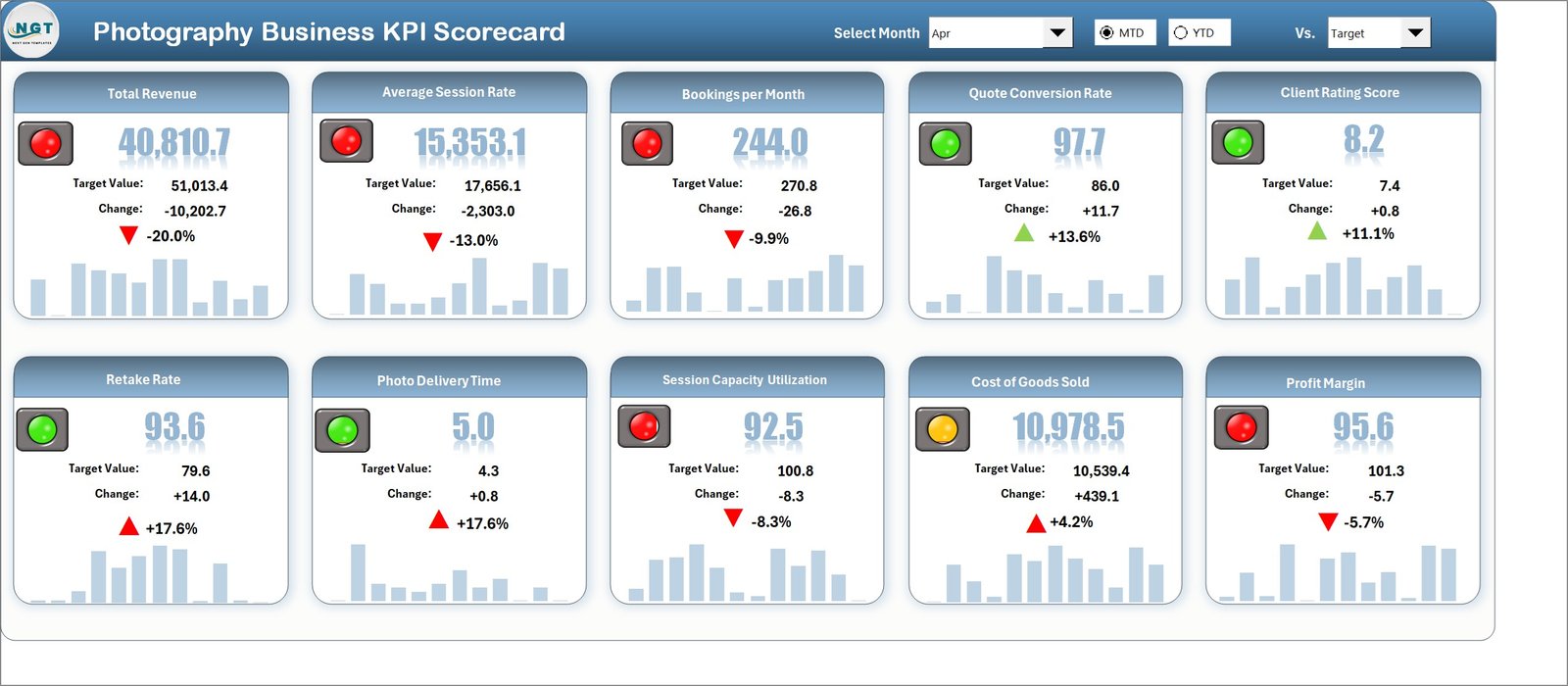
The Scorecard Sheet acts as the primary dashboard of the KPI scorecard.
It provides a comprehensive overview of photography business performance.
Dropdown Menu Controls
The scorecard includes dropdown menus that allow users to select:
-
Month
-
MTD (Month-to-Date)
-
YTD (Year-to-Date)
These controls allow users to analyze performance for different time periods.
Actual vs Target Comparison
One of the most important features of the scorecard is the Actual vs Target comparison.
The scorecard displays:
-
Actual performance values
-
Target performance values
By comparing these numbers, photographers can evaluate whether they are achieving their business goals.
Visual Performance Indicators
The template uses color-coded indicators and conditional formatting to display KPI performance.
For example:
-
Green indicators may represent KPIs meeting targets
-
Red indicators may indicate KPIs falling below targets
These visuals make performance evaluation quick and simple.
Comprehensive KPI Overview
The scorecard provides detailed KPI information, including:
-
MTD performance
-
YTD performance
-
Target comparisons
As a result, business owners gain a clear overview of operational performance.
Click to Purchases Photography Business KPI Scorecard in Excel
2. KPI Trend Sheet – Monitor KPI Performance Over Time
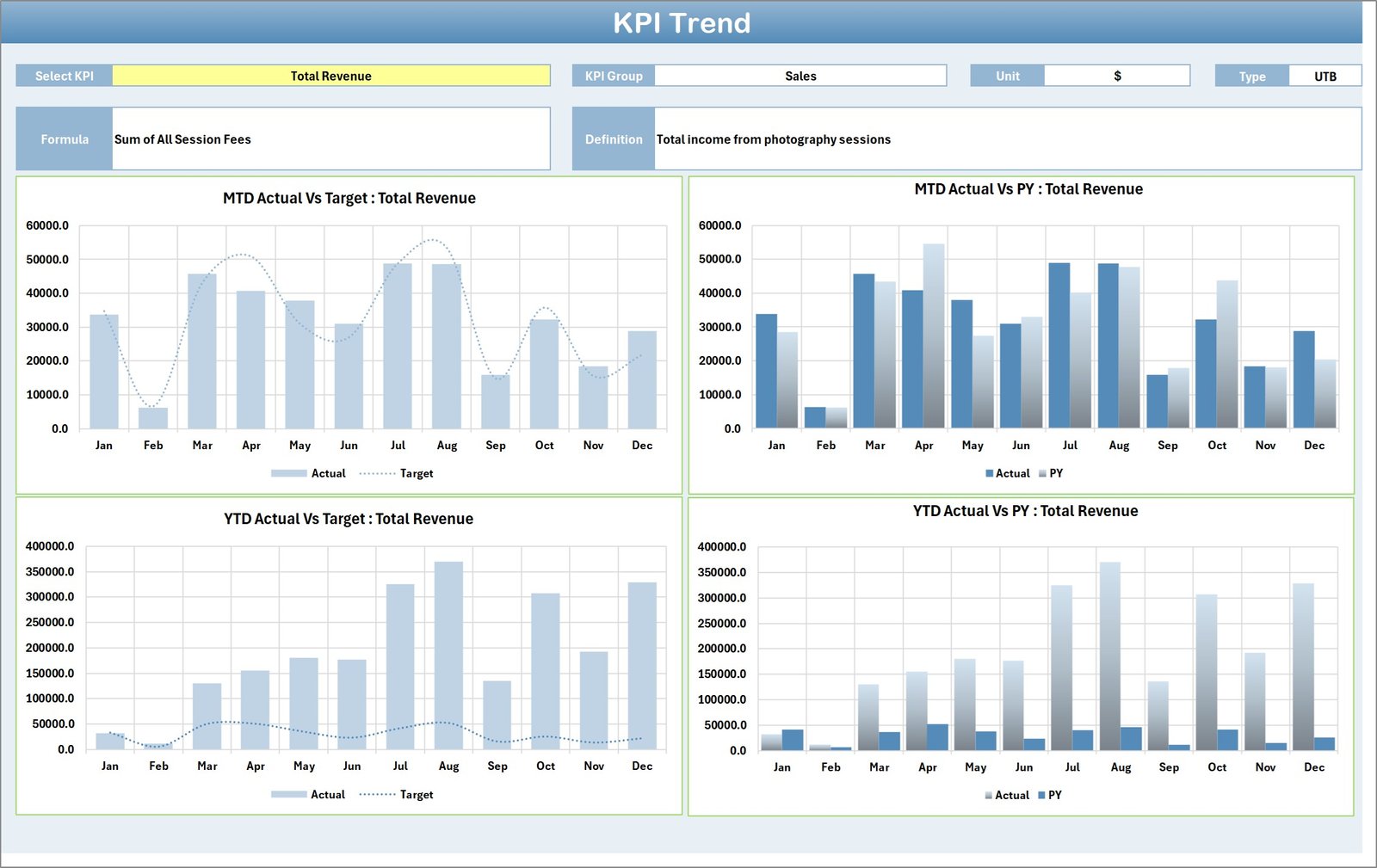
The KPI Trend Sheet provides detailed trend analysis for individual KPIs.
Users can select the KPI name using the dropdown menu located in cell C3.
Once a KPI is selected, the sheet displays important KPI details.
KPI Information Displayed
The trend sheet shows the following information:
-
KPI Group
-
Unit of Measurement
-
KPI Type (Lower the Better or Upper the Better)
-
KPI Formula
-
KPI Definition
This information helps users understand the KPI calculation and purpose.
Trend Charts
The sheet also includes trend charts that display:
-
MTD Actual Values
-
MTD Target Values
-
Previous Year Performance
Additionally, the sheet includes YTD trend charts.
These charts allow photographers to analyze business growth patterns.
Click to Purchases Photography Business KPI Scorecard in Excel
3. Input Data Sheet – Enter KPI Performance Data

The Input Data Sheet is the main data entry section of the template.
This sheet allows users to record performance metrics for each KPI.
Data Entry Fields
Users can enter:
-
Actual KPI values
-
Target KPI values
-
Additional performance data
Because this sheet stores the raw data, the entire scorecard automatically updates when new data is entered.
Flexible Data Updates
Photography businesses can update KPI data regularly as new performance results become available.
This ensures that the scorecard always reflects current business performance.
Click to Purchases Photography Business KPI Scorecard in Excel
4. KPI Definition Sheet – KPI Reference Library

The KPI Definition Sheet stores detailed information about each KPI used in the scorecard.
This sheet acts as a reference library for business metrics.
KPI Information Stored
The sheet includes the following fields:
-
KPI Name
-
KPI Group
-
Unit of Measurement
-
KPI Formula
-
KPI Definition
Because of this structured information, users can clearly understand how each KPI is calculated.
Click to Purchases Photography Business KPI Scorecard in Excel
Advantages of the Photography Business KPI Scorecard in Excel
Using a KPI scorecard provides several benefits for photography businesses.
Better Business Performance Monitoring
The scorecard allows photographers to monitor business performance in one place.
Clear Target Tracking
By comparing actual results with targets, photographers can track progress toward business goals.
Improved Decision Making
The scorecard provides data-driven insights that help photographers make better business decisions.
Easy Performance Visualization
Color-coded indicators make performance evaluation quick and easy.
Trend Analysis
Trend charts help photographers analyze long-term business growth.
Flexible Customization
Since the template uses Excel, users can customize KPIs according to their business needs.
Opportunities for Improvement in Photography Business Analytics
Although the KPI scorecard provides valuable insights, photography businesses can improve analytics capabilities further.
Customer Analytics Integration
Photographers can track customer behavior, repeat bookings, and customer lifetime value.
Marketing Performance Tracking
Businesses can analyze marketing channel performance such as:
-
Social media campaigns
-
Website traffic
-
Online advertisements
Financial Forecasting
Adding revenue forecasting models can help photographers predict future income.
Click to Purchases Photography Business KPI Scorecard in Excel
Best Practices for Using the Photography Business KPI Scorecard
To maximize the effectiveness of the scorecard, businesses should follow several best practices.
Maintain Accurate Data
Always ensure that KPI data entered into the Input Data sheet is correct.
Update Data Regularly
Update KPI data monthly to keep performance insights accurate.
Define Clear KPIs
Choose KPIs that directly measure business performance.
Monitor KPI Trends
Regularly review trend charts to identify performance changes.
Protect Important Formulas
Protect Excel formulas to avoid accidental modification.
Why Excel is Ideal for Photography Business KPI Tracking
Excel remains one of the most powerful tools for small business analytics.
It provides several advantages:
-
Flexible KPI tracking
-
Easy customization
-
Automated calculations
-
Interactive charts
-
Wide accessibility
Because Excel is widely used, photography businesses can implement KPI scorecards without expensive software.
How Does This KPI Scorecard Improve Photography Business Management?
The Photography Business KPI Scorecard in Excel helps photographers track important performance metrics and analyze business trends.
It allows business owners to evaluate revenue performance, booking trends, and operational efficiency.
As a result, photographers can identify growth opportunities and optimize their business strategies.
Conclusion
Running a successful photography business requires effective performance monitoring. Without proper KPI tracking, business owners may struggle to understand their financial performance and operational efficiency.
The Photography Business KPI Scorecard in Excel provides a powerful solution for monitoring business performance. With its structured scorecard interface, KPI trend charts, and performance comparisons, photographers can easily track progress and improve decision-making.
Therefore, photography studios, freelance photographers, and photography agencies should consider using this Excel KPI scorecard template to manage and grow their businesses effectively.
Click to Purchases Photography Business KPI Scorecard in Excel
Frequently Asked Questions (FAQs)
What is a Photography Business KPI Scorecard in Excel?
It is a performance tracking template used to monitor key business metrics for photography businesses.
Who should use this KPI scorecard?
This template is useful for:
-
Photography studios
-
Freelance photographers
-
Wedding photographers
-
Commercial photography agencies
What KPIs can be tracked in this scorecard?
Common photography KPIs include:
-
Monthly bookings
-
Revenue per shoot
-
Client satisfaction
-
Marketing conversion rate
-
Profit margins
Can this template be customized?
Yes. Since the scorecard is built in Excel, users can customize KPIs, charts, and calculations according to their business needs.
How often should the KPI data be updated?
Businesses should update KPI data monthly to ensure accurate performance monitoring.
Click to Purchases Photography Business KPI Scorecard in Excel
Visit our YouTube channel to learn step-by-step video tutorials