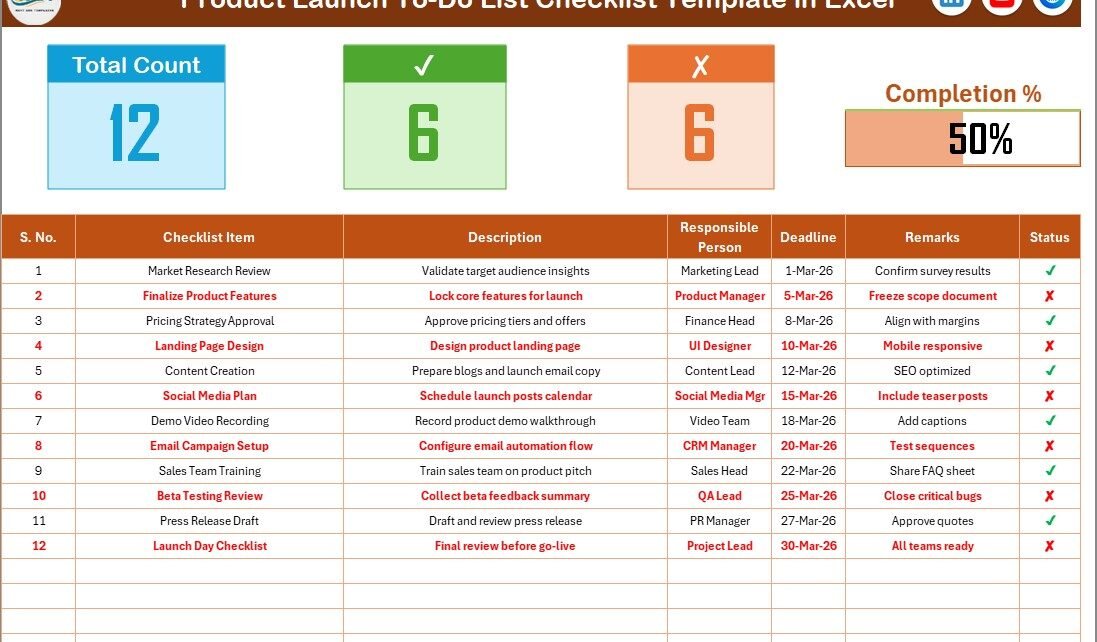
Launching a product feels exciting. However, it can quickly turn stressful if you miss important tasks. Marketing deadlines shift. Design approvals delay. Vendors respond late. Meanwhile, leadership expects everything to run smoothly.
So, how do you stay organized and ensure nothing slips through the cracks?
The answer is simple.
You need a Product Launch To-Do List Checklist in Excel.
This ready-to-use Excel template helps you track every launch activity, assign responsibilities, monitor deadlines, and measure progress clearly. Therefore, you can move from chaos to control in minutes.
Let us explore everything step by step.
Click to Purchases Product Launch To-Do List Checklist in Excel
What Is a Product Launch To-Do List Checklist in Excel?
A Product Launch To-Do List Checklist in Excel is a structured planning tool that organizes all product launch activities in one place. Instead of managing scattered notes and emails, you track tasks in a clean and dynamic Excel sheet.
This template allows you to:
-
List all launch activities
-
Assign responsible team members
-
Set deadlines
-
Track completion status
-
Monitor overall launch progress
Because everything stays centralized, your launch becomes more predictable and organized.
Why Do You Need a Product Launch Checklist?
Product launches involve multiple departments. Marketing, sales, product development, finance, and operations all contribute. Therefore, coordination becomes critical.
However, without a checklist:
-
Tasks get delayed
-
Responsibilities become unclear
-
Deadlines overlap
-
Important approvals get missed
-
Teams lose visibility
As a result, launch performance suffers.
On the other hand, a structured checklist ensures alignment, accountability, and smooth execution.
Click to Purchases Product Launch To-Do List Checklist in Excel
Key Features of the Product Launch To-Do List Checklist in Excel
This ready-to-use template includes 2 worksheets, each designed for simplicity and efficiency.
Let us break them down clearly.
1️⃣ Product Launch To-Do List Checklist Sheet – Where Do You Manage Tasks?
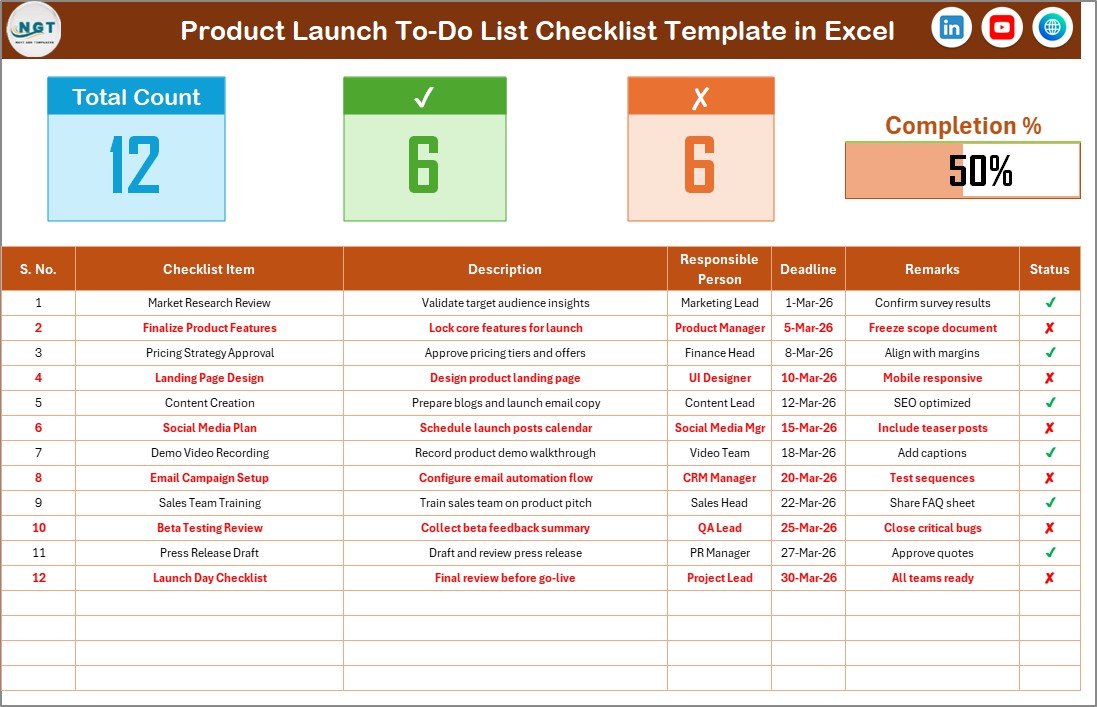
This is the main worksheet where you capture and track all checklist activities.
🔹 Top Section – How Do You Monitor Progress?
At the top, the template displays:
-
Total Task Count
-
Checked Count (✔ Completed Tasks)
-
Crossed Count (✘ Pending Tasks)
-
Progress Bar Showing Completion %
Because the progress bar updates automatically, you instantly know how much work remains.
For example:
If you complete 15 tasks out of 20, the progress bar shows 75%. Therefore, leadership can quickly see the current status.
🔹 Main Checklist Table – How Do You Track Tasks?
Below the summary section, you will find the main checklist table.
This table includes the following columns:
-
Serial No. – Sequence number
-
Checklist Item – Task name
-
Description – Details of the task
-
Responsible Person – Assigned team member
-
Deadline – Task due date
-
Remarks – Additional notes
-
Status – ✔ (Completed) or ✘ (Not Completed)
You simply update the Status column with ✔ or ✘. As soon as you change it, the counts and progress bar update automatically.
Because of this design, task tracking becomes fast and simple.
Click to Purchases Product Launch To-Do List Checklist in Excel
2️⃣ List Sheet – Why Is It Important?
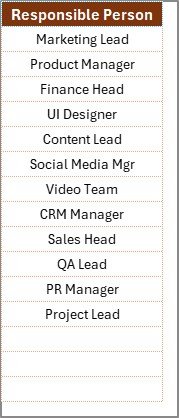
The second worksheet stores the unique list of Responsible Persons.
This sheet creates the dropdown menu in the main checklist table.
Therefore:
-
You avoid typing errors
-
You maintain consistency
-
You ensure clean reporting
If you add a new team member, simply update the List sheet. Then the dropdown updates automatically.
What Tasks Should a Product Launch Checklist Include?
Although every launch differs, most product launches include tasks across several stages.
🔹 Pre-Launch Planning Tasks
-
Define launch goals
-
Finalize product pricing
-
Prepare sales training materials
-
Complete product testing
-
Create marketing strategy
🔹 Marketing Preparation Tasks
-
Design landing page
-
Create social media campaigns
-
Prepare email sequences
-
Publish blog posts
-
Record demo videos
🔹 Sales & Operations Tasks
-
Train sales team
-
Update CRM system
-
Finalize distribution channels
-
Coordinate logistics
-
Prepare support documentation
🔹 Launch Day Tasks
-
Activate website updates
-
Send announcement emails
-
Publish social media posts
-
Monitor campaign performance
-
Respond to customer inquiries
🔹 Post-Launch Tasks
-
Collect feedback
-
Analyze performance metrics
-
Review sales numbers
-
Adjust marketing strategy
-
Conduct internal review meeting
Because structured planning matters, your checklist should cover all these stages.
Click to Purchases Product Launch To-Do List Checklist in Excel
Advantages of Product Launch To-Do List Checklist in Excel
Now let us explore the real benefits.
1️⃣ Centralized Task Management
The template stores all launch activities in one sheet. Therefore, teams avoid confusion.
2️⃣ Clear Responsibility Assignment
Each task includes a responsible person. As a result, accountability improves.
3️⃣ Deadline Tracking
Because deadlines stay visible, teams focus on timely completion.
4️⃣ Real-Time Progress Monitoring
The progress bar shows completion percentage instantly. Therefore, leaders track readiness quickly.
5️⃣ Simple and User-Friendly Design
Excel provides familiar functionality. Consequently, teams require no special training.
6️⃣ Fully Customizable Structure
You can modify columns, tasks, or team members based on your launch needs.
How Does This Checklist Improve Launch Success?
A structured checklist improves launch success in multiple ways:
-
It prevents missed tasks
-
It increases coordination
-
It reduces stress
-
It improves communication
-
It boosts productivity
Because visibility drives action, teams perform better when they see clear task status.
Click to Purchases Product Launch To-Do List Checklist in Excel
Best Practices for the Product Launch To-Do List Checklist
To maximize results, follow these best practices:
✅ Break Tasks into Small Steps
Instead of writing “Prepare Marketing,” break it into detailed actions.
✅ Assign One Owner per Task
Avoid shared responsibility. Assign one accountable person.
✅ Set Realistic Deadlines
Ensure deadlines align with project timelines.
✅ Update Status Regularly
Review and update the checklist daily or weekly.
✅ Conduct Weekly Review Meetings
Discuss pending tasks and blockers.
✅ Keep the Checklist Visible
Share it with all stakeholders to maintain transparency.
Who Should Use This Checklist Template?
This template helps:
-
Product Managers
-
Marketing Teams
-
Startup Founders
-
Project Managers
-
Operations Teams
-
Business Owners
Moreover, both small startups and large enterprises can use it effectively.
Click to Purchases Product Launch To-Do List Checklist in Excel
How to Use the Product Launch To-Do List Checklist in Excel?
Follow these simple steps:
-
Enter all launch tasks
-
Assign responsible team members
-
Set deadlines
-
Update task status regularly
-
Monitor the progress bar
-
Review pending tasks weekly
Because the structure stays simple, implementation takes only minutes.
Conclusion
Product launches require precision, coordination, and discipline. However, without proper planning tools, even strong teams struggle.
The Product Launch To-Do List Checklist in Excel gives you clarity, accountability, and progress tracking in one organized template. It helps you manage responsibilities, track deadlines, and monitor completion percentage effortlessly.
If you want a smoother launch process and better team coordination, this checklist template provides exactly what you need.
Click to Purchases Product Launch To-Do List Checklist in Excel
Frequently Asked Questions with Answers
1. What is a Product Launch To-Do List Checklist?
It is a structured Excel template that tracks all tasks related to a product launch.
2. Can I customize the checklist items?
Yes. You can modify tasks, add new rows, or adjust columns based on your launch needs.
3. How does the progress bar work?
The progress bar calculates the percentage of completed tasks based on ✔ marks.
4. Can I add more team members?
Yes. Simply update the List sheet to add new responsible persons.
5. Is this checklist suitable for small businesses?
Yes. Both startups and enterprises can use it effectively.
6. How often should I update the checklist?
You should update it daily or weekly during the launch phase.
Click to Purchases Product Launch To-Do List Checklist in Excel
Visit our YouTube channel to learn step-by-step video tutorials