Introduction
The Recruitment KPI Scorecard is an essential tool designed to help organizations track and optimize their hiring processes effectively. This ready-to-use scorecard template empowers HR teams and recruitment managers to evaluate performance against key recruitment metrics, ensuring data-driven decisions and improved hiring outcomes.
Click to Purchases Recruitment KPI Scorecard in Excel
Key Features of Recruitment KPI Scorecard
- Comprehensive Performance Tracking: Monitor multiple KPIs related to recruitment in a single interface.
- Flexible Time Frame Selection: Easily switch between Month-to-Date (MTD) and Year-to-Date (YTD) views.
- Visual Indicators: Quickly identify performance status with intuitive color coding and conditional formatting.
- KPI Definitions and Calculations: Clearly defined KPIs with formulas and descriptions for better understanding.
- Trend Analysis: Track performance trends over time for continuous improvement.
- Data Entry Simplicity: Easily update and maintain KPI data through a dedicated input sheet.
Dashboard Pages Explanation
1. Scorecard Sheet

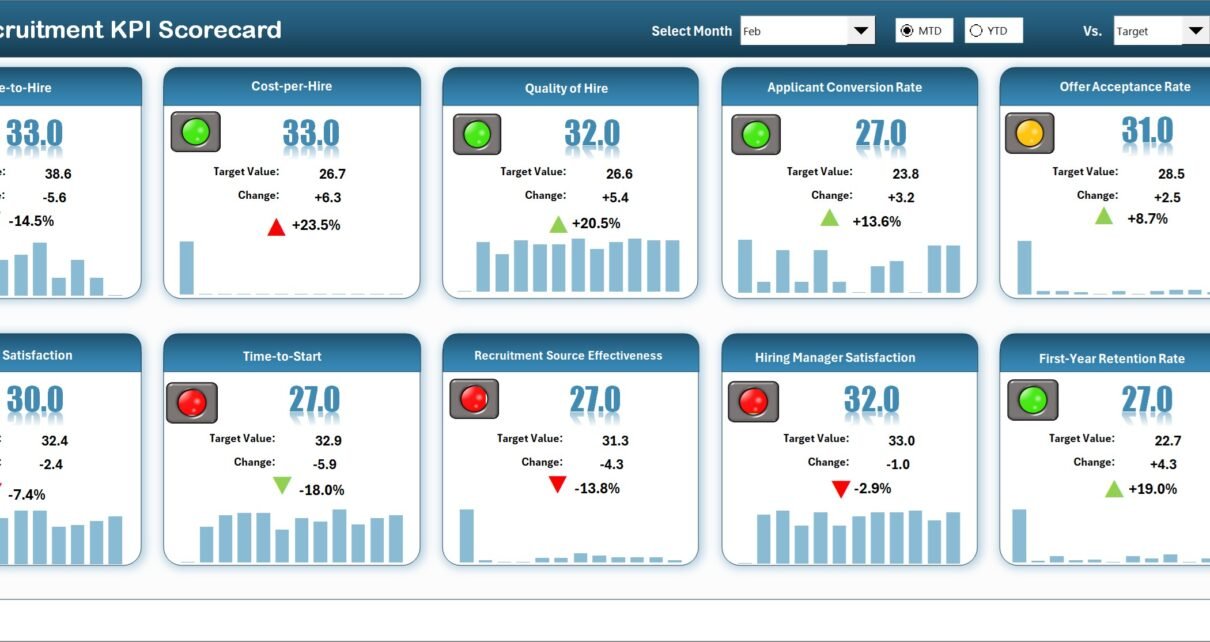
This is the main interface where you can view the overall KPI performance. Key features include:
- Dropdown Menus: Select the month, MTD, or YTD to analyze performance data.
- Actual vs Target Values: Instantly compare actual results against set targets for each KPI.
- Visual Indicators: Use color coding to assess performance status at a glance.
- Comprehensive KPI Overview: Detailed display of all KPIs including MTD and YTD comparisons for informed decision making.
2. KPI Trend Sheet
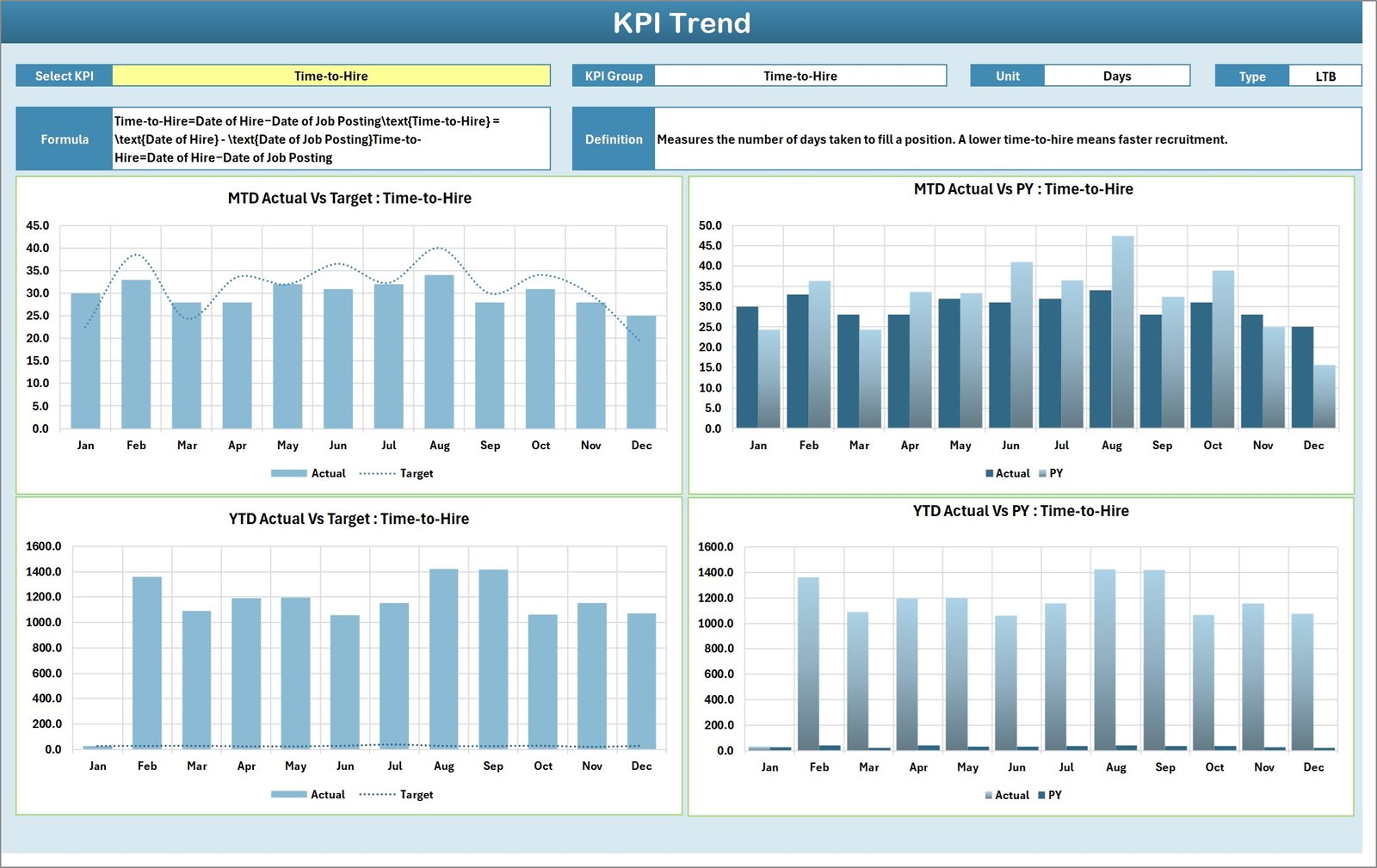
This sheet lets you select a KPI from a dropdown menu (located at cell C3). It displays key details such as:
- KPI Group
- Unit of Measure
- Type of KPI (whether Lower the Better or Upper the Better)
- Formula for calculating the KPI
- KPI Definition
Additionally, you have MTD and YTD trend charts showing Actual, Target, and Previous Year (PY) data, which help visualize performance over time.
3. Input Data Sheet

This sheet serves as the backbone of the scorecard where all KPI data entries happen. Essential features include:
- Data Entry: Easily capture actual KPI values, targets, and other relevant recruitment metrics.
- Flexibility: Update new data as results come in, keeping the scorecard up-to-date effortlessly.
4. KPI Definition Sheet

This tab contains detailed descriptions and essential information about each KPI, including:
- KPI Name
- KPI Group
- Unit of Measure
- Formula Used
- Definition and Explanation
Advantages of Recruitment KPI Scorecard
- Centralized Data: Consolidates all recruitment KPIs in one accessible location.
- Improved Visibility: Clear visuals and summaries aid quick decision making.
- Performance Tracking: Enables continuous monitoring of hiring efficiency and process bottlenecks.
- Data-Driven Actions: Facilitates identifying areas needing improvement through performance trends.
- Accountability: Establishes measurable targets that teams can be held accountable for.
- Customization Friendly: Allows easy modification to suit specific organizational needs.
Opportunities for Improvement
- Integrate Automated Data Feeds to reduce manual data input errors and improve timeliness.
- Include Benchmarking capabilities to compare performance against industry standards.
- Add Notifications or Alerts for KPIs that fall below thresholds.
- Expand to incorporate qualitative feedback from candidates or hiring managers for a comprehensive view.
Best Practices
- Regular Updates: Keep data current to ensure relevance and accuracy.
- Clear KPI Definitions: Make sure all users understand KPI calculations and implications.
- Use Visual Indicators: Leverage color coding to enhance quick understanding and reporting effectiveness.
- Collaborate: Engage relevant stakeholders in reviewing and improving scorecard content.
- Review Trends Monthly: Analyze trends to proactively address recruitment challenges.
FAQs
What is the focus of the Recruitment KPI Scorecard?
It focuses on measuring and tracking essential recruitment metrics to enhance hiring efficiency and effectiveness.
Can this scorecard be customized?
Yes, the template is flexible and can be adjusted to fit unique organizational requirements.
How often should the data be updated?
Ideally, data should be updated monthly or as soon as new recruitment results are available.
Does the scorecard support trend analysis?
Yes, the KPI Trend Sheet provides graphical views of MTD and YTD trends along with previous year comparisons.
Click to Purchases Recruitment KPI Scorecard in Excel
Conclusion
The Recruitment KPI Scorecard is a powerful solution for HR professionals aiming to optimize recruitment efforts through structured measurement and insightful analysis. Its combination of flexible data entry, automated visual indicators, and trending capabilities makes it an indispensable tool for achieving recruitment excellence.
For more insights and hands-on guidance, check out Microsoft’s official guidance on KPI tracking: Microsoft KPI Tracking.
Visit our YouTube channel to watch the demo.