Search Engine Optimization (SEO) drives long-term digital growth for businesses, bloggers, agencies, and online stores. Companies invest significant time and resources into improving rankings, increasing organic traffic, and generating leads through search engines. However, many marketers still struggle to measure SEO performance effectively.
Teams often rely on scattered analytics tools, screenshots, or disconnected reports from multiple platforms like Google Analytics, Google Search Console, and SEO tools. As a result, performance evaluation becomes confusing, progress tracking slows down, and decision-making loses clarity.
Therefore, organizations increasingly adopt structured KPI tracking systems. One powerful and practical solution is the SEO Performance KPI Scorecard in Excel — a ready-to-use template designed to monitor SEO performance using measurable Key Performance Indicators (KPIs).
In this comprehensive guide, you will learn:
-
What an SEO KPI Scorecard is
-
Why KPI tracking matters in SEO
-
Complete worksheet structure explained
-
Important SEO KPIs to track
-
Advantages and best practices
-
Implementation steps
-
Frequently asked questions
Let’s explore how this Excel scorecard helps marketers turn SEO data into actionable insights.
Click to Purchases SEO Performance KPI Scorecard in Excel
What Is an SEO Performance KPI Scorecard in Excel?
An SEO Performance KPI Scorecard in Excel is a structured performance tracking tool that helps marketers measure SEO success using defined KPIs in one centralized dashboard.
Instead of checking multiple analytics platforms daily, users track performance through a single Excel interface.
The scorecard allows users to:
-
Compare Actual vs Target SEO performance
-
Monitor MTD (Month-to-Date) and YTD (Year-to-Date) results
-
Analyze SEO trends over time
-
Compare current performance with previous year results
-
Identify growth opportunities quickly
Because Excel provides flexibility and accessibility, organizations implement this solution easily without additional software costs.
Why Do Businesses Need an SEO KPI Scorecard?
SEO produces results gradually. Without structured tracking, marketers cannot clearly measure progress.
Common SEO Tracking Problems
-
Data scattered across multiple tools
-
No clear performance benchmarks
-
Difficulty tracking monthly improvements
-
Lack of accountability
-
Slow strategic adjustments
However, KPI scorecards solve these challenges.
Benefits of SEO KPI Monitoring
-
Track measurable SEO goals
-
Improve campaign transparency
-
Align marketing strategies with outcomes
-
Identify underperforming areas quickly
-
Support data-driven SEO decisions
Consequently, marketers move from guessing performance to managing it strategically.
Overview of SEO Performance KPI Scorecard Structure
This ready-to-use template contains four structured worksheets, each serving a specific analytical purpose.
Click to Purchases SEO Performance KPI Scorecard in Excel
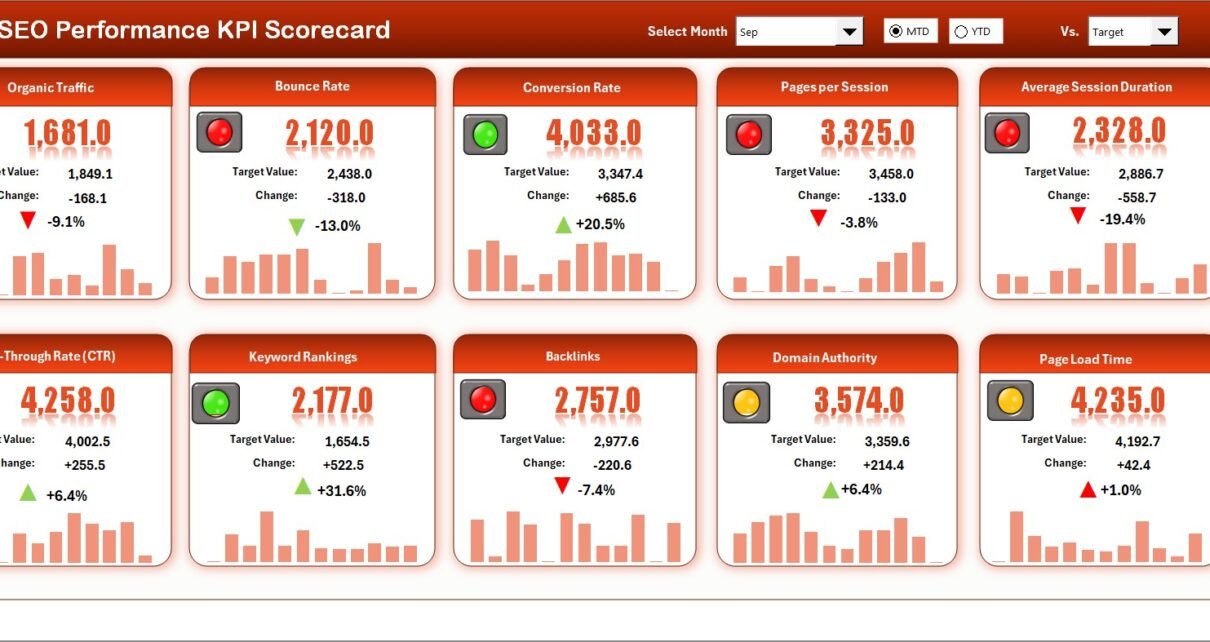
1️⃣ Scorecard Sheet – Main Performance Dashboard
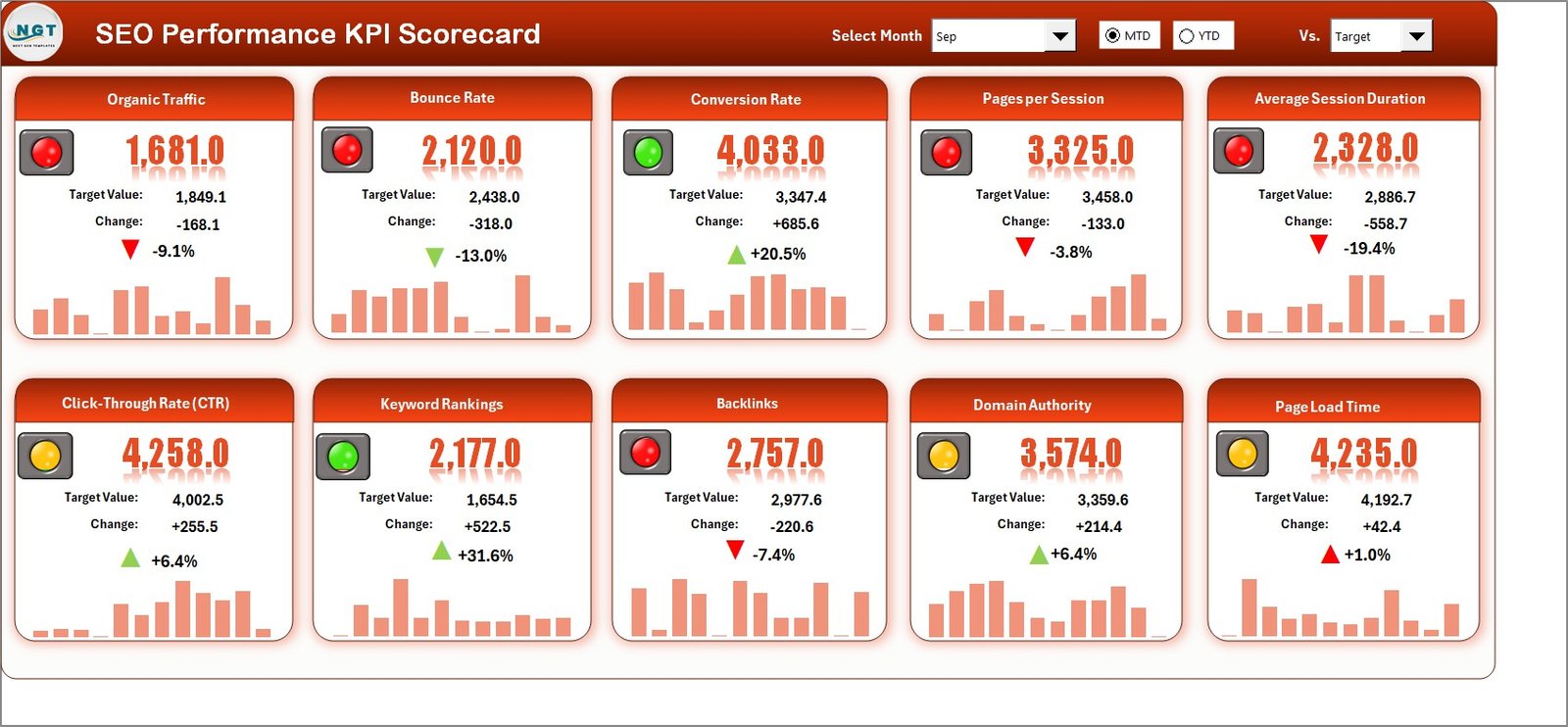
The Scorecard Sheet acts as the primary interface where users analyze SEO performance.
Key Features
-
Dropdown menus for month selection
-
MTD and YTD analysis options
-
Actual vs Target comparison
-
Visual performance indicators
-
Complete KPI overview in one screen
Users select a month, and the entire dashboard updates automatically.
Visual Indicators
Conditional formatting highlights KPI performance using colors or icons:
-
Green indicators show strong performance
-
Red indicators highlight areas needing improvement
Therefore, marketers understand performance instantly.
2️⃣ KPI Trend Sheet – SEO Performance Analysis
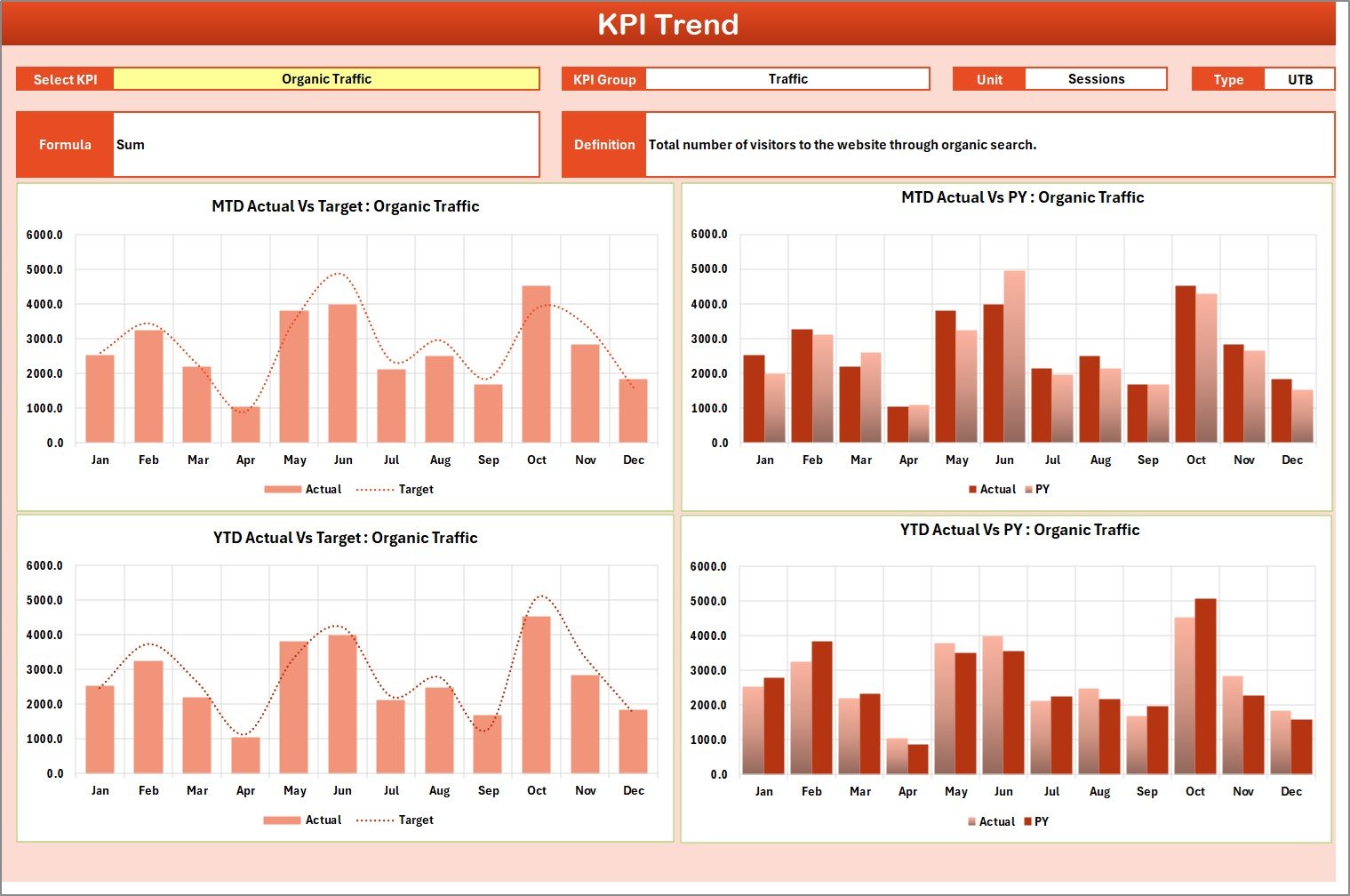
The KPI Trend Sheet provides deeper analytical insights.
Users select a KPI from the dropdown in cell C3.
Information Displayed
-
KPI Group
-
Unit of KPI
-
KPI Type (Lower or Upper is better)
-
KPI Formula
-
KPI Definition
Additionally, the sheet displays trend charts showing:
-
MTD Actual vs Target vs Previous Year
-
YTD Actual vs Target vs Previous Year
These visual trends help marketers understand SEO growth patterns over time.
Click to Purchases SEO Performance KPI Scorecard in Excel
3️⃣ Input Data Sheet – Central Data Entry Area
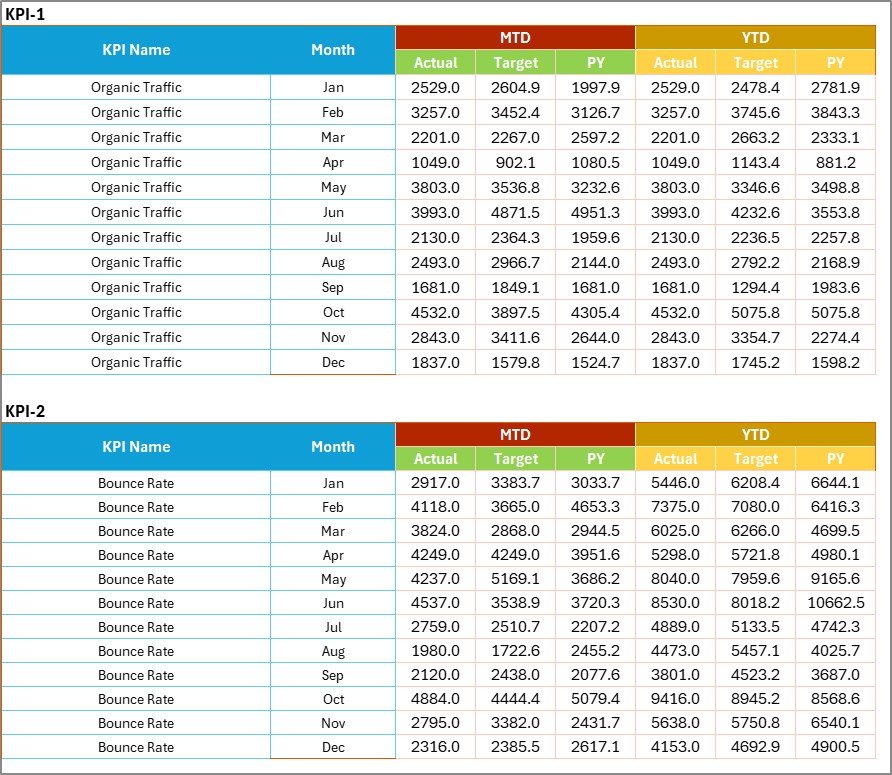
The Input Data Sheet stores all SEO KPI data.
Main Functions
-
Enter actual SEO results
-
Record targets for each KPI
-
Update performance regularly
-
Maintain current analytics data
Because the sheet supports flexible updates, users keep the scorecard accurate and relevant.
4️⃣ KPI Definition Sheet – KPI Documentation

The KPI Definition Sheet acts as a KPI reference library.
Users define:
-
KPI Name
-
KPI Group
-
Unit of Measurement
-
KPI Formula
-
KPI Definition
This ensures consistent KPI understanding across teams and stakeholders.
Which SEO KPIs Should You Track?
Tracking the right KPIs determines SEO success.
Traffic KPIs
-
Organic Traffic
-
New Users from Search
-
Click-Through Rate (CTR)
-
Impressions
Ranking KPIs
-
Keyword Rankings
-
Top 10 Keywords Count
-
Ranking Improvements
Engagement KPIs
-
Bounce Rate
-
Average Session Duration
-
Pages per Session
Conversion KPIs
-
Organic Leads
-
Conversion Rate
-
Revenue from Organic Traffic
Technical SEO KPIs
-
Page Load Speed
-
Index Coverage
-
Core Web Vitals Score
Monitoring these KPIs provides a complete SEO performance view.
Click to Purchases SEO Performance KPI Scorecard in Excel
How Does the SEO KPI Scorecard Improve Decision-Making?
Structured dashboards simplify complex SEO data.
Faster Performance Evaluation
Managers instantly see which KPIs meet targets.
Better Strategy Optimization
Trend analysis reveals what works and what needs improvement.
Improved Goal Tracking
Targets align marketing efforts with business outcomes.
Enhanced Reporting
Teams present professional performance reports easily.
Therefore, decision-making becomes faster and more accurate.
Advantages of SEO Performance KPI Scorecard in Excel
✅ Centralized SEO Monitoring
All SEO metrics appear in one dashboard.
✅ Easy to Use
No advanced software skills required.
✅ Flexible Customization
Users modify KPIs according to strategy.
✅ Cost Effective
Excel eliminates expensive tool dependency.
✅ Visual Performance Tracking
Conditional formatting improves readability.
✅ Historical Comparison
Previous-year comparison supports growth analysis.
✅ Scalable Solution
Works for freelancers, agencies, and enterprises.
Click to Purchases SEO Performance KPI Scorecard in Excel
How to Implement the SEO KPI Scorecard?
Follow these steps for successful implementation.
Step 1: Define SEO Goals
Identify measurable SEO objectives.
Step 2: Add KPI Definitions
Populate KPI Definition sheet.
Step 3: Set Targets
Enter realistic monthly and yearly targets.
Step 4: Input Actual Data
Update results regularly from analytics tools.
Step 5: Analyze Trends
Use KPI Trend charts to review performance.
Step 6: Optimize Strategy
Adjust SEO activities based on insights.
Best Practices for the SEO Performance KPI Scorecard
Update Data Consistently
Add data monthly for accurate analysis.
Focus on Actionable KPIs
Track metrics that influence growth.
Maintain Data Accuracy
Validate entries before reporting.
Review Trends Instead of Single Results
Analyze long-term performance patterns.
Align KPIs With Business Goals
Ensure SEO supports revenue objectives.
Educate Team Members
Make sure everyone understands KPI definitions.
Click to Purchases SEO Performance KPI Scorecard in Excel
Common Challenges in SEO KPI Tracking
Data Overload
Solution: Track only strategic KPIs.
Inconsistent Reporting
Solution: Standardize KPI definitions.
Unrealistic Targets
Solution: Base goals on historical performance.
Lack of Analysis
Solution: Review dashboards regularly.
Click to Purchases SEO Performance KPI Scorecard in Excel
Who Can Use This SEO KPI Scorecard?
This template benefits:
-
Digital marketing agencies
-
SEO specialists
-
Bloggers and content creators
-
E-commerce businesses
-
Marketing managers
-
Startup founders
-
Analytics teams
Why Use Excel for SEO Performance Tracking?
Accessibility
Most teams already use Excel.
Flexibility
Users customize dashboards easily.
Integration
Data imports from analytics platforms quickly.
Simplicity
No complex setup required.
Therefore, Excel remains a powerful SEO analytics solution.
Future of SEO Performance Measurement
SEO analytics continues evolving rapidly.
Future tracking systems may include:
-
AI-based ranking prediction
-
Automated keyword monitoring
-
Real-time SEO dashboards
-
Predictive traffic analytics
However, structured KPI scorecards will always remain essential for performance evaluation.
Click to Purchases SEO Performance KPI Scorecard in Excel
Conclusion: Turn SEO Data into Growth Opportunities
SEO success depends on continuous measurement, analysis, and optimization. Without structured tracking, marketers cannot clearly understand performance or identify improvement areas.
The SEO Performance KPI Scorecard in Excel provides a simple yet powerful solution by combining KPI tracking, trend analysis, and performance comparison into one organized system.
By implementing this scorecard, organizations can:
-
Monitor SEO performance efficiently
-
Track progress toward goals
-
Improve decision-making
-
Optimize digital strategies
Ultimately, KPI-driven SEO management transforms data into measurable business growth.
Frequently Asked Questions (FAQs)
1. What is an SEO KPI Scorecard?
It is an Excel-based tool that tracks SEO performance using measurable KPIs.
2. Can beginners use this template?
Yes. Anyone familiar with Excel can use it easily.
3. How often should I update the scorecard?
You should update it monthly or whenever new SEO data becomes available.
4. Can I customize KPIs?
Yes. You can modify KPIs based on your SEO strategy.
5. Does it support historical comparison?
Yes. It compares current performance with previous-year data.
6. Is Excel suitable for SEO analytics?
Yes. Excel provides flexible and cost-effective performance tracking.
7. Who benefits most from this scorecard?
SEO professionals, agencies, and businesses managing organic growth benefit greatly.
Click to Purchases SEO Performance KPI Scorecard in Excel
Visit our YouTube channel to learn step-by-step video tutorials