Smart cities rely on data to deliver better services, improve infrastructure, and enhance the quality of life for citizens. However, when city departments track performance using disconnected reports or manual spreadsheets, insights remain hidden and decision-making slows down.
That is exactly where a Smart Cities KPI Scorecard in Excel plays a vital role.
In this detailed guide, you will learn what a Smart Cities KPI Scorecard in Excel is, why it matters, how it works, its key features, advantages, best practices, and frequently asked questions. By the end of this article, you will clearly understand how this ready-to-use Excel scorecard helps governments, planners, and administrators monitor smart city performance with clarity and confidence.
Click to Purchases Smart Cities KPI Scorecard in Excel
What Is a Smart Cities KPI Scorecard in Excel?
A Smart Cities KPI Scorecard in Excel is a structured performance management tool that tracks, compares, and visualizes key performance indicators related to smart city initiatives.
Instead of reviewing multiple reports, decision-makers can use one centralized Excel scorecard to monitor:
-
Infrastructure efficiency
-
Urban sustainability metrics
-
Transportation and mobility KPIs
-
Energy and environmental indicators
-
Digital governance performance
-
Citizen service effectiveness
Because Excel powers this scorecard, users can update data easily, customize KPIs, and share insights without technical complexity.
Why Do Smart Cities Need a KPI Scorecard?
Smart cities generate massive volumes of data. However, data alone does not improve performance. Cities need structured analysis and visibility.
A Smart Cities KPI Scorecard in Excel helps because it:
-
Centralizes all KPIs in one dashboard
-
Compares actual performance with targets
-
Tracks progress monthly and yearly
-
Identifies gaps early
-
Supports data-driven urban planning
As a result, city leaders move from assumptions to evidence-based decisions.
Click to Purchases Smart Cities KPI Scorecard in Excel
How Does a Smart Cities KPI Scorecard in Excel Work?
This ready-to-use KPI scorecard works through four well-structured worksheets, each designed for a specific analytical purpose.
Together, these sheets create a complete KPI monitoring and analysis system for smart cities.
What Are the Key Worksheets in the Smart Cities KPI Scorecard in Excel?
1. Scorecard Sheet: How Can You Monitor Overall KPI Performance?
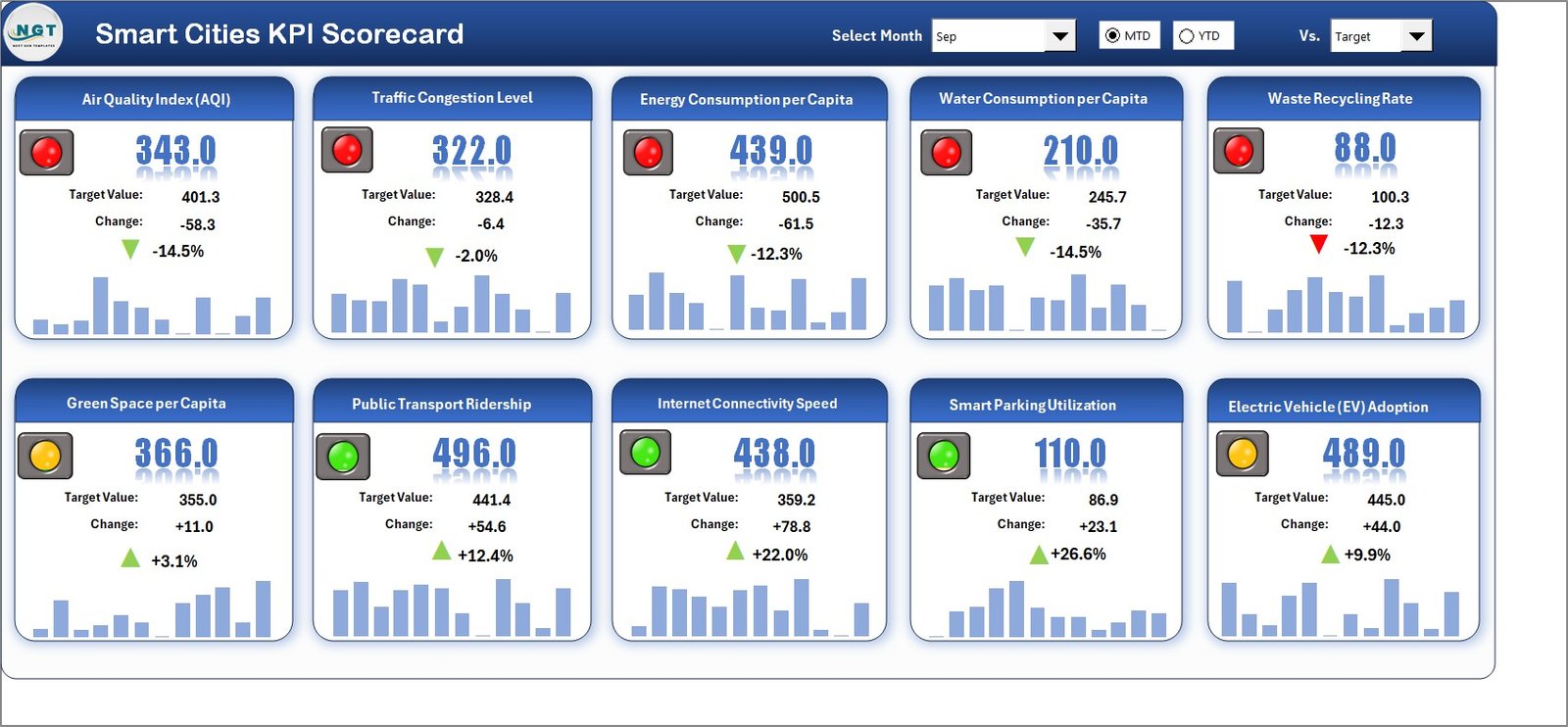
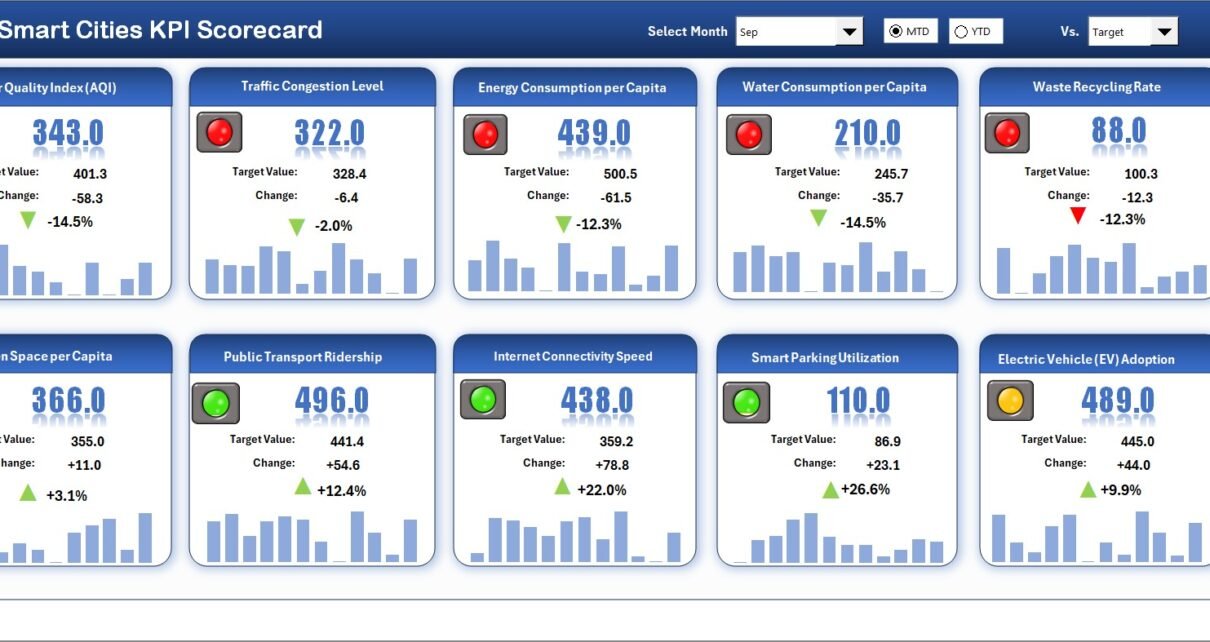
The Scorecard Sheet serves as the main interface of the Smart Cities KPI Scorecard. It provides a clear and summarized view of performance across all KPIs.
Key Features of the Scorecard Sheet
-
Dropdown Menus
Select Month, MTD (Month-to-Date), or YTD (Year-to-Date) to analyze performance dynamically. -
Actual vs Target Comparison
Instantly compare actual KPI values with predefined targets for each smart city metric. -
Visual Performance Indicators
Color-coded visuals and conditional formatting quickly show whether performance meets expectations. -
Comprehensive KPI Overview
View KPI names, groups, actuals, targets, MTD values, and YTD values in one structured layout.
Because of this design, decision-makers can identify issues within seconds.
2. KPI Trend Sheet: How Can You Analyze KPI Performance Over Time?
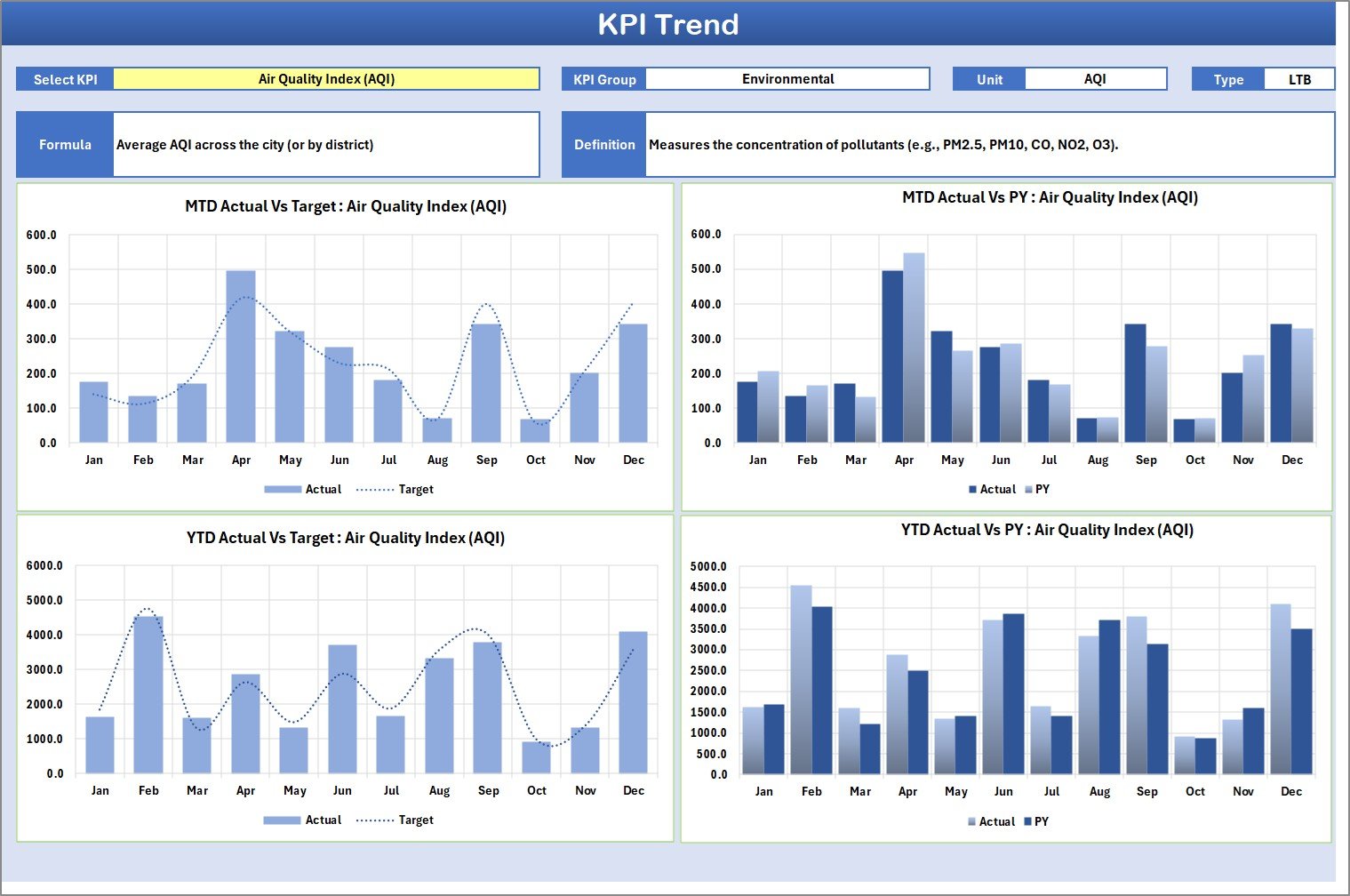
The KPI Trend Sheet focuses on deep analysis for individual KPIs.
How Does the KPI Selection Work?
-
Select the KPI Name from the dropdown available in cell C3
-
The sheet updates automatically based on the selected KPI
What Information Does This Sheet Display?
-
KPI Group
-
Unit of KPI
-
Type of KPI (Lower the Better or Upper the Better)
-
KPI Formula
-
KPI Definition
Trend Analysis Charts
This sheet also displays MTD and YTD trend charts for:
-
Actual values
-
Target values
-
Previous Year (PY) values
Therefore, city planners can easily track progress, seasonality, and performance gaps.
Click to Purchases Smart Cities KPI Scorecard in Excel
3. Input Data Sheet: Where Do You Enter KPI Values?

The Input Data Sheet acts as the data entry layer of the scorecard.
Key Features of the Input Data Sheet
-
Enter actual values, targets, and related metrics
-
Update data regularly as new results become available
-
Maintain flexibility without breaking formulas or visuals
Because this sheet feeds all calculations, accurate data entry ensures reliable insights.
4. KPI Definition Sheet: How Do You Standardize KPIs?

The KPI Definition Sheet ensures consistency and clarity across departments.
Information Captured in This Sheet
-
KPI Name
-
KPI Group
-
KPI Unit
-
KPI Formula
-
KPI Definition
This sheet eliminates confusion by ensuring that everyone measures KPIs the same way.
What Types of KPIs Can You Track in a Smart Cities KPI Scorecard?
A Smart Cities KPI Scorecard in Excel supports a wide range of metrics, such as:
-
Energy consumption efficiency
-
Waste management performance
-
Traffic congestion levels
-
Public transport usage
-
Water supply reliability
-
Air quality indicators
-
Digital service adoption
-
Emergency response times
Therefore, the scorecard adapts to diverse smart city initiatives.
Advantages of Smart Cities KPI Scorecard in Excel
Using a Smart Cities KPI Scorecard in Excel offers powerful benefits for urban governance.
Key Advantages Include:
-
Centralized KPI tracking
-
Clear actual vs target visibility
-
Monthly and yearly performance analysis
-
Easy customization without IT dependency
-
Visual indicators for quick decisions
-
Improved accountability across departments
-
Better alignment with smart city goals
As a result, city administrations gain control and transparency.
How Does This Scorecard Support Better Decision-Making?
Because the scorecard highlights gaps and trends:
-
Leaders identify underperforming areas early
-
Teams prioritize corrective actions
-
Budgets align with real performance needs
-
Policies rely on measurable outcomes
Therefore, decisions become proactive rather than reactive.
Click to Purchases Smart Cities KPI Scorecard in Excel
Who Should Use a Smart Cities KPI Scorecard in Excel?
This KPI scorecard suits multiple stakeholders, including:
-
Smart city administrators
-
Municipal corporations
-
Urban planners
-
Government departments
-
Policy makers
-
Infrastructure project teams
-
Sustainability analysts
If your role involves urban performance monitoring, this tool delivers value.
Best Practices for Using the Smart Cities KPI Scorecard in Excel
To maximize impact, follow these proven best practices.
1. Define KPIs Clearly
Use the KPI Definition Sheet to avoid ambiguity.
2. Update Data Regularly
Frequent updates keep insights relevant and actionable.
3. Review Trends Monthly
Trend analysis reveals patterns that static numbers hide.
4. Use Targets Realistically
Set achievable targets aligned with policy goals.
5. Share Insights Across Teams
Transparency improves collaboration and accountability.
6. Maintain a Single Source of Truth
Use one master file to avoid conflicting reports.
How Is This Better Than Traditional Reporting?
Traditional reports often arrive late and lack interactivity. However, this Excel scorecard:
-
Updates instantly
-
Shows trends visually
-
Allows drill-down analysis
-
Supports quick comparisons
As a result, it replaces static reporting with dynamic performance management.
Click to Purchases Smart Cities KPI Scorecard in Excel
Conclusion: Why Use a Smart Cities KPI Scorecard in Excel?
A Smart Cities KPI Scorecard in Excel empowers city leaders to track performance with clarity, consistency, and confidence. Instead of managing scattered data, stakeholders gain a unified view of smart city progress.
Because the scorecard combines structured data entry, KPI definitions, trend analysis, and visual indicators, it supports both strategic planning and operational execution.
If your goal involves building smarter, more efficient, and citizen-focused cities, this Excel KPI scorecard becomes an essential tool.
Frequently Asked Questions (FAQs)
1. What is a Smart Cities KPI Scorecard in Excel?
It is an Excel-based tool that tracks, analyzes, and visualizes smart city performance metrics.
2. Can I customize KPIs?
Yes, you can easily add, modify, or redefine KPIs.
3. Does it support MTD and YTD analysis?
Yes, it provides both MTD and YTD comparisons.
4. Is Excel knowledge required?
Only basic Excel knowledge is sufficient.
5. Can I track historical trends?
Yes, the KPI Trend Sheet displays MTD and YTD trends.
6. Is it suitable for government use?
Yes, it works well for municipal and government departments.
7. Does it support performance accountability?
Yes, because it links targets with actual results clearly.
Click to Purchases Smart Cities KPI Scorecard in Excel
Visit our YouTube channel to learn step-by-step video tutorials