Vendor management plays a critical role in business success. However, many companies still track vendor performance using scattered spreadsheets or manual notes. As a result, managers struggle to monitor compliance, deadlines, and responsibilities clearly.
So, how can you track vendor evaluation tasks in a structured and professional way?
The answer is simple.
You need a Vendor Evaluation Monitoring Checklist in Excel.
This ready-to-use Excel template helps you monitor vendor performance, track responsibilities, measure checklist completion, and ensure timely follow-ups. Moreover, it gives you a clean dashboard-style summary with progress tracking.
In this detailed guide, you will learn:
-
What a Vendor Evaluation Monitoring Checklist in Excel is
-
Why businesses need it
-
A complete explanation of all worksheets
-
Key benefits and advantages
-
Best practices for implementation
-
Frequently Asked Questions
Let us explore everything step by step.
Click to Purchases Vendor Evaluation Monitoring Checklist in Excel
What Is a Vendor Evaluation Monitoring Checklist in Excel?
A Vendor Evaluation Monitoring Checklist in Excel is a structured template that helps businesses evaluate and monitor vendor performance using a checklist format.
Instead of relying on emails or scattered files, you can:
-
Track evaluation criteria
-
Assign responsible persons
-
Set deadlines
-
Monitor completion status
-
Measure progress percentage
Moreover, Excel allows you to use formulas, drop-down lists, and visual indicators. Therefore, you gain clarity and control over vendor assessments.
Why Do Businesses Need a Vendor Evaluation Monitoring Checklist?
Many organizations work with multiple vendors. However, without a structured checklist, teams often:
-
Miss evaluation deadlines
-
Forget compliance checks
-
Fail to document performance issues
-
Struggle to track accountability
Therefore, a checklist ensures consistency. In addition, it improves transparency and decision-making.
When you monitor vendors properly, you:
-
Reduce operational risks
-
Improve service quality
-
Strengthen supplier relationships
-
Ensure compliance with standards
What Are the Key Features of Vendor Evaluation Monitoring Checklist in Excel?
This ready-to-use template includes two structured worksheets designed for simplicity and control.
Click to Purchases Vendor Evaluation Monitoring Checklist in Excel
1️⃣ Vendor Evaluation Monitoring Checklist Sheet (Main Sheet)
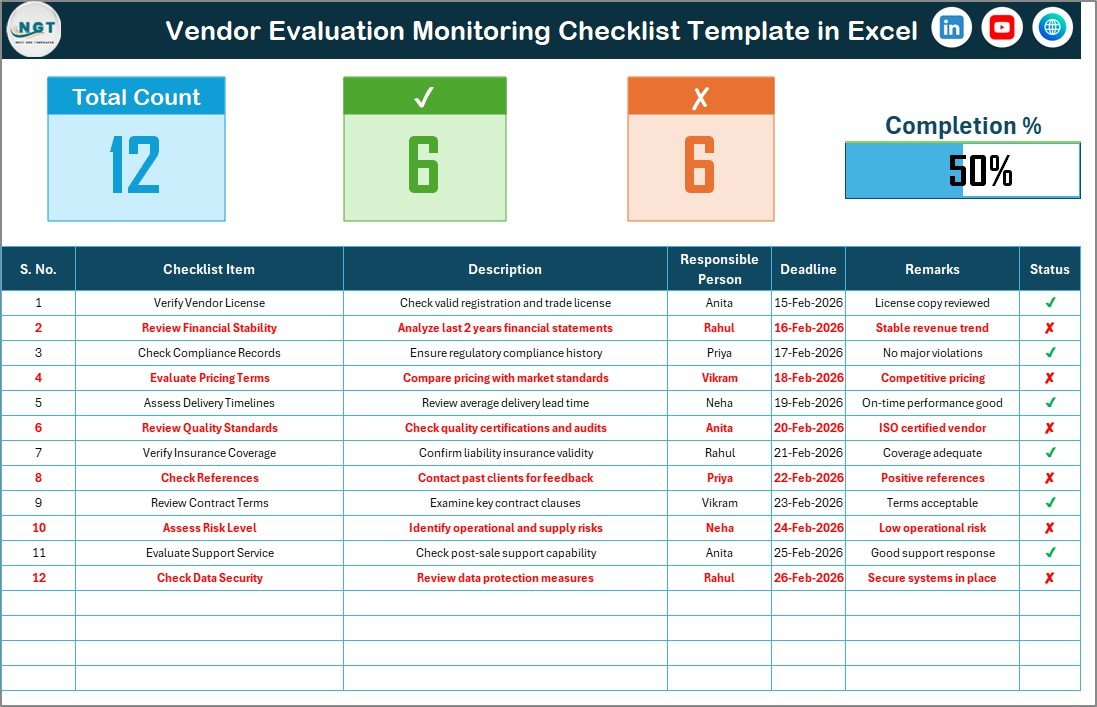
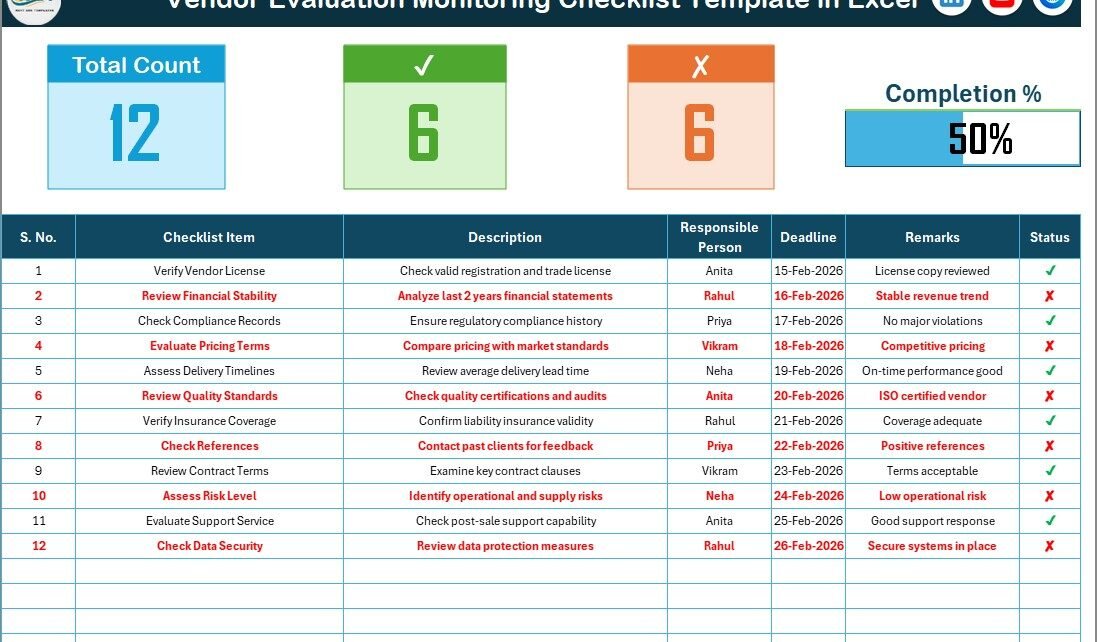
This is the primary worksheet where you capture and monitor all checklist data.
🔹 Top Section – Summary Dashboard
At the top of the sheet, you will find:
-
Total Count – Total number of checklist items
-
Checked Count – Completed evaluation tasks (✔)
-
Crossed Count – Pending or failed tasks (✘)
-
Progress Bar – Visual indicator showing completion percentage
Because of this visual summary, managers instantly understand evaluation status.
Moreover, the progress bar updates automatically when you change the status.
2️⃣ List Sheet Tab – Drop-Down Source Sheet
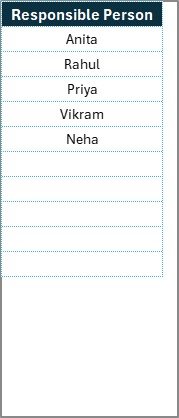
This worksheet captures the unique list of Responsible Persons.
Why does this matter?
Because the template uses this list to create a drop-down in the main sheet. Therefore:
-
You prevent typing errors
-
You maintain data consistency
-
You standardize responsibility tracking
As a result, reporting becomes easier and more accurate.
Click to Purchases Vendor Evaluation Monitoring Checklist in Excel
How Does the Progress Tracking Work?
The template calculates:
Checked % = (Checked Count ÷ Total Count) × 100
Then, it updates the progress bar visually.
For example:
-
If 15 items out of 20 show ✔
-
Then completion = 75%
-
The progress bar reflects 75% completion
Because Excel updates formulas automatically, you always see real-time progress.
What Can You Track Using This Checklist?
You can track multiple vendor evaluation areas, such as:
-
Quality standards compliance
-
Delivery performance
-
Contract adherence
-
Cost competitiveness
-
Risk management compliance
-
Documentation completeness
-
Service level agreement performance
Moreover, you can customize checklist items based on your industry.
Who Can Use Vendor Evaluation Monitoring Checklist in Excel?
This template suits many roles:
-
Procurement Managers
-
Supply Chain Teams
-
Vendor Relationship Managers
-
Quality Assurance Teams
-
Operations Managers
-
Compliance Officers
Whether you run a small business or a large enterprise, you can use this checklist effectively.
Click to Purchases Vendor Evaluation Monitoring Checklist in Excel
How to Use Vendor Evaluation Monitoring Checklist in Excel?
Let us break the process into simple steps.
Step 1: Update Responsible Person List
Go to the List Sheet Tab.
Add or edit the names of responsible persons.
Step 2: Enter Checklist Items
Go to the Main Sheet.
Update:
-
Serial Number
-
Checklist Item
-
Description
-
Responsible Person
-
Deadline
Step 3: Update Status
After completing evaluation tasks:
-
Mark ✔ for completed
-
Mark ✘ for pending
Step 4: Monitor Progress
Check the top summary section.
You will instantly see:
-
Total tasks
-
Completed tasks
-
Pending tasks
-
Overall progress percentage
Because everything updates automatically, you save time and effort.
Click to Purchases Vendor Evaluation Monitoring Checklist in Excel
Advantages of Vendor Evaluation Monitoring Checklist in Excel
Let us explore why this tool offers real value.
1️⃣ Improves Accountability
When you assign responsible persons clearly, everyone knows their role. Therefore, tasks do not get ignored.
2️⃣ Enhances Transparency
Managers can view completion percentage instantly. As a result, they identify delays quickly.
3️⃣ Reduces Risk
Regular vendor evaluation reduces operational risks. Moreover, it ensures compliance with standards.
4️⃣ Saves Time
Instead of preparing reports manually, you track everything in one place.
5️⃣ Improves Vendor Performance
When vendors know that you evaluate them regularly, they maintain quality and consistency.
6️⃣ Simplifies Reporting
Because the data remains structured, you can easily create Pivot tables and charts.
7️⃣ Supports Better Decision Making
You can compare vendor performance trends over time. Therefore, you choose vendors wisely.
Click to Purchases Vendor Evaluation Monitoring Checklist in Excel
How Can You Customize Vendor Evaluation Checklist?
You can modify the checklist based on your needs.
For example, you can:
-
Add scoring columns
-
Include vendor category
-
Add priority level
-
Include risk rating
-
Add evaluation frequency
Moreover, you can add conditional formatting to highlight overdue tasks.
What KPIs Can You Derive from This Checklist?
Although the template works as a checklist, you can also calculate performance metrics.
For example:
-
Completion Rate %
-
On-Time Evaluation %
-
Overdue Tasks Count
-
Responsible Person Performance
-
Monthly Evaluation Trend
Because Excel supports Pivot tables, you can create dashboard views easily.
Click to Purchases Vendor Evaluation Monitoring Checklist in Excel
Best Practices for the Vendor Evaluation Monitoring Checklist
To get the best results, follow these best practices:
✔ Keep Checklist Clear and Specific
Do not write vague checklist items. Instead, write measurable criteria.
Example:
Instead of “Check quality”
Write “Verify product quality meets ISO standards”
✔ Review Checklist Regularly
Do not create the checklist and forget it. Instead, review vendor performance monthly or quarterly.
✔ Assign Clear Deadlines
When you define clear deadlines, you prevent delays.
✔ Standardize Evaluation Criteria
Use the same evaluation parameters for similar vendors. Therefore, you ensure fairness.
✔ Use Data Validation
Always use drop-down lists for responsible persons. This prevents errors.
✔ Track Trends
Do not only check completion status. Also analyze performance trends over time.
✔ Conduct Review Meetings
Discuss evaluation results with your team. Therefore, you improve vendor management strategy.
How Does This Checklist Improve Vendor Relationships?
Many people believe evaluation creates tension. However, structured evaluation builds trust.
Because:
-
Vendors understand expectations clearly
-
Communication becomes transparent
-
Performance gaps become measurable
-
Improvement plans become structured
As a result, relationships improve instead of weakening.
Why Choose Excel for Vendor Evaluation Monitoring?
You might ask: Why not use expensive software?
Here is why Excel works well:
-
Most organizations already use Excel
-
No additional cost required
-
Easy to customize
-
Quick to implement
-
Supports formulas and automation
-
Allows Pivot-based reporting
Moreover, Excel keeps data simple and flexible.
Common Mistakes to Avoid in Vendor Evaluation
Avoid these mistakes:
-
Ignoring documentation
-
Setting unrealistic deadlines
-
Not assigning responsibility
-
Skipping periodic reviews
-
Overcomplicating checklist items
When you avoid these errors, you improve vendor management efficiency.
Click to Purchases Vendor Evaluation Monitoring Checklist in Excel
How Can This Template Support Audit and Compliance?
During audits, organizations must show vendor monitoring records.
This checklist:
-
Documents evaluation history
-
Shows task completion evidence
-
Displays accountability
-
Tracks compliance checks
Therefore, it strengthens audit readiness.
Conclusion: Why Should You Use Vendor Evaluation Monitoring Checklist in Excel?
Vendor evaluation should never remain unstructured. When you monitor vendors properly, you reduce risk, improve quality, and strengthen business performance.
The Vendor Evaluation Monitoring Checklist in Excel provides:
-
Structured evaluation tracking
-
Clear accountability
-
Real-time progress monitoring
-
Easy customization
-
Improved decision-making
Moreover, because it remains simple and user-friendly, any team can use it without training.
If you want better vendor control, improved transparency, and organized monitoring, this Excel checklist gives you a practical and effective solution.
Click to Purchases Vendor Evaluation Monitoring Checklist in Excel
Frequently Asked Questions with Answers
1️⃣ What is the main purpose of Vendor Evaluation Monitoring Checklist in Excel?
It helps organizations track vendor evaluation tasks, monitor responsibilities, and measure completion status efficiently.
2️⃣ Can I customize the checklist items?
Yes. You can edit checklist items, add columns, and modify evaluation criteria based on your business needs.
3️⃣ How does the progress bar work?
The progress bar calculates the percentage of completed tasks based on ✔ status entries.
4️⃣ Can I create reports from this checklist?
Yes. You can use Pivot tables and charts to create vendor performance reports.
5️⃣ Is this template suitable for small businesses?
Yes. Small and medium businesses can use it effectively because it requires no additional software.
6️⃣ How often should I review vendor evaluations?
You should review vendor performance monthly or quarterly depending on contract terms.
7️⃣ Can I track multiple vendors in one file?
Yes. You can create separate sections or duplicate sheets for different vendors.
Click to Purchases Vendor Evaluation Monitoring Checklist in Excel
Visit our YouTube channel to learn step-by-step video tutorials