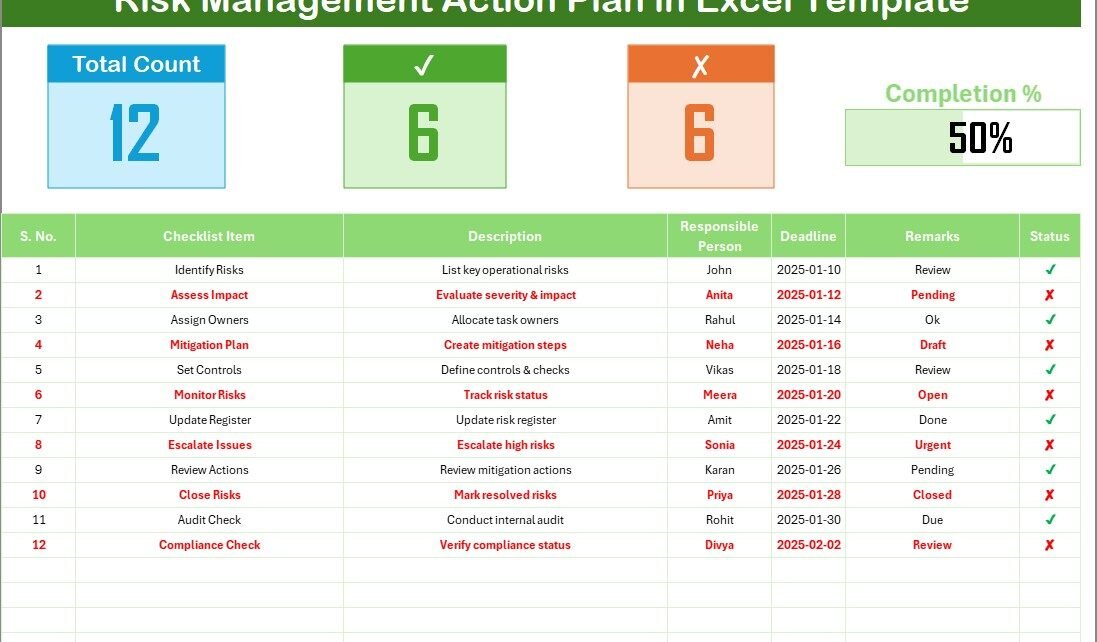
Every organization faces risks. Some risks come from daily operations, while others arise from unexpected situations. Because of this, businesses need a simple and reliable system that helps track, review, and manage risks at the right time. A Risk Management Action Plan Checklist in Excel solves this problem by providing a structured tool that ensures every risk gets proper attention and every action gets completed on time.
This article explains everything you need to know about using a Risk Management Action Plan Checklist in Excel. You will learn how it works, how it improves decision-making, what the checklist includes, and how you can implement it in your team. We will also explore its advantages, best practices, and frequently asked questions.
Click to buy Risk Management Action Plan Checklist in Excel
What Is a Risk Management Action Plan Checklist in Excel?
A Risk Management Action Plan Checklist in Excel is a ready-to-use template that helps you track different risk activities in a simple and organized format. Organizations use this checklist to identify potential risks, assign responsible persons, set deadlines, and monitor the status of each action. The checklist works like a workflow tool that keeps everyone aligned and ensures no important task gets missed.
Because the template is built in Excel, anyone can customize it. You can add new rows, create additional columns, modify formulas, and update the design based on your needs. Even if you work in a small team or manage a large project, this checklist helps you stay in control.
Why Do Businesses Need a Risk Management Action Plan Checklist?
Managing risk is a continuous process. New challenges appear, deadlines change, and responsibilities move from one team to another. Without a checklist, people forget important steps, fail to follow timelines, or miss key tasks.
A checklist provides structure. It allows you to move step by step, track progress, and review pending actions. Moreover, when you use an Excel-based system, you get automation, formulas, data validation, and simple reporting in one place.
A Risk Management Action Plan Checklist in Excel works for all industries, including:
- Finance
- Healthcare
- Construction
- IT
- Manufacturing
- Logistics
- Education
- Public services
Because the template is universal, any department can use it to improve compliance, safety, quality, and operational control.
Key Features of the Risk Management Action Plan Checklist in Excel
This Excel-based checklist includes smart features that make risk management simple and effective. The template has two worksheets:
Risk Management Outline Checklist (Main Sheet)
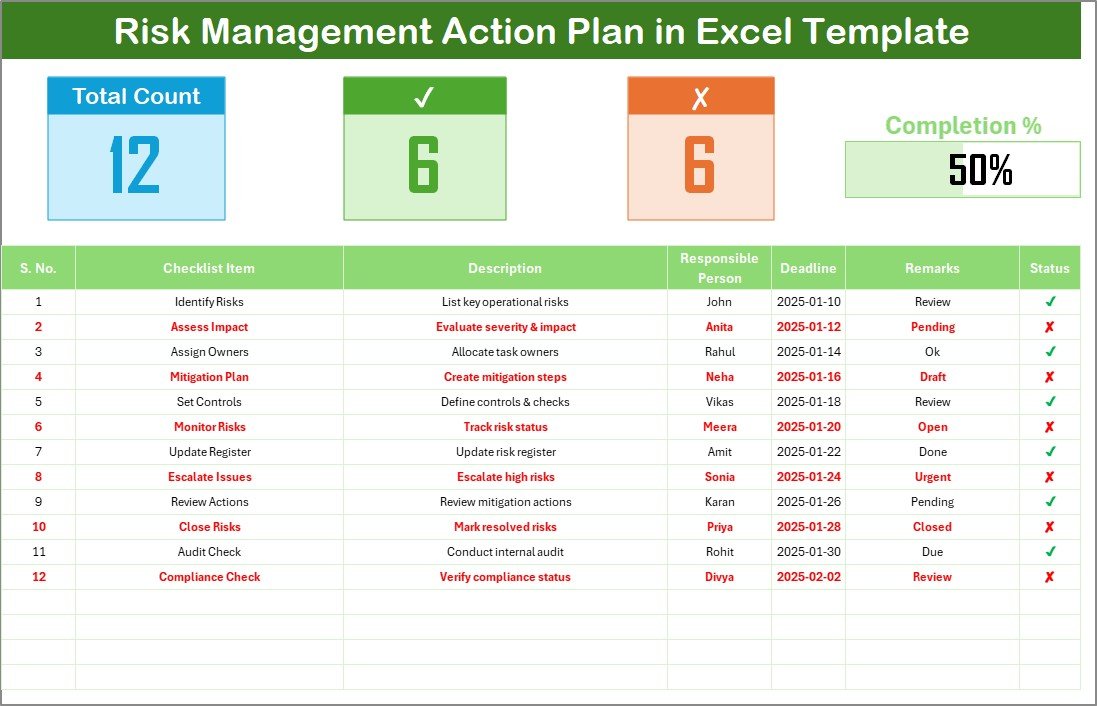
This is the primary worksheet where you will record all checklist items.
Top Section Overview
The top part of the sheet includes four important cards:
- Total Count – Total number of checklist items
- Completed Count – Number of tasks marked as
- Pending Count – Number of tasks marked as
- Progress Bar (%) – Visual bar showing completion percentage
These cards help you understand the overall status of your action plan at a glance.
Click to buy Risk Management Action Plan Checklist in Excel
List Sheet Tab
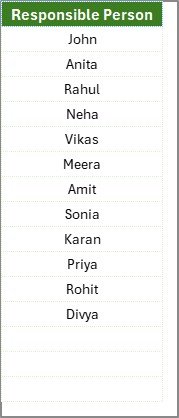
The second worksheet contains a list of unique responsible persons. This list supports the drop-down menu in the “Responsible Person” column of the main sheet.
With this drop-down:
- You avoid spelling mistakes
- You maintain data consistency
- You reduce duplicate entries
This also ensures that reporting becomes smooth because all entries follow a standard format.
How Does a Risk Management Action Plan Checklist Work in Excel?
The checklist works through simple steps:
Step 1: Identify the Risk or Activity
Write clear and short checklist items so your team understands each task.
Step 2: Add Description
Explain why the task is important and how it links to the risk.
Step 3: Assign a Responsible Person
Choose a person from the drop-down list.
Step 4: Set the Deadline
Choose a realistic date that aligns with your project timeline.
Step 5: Update Remarks
Record updates, challenges, approvals, or changes.
Step 6: Mark Status
Use ✔ for completed tasks and ✘ for pending ones.
The progress bar and counts help you track overall performance.
What Are the Benefits of Using Risk Management Checklists?
Using a structured checklist brings clarity and discipline to risk-related activities. You avoid confusion, delays, miscommunication, and errors.
Here are the top benefits:
- Clear Accountability
Every task has a responsible person, which reduces confusion and improves ownership.
- Timely Completion
Deadlines help the team take action at the right time.
- Simple Reporting
The top cards and progress bar give you a visual snapshot.
- Better Decision-Making
You identify pending and critical tasks early, which helps you take timely action.
- Improved Compliance
Regulated industries can use the checklist to meet audits, quality checks, and safety standards.
- Increased Transparency
Teams know what needs attention, what is completed, and what is still pending.
Advantages of a Risk Management Action Plan Checklist in Excel
Advantages help you understand why Excel is one of the best platforms for managing action plans. Here are the most important advantages:
- Easy to Customize
You can add rows, insert columns, apply formulas, or change formatting without any limitation.
- No Special Software Needed
Everyone has access to Excel, so you avoid expensive tools.
- Supports Automation
You can use formulas, conditional formatting, and data validation to automate calculations.
- Works for All Teams
Whether you are handling finance risks, IT risks, or operational risks, this template fits all needs.
- User-Friendly Design
The layout is clean, simple, and easy for anyone to understand.
- Real-Time Progress Tracking
With checkmarks and a progress bar, you track completion instantly.
- Perfect for Small and Large Projects
It works for departments, teams, startups, or corporate-level risk management.
How to Create a Strong Risk Management Action Plan Using the Checklist
If you want to build an effective action plan, follow these steps:
- List All Risks Clearly
Start by identifying risks based on departments, activities, or responsibilities.
- Prioritize Tasks
Give importance to high-impact risks and schedule them early.
- Assign Skilled Persons
Select people who have the right skills to complete the task.
- Track Weekly Progress
Review the checklist at the beginning or end of each week.
- Update Remarks Regularly
Record progress so your reporting stays accurate.
- Close Tasks Immediately
Mark ✔ as soon as an item is completed. This helps maintain accuracy.
- Review Completion Percentage
Use the progress bar to understand current performance.
Best Practices for the Risk Management Action Plan Checklist
To get the best results, follow these practical tips:
- Keep Checklist Items Short
Short and clear tasks improve readability and reduce confusion.
- Maintain Accurate Deadlines
Use realistic deadlines based on workload and priority.
- Review the Checklist Weekly
Short reviews help you control delays and upcoming risks.
- Use Conditional Formatting
Highlight missed deadlines, pending actions, or priority tasks.
- Keep the List of Responsible Persons Updated
Add new team members or update changed roles.
- Protect the Template
Lock formulas or important cells so others do not change them by mistake.
- Use Color Coding
Colors help you separate categories, risk types, or priority levels.
- Archive Old Checklists
Store completed checklists for future audits or reviews.
Who Should Use This Checklist?
This checklist is ideal for:
- Project managers
- Compliance teams
- Safety officers
- HR managers
- Quality teams
- Audit professionals
- Department leaders
- Business owners
Because the template is flexible, any team that wants better control over risk activities can use it.
Conclusion
A Risk Management Action Plan Checklist in Excel brings structure, clarity, and discipline to your risk management activities. It keeps your team aligned, helps you avoid delays, and ensures that every important task receives proper attention. The template is simple to use, easy to customize, and powerful enough to support any project or industry.
When you follow the best practices and maintain the checklist regularly, you reduce risks, improve decision-making, and ensure stronger operational performance.
Frequently Asked Questions (FAQs)
- What is a Risk Management Action Plan Checklist?
It is a structured Excel template that helps you track, assign, and manage risk-related activities in your team or organization.
- Why should I use Excel for risk management?
Excel is flexible, easy to customize, and accessible to everyone. You do not need special tools or software.
- Can I customize the checklist?
Yes, you can add columns, modify formulas, insert new rows, and adjust formatting based on your needs.
- Who should use this checklist?
Project managers, safety teams, HR, quality teams, and business leaders can use it to manage risks efficiently.
- How do I track progress in the checklist?
You update the Status column (✔ or ✘). The progress bar and count cards update automatically.
- What if my team size changes?
You can update the Responsible Person list in the “List” sheet. The drop-down menu will automatically refresh.
- Is this checklist suitable for large projects?
Yes, the template works for small teams as well as large projects because it is easy to scale.
Visit our YouTube channel to learn step-by-step video tutorials
Watch the step-by-step video tutorial:
Click to buy Risk Management Action Plan Checklist in Excel