Choosing the right vendor directly impacts cost, quality, compliance, and delivery timelines. However, many organizations still evaluate suppliers using scattered emails, manual notes, or inconsistent documents. As a result, procurement teams miss critical documents, delay approvals, and increase risk.
So, how can you standardize vendor evaluation while keeping everything structured and transparent?
The answer is simple.
You need a Vendor Evaluation Documentation Checklist in Excel.
This ready-to-use Excel template helps procurement teams track vendor documents, monitor checklist progress, assign responsibilities, and ensure compliance — all in one centralized file.
Let us explore everything step by step.
Click to Purchases Vendor Evaluation Documentation Checklist in Excel
What Is a Vendor Evaluation Documentation Checklist in Excel?
A Vendor Evaluation Documentation Checklist in Excel is a structured tracking tool designed to manage supplier documentation during vendor onboarding or evaluation.
Instead of relying on unorganized files, you can:
-
Track required vendor documents
-
Assign responsible persons
-
Set deadlines
-
Monitor completion status
-
Measure overall progress
Moreover, because the system runs in Excel, your team can use it without additional software costs.
Why Do Businesses Need a Vendor Evaluation Checklist?
Vendor evaluation affects:
-
Procurement efficiency
-
Compliance standards
-
Risk management
-
Audit readiness
-
Operational continuity
However, when teams use manual tracking, they face common problems:
-
Missing compliance documents
-
Unclear ownership
-
Delayed approvals
-
Poor visibility of checklist progress
Therefore, organizations must use a structured documentation system.
The Vendor Evaluation Documentation Checklist in Excel solves these challenges efficiently.
What Worksheets Are Included in the Vendor Evaluation Documentation Checklist?
This template contains 2 well-structured worksheets, each designed to simplify vendor tracking.
Let us break them down clearly.
Click to Purchases Vendor Evaluation Documentation Checklist in Excel
1️⃣ What Is the Vendor Evaluation Documentation Checklist Sheet?
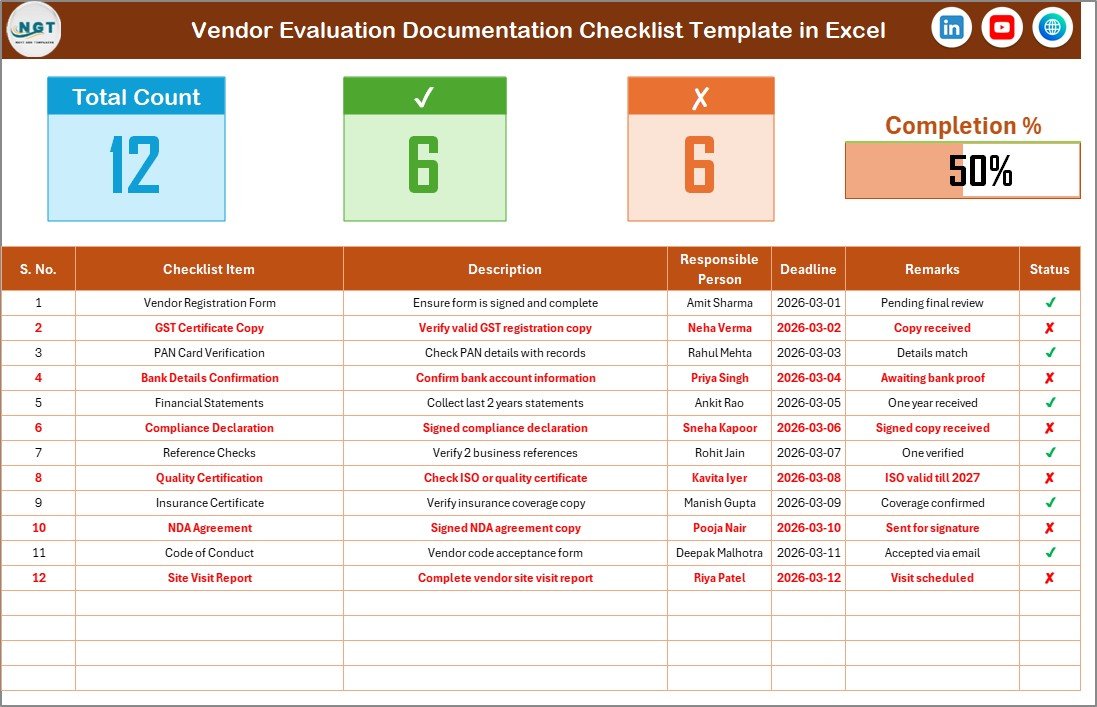
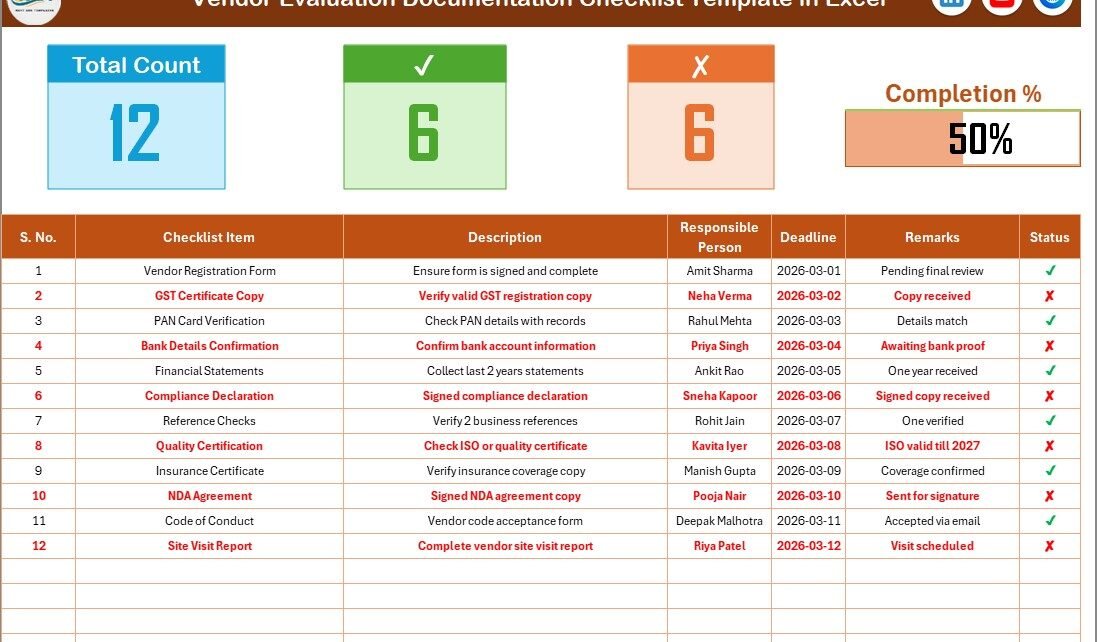
This sheet works as the main working area of the template.
It includes:
-
Summary section at the top
-
Dynamic progress indicators
-
Checklist tracking table
Because everything appears in one sheet, users can manage vendor documentation easily.
What Does the Top Section Include?
The top section provides an overview of checklist progress.
It displays:
-
Total Count of checklist items
-
Checked Count (✔ Completed items)
-
Crossed Count (✘ Pending items)
-
Progress Bar showing completion %
Therefore, procurement managers can instantly see vendor documentation status.
For example:
If you have 20 checklist items and 15 show ✔, the progress bar reflects 75% completion.
This visual clarity helps teams take quick action.
What Columns Are Included in the Checklist Table?
The checklist table forms the core of the template.
It includes the following columns:
-
Serial No.
-
Checklist Item
-
Description
-
Responsible Person
-
Deadline
-
Remarks
-
Status (✔ or ✘)
Let us understand each column in detail.
Serial No.
This column keeps the checklist organized and easy to reference.
Checklist Item
This column includes document names such as:
-
Company Registration Certificate
-
Tax Identification Document
-
ISO Certification
-
Financial Statements
-
Insurance Certificate
-
NDA Agreement
You can modify these items based on your evaluation criteria.
Description
Use this column to provide short explanations about each required document.
For example:
“Submit latest audited financial statements for last 2 years.”
Clear descriptions prevent confusion.
Responsible Person
Assign accountability clearly.
You can assign:
-
Procurement Manager
-
Compliance Officer
-
Vendor Manager
-
Finance Head
Because responsibility remains defined, follow-ups become easier.
Deadline
Set realistic submission deadlines.
When you set clear deadlines, vendors respond faster.
Remarks
Add notes such as:
-
Awaiting revision
-
Under review
-
Approved with condition
-
Expired document
This improves documentation control.
Status (✔ or ✘)
This column drives the progress calculation.
-
✔ indicates completed
-
✘ indicates pending
As you update status, the progress bar updates automatically.
Click to Purchases Vendor Evaluation Documentation Checklist in Excel
2️⃣ What Is the List Sheet Tab?
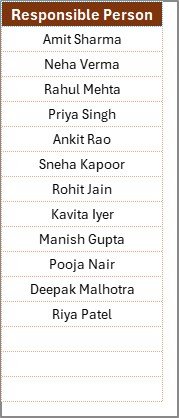
The List Sheet captures the unique list of Responsible Persons.
This sheet supports the drop-down list in the main checklist table.
Therefore:
-
You maintain data accuracy
-
You avoid spelling inconsistencies
-
You standardize responsibility selection
For example, instead of typing different variations like:
“John”, “Mr John”, “John S.”
You maintain one standardized entry.
This improves reporting accuracy.
How Does This Template Improve Vendor Evaluation Efficiency?
Vendor evaluation requires documentation discipline.
When you use this Excel checklist:
-
You standardize vendor onboarding
-
You reduce compliance risk
-
You improve internal coordination
-
You create audit-ready records
Moreover, because the template tracks progress visually, managers can immediately identify bottlenecks.
Click to Purchases Vendor Evaluation Documentation Checklist in Excel
What Types of Businesses Can Use This Template?
This checklist works perfectly for:
-
Manufacturing companies
-
Trading companies
-
Healthcare institutions
-
Educational organizations
-
IT companies
-
Construction firms
-
Government departments
-
Procurement teams
-
Vendor management departments
If your organization works with external vendors, you need structured documentation control.
How Can Procurement Teams Use It Strategically?
Procurement teams can use this checklist for:
-
New vendor onboarding
-
Annual vendor re-evaluation
-
Compliance audits
-
Risk assessments
-
Supplier qualification reviews
For example:
During annual vendor audits, you can duplicate the checklist and evaluate document updates quickly.
Click to Purchases Vendor Evaluation Documentation Checklist in Excel
What Are the Advantages of Vendor Evaluation Documentation Checklist in Excel?
Let us explore the major benefits.
1️⃣ Centralized Documentation Tracking
You track all required vendor documents in one file.
2️⃣ Visual Progress Monitoring
The progress bar instantly shows completion percentage.
Therefore, management can monitor performance quickly.
3️⃣ Clear Accountability
Responsible person column ensures ownership.
4️⃣ Deadline Management
Deadline tracking reduces delays.
5️⃣ Easy Customization
You can add or modify checklist items based on your industry.
6️⃣ Improved Compliance
You ensure vendors submit mandatory certifications before approval.
7️⃣ Audit-Ready Records
The checklist provides structured documentation history.
8️⃣ No Extra Software Required
You only need Microsoft Excel.
How Does It Reduce Vendor Risk?
Vendor risk increases when documentation remains incomplete.
However, when you use a structured checklist:
-
You verify licenses
-
You confirm certifications
-
You validate financial records
-
You confirm insurance coverage
As a result, you minimize operational disruptions.
Best Practices for the Vendor Evaluation Documentation Checklist
To maximize benefits, follow these best practices.
1️⃣ Define Clear Evaluation Criteria
Before you start, define required documents clearly.
2️⃣ Update Status Regularly
Do not delay updates. Instead, mark ✔ or ✘ immediately.
3️⃣ Assign Accountability Properly
Ensure responsible persons understand their tasks.
4️⃣ Review Progress Weekly
Managers should review completion percentage weekly.
5️⃣ Standardize Vendor Categories
You can create separate checklists for:
-
Critical vendors
-
High-risk vendors
-
Service providers
-
Raw material suppliers
6️⃣ Maintain Backup Copies
Always store backup files securely.
7️⃣ Integrate With Procurement Workflow
Use the checklist before final vendor approval.
Click to Purchases Vendor Evaluation Documentation Checklist in Excel
How Does This Checklist Compare to Manual Tracking?
Manual tracking often creates:
-
Lost documents
-
Unclear accountability
-
Delayed approvals
-
Poor visibility
However, this Excel checklist provides:
-
Structured tracking
-
Clear responsibility
-
Visual progress monitoring
-
Organized database
Therefore, it improves efficiency significantly.
Can You Customize This Template?
Yes, you can.
You may:
-
Add risk rating column
-
Add approval status column
-
Add vendor category column
-
Include document expiry date
-
Add compliance score
Therefore, the template adapts to your internal process easily.
How Does It Support Compliance and Audit Requirements?
Auditors require documentation proof.
This checklist:
-
Stores document status
-
Tracks submission dates
-
Shows completion progress
-
Provides structured records
Therefore, you can present organized data during audits confidently.
Click to Purchases Vendor Evaluation Documentation Checklist in Excel
Conclusion: Why Should You Use Vendor Evaluation Documentation Checklist in Excel?
Vendor evaluation directly affects operational stability.
If you rely on scattered tracking methods, you increase risk and inefficiency.
However, when you use a structured Excel checklist, you:
-
Improve documentation accuracy
-
Enhance accountability
-
Reduce delays
-
Strengthen compliance
-
Standardize supplier evaluation
The Vendor Evaluation Documentation Checklist in Excel offers a simple yet powerful solution for modern procurement teams.
If you want better control over vendor documentation and improved compliance monitoring, this template delivers exactly what you need.
Frequently Asked Questions with Answers
1. What is a Vendor Evaluation Documentation Checklist in Excel?
It is a structured Excel template that tracks required vendor documents, responsibilities, deadlines, and completion status.
2. Can I customize checklist items?
Yes. You can modify or add checklist items based on your industry requirements.
3. How does the progress bar work?
The progress bar calculates the percentage of ✔ completed items against total checklist items.
4. Can I assign different responsible persons?
Yes. The List sheet creates a drop-down for responsible person selection.
5. Does this template support audit preparation?
Yes. It provides structured documentation tracking for audit readiness.
6. Can small businesses use this template?
Yes. Both small and large organizations can use it effectively.
7. Do I need advanced Excel knowledge?
No. Basic Excel knowledge is enough to use this template.
8. Can I track deadlines using this template?
Yes. You can assign deadlines to each checklist item.
9. Is this checklist useful for annual vendor review?
Yes. You can reuse it for periodic vendor re-evaluation.
10. Why should I use Excel instead of manual tracking?
Excel provides automation, progress tracking, structured data, and better visibility compared to manual systems.
Click to Purchases Vendor Evaluation Documentation Checklist in Excel
Visit our YouTube channel to learn step-by-step video tutorials